phone Abarth 500 2017 Owner handbook (in English)
[x] Cancel search | Manufacturer: ABARTH, Model Year: 2017, Model line: 500, Model: Abarth 500 2017Pages: 192, PDF Size: 6.46 MB
Page 179 of 192
First access to the vehicle
Once you have launched the
Uconnect™ LIVEApp and entered
your details, you have to pair theBlu-
etooth® with your smartphone and the
radio, as described in the "Pairing a
mobile phone" chapter, to access the
Uconnect™ LIVEservices in your
vehicle.
When pairing is complete, the
connected services can be accessed
by pressing theUconnect™ LIVEicon
on the radio.
Before you can use the connected
services, you must first do theBlu-
etooth® pairing, then complete the
activation procedure by following the
instructions that appear in theUcon-
nect™ LIVEapp.
Uconnect™ LIVE services setup
using the radio
In theUconnect™ LIVEradio menu
the "Settings" section can be accessed
by pressing the
icon. In this section
the user can check the system options
and change them according to their
preferences.
System updates
If an update for theUconnect™ LIVE
system is available while the
Uconnect™ LIVEservices are being
used, the user will be informed with
a message on the radio screen.Abarth Telemetry
The Abarth Telemetry application
unlocks the potential of the new Abarth
595.
The objective is to create driving
confidence and make drivers more
aware of their car’s capabilities. Users
will be able to measure their own
performance thanks to a timer and new
information available on the radio.
Moreover, with Abarth Telemetry they
will be able to receive driving advice
in real time, record their itineraries and
receive badges based on their
behaviour at the wheel.
Abarth Telemetry will not only improve
their driving experience, but will take
it to a new level, allowing users to
access their performance on the
smartphone thanks to theUconnect™
LIVEApp and, if they wish to give
their consent, to share their
performance with theUconnect™
LIVEcommunity on the
www.driveuconnect.eu website.
By pressing theUconnect™keys,
users will be able to access the
following sections.
Badge
The Badge section collects the users’
successes. Each bronze, silver or
gold badge may be locked/unlocked,
depending on the user’s performances.
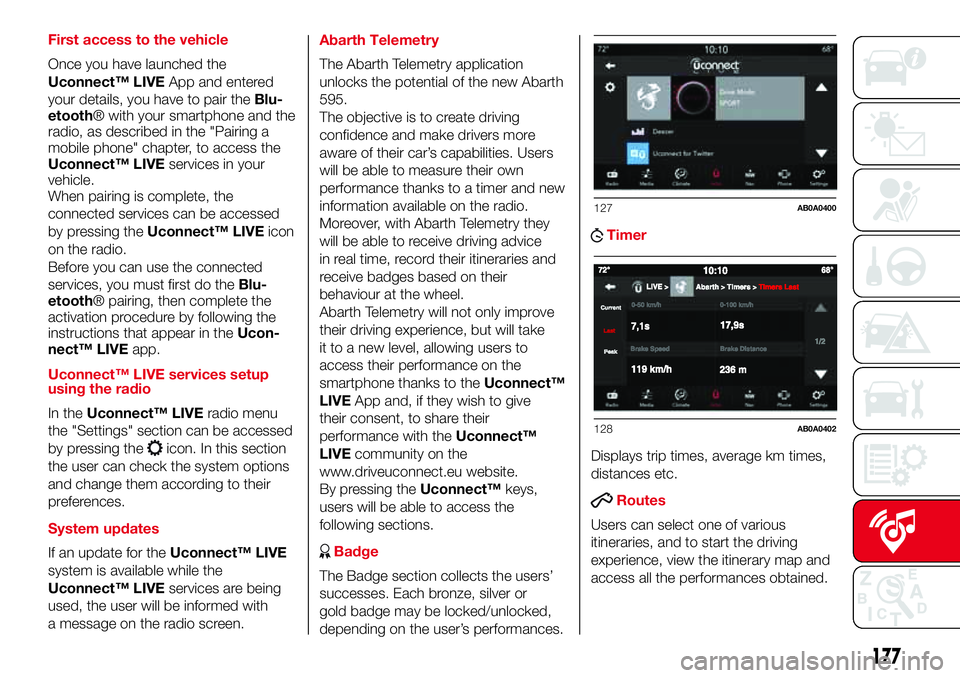
Timer
Displays trip times, average km times,
distances etc.
Routes
Users can select one of various
itineraries, and to start the driving
experience, view the itinerary map and
access all the performances obtained.
127AB0A0400
128AB0A0402
177
Page 180 of 192
Moreover, after selecting the route,
users can access their best
performances and their sessions. Tips
and useful information are available
while driving.
ABMy itineraries
Users can create customised itineraries
or select an itinerary from those that
they have created previously. They can
also record the GPS tracking from
the starting point“A”tothe
destination“B“.After recording the
A-B tracking, the GPS coordinates will
be used to create a customised
itinerary that may be reused by the user
in the future.
Settings
Through the settings, users can select
the measurement units and do a
backup.
Recording and transferring trip data
The trip data can be stored in the
system memory and made available
outside the car thanks to the
Uconnect™ LIVEApp. This allows
users to view the collected data later,
showing the overall trip data analysis.
Further information is available at
www.driveuconnect.eu.For full access to the service’s
functionality, users must allow their data
to be recorded on-board the car. The
following icon
is the user’s
geo-location indicator. Through
Uconnect™ LIVEsmartphone App,
users can choose to enable detection
of their location and to share their
data with the community.
my:Car
my:Car allows you to keep the "health"
of your vehicle always under control.
my:Car can detect malfunction in real
time and inform the user about the
expiry of the servicing interval. Press
the "my:Car" button to interact with the
application.
The display will show a screen with the
"care:Index" section, which provides
all the detailed information about the
status of the vehicle. Press the "Active
warnings" button to show (if present)
the details of the vehicle's faults which
caused a warning light to switch on.
SETTINGS
Press the “Settings” button on the
display to show the main “Settings”
menu.
Note
The menu items displayed vary
according to the versions.The menu includes the following items:
Language;
Display;
Units;
Voice commands;
Time & Date;
Lights;
Doors & Locks;
Engine Off Options;
Audio;
Phone/Bluetooth®;
Radio Setup;
Restore default settings;
Clear personal data.
NAVIGATION (Uconnect™
7" HD Nav LIVE only)
Press the "Nav" button to show the
navigation map on the display.
NOTE: The navigation system volume
can only be adjusted during navigation
when the system provides voice
indications.
Main navigation menu
In the navigation view, tap the "Main
menu" button to open the menu:
Select the "Search" button to search
for an address, a place or a point of
interest, then plan a route to the
location.
178
MULTIMEDIA
Page 182 of 192

Cancel
Repeat
Voice Prompts
Phone
The following voice commands can be
given after pressing the
button on
the steering wheel:
Call
Dial
Redial
Call back
Last calls
Outgoing calls
Missed calls
Incoming calls
Phone Book
Search
Show SMS
Send an SMS
Show messages
Radio
The following voice commands can be
given after pressing the
button on
the steering wheel:
Tune to FM "frequency"
Tune to AM "frequency"
Tune to "radio name" FM
Tune to "radio name"Media
The following voice commands can be
given after pressing the
button on
the steering wheel:
Play song...
Play album…
Play artist…
Play genre…
Play playlist…
Play podcast…
Play audiobook…
Select the source...
Display...
Navigation (Uconnect™ 7" HD Nav
LIVE only)
The following voice commands can be
given after pressing the
button on
the steering wheel:
2D mode
3D mode
Add this position
Navigate going through home
Clear route
Navigate to an “address”
Find "POI"
...
180
MULTIMEDIA
Navigate Home
Navigate to "city name" city centre Zoom in
Zoom out
Page 188 of 192
Jump starting
................................ 108
Lifting the vehicle
.......................... 126
Light bulbs
– bulbs (replacement) ................... 92
– general instructions ................... 92
– types of bulbs ........................... 93
Lubricants (specifications) .............. 142
Luggage Compartment .................. 36
– closing ...................................... 36
– extending the luggage
compartment ............................ 36
Main beam headlights
.................. 20
Main beam headlights (bulb
replacement) ................................ 97
Manual climate control ................... 25
– controls ..................................... 25
Menu options ................................. 41
Number plate lights (bulb
replacement)
................................ 98
Paintwork (maintenance)
............... 127
Parking sensors ............................. 88
Parking the vehicle ......................... 83
Passenger side front airbag ............ 75
Performance .................................. 144
Pre-tensioners................................ 65
– Load limiters.............................. 65
Radio transmitters and mobile
phones
......................................... 4Rear light clusters (bulb
replacement) ................................ 97
Rear seats (backrest release).......... 16
Rear view mirrors ........................... 19
Rear window washer (jets).............. 126
Rear window wiper/washer ............ 23
Reconfigurable multifunction
display ......................................... 39
Refuelling ....................................... 141
Refuelling the vehicle ...................... 89
Replacing an exterior bulb .............. 96
Right hand drive versions ............... 148
Rims
– dimensions................................ 136
– wheels and tyres ....................... 126
Rims and tyres ............................... 136
Safety
........................................... 64
– seat belts .................................. 64
SBR system ................................... 65
Scheduled Servicing Plan ............... 114
Screen wiper/washer ..................... 23
Seat belts
– using the seat belts ................... 64
Seat belts (maintenance) ................ 66
Seats ............................................. 15
– Front seats ................................ 15
Sensors
– parking ...................................... 88
Servicing and maintenance ............ 113
– Demanding use of the car ......... 118– periodic checks ......................... 118
– scheduled servicing ................... 113
– Scheduled Servicing Plan .......... 114
Side airbags (Side bag - Window
bag) ............................................. 78
Side bags (front side airbags) ......... 78
Side lights/daytime running lights
(bulb replacement) ....................... 97
Snow chains .................................. 127
Snow tyres ..................................... 126
Soft top.......................................... 30
Spark plugs (type) .......................... 134
SPORT .......................................... 87
Sport front seats ............................ 16
Starting the engine ......................... 82
Steering wheel ............................... 18
Sun roof ......................................... 29
Technical data
.............................. 133
The keys ........................................ 11
– Key with remote control............. 11
– Mechanical key ......................... 11
Third brake light (bulb
replacement) ................................ 98
Towing the vehicle .......................... 110
Towing trailers ................................ 90
TRIP button.................................... 43
Trip computer................................. 42
Ty r e s
– inflation pressures ..................... 136
– snow tyres................................. 136
INDEX
Page 189 of 192

– tyres provided ........................... 136
Tyres - maintenance ....................... 126
Uconnect™ 5”
– APPS Mode .............................. 160
– Bluetooth Source ...................... 158
– Controls on front panel .............. 154
– eco:Drive ................................... 162
– Media mode .............................. 158
– my:Car ...................................... 163
– Navigation ................................. 163
– Phone mode ............................. 159
– Settings..................................... 163
– Steering wheel controls ............. 156
– Switching the system on/off ...... 158
– Uconnect™ LIVE Services......... 160
– Voice commands ...................... 165
Uconnect™ 5”/7” HD
– AUX inputs, USB ports and
iPod connector.......................... 153
– Tips, controls and information ... 152
Uconnect™ 7” HD
– AUX source ............................... 175
– Bluetooth Source ...................... 174
– Controls on front panel .............. 167
– Media mode .............................. 173
– Navigation ................................. 178
– Phone mode ............................. 175
– Settings..................................... 178– Steering wheel controls ............. 170
– Switching the system on/off ...... 173
– Uconnect LIVE Services ............ 176
– USB/iPod support ..................... 174
– Voice commands ...................... 179
Use of the Owner Handbook.......... 6
Using the manual gearbox ............. 84
Using the robotised sequential
transmission................................. 84
Vehicle changes/alterations
........... 4
Warning lights and messages
....... 45
Washing and cleaning the soft
top ............................................... 128
Weights.......................................... 138
Wheels and tyres ........................... 126
– tyre inflation pressure................. 136
Window bags (side airbags for
head protection) ........................... 78
Window washing............................ 23
Windows (cleaning) ........................ 128
Windscreen washer (jets) ............... 125
Windscreen/rear window washer
fluid .............................................. 121
Windscreen/rear window wiper
(blades) ........................................ 125