USB port Abarth 500 2018 Owner handbook (in English)
[x] Cancel search | Manufacturer: ABARTH, Model Year: 2018, Model line: 500, Model: Abarth 500 2018Pages: 192, PDF Size: 5.86 MB
Page 150 of 192
If the vehicle is stopped for a while and
the external temperature is very high,
the system may go into “thermal
protection” mode, suspending
operation until the temperature in the
passenger compartment returns to
acceptable levels.
Look at the screen only and when it is
necessary and safe. If you need to look
at the screen for a long time, pull over
to a safe place so as not to be
distracted while driving.
Immediately stop using the system in
the event of a fault. Otherwise the
system might be damaged. Contact an
Abarth Dealership as soon as possible
to have the system repaired.AUX and USB
SOURCE
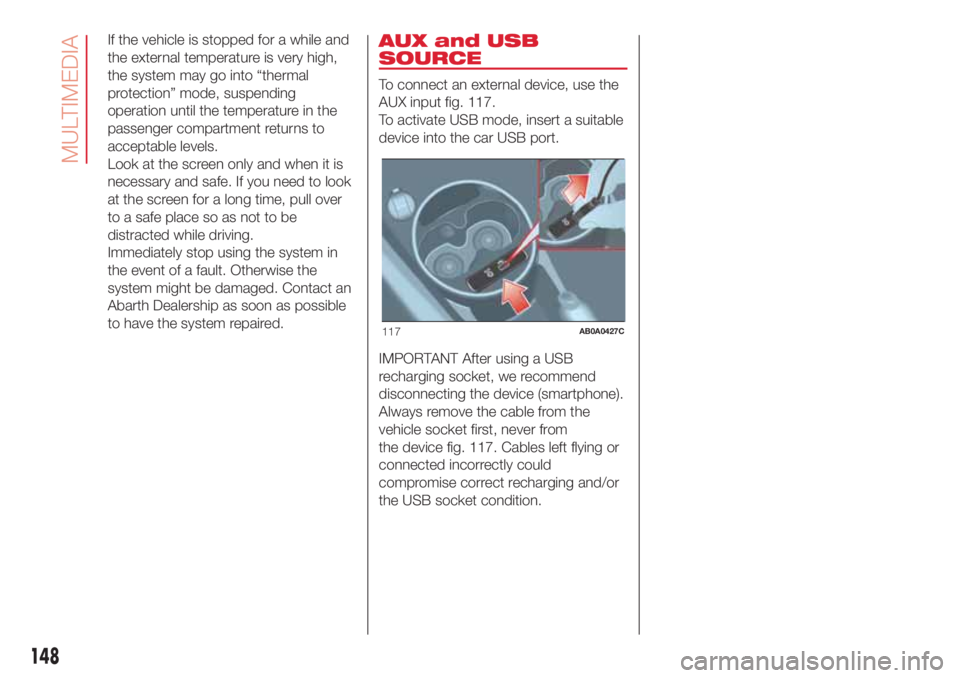
To connect an external device, use the
AUX input fig. 117.
To activate USB mode, insert a suitable
device into the car USB port.
IMPORTANT After using a USB
recharging socket, we recommend
disconnecting the device (smartphone).
Always remove the cable from the
vehicle socket first, never from
the device fig. 117. Cables left flying or
connected incorrectly could
compromise correct recharging and/or
the USB socket condition.
117AB0A0427C
148
MULTIMEDIA
Page 155 of 192

Switching the system
on/off
The system is switched on/off by
pressing the
(ON/OFF) button/knob.
Turn the button/knob clockwise to
increase the radio volume or
anticlockwise to decrease it.
Radio mode
After the desired radio station is
selected, the following information is
shown on the display:
At the top: the list of radio stations
stored (preset) is displayed; the station
currently playing is highlighted.
In the middle: display of the name of
the current radio station and the
buttons for selecting the previous or
next radio station.
At the bottom: display of the following
buttons:
“Browse”: list of the radio stations
available;
“AM/FM”, “AM/DAB”, “FM/DAB”:
selection of the desired frequency band
(button reconfigurable according to
the band selected: AM, FM or DAB);
“Tune”: manual radio station tuning
(not available for DAB radio)
“Info”: additional information on the
source being listened to;
“Audio”: access to the “Audio
Settings” screen.Audio menu
The following adjustments can be
carried out using the “Audio” menu:
“Equaliser” (where provided);
“Balance/Fader” (left/right and
front/rear audio balance adjustment);
“Speed/Volume” (speed-dependent
automatic volume control);
“Loudness” (where provided);
“Auto-On Radio”;
“Radio Off Delay”.
To exit the “Audio” menu, press the
/
Done button.
Media mode
Audio source selection
Press the "Source" button to select the
desired audio source among those
available: AUX, USB orBluetooth®.
Applications used on portable devices
may be not compatible with the
Uconnect™system.
Track selection (Browse)
With Media mode active, briefly press
buttons
/to play the
previous/next track or keep buttons
/pressed to fast rewind/
forward the track.For languages not supported by the
system which feature special
characters (e.g. Greek), the keyboard is
not available. In these cases this
function will be limited.
Bluetooth® source
Pairing a Bluetooth® audio device
To pair aBluetooth® audio device,
proceed as follows:
activate theBluetooth® function on
the device;
press the MEDIA button on the front
panel;
if the “Media” source is active, press
the “Source” button;
select theBluetooth® Media
source;
press the “Add Device” button;
search forUconnect™on the
Bluetooth® audio device (during the
pairing stage a screen is displayed
showing the progress of the operation);
when requested by the audio
device, enter the PIN code shown on
the system display or confirm on the
device the PIN displayed;
153
Page 156 of 192

if the pairing procedure is completed
successfully, a screen is displayed.
Answer “Yes” to the question to pair the
Bluetooth® audio device as favourite
(the device will have priority over all
other devices to be paired subse-
quently). If “No” is selected, the priority
is determined according to the order of
connection. The last device connected
will have the highest priority;
an audio device can also be paired
by pressing the PHONE button on
the front panel and by selecting
“Settings” or, from the “Settings” menu,
selecting “Phone/Bluetooth”.
If theBluetooth® connection between
mobile phone and system is lost, con-
sult the mobile phone handbook.
The Radio may change the track being
played by modifying the name-device
in theBluetooth® settings of the tele-
phone (where provided), if the device is
connected via USB after theBlu-
etooth® connection.
Phone mode
Phone mode activation
Press the PHONE button on the front
panel to activate the Phone mode.
Use the buttons on the display to:
dial the phone number (using the
graphic keypad on the display);
display and call the contacts in the
mobile phone phonebook;
display and call contacts from the
registers of previous calls;
pair up to 10 phones/audio device
to make access and connection easier
and quicker;
transfer calls from the system to the
mobile phone and vice versa and
deactivate the microphone audio for
private conversations.
The mobile phone audio is transmitted
through the vehicle’s audio system;
the system automatically mutes the
radio when the Phone function is used.
To consult the list of mobile phones
and supported functions, visit the
www.driveuconnect.eu website
Pairing a mobile phone
To pair the mobile phone, proceed as
follows:
activate theBluetooth® function on
the mobile phone;
press the PHONE button on the
front panel;
if no phone is paired with the system
yet, the display shows a dedicated
screen;
select “Yes” to start the pairing
procedure, then search for the
Uconnect™device on the mobile
phone (if "No" is selected, the Phone
main screen is displayed);
when prompted by the mobile
phone, use its keypad to enter the PIN
code shown on the system display
or confirm on the mobile phone the PIN
displayed;
from the “Phone” screen you can
always pair a mobile phone by pressing
the “Settings” button: press the “Add
Device” button and proceed as
described above;
during the pairing stage a screen is
displayed showing the progress of
the operation;
when the pairing procedure is
completed successfully, a screen is
displayed: answer “Yes” to the question
to pair the mobile phone as favourite
(the mobile phone will have priority over
all other mobile phones to be paired
subsequently). If no other devices are
paired, the system will consider the first
associated device as favourite.
NOTE After updating the phone
software, for proper operation, it is
recommended to remove the phone
from the list of devices linked to the
radio, delete the previous system
pairing also from the list ofBluetooth®
devices on the phone and make a new
pairing.
154
MULTIMEDIA
Page 160 of 192

Recording and transferring trip data
The trip data can be stored in the
system memory and transferred using a
suitably configured USB memory stick
or byUconnect™ LIVEApp. This
allows you to display the history of the
collected data, showing the complete
analysis of the trip data and of your
driving style.
Further information is available at
www.driveuconnect.eu.
WARNING Do not remove the USB
memory stick nor unpair the
smartphone and theUconnect™ LIVE
App before the system has
downloaded the data, otherwise it
could be lost.
During the transfer of data to the
devices, messages may appear on the
radio display to guide the user correctly
through the operation; follow these
instructions. These messages are only
displayed with the ignition key at STOP
and when a delay in the system
switching off is set. The data are
automatically transferred to the devices
when the engine is switched off.
Transferred data will be deleted from
the system memory in this manner. You
can choose to store the trip data or
not, by pressing the "Settings" button
and by setting the storage activation
and the USB or Cloud transfer mode.NOTES When the USB memory stick is
full, the warning messages are shown
on the radio display.
When theeco:Drive™data are not
transferred to USB memory stick for a
long time, the internal memory of the
Uconnect™ LIVEsystem may be
exhausted. Follow the instructions given
by the messages on the radio display.
my:Car
my:Car allows you to keep the
condition of your car always under
control.
my:Car can detect malfunction in real
time and inform the user about the
expiry of the servicing interval. Press
the "my:Car" button to interact with the
application.
The display will show a screen with the
"care:Index" section, which provides
all the detailed information about the
status of the car. Press the "Active
warnings" button (if present) to show
the details of the vehicle's faults which
caused a warning light to switch on.
The vehicle status can be seen both on
www.driveuconnect.eu or through the
Uconnect™LIVEApp.Settings
Press the
button on the front panel
to display the main “Settings” menu.
NOTE The menu items displayed vary
according to the versions.
The menu includes the following items:
Display;
Units;
Voice controls;
Clock & Date;
Lights (where provided);
Doors & Locks;
Vehicle Off Options;
Audio;
Phone /Bluetooth®;
Configurat. SiriusXM (where
provided);
Radio Setup;
Restore settings;
Clear Personal Data.
Navigation (Uconnect™
5" Nav LIVE only)
Planning a route
IMPORTANT In the interest of safety
and to reduce distractions while you are
driving, you should always plan a route
before you start driving.
To plan a route, do the following:
tap the screen to open the Main
menu;
158
MULTIMEDIA
Page 162 of 192

Select “Enter” in the top right corner
of TomTom HOME.
Select “Create account” and enter
the required details to create a
MyTomTom account. A MyTomTom
account is required to receive map
updates.
After the account is created, you are
asked whether you wish to connect the
Uconnect™system to your account.
The USB device prepared represents
yourUconnect™system.
Select “Connect device”, then select
“close”.
A map can now be downloaded to the
USB device.
Download a map
The map can be updated in two ways:
Most recent maps guarantee: if a
new map is available for your system
within 90 days of initial use, it can
be downloaded once free of charge.
Map update: it is possible to
purchase a new version of the map
installed on the system.
To check availability or purchase a map,
make sure that you have prepared a
USB device and installed TomTom
HOME on your computer.
Connect the USB device to the
computer.Downloading a map
If a map update is available for the
system, this update is included in the
list of updates available.
NOTE If the most recent map is already
installed on the system, the update is
not proposed.
Select the map that you wish to
download, then select “Update and
install”.
The map is downloaded and copied to
your USB device.
Select “Done” when the process is
complete.
NOTE Don’t disconnect the USB device
from the computer while map
downloading and copying is in
progress.
The map can now be installed on the
system.
Installing the map
After downloading a map to your USB
device, it can be installed on your
system.
IMPORTANT The map update MUST
be made with the vehicle engine
running and may require more than 30
minutes.
IMPORTANT Do not disconnect the
USB device during the map installation
process, otherwise installation will be
interrupted.
Insert the USB device containing the
new map in theUconnect™system.
The system detects a new map on
the USB device.
Select “Start”.
Keep the device inserted. Before
updating the map, the system indicates
that this process may take several
minutes. Select “OK”.
NOTE Do not remove the USB device
and do not disconnect the system’s
power supply before the update is
complete. The system cannot be used
until the update is completed correctly.
If the update is interrupted, the system
update is started again.
Once the map has been updated, the
following message is displayed.
Click on “Close”.
The new map is now available on the
system.
Troubleshooting
The following problems may occur
during the update:
The map on the USB device is not
valid. In this case, download the map to
the USB device again, using TomTom
HOME. It may be necessary to prepare
the USB device again.
160
MULTIMEDIA
Page 163 of 192

The version of the map on the USB
device is the same as or is a previous
version of the one already on the
system. In this case, download the map
to the USB device again, using
TomTom HOME. It may be necessary to
prepare the USB device again.
Voice commands
NOTE For languages not supported by
the system, voice commands are not
available. To use the voice commands,
press the
button on the steering
wheel (”Voice” button) and say out loud
the command you want to activate.
Global
The following voice commands can be
given after pressing the
button on
the steering wheel:
Help
Cancel
Repeat
Voice Prompts
Phone
The following voice commands can be
given after pressing the
button on
the steering wheel and saying "Go
to telephone":
Call
Dial
Redial
Call back
Recent calls
Calls made
Missed calls
Calls received
PhoneBook
Search
Show SMS
Radio
The following voice commands can be
given after pressing the
button on
the steering wheel:
Tune to XXX FM
Tune to XXX AM
Tune to Radio XXX
Tune to DAB channel
Media
The following voice commands can be
given after pressing the
button on
the steering wheel:
Play song...
Play album…
Play artist…
Play genre…
Play playlist…
Play podcast…
Play audiobook…
Select the source
ViewNavigation (Uconnect™ 5" Nav LIVE
only)
The following voice commands can be
given after pressing the
button on
the steering wheel:
Drive Home
2D view
3D vision
Cancel Route
Add Favourite
Repeat instruction
161
Page 169 of 192

Switching the system
on/off
The system is switched on/off by
pressing the
button/knob.
Turn the button/knob clockwise to
increase the radio volume or
anticlockwise to decrease it. The
electronic volume adjustment control
rotates continuously (360°) in both
directions, without stop positions.
Radio mode
After the desired radio station is
selected, the following information is
shown on the display:
At the top: the list of radio stations
stored (preset) is displayed; the station
currently playing is highlighted.
In the middle: display of the name of
the current radio station and the
buttons for selecting the previous or
next radio station.
On the left:display of the "AM", "FM”,
“DAB” buttons for selecting the desired
frequency band (reconfigurable button
depending on the selected band:
AM, FM or DAB);
On the right:display of the following
buttons:
“Info”: additional information on the
source being listened to;
“Map": navigation map view
(Uconnect™ 7" HD Nav LIVE
versions only).
At the bottom:display of the following
buttons:
“Browse": list of the radio stations
available;
/: select previous/next
radio station;
“Tune”: manual radio station tuning;
“Audio”: access to the “Audio
Settings” screen.
Audio menu
To access the "Audio" menu press the
"Audio" button located at the bottom of
the display.
The following adjustments can be
carried out using the “Audio” menu:
"Balance/Fader" (left/right and
front/rear audio balance adjustment);
“Equaliser” (where provided);
“Speed Adj Volume” (speed-
dependent automatic volume control);
“Loudness” (where provided);
"AUX volume compensation" (off in
radio mode, selectable only with AUX
source active);
“AutoPlay”;
“Auto-On Radio”.Media mode
Press the "Media" button to select the
desired audio source among those
available: USB,Bluetooth®, AUX.
IMPORTANT NOTE Applications used
on portable devices may be not
compatible with theUconnect™
system
After Media mode is selected, the
following information is shown on the
display:
At the top:information on the track
being played and the following graphic
buttons:
“Repeat”: to repeat the track being
played;
“Shuffle”: to play the tracks in
random order.
In the middle:information on the track
being played.
On the left:display of the following
buttons:
Selected device or audio source;
“Select Source”: select the required
audio source.
On the right:display of the following
buttons:
“Info”: additional information on the
track being played;
“Tracks”: list of available tracks.
167
Page 170 of 192

“Map”: navigation map view
(Uconnect™ 7" HD Nav LIVE
versions only).
At the bottom:information on the
track being played and the following
graphic buttons:
Active device or audio source;
/: select previous/next
track;
: pause track being played;
“Audio”: access to the “Audio
Settings” screen.
Track selection
Use this function to scroll through and
select the tracks on the active device.
The choices available depend on the
device connected. For example, on
a USB device, you can also use the
SCROLL TUNE button/knob to scroll
through the list of artists, genres and
albums available on the device,
depending on the information available
in the tracks.
NOTE This button might be disabled for
someApple® devices.
Press the "Tracks" button to activate
this function on the source being
played.
Turn the SCROLL TUNE button/knob to
select the desired category and then
press the button/knob to confirm the
selection.NOTE The "Tracks" button does not
allow any operation on the AUX device.
NOTE The indexing time of a USB
device can vary according to the media
inserted (in some cases it can take a
few minutes).
Track search (Search)
This functions allows a dynamic search
within a list of tracks.
Bluetooth® SOURCE
This mode is activated by pairing aBlu-
etooth® device containing music
tracks with the system.
PAIRING A Bluetooth® AUDIO
DEVICE
To pair aBluetooth® audio device,
proceed as follows:
activate theBluetooth® function on
the device;
press the “Media” button on the
display;
press the "Select Source" button;
select theBluetooth® Media
source;
press the "Add device" button;
search for “Uconnect” on the
Bluetooth® audio device (during pair-
ing, a screen showing the progress is
displayed);
when requested by the audio
device, enter the PIN code shown on
the system display or confirm on the
device the PIN displayed;
if the pairing procedure is completed
successfully, a screen is displayed.
Answer "Yes" to the question to pair the
Bluetooth® audio device as favourite
(the device will have priority over all
other devices to be paired subse-
quently). If "No" is selected, the priority
is determined according to the order of
connection. The last device connected
will have the highest priority;
an audio device can also be paired
by pressing the "Phone" graphic button
on the display and by selecting
"Settings" or selecting "Phone/
Bluetooth®” from the "Settings"
menu.
IMPORTANT If theBluetooth® con-
nection between mobile phone and
system is lost, consult the mobile
phone handbook.
NOTE When modifying the name-
device in theBluetooth® settings of
the phone (where provided), the Radio
may change the track being played if
the device is connected via USB after
theBluetooth® connection.
168
MULTIMEDIA
Page 171 of 192
After updating the phone software, for
proper operation, it is recommended to
remove the phone from the list of
devices linked to the radio, delete the
previous system pairing also from
the list ofBluetooth® devices on the
phone and make a new pairing.
USB SOURCE
To activate the USB mode, insert the
corresponding device into the USB port
on the central console.
If a USB device is inserted with the
system on, it will start playing the tracks
found on the device.
AUX SOURCE
To activate AUX mode, insert an
appropriate device in the AUX socket
on the car.
When a device is inserted using the
AUX output socket the system starts
reproducing the AUX source
connected, if it is already being played.
Adjust the volume using the
button/
knob on the front panel or using the
volume adjustment control on the
connected device.
The "AUX volume compensation"
function can be selected in Radio mode
only when the AUX source is active.IMPORTANT The functions of the
device connected with the AUX socket
are directly managed by the device
itself: it is not possible to change
track/folder/playlist or control playing
start/end/pause with the controls on
the front panel or on the steering wheel.
Do not leave the cable of your portable
player connected to the AUX socket
after disconnection, to avoid possible
hiss from the speakers.
TRIP COMPUTER
Press the "Trip" button on the display to
view the car's trip information.
This function is composed of the
“Instant info” items (“Range” and
“Current fuel consumption”) and the
two separate trips called “Trip A” and
“Trip B” for monitoring the vehicle's
"complete journey" in a reciprocally
independent manner.
Both functions can be reset (reset -
start of a new journey): to reset the
desired "Trip" hold down the "Trip A" or
"Trip B" buttons.
PHONE MODE
PHONE MODE ACTIVATION
Press the “Phone” button on the
display to activate the Phone mode.
NOTE To consult the list of mobile
phones and supported functions, visit
the www.driveuconnect.eu website.Use the buttons on the display to:
dial the phone number (using the
graphic keypad on the display);
display and call the contacts in the
mobile phone phonebook;
display and call contacts from the
registers of previous calls;
pair up to 10 phones/audio device
to make access and connection easier
and quicker;
transfer calls from the system to the
mobile phone and vice versa and
deactivate the microphone audio for
private conversations.
The mobile phone audio is transmitted
through the vehicle’s audio system;
the system automatically mutes the
radio when the Phone function is used.
PAIRING A MOBILE PHONE
IMPORTANT Only perform this
operation with the vehicle stationary
and in safe conditions; this function is
deactivated when the vehicle is moving.
The pairing procedure for a mobile
phone is described below: always
consult the handbook for the mobile
phone in any case.
To pair the mobile phone, proceed as
follows:
activate theBluetooth® function on
the mobile phone;
169
Page 175 of 192

Recording and transferring trip data
The trip data can be stored in the
system memory and made available
outside the car thanks to the
Uconnect™ LIVEApp. This allows
users to view the collected data later,
showing the overall trip data analysis.
Further information is available at
www.driveuconnect.eu.
For full access to the service’s
functionality, users must allow their data
to be recorded on-board the car. The
following icon
is the user’s
geolocation indicator. Through
Uconnect™ LIVEsmartphone App,
users can choose to enable detection
of their location and to share their
data with the community.
my:Car
154)
my:Car allows you to keep the "health"
of your vehicle always under control.
my:Car can detect malfunction in real
time and inform the user about the
expiry of the servicing interval. Press
the "my:Car" button to interact with the
application.The display will show a screen with the
"care:Index" section, which provides
all the detailed information about the
status of the vehicle. Press the "Active
warnings" button (if present) to show
the details of the faults of the car which
caused a warning light to switch on.
Apple CarPlay and
Android Auto
(for versions/markets, where provided)
The Apple CarPlay and Android Auto
applications allow you to use your
smartphone in the car safely and
intuitively.
To enable them, just connect a
compatible smartphone via the USB
port and the phone's contents will
be automatically shown on the
Uconnect™system display.
To check the compatibility of your
smartphone, see the indications on the
websites: https://www.android.com/
intl/it_it/auto/ and http://
www.apple.com/it/ios/carplay/.
If the smartphone is connected
correctly to the car via the USB port,
the Apple CarPlay or Android Auto icon
will be displayed in place of the
button in the main menu.Android Auto – app configuration
Before use, download the Android Auto
application to your smartphone from
Google Play Store.
The application is compatible with
Android 5.0 (Lollipop) and later
versions.
To use Android Auto, the smartphone
must be connected to the car with a
USB cable.
On the first connection, you will have to
perform the setup procedure that
appears on the smartphone. You can
only perform this procedure with the
vehicle stationary.
Apple CarPlay – app configuration
Apple CarPlay is compatible with the
iPhone 5 or more recent models, with
the iOS 7.1 operating system or later
versions.
Before using Apple CarPlay, enable Siri
from Settings > General > Siri on the
smartphone.
To use Apple CarPlay, the smartphone
must be connected to the car with a
USB cable.
NOTE Enabling Apple CarPlay/Android
Auto or some functions could require
interaction on the smartphone. If
necessary, complete the step on your
device (smartphone).
173