door lock Abarth 500 2018 Owner handbook (in English)
[x] Cancel search | Manufacturer: ABARTH, Model Year: 2018, Model line: 500, Model: Abarth 500 2018Pages: 192, PDF Size: 5.86 MB
Page 13 of 192
KEYS
1)
1)
MECHANICAL KEY
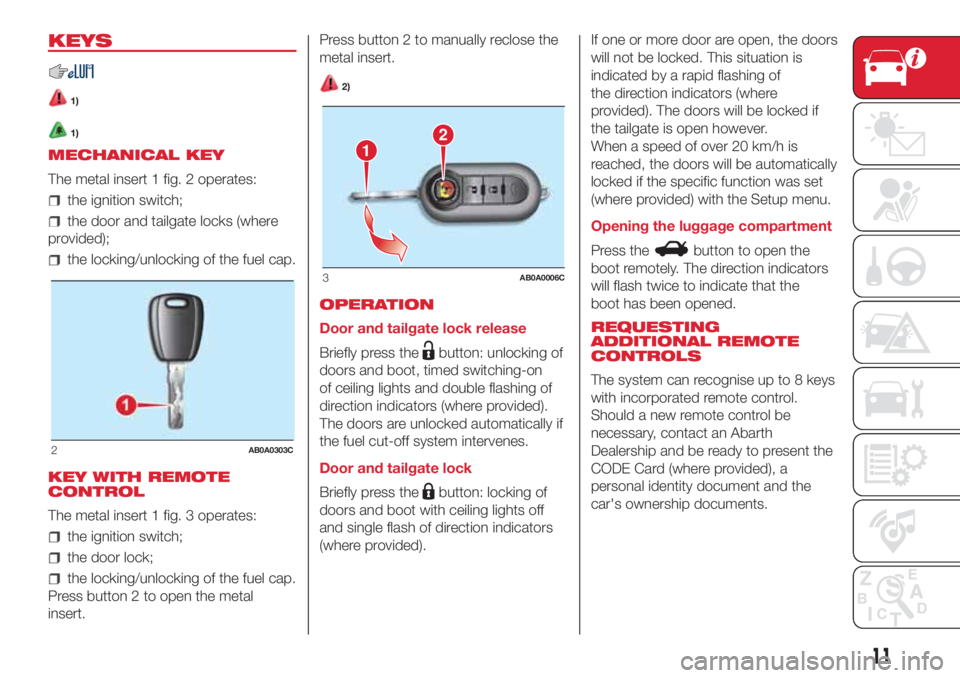
The metal insert 1 fig. 2 operates:
the ignition switch;
the door and tailgate locks (where
provided);
the locking/unlocking of the fuel cap.
KEY WITH REMOTE
CONTROL
The metal insert 1 fig. 3 operates:
the ignition switch;
the door lock;
the locking/unlocking of the fuel cap.
Press button 2 to open the metal
insert.Press button 2 to manually reclose the
metal insert.
2)
OPERATION
Door and tailgate lock release
Briefly press the
button: unlocking of
doors and boot, timed switching-on
of ceiling lights and double flashing of
direction indicators (where provided).
The doors are unlocked automatically if
the fuel cut-off system intervenes.
Door and tailgate lock
Briefly press the
button: locking of
doors and boot with ceiling lights off
and single flash of direction indicators
(where provided).If one or more door are open, the doors
will not be locked. This situation is
indicated by a rapid flashing of
the direction indicators (where
provided). The doors will be locked if
the tailgate is open however.
When a speed of over 20 km/h is
reached, the doors will be automatically
locked if the specific function was set
(where provided) with the Setup menu.
Opening the luggage compartment
Press the
button to open the
boot remotely. The direction indicators
will flash twice to indicate that the
boot has been opened.
REQUESTING
ADDITIONAL REMOTE
CONTROLS
The system can recognise up to 8 keys
with incorporated remote control.
Should a new remote control be
necessary, contact an Abarth
Dealership and be ready to present the
CODE Card (where provided), a
personal identity document and the
car's ownership documents.
2AB0A0303C
12
3AB0A0006C
11
Page 14 of 192
WARNING
1)The electronic components inside the
key may be damaged if the key is
subjected to strong shocks. In order to
ensure complete efficiency of the
electronic devices inside the keys, they
should never be exposed to direct sunlight.
2)Press button 2 fig. 3 only with the key
away from your body, especially your eyes
and from objects which could get
damaged (e.g. your clothes). Do not leave
the key unattended to avoid the button
being accidentally pressed while it is being
handled, e.g. by a child.
WARNING
1)Used batteries may be harmful to the
environment if not disposed of correctly.
They must be disposed of as specified by
law in the special containers or taken to
an Abarth Dealership, which will take care
of their disposal.
IGNITION DEVICE
OPERATION
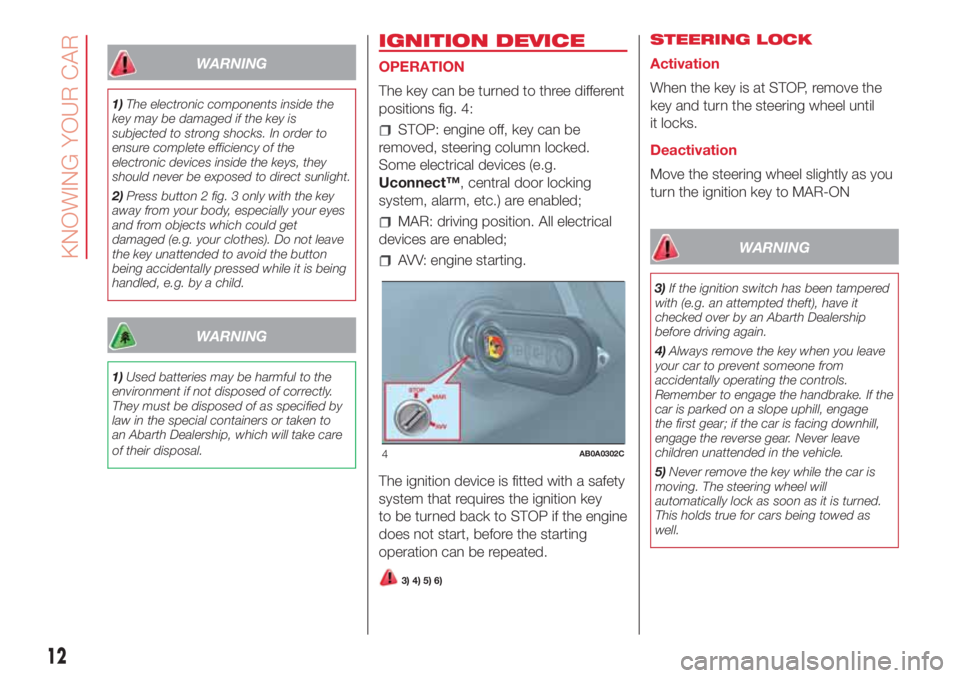
The key can be turned to three different
positions fig. 4:
STOP: engine off, key can be
removed, steering column locked.
Some electrical devices (e.g.
Uconnect™, central door locking
system, alarm, etc.) are enabled;
MAR: driving position. All electrical
devices are enabled;
AVV: engine starting.
The ignition device is fitted with a safety
system that requires the ignition key
to be turned back to STOP if the engine
does not start, before the starting
operation can be repeated.
3) 4) 5) 6)
STEERING LOCK
Activation
When the key is at STOP, remove the
key and turn the steering wheel until
it locks.
Deactivation
Move the steering wheel slightly as you
turn the ignition key to MAR-ON
WARNING
3)If the ignition switch has been tampered
with (e.g. an attempted theft), have it
checked over by an Abarth Dealership
before driving again.
4)Always remove the key when you leave
your car to prevent someone from
accidentally operating the controls.
Remember to engage the handbrake. If the
car is parked on a slope uphill, engage
the first gear; if the car is facing downhill,
engage the reverse gear. Never leave
children unattended in the vehicle.
5)Never remove the key while the car is
moving. The steering wheel will
automatically lock as soon as it is turned.
This holds true for cars being towed as
well.
4AB0A0302C
12
KNOWING YOUR CAR
Page 16 of 192
DOORS
7)
1)
DOOR CENTRAL
LOCKING/UNLOCKING
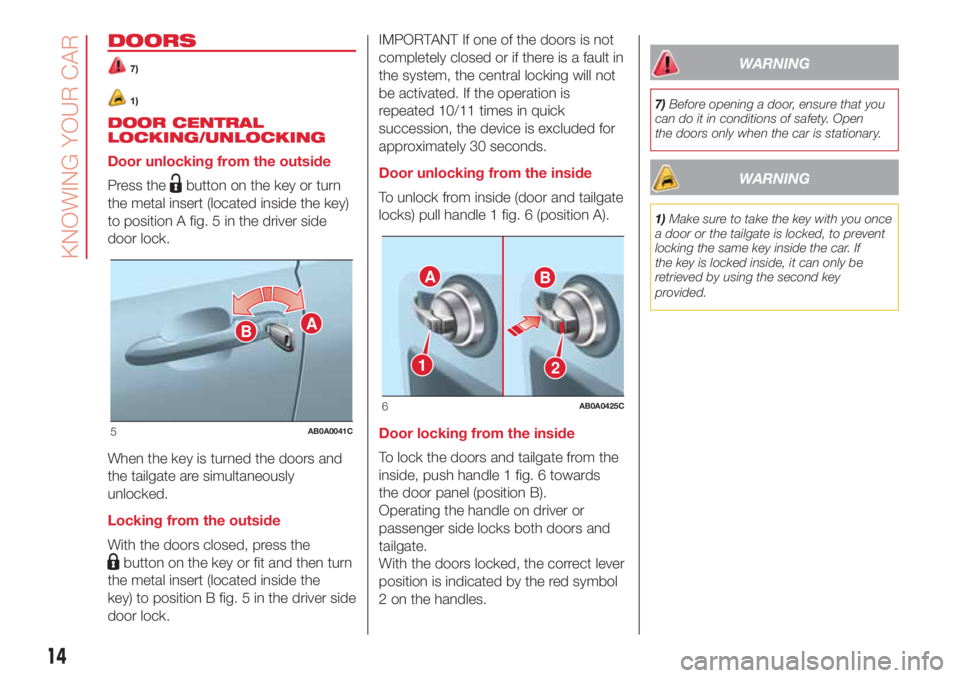
Door unlocking from the outside
Press the
button on the key or turn
the metal insert (located inside the key)
to position A fig. 5 in the driver side
door lock.
When the key is turned the doors and
the tailgate are simultaneously
unlocked.
Locking from the outside
With the doors closed, press the
button on the key or fit and then turn
the metal insert (located inside the
key) to position B fig. 5 in the driver side
door lock.IMPORTANT If one of the doors is not
completely closed or if there is a fault in
the system, the central locking will not
be activated. If the operation is
repeated 10/11 times in quick
succession, the device is excluded for
approximately 30 seconds.
Door unlocking from the inside
To unlock from inside (door and tailgate
locks) pull handle 1 fig. 6 (position A).
Door locking from the inside
To lock the doors and tailgate from the
inside, push handle 1 fig. 6 towards
the door panel (position B).
Operating the handle on driver or
passenger side locks both doors and
tailgate.
With the doors locked, the correct lever
position is indicated by the red symbol
2 on the handles.
WARNING
7)Before opening a door, ensure that you
can do it in conditions of safety. Open
the doors only when the car is stationary.
WARNING
1)Make sure to take the key with you once
a door or the tailgate is locked, to prevent
locking the same key inside the car. If
the key is locked inside, it can only be
retrieved by using the second key
provided.
BA
5AB0A0041C
AB
21
6AB0A0425C
14
KNOWING YOUR CAR
Page 19 of 192
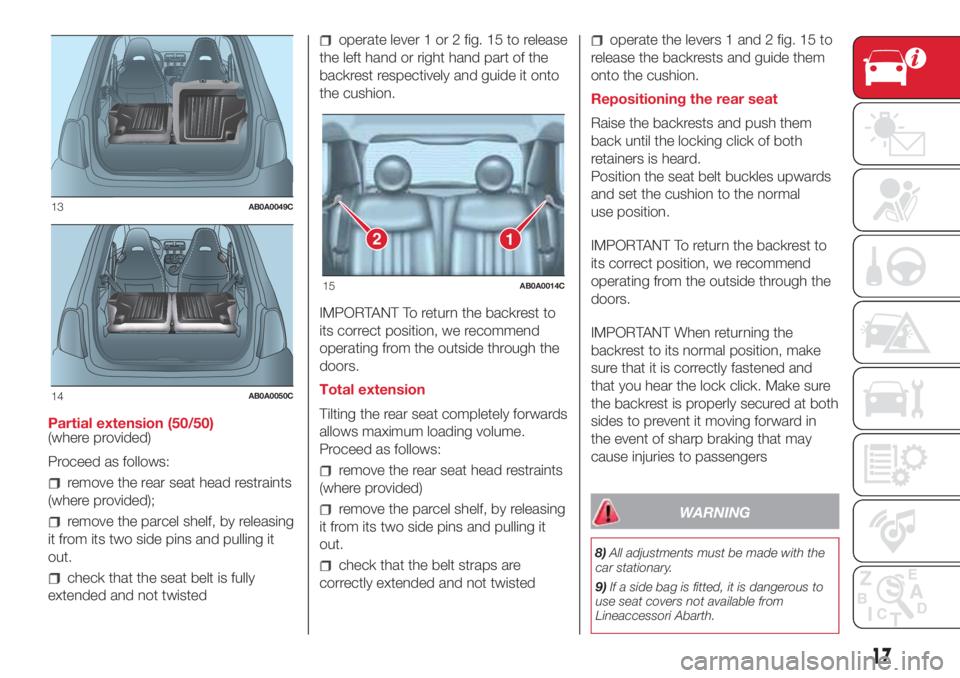
Partial extension (50/50)
(where provided)
Proceed as follows:
remove the rear seat head restraints
(where provided);
remove the parcel shelf, by releasing
it from its two side pins and pulling it
out.
check that the seat belt is fully
extended and not twisted
operate lever 1 or 2 fig. 15 to release
the left hand or right hand part of the
backrest respectively and guide it onto
the cushion.
IMPORTANT To return the backrest to
its correct position, we recommend
operating from the outside through the
doors.
Total extension
Tilting the rear seat completely forwards
allows maximum loading volume.
Proceed as follows:
remove the rear seat head restraints
(where provided)
remove the parcel shelf, by releasing
it from its two side pins and pulling it
out.
check that the belt straps are
correctly extended and not twisted
operate the levers 1 and 2 fig. 15 to
release the backrests and guide them
onto the cushion.
Repositioning the rear seat
Raise the backrests and push them
back until the locking click of both
retainers is heard.
Position the seat belt buckles upwards
and set the cushion to the normal
use position.
IMPORTANT To return the backrest to
its correct position, we recommend
operating from the outside through the
doors.
IMPORTANT When returning the
backrest to its normal position, make
sure that it is correctly fastened and
that you hear the lock click. Make sure
the backrest is properly secured at both
sides to prevent it moving forward in
the event of sharp braking that may
cause injuries to passengers
WARNING
8)All adjustments must be made with the
car stationary.
9)If a side bag is fitted, it is dangerous to
use seat covers not available from
Lineaccessori Abarth.
13AB0A0049C
14AB0A0050C
12
15AB0A0014C
17
Page 25 of 192
When the doors are released using the
key with remote control, a timer will
be activated for about 10 seconds.
When the doors are locked using the
key with remote control, the roof light
switches off.
Roof light timing (lens central
position)
The ceiling light automatically turns on
in the following cases: on opening
the door, on removing the key from the
ignition switch and on unlocking the
doors.
The ceiling light turns off 10 seconds
after closing all the doors and on
locking the doors. The interior lights are
switched off in any case after 15
minutes to preserve battery charge.WINDOW WASHING
The right stalk controls screen
wiper/washer operation.
This operates only with the ignition key
turned to MAR.
SCREEN WIPER/WASHER
Operation
18)
4) 5)
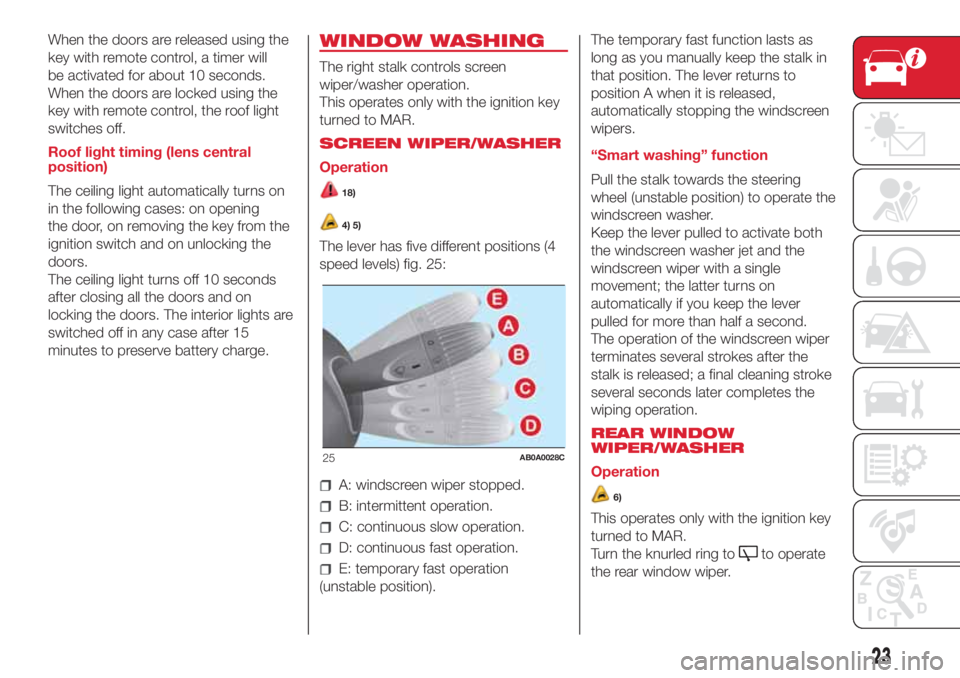
The lever has five different positions (4
speed levels) fig. 25:
A: windscreen wiper stopped.
B: intermittent operation.
C: continuous slow operation.
D: continuous fast operation.
E: temporary fast operation
(unstable position).The temporary fast function lasts as
long as you manually keep the stalk in
that position. The lever returns to
position A when it is released,
automatically stopping the windscreen
wipers.
“Smart washing” function
Pull the stalk towards the steering
wheel (unstable position) to operate the
windscreen washer.
Keep the lever pulled to activate both
the windscreen washer jet and the
windscreen wiper with a single
movement; the latter turns on
automatically if you keep the lever
pulled for more than half a second.
The operation of the windscreen wiper
terminates several strokes after the
stalk is released; a final cleaning stroke
several seconds later completes the
wiping operation.
REAR WINDOW
WIPER/WASHER
Operation
6)
This operates only with the ignition key
turned to MAR.
Turn the knurled ring to
to operate
the rear window wiper.
25AB0A0028C
23
Page 33 of 192
SOFT TOP
(where provided)
The soft top can be automatically
opened from the closed position to the
spoiler position, and from this position
to the fully open position.
Suggestions
it is advisable to close the soft top
when the car is parked. The closed soft
top effectively protects the car from
bad weather and from theft;
it is advisable to put valuables in the
boot and lock the lid even when the
top is closed.
SOFT TOP MOVEMENT
22) 23) 24)
9) 10) 11)
IMPORTANT NOTE If moved frequently
in a short time, the motor could
overheat causing the thermal protection
to block the system. Wait for a minute
and repeat.
OPERATION USING THE BUTTONS
INSIDE THE CAR
Opening the soft top:
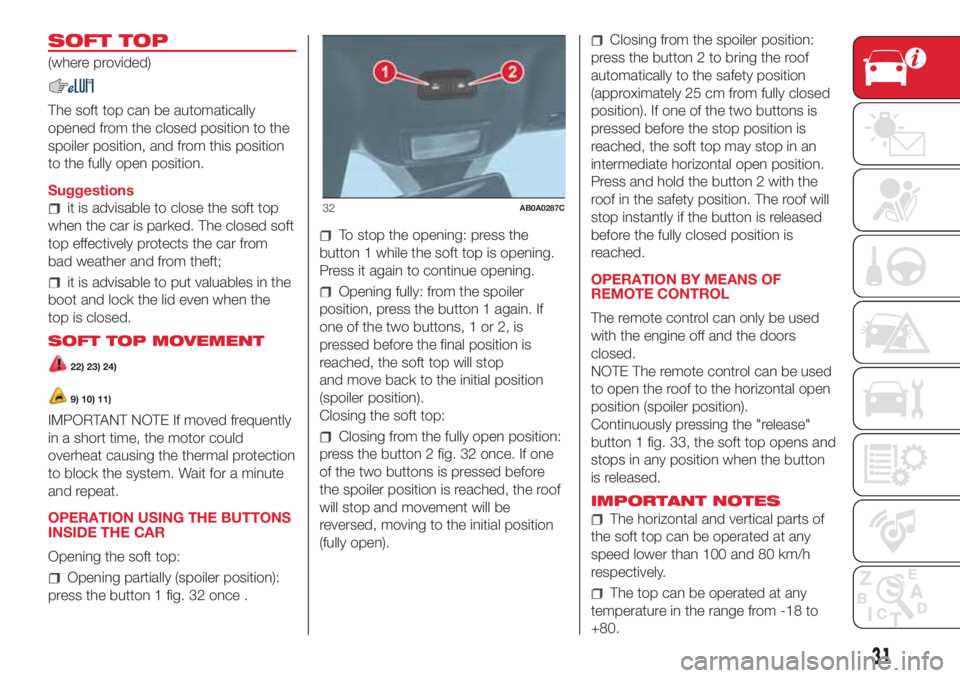
Opening partially (spoiler position):
press the button 1 fig. 32 once .
To stop the opening: press the
button 1 while the soft top is opening.
Press it again to continue opening.
Opening fully: from the spoiler
position, press the button 1 again. If
one of the two buttons, 1 or 2, is
pressed before the final position is
reached, the soft top will stop
and move back to the initial position
(spoiler position).
Closing the soft top:
Closing from the fully open position:
press the button 2 fig. 32 once. If one
of the two buttons is pressed before
the spoiler position is reached, the roof
will stop and movement will be
reversed, moving to the initial position
(fully open).
Closing from the spoiler position:
press the button 2 to bring the roof
automatically to the safety position
(approximately 25 cm from fully closed
position). If one of the two buttons is
pressed before the stop position is
reached, the soft top may stop in an
intermediate horizontal open position.
Press and hold the button 2 with the
roof in the safety position. The roof will
stop instantly if the button is released
before the fully closed position is
reached.
OPERATION BY MEANS OF
REMOTE CONTROL
The remote control can only be used
with the engine off and the doors
closed.
NOTE The remote control can be used
to open the roof to the horizontal open
position (spoiler position).
Continuously pressing the "release"
button 1 fig. 33, the soft top opens and
stops in any position when the button
is released.
IMPORTANT NOTES
The horizontal and vertical parts of
the soft top can be operated at any
speed lower than 100 and 80 km/h
respectively.
The top can be operated at any
temperature in the range from -18 to
+80.
32AB0A0287C
31
Page 44 of 192
NOTE Buttons+and–activate different
functions according to the following
situations:
within the menu, they allow you to
scroll up or down through the options;
during setting operations, they
increase or decrease values.
The menu comprises the following
functions:
LIGHTING: adjusts the dashboard
and instrument panel lighting
SPEED BEEP: sets the vehicle
speed limit (km/h or mph). The driver is
alerted when this speed is exceeded.
TRIP B ACTIVATION/DATA: activates
(”On”) and deactivates (”Off”) the Trip
B display (partial trip counter)
SET TIME: set the display clock
SET DATE: sets the display date
AUTOCLOSE: enables or disables
automatic door locking on exceeding a
speed of 20 km/h
MEASUREMENT UNITS: sets the
measurement units for distance and
fuel consumption
LANGUAGE: sets the display
language
WARNING VOLUME: sets the
volume (on 8 levels) of the audible
warning (buzzer) that accompanies the
failure/warning display
SEAT BELT BUZZER: reactivation of
the SBR buzzer (displayed only if the
SBR system was disabled by the
Abarth Dealership)
SERVICE: displays mileage intervals
for scheduled servicing
AIRBAG/PASSENGER BAG:
enables/disables the passenger side
airbag
DAYTIME RUNNING LIGHTS:
enables/disables daytime running lights
ITPMS RESET: resets the iTPMS
system (”self-learning”, see the “iTPMS
System” paragraph)
SEE RADIO (if present): enables/
disables duplicating some of the radio
information shown on theUconnect™
system display on the instrument panel
display.
SEE PHONE (if present): enables/
disables duplicating some of the call
information shown on theUconnect™
system display on the instrument panel
display.
SEE NAVIGATION (if present):
enables/disables duplicating some of
the navigation information shown on
theUconnect™system display on the
instrument panel display.
EXIT MENU
TRIP COMPUTER
The Trip computer is used to display
information on car operation when the
key is turned to MAR.
This function is characterised by two
separate memories, called "Trip A" and
"Trip B", where the car's "complete
missions" (journeys) are recorded in a
reciprocally independent manner, as
well as, for versions where present,
"Instant info" and "Best average
consumption".
Both memories can be reset: i.e. start
of a new journey.
"Trip A" can be used to display the
values relating to:
Range (where present)
Distance travelled A
Average consumption A
Instantaneous fuel consumption
(where present)
Average speed A
Trip time A (driving time)
Reset Trip A.
“Best average consumption": in ECO
mode, displays a screen summarising
the best average consumption (where
provided). The
icon indicates the
best performance. This information can
be reset by resetting Trip A.
42
KNOWING THE INSTRUMENT PANEL
Page 98 of 192
REPLACING AN
EXTERIOR BULB
For the type of bulb and power rating,
see paragraph "Replacing a bulb".
FRONT LIGHT CLUSTERS
The front light clusters contain side
lights, dipped headlights, main beam
headlights and direction indicator bulbs.
Access to the direction indicator
bulbs
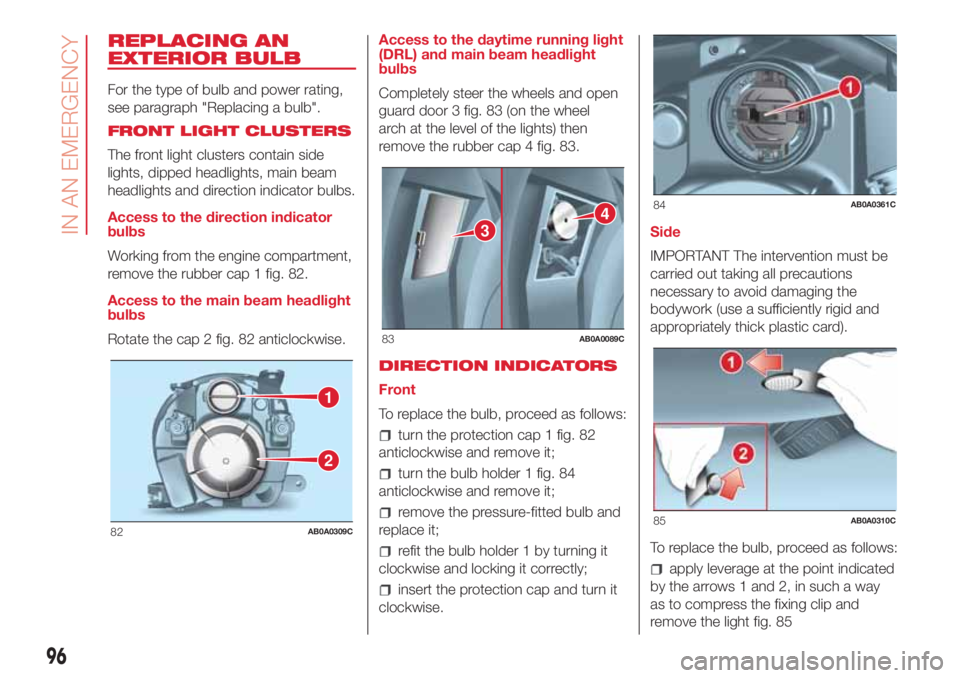
Working from the engine compartment,
remove the rubber cap 1 fig. 82.
Access to the main beam headlight
bulbs
Rotate the cap 2 fig. 82 anticlockwise.Access to the daytime running light
(DRL) and main beam headlight
bulbs
Completely steer the wheels and open
guard door 3 fig. 83 (on the wheel
arch at the level of the lights) then
remove the rubber cap 4 fig. 83.
DIRECTION INDICATORS
Front
To replace the bulb, proceed as follows:
turn the protection cap 1 fig. 82
anticlockwise and remove it;
turn the bulb holder 1 fig. 84
anticlockwise and remove it;
remove the pressure-fitted bulb and
replace it;
refit the bulb holder 1 by turning it
clockwise and locking it correctly;
insert the protection cap and turn it
clockwise.Side
IMPORTANT The intervention must be
carried out taking all precautions
necessary to avoid damaging the
bodywork (use a sufficiently rigid and
appropriately thick plastic card).
To replace the bulb, proceed as follows:
apply leverage at the point indicated
by the arrows 1 and 2, in such a way
as to compress the fixing clip and
remove the light fig. 85
1
2
82AB0A0309C
3
4
83AB0A0089C
84AB0A0361C
85AB0A0310C
96
IN AN EMERGENCY
Page 101 of 192

REPLACING FUSES
GENERAL INFORMATION
Fuses protect the electrical system:
they intervene (blow) in the event of a
failure or improper action on the
system.
118) 119) 120) 121) 122) 123)
To facilitate fuse replacement, use the
pliers hooked inside the fuse box lid on
the dashboard left-hand side.
Refer to the tables on the following
pages to identify the protective fuse.
FUSE LOCATION
Dashboard fuse box
To access the fuse you must remove
the press-fit cover 5 fig. 93.
The 5 A fuse for door mirror demisting
is located in the diagnosis socket
area, as shown in fig. 94.The fuse box shown in fig. 96 is located
in the lower area next to the pedal
unit.
Engine compartment
junction box
The fuse box is located on the right
side of the engine compartment, next
to the battery. To access the fuses,
proceed as follows:
Fully tighten the screw 1 fig. 95;
at the same time slowly rotate the
screw anticlockwise, until resistance is
encountered (do not overtighten);
slowly release the screw;
opening is indicated by the entire
screw head coming out of its housing;
remove cover 2, sliding it upwards
on the side guides, as indicated in
the figure;
after replacing the fuse, refit the
cover, making sure that it is closed
properly.
The number identifying the electrical
component corresponding to each fuse
is shown on the cover fig. 97.
25)
93AB0A0291C
94AB0A0317C
12
95AB0A0375C
99
Page 102 of 192

DASHBOARD FUSE BOX
DEVICE PROTECTED FUSE AMPERE
Headlight alignment corrector F13
5(*)
Diagnosis socket, Uconnect, climate control, EOBD F36 15
Brake light switch, instrument panel node F37 5
Central door locking F38 15
Windscreen/rear window washer pump F43 15
Driver's side electric windows F47 20
(*) (where provided)
96AB0A0106C
100
IN AN EMERGENCY