Acura Acura ILX 2013 Owner's Manual
[x] Cancel search | Manufacturer: ACURA, Model Year: 2013, Model line: ILX, Model: Acura ILX 2013Pages: 351, PDF Size: 8.21 MB
Page 48 of 351
47
uuAirbagsuAirbag Care
Safe Driving
Airbag CareYou do not need to, and should not, perform any maintenance on or replace any
airbag system components yourself. However, you should have your vehicle
inspected by a dealer in the following situations:■When the airbags have deployed
If an airbag has inflated, the control unit and other related parts must be replaced.
Similarly, once an automatic seat belt tensioner has been activated, it must be
replaced.■When the vehicle has been in a moderate-to-severe collision
Even if the airbags did not inflate, have your dealer inspect the following: the driver’s
seat position sensor, weight sensors in the passenger’s seat, front seat belt
tensioners, and each seat belt that was worn during the crash.■Do not remove or modify a front seat without consulting a dealer
This would likely disable the driver's seat position sensor or the passenger's weight
sensors. If it is necessary to remove or modify a front seat to accommodate a person
with disabilities, contact an Acura dealer, or for U.S. vehicles, Acura Client Relations
at 1-800-382-2238 and for Canadian vehicles, Canadian Acura Client Service at 1-
888-9-ACURA-9.
1Airbag Care
We recommend against the use of salvaged airbag
system components, including the airbag, tensioners,
sensors, and control unit.
Page 143 of 351
142Features
Audio SystemAbout Your Audio SystemOn models with navigation system, see Navigation System Manual for operation of
the audio system, AcuraLink
*, Bluetooth®HandsFreeLink®, and voice commands for
these features.
The audio system features AM/FM radio and the XM® Radio service. It can also play
audio CDs, WMA/MP3/AAC files, iPod®, iPhone®, USB flash drives, and Bluetooth®
devices.
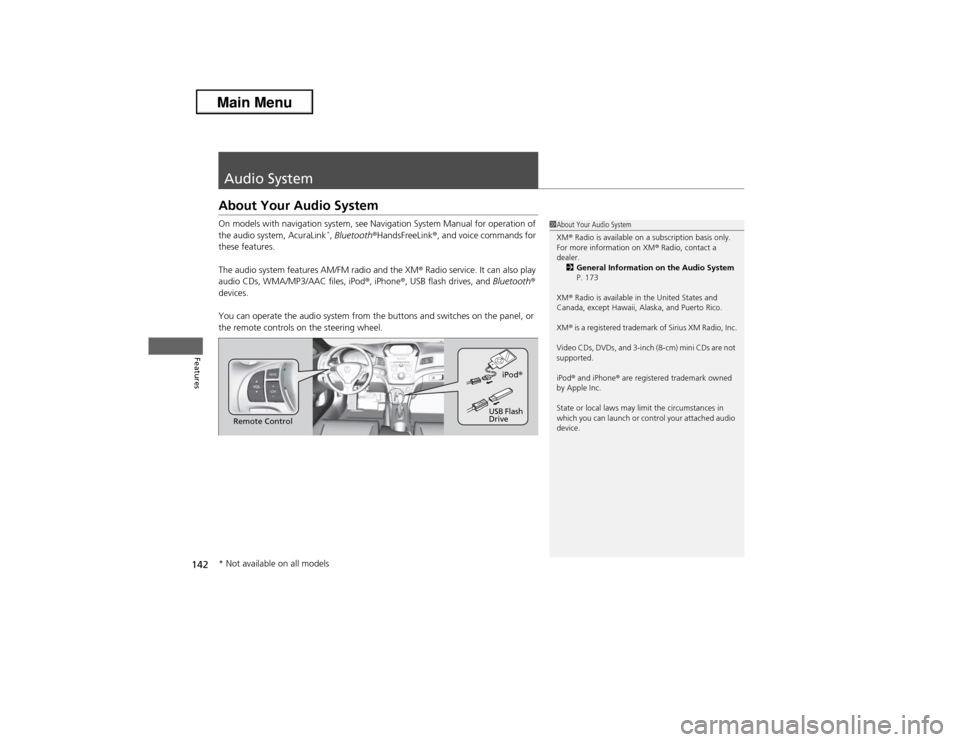
You can operate the audio system from the buttons and switches on the panel, or
the remote controls on the steering wheel.
1About Your Audio System
XM® Radio is available on a subscription basis only.
For more information on XM® Radio, contact a
dealer.
2General Information on the Audio System
P. 173
XM® Radio is available in the United States and
Canada, except Hawaii, Alaska, and Puerto Rico.
XM® is a registered trademark of Sirius XM Radio, Inc.
Video CDs, DVDs, and 3-inch (8-cm) mini CDs are not
supported.
iPod® and iPhone® are registered trademark owned
by Apple Inc.
State or local laws may limit the circumstances in
which you can launch or control your attached audio
device.
Remote ControliPod®
USB Flash
Drive
* Not available on all models
Page 145 of 351
144
uuAudio SystemuAudio System Theft Protection
Features
Audio System Theft ProtectionThe audio system is disabled when it is disconnected from the power source, such as
when the battery is disconnected or goes dead.■Reactivating the audio system
1.Set the power mode to ON, and turn on the audio system.
uIf you set the power mode to ACCESSORY, you will be requested to enter the
audio security code. See step 3.
2.Press and hold the power button again for more than two seconds.
uThe audio system is reactivated when the system’s control unit recognizes that
the system is in your vehicle.
If the control unit fails to recognize, ENTER CODE appears on the audio/
information screen.
3.Enter the audio security code using the preset buttons. If you enter an incorrect
digit, continue to the last digit, then try again. If you do not enter the code
correctly after 10 tries, leave the system for one hour before trying again, or visit
a dealer to have the system reset.
1Audio System Theft Protection
Find the audio system's security code and serial
number label in your owner’s manual kit.
We recommend that you write down the serial
number in this owner’s manual.
Do not store the label in your vehicle. If you lose the
label, you must first retrieve the serial number, and
then obtain the code.
You can find out about your serial number and
security code from a dealer.
You can register the security code at My Acura
(owners.acura.com.), and find information on how to
retrieve the serial number and obtain the code at
radio-navicode.acura.com.U.S. models
Page 167 of 351
166
uuAudio System Basic OperationuPlaying Bluetooth® Audio
Features
Playing Bluetooth® AudioYour audio system allows you to listen to music from your Bluetooth®-compatible
phone.
This function is available when the phone is paired and linked to the vehicle's
Bluetooth® HandsFreeLink® (HFL) system.2Phone Setup P. 186
1Playing Bluetooth® Audio
Not all Bluetooth-enabled phones with streaming
audio capabilities are compatible with the system.
For a list of compatible phones:•U.S.: Visit www.acura.com/handsfreelink, or call 1-
888-528-7876.•Canada: Visit www.handsfreelink.ca, or call 1-888-
528-7876.
In some states, it may be illegal to perform some data
device functions while driving.
If more than one phone is paired to the HFL system,
there will be a delay before the system begins to play.
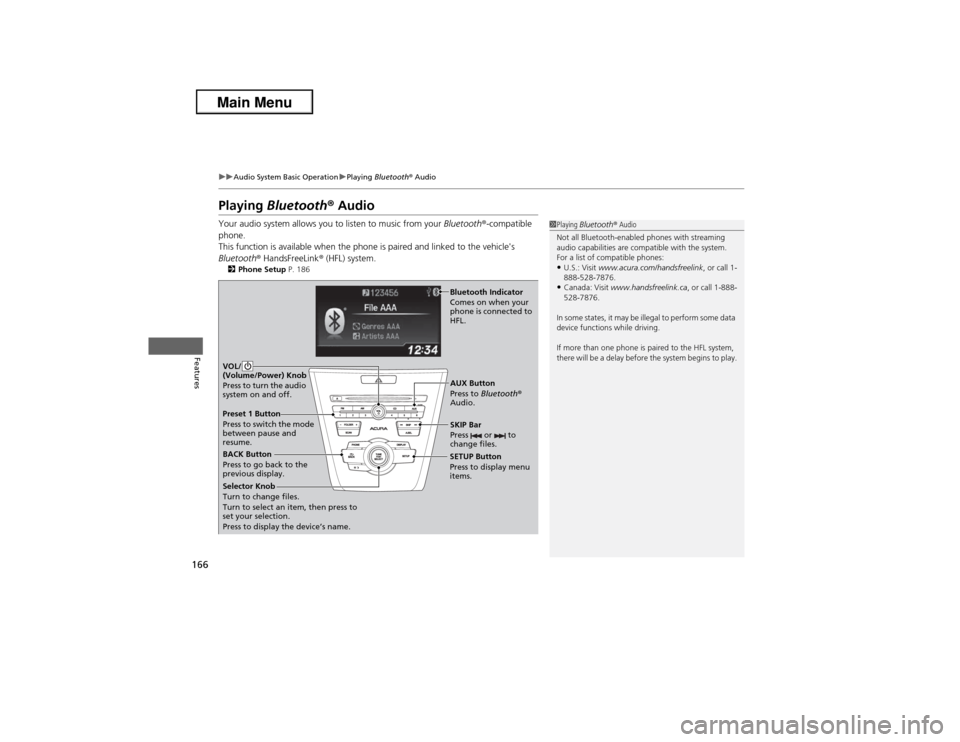
BACK Button
Press to go back to the
previous display.SETUP Button
Press to display menu
items.SKIP Bar
Press or to
change files.
AUX Button
Press to Bluetooth®
Audio. VOL/
(Volume/Power) Knob
Press to turn the audio
system on and off.
Selector Knob
Turn to change files.
Turn to select an item, then press to
set your selection.
Press to display the device’s name.
Bluetooth Indicator
Comes on when your
phone is connected to
HFL.
Preset 1 Button
Press to switch the mode
between pause and
resume.
Page 180 of 351
179
Continued
Features
Bluetooth® HandsFreeLink®For models with the navigation system, see Navigation System Manual for how to
operate the Bluetooth® HandsFreeLink®.
Bluetooth® HandsFreeLink® (HFL) allows you to place and receive phone calls using
your vehicle's audio system, without handling your cell phone.Using HFL
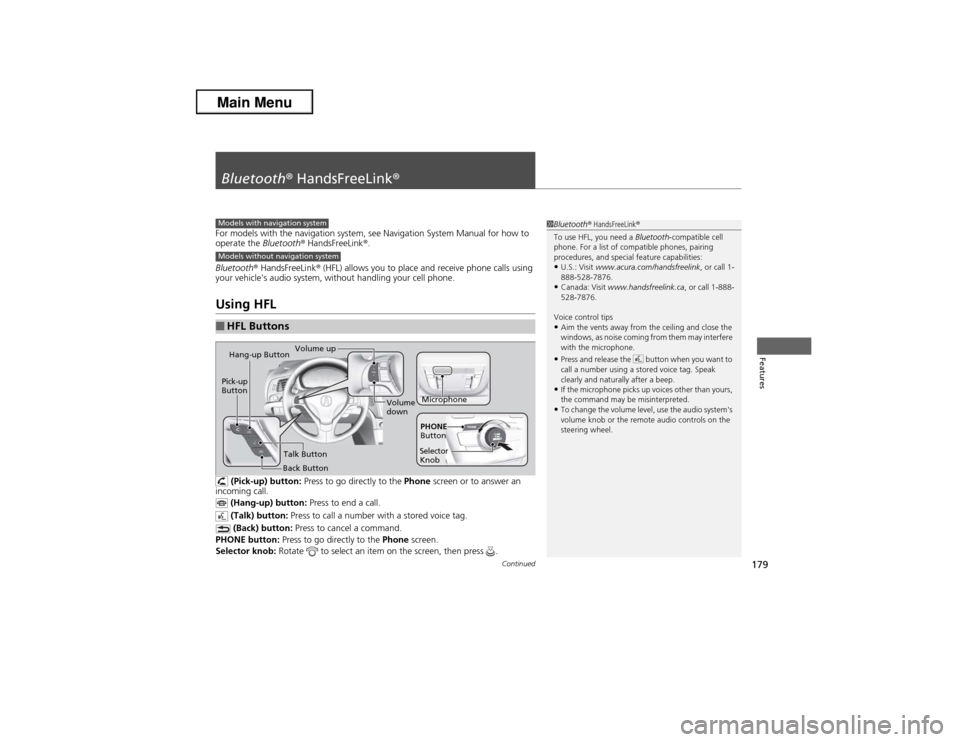
(Pick-up) button: Press to go directly to the Phone screen or to answer an
incoming call.
(Hang-up) button: Press to end a call.
(Talk) button: Press to call a number with a stored voice tag.
(Back) button: Press to cancel a command.
PHONE button: Press to go directly to the Phone screen.
Selector knob: Rotate to select an item on the screen, then press .
■HFL Buttons
1Bluetooth® HandsFreeLink®
To use HFL, you need a Bluetooth-compatible cell
phone. For a list of compatible phones, pairing
procedures, and special feature capabilities:•U.S.: Visit www.acura.com/handsfreelink, or call 1-
888-528-7876.•Canada: Visit www.handsfreelink.ca, or call 1-888-
528-7876.
Voice control tips•Aim the vents away from the ceiling and close the
windows, as noise coming from them may interfere
with the microphone.•Press and release the button when you want to
call a number using a stored voice tag. Speak
clearly and naturally after a beep.•If the microphone picks up voices other than yours,
the command may be misinterpreted.•To change the volume level, use the audio system's
volume knob or the remote audio controls on the
steering wheel.
Models with navigation systemModels without navigation system
Microphone Pick-up
Button
Selector
KnobPHONE
Button
Hang-up Button
Volume up
Volume
down
Back ButtonTalk Button
Page 244 of 351
243Driving
RefuelingFuel Information■Fuel recommendation
Use of lower octane gasoline can cause occasional metallic knocking noise in the
engine and will result in decreased engine performance.
Use of gasoline with a pump octane less than 87 can lead to engine damage.■Top tier detergent gasoline
Because the level of detergency and additives in gasoline vary in the market, Acura
endorses the use of “TOP TIER Detergent Gasoline” where available to help
maintain the performance and reliability of your vehicle. TOP TIER Detergent
Gasoline meets a new gasoline standard jointly established by leading automotive
manufacturers to meet the needs of today’s advanced engines.
Qualifying gasoline retailers will, in most cases, identify their gasoline as having met
“TOP TIER Detergent Gasoline” standards at the retail location. This fuel is
guaranteed to contain the proper level of detergent additives and be free of metallic
additives. The proper level of detergent additives, and absence of harmful metallic
additives in gasoline, help avoid build-up of deposits in your engine and emission
control system.
For further important fuel-related information for your vehicle, or on information on
gasoline that does not contain MMT, visit My Acura at owners.acura.com. In
Canada, visit www.acura.ca for additional information on gasoline. For more
information on top tier gasoline, visit www.toptiergas.com.■Fuel tank capacity: 13.2 US gal (50 liters)Unleaded premium gasoline, pump octane number 91 or higher
1Fuel InformationNOTICEWe recommend quality gasoline containing
detergent additives that help prevent fuel system and
engine deposits. In addition, in order to maintain
good performance, fuel economy, and emissions
control, we strongly recommend the use of gasoline
that does NOT contain harmful manganese-based
fuel additives such as MMT, if such gasoline is
available.
Use of gasoline with these additives may adversely
affect performance, and cause the malfunction
indicator lamp on your instrument panel to come on.
If this happens, contact a dealer for service.
Some gasoline today is blended with oxygenates such
as ethanol. Your vehicle is designed to operate on
oxygenated gasoline containing up to 10% ethanol
by volume. Do not use gasoline containing methanol.
If you notice any undesirable operating symptoms, try
another service station or switch to another brand of
gasoline.
Page 247 of 351
246Driving
Accessories and ModificationsAccessoriesWhen installing accessories, check the following:
•Do not install accessories on the windshield. They can obstruct your view and
delay your reaction to driving conditions.
•Do not install accessories on the side pillars or across the side windows.
Accessories installed in these areas may interfere with proper operation of the
side curtain airbags.
•Be sure electronic accessories do not overload electrical circuits or interfere with
proper operation of your vehicle.
2Fuses P. 324
•Before installing any electronic accessory, have the installer contact a dealer for
assistance. If possible, have a dealer inspect the final installation.ModificationsDo not modify your vehicle or use non-Acura components that can affect its
handling, stability, and reliability.
Overall vehicle performance can be affected. Always make sure all equipment is
properly installed and maintained, and that it meets federal, state, province,
territory, and local regulations.
1Accessories and Modifications
Acura Genuine accessories are recommended to
ensure proper operation on your vehicle.
3
WARNING
Improper accessories or modifications can
affect your vehicle's handling, stability, and
performance, and cause a crash in which
you can be seriously hurt or killed.
Follow all instructions in this owner's
manual regarding accessories and
modifications.
Page 251 of 351

250
uuBefore Performing MaintenanceuParts and Fluids Used in Maintenance Service
Maintenance
Parts and Fluids Used in Maintenance ServiceThe use of Acura genuine parts and fluids is recommended when maintaining and
servicing your vehicle. Acura genuine parts are manufactured according to the same
high quality standards used in Acura vehicles.
Page 262 of 351
261
uuMaintenance Under the HooduRecommended Engine Oil
Maintenance
Recommended Engine Oil
Oil is a major contributor to your engine's
performance and longevity. If you drive the
vehicle with insufficient or deteriorated oil,
the engine may fail or be damaged.
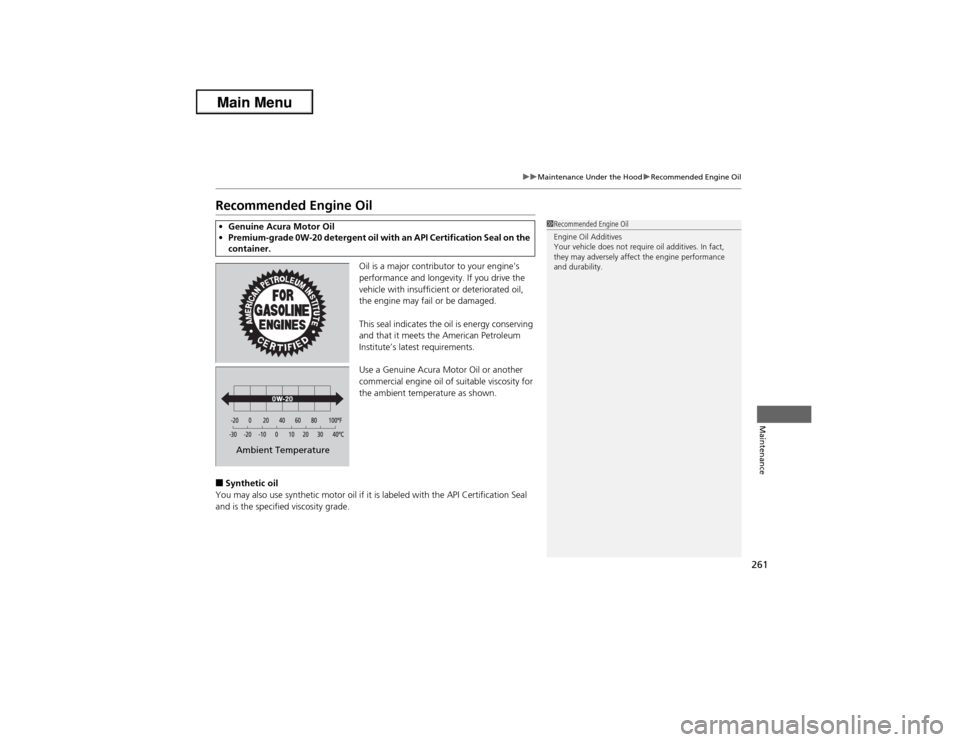
This seal indicates the oil is energy conserving
and that it meets the American Petroleum
Institute’s latest requirements.
Use a Genuine Acura Motor Oil or another
commercial engine oil of suitable viscosity for
the ambient temperature as shown.
■Synthetic oil
You may also use synthetic motor oil if it is labeled with the API Certification Seal
and is the specified viscosity grade.•Genuine Acura Motor Oil
•Premium-grade 0W-20 detergent oil with an API Certification Seal on the
container.
1Recommended Engine Oil
Engine Oil Additives
Your vehicle does not require oil additives. In fact,
they may adversely affect the engine performance
and durability.
Ambient Temperature
Page 271 of 351
270
uuMaintenance Under the HooduTransmission Fluid
Maintenance
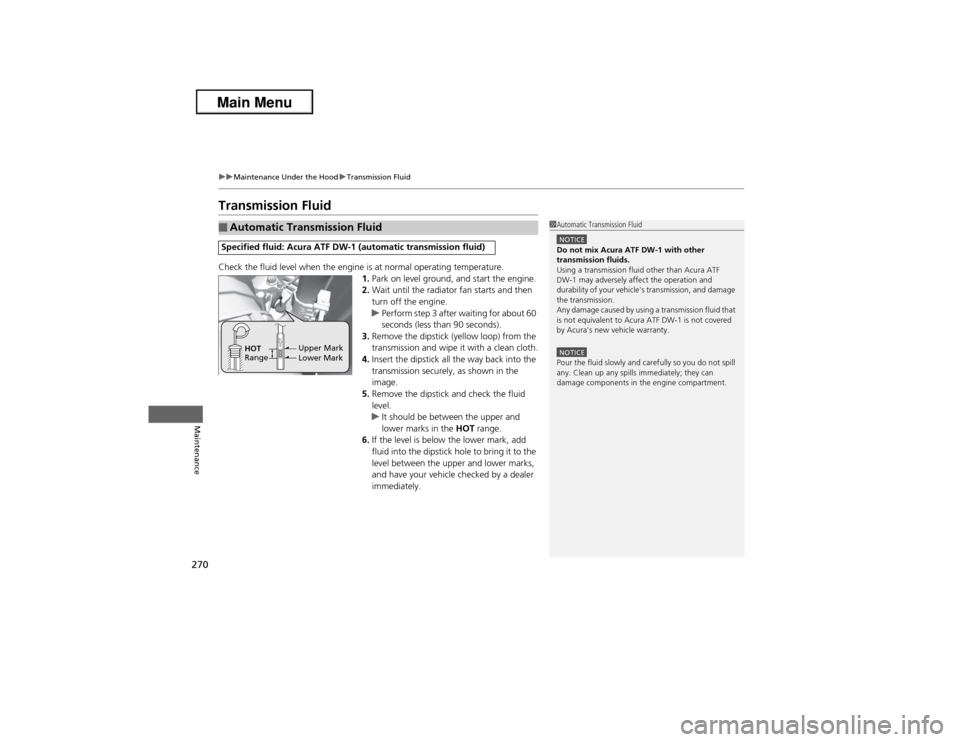
Transmission FluidCheck the fluid level when the engine is at normal operating temperature.
1.Park on level ground, and start the engine.
2.Wait until the radiator fan starts and then
turn off the engine.
uPerform step 3 after waiting for about 60
seconds (less than 90 seconds).
3.Remove the dipstick (yellow loop) from the
transmission and wipe it with a clean cloth.
4.Insert the dipstick all the way back into the
transmission securely, as shown in the
image.
5.Remove the dipstick and check the fluid
level.
uIt should be between the upper and
lower marks in the HOT range.
6.If the level is below the lower mark, add
fluid into the dipstick hole to bring it to the
level between the upper and lower marks,
and have your vehicle checked by a dealer
immediately.■Automatic Transmission FluidSpecified fluid: Acura ATF DW-1 (automatic transmission fluid)
1Automatic Transmission FluidNOTICEDo not mix Acura ATF DW-1 with other
transmission fluids.
Using a transmission fluid other than Acura ATF
DW-1 may adversely affect the operation and
durability of your vehicle's transmission, and damage
the transmission.
Any damage caused by using a transmission fluid that
is not equivalent to Acura ATF DW-1 is not covered
by Acura's new vehicle warranty.NOTICEPour the fluid slowly and carefully so you do not spill
any. Clean up any spills immediately; they can
damage components in the engine compartment.
Upper Mark
Lower Mark HOT
Range