engine oil Acura ILX 2014 User Guide
[x] Cancel search | Manufacturer: ACURA, Model Year: 2014, Model line: ILX, Model: Acura ILX 2014Pages: 351, PDF Size: 7.94 MB
Page 253 of 351
252
uuMaintenance Minder
TMuTo Use Maintenance Minder
TM
Maintenance
To Use Maintenance Minder
TM
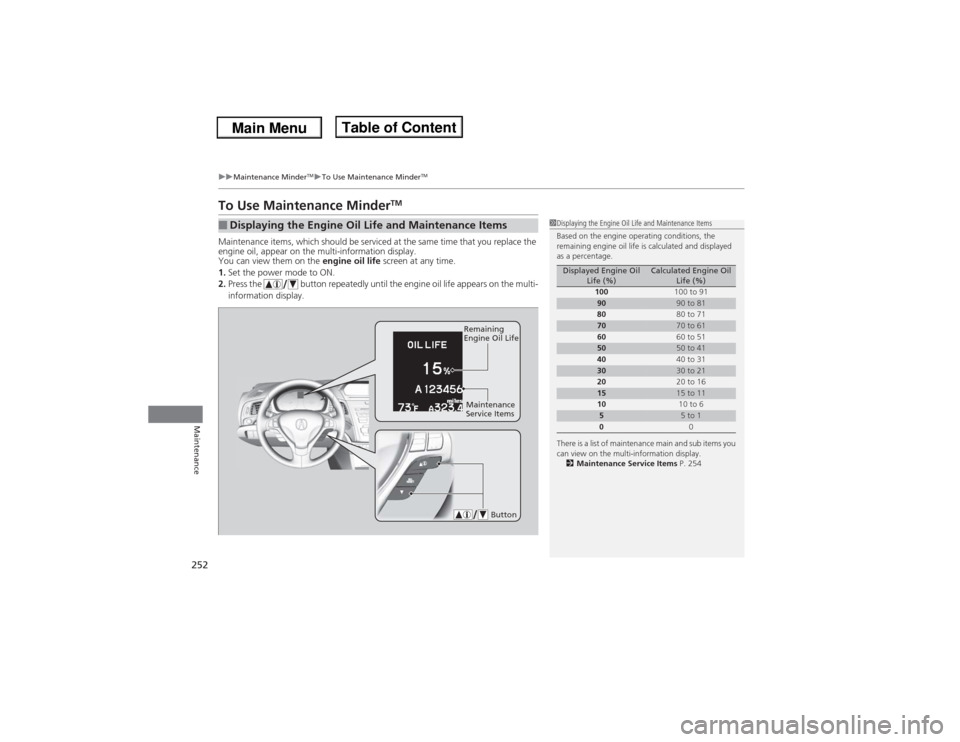
Maintenance items, which should be serviced at the same time that you replace the
engine oil, appear on the multi-information display.
You can view them on the engine oil life screen at any time.
1.Set the power mode to ON.
2.Press the button repeatedly until the engine oil life appears on the multi-
information display.■Displaying the Engine Oil Life and Maintenance Items
1Displaying the Engine Oil Life and Maintenance Items
Based on the engine operating conditions, the
remaining engine oil life is calculated and displayed
as a percentage.
There is a list of maintenance main and sub items you
can view on the multi-information display.
2Maintenance Service Items P. 254
Displayed Engine Oil
Life (%)
Calculated Engine Oil
Life (%)
100100 to 91
90
90 to 81
8080 to 71
70
70 to 61
6060 to 51
50
50 to 41
4040 to 31
30
30 to 21
2020 to 16
15
15 to 11
1010 to 6
5
5 to 1
00
Button
Remaining
Engine Oil Life
Maintenance
Service Items
Page 254 of 351

253
uuMaintenance Minder
TMuTo Use Maintenance Minder
TM
Continued
Maintenance
The system message indicator ( ) comes on along with the Maintenance Minder message.■Maintenance Minder Messages on the Multi-Information
DisplayMaintenance Message
Oil Life Display
Explanation
Information
SERVICE DUE SOON
15 %
The remaining engine oil life is 15 to 6
percent. Once you switch the display
by pressing the
(information) button, this message
will go off.
The engine oil is approaching the end
of its service life, and the maintenance
items should be inspected and
serviced soon.
SERVICE DUE NOW
5 %
The remaining engine oil life is 5 to 1
percent. Press the button to
switch to another display.
The engine oil has almost reached the
end of its service life, and the
maintenance items should be
inspected and serviced as soon as
possible.
SERVICE PAST DUE
Negative Distance
The remaining engine oil life has
passed its service life, and a negative
distance appears after driving over 10
miles (U.S. models) or 10 km
(Canadian models). Press the
button to switch to another
display.
The engine oil life has passed.
The maintenance items must be
inspected and serviced immediately.
U.S.
Canada
Page 255 of 351
254
uuMaintenance Minder
TMuTo Use Maintenance Minder
TM
Maintenance
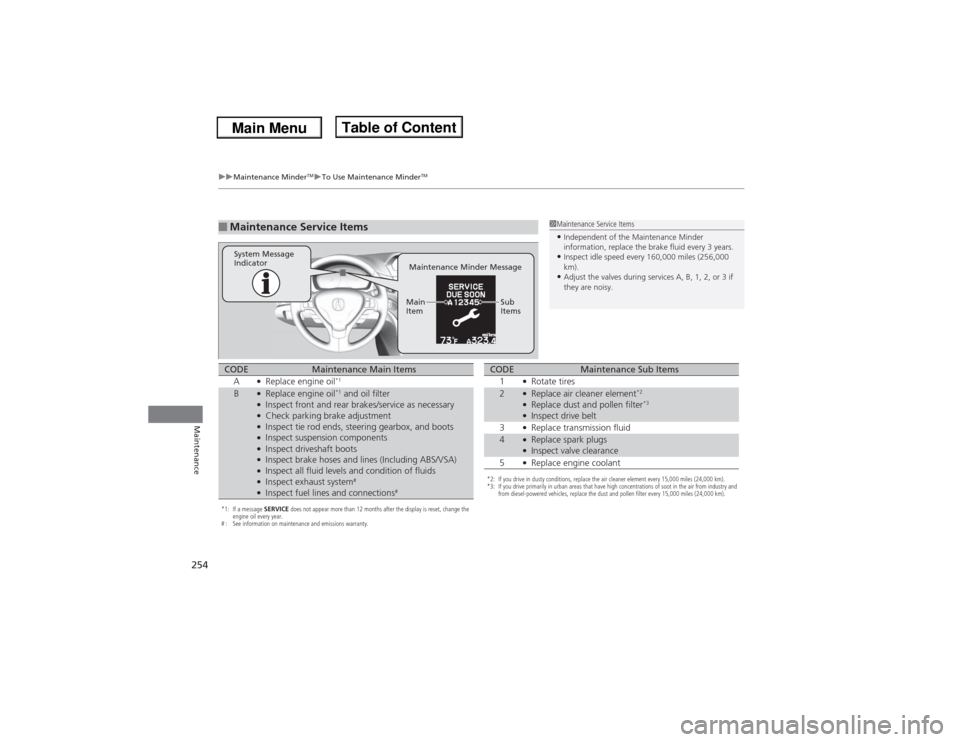
■Maintenance Service Items
1Maintenance Service Items•Independent of the Maintenance Minder
information, replace the brake fluid every 3 years.•Inspect idle speed every 160,000 miles (256,000
km).•Adjust the valves during services A, B, 1, 2, or 3 if
they are noisy.
Maintenance Minder Message System Message
Indicator
Sub
Items Main
Item
*1: If a message SERVICE does not appear more than 12 months after the display is reset, change the
engine oil every year.
# : See information on maintenance and emissions warranty.CODE
Maintenance Main Items
A
●Replace engine oil
*1
B
●Replace engine oil
*1 and oil filter
●Inspect front and rear brakes/service as necessary●Check parking brake adjustment●Inspect tie rod ends, steering gearbox, and boots●Inspect suspension components●Inspect driveshaft boots●Inspect brake hoses and lines (Including ABS/VSA)●Inspect all fluid levels and condition of fluids●Inspect exhaust system
#
●Inspect fuel lines and connections
#
*2: If you drive in dusty conditions, replace the air cleaner element every 15,000 miles (24,000 km).
*3: If you drive primarily in urban areas that have high concentrations of soot in the air from industry and
from diesel-powered vehicles, replace the dust and pollen filter every 15,000 miles (24,000 km).CODE
Maintenance Sub Items
1
●Rotate tires
2
●Replace air cleaner element
*2
●Replace dust and pollen filter
*3
●Inspect drive belt
3●Replace transmission fluid
4
●Replace spark plugs●Inspect valve clearance
5●Replace engine coolant
Page 256 of 351

255
uuMaintenance Minder
TMuTo Use Maintenance Minder
TM
Maintenance
Reset the engine oil life display if you have performed the maintenance service.
1.Set the power mode to ON.
2.Go to the MAINTENANCE INFO. group.
2Customized Features P. 83
3.Press the SEL/RESET button.
uThe oil life reset mode is displayed on the multi-information display.
4.Select RESET with the button, then press the SEL/RESET button.
uThe displayed maintenance items disappear, and the engine oil life display
returns to 100%.
To cancel the oil life reset mode, select CANCEL, then press the SEL/RESET button.■Resetting the Display
1Resetting the DisplayNOTICEFailure to reset the engine oil life after a maintenance
service results in the system showing incorrect
maintenance intervals, which can lead to serious
mechanical problems.
The dealer will reset the engine oil life display after
completing the required maintenance service. If
someone other than a dealer performs maintenance
service, reset the engine oil life display yourself.
Engine Oil Life Maintenance
Item Codes
SEL/RESET Button
Button
Page 257 of 351
256Maintenance
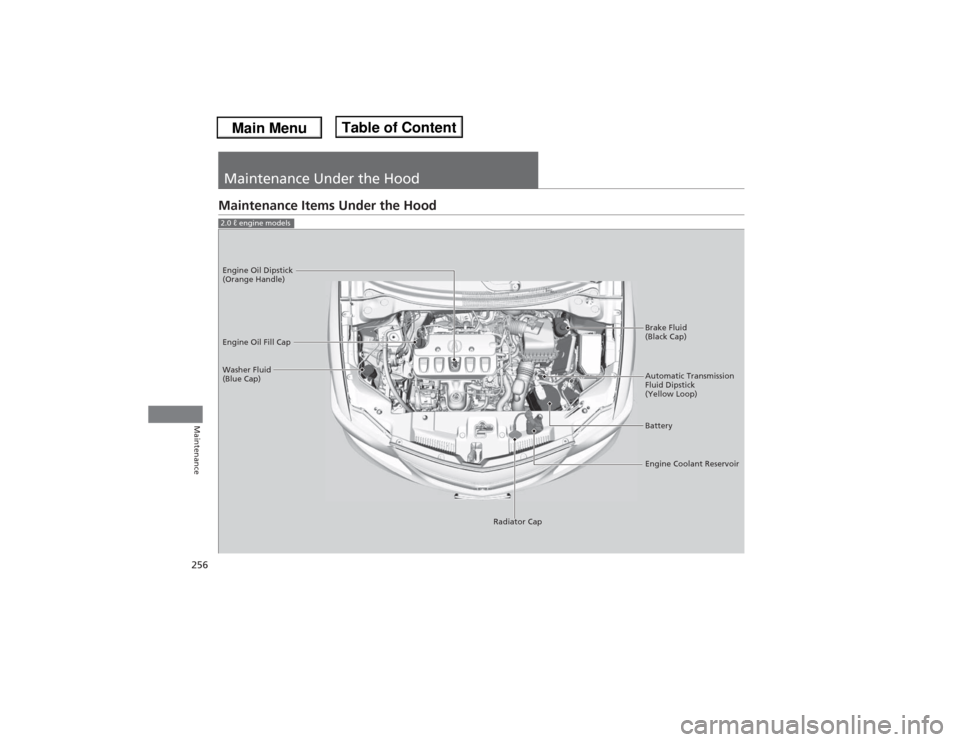
Maintenance Under the HoodMaintenance Items Under the Hood2.0 ℓ engine models
Brake Fluid
(Black Cap)
Washer Fluid
(Blue Cap) Engine Oil Dipstick
(Orange Handle)
Engine Oil Fill Cap
Automatic Transmission
Fluid Dipstick
(Yellow Loop)
Battery
Engine Coolant Reservoir
Radiator Cap
Page 258 of 351
257
uuMaintenance Under the HooduMaintenance Items Under the Hood
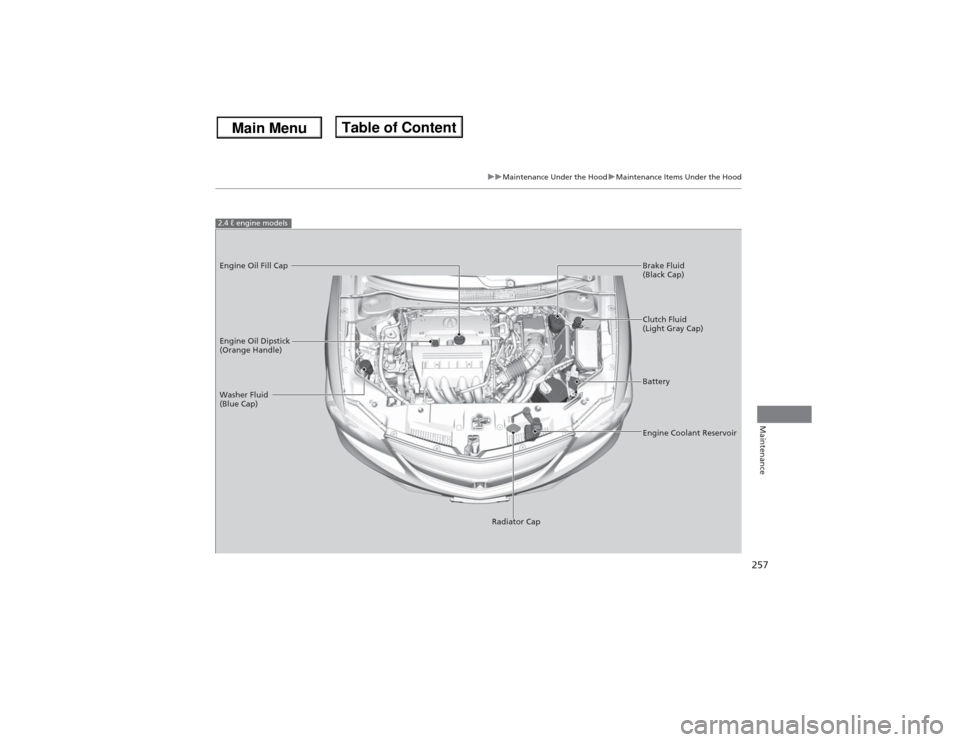
Maintenance
2.4 ℓ engine modelsEngine Oil Dipstick
(Orange Handle)
Washer Fluid
(Blue Cap)
Engine Coolant Reservoir Brake Fluid
(Black Cap) Engine Oil Fill Cap
Clutch Fluid
(Light Gray Cap)
Battery
Radiator Cap
Page 262 of 351
261
uuMaintenance Under the HooduRecommended Engine Oil
Maintenance
Recommended Engine Oil
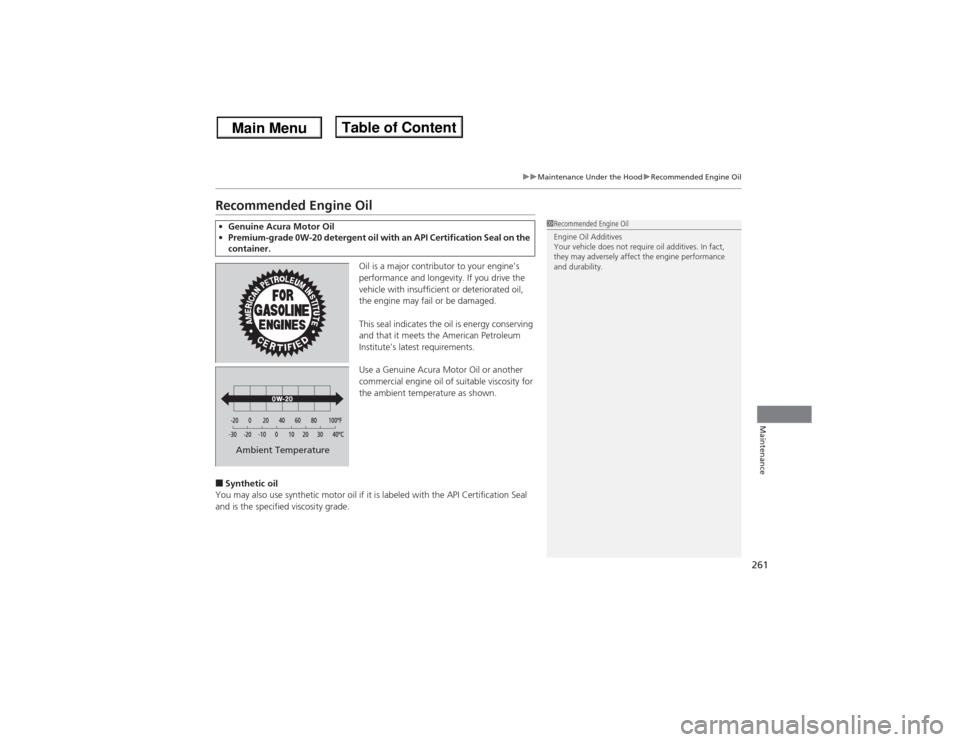
Oil is a major contributor to your engine's
performance and longevity. If you drive the
vehicle with insufficient or deteriorated oil,
the engine may fail or be damaged.
This seal indicates the oil is energy conserving
and that it meets the American Petroleum
Institute’s latest requirements.
Use a Genuine Acura Motor Oil or another
commercial engine oil of suitable viscosity for
the ambient temperature as shown.
■Synthetic oil
You may also use synthetic motor oil if it is labeled with the API Certification Seal
and is the specified viscosity grade.•Genuine Acura Motor Oil
•Premium-grade 0W-20 detergent oil with an API Certification Seal on the
container.
1Recommended Engine Oil
Engine Oil Additives
Your vehicle does not require oil additives. In fact,
they may adversely affect the engine performance
and durability.
Ambient Temperature
Page 263 of 351
262
uuMaintenance Under the HooduOil Check
Maintenance
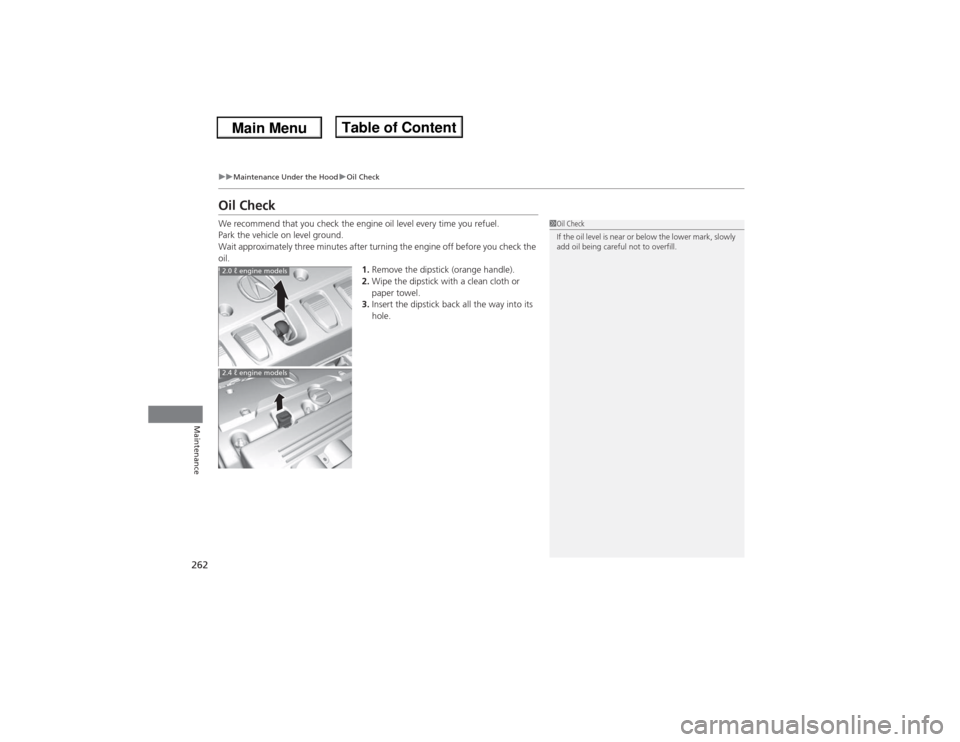
Oil CheckWe recommend that you check the engine oil level every time you refuel.
Park the vehicle on level ground.
Wait approximately three minutes after turning the engine off before you check the
oil.
1.Remove the dipstick (orange handle).
2.Wipe the dipstick with a clean cloth or
paper towel.
3.Insert the dipstick back all the way into its
hole.
1Oil Check
If the oil level is near or below the lower mark, slowly
add oil being careful not to overfill.
2.0 ℓ engine models2.4 ℓ engine models
Page 264 of 351
263
uuMaintenance Under the HooduOil Check
Maintenance
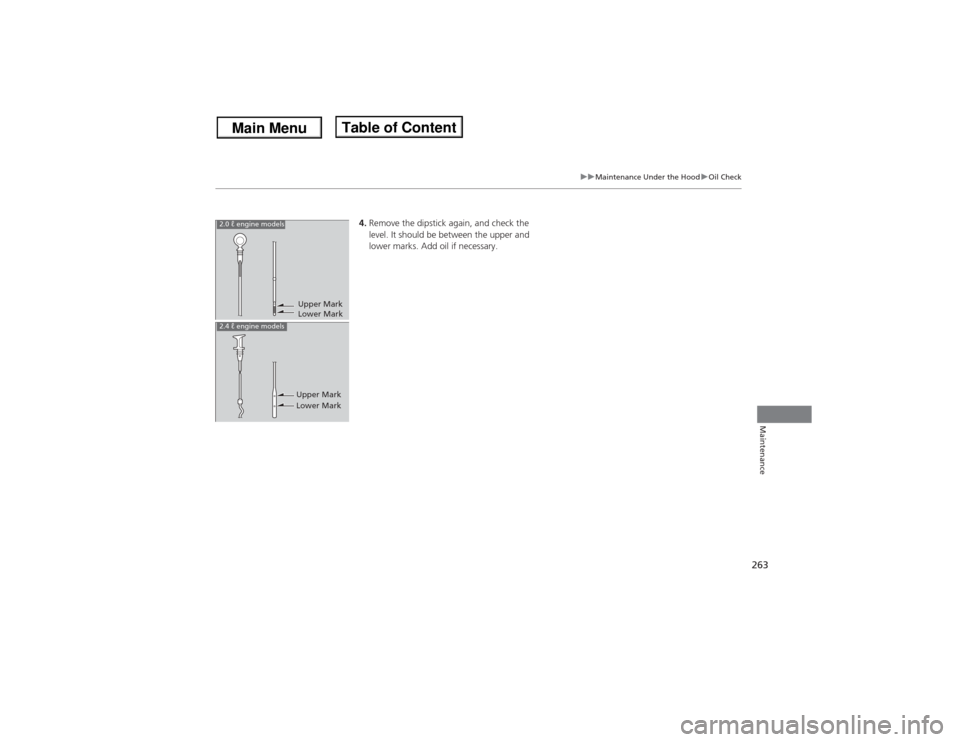
4.Remove the dipstick again, and check the
level. It should be between the upper and
lower marks. Add oil if necessary.
Upper Mark
Lower Mark
2.0 ℓ engine models
Upper Mark
Lower Mark
2.4 ℓ engine models
Page 265 of 351

264
uuMaintenance Under the HooduAdding Engine Oil
Maintenance
Adding Engine Oil
1.Unscrew and remove the engine oil fill cap.
2.Add oil slowly.
3.Reinstall the engine oil fill cap, and tighten
it securely.
4.Wait for three minutes and recheck the
engine oil dipstick.
1Adding Engine Oil
If any oil spills, wipe it up immediately. Spilled oil may
damage the engine compartment components.NOTICEDo not fill the engine oil above the upper mark.
Overfilling the engine oil can result in leaks and
engine damage.
2.0 ℓ engine models
Engine Oil Fill Cap
2.4 ℓ engine models
Engine Oil Fill Cap