Settings Acura ILX 2014 Owner's Manual
[x] Cancel search | Manufacturer: ACURA, Model Year: 2014, Model line: ILX, Model: Acura ILX 2014Pages: 351, PDF Size: 7.94 MB
Page 80 of 351

79
uuGauges and Multi-Information DisplayuMulti-Information Display
Continued
Instrument Panel
Multi-Information DisplayThe multi-information display shows the odometer, trip meter, outside temperature
indicator, and other gauges. It also displays important messages such as warnings
and other helpful information.
Press the (information) button or the SEL/RESET button to change the
display.■Switching the Display
SEL/RESET
Button
Engine Oil Life Customize Settings Elapsed Time A Button
OFF
Average Speed ARange Average Fuel Economy/
Instant Fuel Economy
Page 84 of 351
Continued
83
uuGauges and Multi-Information DisplayuMulti-Information Display
Instrument Panel
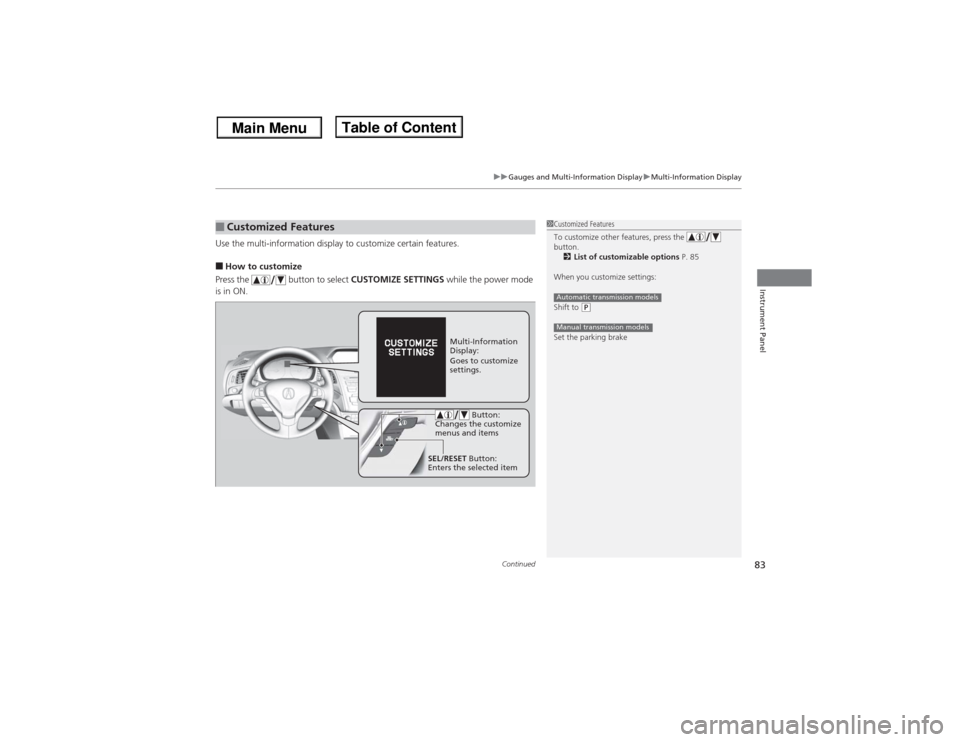
Use the multi-information display to customize certain features.■How to customize
Press the button to select CUSTOMIZE SETTINGS while the power mode
is in ON.■Customized Features
1Customized Features
To customize other features, press the
button.
2List of customizable options P. 85
When you customize settings:
Shift to
(P
Set the parking brakeAutomatic transmission modelsManual transmission models
Multi-Information
Display:
Goes to customize
settings.
SEL/RESET Button:
Enters the selected item Button:
Changes the customize
menus and items
Page 85 of 351
84
uuGauges and Multi-Information DisplayuMulti-Information Display
Instrument Panel
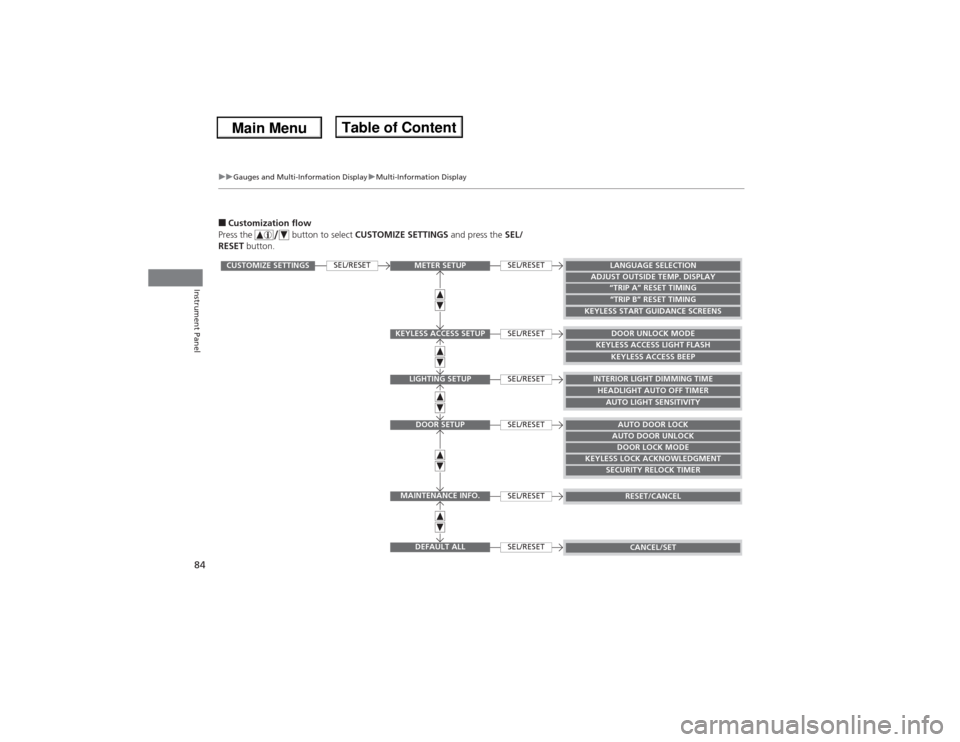
■Customization flow
Press the button to select CUSTOMIZE SETTINGS and press the SEL/
RESET button.
SEL/RESET
SEL/RESETSEL/RESETSEL/RESETSEL/RESETSEL/RESETSEL/RESET
CUSTOMIZE SETTINGS
METER SETUP
KEYLESS ACCESS SETUP
LIGHTING SETUPDOOR SETUP
MAINTENANCE INFO.
DEFAULT ALL
LANGUAGE SELECTION
ADJUST OUTSIDE TEMP. DISPLAY
“TRIP A” RESET TIMING“TRIP B” RESET TIMING
KEYLESS START GUIDANCE SCREENS
DOOR UNLOCK MODE
KEYLESS ACCESS LIGHT FLASH
KEYLESS ACCESS BEEP
INTERIOR LIGHT DIMMING TIMEHEADLIGHT AUTO OFF TIMERAUTO LIGHT SENSITIVITYAUTO DOOR LOCKAUTO DOOR UNLOCKDOOR LOCK MODE
KEYLESS LOCK ACKNOWLEDGMENT
SECURITY RELOCK TIMER
RESET/CANCELCANCEL/SET
Page 86 of 351

85
uuGauges and Multi-Information DisplayuMulti-Information Display
Continued
Instrument Panel
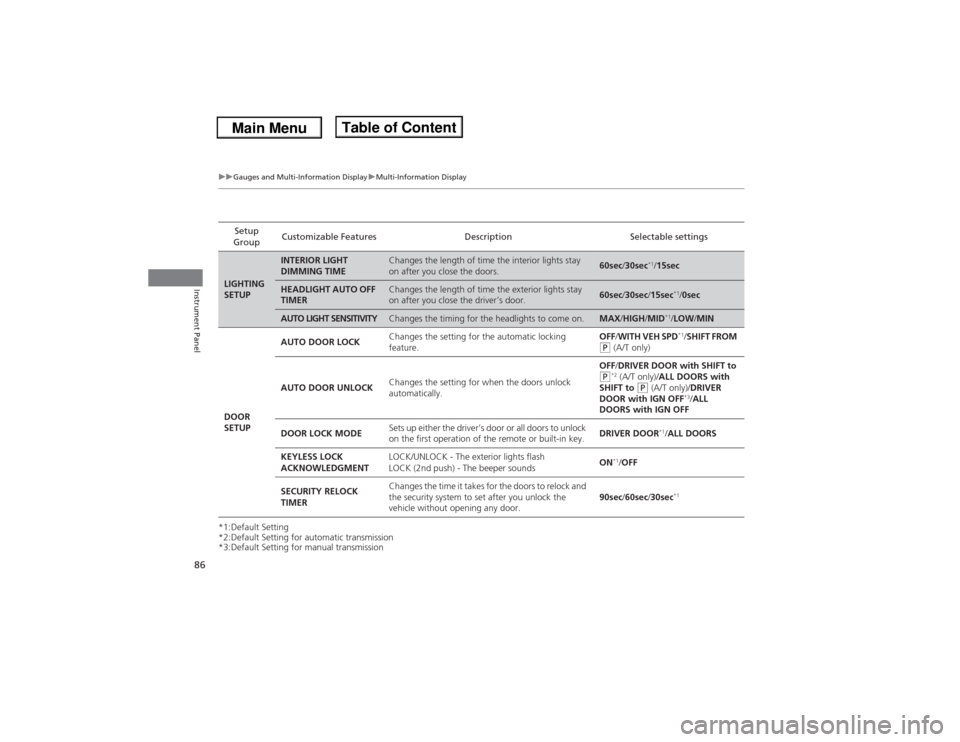
■List of customizable options
*1: Default SettingSetup GroupCustomizable
FeaturesDescription Selectable settingsMETER
SETUP
LANGUAGE
SELECTION
Changes the displayed language.
ENGLISH
*1/FRENCH/
SPANISH
ADJUST OUTSIDE
TEMP. DISPLAY
Adjust the temperature reading by a few degrees.
-5°F ~ ±0°F
*1 ~ +5°F (U.S.)
-3°C ~ ±0°C
*1 ~ +3°C
(Canada)
“TRIP A” RESET
TIMING
Changes the setting of how to reset trip meter A, average
fuel economy A, average speed A, and elapsed time A.
WITH REFUEL/IGN OFF/
MANUALLY RESET
*1
“TRIP B” RESET
TIMING
Changes the setting of how to reset trip meter B, average
fuel economy B, average speed B, and elapsed time B.
WITH REFUEL/IGN OFF/
MANUALLY RESET
*1
KEYLESS START
GUIDANCE SCREENS
Changes the display of the keyless start guidance screens.
ON
*1/OFF
KEYLESS
ACCESS
SETUPDOOR UNLOCK
MODEChanges which doors unlock when you grab the driver’s
door handle.DRIVER DOOR ONLY
*1/ALL
DOORS
KEYLESS ACCESS
LIGHT FLASHCauses some exterior lights to blink when you unlock/lock
the doors.ON
*1/OFF
KEYLESS ACCESS
BEEPCauses the beeper to sound when you unlock/lock the doors.ON*1/OFF
Page 87 of 351
86
uuGauges and Multi-Information DisplayuMulti-Information Display
Instrument Panel
*1:Default Setting
*2:Default Setting for automatic transmission
*3:Default Setting for manual transmissionSetup
GroupCustomizable Features Description Selectable settingsLIGHTING
SETUP
INTERIOR LIGHT
DIMMING TIME
Changes the length of time the interior lights stay
on after you close the doors.
60sec/30sec
*1/15sec
HEADLIGHT AUTO OFF
TIMER
Changes the length of time the exterior lights stay
on after you close the driver’s door.
60sec/30sec/15sec
*1/0sec
AUTO LIGHT SENSITIVITY
Changes the timing for the headlights to come on.
MAX/HIGH/MID
*1/LOW/MIN
DOOR
SETUPAUTO DOOR LOCKChanges the setting for the automatic locking
feature.OFF/WITH VEH SPD*1/SHIFT FROM
(P (A/T only)
AUTO DOOR UNLOCKChanges the setting for when the doors unlock
automatically.OFF/DRIVER DOOR with SHIFT to (P*2 (A/T only)/ALL DOORS with
SHIFT to
(P (A/T only)/DRIVER
DOOR with IGN OFF
*3/ALL
DOORS with IGN OFF
DOOR LOCK MODESets up either the driver’s door or all doors to unlock
on the first operation of the remote or built-in key.DRIVER DOOR
*1/ALL DOORS
KEYLESS LOCK
ACKNOWLEDGMENTLOCK/UNLOCK - The exterior lights flash
LOCK (2nd push) - The beeper soundsON
*1/OFF
SECURITY RELOCK
TIMERChanges the time it takes for the doors to relock and
the security system to set after you unlock the
vehicle without opening any door.90sec/60sec/30sec
*1
Page 88 of 351
87
uuGauges and Multi-Information DisplayuMulti-Information Display
Continued
Instrument Panel
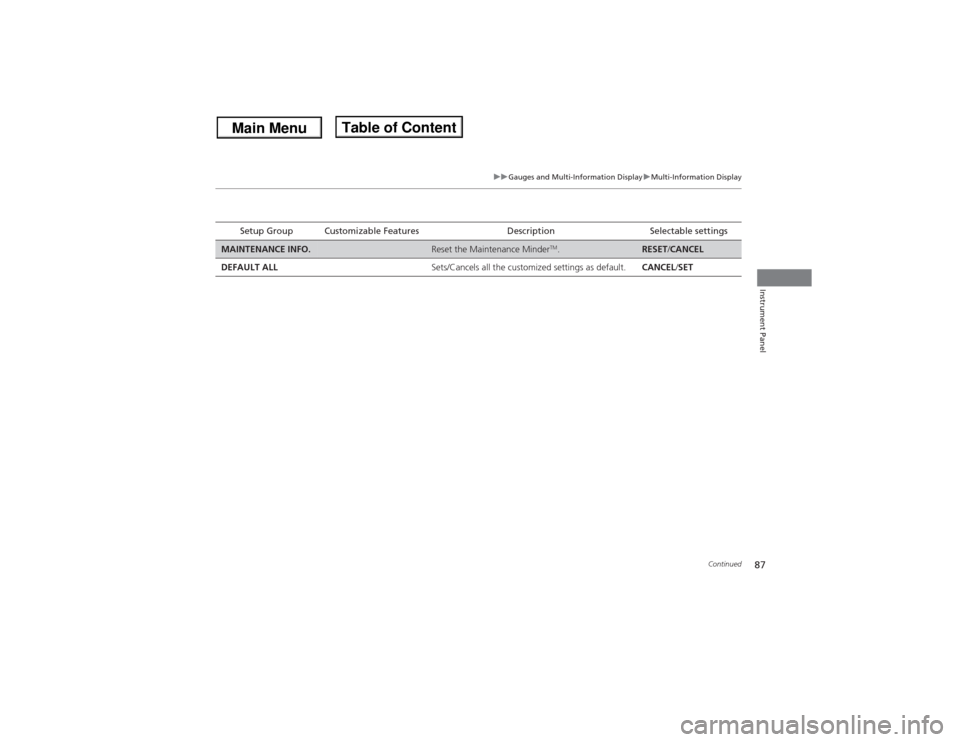
Setup Group Customizable Features Description Selectable settings
MAINTENANCE INFO.
Reset the Maintenance Minder
TM.
RESET/CANCEL
DEFAULT ALLSets/Cancels all the customized settings as default.CANCEL/SET
Page 89 of 351
88
uuGauges and Multi-Information DisplayuMulti-Information Display
Instrument Panel
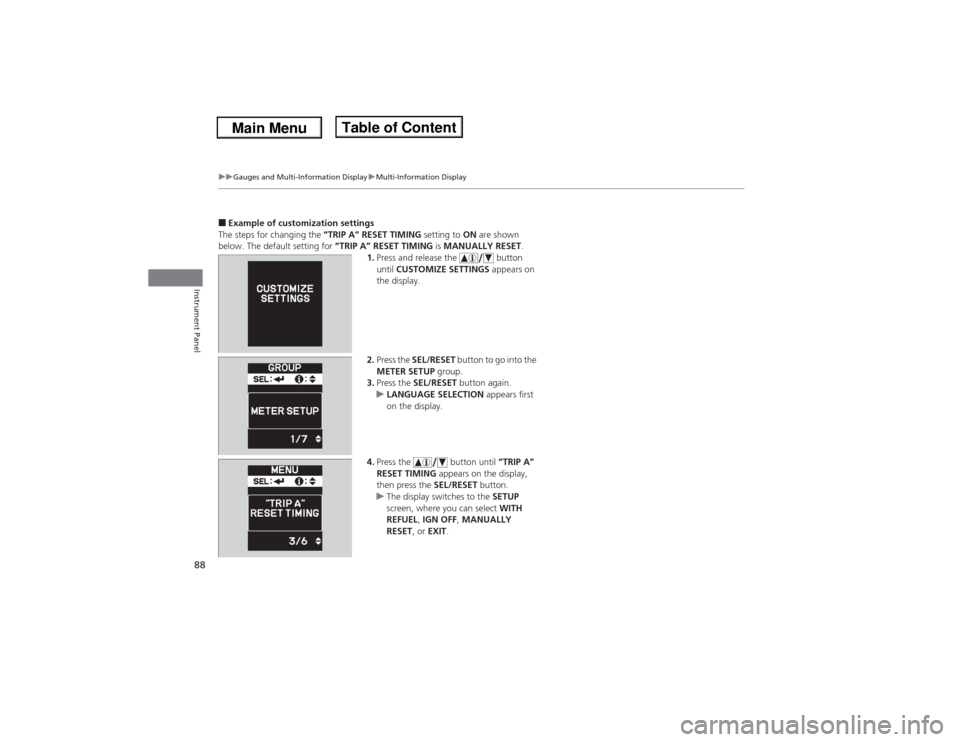
■Example of customization settings
The steps for changing the “TRIP A” RESET TIMING setting to ON are shown
below. The default setting for “TRIP A” RESET TIMING is MANUALLY RESET.
1.Press and release the button
until CUSTOMIZE SETTINGS appears on
the display.
2.Press the SEL/RESET button to go into the
METER SETUP group.
3.Press the SEL/RESET button again.
uLANGUAGE SELECTION appears first
on the display.
4.Press the button until “TRIP A”
RESET TIMING appears on the display,
then press the SEL/RESET button.
uThe display switches to the SETUP
screen, where you can select WITH
REFUEL, IGN OFF, MANUALLY
RESET, or EXIT.
Page 98 of 351
Continued
97
uuLocking and Unlocking the DoorsuLocking/Unlocking the Doors from the Outside
Controls
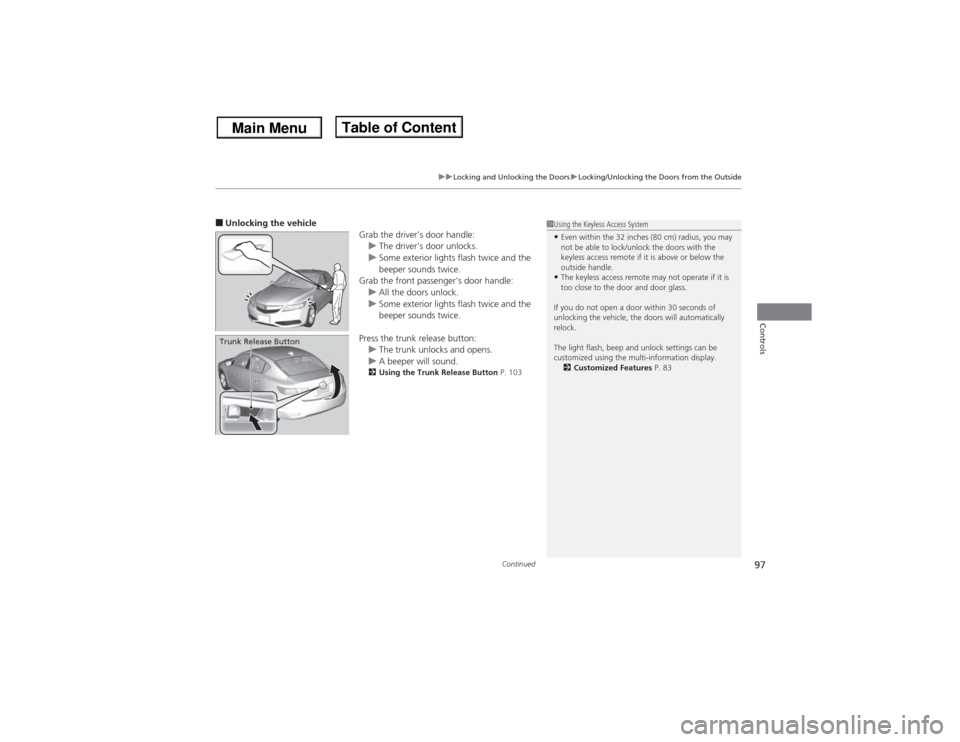
■Unlocking the vehicle
Grab the driver’s door handle:
uThe driver’s door unlocks.
uSome exterior lights flash twice and the
beeper sounds twice.
Grab the front passenger’s door handle:
uAll the doors unlock.
uSome exterior lights flash twice and the
beeper sounds twice.
Press the trunk release button:
uThe trunk unlocks and opens.
uA beeper will sound.
2Using the Trunk Release Button P. 103
Trunk Release Button
1Using the Keyless Access System•Even within the 32 inches (80 cm) radius, you may
not be able to lock/unlock the doors with the
keyless access remote if it is above or below the
outside handle.•The keyless access remote may not operate if it is
too close to the door and door glass.
If you do not open a door within 30 seconds of
unlocking the vehicle, the doors will automatically
relock.
The light flash, beep and unlock settings can be
customized using the multi-information display.
2Customized Features P. 83
Page 102 of 351
101
uuLocking and Unlocking the DoorsuAuto Door Locking/Unlocking
Controls
Auto Door Locking/UnlockingYour vehicle locks all doors and unlocks the driver’s door automatically when a
certain condition is met.■Drive lock mode
All doors lock when the vehicle’s speed reaches about 10 mph (15 km/h).■Park unlock mode
The driver’s door unlocks when the shift lever is moved into
(P with the brake pedal
depressed.
■Power mode unlock mode
The driver’s door unlocks when the power mode is changed from ON.
The settings can be changed to unlock all doors.■Auto Door Locking■Auto Door Unlocking
1Auto Door Locking/Unlocking
You can turn off or change to another auto door
locking/unlocking setting using the multi-information
display.
2Customized Features P. 83
Models with automatic transmissionModels with manual transmission
Page 138 of 351

137
uuClimate Control SystemuUsing Automatic Climate Control
Controls
Pressing the button turns the air
conditioning system on and automatically
switches the system to fresh air mode.
Press the button again to turn off, the
system returns to the previous settings.
■To rapidly defrost the windows
1.Press the button.
2.Press the button.■Defrosting the Windshield and Windows
1Defrosting the Windshield and Windows
For your safety, make sure you have a clear view
through all the windows before driving.
Do not set the temperature near the upper or lower
limit.
When cold air hits the windshield, the outside of the
windshield may fog up.
If the side windows fog up, adjust the vents so that
the air hits the side windows.1To rapidly defrost the windows
After defrosting the windows, switch over to fresh air
mode.
If you keep the system in recirculation mode, the
windows may fog up from humidity. This impedes
visibility.