light Acura ILX 2015 Service Manual
[x] Cancel search | Manufacturer: ACURA, Model Year: 2015, Model line: ILX, Model: Acura ILX 2015Pages: 353, PDF Size: 16.19 MB
Page 223 of 353
222
uuWhen Driving uShifting
Driving
Shifting
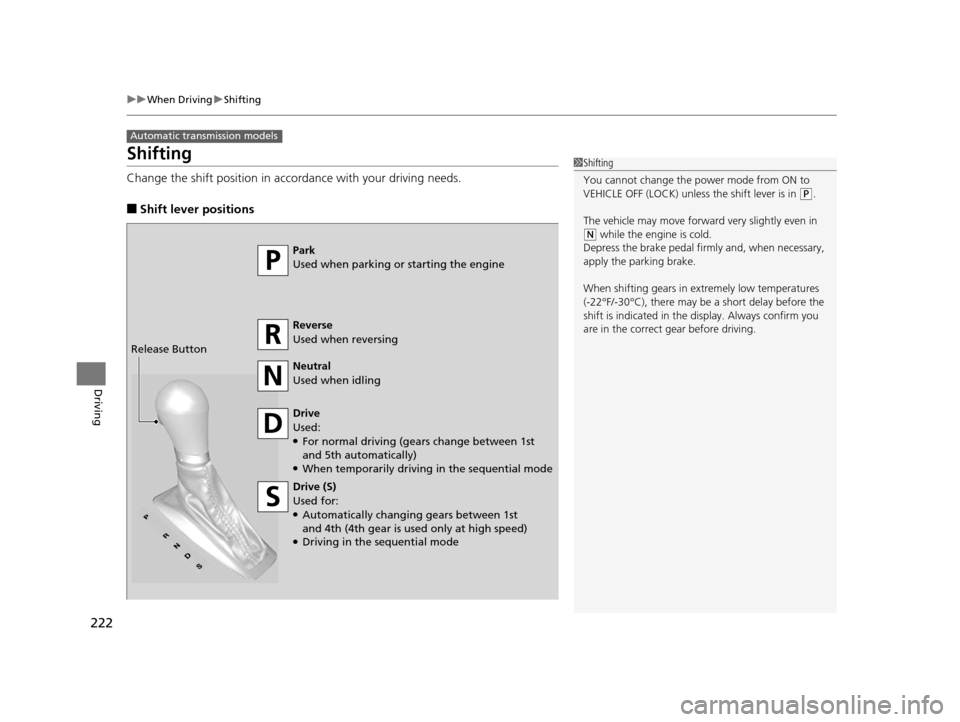
Change the shift position in accordance with your driving needs.
■Shift lever positions
Automatic transmission models
1Shifting
You cannot change the pow er mode from ON to
VEHICLE OFF (LOCK) unless the shift lever is in
( P.
The vehicle may move forward very slightly even in
(N while the engine is cold.
Depress the brake pe dal firmly and, when necessary,
apply the parking brake.
When shifting gears in extremely low temperatures
(-22°F/-30°C), there may be a short delay before the
shift is indicated in the di splay. Always confirm you
are in the correct gear before driving.
Park
Used when parking or starting the engine
Reverse
Used when reversing
Neutral
Used when idling
Drive
Used:
●For normal driving (gears change between 1st
and 5th automatically)
●When temporarily driving in the sequential mode
Drive (S)
Used for:
●Automatically changing gears between 1st
and 4th (4th gear is used only at high speed)
●Driving in the sequential mode
Release Button
15 ACURA ILX-31TX66200.book 222 ページ 2014年3月27日 木曜日 午前10時34分
Page 224 of 353

Continued223
uuWhen Driving uShifting
Driving
■Shift Lever Operation1Shift Lever Operation
NOTICE
When you change the shift lever from (D to ( R and
vice versa, come to a complete stop and keep the
brake pedal depressed.
Operating the shift lever be fore the vehicle has come
to a complete standstill can damage the transmission.
Use the shift lever position indicator to check the
lever position befo re pulling away.
Whichever position the shift lever is in when driving,
a blinking
( D indicator indicates a transmission
problem.
Avoid sudden acceleration and have the transmission
checked by a dealer as soon as possible.
The fuel supply may be cut of f if you drive at engine
speeds in or over the tac hometer's red zone (engine
speed limit). If this happe ns, you may experience a
slight jolt.
It may not be possible to operate the shift lever if the
brake pedal is applied while the shift lever release
button is held down.
Depress the brake pedal first.
Shift Lever Position Indicator
Depress the brake pedal and press the shift lever
release button to shift.
Shift without pressing the shift lever release button.
Press the shift lever re lease button and shift.
Tachometer's red zone
15 ACURA ILX-31TX66200.book 223 ページ 2014年3月27日 木曜日 午前10時34分
Page 226 of 353
225
uuWhen Driving uShifting
Driving
■Second gear lock mode
If you pull the
(+ paddle shifter while stopped or dr iving at 6 mph (10 km/h) or less,
the gear position will be lo cked in 2nd gear. This makes it easier to pull away on
slippery surfaces such as snow covered roads.
To cancel the 2nd gear lock mode, pull the
(- paddle shifter, or move the shift lever
from
(S to ( D.
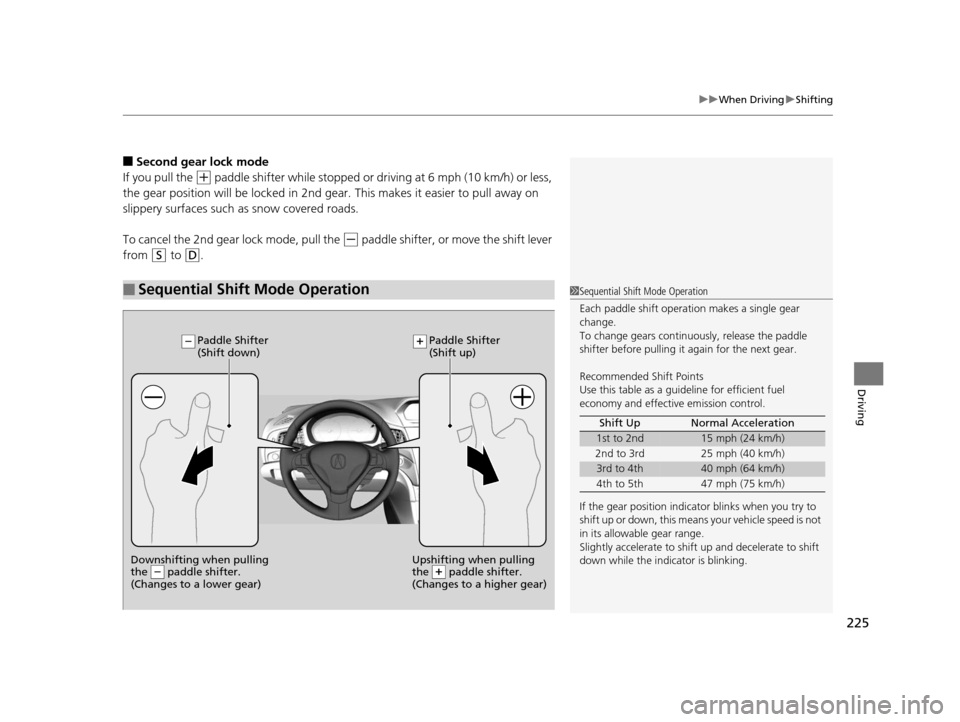
■Sequential Shift Mode Operation1 Sequential Shift Mode Operation
Each paddle shift operation makes a single gear
change.
To change gears continuously, release the paddle
shifter before pulling it again for the next gear.
Recommended Shift Points
Use this table as a guideline for efficient fuel
economy and effectiv e emission control.
If the gear position indicator blinks when you try to
shift up or down, this means your vehicle speed is not
in its allowabl e gear range.
Slightly accelerate to shift up and decelerate to shift
down while the indi cator is blinking.
Shift Up Normal Acceleration
1st to 2nd15 mph (24 km/h)
2nd to 3rd 25 mph (40 km/h)
3rd to 4th40 mph (64 km/h)
4th to 5th 47 mph (75 km/h)
Downshifting when pulling
the paddle shifter.
(Changes to a lower gear)Upshifting when pulling
the paddle shifter.
(Changes to a higher gear)
Paddle Shifter
(Shift down) Paddle Shifter
(Shift up)
15 ACURA ILX-31TX66200.book 225 ページ 2014年3月27日 木曜日 午前10時34分
Page 228 of 353
Continued227
uuWhen Driving uShifting
Driving
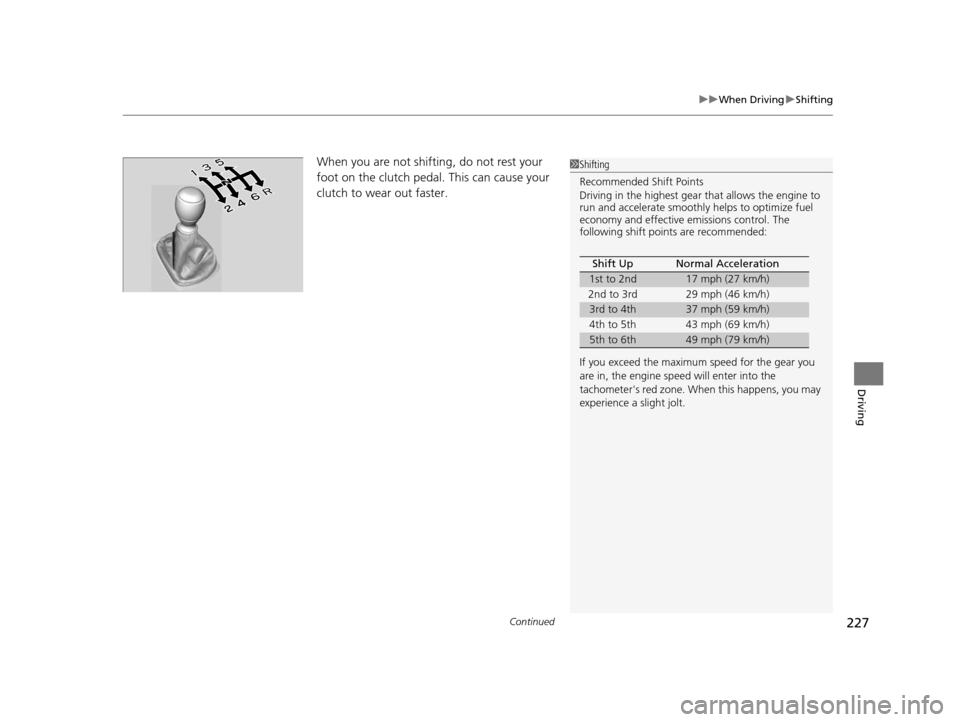
When you are not shifting, do not rest your
foot on the clutch pedal. This can cause your
clutch to wear out faster. 1Shifting
Recommended Shift Points
Driving in the highest gear that allows the engine to
run and accelerate smoothly helps to optimize fuel
economy and effective emissions control. The
following shift points are recommended:
If you exceed the maximum speed for the gear you
are in, the engine speed will enter into the
tachometer's red zone. When this happens, you may
experience a slight jolt. Shift Up Normal Acceleration
1st to 2nd17 mph (27 km/h)
2nd to 3rd 29 mph (46 km/h)
3rd to 4th37 mph (59 km/h)
4th to 5th 43 mph (69 km/h)
5th to 6th49 mph (79 km/h)
15 ACURA ILX-31TX66200.book 227 ページ 2014年3月27日 木曜日 午前10時34分
Page 238 of 353
237Continued
Driving
Braking
Brake System
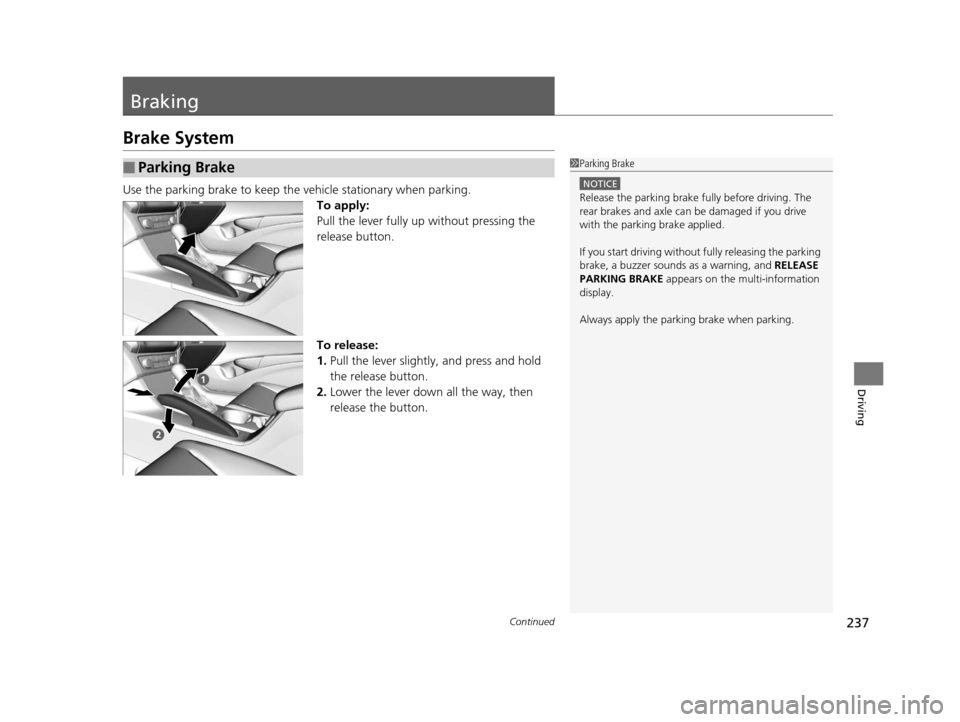
Use the parking brake to keep the vehicle stationary when parking.
To apply:
Pull the lever fully up without pressing the
release button.
To release:
1. Pull the lever slightly, and press and hold
the release button.
2. Lower the lever down all the way, then
release the button.
■Parking Brake1Parking Brake
NOTICE
Release the parking brake fu lly before driving. The
rear brakes and axle can be damaged if you drive
with the parki ng brake applied.
If you start driving without fully releasing the parking
brake, a buzzer sounds as a warning, and RELEASE
PARKING BRAKE appears on the multi-information
display.
Always apply the parki ng brake when parking.
15 ACURA ILX-31TX66200.book 237 ページ 2014年3月27日 木曜日 午前10時34分
Page 239 of 353
uuBraking uBrake System
238
Driving
Your vehicle is equipped with disc brakes at all four wheels. A vacuum power assist
helps reduce the effort needed on the brake pedal. The brake assist system increases
the stopping force when you depress th e brake pedal hard in an emergency
situation. The anti-lock brake system (ABS ) helps you retain steering control when
braking very hard.
2 Brake Assist System P. 240
2 Anti-lock Brake System (ABS) P. 239
■Foot Brake1Foot Brake
Check the brakes after driving through deep water,
or if there is a buildup of road surface water. If
necessary, dry the brakes by lightly depressing the
pedal several times.
If you hear a continuous me tallic friction sound when
applying the brakes, the brake pads need to be
replaced. Have the vehicle checked by a dealer.
Constantly using the brak e pedal while going down a
long hill builds up heat, which reduces the brake
effectiveness. Apply engine braking by taking your
foot off the accelerator pe dal and downshifting to a
lower gear. With manual transmission use a lower
gear for greate r engine braking.
Do not rest your foot on the brake pedal while
driving, as it will lightly apply the brakes and cause
them to lose effectiveness over time and reduce pad
life. It will also conf use drivers behind you.
15 ACURA ILX-31TX66200.book 238 ページ 2014年3月27日 木曜日 午前10時34分
Page 240 of 353
239
uuBraking uAnti-lock Brake System (ABS)
Driving
Anti-lock Brake System (ABS)
Helps prevent the wheels from locking up, and helps you retain steering control by
pumping the brakes rapidly, much faster than you.
The electronic brake distribu tion (EBD) system, which is part of the ABS, also
balances the front-to-rear braking distribution according to vehicle loading.
You should never pu mp the brake pedal. Let the ABS work for you by always
keeping firm, steady pressure on the brake pe dal. This is sometimes referred to as
“stomp and steer.”
■ABS operation
The brake pedal may pulsate slightly when the ABS is working. Keep holding the
pedal firmly down. On dry pavement, you w ill need to press on the brake pedal very
hard before the ABS activates. However, you may feel the ABS activate immediately
if you are trying to stop on snow or ice.
When the vehicle speed goes unde r 6 mph (10 km/h), the ABS stops.
■ABS1Anti-lock Brake System (ABS)
NOTICE
The ABS may not function correctly if you use an
incorrect tire type and size.
When the ABS indicator comes on while driving,
there may be a problem with the system.
While normal braking is not affected, there is a
possibility of the ABS not operating. Have the vehicle
checked by a dealer immediately.
The ABS does not reduce the ti me or distance it takes
to stop the vehicle. It only helps with steering control
during hard braking.
In the following cases, yo ur vehicle may need more
stopping distance than a vehicle without the ABS:
•When driving on rough road surfaces, including
when driving on uneven surf aces, such as gravel or
snow.
•When tire chains are installed.
You may hear a motor sound coming from the
engine compartment while system checks are being
performed immediately after starting the engine or
while driving. This is normal.
15 ACURA ILX-31TX66200.book 239 ページ 2014年3月27日 木曜日 午前10時34分
Page 241 of 353
240
uuBraking uBrake Assist System
Driving
Brake Assist System
Designed to assist the driver by generati ng greater braking force when you depress
the brake pedal hard during emergency braking.
■Brake assist system operation
Press the brake pedal firmly for more powerful braking.
When brake assist operates, the pedal ma y wiggle slightly and an operating noise
may be heard. This is normal. Keep holding the brake pedal firmly down.
■Brake Assist System
15 ACURA ILX-31TX66200.book 240 ページ 2014年3月27日 木曜日 午前10時34分
Page 243 of 353

242
Driving
Multi-View Rear Camera
About Your Multi-View Rear Camera
See the Navigation System Manual.
The audio/information screen can display your vehicle’s rear view. The display
automatically changes to the rear view when the shift lever is moved to
(R.
You can view three different camera angl es on the rearview display. Press the
selector knob to switch the angle.
If the last used viewing mode is Wide or Normal, the same mode is selected the next
time you shift into
(R. If Top View was last used , Wide mode is selected.
■Multi-View Rear Camera Display Area
1About Your Multi-View Rear Camera
The rear camera view is restricted. You cannot see
the corner ends of the bum per or what is underneath
the bumper. Its unique le ns also makes objects
appear closer or farther than they actually are.
Visually confirm that it is safe to drive before backing
up. Certain conditions (such as weather, lighting, and
high temperatures) may also re strict the rear view. Do
not rely on the rearview display which does not give
you all information about conditions at the back of
your vehicle.
If the camera lens is cove red with dirt or moisture,
use a soft, moist cloth to keep the lens clean and free
of debris.Models with navigation system
Models without navigation system
Top Down View Mode Normal View Mode Wide View Mode
Guidelines Bumper
Camera
Approx. 118 inches (3 m)Approx. 79 inches (2 m)Approx. 39 inches (1 m)
Approx. 20 inches (50 cm)
15 ACURA ILX-31TX66200.book 242 ページ 2014年3月27日 木曜日 午前10時34分
Page 248 of 353
247
Maintenance
This chapter discusses basic maintenance.
Before Performing MaintenanceInspection and Maintenance ............ 248
Safety When Performing Maintenance..... 249Parts and Fluids Used in Maintenance Service ........................................... 250
Maintenance Minder
TM..................... 251
Maintenance Under the Hood
Maintenance Items Under the Hood ..... 256Opening the Hood ........................... 258
Engine Compartment Cover ............. 259
Recommended Engine Oil ................ 261
Oil Check ......................................... 262
Adding Engine Oil ............................ 264
Changing the Engine Oil and Oil Filter ..... 265Engine Coolant ................................ 268
Transmission Fluid ............................ 270
Brake/Clutch Fluid ............................ 272
Refilling Window Washer Fluid......... 273
Replacing Light Bulbs ....................... 274
Checking and Maintaining Wiper
Blades .......................................... 284
Checking and Maintaining Tires
Checking Tires ................................. 286
Tire and Loading Information Label ...... 287Tire Labeling .................................... 287DOT Tire Quality Grading (U.S. Vehicles)....... 289
Wear Indicators ............................... 291
Tire Service Life ................................ 291
Tire and Wheel Replacement ........... 292
Tire Rotation .................................... 293
Winter Tires ..................................... 294
Battery ............................................... 295
Remote Transmitter Care Replacing the Button Battery ........... 296
Climate Control System Maintenance.... 297Cleaning
Interior Care .................................... 298
Exterior Care.................................... 300
15 ACURA ILX-31TX66200.book 247 ページ 2014年3月27日 木曜日 午前10時34分