headlights Acura ILX 2015 Owner's Manual
[x] Cancel search | Manufacturer: ACURA, Model Year: 2015, Model line: ILX, Model: Acura ILX 2015Pages: 353, PDF Size: 16.19 MB
Page 6 of 353
5
Quick Reference Guide
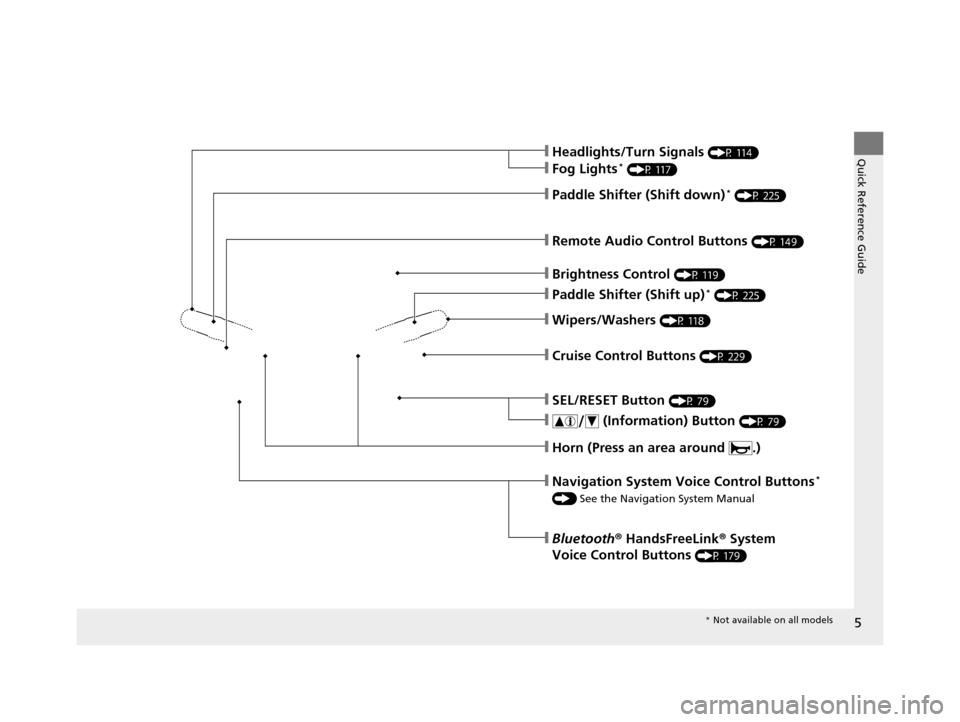
❙Wipers/Washers (P 118)
❙Cruise Control Buttons (P 229)
❙Remote Audio Control Buttons (P 149)
❙SEL/RESET Button (P 79)
❙ (Information) Button (P 79)
❙Brightness Control (P 119)
❙Headlights/Turn Signals (P 114)
❙Fog Lights* (P 117)
❙Paddle Shifter (Shift down)* (P 225)
❙Paddle Shifter (Shift up)* (P 225)
❙Horn (Press an area around .)
❙Navigation System Voice Control Buttons*
() See the Navigation System Manual
❙Bluetooth® HandsFreeLink ® System
Voice Control Buttons
(P 179)
* Not available on all models
15 ACURA ILX-31TX66200.book 5 ページ 2014年3月27日 木曜日 午前10時34分
Page 9 of 353
Visual Index
8
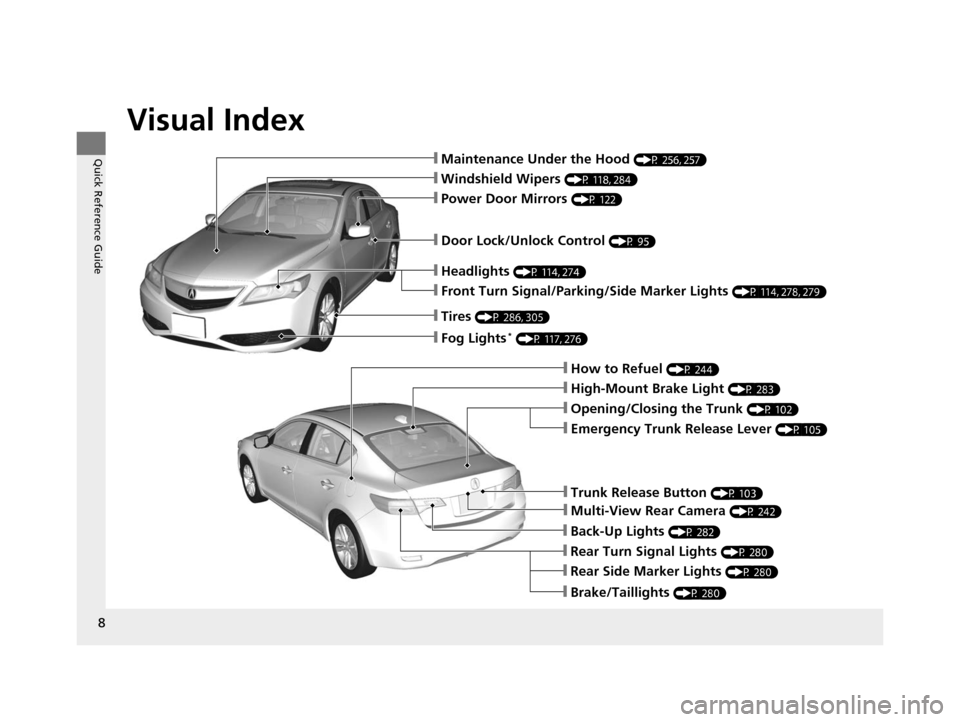
Quick Reference Guide❙Maintenance Under the Hood (P 256, 257)
❙Windshield Wipers (P 118, 284)
❙Tires (P 286, 305)
❙Door Lock/Unlock Control (P 95)
❙Power Door Mirrors (P 122)
❙Headlights (P 114, 274)
❙Front Turn Signal/Parking/Side Marker Lights (P 114, 278, 279)
❙How to Refuel (P 244)
❙High-Mount Brake Light (P 283)
❙Emergency Trunk Release Lever (P 105)
❙Opening/Closing the Trunk (P 102)
❙Fog Lights* (P 117, 276)
❙Back-Up Lights (P 282)
❙Multi-View Rear Camera (P 242)
❙Trunk Release Button (P 103)
❙Rear Side Marker Lights (P 280)
❙Brake/Taillights (P 280)
❙Rear Turn Signal Lights (P 280)
15 ACURA ILX-31TX66200.book 8 ページ 2014年3月27日 木曜日 午前10時34分
Page 71 of 353
70
uuIndicators u
Instrument Panel
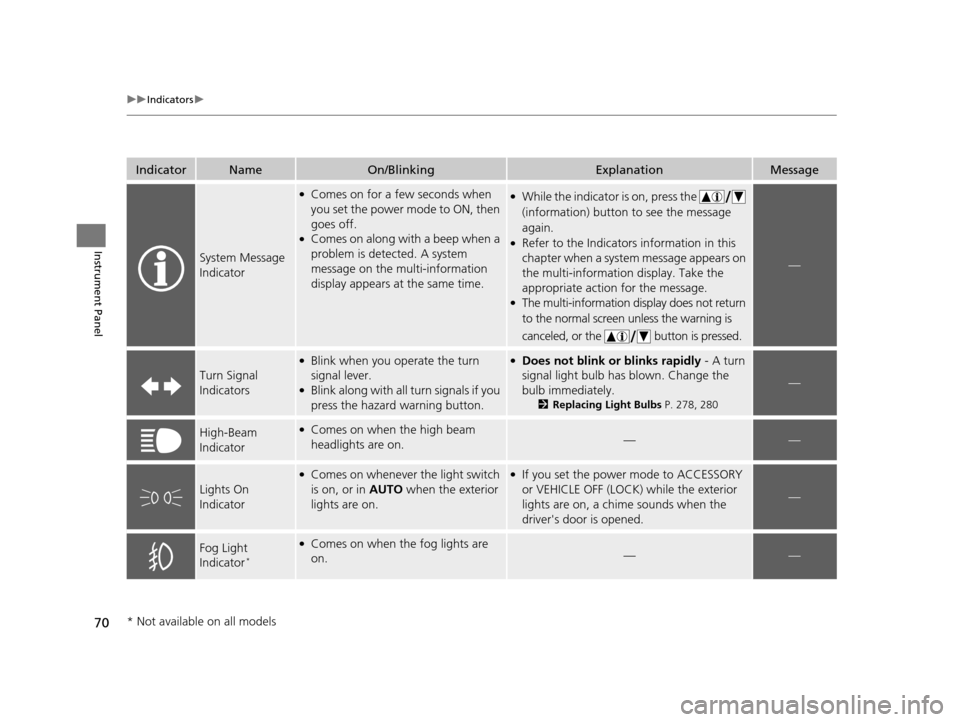
IndicatorNameOn/BlinkingExplanationMessage
System Message
Indicator
●Comes on for a few seconds when
you set the power mode to ON, then
goes off.
●Comes on along with a beep when a
problem is detected. A system
message on the multi-information
display appears at the same time.
●While the indicator is on, press the
(information) button to see the message
again.
●Refer to the Indicators information in this
chapter when a system message appears on
the multi-information display. Take the
appropriate action for the message.
●The multi-information display does not return
to the normal screen unless the warning is
canceled, or the button is pressed.
—
Turn Signal
Indicators
●Blink when you operate the turn
signal lever.
●Blink along with all turn signals if you
press the hazard warning button.
●Does not blink or blinks rapidly - A turn
signal light bulb has blown. Change the
bulb immediately.
2 Replacing Light Bulbs P. 278, 280
—
High-Beam
Indicator●Comes on when the high beam
headlights are on.——
Lights On
Indicator
●Comes on whenever the light switch
is on, or in AUTO when the exterior
lights are on.●If you set the power mode to ACCESSORY
or VEHICLE OFF (LOCK) while the exterior
lights are on, a chime sounds when the
driver's door is opened.
—
Fog Light
Indicator*
●Comes on when the fog lights are
on.——
* Not available on all models
15 ACURA ILX-31TX66200.book 70 ページ 2014年3月27日 木曜日 午前10時34分
Page 87 of 353
86
uuGauges and Multi-Information Display uMulti-Information Display
Instrument Panel
*1:Default Setting
*2:Default Setting for automatic transmission
*3:Default Setting for manual transmission Setup
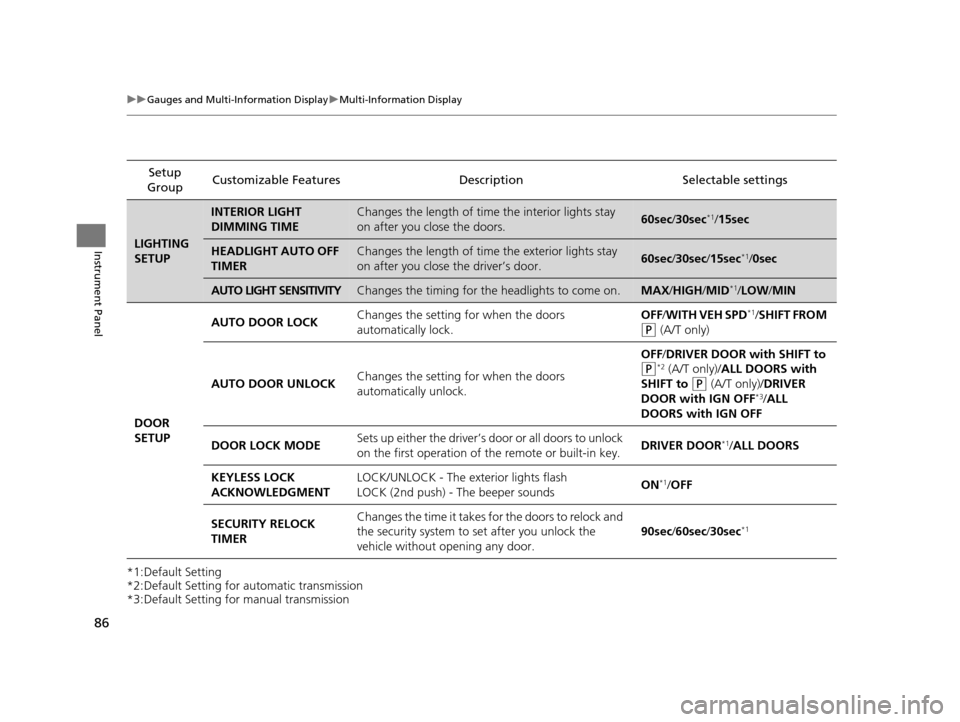
Group Customizable Features
DescriptionSelectable settings
LIGHTING
SETUP
INTERIOR LIGHT
DIMMING TIMEChanges the length of time the interior lights stay
on after you close the doors.60sec/30sec*1/ 15sec
HEADLIGHT AUTO OFF
TIMERChanges the length of time the exterior lights stay
on after you close the driver’s door.60sec /30sec /15sec*1/0sec
AUTO LIGHT SENSITIVITYChanges the timing for the headlights to come on.MAX /HIGH/ MID*1/LOW /MIN
DOOR
SETUP AUTO DOOR LOCK
Changes the setting for when the doors
automatically lock. OFF
/WITH VEH SPD
*1/SHIFT FROM
(P (A/T only)
AUTO DOOR UNLOCK Changes the setting for when the doors
automatically unlock. OFF
/DRIVER DOOR with SHIFT to
(P*2 (A/T only)/ALL DOORS with
SHIFT to
(P (A/T only)/ DRIVER
DOOR with IGN OFF*3/ ALL
DOORS with IGN OFF
DOOR LOCK MODE Sets up either the driver’s d
oor or all doors to unlock
on the first operation of the remote or built-in key. DRIVER DOOR
*1/
ALL DOORS
KEYLESS LOCK
ACKNOWLEDGMENT LOCK/UNLOCK - The exterior lights flash
LOCK (2nd push) - The beeper sounds
ON
*1/
OFF
SECURITY RELOCK
TIMER Changes the time it takes for the doors to relock and
the security system to set after you unlock the
vehicle without opening any door.
90sec
/60sec /30sec
*1
15 ACURA ILX-31TX66200.book 86 ページ 2014年3月27日 木曜日 午前10時34分
Page 115 of 353
114
uuOperating the Switches Around the Steering Wheel uTurn Signals
Controls
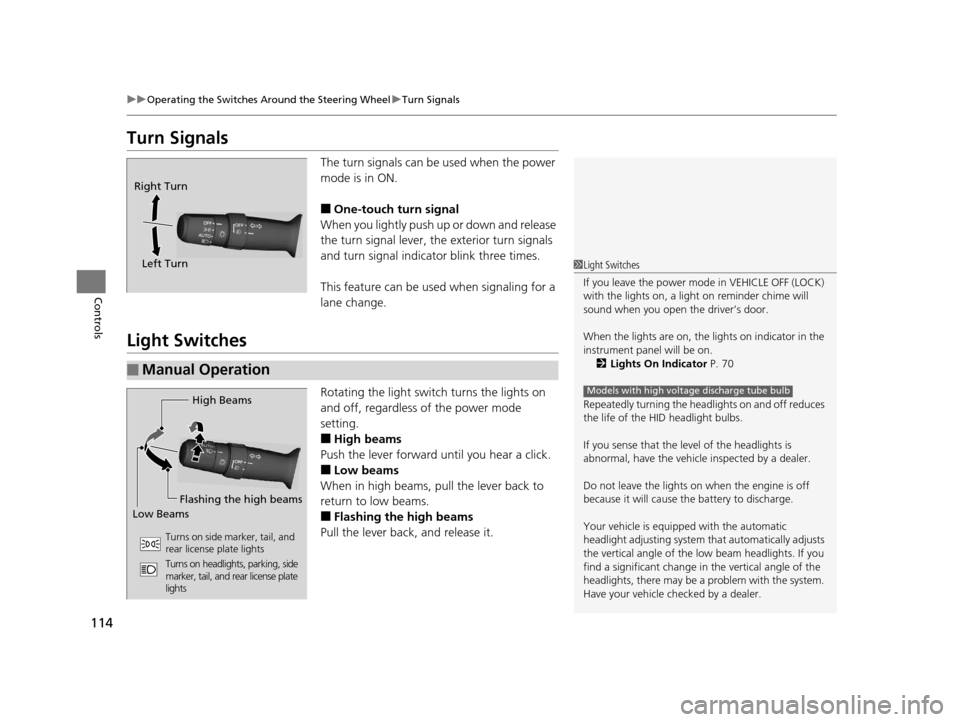
Turn Signals
The turn signals can be used when the power
mode is in ON.
■One-touch turn signal
When you lightly push up or down and release
the turn signal lever, th e exterior turn signals
and turn signal indica tor blink three times.
This feature can be used when signaling for a
lane change.
Light Switches
Rotating the light switch turns the lights on
and off, regardless of the power mode
setting.
■High beams
Push the lever forward until you hear a click.
■Low beams
When in high beams, pull the lever back to
return to low beams.
■Flashing the high beams
Pull the lever back, and release it.
Right Turn
Left Turn
■Manual Operation
1 Light Switches
If you leave the power mode in VEHICLE OFF (LOCK)
with the lights on, a light on reminder chime will
sound when you open the driver’s door.
When the lights are on, the lights on indicator in the
instrument pane l will be on.
2 Lights On Indicator P. 70
Repeatedly turning the headlights on and off reduces
the life of the HI D headlight bulbs.
If you sense that the le vel of the headlights is
abnormal, have the vehicl e inspected by a dealer.
Do not leave the lights on when the engine is off
because it will cause the battery to discharge.
Your vehicle is equipped with the automatic
headlight adjusting system that automatically adjusts
the vertical angle of the low beam headlights. If you
find a significant change in the vertical angle of the
headlights, there may be a problem with the system.
Have your vehicle checked by a dealer.
Models with high voltage discharge tube bulbHigh Beams
Flashing the high beams
Low Beams
Turns on side marker, tail, and
rear license plate lights
Turns on headlights, parking, side
marker, tail, and rear license plate
lights
15 ACURA ILX-31TX66200.book 114 ページ 2014年3月27日 木曜日 午前10時34分
Page 116 of 353

Continued115
uuOperating the Switches Around the Steering Wheel uLight Switches
Controls
Automatic lighting control can be used when
the power mode is in ON.
When you turn the light switch to AUTO, the
headlights and other exterior lights will switch
on and off automatically depending on the
ambient brightness.
You can change the auto light sensitivity
setting.
2 Customized Features P. 83
■Automatic Lighting Control1Automatic Lighting Control
We recommend that you tu rn on the lights manually
when driving at night, in a dense fog, or in dark areas
such as long tunnels or parking facilities.
The light sensor is in the location shown below.
Do not cover this light sensor with anything;
otherwise, the automatic lighting system may not
work properly.
Adjust the auto light sensitivity as follows:
2 Customized Features P. 83
SettingThe exterior lights come on
when the ambient light is at
MAX
HIGH
MID
LOW
MIN
Light Sensor
Bright
Dark
15 ACURA ILX-31TX66200.book 115 ページ 2014年3月27日 木曜日 午前10時34分
Page 117 of 353
uuOperating the Switches Around the Steering Wheel uLight Switches
116
Controls
The headlights automatically co me on when the wipers are used several times within
a certain intervals with the headlight switch in AUTO.
The headlights automatically go off a few minutes later if the wipers are stopped.
The headlights, all other exterior lights, an d the instrument panel lights turn off 15
seconds after you set the power mode to VE HICLE OFF (LOCK), take the remote with
you, and close the driver's door even if you leave the light switch on or in AUTO.
If you set the power mode to VEHICLE OFF (LOCK) with the headlight switch on, but
do not open the door, the li ghts turn off after 10 minutes (three minutes, if the
switch is in the AUTO position).
The lights turn on again when you unlock or open the driver's door. If you unlock
the door, but do not open it within 15 seconds, the lights go off. If you open the
driver's door, you will hear a lights on reminder chime.
■Headlight Integration with Wiper*1Headlight Integration with Wiper*
This feature activates during the headlights are off in
AUTO .
The instrument panel br ightness does not change
when the headlights come on.
When the ambient light is at dark, the automatic
lighting control feature over rides, and the headlights
come on with or without the wipers sweeping more
than several times.
■Automatic Lighting Off Feature1 Automatic Lighting Off Feature
You can change the headli ght auto off timer setting.
2 Customized Features P. 83
* Not available on all models
15 ACURA ILX-31TX66200.book 116 ページ 2014年3月27日 木曜日 午前10時34分
Page 118 of 353
117
uuOperating the Switches Around the Steering Wheel uFog Lights*
Controls
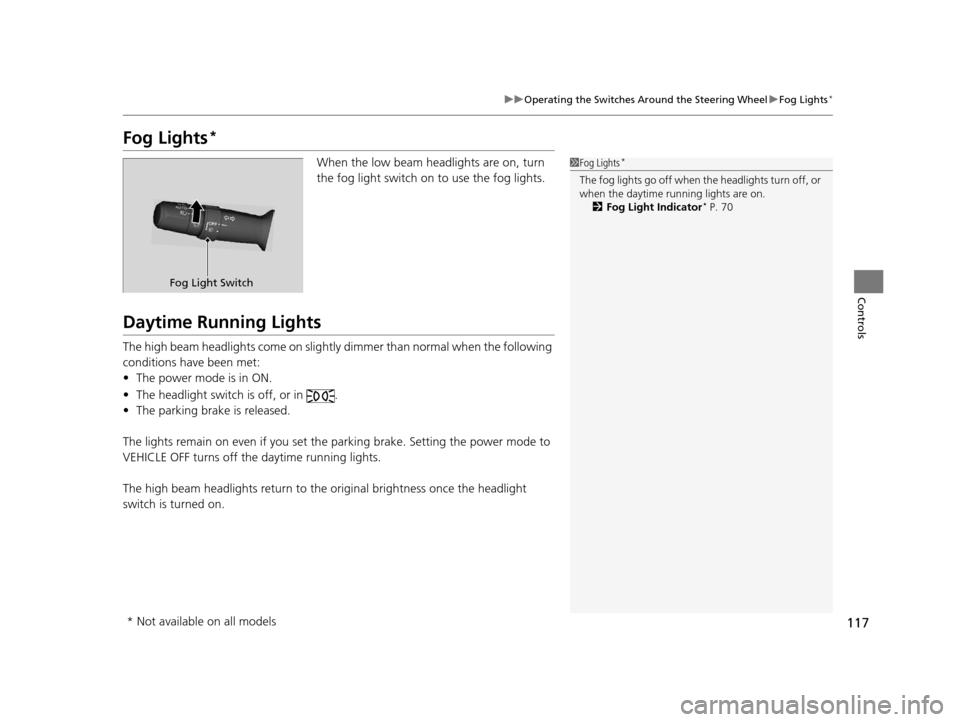
Fog Lights*
When the low beam headlights are on, turn
the fog light switch on to use the fog lights.
Daytime Running Lights
The high beam headlights come on slight ly dimmer than normal when the following
conditions have been met:
• The power mode is in ON.
• The headlight switch is off, or in .
• The parking brake is released.
The lights remain on even if you set th e parking brake. Setting the power mode to
VEHICLE OFF turns off the daytime running lights.
The high beam headlights return to the original brightness once the headlight
switch is turned on.
1 Fog Lights*
The fog lights go off when th e headlights turn off, or
when the daytime running lights are on. 2 Fog Light Indicator
* P. 70
Fog Light Switch
* Not available on all models
15 ACURA ILX-31TX66200.book 117 ページ 2014年3月27日 木曜日 午前10時34分
Page 122 of 353
121
Controls
Adjusting the Mirrors
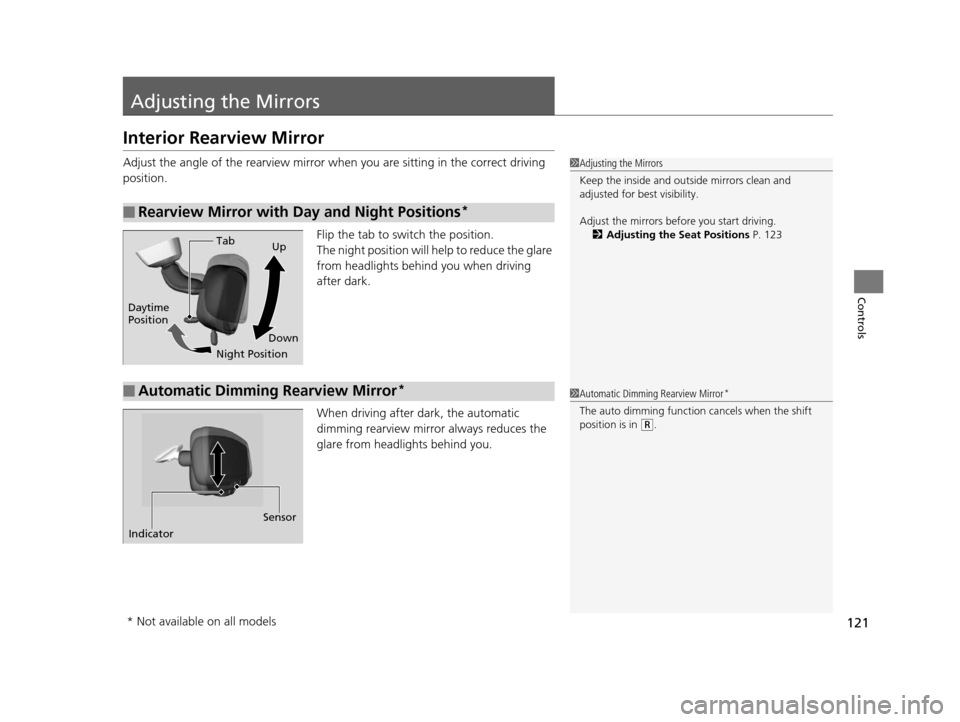
Interior Rearview Mirror
Adjust the angle of the rearview mirror when you are sitting in the correct driving
position.
Flip the tab to switch the position.
The night position will help to reduce the glare
from headlights behind you when driving
after dark.
When driving after dark, the automatic
dimming rearview mirror always reduces the
glare from headlights behind you.
■Rearview Mirror with Day and Night Positions*
1 Adjusting the Mirrors
Keep the inside and out side mirrors clean and
adjusted for best visibility.
Adjust the mirrors befo re you start driving.
2 Adjusting the Seat Positions P. 123
Tab
Daytime
Position
Night PositionUp
Down
■Automatic Dimming Rearview Mirror*1 Automatic Dimming Rearview Mirror*
The auto dimming function cancels when the shift
position is in
(R.
Sensor
Indicator
* Not available on all models
15 ACURA ILX-31TX66200.book 121 ページ 2014年3月27日 木曜日 午前10時34分
Page 275 of 353
274
Maintenance
Replacing Light Bulbs
Headlight Bulbs
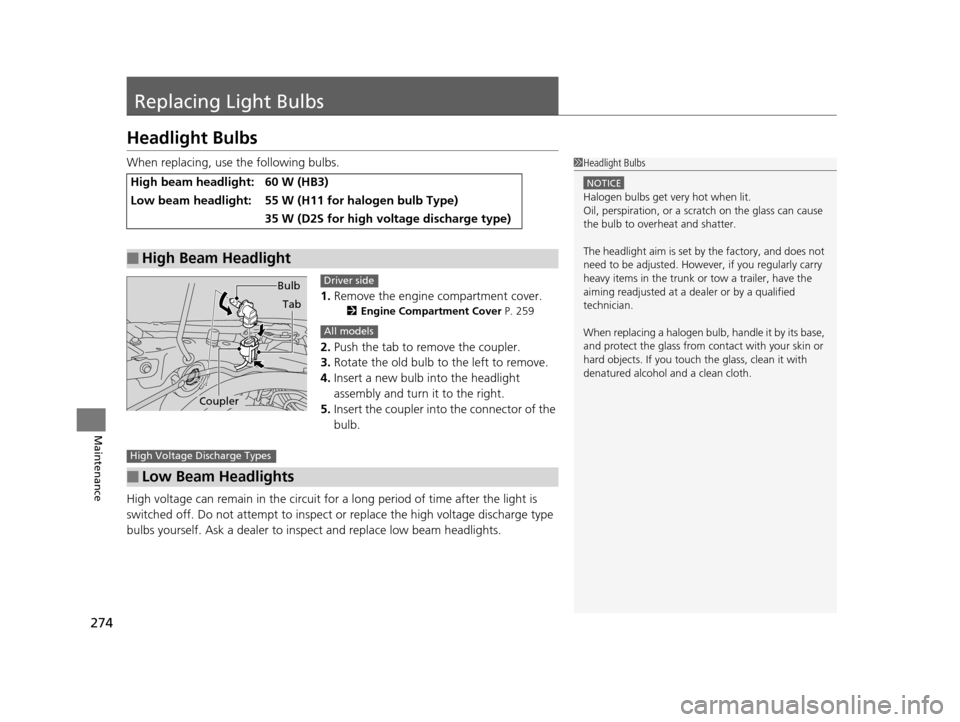
When replacing, use the following bulbs.1.Remove the engine compartment cover.
2 Engine Compartment Cover P. 259
2.Push the tab to remove the coupler.
3. Rotate the old bulb to the left to remove.
4. Insert a new bulb into the headlight
assembly and turn it to the right.
5. Insert the coupler into the connector of the
bulb.
High voltage can remain in the circuit for a long period of time after the light is
switched off. Do not attemp t to inspect or replace the high voltage discharge type
bulbs yourself. Ask a dealer to insp ect and replace low beam headlights.
High beam headlight:60 W (HB3)
Low beam headlight:55 W (H11 for halogen bulb Type)
35 W (D2S for high voltage discharge type)
■High Beam Headlight
1Headlight Bulbs
NOTICE
Halogen bulbs get very hot when lit.
Oil, perspiration, or a scratch on the glass can cause
the bulb to overhe at and shatter.
The headlight aim is set by the factory, and does not
need to be adjusted. Howeve r, if you regularly carry
heavy items in the trunk or tow a trailer, have the
aiming readjusted at a de aler or by a qualified
technician.
When replacing a halogen bulb, handle it by its base,
and protect the glass from c ontact with your skin or
hard objects. If you touch the glass, clean it with
denatured alcohol and a clean cloth.
Bulb
Tab
Coupler
Driver side
All models
■Low Beam Headlights
High Voltage Discharge Types
15 ACURA ILX-31TX66200.book 274 ページ 2014年3月27日 木曜日 午前10時34分