service Acura ILX 2015 Owner's Manual
[x] Cancel search | Manufacturer: ACURA, Model Year: 2015, Model line: ILX, Model: Acura ILX 2015Pages: 353, PDF Size: 16.19 MB
Page 1 of 353
California Proposition 65 Warning
Event Data Recorders
This vehicle is equipped with an event data recorder (EDR).
The main purpose of an EDR is to record, in certain crash or near
crash-like situations, such as an air bag deployment or hitting a
road obstacle, data that will assist in understanding how a vehicle’s
systems performed. The EDR is designed to record data related
to vehicle dynamics and safety systems for a short period of
time, typically 30 seconds or le ss. The EDR in this vehicle is
designed to record such data as:
• How various systems in your vehicle were operating;
• Whether or not the driver and passenger safety belts were
buckled/fastened;
• How far (if at all) the driver was depressing the accelerator
and/or brake pedal; and,
• How fast the vehicle was traveling.
These data can help provide a better understanding of the
circumstances in which crashes and injuries occur. NOTE: EDR data
are recorded by your vehicle only if a non-trivial crash situation
occurs; no data are recorded by the EDR under normal driving
conditions and no personal data (e.g., name, gender, age, and
crash location) are recorded. Howe ver, other parties, such as law
enforcement, could combine the EDR data with the type of
personally identifying data routinely acquired during a crash
investigation.
WARNING: This product contains or emits
chemicals known to the state of California to cause
cancer and birth defects or other reproductive
harm.
To read data recorded by an ED R, special equipment is required,
and access to the vehicle or the EDR is needed. In addition to the
vehicle manufacturer, other parties, such as law enforcement, that
have the special equipment, can re ad the information if they have
access to the vehicle or the EDR.
The data belongs to the vehicle ow ner and may not be accessed by
anyone else except as legally requir ed or with the permission of the
vehicle owner.
Service Diagnostic Recorders
This vehicle is equipped with se rvice-related devices that record
information about powertrain perfo rmance. The data can be used
to verify emissions law requirem ents and/or help technicians
diagnose and solve service problems. It may also be combined with
data from other sources for res earch purposes, but it remains
confidential.
California Perchlorate Contamination Prevention Act
The airbags, seat belt tensioners , and CR type batteries in this
vehicle may contain perchlorate ma terials - special handling may
apply. See www.dtsc.ca.gov/hazardouswaste/perchlorate/
As you read this manual, you will find information that is preceded
by a symbol. This information is intended to help you avoid
damage to your vehicle, othe r property, or the environment.
NOTICE
15 ACURA ILX-31TX66200.book 0 ページ 2014年3月27日 木曜日 午前10時34分
Page 4 of 353
Contents
Child Safety P. 48Exhaust Gas Hazard P. 60Safety Labels P. 61
Opening and Closing the Trunk P. 102 Security System P. 106 Opening and Closing the Windows P. 108
Operating the Switches Around the Steering Wheel P. 112 Adjusting the Mirrors P. 121
Interior Lights/Interior Convenience It ems P. 131 Climate Control System P. 136
Audio Error Messages* P. 170General Information on the Audio System P. 173
Bluetooth ® HandsFreeLink ® P. 179
When Driving P. 216 Braking P. 237Parking Your Vehicle P. 241
Fuel Economy P. 245 Accessories and Modifications P. 246
Maintenance Under the Hood P. 256 Replacing Light Bulbs P. 274
Checking and Maintaining Tires P. 286 Battery P. 295 Remote Transmitter Care P. 296
Cleaning P. 298
Engine Does Not Start P. 311Jump Starting P. 314 Shift Lever Does Not Move P. 317
Fuses P. 324 Emergency Towing P. 327
Devices that Emit Radio Waves P. 335 Reporting Safety Defects P. 336
Authorized Manuals P. 341 Client Service Information P. 342
Quick Reference GuideP. 4
Safe DrivingP. 21
Instrument PanelP. 63
ControlsP. 91
FeaturesP. 141
DrivingP. 209
MaintenanceP. 247
Handling the UnexpectedP. 303
InformationP. 329
IndexP. 343
15 ACURA ILX-31TX66200.book 3 ページ 2014年3月27日 木曜日 午前10時34分
Page 19 of 353
18
Quick Reference Guide
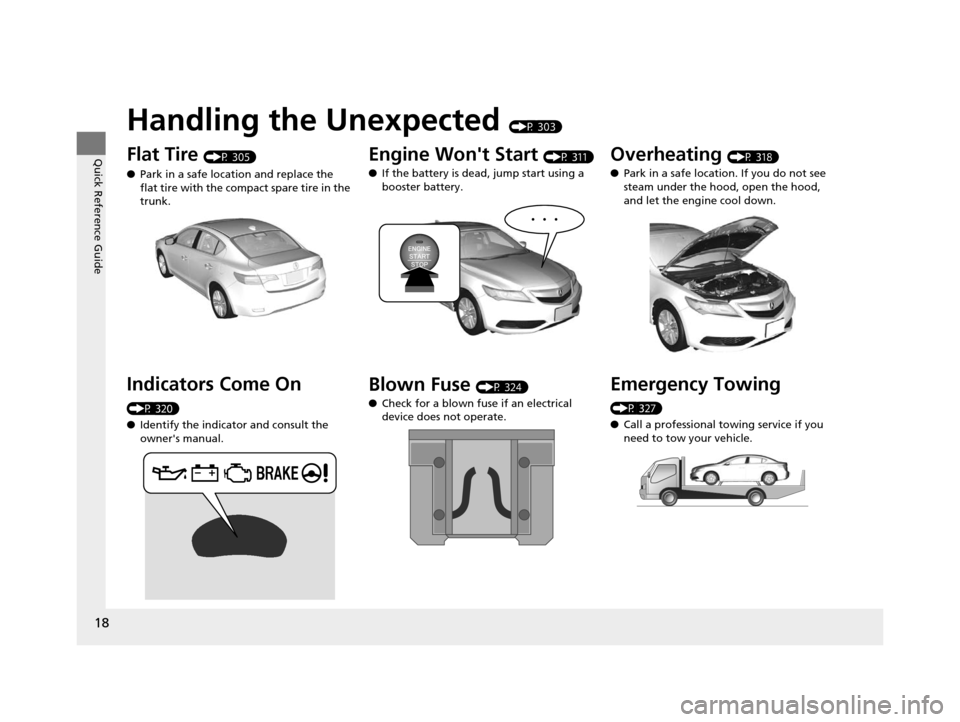
Handling the Unexpected (P 303)
Flat Tire (P 305)
● Park in a safe location and replace the
flat tire with the compact spare tire in the
trunk.
Indicators Come On
(P 320)
●Identify the indicator and consult the
owner's manual.
Engine Won't Start (P 311)
● If the battery is dead, jump start using a
booster battery.
Blown Fuse (P 324)
● Check for a blown fuse if an electrical
device does not operate.
Overheating (P 318)
● Park in a safe location. If you do not see
steam under the hood, open the hood,
and let the engine cool down.
Emergency Towing
(P 327)
●Call a professional towing service if you
need to tow your vehicle.
15 ACURA ILX-31TX66200.book 18 ページ 2014年3月27日 木曜日 午前10時34分
Page 48 of 353
47
uuAirbags uAirbag Care
Safe Driving
Airbag Care
You do not need to, and should not, perform any maintenance on or replace any
airbag system components yourself. However, you should have your vehicle
inspected by a dealer in the following situations:
■When the airbags have deployed
If an airbag has inflated, th e control unit and other related parts must be replaced.
Similarly, once an automatic seat belt te nsioner has been activated, it must be
replaced.
■When the vehicle has been in a moderate-to-severe collision
Even if the airbags did not infl ate, have your dealer inspect the following: the driver’s
seat position sensor, weight sensors in the passenger’s seat, front seat belt
tensioners, and each seat belt that was worn during the crash.
■Do not remove or modify a fron t seat without consulting a dealer
This would likely disable the driver's seat position sensor or the passenger's weight
sensors. If it is necessary to remove or modify a front seat to accommodate a person
with disabilities, contact an Acura dealer, or for U.S. vehi cles, Acura Client Relations
at 1-800-382-2238 and for Canadian vehicl es, Canadian Acura Client Service at 1-
888-9-ACURA-9.
1 Airbag Care
We recommend against the use of salvaged airbag
system components, including the airbag, tensioners,
sensors, and control unit.
15 ACURA ILX-31TX66200.book 47 ページ 2014年3月27日 木曜日 午前10時34分
Page 74 of 353
73
uuIndicators uMulti-Information Display Warning and Information Messages
Continued
Instrument Panel
Multi-Information Display Warn ing and Information Messages
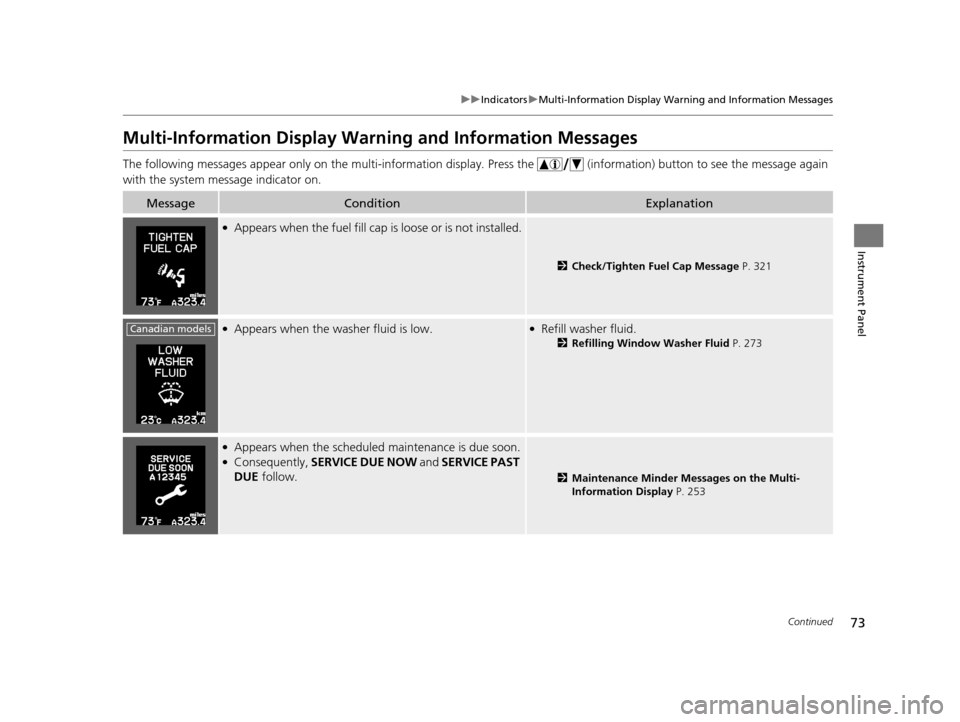
The following messages appear only on the multi-information display. Press the (information) button to see the message again
with the system message indicator on.
MessageConditionExplanation
●Appears when the fuel fill cap is loose or is not installed.
2Check/Tighten Fuel Cap Message P. 321
●Appears when the washer fluid is low.●Refill washer fluid.
2Refilling Window Washer Fluid P. 273
●Appears when the scheduled maintenance is due soon.●Consequently, SERVICE DUE NOW and SERVICE PAST
DUE follow.
2Maintenance Minder Messages on the Multi-
Information Display P. 253
Canadian models
15 ACURA ILX-31TX66200.book 73 ページ 2014年3月27日 木曜日 午前10時34分
Page 142 of 353
141
Features
This chapter describes how to operate technology features.
Audio SystemAbout Your Audio System ................ 142
USB Adapter Cable .......................... 143
Auxiliary Input Jack .......................... 143
Audio System Theft Protection ......... 144
Audio System Basic Operation ........ 145
Audio/Information Screen ................ 146
Audio Remote Controls .................... 149
Adjusting the Sound ........................ 150
Playing AM/FM Radio ....................... 151
Playing XM ® Radio
*......................... 153
Playing a CD .................................... 155
Playing an iPod ................................ 158 Playing Internet Radio ...................... 161
Playing a USB Flash Drive ................. 163
Playing
Bluetooth ® Audio................. 166
Wallpaper Setup .............................. 168
Audio Error Messages
*
CD Player ......................................... 170
iPod/USB Flash Drive ........................ 171
Pandora ®......................................... 172
General Information on the Audio
System XM ® Radio Service
*......................... 173
Recommended CDs ......................... 174 Compatible iPod, iP
hone, and USB Flash
Drives ............................................ 176
HomeLink® Universal Transceiver*......177Training HomeLink........................... 177
Bluetooth ® HandsFreeLink®
Using HFL ........................................ 179
HFL Menus ...................................... 181
* Not available on all models
15 ACURA ILX-31TX66200.book 141 ページ 2014年3月27日 木曜日 午前10時34分
Page 143 of 353
142
Features
Audio System
About Your Audio System
See the Navigation System Manual for operation of the audio system, AcuraLink*,
Bluetooth ® HandsFreeLink ®, and voice commands for these features.
The audio system features AM/FM radio and the XM ® Radio service. It can also play
audio CDs, WMA/MP3/AAC files, USB flash drives, and iPod, iPhone and Bluetooth®
devices.
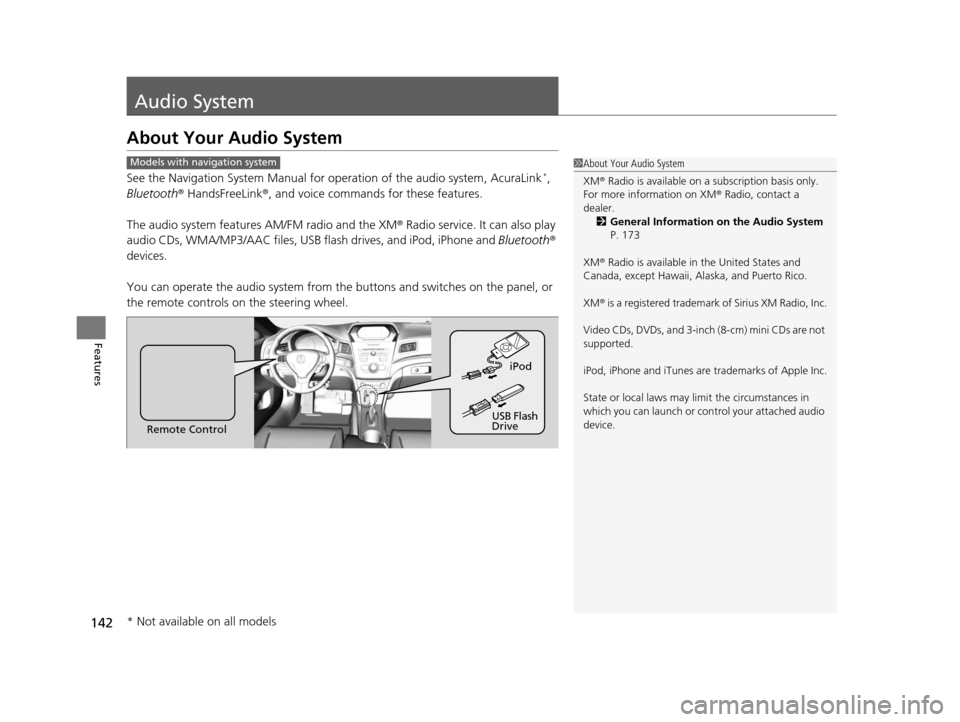
You can operate the audio system from the buttons and switches on the panel, or
the remote controls on the steering wheel.
1About Your Audio System
XM ® Radio is available on a subscription basis only.
For more information on XM ® Radio, contact a
dealer. 2 General Information on the Audio System
P. 173
XM ® Radio is available in the United States and
Canada, except Ha waii, Alaska, and Puerto Rico.
XM ® is a registered trademark of Sirius XM Radio, Inc.
Video CDs, DVDs, and 3-inch (8-cm) mini CDs are not
supported.
iPod, iPhone and iTunes are trademarks of Apple Inc.
State or local laws may li mit the circumstances in
which you can launch or cont rol your attached audio
device.Models with navigation system
Remote Control iPod
USB Flash
Drive
* Not available on all models
15 ACURA ILX-31TX66200.book 142 ページ 2014年3月27日 木曜日 午前10時34分
Page 163 of 353
uuAudio System Basic Operation uPlaying Internet Radio
162
Features
You can operate some of the Pandora menu items from your vehicle’s audio system.
The available items are:
• Station List (QuickMix is also available)
• Like
• Dislike
• Resume/Pause
• SKIP
• Bookmark This Song
• Bookmark This Artist
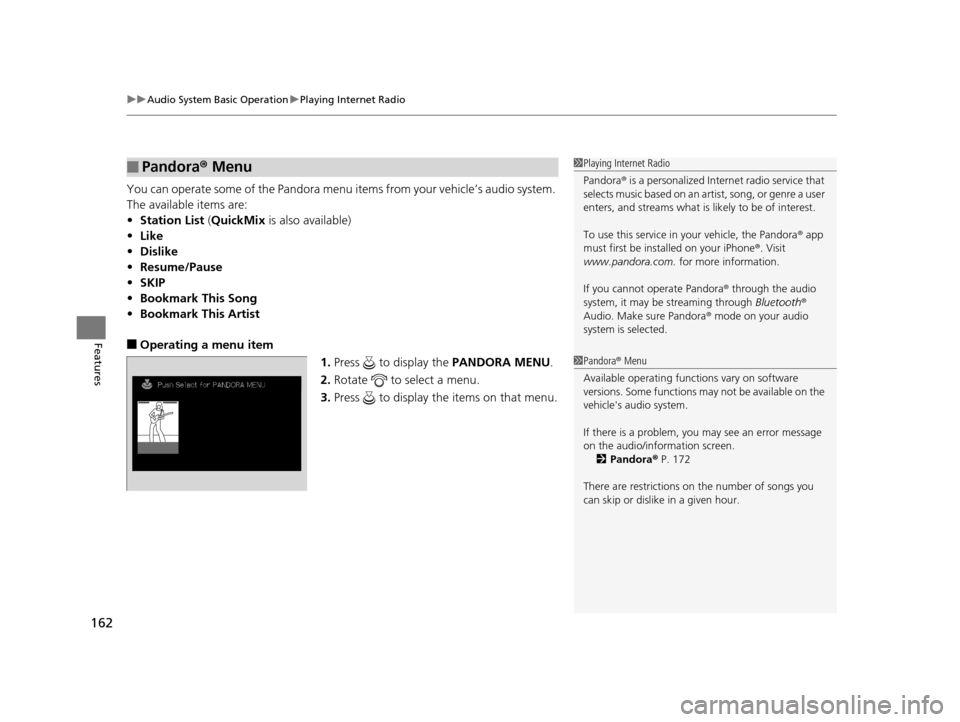
■Operating a menu item
1.Press to display the PANDORA MENU.
2. Rotate to select a menu.
3. Press to display the items on that menu.
■Pandora® Menu1Playing Internet Radio
Pandora ® is a personalized Internet radio service that
selects music based on an artist, song, or genre a user
enters, and streams what is likely to be of interest.
To use this service in your vehicle, the Pandora ® app
must first be installed on your iPhone ®. Visit
www.pandora.com. for more information.
If you cannot operate Pandora ® through the audio
system, it may be streaming through Bluetooth®
Audio. Make sure Pandora ® mode on your audio
system is selected.
1 Pandora ® Menu
Available operating functi ons vary on software
versions. Some functions ma y not be available on the
vehicle's audio system.
If there is a problem, you may see an error message
on the audio/information screen. 2 Pandora ® P. 172
There are restrictions on the number of songs you
can skip or dislike in a given hour.
15 ACURA ILX-31TX66200.book 162 ページ 2014年3月27日 木曜日 午前10時34分
Page 174 of 353
173
Features
General Information on the Audio System
XM® Radio Service*
1. You need your radio ID ready before regist ering for subscription. To see the ID in
the display: Turn the selector knob until 0 appears.
2. Have your radio ID and credit card numb er ready, and either call or visit the XM®
website to subscribe.
Press the (XM ®) button and stay in this mode for about 30 minutes until the
service is activated. Make su re your vehicle is in an open area with good reception.
Loading...:
XM ® is loading the audio or program information.
Channel Off Air:
The channel is not currently broadcasting.
Channel Not Authorized:
XM ® radio is receiving informat ion update from the network.
No Signal:
The signal is too weak in the current location.
--------:
No such channel exists, the channel is not part of your subscription, or the artist or
title information is unavailable.
Check Antenna:
There is a problem with the XM ® antenna. Contact a dealer.
■Subscribing to XM® Radio
■Receiving XM ® Radio
■XM ® Radio Display Messages
1 Subscribing to XM ® Radio
Contact Information for XM ® Radio:
US: XM ® Radio at www.siriusxm.com or 1-800-852-
9696
Canada: XM® Canada at www.xmradio.ca , or 1-877-
209-0079
1 Receiving XM ® Radio
The XM ® satellites are in orbit over the equator;
therefore, objects south of the vehicle may cause
satellite rece ption interruptions. Sa tellite signals are
more likely to be blocked by tall buildings and
mountains the farther north you travel from the
equator.
You may experience rece ption problems under the
following circumstances:
•In a location with an obstruction to the south of
your vehicle.
•In tunnels
•On the lower level of a multi-tiered road
•Large items carried on the roof rack
* Not available on all models
15 ACURA ILX-31TX66200.book 173 ページ 2014年3月27日 木曜日 午前10時34分
Page 244 of 353
243
Driving
Refueling
Fuel Information
■Fuel recommendation
Use of lower octane gasoline can cause occasional metallic knocking noise in the
engine and will result in decreased engine performance.
Use of gasoline with a pump octane less than 87 can lead to engine damage.
■Top tier detergent gasoline
Because the level of detergency and additi ves in gasoline vary in the market, Acura
endorses the use of “TOP TIER Detergent Gasoline” where available to help
maintain the performance and reliability of your vehicle. TOP TIER Detergent
Gasoline meets a new gasoline standard jointly established by leading automotive
manufacturers to meet the needs of today’s advanced engines.
Qualifying gasoline retailers will, in most cases, identify their gasoline as having met
“TOP TIER Detergent Gasoline” standards at the retail location. This fuel is
guaranteed to contain the proper level of de tergent additives and be free of metallic
additives. The proper level of detergent ad ditives, and absence of harmful metallic
additives in gasoline, help avoid build-up of deposits in your engine and emission
control system.
For further important fuel-related information for your vehicle, or on information on
gasoline that does not contain MMT, visit Acura Owners at owners.acura.com. In
Canada, visit www.acura.ca for additional informati on on gasoline. For more
information on top tier gasoline, visit www.toptiergas.com.
■Fuel tank capacity: 13.2 US gal (50 liters)
Unleaded premium gasoline, pump octane number 91 or higher
1Fuel Information
NOTICE
We recommend quality ga soline containing
detergent additives that help prevent fuel system and
engine deposits. In addition, in order to maintain
good performance, fuel economy, and emissions
control, we strongly reco mmend the use of gasoline
that does NOT contain harmful manganese-based
fuel additives such as MMT, if such gasoline is
available.
Use of gasoline with these additives may adversely
affect performance, a nd cause the malfunction
indicator lamp on your inst rument panel to come on.
If this happens, contact a dealer for service.
Some gasoline today is ble nded with oxygenates such
as ethanol. Your vehicle is designed to operate on
oxygenated gasoline containing up to 15% ethanol
by volume. Do not use gaso line containing methanol.
If you notice any undesira ble operating symptoms, try
another service station or sw itch to another brand of
gasoline.
15 ACURA ILX-31TX66200.book 243 ページ 2014年3月27日 木曜日 午前10時34分