door lock Acura ILX 2016 User Guide
[x] Cancel search | Manufacturer: ACURA, Model Year: 2016, Model line: ILX, Model: Acura ILX 2016Pages: 78, PDF Size: 20.92 MB
Page 48 of 78
88 || 89
DRIVING
DRIVING
TABLE OF
CONTENTS
INDEX
VISUAL INDEX
VOICE COMMAND INDEX
SAFETY
INFORMATION
CLIENT
INFORMATION
INSTRUMENT PANEL
SPECIFICATIONS
VEHICLE
CONTROLS
MAINTENANCE
AUDIO AND
CONNECTIVITY
HANDLING THE UNEXPECTED
BLUETOOTH®
HANDSFREELINK®
DRIVING
ACURALINK®
NAVIGATION
Learn about preparation for driving, as well as other features.
DRIVING
If the doors are frozen shut, use warm water around the door edges to melt any
ice. Do not try to force them open, as this can damage the rubber trim around
the doors. When done, wipe dry to avoid further freezing.
NOTICE
Interior Checks
• Store or secure all items on board properly.
• Do not pile items higher than the seat height.
• Do not place anything in the front seat footwells. Secure the floor mats.
• If you have any animals on board, do not let them move freely in the vehicle.
• Securely close and lock all doors and the trunk.
• Adjust your seating position, mirrors, and steering wheel properly.
• Make sure items placed on the floor behind the front seats cannot roll under
the seats.
• Everyone in the vehicle must fasten their seat belt.
Make sure that the indicators in the instrument panel come on when you start
the vehicle, and go off soon after.
In addition:
• During the first 600 miles (1,000 km) of operation, avoid sudden acceleration
or full throttle operation so as to not damage the engine or powertrain.
• Avoid hard braking for the first 200 miles (300 km). You should also follow this
when the brake pads are replaced.
Before Driving
Check the following items before you begin driving.
Exterior Checks
• Make sure there are no obstructions on the windows, door mirrors, exterior
lights, or other parts of the vehicle.
• Remove any frost, snow, or ice.
• Make sure the hood is securely closed.
• Heat from the engine and exhaust can ignite flammable materials left under
the hood, causing a fire. If you’ve parked your vehicle for an extended period,
inspect and remove any debris that may have collected, such as dried grass
and leaves that have fallen or have been carried in for use as a nest by a small
animal. Also check under the hood for leftover flammable materials after you
or someone else has performed maintenance on your vehicle.
• Make sure the tires are in good condition.
• Make sure there are no people or objects behind or around the vehicle.
Maximum Load Limit
Carrying too much cargo or improperly storing it can affect your vehicle’s handling,
stability, stopping distance, and tires, and make it unsafe.
Your vehicle is not designed to tow a trailer. Attempting to do so can void your
vehicle warranties.
The maximum load for your vehicle is 850 lbs (385 kg). See the Tire and Loading
Information label on the driver’s doorjamb.
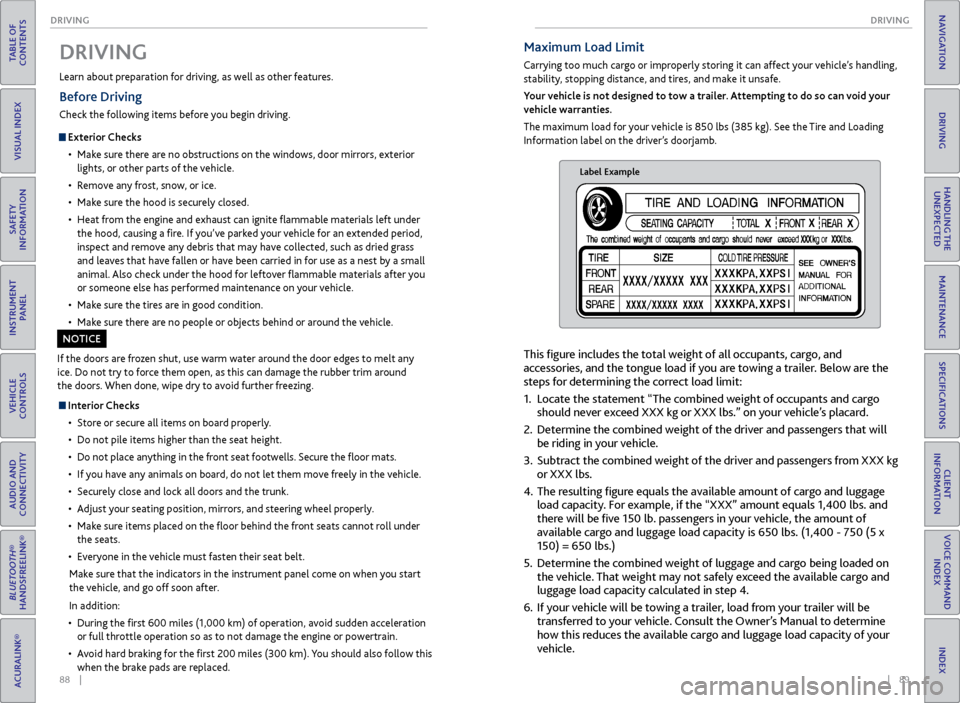
Label Example
This figure includes the total weight of all occupants, cargo, and
accessories, and the tongue load if you are towing a trailer. Below are the
steps for determining the correct load limit:
1. Locate the statement “The combined weight of occupants and cargo
should never exceed XXX kg or XXX lbs.” on your vehicle’s placard.
2. Determine the combined weight of the driver and passengers that will
be riding in your vehicle.
3. Subtract the combined weight of the driver and passengers from XXX kg
or XXX lbs.
4. The resulting figure equals the available amount of cargo and luggage
load capacity. For example, if the “XXX” amount equals 1,400 lbs. and
there will be five 150 lb. passengers in your vehicle, the amount of
available cargo and luggage load capacity is 650 lbs. (1,400 - 750 (5 x
150) = 650 lbs.)
5. Determine the combined weight of luggage and cargo being loaded on
the vehicle. That weight may not safely exceed the available cargo and
luggage load capacity calculated in step 4.
6. If your vehicle will be towing a trailer, load from your trailer will be
transferred to your vehicle. Consult the Owner’s Manual to determine
how this reduces the available cargo and luggage load capacity of your
vehicle.
Page 49 of 78
90 || 91
DRIVING
DRIVING
TABLE OF
CONTENTS
INDEX
VISUAL INDEX
VOICE COMMAND INDEX
SAFETY
INFORMATION
CLIENT
INFORMATION
INSTRUMENT PANEL
SPECIFICATIONS
VEHICLE
CONTROLS
MAINTENANCE
AUDIO AND
CONNECTIVITY
HANDLING THE UNEXPECTED
BLUETOOTH®
HANDSFREELINK®
DRIVING
ACURALINK®
NAVIGATION
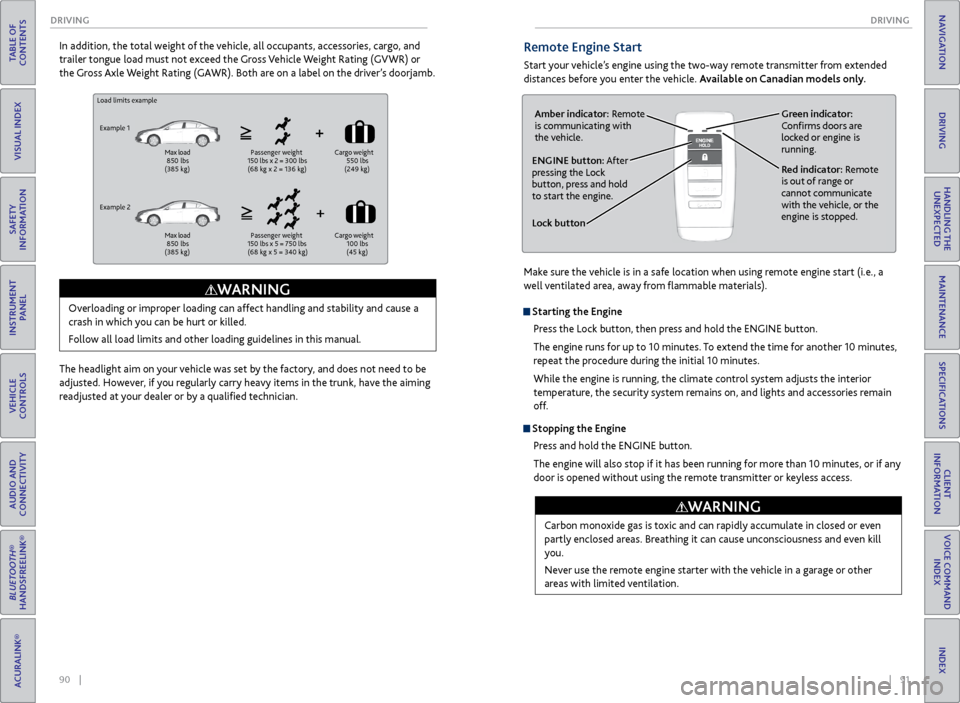
Load limits example
Example 1
Max load
850 lbs
(385 kg) Passenger weight
150 lbs x 2 = 300 lbs
(68 kg x 2 = 136 kg) Cargo
weight
550 lbs
(249 kg)
Example 2
Max load
850 lbs
(385 kg) Passenger weight
150 lbs x 5 = 750 lbs
(68 kg x 5 = 340 kg) Cargo
weight
100 lbs
(45 kg)
Overloading or improper loading can affect handling and stability and cause a
crash in which you can be hurt or killed.
Follow all load limits and other loading guidelines in this manual.
WARNING
In addition, the total weight of the vehicle, all occupants, accessories, cargo, and
trailer tongue load must not exceed the Gross Vehicle Weight Rating (GVWR) or
the Gross Axle Weight Rating (GAWR). Both are on a label on the driver’s doorjamb.
The headlight aim on your vehicle was set by the factory, and does not need to be
adjusted. However, if you regularly carry heavy items in the trunk, have the aiming
readjusted at your dealer or by a qualified technician.Remote Engine Start
Start your vehicle’s engine using the two-way remote transmitter from extended
distances before you enter the vehicle. Available on Canadian models only.
Lock button
ENGINE button: After
pressing the Lock
button, press and hold
to start the engine.Red indicator: Remote
is out of range or
cannot communicate
with the vehicle, or the
engine is stopped.
Amber indicator: Remote
is communicating with
the vehicle.
Green indicator:
Confirms doors are
locked or engine is
running.
Starting the Engine
Press the Lock button, then press and hold the ENGINE button.
The engine runs for up to 10 minutes. To extend the time for another 10 minutes,
repeat the procedure during the initial 10 minutes.
While the engine is running, the climate control system adjusts the interior
temperature, the security system remains on, and lights and accessories remain
off.
Stopping the EnginePress and hold the ENGINE button.
The engine will also stop if it has been running for more than 10 minutes, or if any
door is opened without using the remote transmitter or keyless access.
Carbon monoxide gas is toxic and can rapidly accumulate in closed or even
partly enclosed areas. Breathing it can cause unconsciousness and even kill
you.
Never use the remote engine starter with the vehicle in a garage or other
areas with limited ventilation.
WARNING
Make sure the vehicle is in a safe location when using remote engine start (i.e., a
well ventilated area, away from flammable materials).
Page 57 of 78
106 || 107
HANDLING THE UNEXPECTED
DRIVING
TABLE OF
CONTENTS
INDEX
VISUAL INDEX
VOICE COMMAND INDEX
SAFETY
INFORMATION
CLIENT
INFORMATION
INSTRUMENT PANEL
SPECIFICATIONS
VEHICLE
CONTROLS
MAINTENANCE
AUDIO AND
CONNECTIVITY
HANDLING THE UNEXPECTED
BLUETOOTH®
HANDSFREELINK®
DRIVING
ACURALINK®
NAVIGATION
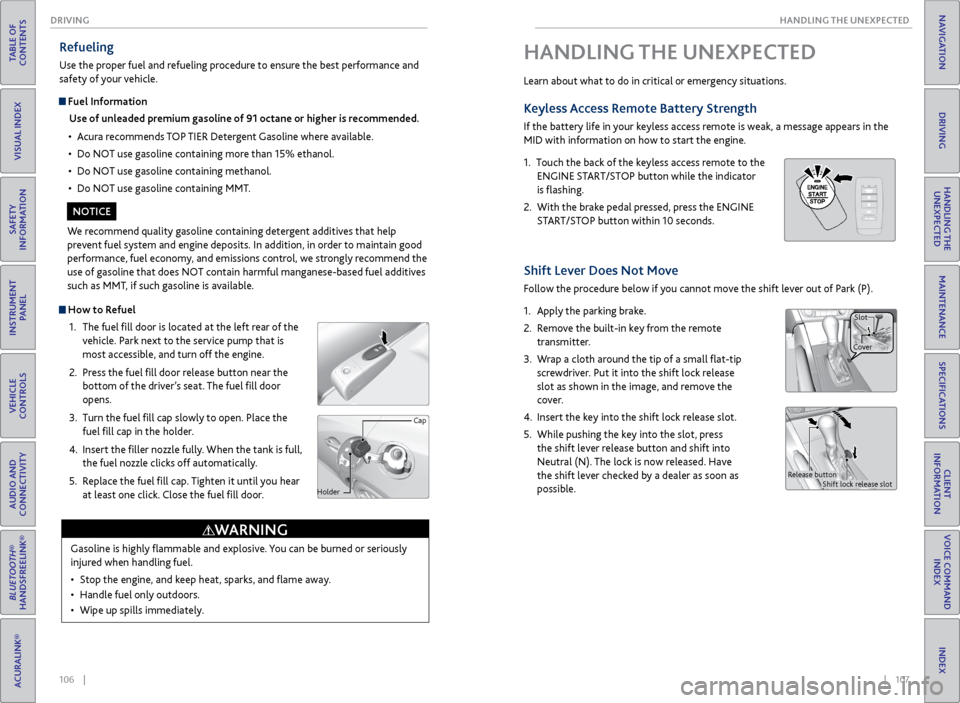
How to Refuel
1. The fuel fill door is located at the left rear of the
vehicle. Park next to the service pump that is
most accessible, and turn off the engine.
2. Press the fuel fill door release button near the
bottom of the driver’s seat. The fuel fill door
opens.
3. Turn the fuel fill cap slowly to open. Place the
fuel fill cap in the holder.
4. Insert the filler nozzle fully. When the tank is full,
the fuel nozzle clicks off automatically.
5. Replace the fuel fill cap. Tighten it until you hear
at least one click. Close the fuel fill door.
Refueling
Use the proper fuel and refueling procedure to ensure the best performance and
safety of your vehicle.
Fuel Information
Use of unleaded premium gasoline of 91 octane or higher is recommended.
• Acura recommends TOP TIER Detergent Gasoline where available.
• Do NOT use gasoline containing more than 15% ethanol.
• Do NOT use gasoline containing methanol.
• Do NOT use gasoline containing MMT.
We recommend quality gasoline containing detergent additives that help
prevent fuel system and engine deposits. In addition, in order to maintain good
performance, fuel economy, and emissions control, we strongly recommend the
use of gasoline that does NOT contain harmful manganese-based fuel additives
such as MMT, if such gasoline is available.
NOTICE
Gasoline is highly flammable and explosive. You can be burned or seriously
injured when handling fuel.
• Stop the engine, and keep heat, sparks, and flame away.
• Handle fuel only outdoors.
• Wipe up spills immediately.
WARNING
Cap
Holder
HANDLING THE UNEXPECTED
Learn about what to do in critical or emergency situations.
Keyless Access Remote Battery Strength
If the battery life in your keyless access remote is weak, a message appears in the
MID with information on how to start the engine.
1. Touch the back of the keyless access remote to the
ENGINE START/STOP button while the indicator
is flashing.
2. With the brake pedal pressed, press the ENGINE
START/STOP button within 10 seconds.
Shift Lever Does Not Move
Follow the procedure below if you cannot move the shift lever out of Park (P).
1. Apply the parking brake.
2. Remove the built-in key from the remote
transmitter.
3. Wrap a cloth around the tip of a small flat-tip
screwdriver. Put it into the shift lock release
slot as shown in the image, and remove the
cover.
4. Insert the key into the shift lock release slot.
5. While pushing the key into the slot, press
the shift lever release button and shift into
Neutral (N). The lock is now released. Have
the shift lever checked by a dealer as soon as
possible.
Release button
Shift lock release slot
CoverSlot
Page 59 of 78
110 || 111
HANDLING THE UNEXPECTED
HANDLING THE UNEXPECTED
TABLE OF
CONTENTS
INDEX
VISUAL INDEX
VOICE COMMAND INDEX
SAFETY
INFORMATION
CLIENT
INFORMATION
INSTRUMENT PANEL
SPECIFICATIONS
VEHICLE
CONTROLS
MAINTENANCE
AUDIO AND
CONNECTIVITY
HANDLING THE UNEXPECTED
BLUETOOTH®
HANDSFREELINK®
DRIVING
ACURALINK®
NAVIGATION
Emergency Engine Stop
The ENGINE START/STOP button may be used to stop the engine due to an
emergency situation even while driving. If you must stop the engine, choose one of
the following operations:
• Press and hold the ENGINE START/STOP button for
two seconds, or
• Firmly press the ENGINE START/STOP button two
times.
The steering wheel will not lock. The power mode changes to ACCESSORY, unless
the shift lever is in Park, in which case the power mode changes to VEHICLE OFF.
Because turning off the engine also disables the power assist the engine provides to
the steering and braking systems, it will require significantly more physical effort
and time to steer and slow the vehicle. Downshift gears and use both feet on the
brake pedal, if necessary, to slow the vehicle and stop immediately in a safe place.
Do not press the button while driving unless it is absolutely necessary for the
engine to be switched off.
Emergency Towing
Call a professional towing service if you need to tow your vehicle.
Flat bed equipment: The operator loads your vehicle on the back of a truck. This is
the best way to transport your vehicle.
Wheel lift equipment: The tow truck uses two pivoting arms that go under the front
tires and lift them off the ground. The rear tires remain on the ground. This is an
acceptable way to tow your vehicle.
Trying to lift or tow your vehicle by the bumpers will cause serious damage. The
bumpers are not designed to support the vehicle’s weight.
Improper towing such as towing behind a motorhome or other motor vehicle can
damage the transmission.
NOTICE
Tire Pressure Monitoring System (TPMS)
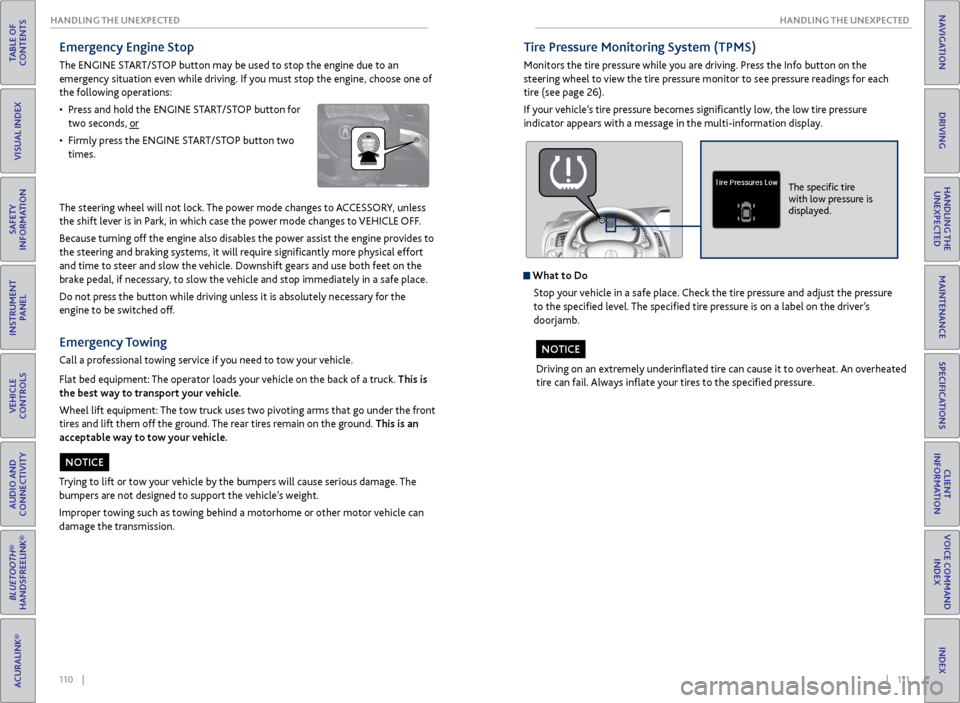
Monitors the tire pressure while you are driving. Press the Info button on the
steering wheel to view the tire pressure monitor to see pressure readings for each
tire (see page 26).
If your vehicle’s tire pressure becomes significantly low, the low tire pressure
indicator appears with a message in the multi-information display.
What to Do
Stop your vehicle in a safe place. Check the tire pressure and adjust the pressure
to the specified level. The specified tire pressure is on a label on the driver’s
doorjamb.
Driving on an extremely underinflated tire can cause it to overheat. An overheated
tire can fail. Always inflate your tires to the specified pressure.
NOTICE
The specific tire
with low pressure is
displayed.
Page 63 of 78
118 || 119
HANDLING THE UNEXPECTED
HANDLING THE UNEXPECTED
TABLE OF
CONTENTS
INDEX
VISUAL INDEX
VOICE COMMAND INDEX
SAFETY
INFORMATION
CLIENT
INFORMATION
INSTRUMENT PANEL
SPECIFICATIONS
VEHICLE
CONTROLS
MAINTENANCE
AUDIO AND
CONNECTIVITY
HANDLING THE UNEXPECTED
BLUETOOTH®
HANDSFREELINK®
DRIVING
ACURALINK®
NAVIGATION
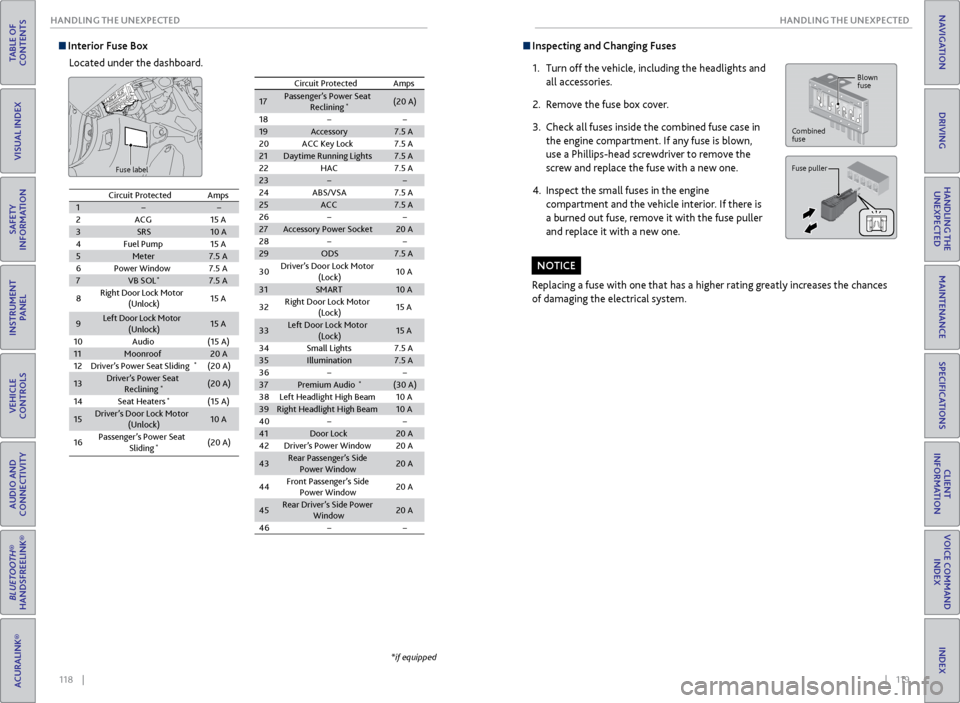
Interior Fuse Box
Located under the dashboard.
Fuse label
*if equipped
Circuit ProtectedAmps12ACG15 A3SRS10 A4Fuel Pump15 A5Meter7.5 A6Power Windo w7.5 A7VB SOL*7.5 A
8Right Door Lock Motor
(Unlock)15 A
9Left Door Lock Motor
(Unlock )15 A
10Audio(15 A)11Moonroof20 A12Driver’s Power Seat Slidin g*(20 A)
13Driver’s Power Seat
Reclining*(20 A)
14Seat Heaters*(15 A)
15Driver’s Door Lock Motor (Unlock)10 A
16Passenger’s Power Seat
Sliding*(20 A)
17Passenger’s Power Seat
Reclinin g*(20 A)
18
19 Accessory 7.5 A
20 ACC Key Lock 7.5 A
21 Daytime Running Lights 7.5 A
22 HAC 7.5 A
23
24 ABS/VSA 7.5 A
25 ACC 7.5 A
26
27 Accessory Power Socket 20 A
28
29 ODS 7.5 A
Circuit Protected
Amps
30 Driver’s Door Lock Motor
(Lock) 10
A
31 SMART 10 A
32 Right Door Lock Motor
(Lock) 15
A
33 Left Door Lock Motor
(Lock) 15
A
34 Small Lights 7.5 A
35 Illumination 7.5 A
36
37 Premium Audio
*(30 A)
38 Left Headlight High Beam 10 A
39 Right Headlight High Bea m10 A
40
41 Door Lock 20 A
42 Driver’s Power Window 20 A
43 Rear Passenger’s Side
Power Window 20
A
44 Front Passenger’s Side
Power Window 20
A
45 Rear Driver’s Side Power
Window 20
A
46
Inspecting and Changing Fuses
1. Turn off the vehicle, including the headlights and
all accessories.
2. Remove the fuse box cover.
3. Check all fuses inside the combined fuse case in
the engine compartment. If any fuse is blown,
use a Phillips-head screwdriver to remove the
screw and replace the fuse with a new one.
4. Inspect the small fuses in the engine
compartment and the vehicle interior. If there is
a burned out fuse, remove it with the fuse puller
and replace it with a new one.
Replacing a fuse with one that has a higher rating greatly increases the chances
of damaging the electrical system.
NOTICE
Combined
fuse Blown
fuse
Fuse puller
Circuit Protected
Amps
1
2 ACG 15 A
3 SRS 10 A
4 Fuel Pump 15 A
5 Meter 7.5 A
6 Power Windo w7.5 A
7 VB SOL
*7.5 A
8 Right Door Lock Motor
(Unlock) 15
A
9 Left Door Lock Motor
(Unlock ) 15
A
10 Audio (15 A)
11 Moonroof 20 A
12 Driver’s Power Seat Slidin g
*(20 A)
13 Driver’s Power Seat
Reclining
*(20 A)
14 Seat Heaters
*(15 A)
15 Driver’s Door Lock Motor
(Unlock) 10
A
16 Passenger’s Power Seat
Sliding
*(20 A)
17Passenger’s Power Seat Reclinin g*(20 A)
1819Accessory7.5 A20ACC Key Lock7.5 A21Daytime Running Lights7.5 A22HAC7.5 A2324ABS/VSA7.5 A25ACC7.5 A2627Accessory Power Socket20 A2829ODS7.5 A
Circuit ProtectedAmps
30Driver’s Door Lock Motor
(Lock)10 A
31SMART10 A
32Right Door Lock Motor
(Lock)15 A
33Left Door Lock Motor
(Lock)15 A
34Small Lights7.5 A35Illumination7.5 A3637Premium Audio*(30 A)38Left Headlight High Beam10 A39Right Headlight High Bea m10 A4041Door Lock20 A42Driver’s Power Window20 A
43Rear Passenger’s Side
Power Window20 A
44Front Passenger’s Side
Power Window20 A
45Rear Driver’s Side Power
Window20 A
46
Page 68 of 78
128 || 129
MAINTENANCE
MAINTENANCE
TABLE OF
CONTENTS
INDEX
VISUAL INDEX
VOICE COMMAND INDEX
SAFETY
INFORMATION
CLIENT
INFORMATION
INSTRUMENT PANEL
SPECIFICATIONS
VEHICLE
CONTROLS
MAINTENANCE
AUDIO AND
CONNECTIVITY
HANDLING THE UNEXPECTED
BLUETOOTH®
HANDSFREELINK®
DRIVING
ACURALINK®
NAVIGATION
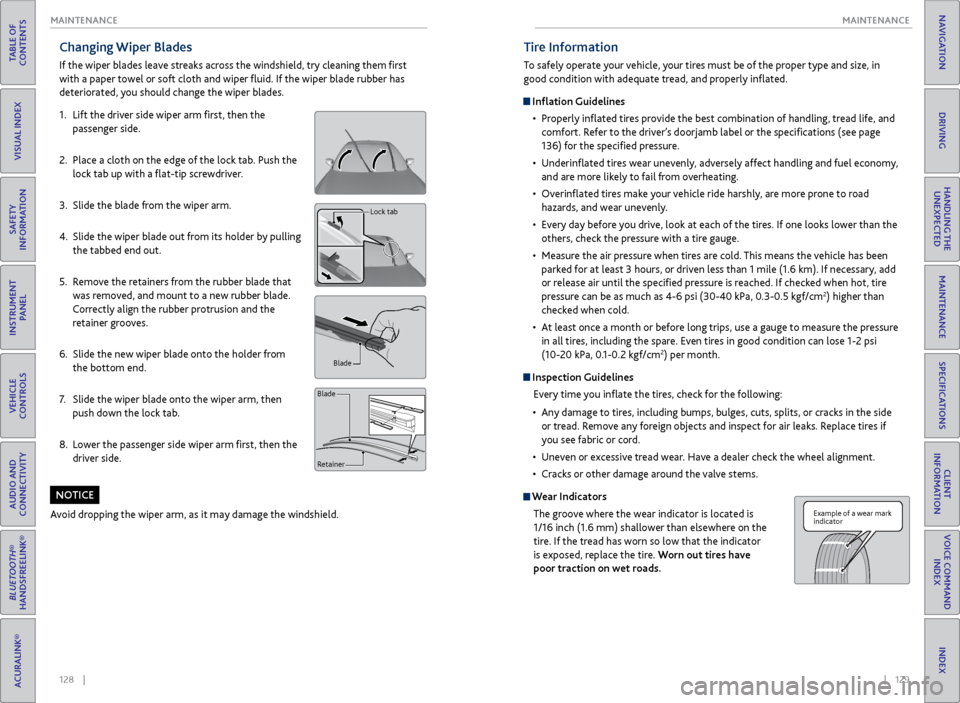
Changing Wiper Blades
If the wiper blades leave streaks across the windshield, try cleaning them first
with a paper towel or soft cloth and wiper fluid. If the wiper blade rubber has
deteriorated, you should change the wiper blades.
1. Lift the driver side wiper arm first, then the
passenger side.
2. Place a cloth on the edge of the lock tab. Push the
lock tab up with a flat-tip screwdriver.
3. Slide the blade from the wiper arm.
4. Slide the wiper blade out from its holder by pulling
the tabbed end out.
5. Remove the retainers from the rubber blade that
was removed, and mount to a new rubber blade.
Correctly align the rubber protrusion and the
retainer grooves.
6. Slide the new wiper blade onto the holder from
the bottom end.
7. Slide the wiper blade onto the wiper arm, then
push down the lock tab.
8. Lower the passenger side wiper arm first, then the
driver side.
Avoid dropping the wiper arm, as it may damage the windshield.
NOTICE
Lock tab
Blade
Retainer
Blade
Tire Information
To safely operate your vehicle, your tires must be of the proper type and size, in
good condition with adequate tread, and properly inflated.
Inflation Guidelines • Properly inflated tires provide the best combination of handling, tread life, and
comfort. Refer to the driver’s doorjamb label or the specifications (see page
136) for the specified pressure.
• Underinflated tires wear unevenly, adversely affect handling and fuel economy,
and are more likely to fail from overheating.
• Overinflated tires make your vehicle ride harshly, are more prone to road
hazards, and wear unevenly.
• Every day before you drive, look at each of the tires. If one looks lower than the
others, check the pressure with a tire gauge.
• Measure the air pressure when tires are cold. This means the vehicle has been
parked for at least 3 hours, or driven less than 1 mile (1.6 km). If necessary, add
or release air until the specified pressure is reached. If checked when hot, tire
pressure can be as much as 4-6 psi (30-40 kPa, 0.3-0.5 kgf/cm
2) higher than
checked when cold.
• At least once a month or before long trips, use a gauge to measure the pressure
in all tires, including the spare. Even tires in good condition can lose 1-2 psi
(10-20 kPa, 0.1-0.2 kgf/cm
2) per month.
Inspection Guidelines
Every time you inflate the tires, check for the following:
• Any damage to tires, including bumps, bulges, cuts, splits, or cracks in the side
or tread. Remove any foreign objects and inspect for air leaks. Replace tires if
you see fabric or cord.
• Uneven or excessive tread wear. Have a dealer check the wheel alignment.
• Cracks or other damage around the valve stems.
Wear Indicators
The groove where the wear indicator is located is
1/16 inch (1.6 mm) shallower than elsewhere on the
tire. If the tread has worn so low that the indicator
is exposed, replace the tire. Worn out tires have
poor traction on wet roads.
Example of a wear mark
indicator
Page 72 of 78
136 || 137
CLIENT INFORMATION
SPECIFICATIONS
TABLE OF
CONTENTS
INDEX
VISUAL INDEX
VOICE COMMAND INDEX
SAFETY
INFORMATION
CLIENT
INFORMATION
INSTRUMENT PANEL
SPECIFICATIONS
VEHICLE
CONTROLS
MAINTENANCE
AUDIO AND
CONNECTIVITY
HANDLING THE UNEXPECTED
BLUETOOTH®
HANDSFREELINK®
DRIVING
ACURALINK®
NAVIGATION
Vehicle
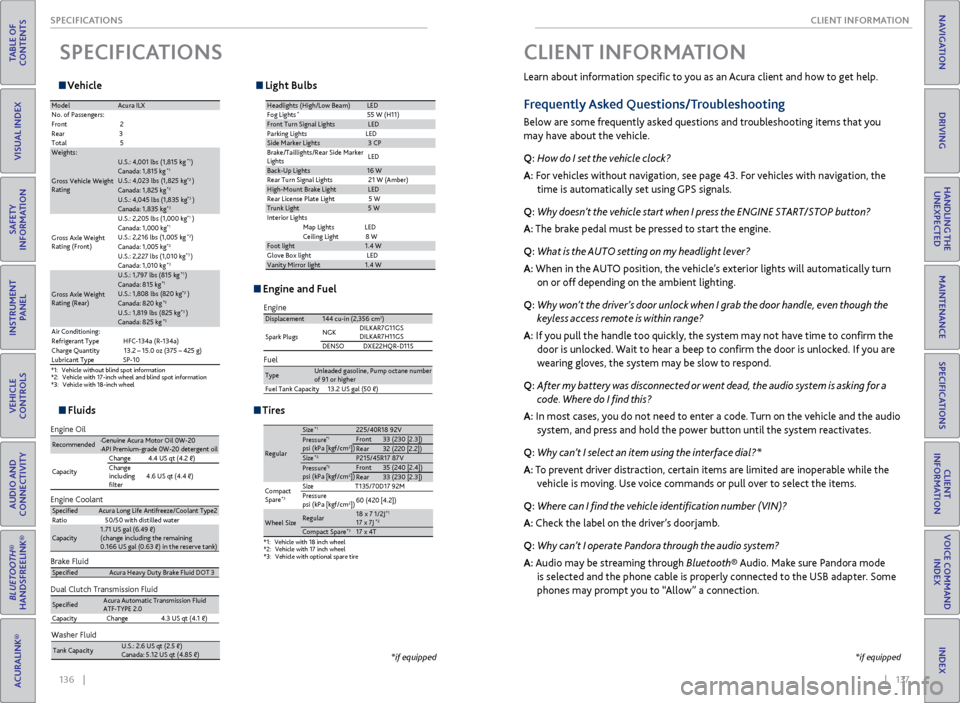
SPECIFICATIONS
*1:V ehicl e without blind spot information *2:Vehicle with 17-inch wheel and blind spot information *3:V ehic le with 18-inc h wheel
ModelAcura IL X
No. of Passengers :
Fron t2
Rear 3
Tota l5
Weights:
Gross Vehicle Weight
Ratin g
U.S.: 4,001 lbs (1,815 kg )*1Canada: 1,815 kg*1U.S.: 4,023 lbs (1,825 kg )*2Canada: 1,825 kg*2U.S.: 4,045 lbs (1,835 kg )*3Canada: 1,835 kg*3
Gross Axle Weight
Rating (Front)U.S.: 2,205 lbs (1,000 kg
)
*1Canada: 1,000 kg*1U.S.: 2,216 lbs (1,005 kg )*2Canada: 1,005 kg*2U.S.: 2,227 lbs (1,010 kg )*3Canada: 1,010 kg*3
Gross Axle Weight
Rating (Rear)
U.S.: 1,797 lbs (815 kg )*1Canada: 815 kg*1U.S.: 1,808 lbs (820 kg )*2Canada: 820 kg*2U.S.: 1,819 lbs (825 kg )*3Canada: 825 kg*3Air Conditioning:
Refrigerant Type HFC-134a (R-134a)
Charge Quantity 13.2 – 15.0 oz (375 – 425 g)
Lubricant Typ eSP-10
Light Bulbs
Headlights (High/Low Beam )LED
Fog Lights*55 W (H11)Front Turn Signal LightsLE D
Parking Lights LED
Side Ma rker Lights3 CP
Brake/Taillights/Rear Side Marker
Light s LE
D
Back-Up Lights16 W
Rear Turn Signal Lights 21 W (Amber)
High-Mount Brake Ligh tLED
Rear License Plate Light 5 W
Trunk Light5 W
In teri or Lights
Map Lights LED
Ceiling Ligh t8 W
Foot light1.4 W
Glove Box lightL ED
Vanity Mirror light1.4 W
Fluids
Brake Fluid
Dual Clutch Transmission Fluid
Specie dAcura Heavy Duty Brake Fluid DOT 3
SpeciedAcura Automatic Transmission Fluid
ATF-TYPE 2. 0
Capacity Change4 .3 US qt (4.1)
Engine Oil
Engine Coolan
t
Recommended·Genuine Acura Motor Oil 0W-2 0
·API Premium-grade 0W-20 detergent oi l
Capacity Change
4.4 US qt (4.2 )
Change
including
lter 4.6 US qt (4.4 )
Specie
dAcura Long Life Antifreeze/Coolant Type 2
Ratio 50/50 with distilled wate r
Capacity1.71 US gal (6.49 )
(change including the remaining
0.166 US gal (0.63 ) in the reserve tank )
Washer Fluid
Tank Capacit yU.S.: 2.6 US qt (2.5 )
Canada: 5.12 US qt (4.85 )
Engine and Fuel
Engine
FuelDisplacement144 cu-in (2,356 cm3)
Spark Plugs NG
K DILKAR7G11GS
DILKAR7H11GS
DENSO DXE22HQR-D11S
TypeUnleaded gasoline, Pump octane number of 91 or higher
Fuel Tank Capacity 13.2 US gal (50 )
Tires
*1:Vehicle with 18 inch wheel*2:Vehicle with 17 inch wheel*3: Vehicle with optional spare tire
Regular
Size*1225/40R18 92 VPressure*1psi (kPa [kgf/cm2Front33 (230 [2.3])Rear32 (220 [2.2])Size*2P215/45R17 87 VPressure*2psi (kPa [kgf/cm2Front35 (240 [2.4])Rear33 (230 [2.3])
Compact
Spar e
*3Size T135/70D17 92M
Pressure
psi (kPa [kgf/cm
2]) 60 (420 [4.2])
Wheel SizeRegula
r18 x 7 1/2J*117 x 7J*2Compact Spar e*317 x 4T
])
])
*if equipped
Learn about information specific to you as an Acura client and how to get help.
Frequently Asked Questions/Troubleshooting
Below are some frequently asked questions and troubleshooting items that you
may have about the vehicle.
Q: How do I set the vehicle clock?
A: For vehicles without navigation, see page 43. For vehicles with navigation, the
time is automatically set using GPS signals.
Q: Why doesn’t the vehicle start when I press the ENGINE START/STOP button?
A: The brake pedal must be pressed to start the engine.
Q: What is the AUTO setting on my headlight lever?
A: When in the AUTO position, the vehicle’s exterior lights will automatically turn
on or off depending on the ambient lighting.
Q: Why won’t the driver’s door unlock when I grab the door handle, even though the
keyless access remote is within range?
A: If you pull the handle too quickly, the system may not have time to confirm the
door is unlocked. Wait to hear a beep to confirm the door is unlocked. If you are
wearing gloves, the system may be slow to respond.
Q: After my battery was disconnected or went dead, the audio system is asking for a
code. Where do I find this?
A: In most cases, you do not need to enter a code. Turn on the vehicle and the audio
system, and press and hold the power button until the system reactivates.
Q: Why can’t I select an item using the interface dial?*
A: To prevent driver distraction, certain items are limited are inoperable while the
vehicle is moving. Use voice commands or pull over to select the items.
Q: Where can I find the vehicle identification number (VIN)?
A: Check the label on the driver’s doorjamb.
Q: Why can’t I operate Pandora through the audio system?
A: Audio may be streaming through Bluetooth® Audio. Make sure Pandora mode
is selected and the phone cable is properly connected to the USB adapter. Some
phones may prompt you to “Allow” a connection.
CLIENT INFORMATION
*if equipped
Page 77 of 78
146 || 147
INDEX
INDEX
TABLE OF
CONTENTS
INDEX
VISUAL INDEX
VOICE COMMAND INDEX
SAFETY
INFORMATION
CLIENT
INFORMATION
INSTRUMENT PANEL
SPECIFICATIONS
VEHICLE
CONTROLS
MAINTENANCE
AUDIO AND
CONNECTIVITY
HANDLING THE UNEXPECTED
BLUETOOTH®
HANDSFREELINK®
DRIVING
ACURALINK®
NAVIGATION
INDEX
ABS indicator ............................................... 23
Accessory Power Socket ........................... 48
ACC indicator ....................................... 23, 25
AcuraLink® ................................................... 77
ASSIST button ......................................... 78
Emergency Assistance ............................ 78
LINK button ............................................. 78
Messages .................................................. 77
Operator Assistance ............................... 78
Security Features .................................... 78
Subscription Features .............................78
AcuraLink featuring Aha™ ....................... 64
AcuraLink Real-Time Traffic™ .................. 85
Acura Total Luxury Care Roadside Assistance ................................... 139
Adaptive Cruise Control (ACC) ... 23, 25, 97
Aha Radio™ ................................................ 64
Aha Radio™ Commands ......................... 144
Airbags .......................................................... 8
Advanced Airbags ..................................... 8
Airbag Care ............................................... 13
Airbag System Components ................. 12
Airbag System Indicators ...................... 10
Front Airbags (SRS) ................................... 8
Side Airbags ................................................ 9
Side Curtain Airbags ................................. 9
Anti-Lock Brake System (ABS) .......... 23, 95
APP button .................................................. 86
ASSIST button ............................................. 78
Audio Commands .................................... 143
Audio Operation ......................................... 47
Accessory Power Socket ....................... 48
Aha™ ....................................................... 64
Auxiliary Input Jack ................................. 47
Bluetooth® Audio .............................54, 62
Color Information Display ................... 50
Compact Disc ................................... 52, 59
FM/AM Radio ..................................... 51, 57
Hard Disc Drive (HDD) Audio .............. 60
HDMI Port ................................................ 47
iPod® ................................................. 53, 61
On-Demand Multi-Use Display (ODMD) ....................................... 56
Pandora® ........................................... 55, 63
SiriusXM® Radio..................................... 58
Sound ....................................................... 49
Steering Wheel Controls ...................... 48
USB Connection ...................................... 47
USB Flash Drive ................................ 52, 59
AUTO button .............................................. 45
Automatic Dimming Rearview Mirror .....41
Automatic Rain-Sensing Wipers .............. 35AUX Commands
....................................... 144
Auxiliary Input Jack ..................................... 47
Battery ...................................................... 127
Blind Spot Information (BSI) ........... 23, 101
Bluetooth® Audio ................................ 54, 62
Bluetooth® Audio Commands ............... 144
Bluetooth® HandsFreeLink® .................... 65
Call History .............................................. 74
Dialing a Number .............................. 67, 72
Displays and Controls ..................... 65, 69
E-Mail ........................................................ 75
Making a Call ........................ 67, 72, 73, 74
Pairing a Phone ................................. 66, 71
Phonebook ......................................... 67, 73
Phone Commands .................................145
Siri™ Eyes Free ........................................ 76
SMS Text Messaging ........................ 68, 75
Speed Dial ............................ 67, 68, 73, 74
Talk Button Tips ....................................... 70
Brake Assist System .................................... 95
Brake system ........................................ 22, 23
Braking ........................................................ 95
Brightness Control ..................................... 33
Call History .................................................. 74
Carbon Monoxide Gas ................................. 4
Change a Setting ........................................ 42
Changing a Flat Tire .................................. 114
Changing Fuses ......................................... 119
Changing Wiper Blades ............................ 128
Charging system indicator ........................ 22
Checking the Battery ............................... 127
Childproof Door Locks .............................. 30
Child Safety ................................................. 14
Child Seat ..................................................... 16
Adding Security with a Tether .............. 19
Installing a Child Seat ...................... 17, 18
LATCH-Compatible Child Seat ............. 17
Selecting a Child Seat ............................ 16
Client Information .................................... 137
Climate Control Commands ................... 142
Climate Control System ........................... 45
Clock ....................................................... 43
Collision Mitigation Braking System™ (CMBS™) ...................... 23, 25, 102
Color Information Display ....................... 50
Compact Disc ....................................... 52, 59
Compact Disc Commands ...................... 143
Contact Us ................................................ 138
Cross Traffic Monitor ................................ 105
Cruise Control ...................................... 25, 96
Customized Features .................................42
Dashboard and Ceiling Controls ................ 2Destination .................................................
82
Detour ....................................................... 85
Dialing a Number .................................. 67, 72
Door Mirrors ................................................ 41
Doors ................................................. 29, 30
DOT Tire Quality Grading ....................... 133
Driver’s Side Interior Fuse Boxes ............ 118
Driving ....................................................... 88
Adaptive Cruise Control (ACC) ............ 97
Blind Spot Information (BSI) .............. 101
Braking ...................................................... 95
Collision Mitigation Braking System™ (CMBS™) .................................... 102
Cruise Control ........................................ 96
Lane Keeping Assist System (LKAS) ... 100
Maximum Load Limit ............................ 89
Multi-View Rear Camera .................... 104
Power Mode ............................................. 92
Rear Cross Traffic Monitor ................... 105
Refueling ................................................ 106
Remote Engine Start .............................. 91
Road Departure Mitigation (RDM) ..... 99
Shifting .................................................... 93
Driving Position Memory System ........... 40
Electric Power Steering indicator .............23
Electronic Stability Control (ESC)........... 93
E-Mail ........................................................ 75
Emergency Assistance ................................78
Emergency Engine Stop ........................... 110
Emergency Towing ....................................
110
Engine and Fuel ......................................... 136
Engine Compartment Fuse Boxes .......... 117
Engine Coolant .......................................... 126
Engine Oil ................................................... 124
Engine Start/Stop Button .......................... 92
Exterior Lights ...................................... 25, 33
Fastening a Seat Belt .................................... 7
Find Nearest Place ..................................... 83
Find Place Commands .............................. 141
Flat Tire ...................................................... 114
Floor Mats ................................................... 39
Fluids ...................................................... 136
FM/AM Radio ......................................... 51, 57
FM/AM Radio Commands ...................... 143
Fog lights indicator ..................................... 25
Foot Brake .................................................... 95
Frequently Asked Questions ................... 137
Front Airbags (SRS) ....................................... 8
Front Door Inner Handle .......................... 30
Front Seats .................................................. 36
Fuel Information ...................................... 106
Fuse Locations ........................................... 117
Garage Opener ........................................... 44
Hang-Up button .................................. 65, 69
Hard Disc Drive (HDD) Audio .................. 60Hard Disc Drive (HDD) Commands .......
145
HDMI Port .................................................... 47
Headlight-Wiper Integration .................... 35
Head Restraints .......................................... 38
HFL ....................................................... 65
High beams indicator ................................. 25
Home Address ............................................ 82
HomeLink® ................................................. 44
Hood ...................................................... 123
Immobilizer indicator ................................. 24
Info buttons ................................................ 26
Info Commands ......................................... 145
Instrument Panel ........................................ 22
Condition Indicators ............................... 24
Malfunction Indicators .......................... 22
On/Off Indicators ................................... 25
Interface Dial Feedback ............................. 81
Interior Fuse Box ....................................... 118
Interior Lights ............................................. 33
Intermittent Wipers ................................... 35
iPod® ................................................. 53, 61
iPod® Commands .................................... 144
Jump Starting ........................................... 108
Keyless Access System ........................ 23, 29
Lane Keeping Assist System (LKAS) ........................................ 23, 25, 100
Lap/Shoulder Seat Belts .............................. 5
LATCH-Compatible Child Seat ................. 17
Light Bulbs .................................................. 136
Lights ................................................. 25, 33
LINK button ................................................. 78
Locking the Doors ....................................... 29
Lock Tab ....................................................... 30
Low fuel indicator ....................................... 24
Low oil pressure indicator ......................... 22
Low tire pressure indicator ........................24
Maintenance .............................................. 120
Maintenance Minder ............................ 121
Opening the Hood ................................ 123
Safety Precautions ................................ 120
Service Codes ......................................... 122
Under the Hood .................................... 123
Making a Call ............................ 67, 72, 73, 74
Malfunction indicator lamp ...................... 22
Map Display Commands ........................ 140
Map Legend ................................................. 84
Map Lights ................................................... 34
Master Door Lock Switch ......................... 30
Maximum Load Limit ................................ 89
Mirrors ........................................................ 41
Moonroof ..................................................... 32
Multi-Information Display ....................... 26
Multi-View Rear Camera ........................ 104
Navigation ................................................... 79
AcuraLink Real-Time Traffic™ .............. 85
Page 78 of 78
148 || 149
INDEX
INDEX
TABLE OF
CONTENTS
INDEX
VISUAL INDEX
VOICE COMMAND INDEX
SAFETY
INFORMATION
CLIENT
INFORMATION
INSTRUMENT PANEL
SPECIFICATIONS
VEHICLE
CONTROLS
MAINTENANCE
AUDIO AND
CONNECTIVITY
HANDLING THE UNEXPECTED
BLUETOOTH®
HANDSFREELINK®
DRIVING
ACURALINK®
NAVIGATION
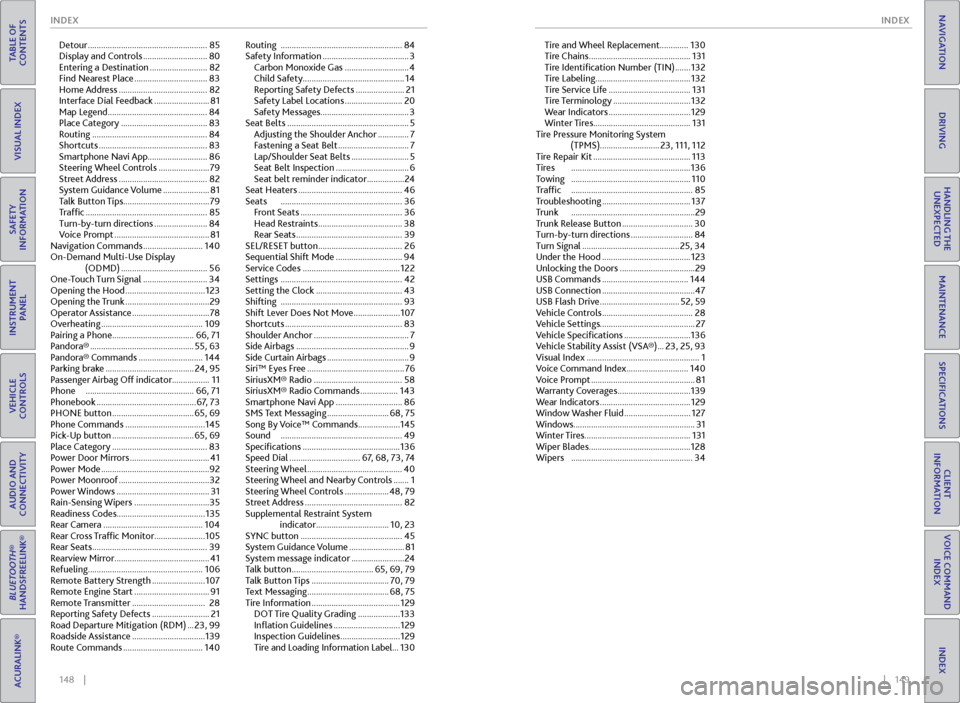
Detour ...................................................... 85
Display and Controls ............................. 80
Entering a Destination .......................... 82
Find Nearest Place ................................. 83
Home Address ........................................ 82
Interface Dial Feedback ......................... 81
Map Legend ............................................. 84
Place Category ....................................... 83
Routing .................................................... 84
Shortcuts ................................................. 83
Smartphone Navi App ...........................86
Steering Wheel Controls ....................... 79
Street Address ........................................ 82
System Guidance Volume ..................... 81
Talk Button Tips ....................................... 79
Traffic ....................................................... 85
Turn-by-turn directions ........................ 84
Voice Prompt ........................................... 81
Navigation Commands ........................... 140
On-Demand Multi-Use Display (ODMD) ....................................... 56
One-Touch Turn Signal ............................. 34
Opening the Hood .................................... 123
Opening the Trunk ...................................... 29
Operator Assistance ................................... 78
Overheating .............................................. 109
Pairing a Phone ..................................... 66, 71
Pandora® ............................................... 55, 63
Pandora® Commands ............................. 144
Parking brake ........................................ 24, 95
Passenger Airbag Off indicator .................11
Phone ................................................. 66, 71
Phonebook ............................................. 67, 73
PHONE button ..................................... 65, 69
Phone Commands .................................... 145
Pick-Up button ..................................... 65, 69
Place Category ........................................... 83
Power Door Mirrors .................................... 41
Power Mode ................................................. 92
Power Moonroof ......................................... 32
Power Windows .......................................... 31
Rain-Sensing Wipers .................................. 35
Readiness Codes ........................................ 135
Rear Camera ............................................. 104
Rear Cross Traffic Monitor ....................... 105
Rear Seats .................................................... 39
Rearview Mirror ........................................... 41
Refueling .................................................... 106
Remote Battery Strength ........................ 107
Remote Engine Start .................................. 91
Remote Transmitter ................................. 28
Reporting Safety Defects .......................... 21
Road Departure Mitigation (RDM) ... 23, 99
Roadside Assistance ................................. 139
Route Commands .................................... 140Routing
....................................................... 84
Safety Information ....................................... 3
Carbon Monoxide Gas ............................. 4
Child Safety .............................................. 14
Reporting Safety Defects ...................... 21
Safety Label Locations .......................... 20
Safety Messages ........................................ 3
Seat Belts ....................................................... 5
Adjusting the Shoulder Anchor .............. 7
Fastening a Seat Belt ................................ 7
Lap/Shoulder Seat Belts .......................... 5
Seat Belt Inspection ................................. 6
Seat belt reminder indicator ................. 24
Seat Heaters ............................................... 46
Seats ....................................................... 36
Front Seats .............................................. 36
Head Restraints ...................................... 38
Rear Seats ................................................ 39
SEL/RESET button ...................................... 26
Sequential Shift Mode .............................. 94
Service Codes ............................................ 122
Settings ....................................................... 42
Setting the Clock ....................................... 43
Shifting ....................................................... 93
Shift Lever Does Not Move ..................... 107
Shortcuts ..................................................... 83
Shoulder Anchor ........................................... 7
Side Airbags ................................................... 9
Side Curtain Airbags ..................................... 9
Siri™ Eyes Free ............................................ 76
SiriusXM® Radio ........................................ 58
SiriusXM® Radio Commands ................. 143
Smartphone Navi App .............................. 86
SMS Text Messaging ............................ 68, 75
Song By Voice™ Commands ................... 145
Sound ....................................................... 49
Specifications ............................................ 136
Speed Dial ................................ 67, 68, 73, 74
Steering Wheel ........................................... 40
Steering Wheel and Nearby Controls ....... 1
Steering Wheel Controls .................... 48, 79
Street Address ............................................ 82
Supplemental Restraint System indicator ................................. 10, 23
SYNC button .............................................. 45
System Guidance Volume ......................... 81
System message indicator ........................ 24
Talk button ..................................... 65, 69, 79
Talk Button Tips ................................... 70, 79
Text Messaging ..................................... 68, 75
Tire Information ........................................ 129
DOT Tire Quality Grading ................... 133
Inflation Guidelines .............................. 129
Inspection Guidelines ........................... 129
Tire and Loading Information Label ... 130Tire and Wheel Replacement.............
130
Tire Chains .............................................. 131
Tire Identification Number (TIN) ....... 132
Tire Labeling ........................................... 132
Tire Service Life ..................................... 131
Tire Terminology ................................... 132
Wear Indicators ..................................... 129
Winter Tires ............................................ 131
Tire Pressure Monitoring System (TPMS)........................... 23, 111, 112
Tire Repair Kit ............................................ 113
Tires ...................................................... 136
Towing ...................................................... 110
Traffic ....................................................... 85
Troubleshooting ........................................ 137
Trunk ........................................................ 29
Trunk Release Button ................................ 30
Turn-by-turn directions ............................ 84
Turn Signal ............................................ 25, 34
Under the Hood ........................................ 123
Unlocking the Doors .................................. 29
USB Commands ....................................... 144
USB Connection .......................................... 47
USB Flash Drive .................................... 52, 59
Vehicle Controls
......................................... 28
Vehicle Settings ........................................... 27
Vehicle Specifications .............................. 136
Vehicle Stability Assist (VSA®) ... 23, 25, 93
Visual Index ................................................... 1
Voice Command Index ............................ 140
Voice Prompt ............................................... 81
Warranty Coverages ................................. 139
Wear Indicators ......................................... 129
Window Washer Fluid .............................. 127
Windows ....................................................... 31
Winter Tires ................................................ 131
Wiper Blades .............................................. 128
Wipers ....................................................... 34