warning light Acura ILX 2016 User Guide
[x] Cancel search | Manufacturer: ACURA, Model Year: 2016, Model line: ILX, Model: Acura ILX 2016Pages: 78, PDF Size: 20.92 MB
Page 61 of 78
114 || 115
HANDLING THE UNEXPECTED
HANDLING THE UNEXPECTED
TABLE OF
CONTENTS
INDEX
VISUAL INDEX
VOICE COMMAND INDEX
SAFETY
INFORMATION
CLIENT
INFORMATION
INSTRUMENT PANEL
SPECIFICATIONS
VEHICLE
CONTROLS
MAINTENANCE
AUDIO AND
CONNECTIVITY
HANDLING THE UNEXPECTED
BLUETOOTH®
HANDSFREELINK®
DRIVING
ACURALINK®
NAVIGATION
Changing a Flat Tire
If a tire goes flat while driving, grasp the steering wheel firmly, and brake gradually
to reduce speed. Stop in a safe place. Replace the flat tire with the compact
spare tire*. Go to a dealer as soon as possible to have the full-size tire repaired or
replaced.
Before Changing the Tire
1. Park the vehicle on a firm, level, non-slippery surface.
2. Put the vehicle in Park (P), and apply the parking brake.
3. Turn on the hazard warning lights and turn the vehicle off.
Getting Ready to Change the Tire
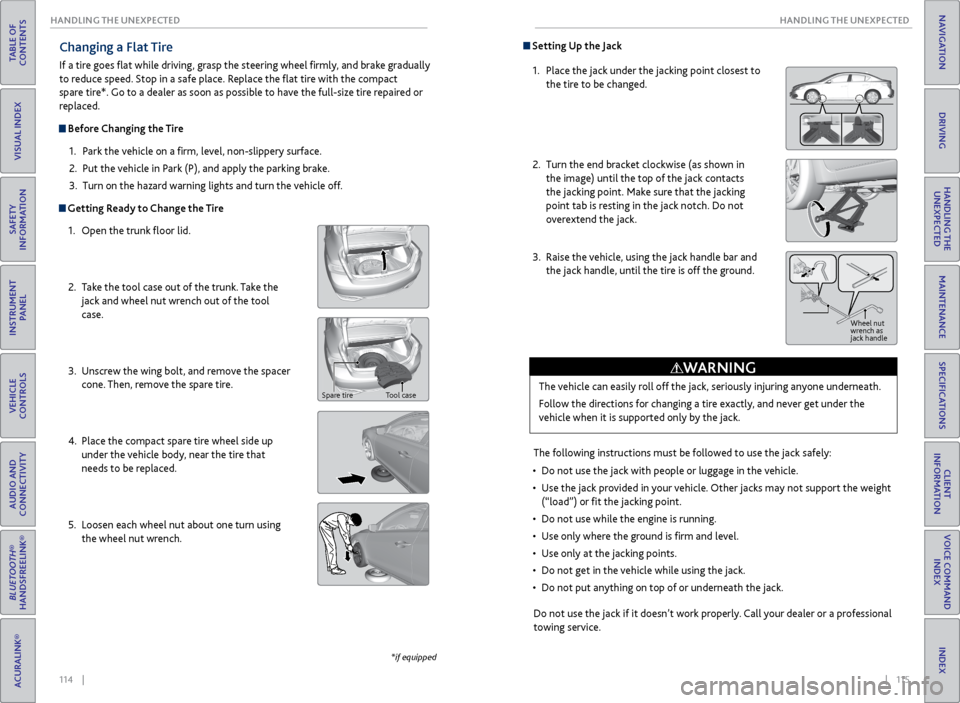
1. Open the trunk floor lid.
2. Take the tool case out of the trunk. Take the
jack and wheel nut wrench out of the tool
case.
3. Unscrew the wing bolt, and remove the spacer
cone. Then, remove the spare tire.
4. Place the compact spare tire wheel side up
under the vehicle body, near the tire that
needs to be replaced.
5. Loosen each wheel nut about one turn using
the wheel nut wrench.
*if equipped
Spare tire Tool case
Setting Up the Jack
1. Place the jack under the jacking point closest to
the tire to be changed.
2. Turn the end bracket clockwise (as shown in
the image) until the top of the jack contacts
the jacking point. Make sure that the jacking
point tab is resting in the jack notch. Do not
overextend the jack.
3. Raise the vehicle, using the jack handle bar and
the jack handle, until the tire is off the ground.
The following instructions must be followed to use the jack safely:
• Do not use the jack with people or luggage in the vehicle.
• Use the jack provided in your vehicle. Other jacks may not support the weight
(“load”) or fit the jacking point.
• Do not use while the engine is running.
• Use only where the ground is firm and level.
• Use only at the jacking points.
• Do not get in the vehicle while using the jack.
• Do not put anything on top of or underneath the jack.
The vehicle can easily roll off the jack, seriously injuring anyone underneath.
Follow the directions for changing a tire exactly, and never get under the
vehicle when it is supported only by the jack.
WARNING
Jack
handle bar
Do not use the jack if it doesn’t work properly. Call your dealer or a professional
towing service.
Wheel nut
wrench as
jack handle
Page 62 of 78
116 || 117
HANDLING THE UNEXPECTED
HANDLING THE UNEXPECTED
TABLE OF
CONTENTS
INDEX
VISUAL INDEX
VOICE COMMAND INDEX
SAFETY
INFORMATION
CLIENT
INFORMATION
INSTRUMENT PANEL
SPECIFICATIONS
VEHICLE
CONTROLS
MAINTENANCE
AUDIO AND
CONNECTIVITY
HANDLING THE UNEXPECTED
BLUETOOTH®
HANDSFREELINK®
DRIVING
ACURALINK®
NAVIGATION
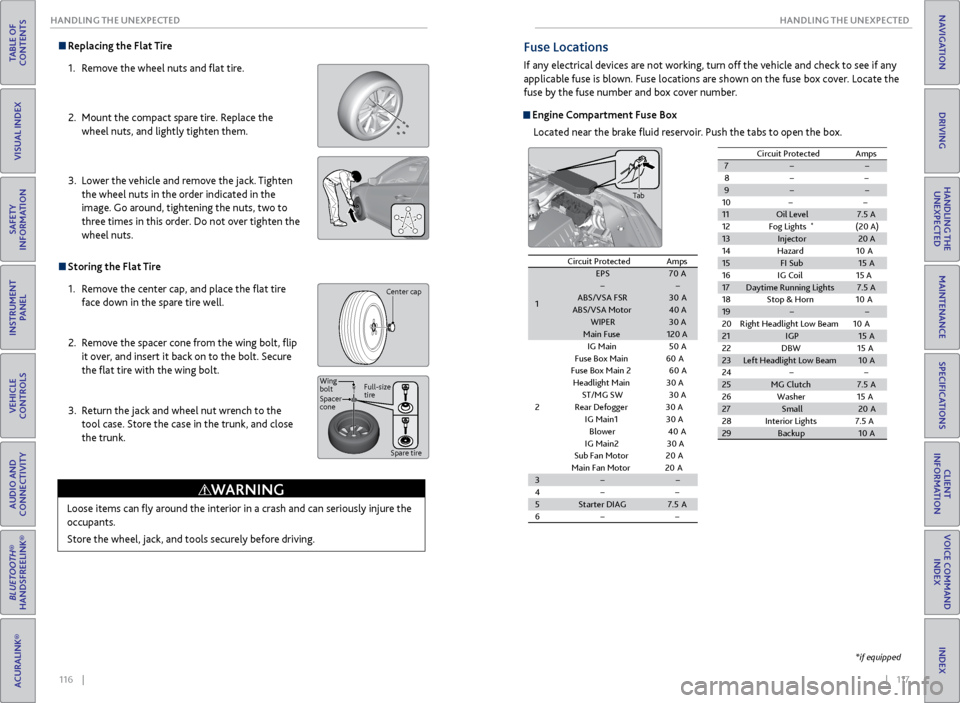
Replacing the Flat Tire
1. Remove the wheel nuts and flat tire.
2. Mount the compact spare tire. Replace the
wheel nuts, and lightly tighten them.
3. Lower the vehicle and remove the jack. Tighten
the wheel nuts in the order indicated in the
image. Go around, tightening the nuts, two to
three times in this order. Do not over tighten the
wheel nuts.
Storing the Flat Tire
1. Remove the center cap, and place the flat tire
face down in the spare tire well.
2. Remove the spacer cone from the wing bolt, flip
it over, and insert it back on to the bolt. Secure
the flat tire with the wing bolt.
3. Return the jack and wheel nut wrench to the
tool case. Store the case in the trunk, and close
the trunk.
Loose items can fly around the interior in a crash and can seriously injure the
occupants.
Store the wheel, jack, and tools securely before driving.
WARNING
Center cap
Spacer
cone Wing
bolt Full-size
tire
Spare tire
Fuse Locations
If any electrical devices are not working, turn off the vehicle and check to see if any
applicable fuse is blown. Fuse locations are shown on the fuse box cover. Locate the
fuse by the fuse number and box cover number.
Engine Compartment Fuse BoxLocated near the brake fluid reservoir. Push the tabs to open the box.
*if equipped
Circuit ProtectedAmps
1
EPS70 AABS/VSA FS R30AABS/VSA Moto r40 AWIPER30 AMain Fuse120 A
2
IG Main50A
Fuse Box Main 60A
Fuse Box Main 260A
Headlight Main 30 A
ST/MG SW30 A
Rear Defogger 30 A
IG Main
130 A
Blower40A
IG Main230 A
Sub Fan Motor20A
Main Fan Motor20A3
4
5Starter DIAG7.5A
6
7
8
9
10
11 Oil Level 7.5 A
12 Fog Lights
*(20 A)
13 Injector 20 A
14 Hazard 10A
15 FI Sub 15A
16 IG Coil 15 A
17 Daytime Running Lights 7.5 A
18 Stop & Horn 10A
19
20 Right Headlight Low Beam 10A
21 IGP 15A
22 DBW1 5A
23 Left Headlight Low Beam 10A
24
25 MG Clutch 7.5A
26 Washer 15A
27 Small 20A
28 Interior Lights 7.5 A
29 Backup 10A
Circuit Protecte
dAmps
Tab
Circuit Protected Amps
1 EPS
70A
ABS/VSA FS R 30A
ABS/VSA Moto r40 A
WIPER 30 A
Main Fuse 120 A
2 IG Main
50A
Fuse Box Main 60A
Fuse Box Main 260A
Headlight Main 30 A
ST/MG SW 30 A
Rear Defogger 30 A
IG Main 13 0 A
Blowe r4 0A
IG Main 23 0 A
Sub Fan Moto r20A
Main Fan Moto r20A
3
4
5 Starter DIAG 7.5A
6 7
8
9
1011Oil Level7.5 A
12 Fog Lights*(20 A)13Injector20 A
14 Hazard 10A
15FI Sub15A
16 IG Coil 15 A
17Daytime Running Lights7.5 A
18 Stop & Horn 10A
19
20 Right Headlight Low Beam 10A
21IGP15A
22 DBW15A23Left Headlight Low Beam10A
2425MG Clutch7.5A
26 Washer 15A
27Small20 A
28 Interior Lights 7.5 A
29Backu p10A
Circuit Protecte dAmps
Page 71 of 78
134 || 135
MAINTENANCE
MAINTENANCE
TABLE OF
CONTENTS
INDEX
VISUAL INDEX
VOICE COMMAND INDEX
SAFETY
INFORMATION
CLIENT
INFORMATION
INSTRUMENT PANEL
SPECIFICATIONS
VEHICLE
CONTROLS
MAINTENANCE
AUDIO AND
CONNECTIVITY
HANDLING THE UNEXPECTED
BLUETOOTH®
HANDSFREELINK®
DRIVING
ACURALINK®
NAVIGATION
Temperature
The temperature grades are A (the highest), B, and C, representing the tire’s
resistance to the generation of heat and its ability to dissipate heat when
tested under controlled conditions on a specified indoor laboratory test wheel.
Sustained high temperature can cause the material of the tire to degenerate and
reduce tire life, and excessive temperature can lead to sudden tire failure. The
grade C corresponds to a level of performance which all passenger car tires must
meet under the Federal Motor Vehicle Safety Standard No. 109. Grades B and
A represent higher levels of performance on the laboratory test wheel than the
minimum required by law.
WARNING: The temperature grade for this tire is established for a tire that
is properly inflated and not overloaded. Excessive speed, underinflation, or
excessive loading, either separately or in combination, can cause heat buildup
and possible tire failure.Testing of Readiness Codes
Your vehicle has “Readiness Codes” as part of the onboard self-diagnostic system.
Some states refer to these codes as a test to see if your vehicle’s emissions
components are working properly. The codes may not be read if you go through the
testing just after the battery has gone dead or been disconnected.
To check if they are set, turn the vehicle on without starting the engine. The
malfunction indicator lamp will come on for several seconds. If it goes off, the
readiness codes are set. If it blinks five times, the readiness codes are not set.
If you are required to have your vehicle tested before the readiness codes are set,
prepare the vehicle for retesting by doing the following:
1. Fill the gas tank to approximately 3/4 full.
2. Park the vehicle and leave the engine off for 6 hours or more.
3. Make sure the ambient temperature is between 40°F and 95°F (4°C and 35°C).
4. Start the engine without touching the accelerator pedal, and let it idle for 20
seconds.
5. Keep the vehicle in Park. Increase the engine speed to 2,000 rpm, and hold it
there for about 3 minutes.
6. Let the engine idle with your foot off the accelerator for 20 seconds.
7. Select a nearby, lightly traveled major highway where you can maintain a speed
of 50 to 60 mph (80 to 97 km/h) for at least 20 minutes. Drive on the highway
with the vehicle in Drive. Do not use cruise control. When traffic allows, drive
for 90 seconds without using the accelerator pedal. (Vehicle speed may vary
slightly; this is OK.) If you cannot do this for a continuous 90 seconds because of
traffic conditions, drive for at least 30 seconds, then repeat two more times (for
a total of 90 seconds).
8. Drive in city/suburban traffic for at least 10 minutes. When traffic conditions
allow, let the vehicle coast for several seconds without using the accelerator
pedal or the brake pedal.
9. Park the vehicle and leave the engine off for 30 minutes.
The readiness codes are erased when the battery is disconnected, and set again
only after several days of driving under a variety of conditions.
If a testing facility determines that the readiness codes are not set, you may be
requested to return at a later date to complete the test, or see your dealer.