weight Acura ILX 2016 User Guide
[x] Cancel search | Manufacturer: ACURA, Model Year: 2016, Model line: ILX, Model: Acura ILX 2016Pages: 78, PDF Size: 20.92 MB
Page 61 of 78
114 || 115
HANDLING THE UNEXPECTED
HANDLING THE UNEXPECTED
TABLE OF
CONTENTS
INDEX
VISUAL INDEX
VOICE COMMAND INDEX
SAFETY
INFORMATION
CLIENT
INFORMATION
INSTRUMENT PANEL
SPECIFICATIONS
VEHICLE
CONTROLS
MAINTENANCE
AUDIO AND
CONNECTIVITY
HANDLING THE UNEXPECTED
BLUETOOTH®
HANDSFREELINK®
DRIVING
ACURALINK®
NAVIGATION
Changing a Flat Tire
If a tire goes flat while driving, grasp the steering wheel firmly, and brake gradually
to reduce speed. Stop in a safe place. Replace the flat tire with the compact
spare tire*. Go to a dealer as soon as possible to have the full-size tire repaired or
replaced.
Before Changing the Tire
1. Park the vehicle on a firm, level, non-slippery surface.
2. Put the vehicle in Park (P), and apply the parking brake.
3. Turn on the hazard warning lights and turn the vehicle off.
Getting Ready to Change the Tire
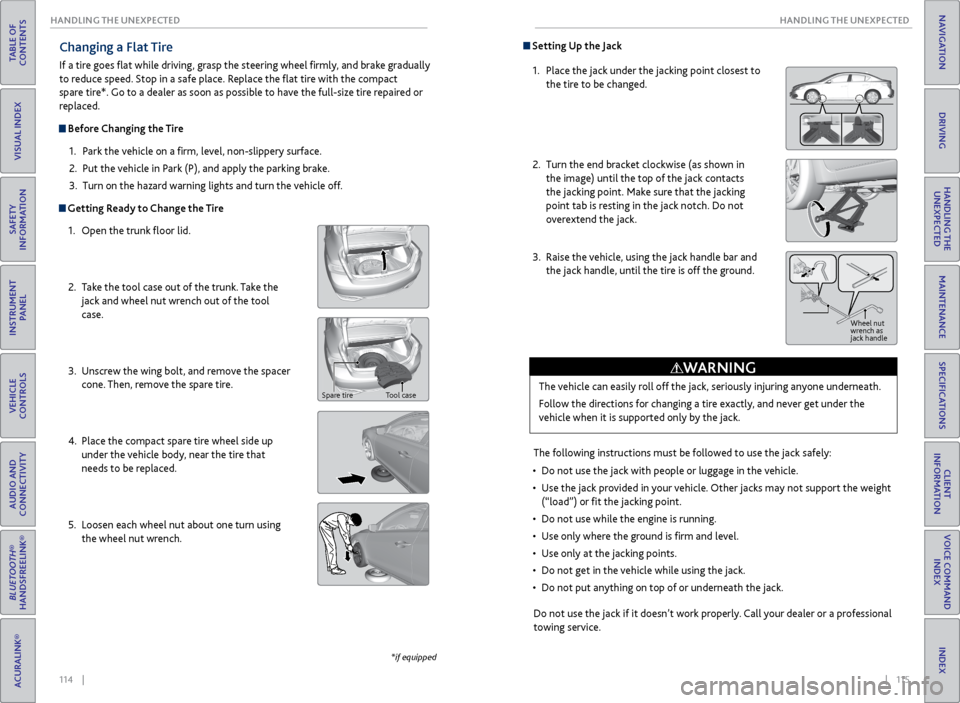
1. Open the trunk floor lid.
2. Take the tool case out of the trunk. Take the
jack and wheel nut wrench out of the tool
case.
3. Unscrew the wing bolt, and remove the spacer
cone. Then, remove the spare tire.
4. Place the compact spare tire wheel side up
under the vehicle body, near the tire that
needs to be replaced.
5. Loosen each wheel nut about one turn using
the wheel nut wrench.
*if equipped
Spare tire Tool case
Setting Up the Jack
1. Place the jack under the jacking point closest to
the tire to be changed.
2. Turn the end bracket clockwise (as shown in
the image) until the top of the jack contacts
the jacking point. Make sure that the jacking
point tab is resting in the jack notch. Do not
overextend the jack.
3. Raise the vehicle, using the jack handle bar and
the jack handle, until the tire is off the ground.
The following instructions must be followed to use the jack safely:
• Do not use the jack with people or luggage in the vehicle.
• Use the jack provided in your vehicle. Other jacks may not support the weight
(“load”) or fit the jacking point.
• Do not use while the engine is running.
• Use only where the ground is firm and level.
• Use only at the jacking points.
• Do not get in the vehicle while using the jack.
• Do not put anything on top of or underneath the jack.
The vehicle can easily roll off the jack, seriously injuring anyone underneath.
Follow the directions for changing a tire exactly, and never get under the
vehicle when it is supported only by the jack.
WARNING
Jack
handle bar
Do not use the jack if it doesn’t work properly. Call your dealer or a professional
towing service.
Wheel nut
wrench as
jack handle
Page 69 of 78
130 || 131
MAINTENANCE
MAINTENANCE
TABLE OF
CONTENTS
INDEX
VISUAL INDEX
VOICE COMMAND INDEX
SAFETY
INFORMATION
CLIENT
INFORMATION
INSTRUMENT PANEL
SPECIFICATIONS
VEHICLE
CONTROLS
MAINTENANCE
AUDIO AND
CONNECTIVITY
HANDLING THE UNEXPECTED
BLUETOOTH®
HANDSFREELINK®
DRIVING
ACURALINK®
NAVIGATION
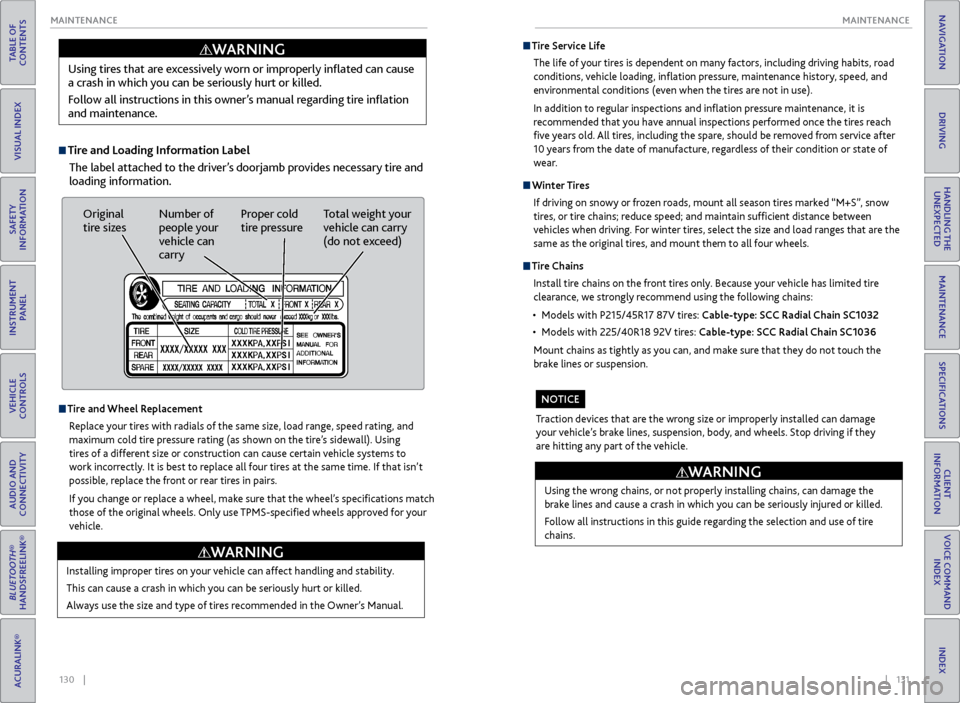
Tire and Loading Information Label
The label attached to the driver’s doorjamb provides necessary tire and
loading information.
Using tires that are excessively worn or improperly inflated can cause
a crash in which you can be seriously hurt or killed.
Follow all instructions in this owner’s manual regarding tire inflation
and maintenance.
WARNING
Original
tire sizes
Number of
people your
vehicle can
carry Proper cold
tire pressure
Total weight your
vehicle can carry
(do not exceed)
Tire and Wheel Replacement
Replace your tires with radials of the same size, load range, speed rating, and
maximum cold tire pressure rating (as shown on the tire’s sidewall). Using
tires of a different size or construction can cause certain vehicle systems to
work incorrectly. It is best to replace all four tires at the same time. If that isn’t
possible, replace the front or rear tires in pairs.
If you change or replace a wheel, make sure that the wheel’s specifications match
those of the original wheels. Only use TPMS-specified wheels approved for your
vehicle.
Installing improper tires on your vehicle can affect handling and stability.
This can cause a crash in which you can be seriously hurt or killed.
Always use the size and type of tires recommended in the Owner’s Manual.
WARNING
Tire Service Life
The life of your tires is dependent on many factors, including driving habits, road
conditions, vehicle loading, inflation pressure, maintenance history, speed, and
environmental conditions (even when the tires are not in use).
In addition to regular inspections and inflation pressure maintenance, it is
recommended that you have annual inspections performed once the tires reach
five years old. All tires, including the spare, should be removed from service after
10 years from the date of manufacture, regardless of their condition or state of
wear.
Winter Tires
If driving on snowy or frozen roads, mount all season tires marked “M+S”, snow
tires, or tire chains; reduce speed; and maintain sufficient distance between
vehicles when driving. For winter tires, select the size and load ranges that are the
same as the original tires, and mount them to all four wheels.
Tire Chains
Install tire chains on the front tires only. Because your vehicle has limited tire
clearance, we strongly recommend using the following chains:
• Models with P215/45R17 87V tires: Cable-type: SCC Radial Chain SC1032
• Models with 225/40R18 92V tires: Cable-type: SCC Radial Chain SC1036
Mount chains as tightly as you can, and make sure that they do not touch the
brake lines or suspension.
Using the wrong chains, or not properly installing chains, can damage the
brake lines and cause a crash in which you can be seriously injured or killed.
Follow all instructions in this guide regarding the selection and use of tire
chains.
WARNING
Traction devices that are the wrong size or improperly installed can damage
your vehicle’s brake lines, suspension, body, and wheels. Stop driving if they
are hitting any part of the vehicle.
NOTICE
Page 72 of 78
136 || 137
CLIENT INFORMATION
SPECIFICATIONS
TABLE OF
CONTENTS
INDEX
VISUAL INDEX
VOICE COMMAND INDEX
SAFETY
INFORMATION
CLIENT
INFORMATION
INSTRUMENT PANEL
SPECIFICATIONS
VEHICLE
CONTROLS
MAINTENANCE
AUDIO AND
CONNECTIVITY
HANDLING THE UNEXPECTED
BLUETOOTH®
HANDSFREELINK®
DRIVING
ACURALINK®
NAVIGATION
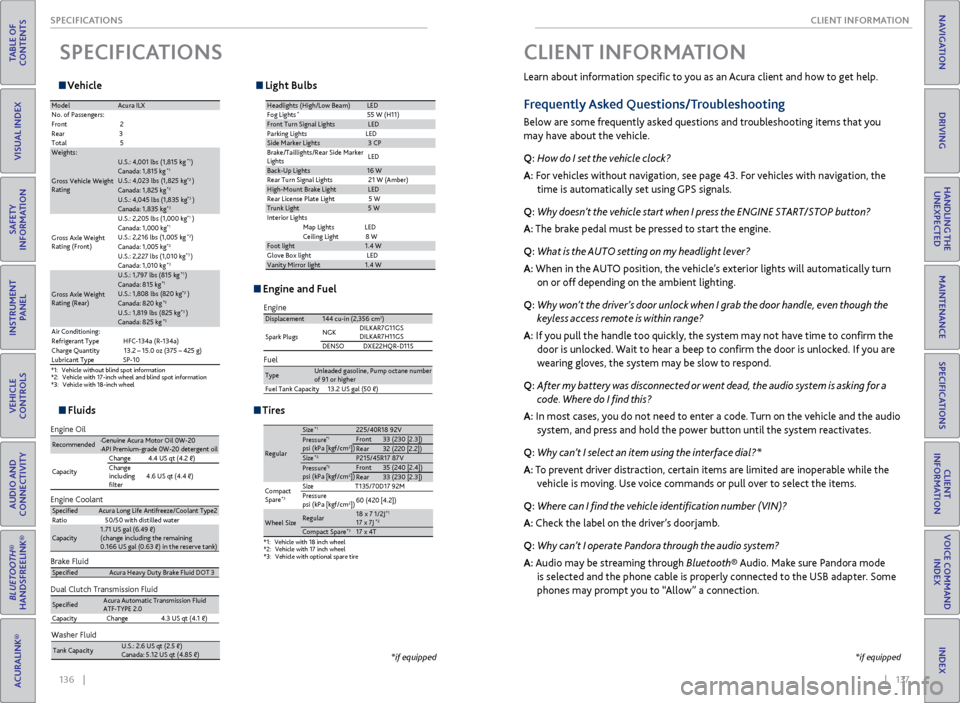
Vehicle
SPECIFICATIONS
*1:V ehicl e without blind spot information *2:Vehicle with 17-inch wheel and blind spot information *3:V ehic le with 18-inc h wheel
ModelAcura IL X
No. of Passengers :
Fron t2
Rear 3
Tota l5
Weights:
Gross Vehicle Weight
Ratin g
U.S.: 4,001 lbs (1,815 kg )*1Canada: 1,815 kg*1U.S.: 4,023 lbs (1,825 kg )*2Canada: 1,825 kg*2U.S.: 4,045 lbs (1,835 kg )*3Canada: 1,835 kg*3
Gross Axle Weight
Rating (Front)U.S.: 2,205 lbs (1,000 kg
)
*1Canada: 1,000 kg*1U.S.: 2,216 lbs (1,005 kg )*2Canada: 1,005 kg*2U.S.: 2,227 lbs (1,010 kg )*3Canada: 1,010 kg*3
Gross Axle Weight
Rating (Rear)
U.S.: 1,797 lbs (815 kg )*1Canada: 815 kg*1U.S.: 1,808 lbs (820 kg )*2Canada: 820 kg*2U.S.: 1,819 lbs (825 kg )*3Canada: 825 kg*3Air Conditioning:
Refrigerant Type HFC-134a (R-134a)
Charge Quantity 13.2 – 15.0 oz (375 – 425 g)
Lubricant Typ eSP-10
Light Bulbs
Headlights (High/Low Beam )LED
Fog Lights*55 W (H11)Front Turn Signal LightsLE D
Parking Lights LED
Side Ma rker Lights3 CP
Brake/Taillights/Rear Side Marker
Light s LE
D
Back-Up Lights16 W
Rear Turn Signal Lights 21 W (Amber)
High-Mount Brake Ligh tLED
Rear License Plate Light 5 W
Trunk Light5 W
In teri or Lights
Map Lights LED
Ceiling Ligh t8 W
Foot light1.4 W
Glove Box lightL ED
Vanity Mirror light1.4 W
Fluids
Brake Fluid
Dual Clutch Transmission Fluid
Specie dAcura Heavy Duty Brake Fluid DOT 3
SpeciedAcura Automatic Transmission Fluid
ATF-TYPE 2. 0
Capacity Change4 .3 US qt (4.1)
Engine Oil
Engine Coolan
t
Recommended·Genuine Acura Motor Oil 0W-2 0
·API Premium-grade 0W-20 detergent oi l
Capacity Change
4.4 US qt (4.2 )
Change
including
lter 4.6 US qt (4.4 )
Specie
dAcura Long Life Antifreeze/Coolant Type 2
Ratio 50/50 with distilled wate r
Capacity1.71 US gal (6.49 )
(change including the remaining
0.166 US gal (0.63 ) in the reserve tank )
Washer Fluid
Tank Capacit yU.S.: 2.6 US qt (2.5 )
Canada: 5.12 US qt (4.85 )
Engine and Fuel
Engine
FuelDisplacement144 cu-in (2,356 cm3)
Spark Plugs NG
K DILKAR7G11GS
DILKAR7H11GS
DENSO DXE22HQR-D11S
TypeUnleaded gasoline, Pump octane number of 91 or higher
Fuel Tank Capacity 13.2 US gal (50 )
Tires
*1:Vehicle with 18 inch wheel*2:Vehicle with 17 inch wheel*3: Vehicle with optional spare tire
Regular
Size*1225/40R18 92 VPressure*1psi (kPa [kgf/cm2Front33 (230 [2.3])Rear32 (220 [2.2])Size*2P215/45R17 87 VPressure*2psi (kPa [kgf/cm2Front35 (240 [2.4])Rear33 (230 [2.3])
Compact
Spar e
*3Size T135/70D17 92M
Pressure
psi (kPa [kgf/cm
2]) 60 (420 [4.2])
Wheel SizeRegula
r18 x 7 1/2J*117 x 7J*2Compact Spar e*317 x 4T
])
])
*if equipped
Learn about information specific to you as an Acura client and how to get help.
Frequently Asked Questions/Troubleshooting
Below are some frequently asked questions and troubleshooting items that you
may have about the vehicle.
Q: How do I set the vehicle clock?
A: For vehicles without navigation, see page 43. For vehicles with navigation, the
time is automatically set using GPS signals.
Q: Why doesn’t the vehicle start when I press the ENGINE START/STOP button?
A: The brake pedal must be pressed to start the engine.
Q: What is the AUTO setting on my headlight lever?
A: When in the AUTO position, the vehicle’s exterior lights will automatically turn
on or off depending on the ambient lighting.
Q: Why won’t the driver’s door unlock when I grab the door handle, even though the
keyless access remote is within range?
A: If you pull the handle too quickly, the system may not have time to confirm the
door is unlocked. Wait to hear a beep to confirm the door is unlocked. If you are
wearing gloves, the system may be slow to respond.
Q: After my battery was disconnected or went dead, the audio system is asking for a
code. Where do I find this?
A: In most cases, you do not need to enter a code. Turn on the vehicle and the audio
system, and press and hold the power button until the system reactivates.
Q: Why can’t I select an item using the interface dial?*
A: To prevent driver distraction, certain items are limited are inoperable while the
vehicle is moving. Use voice commands or pull over to select the items.
Q: Where can I find the vehicle identification number (VIN)?
A: Check the label on the driver’s doorjamb.
Q: Why can’t I operate Pandora through the audio system?
A: Audio may be streaming through Bluetooth® Audio. Make sure Pandora mode
is selected and the phone cable is properly connected to the USB adapter. Some
phones may prompt you to “Allow” a connection.
CLIENT INFORMATION
*if equipped