light Acura ILX 2016 Owner's Manual
[x] Cancel search | Manufacturer: ACURA, Model Year: 2016, Model line: ILX, Model: Acura ILX 2016Pages: 78, PDF Size: 20.92 MB
Page 56 of 78
104 || 105
DRIVING
DRIVING
TABLE OF
CONTENTS
INDEX
VISUAL INDEX
VOICE COMMAND INDEX
SAFETY
INFORMATION
CLIENT
INFORMATION
INSTRUMENT PANEL
SPECIFICATIONS
VEHICLE
CONTROLS
MAINTENANCE
AUDIO AND
CONNECTIVITY
HANDLING THE UNEXPECTED
BLUETOOTH®
HANDSFREELINK®
DRIVING
ACURALINK®
NAVIGATION
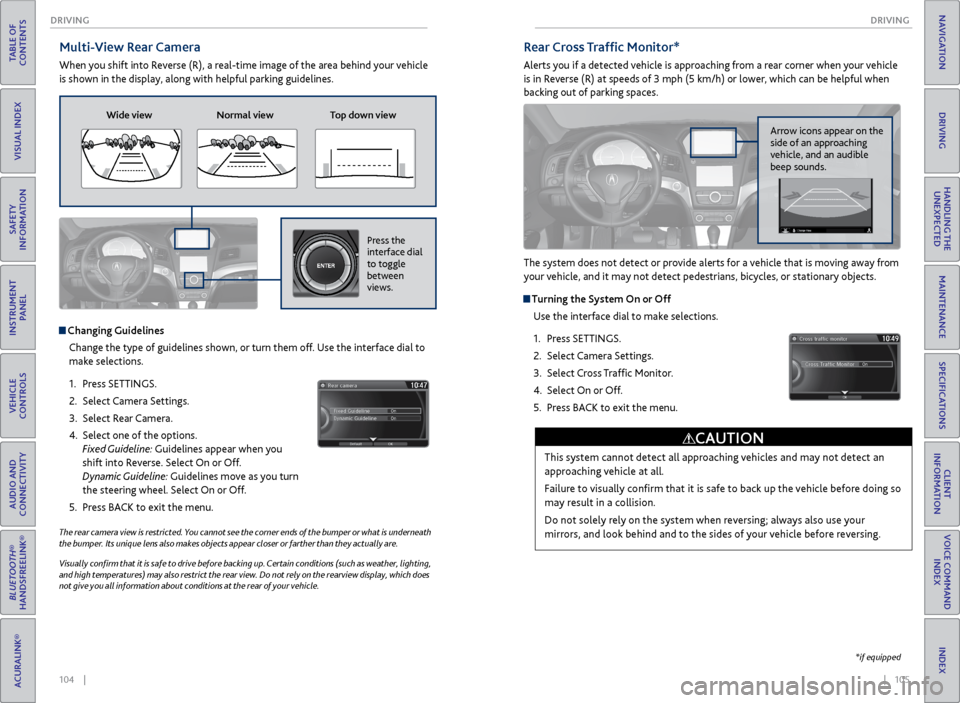
Multi-View Rear Camera
When you shift into Reverse (R), a real-time image of the area behind your vehicle
is shown in the display, along with helpful parking guidelines.
The rear camera view is restricted. You cannot see the corner ends of the bumper or what is underneath
the bumper. Its unique lens also makes objects appear closer or farther than they actually are.
Visually confirm that it is safe to drive before backing up. Certain conditions (such as weather, lighting,
and high temperatures) may also restrict the rear view. Do not rely on the rearview display, which does
not give you all information about conditions at the rear of your vehicle.
Changing Guidelines
Change the type of guidelines shown, or turn them off. Use the interface dial to
make selections.
1. Press SETTINGS.
2. Select Camera Settings.
3. Select Rear Camera.
4. Select one of the options.
Fixed Guideline: Guidelines appear when you
shift into Reverse. Select On or Off.
Dynamic Guideline: Guidelines move as you turn
the steering wheel. Select On or Off.
5. Press BACK to exit the menu.
Wide view Normal view Top down view
Press the
interface dial
to toggle
between
views.NAVAUDIOAUDIONAV
Rear Cross Traffic Monitor*
Alerts you if a detected vehicle is approaching from a rear corner when your vehicle
is in Reverse (R) at speeds of 3 mph (5 km/h) or lower, which can be helpful when
backing out of parking spaces.
The system does not detect or provide alerts for a vehicle that is moving away from
your vehicle, and it may not detect pedestrians, bicycles, or stationary objects.
Turning the System On or Off
Use the interface dial to make selections.
1. Press SETTINGS.
2. Select Camera Settings.
3. Select Cross Traffic Monitor.
4. Select On or Off.
5. Press BACK to exit the menu.
This system cannot detect all approaching vehicles and may not detect an
approaching vehicle at all.
Failure to visually confirm that it is safe to back up the vehicle before doing so
may result in a collision.
Do not solely rely on the system when reversing; always also use your
mirrors, and look behind and to the sides of your vehicle before reversing.
CAUTION
Arrow icons appear on the
side of an approaching
vehicle, and an audible
beep sounds.
*if equipped
Page 58 of 78
108 || 109
HANDLING THE UNEXPECTED
HANDLING THE UNEXPECTED
TABLE OF
CONTENTS
INDEX
VISUAL INDEX
VOICE COMMAND INDEX
SAFETY
INFORMATION
CLIENT
INFORMATION
INSTRUMENT PANEL
SPECIFICATIONS
VEHICLE
CONTROLS
MAINTENANCE
AUDIO AND
CONNECTIVITY
HANDLING THE UNEXPECTED
BLUETOOTH®
HANDSFREELINK®
DRIVING
ACURALINK®
NAVIGATION
Jump Starting
Turn off the power to electric devices, such as audio and lights. Turn off the engine,
then open the hood (see page 123).
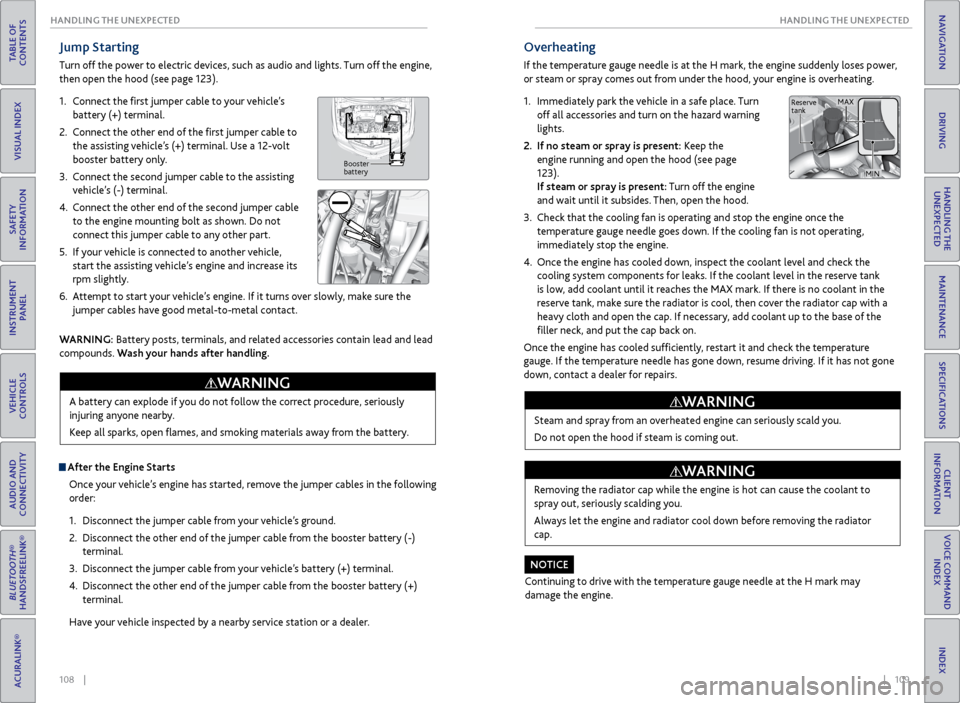
1. Connect the first jumper cable to your vehicle’s
battery (+) terminal.
2. Connect the other end of the first jumper cable to
the assisting vehicle’s (+) terminal. Use a 12-volt
booster battery only.
3. Connect the second jumper cable to the assisting
vehicle’s (-) terminal.
4. Connect the other end of the second jumper cable
to the engine mounting bolt as shown. Do not
connect this jumper cable to any other part.
5. If your vehicle is connected to another vehicle,
start the assisting vehicle’s engine and increase its
rpm slightly.
6. Attempt to start your vehicle’s engine. If it turns over slowly, make sure the
jumper cables have good metal-to-metal contact.
Booster
battery
WARNING: Battery posts, terminals, and related accessories contain lead and lead
compounds. Wash your hands after handling.
After the Engine Starts
Once your vehicle’s engine has started, remove the jumper cables in the following
order:
1. Disconnect the jumper cable from your vehicle’s ground.
2. Disconnect the other end of the jumper cable from the booster battery (-)
terminal.
3. Disconnect the jumper cable from your vehicle’s battery (+) terminal.
4. Disconnect the other end of the jumper cable from the booster battery (+)
terminal.
Have your vehicle inspected by a nearby service station or a dealer. A battery can explode if you do not follow the correct procedure, seriously
injuring anyone nearby.
Keep all sparks, open flames, and smoking materials away from the battery.
WARNING
Overheating
If the temperature gauge needle is at the H mark, the engine suddenly loses power,
or steam or spray comes out from under the hood, your engine is overheating.
1.
Immediately park the vehicle in a safe place. Turn
off all accessories and turn on the hazard warning
lights.
2. If no steam or spray is present: Keep the
engine running and open the hood (see page
123).
If steam or spray is present: Turn off the engine
and wait until it subsides. Then, open the hood.
3. Check that the cooling fan is operating and stop the engine once the
temperature gauge needle goes down. If the cooling fan is not operating,
immediately stop the engine.
4. Once the engine has cooled down, inspect the coolant level and check the
cooling system components for leaks. If the coolant level in the reserve tank
is low, add coolant until it reaches the MAX mark. If there is no coolant in the
reserve tank, make sure the radiator is cool, then cover the radiator cap with a
heavy cloth and open the cap. If necessary, add coolant up to the base of the
filler neck, and put the cap back on.
Once the engine has cooled sufficiently, restart it and check the temperature
gauge. If the temperature needle has gone down, resume driving. If it has not gone
down, contact a dealer for repairs.
Steam and spray from an overheated engine can seriously scald you.
Do not open the hood if steam is coming out.
WARNING
Removing the radiator cap while the engine is hot can cause the coolant to
spray out, seriously scalding you.
Always let the engine and radiator cool down before removing the radiator
cap.
WARNING
Continuing to drive with the temperature gauge needle at the H mark may
damage the engine.
NOTICE
Reserve
tank MAX
MIN
Page 60 of 78
112 || 113
HANDLING THE UNEXPECTED
HANDLING THE UNEXPECTED
TABLE OF
CONTENTS
INDEX
VISUAL INDEX
VOICE COMMAND INDEX
SAFETY
INFORMATION
CLIENT
INFORMATION
INSTRUMENT PANEL
SPECIFICATIONS
VEHICLE
CONTROLS
MAINTENANCE
AUDIO AND
CONNECTIVITY
HANDLING THE UNEXPECTED
BLUETOOTH®
HANDSFREELINK®
DRIVING
ACURALINK®
NAVIGATION
Tire Pressure Monitoring System (TPMS) - Required Federal
Explanation
Each tire, including the spare (if provided), should be checked monthly
when cold and inflated to the inflation pressure recommended by the
vehicle manufacturer on the vehicle placard or tire inflation pressure
label.
(If your vehicle has tires of a different size than the size indicated on the
vehicle placard or tire inflation pressure label, you should determine the
proper tire inflation pressure for those tires.)
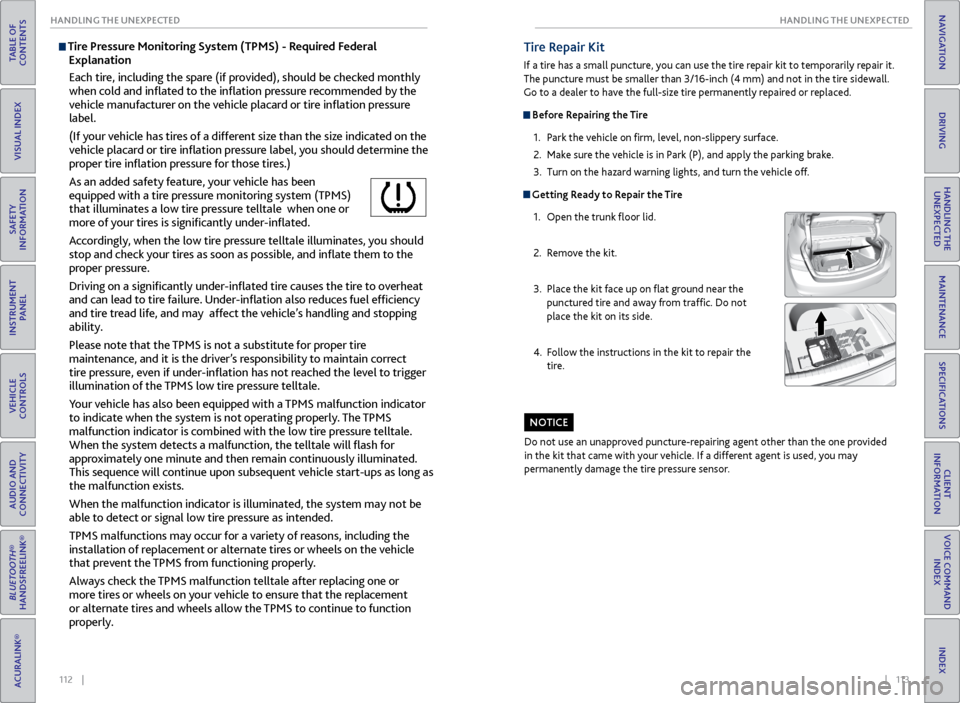
As an added safety feature, your vehicle has been
equipped with a tire pressure monitoring system (TPMS)
that illuminates a low tire pressure telltale when one or
more of your tires is significantly under-inflated.
Accordingly, when the low tire pressure telltale illuminates, you should
stop and check your tires as soon as possible, and inflate them to the
proper pressure.
Driving on a significantly under-inflated tire causes the tire to overheat
and can lead to tire failure. Under-inflation also reduces fuel efficiency
and tire tread life, and may affect the vehicle’s handling and stopping
ability.
Please note that the TPMS is not a substitute for proper tire
maintenance, and it is the driver’s responsibility to maintain correct
tire pressure, even if under-inflation has not reached the level to trigger
illumination of the TPMS low tire pressure telltale.
Your vehicle has also been equipped with a TPMS malfunction indicator
to indicate when the system is not operating properly. The TPMS
malfunction indicator is combined with the low tire pressure telltale.
When the system detects a malfunction, the telltale will flash for
approximately one minute and then remain continuously illuminated.
This sequence will continue upon subsequent vehicle start-ups as long as
the malfunction exists.
When the malfunction indicator is illuminated, the system may not be
able to detect or signal low tire pressure as intended.
TPMS malfunctions may occur for a variety of reasons, including the
installation of replacement or alternate tires or wheels on the vehicle
that prevent the TPMS from functioning properly.
Always check the TPMS malfunction telltale after replacing one or
more tires or wheels on your vehicle to ensure that the replacement
or alternate tires and wheels allow the TPMS to continue to function
properly.Tire Repair Kit
If a tire has a small puncture, you can use the tire repair kit to temporarily repair it.
The puncture must be smaller than 3/16-inch (4 mm) and not in the tire sidewall.
Go to a dealer to have the full-size tire permanently repaired or replaced.
Before Repairing the Tire
1. Park the vehicle on firm, level, non-slippery surface.
2. Make sure the vehicle is in Park (P), and apply the parking brake.
3. Turn on the hazard warning lights, and turn the vehicle off.
Getting Ready to Repair the Tire
1. Open the trunk floor lid.
2. Remove the kit.
3. Place the kit face up on flat ground near the
punctured tire and away from traffic. Do not
place the kit on its side.
4. Follow the instructions in the kit to repair the
tire.
Do not use an unapproved puncture-repairing agent other than the one provided
in the kit that came with your vehicle. If a different agent is used, you may
permanently damage the tire pressure sensor.
NOTICE
Page 61 of 78
114 || 115
HANDLING THE UNEXPECTED
HANDLING THE UNEXPECTED
TABLE OF
CONTENTS
INDEX
VISUAL INDEX
VOICE COMMAND INDEX
SAFETY
INFORMATION
CLIENT
INFORMATION
INSTRUMENT PANEL
SPECIFICATIONS
VEHICLE
CONTROLS
MAINTENANCE
AUDIO AND
CONNECTIVITY
HANDLING THE UNEXPECTED
BLUETOOTH®
HANDSFREELINK®
DRIVING
ACURALINK®
NAVIGATION
Changing a Flat Tire
If a tire goes flat while driving, grasp the steering wheel firmly, and brake gradually
to reduce speed. Stop in a safe place. Replace the flat tire with the compact
spare tire*. Go to a dealer as soon as possible to have the full-size tire repaired or
replaced.
Before Changing the Tire
1. Park the vehicle on a firm, level, non-slippery surface.
2. Put the vehicle in Park (P), and apply the parking brake.
3. Turn on the hazard warning lights and turn the vehicle off.
Getting Ready to Change the Tire
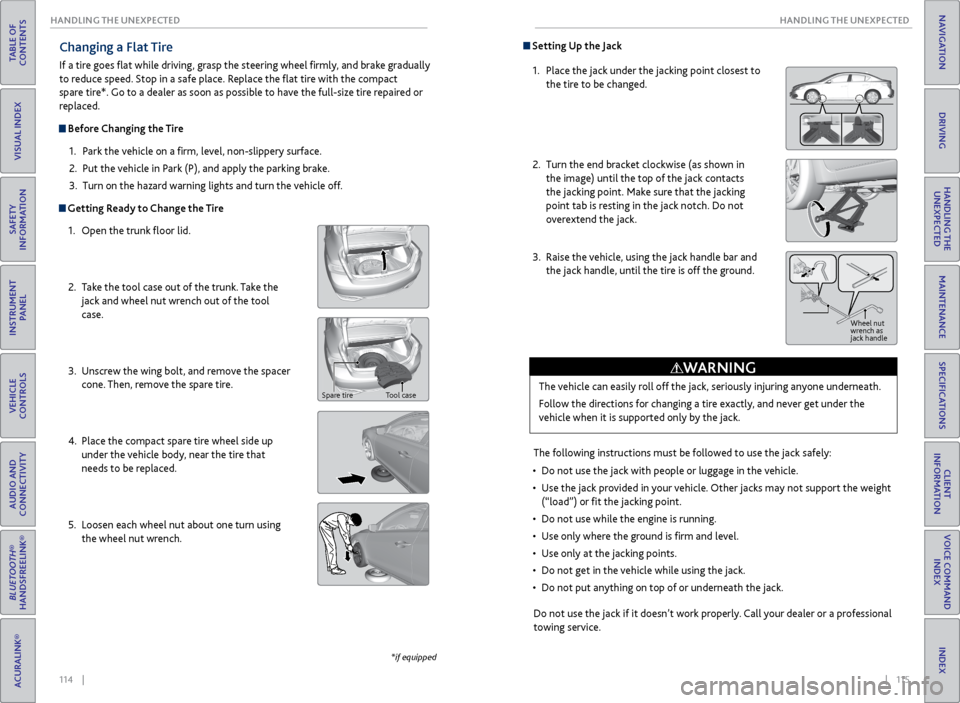
1. Open the trunk floor lid.
2. Take the tool case out of the trunk. Take the
jack and wheel nut wrench out of the tool
case.
3. Unscrew the wing bolt, and remove the spacer
cone. Then, remove the spare tire.
4. Place the compact spare tire wheel side up
under the vehicle body, near the tire that
needs to be replaced.
5. Loosen each wheel nut about one turn using
the wheel nut wrench.
*if equipped
Spare tire Tool case
Setting Up the Jack
1. Place the jack under the jacking point closest to
the tire to be changed.
2. Turn the end bracket clockwise (as shown in
the image) until the top of the jack contacts
the jacking point. Make sure that the jacking
point tab is resting in the jack notch. Do not
overextend the jack.
3. Raise the vehicle, using the jack handle bar and
the jack handle, until the tire is off the ground.
The following instructions must be followed to use the jack safely:
• Do not use the jack with people or luggage in the vehicle.
• Use the jack provided in your vehicle. Other jacks may not support the weight
(“load”) or fit the jacking point.
• Do not use while the engine is running.
• Use only where the ground is firm and level.
• Use only at the jacking points.
• Do not get in the vehicle while using the jack.
• Do not put anything on top of or underneath the jack.
The vehicle can easily roll off the jack, seriously injuring anyone underneath.
Follow the directions for changing a tire exactly, and never get under the
vehicle when it is supported only by the jack.
WARNING
Jack
handle bar
Do not use the jack if it doesn’t work properly. Call your dealer or a professional
towing service.
Wheel nut
wrench as
jack handle
Page 62 of 78
116 || 117
HANDLING THE UNEXPECTED
HANDLING THE UNEXPECTED
TABLE OF
CONTENTS
INDEX
VISUAL INDEX
VOICE COMMAND INDEX
SAFETY
INFORMATION
CLIENT
INFORMATION
INSTRUMENT PANEL
SPECIFICATIONS
VEHICLE
CONTROLS
MAINTENANCE
AUDIO AND
CONNECTIVITY
HANDLING THE UNEXPECTED
BLUETOOTH®
HANDSFREELINK®
DRIVING
ACURALINK®
NAVIGATION
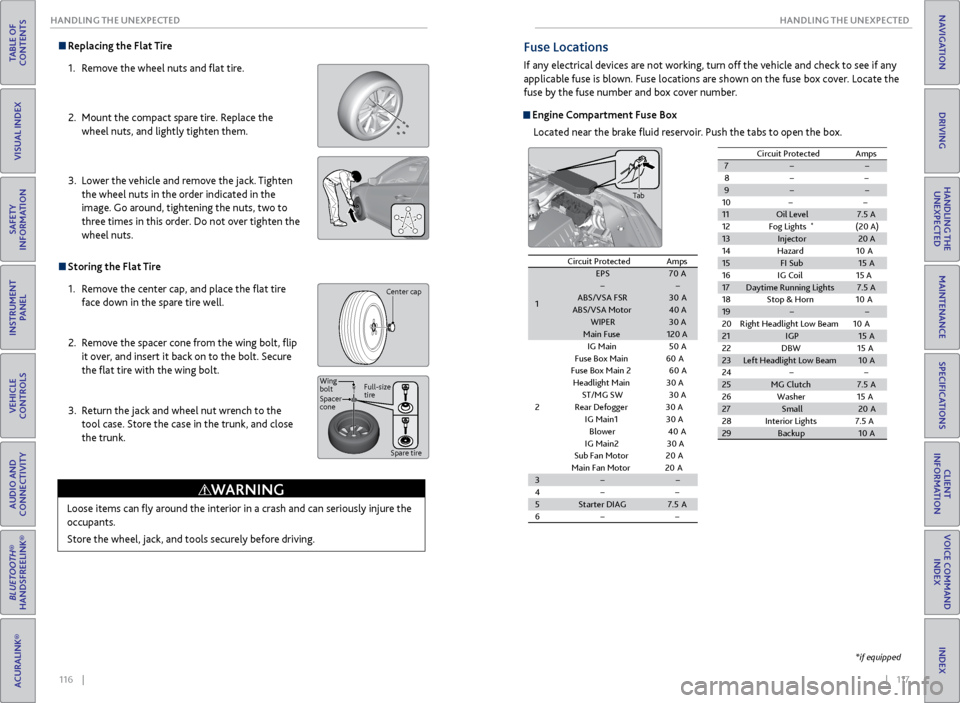
Replacing the Flat Tire
1. Remove the wheel nuts and flat tire.
2. Mount the compact spare tire. Replace the
wheel nuts, and lightly tighten them.
3. Lower the vehicle and remove the jack. Tighten
the wheel nuts in the order indicated in the
image. Go around, tightening the nuts, two to
three times in this order. Do not over tighten the
wheel nuts.
Storing the Flat Tire
1. Remove the center cap, and place the flat tire
face down in the spare tire well.
2. Remove the spacer cone from the wing bolt, flip
it over, and insert it back on to the bolt. Secure
the flat tire with the wing bolt.
3. Return the jack and wheel nut wrench to the
tool case. Store the case in the trunk, and close
the trunk.
Loose items can fly around the interior in a crash and can seriously injure the
occupants.
Store the wheel, jack, and tools securely before driving.
WARNING
Center cap
Spacer
cone Wing
bolt Full-size
tire
Spare tire
Fuse Locations
If any electrical devices are not working, turn off the vehicle and check to see if any
applicable fuse is blown. Fuse locations are shown on the fuse box cover. Locate the
fuse by the fuse number and box cover number.
Engine Compartment Fuse BoxLocated near the brake fluid reservoir. Push the tabs to open the box.
*if equipped
Circuit ProtectedAmps
1
EPS70 AABS/VSA FS R30AABS/VSA Moto r40 AWIPER30 AMain Fuse120 A
2
IG Main50A
Fuse Box Main 60A
Fuse Box Main 260A
Headlight Main 30 A
ST/MG SW30 A
Rear Defogger 30 A
IG Main
130 A
Blower40A
IG Main230 A
Sub Fan Motor20A
Main Fan Motor20A3
4
5Starter DIAG7.5A
6
7
8
9
10
11 Oil Level 7.5 A
12 Fog Lights
*(20 A)
13 Injector 20 A
14 Hazard 10A
15 FI Sub 15A
16 IG Coil 15 A
17 Daytime Running Lights 7.5 A
18 Stop & Horn 10A
19
20 Right Headlight Low Beam 10A
21 IGP 15A
22 DBW1 5A
23 Left Headlight Low Beam 10A
24
25 MG Clutch 7.5A
26 Washer 15A
27 Small 20A
28 Interior Lights 7.5 A
29 Backup 10A
Circuit Protecte
dAmps
Tab
Circuit Protected Amps
1 EPS
70A
ABS/VSA FS R 30A
ABS/VSA Moto r40 A
WIPER 30 A
Main Fuse 120 A
2 IG Main
50A
Fuse Box Main 60A
Fuse Box Main 260A
Headlight Main 30 A
ST/MG SW 30 A
Rear Defogger 30 A
IG Main 13 0 A
Blowe r4 0A
IG Main 23 0 A
Sub Fan Moto r20A
Main Fan Moto r20A
3
4
5 Starter DIAG 7.5A
6 7
8
9
1011Oil Level7.5 A
12 Fog Lights*(20 A)13Injector20 A
14 Hazard 10A
15FI Sub15A
16 IG Coil 15 A
17Daytime Running Lights7.5 A
18 Stop & Horn 10A
19
20 Right Headlight Low Beam 10A
21IGP15A
22 DBW15A23Left Headlight Low Beam10A
2425MG Clutch7.5A
26 Washer 15A
27Small20 A
28 Interior Lights 7.5 A
29Backu p10A
Circuit Protecte dAmps
Page 63 of 78
118 || 119
HANDLING THE UNEXPECTED
HANDLING THE UNEXPECTED
TABLE OF
CONTENTS
INDEX
VISUAL INDEX
VOICE COMMAND INDEX
SAFETY
INFORMATION
CLIENT
INFORMATION
INSTRUMENT PANEL
SPECIFICATIONS
VEHICLE
CONTROLS
MAINTENANCE
AUDIO AND
CONNECTIVITY
HANDLING THE UNEXPECTED
BLUETOOTH®
HANDSFREELINK®
DRIVING
ACURALINK®
NAVIGATION
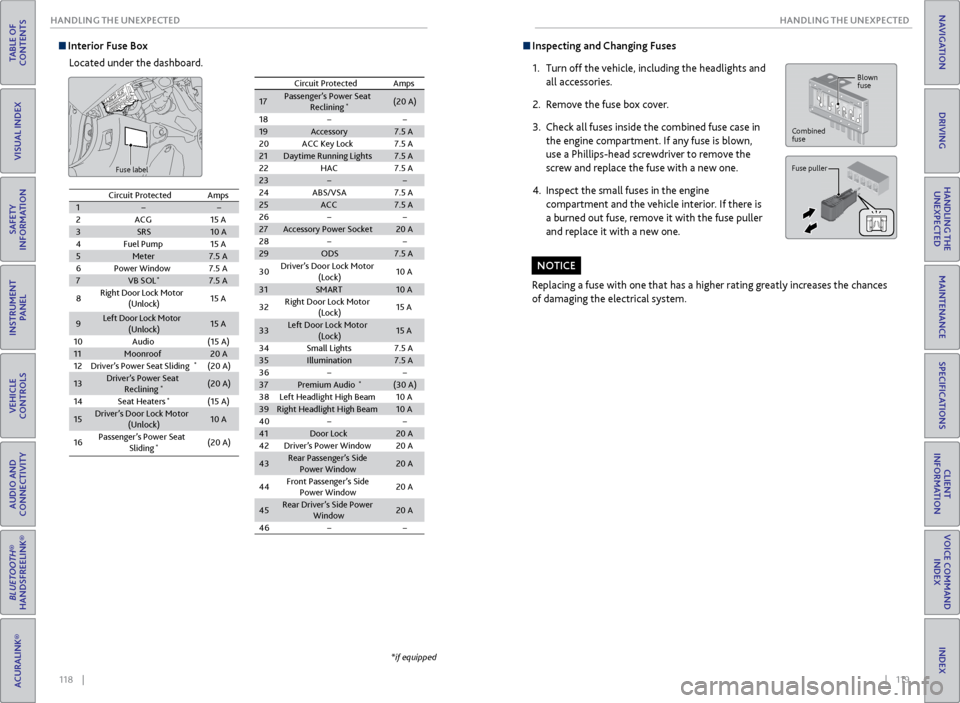
Interior Fuse Box
Located under the dashboard.
Fuse label
*if equipped
Circuit ProtectedAmps12ACG15 A3SRS10 A4Fuel Pump15 A5Meter7.5 A6Power Windo w7.5 A7VB SOL*7.5 A
8Right Door Lock Motor
(Unlock)15 A
9Left Door Lock Motor
(Unlock )15 A
10Audio(15 A)11Moonroof20 A12Driver’s Power Seat Slidin g*(20 A)
13Driver’s Power Seat
Reclining*(20 A)
14Seat Heaters*(15 A)
15Driver’s Door Lock Motor (Unlock)10 A
16Passenger’s Power Seat
Sliding*(20 A)
17Passenger’s Power Seat
Reclinin g*(20 A)
18
19 Accessory 7.5 A
20 ACC Key Lock 7.5 A
21 Daytime Running Lights 7.5 A
22 HAC 7.5 A
23
24 ABS/VSA 7.5 A
25 ACC 7.5 A
26
27 Accessory Power Socket 20 A
28
29 ODS 7.5 A
Circuit Protected
Amps
30 Driver’s Door Lock Motor
(Lock) 10
A
31 SMART 10 A
32 Right Door Lock Motor
(Lock) 15
A
33 Left Door Lock Motor
(Lock) 15
A
34 Small Lights 7.5 A
35 Illumination 7.5 A
36
37 Premium Audio
*(30 A)
38 Left Headlight High Beam 10 A
39 Right Headlight High Bea m10 A
40
41 Door Lock 20 A
42 Driver’s Power Window 20 A
43 Rear Passenger’s Side
Power Window 20
A
44 Front Passenger’s Side
Power Window 20
A
45 Rear Driver’s Side Power
Window 20
A
46
Inspecting and Changing Fuses
1. Turn off the vehicle, including the headlights and
all accessories.
2. Remove the fuse box cover.
3. Check all fuses inside the combined fuse case in
the engine compartment. If any fuse is blown,
use a Phillips-head screwdriver to remove the
screw and replace the fuse with a new one.
4. Inspect the small fuses in the engine
compartment and the vehicle interior. If there is
a burned out fuse, remove it with the fuse puller
and replace it with a new one.
Replacing a fuse with one that has a higher rating greatly increases the chances
of damaging the electrical system.
NOTICE
Combined
fuse Blown
fuse
Fuse puller
Circuit Protected
Amps
1
2 ACG 15 A
3 SRS 10 A
4 Fuel Pump 15 A
5 Meter 7.5 A
6 Power Windo w7.5 A
7 VB SOL
*7.5 A
8 Right Door Lock Motor
(Unlock) 15
A
9 Left Door Lock Motor
(Unlock ) 15
A
10 Audio (15 A)
11 Moonroof 20 A
12 Driver’s Power Seat Slidin g
*(20 A)
13 Driver’s Power Seat
Reclining
*(20 A)
14 Seat Heaters
*(15 A)
15 Driver’s Door Lock Motor
(Unlock) 10
A
16 Passenger’s Power Seat
Sliding
*(20 A)
17Passenger’s Power Seat Reclinin g*(20 A)
1819Accessory7.5 A20ACC Key Lock7.5 A21Daytime Running Lights7.5 A22HAC7.5 A2324ABS/VSA7.5 A25ACC7.5 A2627Accessory Power Socket20 A2829ODS7.5 A
Circuit ProtectedAmps
30Driver’s Door Lock Motor
(Lock)10 A
31SMART10 A
32Right Door Lock Motor
(Lock)15 A
33Left Door Lock Motor
(Lock)15 A
34Small Lights7.5 A35Illumination7.5 A3637Premium Audio*(30 A)38Left Headlight High Beam10 A39Right Headlight High Bea m10 A4041Door Lock20 A42Driver’s Power Window20 A
43Rear Passenger’s Side
Power Window20 A
44Front Passenger’s Side
Power Window20 A
45Rear Driver’s Side Power
Window20 A
46
Page 71 of 78
134 || 135
MAINTENANCE
MAINTENANCE
TABLE OF
CONTENTS
INDEX
VISUAL INDEX
VOICE COMMAND INDEX
SAFETY
INFORMATION
CLIENT
INFORMATION
INSTRUMENT PANEL
SPECIFICATIONS
VEHICLE
CONTROLS
MAINTENANCE
AUDIO AND
CONNECTIVITY
HANDLING THE UNEXPECTED
BLUETOOTH®
HANDSFREELINK®
DRIVING
ACURALINK®
NAVIGATION
Temperature
The temperature grades are A (the highest), B, and C, representing the tire’s
resistance to the generation of heat and its ability to dissipate heat when
tested under controlled conditions on a specified indoor laboratory test wheel.
Sustained high temperature can cause the material of the tire to degenerate and
reduce tire life, and excessive temperature can lead to sudden tire failure. The
grade C corresponds to a level of performance which all passenger car tires must
meet under the Federal Motor Vehicle Safety Standard No. 109. Grades B and
A represent higher levels of performance on the laboratory test wheel than the
minimum required by law.
WARNING: The temperature grade for this tire is established for a tire that
is properly inflated and not overloaded. Excessive speed, underinflation, or
excessive loading, either separately or in combination, can cause heat buildup
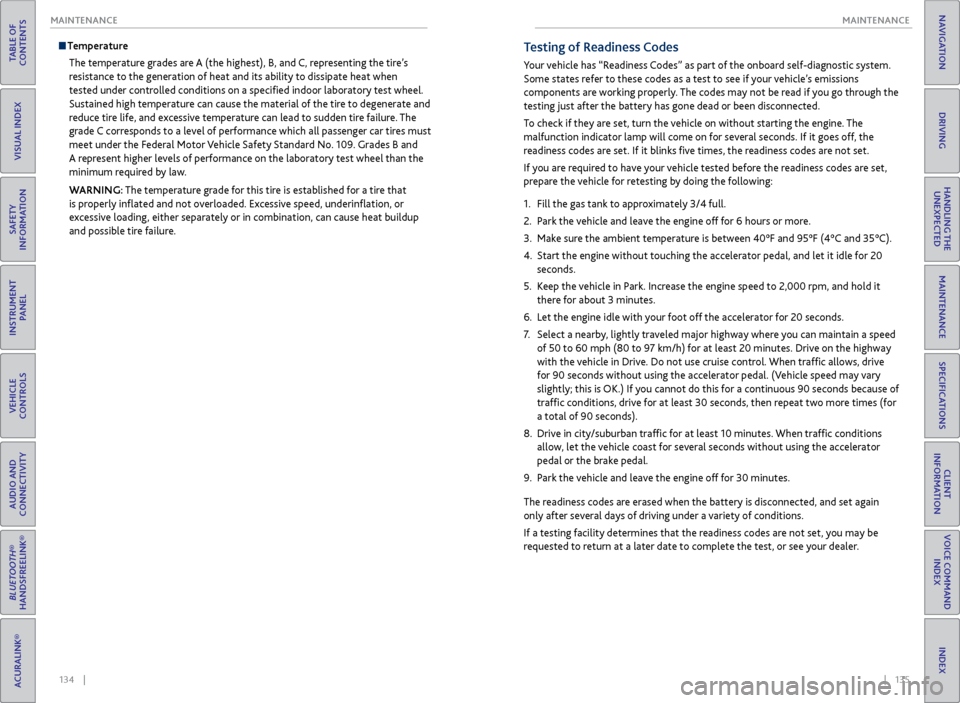
and possible tire failure.Testing of Readiness Codes
Your vehicle has “Readiness Codes” as part of the onboard self-diagnostic system.
Some states refer to these codes as a test to see if your vehicle’s emissions
components are working properly. The codes may not be read if you go through the
testing just after the battery has gone dead or been disconnected.
To check if they are set, turn the vehicle on without starting the engine. The
malfunction indicator lamp will come on for several seconds. If it goes off, the
readiness codes are set. If it blinks five times, the readiness codes are not set.
If you are required to have your vehicle tested before the readiness codes are set,
prepare the vehicle for retesting by doing the following:
1. Fill the gas tank to approximately 3/4 full.
2. Park the vehicle and leave the engine off for 6 hours or more.
3. Make sure the ambient temperature is between 40°F and 95°F (4°C and 35°C).
4. Start the engine without touching the accelerator pedal, and let it idle for 20
seconds.
5. Keep the vehicle in Park. Increase the engine speed to 2,000 rpm, and hold it
there for about 3 minutes.
6. Let the engine idle with your foot off the accelerator for 20 seconds.
7. Select a nearby, lightly traveled major highway where you can maintain a speed
of 50 to 60 mph (80 to 97 km/h) for at least 20 minutes. Drive on the highway
with the vehicle in Drive. Do not use cruise control. When traffic allows, drive
for 90 seconds without using the accelerator pedal. (Vehicle speed may vary
slightly; this is OK.) If you cannot do this for a continuous 90 seconds because of
traffic conditions, drive for at least 30 seconds, then repeat two more times (for
a total of 90 seconds).
8. Drive in city/suburban traffic for at least 10 minutes. When traffic conditions
allow, let the vehicle coast for several seconds without using the accelerator
pedal or the brake pedal.
9. Park the vehicle and leave the engine off for 30 minutes.
The readiness codes are erased when the battery is disconnected, and set again
only after several days of driving under a variety of conditions.
If a testing facility determines that the readiness codes are not set, you may be
requested to return at a later date to complete the test, or see your dealer.
Page 72 of 78
136 || 137
CLIENT INFORMATION
SPECIFICATIONS
TABLE OF
CONTENTS
INDEX
VISUAL INDEX
VOICE COMMAND INDEX
SAFETY
INFORMATION
CLIENT
INFORMATION
INSTRUMENT PANEL
SPECIFICATIONS
VEHICLE
CONTROLS
MAINTENANCE
AUDIO AND
CONNECTIVITY
HANDLING THE UNEXPECTED
BLUETOOTH®
HANDSFREELINK®
DRIVING
ACURALINK®
NAVIGATION
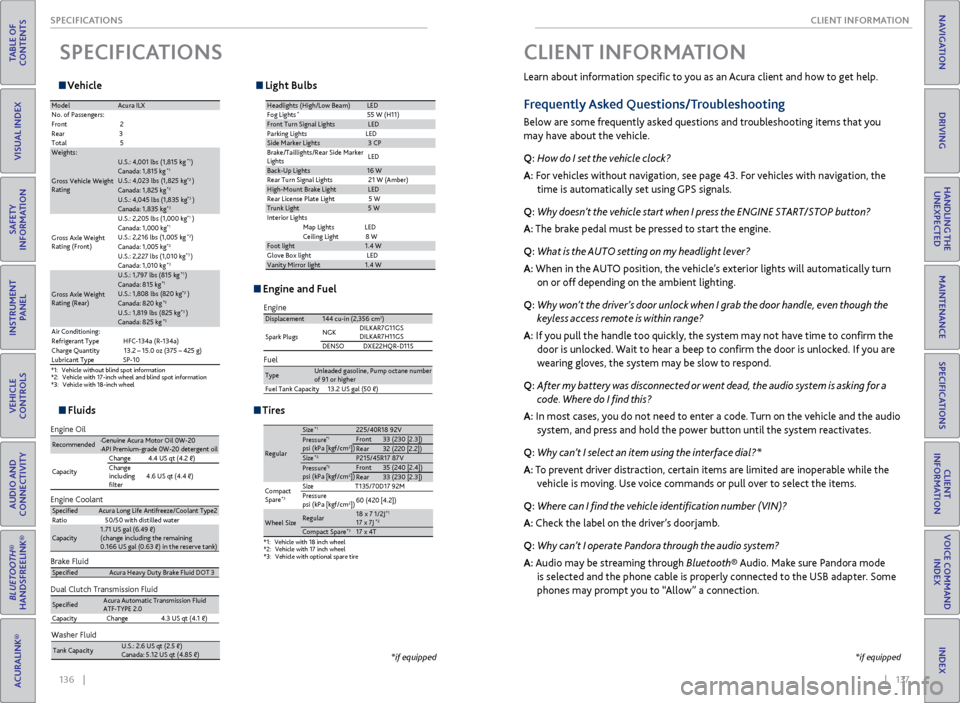
Vehicle
SPECIFICATIONS
*1:V ehicl e without blind spot information *2:Vehicle with 17-inch wheel and blind spot information *3:V ehic le with 18-inc h wheel
ModelAcura IL X
No. of Passengers :
Fron t2
Rear 3
Tota l5
Weights:
Gross Vehicle Weight
Ratin g
U.S.: 4,001 lbs (1,815 kg )*1Canada: 1,815 kg*1U.S.: 4,023 lbs (1,825 kg )*2Canada: 1,825 kg*2U.S.: 4,045 lbs (1,835 kg )*3Canada: 1,835 kg*3
Gross Axle Weight
Rating (Front)U.S.: 2,205 lbs (1,000 kg
)
*1Canada: 1,000 kg*1U.S.: 2,216 lbs (1,005 kg )*2Canada: 1,005 kg*2U.S.: 2,227 lbs (1,010 kg )*3Canada: 1,010 kg*3
Gross Axle Weight
Rating (Rear)
U.S.: 1,797 lbs (815 kg )*1Canada: 815 kg*1U.S.: 1,808 lbs (820 kg )*2Canada: 820 kg*2U.S.: 1,819 lbs (825 kg )*3Canada: 825 kg*3Air Conditioning:
Refrigerant Type HFC-134a (R-134a)
Charge Quantity 13.2 – 15.0 oz (375 – 425 g)
Lubricant Typ eSP-10
Light Bulbs
Headlights (High/Low Beam )LED
Fog Lights*55 W (H11)Front Turn Signal LightsLE D
Parking Lights LED
Side Ma rker Lights3 CP
Brake/Taillights/Rear Side Marker
Light s LE
D
Back-Up Lights16 W
Rear Turn Signal Lights 21 W (Amber)
High-Mount Brake Ligh tLED
Rear License Plate Light 5 W
Trunk Light5 W
In teri or Lights
Map Lights LED
Ceiling Ligh t8 W
Foot light1.4 W
Glove Box lightL ED
Vanity Mirror light1.4 W
Fluids
Brake Fluid
Dual Clutch Transmission Fluid
Specie dAcura Heavy Duty Brake Fluid DOT 3
SpeciedAcura Automatic Transmission Fluid
ATF-TYPE 2. 0
Capacity Change4 .3 US qt (4.1)
Engine Oil
Engine Coolan
t
Recommended·Genuine Acura Motor Oil 0W-2 0
·API Premium-grade 0W-20 detergent oi l
Capacity Change
4.4 US qt (4.2 )
Change
including
lter 4.6 US qt (4.4 )
Specie
dAcura Long Life Antifreeze/Coolant Type 2
Ratio 50/50 with distilled wate r
Capacity1.71 US gal (6.49 )
(change including the remaining
0.166 US gal (0.63 ) in the reserve tank )
Washer Fluid
Tank Capacit yU.S.: 2.6 US qt (2.5 )
Canada: 5.12 US qt (4.85 )
Engine and Fuel
Engine
FuelDisplacement144 cu-in (2,356 cm3)
Spark Plugs NG
K DILKAR7G11GS
DILKAR7H11GS
DENSO DXE22HQR-D11S
TypeUnleaded gasoline, Pump octane number of 91 or higher
Fuel Tank Capacity 13.2 US gal (50 )
Tires
*1:Vehicle with 18 inch wheel*2:Vehicle with 17 inch wheel*3: Vehicle with optional spare tire
Regular
Size*1225/40R18 92 VPressure*1psi (kPa [kgf/cm2Front33 (230 [2.3])Rear32 (220 [2.2])Size*2P215/45R17 87 VPressure*2psi (kPa [kgf/cm2Front35 (240 [2.4])Rear33 (230 [2.3])
Compact
Spar e
*3Size T135/70D17 92M
Pressure
psi (kPa [kgf/cm
2]) 60 (420 [4.2])
Wheel SizeRegula
r18 x 7 1/2J*117 x 7J*2Compact Spar e*317 x 4T
])
])
*if equipped
Learn about information specific to you as an Acura client and how to get help.
Frequently Asked Questions/Troubleshooting
Below are some frequently asked questions and troubleshooting items that you
may have about the vehicle.
Q: How do I set the vehicle clock?
A: For vehicles without navigation, see page 43. For vehicles with navigation, the
time is automatically set using GPS signals.
Q: Why doesn’t the vehicle start when I press the ENGINE START/STOP button?
A: The brake pedal must be pressed to start the engine.
Q: What is the AUTO setting on my headlight lever?
A: When in the AUTO position, the vehicle’s exterior lights will automatically turn
on or off depending on the ambient lighting.
Q: Why won’t the driver’s door unlock when I grab the door handle, even though the
keyless access remote is within range?
A: If you pull the handle too quickly, the system may not have time to confirm the
door is unlocked. Wait to hear a beep to confirm the door is unlocked. If you are
wearing gloves, the system may be slow to respond.
Q: After my battery was disconnected or went dead, the audio system is asking for a
code. Where do I find this?
A: In most cases, you do not need to enter a code. Turn on the vehicle and the audio
system, and press and hold the power button until the system reactivates.
Q: Why can’t I select an item using the interface dial?*
A: To prevent driver distraction, certain items are limited are inoperable while the
vehicle is moving. Use voice commands or pull over to select the items.
Q: Where can I find the vehicle identification number (VIN)?
A: Check the label on the driver’s doorjamb.
Q: Why can’t I operate Pandora through the audio system?
A: Audio may be streaming through Bluetooth® Audio. Make sure Pandora mode
is selected and the phone cable is properly connected to the USB adapter. Some
phones may prompt you to “Allow” a connection.
CLIENT INFORMATION
*if equipped
Page 76 of 78
144 || 145
VOICE COMMAND INDEX
VOICE COMMAND INDEX
TABLE OF
CONTENTS
INDEX
VISUAL INDEX
VOICE COMMAND INDEX
SAFETY
INFORMATION
CLIENT
INFORMATION
INSTRUMENT PANEL
SPECIFICATIONS
VEHICLE
CONTROLS
MAINTENANCE
AUDIO AND
CONNECTIVITY
HANDLING THE UNEXPECTED
BLUETOOTH®
HANDSFREELINK®
DRIVING
ACURALINK®
NAVIGATION
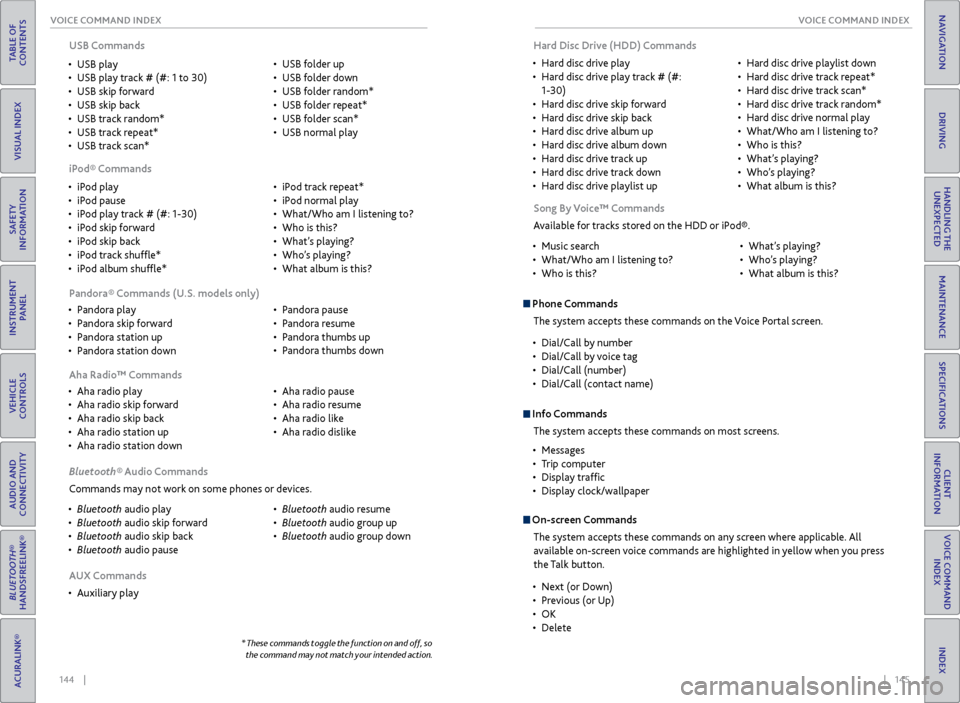
• iPod play
• iPod pause
• iPod play track # (#: 1-30)
• iPod skip forward
• iPod skip back
• iPod track shuffle*
• iPod album shuffle* •
iPod track repeat*
• iPod normal play
• What/Who am I listening to?
• Who is this?
• What’s playing?
• Who’s playing?
• What album is this?
USB Commands
• USB play
• USB play track # (#: 1 to 30)
• USB skip forward
• USB skip back
• USB track random*
• USB track repeat*
• USB track scan* •
USB folder up
• USB folder down
• USB folder random*
• USB folder repeat*
• USB folder scan*
• USB normal play
iPod® Commands
• Pandora play
• Pandora skip forward
• Pandora station up
• Pandora station down •
Pandora pause
• Pandora resume
• Pandora thumbs up
• Pandora thumbs down
Pandora® Commands (U.S. models only)
• Aha radio play
• Aha radio skip forward
• Aha radio skip back
• Aha radio station up
• Aha radio station down •
Aha radio pause
• Aha radio resume
• Aha radio like
• Aha radio dislike
Aha Radio™ Commands
Bluetooth® Audio Commands
Commands may not work on some phones or devices.
• Bluetooth audio play
• Bluetooth audio skip forward
• Bluetooth audio skip back
• Bluetooth audio pause •
Bluetooth audio resume
• Bluetooth audio group up
• Bluetooth audio group down
* These commands toggle the function on and off, so
the command may not match your intended action.
AUX Commands
• Auxiliary play Song By Voice™ Commands
Available for tracks stored on the HDD or iPod®.
• Music search
• What/Who am I listening to?
• Who is this? •
What’s playing?
• Who’s playing?
• What album is this?
Phone Commands
The system accepts these commands on the Voice Portal screen.
• Dial/Call by number
• Dial/Call by voice tag
• Dial/Call (number)
• Dial/Call (contact name)
On-screen Commands
The system accepts these commands on any screen where applicable. All
available on-screen voice commands are highlighted in yellow when you press
the Talk button.
Info CommandsThe system accepts these commands on most screens.
• Messages
• Trip computer
• Display traffic
• Display clock/wallpaper
• Next (or Down)
• Previous (or Up)
• OK
• Delete
Hard Disc Drive (HDD) Commands
• Hard disc drive play
• Hard disc drive play track # (#:
1-30)
• Hard disc drive skip forward
• Hard disc drive skip back
• Hard disc drive album up
• Hard disc drive album down
• Hard disc drive track up
• Hard disc drive track down
• Hard disc drive playlist up •
Hard disc drive playlist down
• Hard disc drive track repeat*
• Hard disc drive track scan*
• Hard disc drive track random*
• Hard disc drive normal play
• What/Who am I listening to?
• Who is this?
• What’s playing?
• Who’s playing?
• What album is this?
Page 77 of 78
146 || 147
INDEX
INDEX
TABLE OF
CONTENTS
INDEX
VISUAL INDEX
VOICE COMMAND INDEX
SAFETY
INFORMATION
CLIENT
INFORMATION
INSTRUMENT PANEL
SPECIFICATIONS
VEHICLE
CONTROLS
MAINTENANCE
AUDIO AND
CONNECTIVITY
HANDLING THE UNEXPECTED
BLUETOOTH®
HANDSFREELINK®
DRIVING
ACURALINK®
NAVIGATION
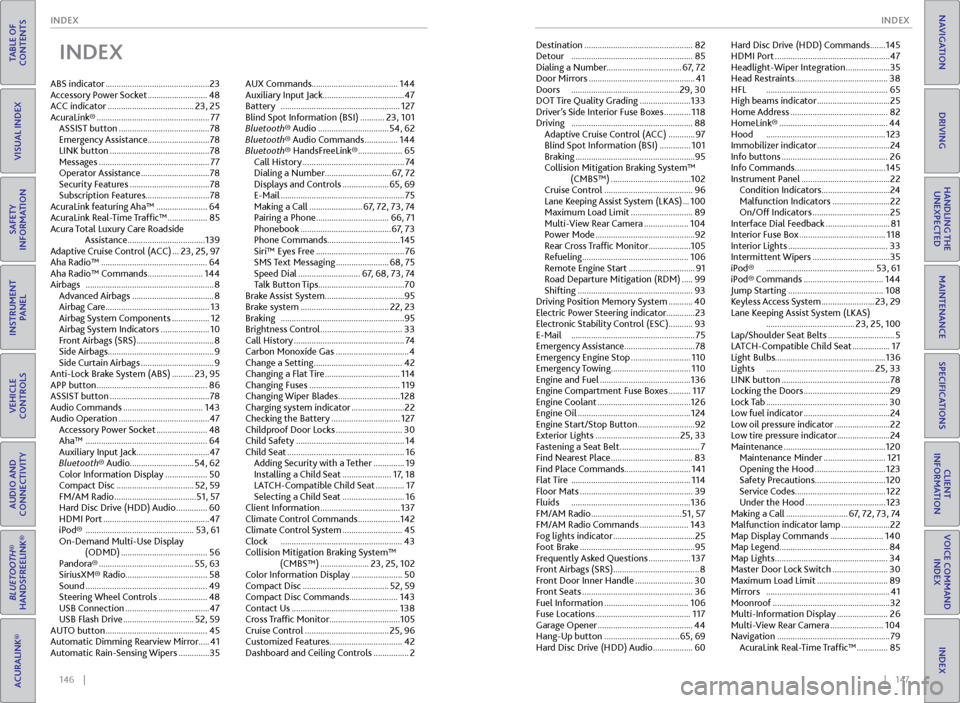
INDEX
ABS indicator ............................................... 23
Accessory Power Socket ........................... 48
ACC indicator ....................................... 23, 25
AcuraLink® ................................................... 77
ASSIST button ......................................... 78
Emergency Assistance ............................ 78
LINK button ............................................. 78
Messages .................................................. 77
Operator Assistance ............................... 78
Security Features .................................... 78
Subscription Features .............................78
AcuraLink featuring Aha™ ....................... 64
AcuraLink Real-Time Traffic™ .................. 85
Acura Total Luxury Care Roadside Assistance ................................... 139
Adaptive Cruise Control (ACC) ... 23, 25, 97
Aha Radio™ ................................................ 64
Aha Radio™ Commands ......................... 144
Airbags .......................................................... 8
Advanced Airbags ..................................... 8
Airbag Care ............................................... 13
Airbag System Components ................. 12
Airbag System Indicators ...................... 10
Front Airbags (SRS) ................................... 8
Side Airbags ................................................ 9
Side Curtain Airbags ................................. 9
Anti-Lock Brake System (ABS) .......... 23, 95
APP button .................................................. 86
ASSIST button ............................................. 78
Audio Commands .................................... 143
Audio Operation ......................................... 47
Accessory Power Socket ....................... 48
Aha™ ....................................................... 64
Auxiliary Input Jack ................................. 47
Bluetooth® Audio .............................54, 62
Color Information Display ................... 50
Compact Disc ................................... 52, 59
FM/AM Radio ..................................... 51, 57
Hard Disc Drive (HDD) Audio .............. 60
HDMI Port ................................................ 47
iPod® ................................................. 53, 61
On-Demand Multi-Use Display (ODMD) ....................................... 56
Pandora® ........................................... 55, 63
SiriusXM® Radio..................................... 58
Sound ....................................................... 49
Steering Wheel Controls ...................... 48
USB Connection ...................................... 47
USB Flash Drive ................................ 52, 59
AUTO button .............................................. 45
Automatic Dimming Rearview Mirror .....41
Automatic Rain-Sensing Wipers .............. 35AUX Commands
....................................... 144
Auxiliary Input Jack ..................................... 47
Battery ...................................................... 127
Blind Spot Information (BSI) ........... 23, 101
Bluetooth® Audio ................................ 54, 62
Bluetooth® Audio Commands ............... 144
Bluetooth® HandsFreeLink® .................... 65
Call History .............................................. 74
Dialing a Number .............................. 67, 72
Displays and Controls ..................... 65, 69
E-Mail ........................................................ 75
Making a Call ........................ 67, 72, 73, 74
Pairing a Phone ................................. 66, 71
Phonebook ......................................... 67, 73
Phone Commands .................................145
Siri™ Eyes Free ........................................ 76
SMS Text Messaging ........................ 68, 75
Speed Dial ............................ 67, 68, 73, 74
Talk Button Tips ....................................... 70
Brake Assist System .................................... 95
Brake system ........................................ 22, 23
Braking ........................................................ 95
Brightness Control ..................................... 33
Call History .................................................. 74
Carbon Monoxide Gas ................................. 4
Change a Setting ........................................ 42
Changing a Flat Tire .................................. 114
Changing Fuses ......................................... 119
Changing Wiper Blades ............................ 128
Charging system indicator ........................ 22
Checking the Battery ............................... 127
Childproof Door Locks .............................. 30
Child Safety ................................................. 14
Child Seat ..................................................... 16
Adding Security with a Tether .............. 19
Installing a Child Seat ...................... 17, 18
LATCH-Compatible Child Seat ............. 17
Selecting a Child Seat ............................ 16
Client Information .................................... 137
Climate Control Commands ................... 142
Climate Control System ........................... 45
Clock ....................................................... 43
Collision Mitigation Braking System™ (CMBS™) ...................... 23, 25, 102
Color Information Display ....................... 50
Compact Disc ....................................... 52, 59
Compact Disc Commands ...................... 143
Contact Us ................................................ 138
Cross Traffic Monitor ................................ 105
Cruise Control ...................................... 25, 96
Customized Features .................................42
Dashboard and Ceiling Controls ................ 2Destination .................................................
82
Detour ....................................................... 85
Dialing a Number .................................. 67, 72
Door Mirrors ................................................ 41
Doors ................................................. 29, 30
DOT Tire Quality Grading ....................... 133
Driver’s Side Interior Fuse Boxes ............ 118
Driving ....................................................... 88
Adaptive Cruise Control (ACC) ............ 97
Blind Spot Information (BSI) .............. 101
Braking ...................................................... 95
Collision Mitigation Braking System™ (CMBS™) .................................... 102
Cruise Control ........................................ 96
Lane Keeping Assist System (LKAS) ... 100
Maximum Load Limit ............................ 89
Multi-View Rear Camera .................... 104
Power Mode ............................................. 92
Rear Cross Traffic Monitor ................... 105
Refueling ................................................ 106
Remote Engine Start .............................. 91
Road Departure Mitigation (RDM) ..... 99
Shifting .................................................... 93
Driving Position Memory System ........... 40
Electric Power Steering indicator .............23
Electronic Stability Control (ESC)........... 93
E-Mail ........................................................ 75
Emergency Assistance ................................78
Emergency Engine Stop ........................... 110
Emergency Towing ....................................
110
Engine and Fuel ......................................... 136
Engine Compartment Fuse Boxes .......... 117
Engine Coolant .......................................... 126
Engine Oil ................................................... 124
Engine Start/Stop Button .......................... 92
Exterior Lights ...................................... 25, 33
Fastening a Seat Belt .................................... 7
Find Nearest Place ..................................... 83
Find Place Commands .............................. 141
Flat Tire ...................................................... 114
Floor Mats ................................................... 39
Fluids ...................................................... 136
FM/AM Radio ......................................... 51, 57
FM/AM Radio Commands ...................... 143
Fog lights indicator ..................................... 25
Foot Brake .................................................... 95
Frequently Asked Questions ................... 137
Front Airbags (SRS) ....................................... 8
Front Door Inner Handle .......................... 30
Front Seats .................................................. 36
Fuel Information ...................................... 106
Fuse Locations ........................................... 117
Garage Opener ........................................... 44
Hang-Up button .................................. 65, 69
Hard Disc Drive (HDD) Audio .................. 60Hard Disc Drive (HDD) Commands .......
145
HDMI Port .................................................... 47
Headlight-Wiper Integration .................... 35
Head Restraints .......................................... 38
HFL ....................................................... 65
High beams indicator ................................. 25
Home Address ............................................ 82
HomeLink® ................................................. 44
Hood ...................................................... 123
Immobilizer indicator ................................. 24
Info buttons ................................................ 26
Info Commands ......................................... 145
Instrument Panel ........................................ 22
Condition Indicators ............................... 24
Malfunction Indicators .......................... 22
On/Off Indicators ................................... 25
Interface Dial Feedback ............................. 81
Interior Fuse Box ....................................... 118
Interior Lights ............................................. 33
Intermittent Wipers ................................... 35
iPod® ................................................. 53, 61
iPod® Commands .................................... 144
Jump Starting ........................................... 108
Keyless Access System ........................ 23, 29
Lane Keeping Assist System (LKAS) ........................................ 23, 25, 100
Lap/Shoulder Seat Belts .............................. 5
LATCH-Compatible Child Seat ................. 17
Light Bulbs .................................................. 136
Lights ................................................. 25, 33
LINK button ................................................. 78
Locking the Doors ....................................... 29
Lock Tab ....................................................... 30
Low fuel indicator ....................................... 24
Low oil pressure indicator ......................... 22
Low tire pressure indicator ........................24
Maintenance .............................................. 120
Maintenance Minder ............................ 121
Opening the Hood ................................ 123
Safety Precautions ................................ 120
Service Codes ......................................... 122
Under the Hood .................................... 123
Making a Call ............................ 67, 72, 73, 74
Malfunction indicator lamp ...................... 22
Map Display Commands ........................ 140
Map Legend ................................................. 84
Map Lights ................................................... 34
Master Door Lock Switch ......................... 30
Maximum Load Limit ................................ 89
Mirrors ........................................................ 41
Moonroof ..................................................... 32
Multi-Information Display ....................... 26
Multi-View Rear Camera ........................ 104
Navigation ................................................... 79
AcuraLink Real-Time Traffic™ .............. 85