App Acura ILX 2016 Owner's Manual
[x] Cancel search | Manufacturer: ACURA, Model Year: 2016, Model line: ILX, Model: Acura ILX 2016Pages: 521, PDF Size: 24.09 MB
Page 482 of 521

481
uuIf a Tire Goes Flat uChanging a Flat Tire
Handling the Unexpected
If you replace a flat tire with the spare tire, the low tire pressure/TPMS indicator
comes on while you are driving. After dr iving for a few miles (kilometers), the
indicator will start blinking for a short time and then stay on. Tire Pressure
Monitor Problem appears on the multi-information display, but this is normal.
If you replace the tire with a specified regular tire, the warning message on the
multi-information display and the low tire pressure/TPMS indicator will go off after
a few miles (kilometers).
■TPMS and the Spare Tire1 TPMS and the Spare Tire
The system cannot monitor th e pressure of the spare
tire. Manually check the spare tire pressure to be sure
that it is correct.
Use the TPMS specific wheels. Each is equipped with
a tire pressure sensor mount ed inside the tire behind
the valve stem.
16 ACURA ILX-31TX66300.book 481 ページ 2014年12月22日 月曜日 午後10時15分
Page 483 of 521
482
Handling the Unexpected
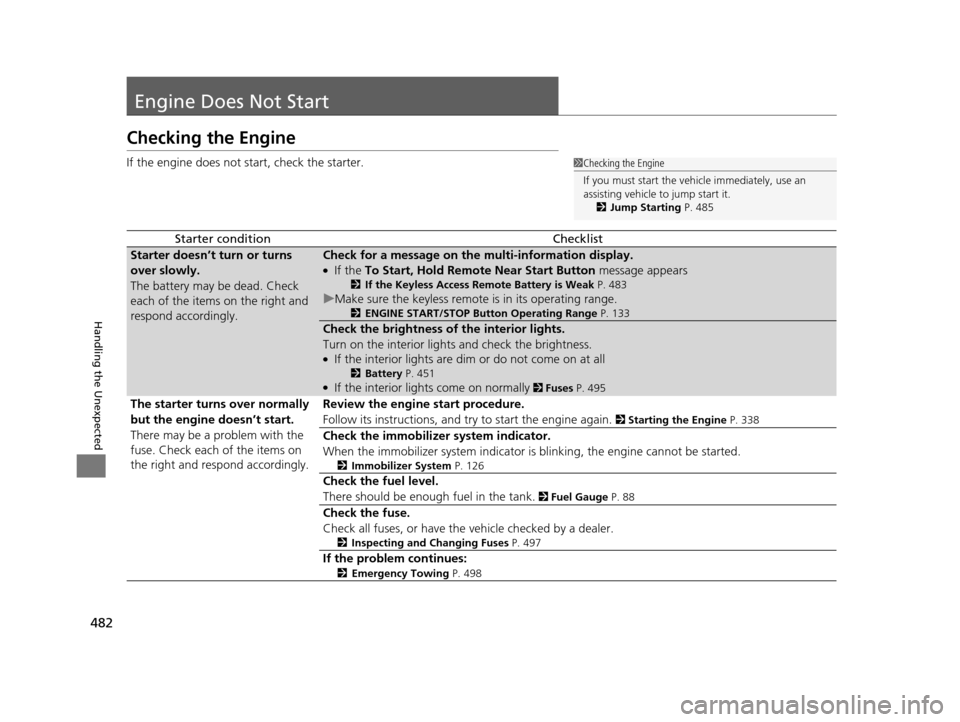
Engine Does Not Start
Checking the Engine
If the engine does not start, check the starter.
Starter conditionChecklist
Starter doesn’t turn or turns
over slowly.
The battery may be dead. Check
each of the items on the right and
respond accordingly.Check for a message on the multi-information display.
●If the To Start, Hold Remote Near Start Button message appears
2If the Keyless Access Remote Battery is Weak P. 483
uMake sure the keyless remote is in its operating range.
2ENGINE START/STOP Button Operating Range P. 133
Check the brightness of the interior lights.
Turn on the interior lights and check the brightness.
●If the interior lights are dim or do not come on at all
2Battery P. 451●If the interior lights come on normally 2 Fuses P. 495
The starter turns over normally
but the engine doesn’t start.
There may be a problem with the
fuse. Check each of the items on
the right and resp ond accordingly. Review the engine start procedure.
Follow its instructions, and try to start the engine again.
2
Starting the Engine P. 338
Check the immobilizer system indicator.
When the immobilizer system indicator is blinking, the engine cannot be started.
2Immobilizer System P. 126
Check the fuel level.
There should be enough fuel in the tank.
2 Fuel Gauge P. 88
Check the fuse.
Check all fuses, or have the vehicle checked by a dealer.
2Inspecting and Changing Fuses P. 497
If the problem continues:
2Emergency Towing P. 498
1Checking the Engine
If you must start the vehi cle immediately, use an
assisting vehicle to jump start it.
2 Jump Starting P. 485
16 ACURA ILX-31TX66300.book 482 ページ 2014年12月22日 月曜日 午後10時15分
Page 484 of 521

483
uuEngine Does Not Start uIf the Keyless Access Remote Battery is Weak
Handling the Unexpected
If the Keyless Access Re mote Battery is Weak
If the beeper sounds, the To Start, Hold Remote Near Start Button message
appears on the multi-information display, the indicator on the ENGINE START/
STOP button flashes, and the engine won’t start. Start the engine as follows.
1. Touch the center of the ENGINE START/
STOP button with the A logo on the keyless
access remote while the indicator on the
ENGINE START/STOP button is flashing.
The buttons on the keyless access remote
should be facing you.
u The indicator flashes for about 30
seconds.
2. Depress the brake pedal and press the
ENGINE START/STOP button within 10
seconds after the beeper sounds and the
indicator stays on.
u If you don’t depress the pedal, the mode
will change to ACCESSORY.
16 ACURA ILX-31TX66300.book 483 ページ 2014年12月22日 月曜日 午後10時15分
Page 493 of 521
492
uuIndicator, Coming On/Blinking uIf the Malfunction Indicato r Lamp Comes On or Blinks
Handling the Unexpected
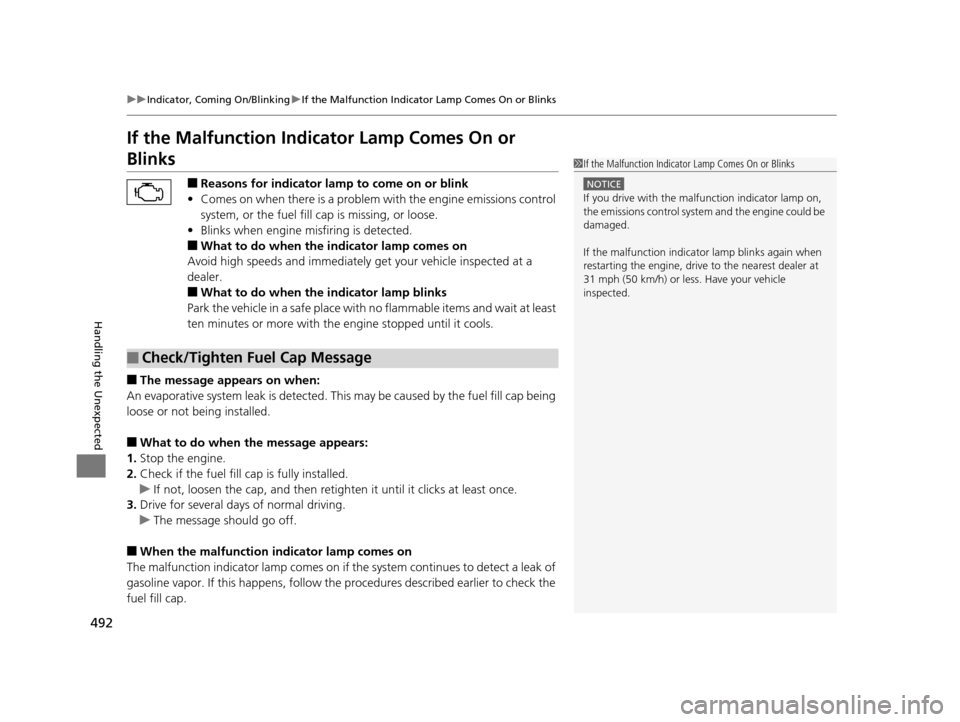
If the Malfunction Indicator Lamp Comes On or
Blinks
■Reasons for indicator lamp to come on or blink
• Comes on when there is a problem with the engine emissions control
system, or the fuel fill cap is missing, or loose.
• Blinks when engine misfiring is detected.
■What to do when the indicator lamp comes on
Avoid high speeds and immediately get your vehicle inspected at a
dealer.
■What to do when the indicator lamp blinks
Park the vehicle in a safe place with no flammable items and wait at least
ten minutes or more with the engine stopped until it cools.
■The message appears on when:
An evaporative system leak is detected. This may be caused by the fuel fill cap being
loose or not being installed.
■What to do when the message appears:
1. Stop the engine.
2. Check if the fuel fill cap is fully installed.
u If not, loosen the cap, and then reti ghten it until it clicks at least once.
3. Drive for several days of normal driving.
u The message should go off.
■When the malfunction indicator lamp comes on
The malfunction indicator lamp comes on if the system continues to detect a leak of
gasoline vapor. If this happens, follow th e procedures described earlier to check the
fuel fill cap.
■Check/Tighten Fuel Cap Message
1 If the Malfunction Indicato r Lamp Comes On or Blinks
NOTICE
If you drive with the malf unction indicator lamp on,
the emissions control system and the engine could be
damaged.
If the malfunction indicator lamp blinks again when
restarting the engine, drive to the nearest dealer at
31 mph (50 km/h) or less. Have your vehicle
inspected.
16 ACURA ILX-31TX66300.book 492 ページ 2014年12月22日 月曜日 午後10時15分
Page 496 of 521
495Continued
Handling the Unexpected
Fuses
Fuse Locations
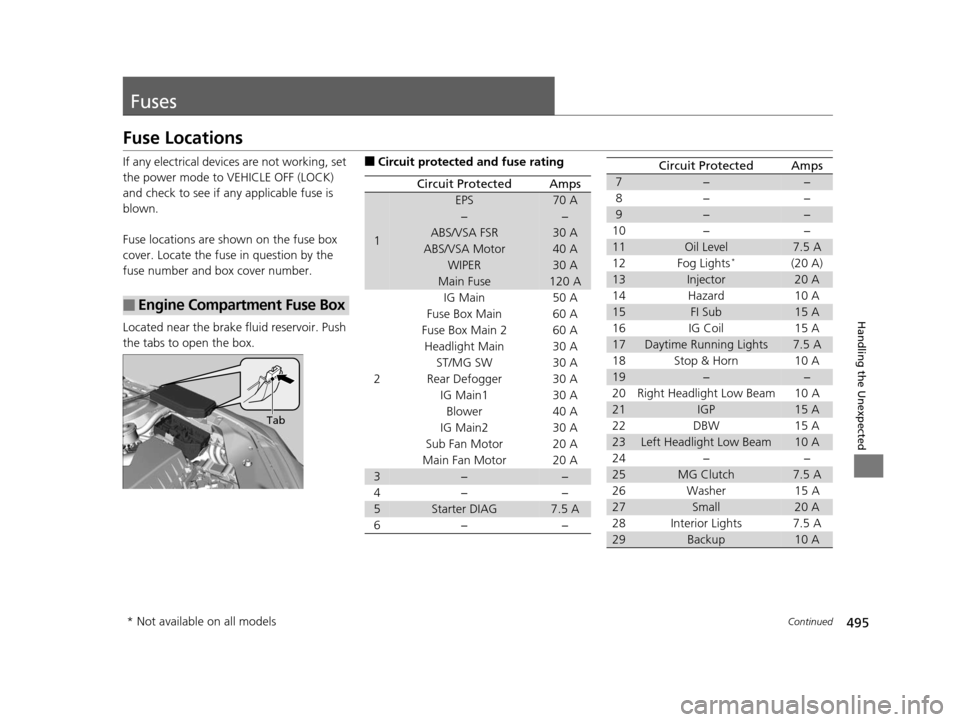
If any electrical devices are not working, set
the power mode to VEHICLE OFF (LOCK)
and check to see if any applicable fuse is
blown.
Fuse locations are shown on the fuse box
cover. Locate the fuse in question by the
fuse number and box cover number.
Located near the brake fluid reservoir. Push
the tabs to open the box.
■Engine Compartment Fuse Box
Tab
■Circuit protected and fuse rating
Circuit ProtectedAmps
1
EPS70 A
−−
ABS/VSA FSR30 A
ABS/VSA Motor40 A
WIPER30 A
Main Fuse120 A
2
IG Main50 A
Fuse Box Main 60 A
Fuse Box Main 260 A
Headlight Main 30 A
ST/MG SW30 A
Rear Defogger 30 A IG Main1 30 ABlower 40 A
IG Main2 30 A
Sub Fan Motor 20 A
Main Fan Motor 20 A
3−−
4− −
5Starter DIAG7.5 A
6− −
7−−
8− −
9−−
10 − −
11Oil Level7.5 A
12 Fog Lights*(20 A)
13Injector20 A
14 Hazard 10 A
15FI Sub15 A
16 IG Coil 15 A
17Daytime Running Lights7.5 A
18 Stop & Horn 10 A
19−−
20 Right Headlight Low Beam 10 A
21IGP15 A
22 DBW 15 A
23Left Headlight Low Beam10 A
24 − −
25MG Clutch7.5 A
26 Washer 15 A
27Small20 A
28 Interior Lights 7.5 A
29Backup10 A
Circuit ProtectedAmps
* Not available on all models
16 ACURA ILX-31TX66300.book 495 ページ 2014年12月22日 月曜日 午後10時15分
Page 504 of 521
503
Information
Devices that Emit Radio Waves
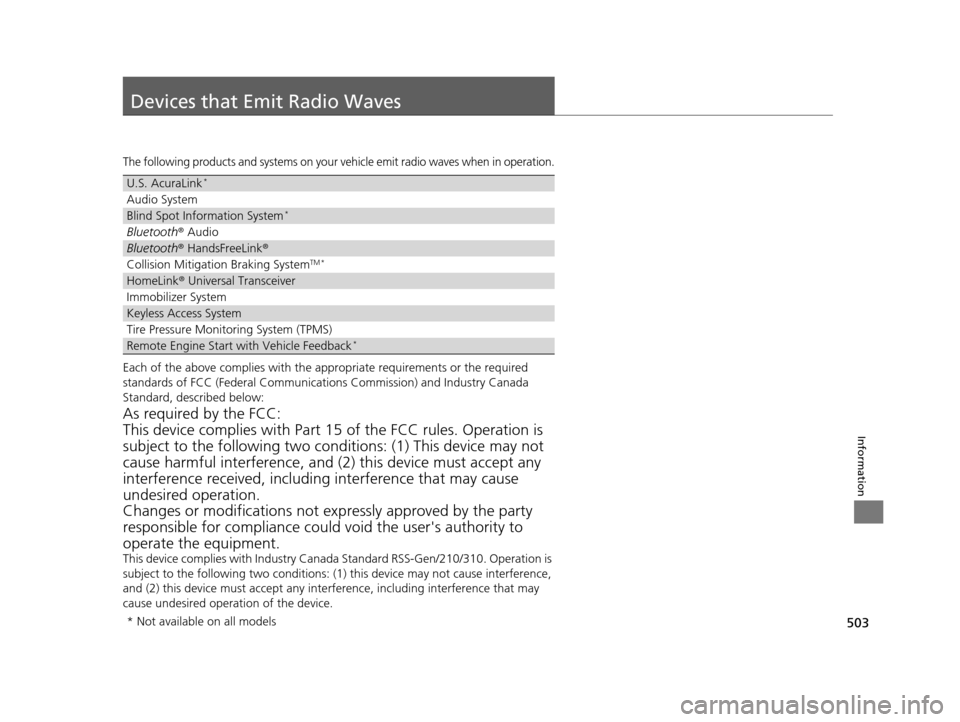
The following products and systems on your vehicle emit radio waves when in operation.
Each of the above complies with the appropriate requirements or the required
standards of FCC (Federal Communications Commission) and Industry Canada
Standard, described below:
As required by the FCC:
This device complies with Part 15 of the FCC rules. Operation is
subject to the following two cond itions: (1) This device may not
cause harmful interferenc e, and (2) this device must accept any
interference received, including interference that may cause
undesired operation.
Changes or modifications not ex pressly approved by the party
responsible for compliance could void the user's authority to
operate the equipment.
This device complies with Industry Canada Standard RSS-Gen/210/310. Operation is
subject to the following two conditions: (1) this device may not cause interference,
and (2) this device must accept any inte rference, including interference that may
cause undesired operation of the device.
U.S. AcuraLink*
Audio System
Blind Spot Information System*
Bluetooth ® Audio
Bluetooth® HandsFreeLink ®
Collision Mitigati on Braking SystemTM *
HomeLink® Universal Transceiver
Immobilizer System
Keyless Access System
Tire Pressure Monitoring System (TPMS)
Remote Engine Start with Vehicle Feedback*
* Not available on all models
16 ACURA ILX-31TX66300.book 503 ページ 2014年12月22日 月曜日 午後10時15分
Page 506 of 521
505Continued
Information
Emissions Testing
Testing of Readiness Codes
Your vehicle has “Readiness Codes,” as part of the onboard self diagnostic system.
Some states use these codes as a test to see if your vehicle’s emissions components
are working properly.
The codes may not be read properly if testing is performed just after the battery has
gone dead or been disconnected.
To check if they are set, set the power mo de to ON, without starting the engine. The
malfunction indicator lamp will come on for several seconds. If it then goes off, the
readiness codes are set. If it blinks fi ve times, the readiness codes are not set.
If you are required to have your vehicle te sted before the readiness codes are ready,
prepare the vehicle for retest ing by doing the following:
1. Fill the gas tank to approximately 3/4 full.
2. Park the vehicle and leave the engine off for 6 hours or more.
3. Make sure the ambient temperature is between 40°F and 95°F (4°C and 35°C).
4. Start the engine without touching the ac celerator pedal, and let it idle for 20
seconds.
5. Keep the vehicle in
(P. Increase the engine speed to 2,000 rpm, and hold it there
until the temperature gauge rises to at least 1/4 of the scale (about 3 minutes).
6. Let the engine idle with your foot off the accelerator for 20 seconds.
1Testing of Readiness Codes
The readiness codes are erased when the battery is
disconnected, and set again only after several days of
driving under a variety of conditions.
If a testing facility determines that the readiness
codes are not set, you may be requested to return at
a later date to complete the test.
If the testing facility determines the readiness codes
are still not set, see a dealer.
16 ACURA ILX-31TX66300.book 505 ページ 2014年12月22日 月曜日 午後10時15分
Page 509 of 521
508
uuWarranty Coverages u
Information
Replacement Battery Limited Warranty – provides prorated coverage for a
replacement battery purchased from a dealer.
Replacement Muffler Life time Limited Warranty – provides coverage for as
long as the purchaser of the muffler owns the vehicle.
Restrictions and exclusions apply to a ll these warranties. Please read the Acura
warranty information booklet that came with your vehicle for precise information on
warranty coverages. Your vehi cle’s original tires are covered by their manufacturer.
Tire warranty information is in a separate booklet.
■Canadian Owners
Please refer to the warranty manual that came with your vehicle.
16 ACURA ILX-31TX66300.book 508 ページ 2014年12月22日 月曜日 午後10時15分
Page 512 of 521
511
uuClient Service Information u
Information
Requirements to access Pandora ®
• Latest version of the Pandora app
installed on your Android, Blackberry, or
iPhone.
• Registered Pandora account (you can
create a free account at
www.pandora.com
smartphone)
• Connection to the in ternet via WiFi or
cellular data network.
■Disclaimer of Pandora ®
16 ACURA ILX-31TX66300.book 511 ページ 2014年12月22日 月曜日 午後10時15分