ECO mode Acura ILX 2016 Repair Manual
[x] Cancel search | Manufacturer: ACURA, Model Year: 2016, Model line: ILX, Model: Acura ILX 2016Pages: 521, PDF Size: 24.09 MB
Page 229 of 521
228
uuAudio System Basic Operation uPlaying a USB Flash Drive
Features
Playing a USB Flash Drive
Your audio system reads and plays sound fi les on a USB flash drive in either MP3,
WMA, or AAC*1 format.
Connect your USB flash drive to the USB port, then select the USB mode.
2USB Port* P. 168
*1:Only AAC format files recorded with iTunes are playable on this unit.
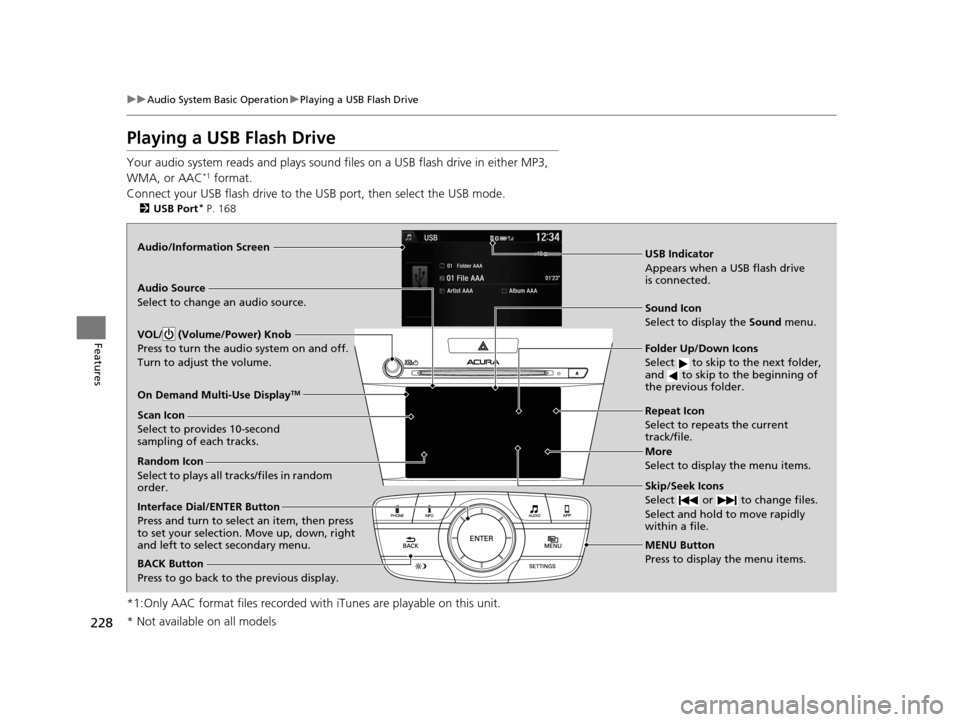
Audio/Information Screen
BACK Button
Press to go back to the previous display.
More
Select to display the menu items.
Audio Source
Select to change an audio source.
USB Indicator
Appears when a USB flash drive
is connected.
Folder Up/Down Icons
Select to skip to the next folder,
and to skip to the beginning of
the previous folder.
Skip/Seek Icons
Select or to change files.
Select and hold to move rapidly
within a file.
Interface Dial/ENTER Button
Press and turn to select an item, then press
to set your selection. Move up, down, right
and left to select secondary menu.
MENU Button
Press to display the menu items.
On Demand Multi-Use Display
TM
VOL/ (Volume/Power) Knob
Press to turn the audio system on and off.
Turn to adjust the volume.
Random Icon
Select to plays all tracks/files in random
order. Scan Icon
Select to provides 10-second
sampling of each tracks.
Repeat Icon
Select to repeats the current
track/file.
Sound Icon
Select to display the Sound
menu.
* Not available on all models
16 ACURA ILX-31TX66300.book 228 ページ 2014年12月22日 月曜日 午後10時15分
Page 231 of 521
uuAudio System Basic Operation uPlaying a USB Flash Drive
230
Features
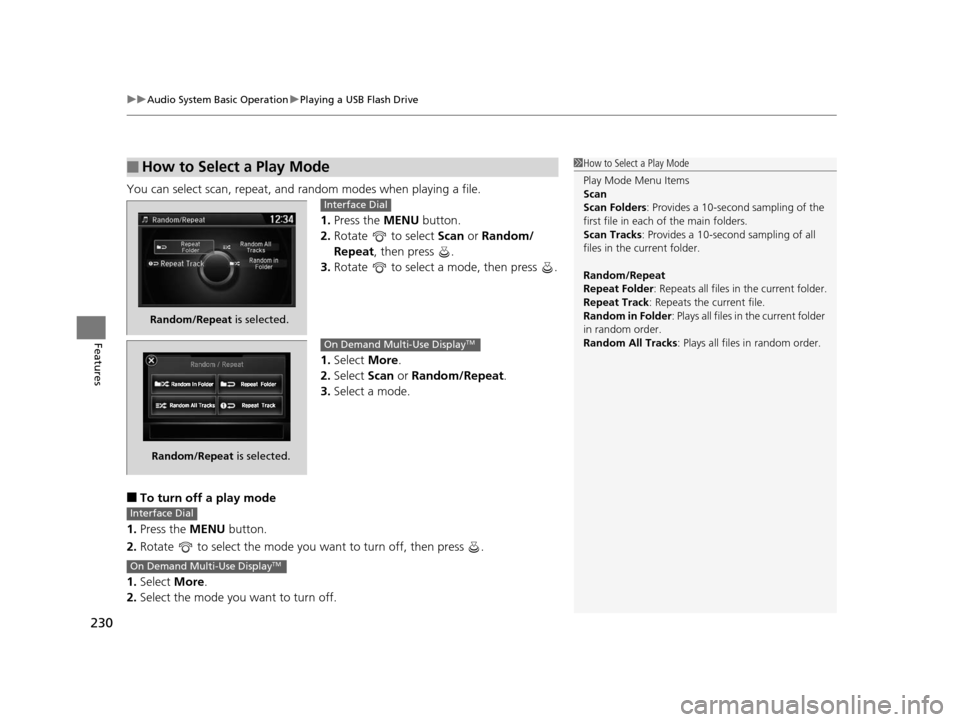
You can select scan, repeat, and random modes when playing a file.
1.Press the MENU button.
2. Rotate to select Scan or Random/
Repeat, then press .
3. Rotate to select a mode, then press .
1. Select More.
2. Select Scan or Random/Repeat .
3. Select a mode.
■To turn off a play mode
1. Press the MENU button.
2. Rotate to select the mode you want to turn off, then press .
1. Select More.
2. Select the mode you want to turn off.
■How to Select a Play Mode1How to Select a Play Mode
Play Mode Menu Items
Scan
Scan Folders : Provides a 10-second sampling of the
first file in each of the main folders.
Scan Tracks : Provides a 10-second sampling of all
files in the current folder.
Random/Repeat
Repeat Folder : Repeats all files in the current folder.
Repeat Track: Repeats the current file.
Random in Folder : Plays all files in the current folder
in random order.
Random All Tracks : Plays all files in random order.
Random/Repeat is selected.
Interface Dial
Random/Repeat is selected.
On Demand Multi-Use DisplayTM
Interface Dial
On Demand Multi-Use DisplayTM
16 ACURA ILX-31TX66300.book 230 ページ 2014年12月22日 月曜日 午後10時15分
Page 233 of 521
uuAudio System Basic Operation uPlaying Bluetooth ® Audio
232
Features
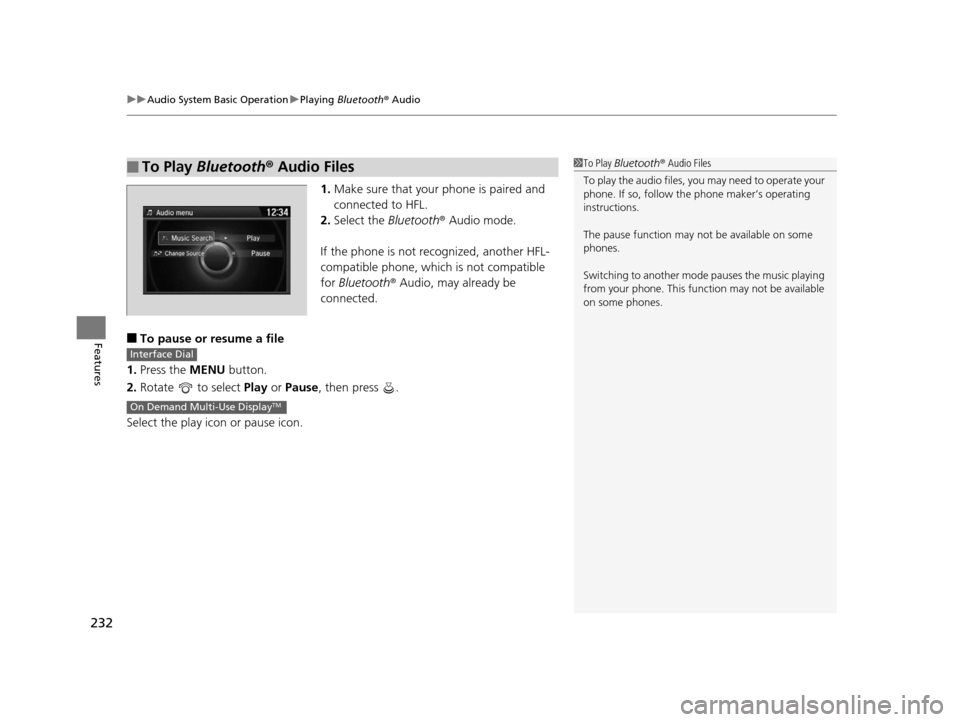
1. Make sure that your phone is paired and
connected to HFL.
2. Select the Bluetooth® Audio mode.
If the phone is not recognized, another HFL-
compatible phone, which is not compatible
for Bluetooth ® Audio, may already be
connected.
■To pause or resume a file
1. Press the MENU button.
2. Rotate to select Play or Pause , then press .
Select the play icon or pause icon.
■To Play Bluetooth® Audio Files1To Play Bluetooth ® Audio Files
To play the audio files, y ou may need to operate your
phone. If so, follow the phone maker’s operating
instructions.
The pause function may no t be available on some
phones.
Switching to another mode pauses the music playing
from your phone. This functi on may not be available
on some phones.
Interface Dial
On Demand Multi-Use DisplayTM
16 ACURA ILX-31TX66300.book 232 ページ 2014年12月22日 月曜日 午後10時15分
Page 237 of 521
236
uuAudio Error Messages uiPod/USB Flash Drive
Features
iPod/USB Flash Drive
If an error occurs while play ing an iPod or USB flash driv e, you may see the following
error messages. If you cannot clear the error message, contact a dealer.
*1:Models with one display
*2:Models with two displays
Error MessageSolution
USB ErrorAppears when there is a probl em with the USB adapter unit*1 or audio unit*2. Check if the device is
compatible with the USB adapter unit*1 or audio unit*2.
Bad USB Device
Please Check Owners
Manual.
*1Appears when an incompatible device is connected. Disconnect the device. Then turn the audio system
off, and turn it on again. Do not reco nnect the device that caused the error.
Incompatible USB Device
Please Check Owner’s
Manual
*2
No Song*1Appears when the iPod is empty. Check that compatible files are stored on the device.
Unsupported Ver*1Appears when an unsupported iPod is connected. If it appears when a supported iPod is connected,
update the iPod software to the newer version.
Unsupported Version*2
Retry Connection*1
Appears when the system does not ac knowledge the iPod. Reconnect the iPod.Connect Retry*2
Unplayable FileAppears when the files in the USB flash drive are DRM or an unsupported format. This error message
appears for about 3 seconds, then plays the next song.
16 ACURA ILX-31TX66300.book 236 ページ 2014年12月22日 月曜日 午後10時15分
Page 238 of 521
237
uuAudio Error Messages u
Continued
Features
*2:Models with two displays
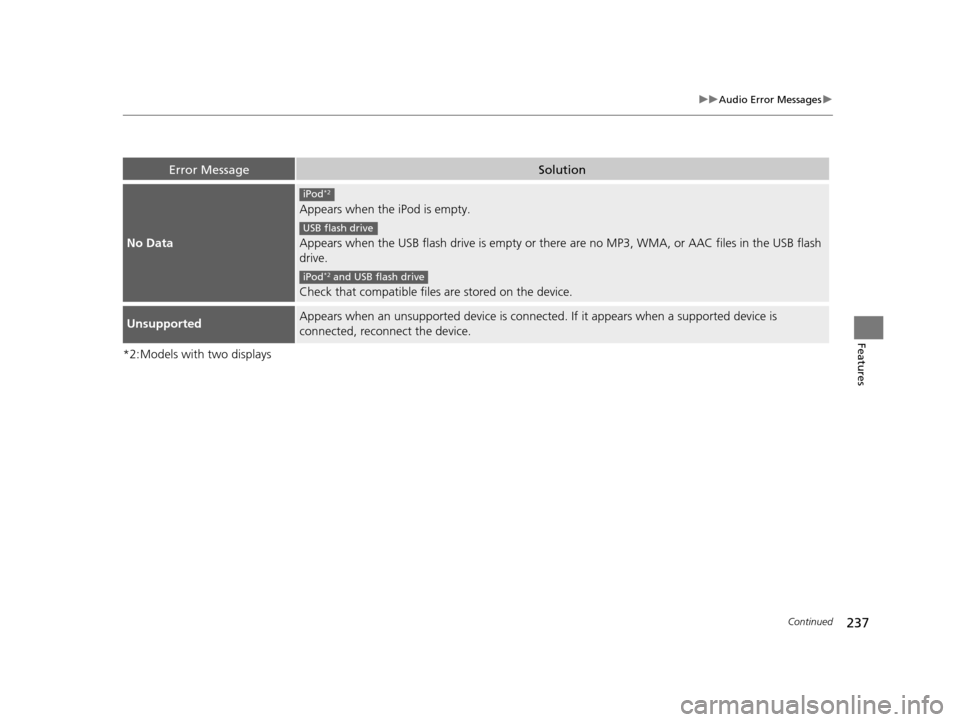
Error MessageSolution
No Data
Appears when the iPod is empty.
Appears when the USB flash drive is empty or there are no MP3, WMA, or AAC files in the USB flash
drive.
Check that compatible files are stored on the device.
UnsupportedAppears when an unsupported device is connected . If it appears when a supported device is
connected, reconnect the device.
iPod*2
USB flash drive
iPod*2 and USB flash drive
16 ACURA ILX-31TX66300.book 237 ページ 2014年12月22日 月曜日 午後10時15分
Page 239 of 521
238
uuAudio Error Messages uPandora®
Features
Pandora ®
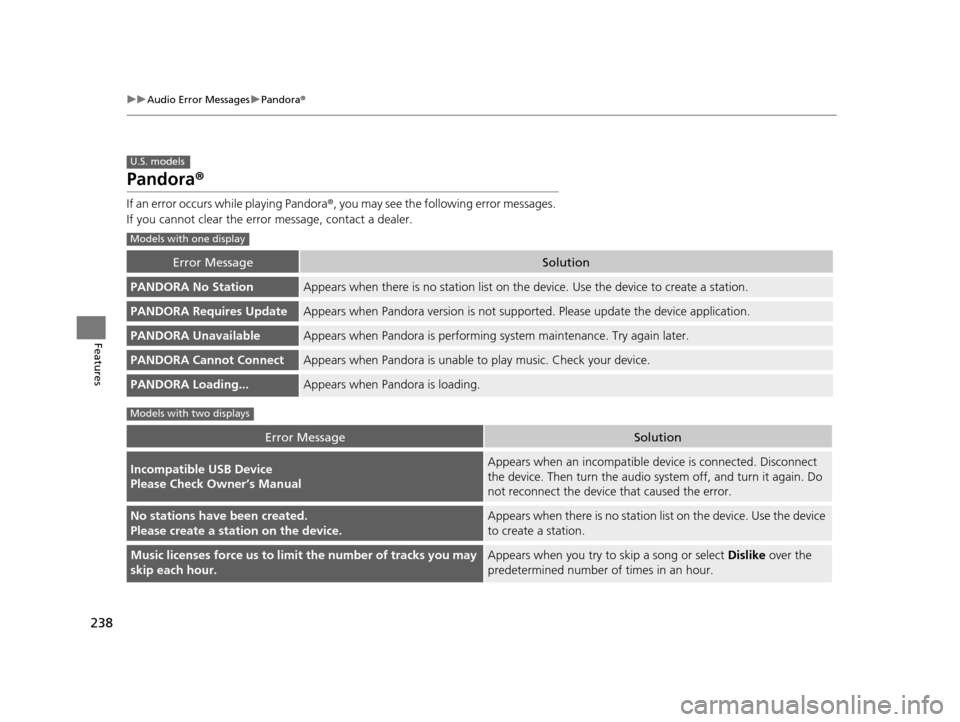
If an error occurs while playing Pandora ®, you may see the following error messages.
If you cannot clear the error message, contact a dealer.
Error MessageSolution
PANDORA No StationAppears when there is no stat ion list on the device. Use the device to create a station.
PANDORA Requires UpdateAppears when Pandora version is not supporte d. Please update the device application.
PANDORA UnavailableAppears when Pandora is performing system maintenance. Try again later.
PANDORA Cannot ConnectAppears when Pandora is unable to play music. Check your device.
PANDORA Loading...Appears when Pandora is loading.
Error MessageSolution
Incompatible USB Device
Please Check Owner’s ManualAppears when an incompatible device is connected. Disconnect
the device. Then turn the audio system off, and turn it again. Do
not reconnect the device that caused the error.
No stations have been created.
Please create a station on the device.Appears when there is no station list on the device. Use the device
to create a station.
Music licenses force us to limi t the number of tracks you may
skip each hour.Appears when you try to skip a song or select Dislike over the
predetermined number of times in an hour.
U.S. models
Models with one display
Models with two displays
16 ACURA ILX-31TX66300.book 238 ページ 2014年12月22日 月曜日 午後10時15分
Page 241 of 521
240
uuAudio Error Messages uAhaTM Radio
Features
AhaTM Radio
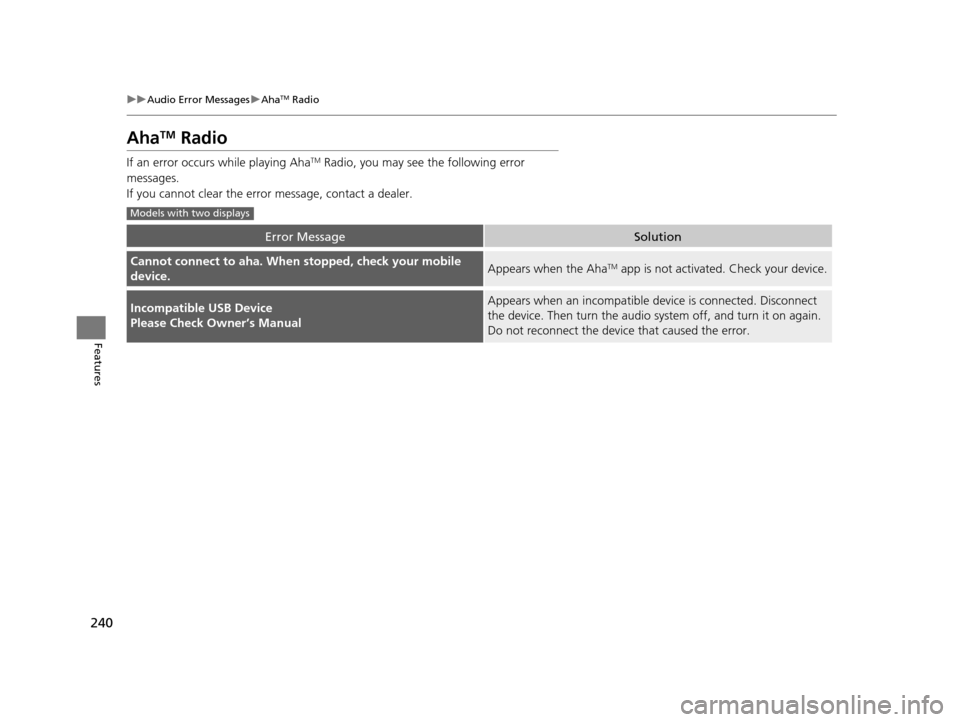
If an error occurs while playing AhaTM Radio, you may see the following error
messages.
If you cannot clear the error message, contact a dealer.
Error MessageSolution
Cannot connect to aha. When stopped, check your mobile
device.Appears when the AhaTM app is not activated. Check your device.
Incompatible USB Device
Please Check Owner’s ManualAppears when an incompatible device is connected. Disconnect
the device. Then turn the audio syst em off, and turn it on again.
Do not reconnect the device that caused the error.
Models with two displays
16 ACURA ILX-31TX66300.book 240 ページ 2014年12月22日 月曜日 午後10時15分
Page 245 of 521
244
uuGeneral Information on the Audio System uCompatible iPod, iPhone, and USB Flash Drives
Features
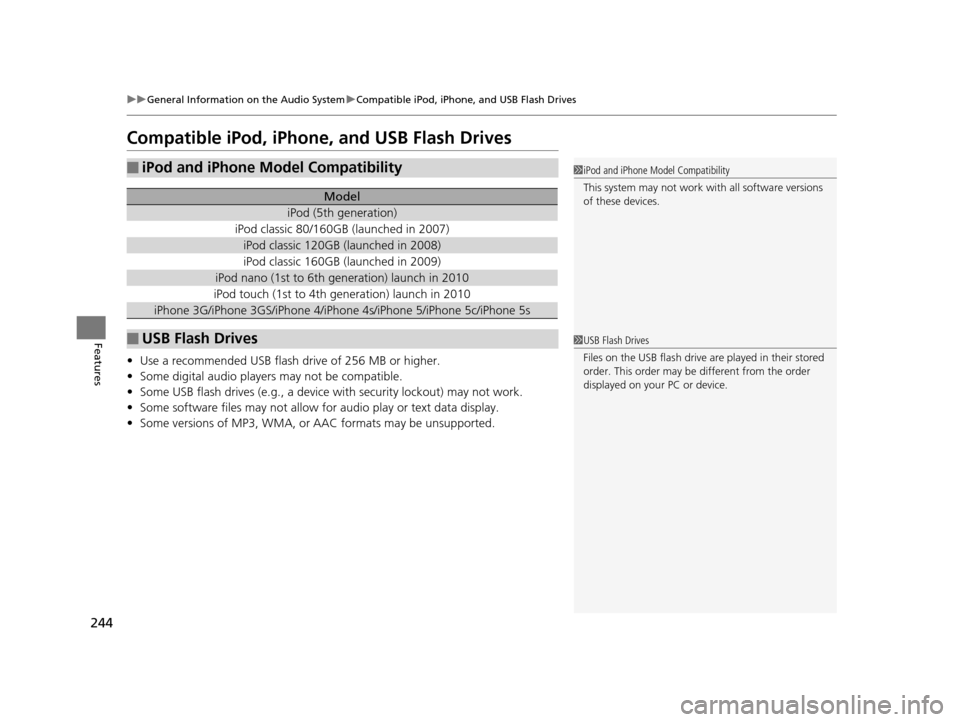
Compatible iPod, iPhone, and USB Flash Drives
• Use a recommended USB flash drive of 256 MB or higher.
• Some digital audio players may not be compatible.
• Some USB flash drives (e.g., a device with security lockout) may not work.
• Some software files may not allow for audio play or text data display.
• Some versions of MP3, WMA, or AAC formats may be unsupported.
■iPod and iPhone Model Compatibility
Model
iPod (5th generation)
iPod classic 80/160GB (launched in 2007)
iPod classic 120GB (launched in 2008)
iPod classic 160GB (launched in 2009)
iPod nano (1st to 6th generation) launch in 2010
iPod touch (1st to 4th generation) launch in 2010
iPhone 3G/iPhone 3GS/iPhone 4/iPhone 4s/iPhone 5/iPhone 5c/iPhone 5s
■USB Flash Drives
1iPod and iPhone Model Compatibility
This system may not work with all software versions
of these devices.
1USB Flash Drives
Files on the USB flash drive are played in their stored
order. This order may be different from the order
displayed on your PC or device.
16 ACURA ILX-31TX66300.book 244 ページ 2014年12月22日 月曜日 午後10時15分
Page 247 of 521
246
uuCustomized Features*u
Features
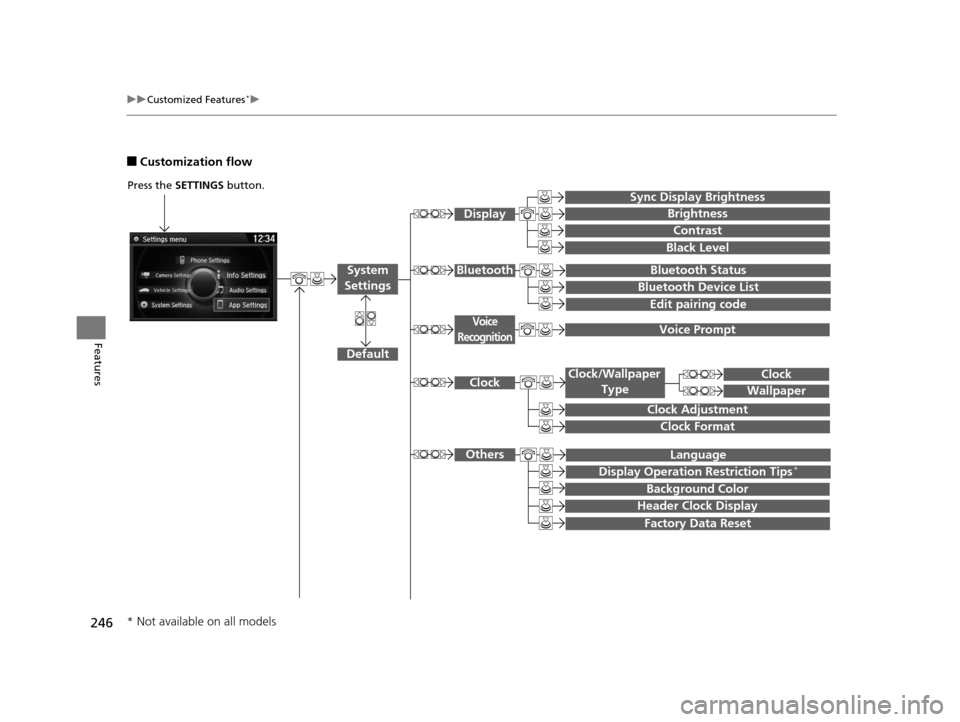
■Customization flow
Press the SETTINGS button.
Voice Prompt
Brightness
Contrast
Black Level
Bluetooth Status
Bluetooth Device List
Edit pairing code
Default
Display
System
SettingsBluetooth
Voice
Recognition
Sync Display Brightness
Factory Data Reset
Background Color
Header Clock Display
Clock
Clock Adjustment
Clock Format
Clock
Language
Display Operation Restriction Tips*
Others
Wallpaper
Clock/Wallpaper Type
* Not available on all models
16 ACURA ILX-31TX66300.book 246 ページ 2014年12月22日 月曜日 午後10時15分
Page 256 of 521
255
uuCustomized Features*u
Continued
Features
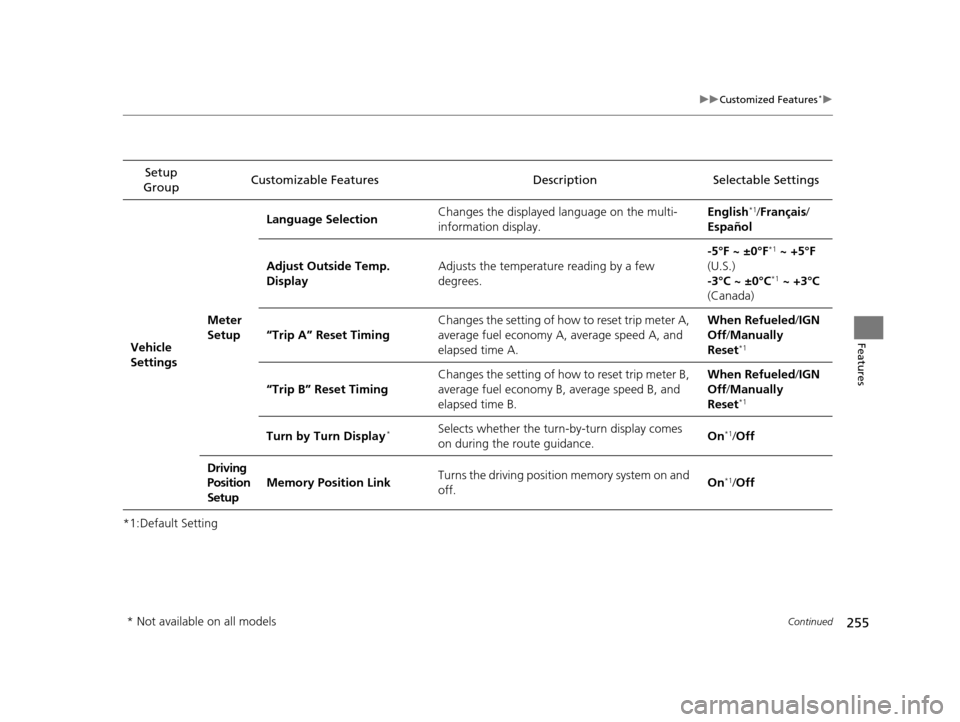
*1:Default SettingSetup
Group Customizable Features Description Selectable Settings
Vehicle
Settings Meter
SetupLanguage Selection
Changes the displayed language on the multi-
information display. English
*1/
Français /
Español
Adjust Outside Temp.
Display Adjusts the temperature reading by a few
degrees. -5°F ~ ±0°F
*1
~ +5°F
(U.S.)
-3°C ~ ±0°C
*1 ~ +3°C
(Canada)
“Trip A” Reset Timing Changes the setting of how to reset trip meter A,
average fuel economy A, average speed A, and
elapsed time A. When Refueled
/IGN
Off /Manually
Reset
*1
“Trip B” Reset Timing Changes the setting of how to reset trip meter B,
average fuel economy B, average speed B, and
elapsed time B. When Refueled
/IGN
Off /Manually
Reset*1
Turn by Turn Display*Selects whether the turn-by-turn display comes
on during the route guidance. On*1/
Off
Driving
Position
Setup Memory Position Link
Turns the driving position memory system on and
off. On
*1/
Off
* Not available on all models
16 ACURA ILX-31TX66300.book 255 ページ 2014年12月22日 月曜日 午後10時15分