seats Acura ILX 2017 Owner's Guide
[x] Cancel search | Manufacturer: ACURA, Model Year: 2017, Model line: ILX, Model: Acura ILX 2017Pages: 521, PDF Size: 29.65 MB
Page 153 of 521
uuAdjusting the Seats uHead Restraints
152
Controls
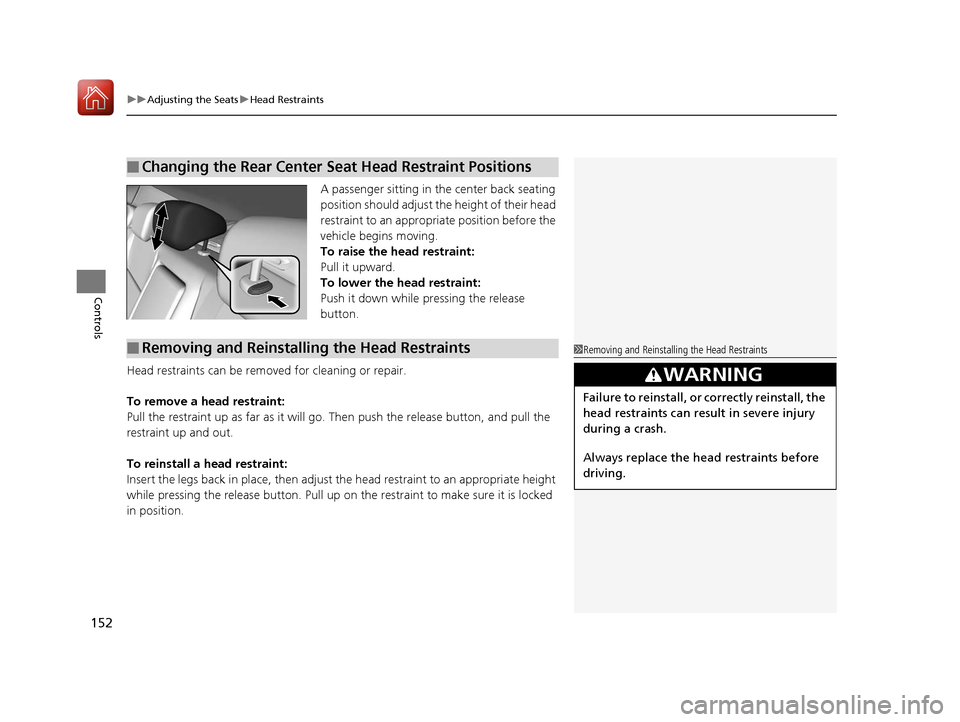
A passenger sitting in the center back seating
position should adjust th e height of their head
restraint to an appropriate position before the
vehicle begins moving.
To raise the head restraint:
Pull it upward.
To lower the head restraint:
Push it down while pressing the release
button.
Head restraints can be removed for cleaning or repair.
To remove a head restraint:
Pull the restraint up as far as it will go. Then push the release button, and pull the
restraint up and out.
To reinstall a head restraint:
Insert the legs back in place, then adjust the head restraint to an appropriate height
while pressing the release butto n. Pull up on the restraint to make sure it is locked
in position.
■Changing the Rear Center Seat Head Restraint Positions
■Removing and Reinstalling the Head Restraints1 Removing and Reinstalling the Head Restraints
3WARNING
Failure to reinstall, or correctly reinstall, the
head restraints can result in severe injury
during a crash.
Always replace the he ad restraints before
driving.
17 ACURA ILX-31TX66400.book 152 ページ 2016年3月15日 火曜日 午後5時0分
Page 154 of 521
153
uuAdjusting the Seats uMaintain a Sitting Proper Position
Controls
Maintain a Sitting Proper Position
After all occupants have adjusted their s eats and head restraints, and put on their
seat belts, it is very important that they continue to sit upright, well back in their
seats, with their feet on the floor, until the vehicle is safe ly parked and the engine is
off.
Sitting improperly can increase the chance of injury during a crash. For example, if
an occupant slouches, lies down, turns sideways, sits forward, leans forward or
sideways, or puts one or both feet up, the chance of injury during a crash is greatly
increased.
In addition, an occupant who is out of posi tion in the front seat can be seriously or
fatally injured in a crash by striking interior parts of the vehicle or being struck by an
inflating front airbag.1 Maintain a Sitting Proper Position
3WARNING
Sitting improperly or out of position can
result in serious injury or death in a crash.
Always sit upright, well back in the seat,
with your feet on the floor.
17 ACURA ILX-31TX66400.book 153 ページ 2016年3月15日 火曜日 午後5時0分
Page 155 of 521
154
uuAdjusting the Seats uRear Seat
Controls
Rear Seat
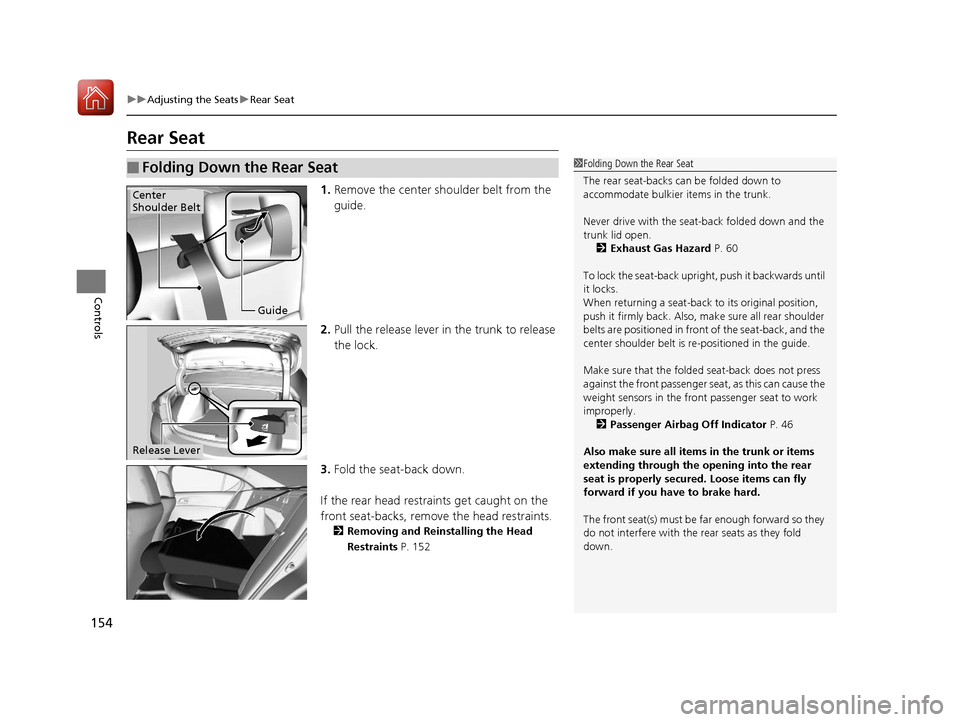
1. Remove the center shoulder belt from the
guide.
2. Pull the release lever in the trunk to release
the lock.
3. Fold the seat-back down.
If the rear head restraints get caught on the
front seat-backs, remove the head restraints.
2 Removing and Reinstalling the Head
Restraints P. 152
■Folding Down the Rear Seat1Folding Down the Rear Seat
The rear seat-backs can be folded down to
accommodate bulkier items in the trunk.
Never drive with the seat-back folded down and the
trunk lid open. 2 Exhaust Gas Hazard P. 60
To lock the seat-back upri ght, push it backwards until
it locks.
When returning a seat-back to its original position,
push it firmly back. Also, m ake sure all rear shoulder
belts are positioned in front of the seat-back, and the
center shoulder belt is re -positioned in the guide.
Make sure that the folded seat-back does not press
against the front passenger seat, as this can cause the
weight sensors in the front passenger seat to work
improperly.
2 Passenger Airbag Off Indicator P. 46
Also make sure all items in the trunk or items
extending through the opening into the rear
seat is properly secured. Loose items can fly
forward if you have to brake hard.
The front seat(s) must be far enough forward so they
do not interfere with the rear seats as they fold
down.
Guide
Center
Shoulder Belt
Release Lever
17 ACURA ILX-31TX66400.book 154 ページ 2016年3月15日 火曜日 午後5時0分
Page 156 of 521
155
uuAdjusting the Seats uArmrest
Controls
Armrest
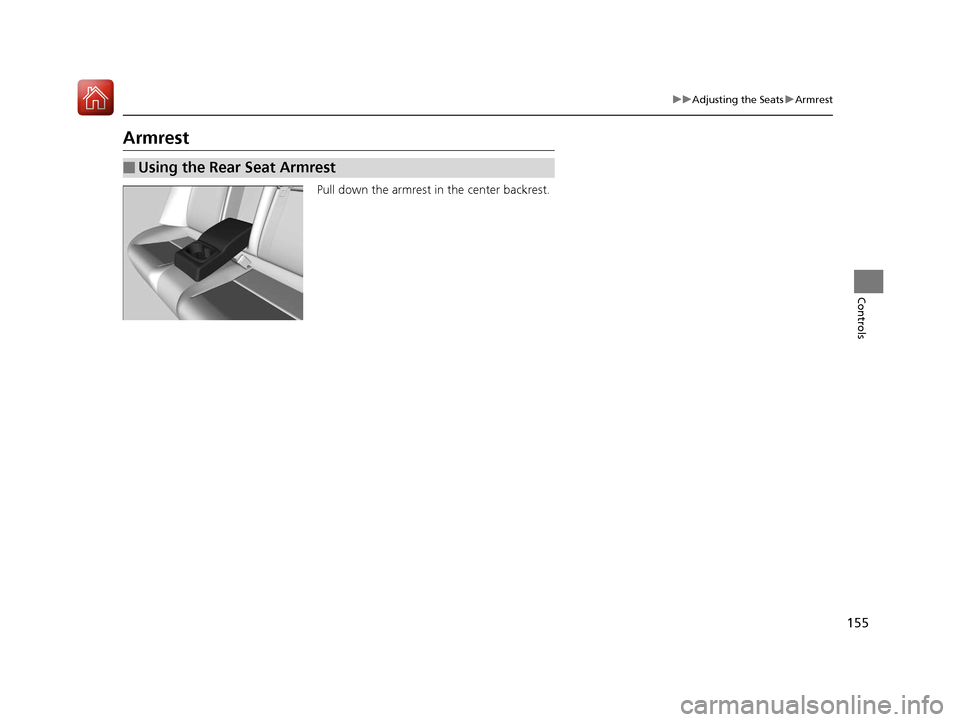
Pull down the armrest in the center backrest.
■Using the Rear Seat Armrest
17 ACURA ILX-31TX66400.book 155 ページ 2016年3月15日 火曜日 午後5時0分
Page 159 of 521
uuInterior Lights/Interior Convenience Items uInterior Convenience Items
158
Controls
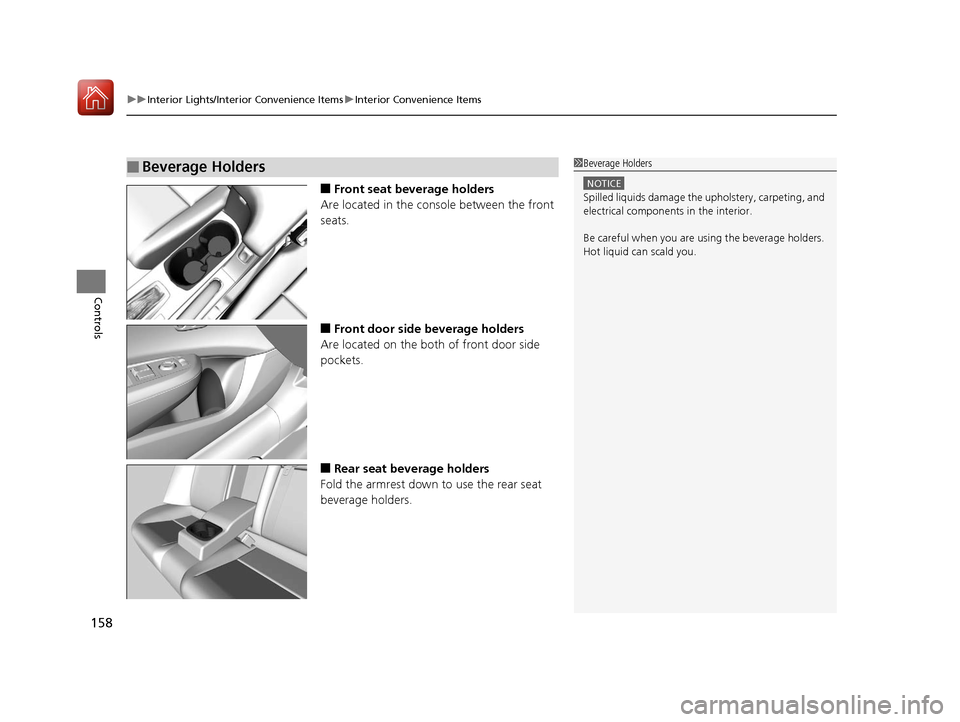
■Front seat beverage holders
Are located in the console between the front
seats.
■Front door side beverage holders
Are located on the both of front door side
pockets.
■Rear seat beverage holders
Fold the armrest down to use the rear seat
beverage holders.
■Beverage Holders1 Beverage Holders
NOTICE
Spilled liquids damage the upholstery, carpeting, and
electrical components in the interior.
Be careful when you are us ing the beverage holders.
Hot liquid can scald you.
17 ACURA ILX-31TX66400.book 158 ページ 2016年3月15日 火曜日 午後5時0分
Page 334 of 521
Continued333
uuBefore Driving uDriving Preparation
Driving
• Store or secure all items on board properly.
u Carrying too much cargo, or improperly storing it, can affect your vehicle's
handling, stability, sto pping distance, and tires, and make it unsafe.
2Maximum Load Limit P. 335
•Do not pile items higher than the seat height.
u They can block your view and may be thrown forward in the event of sudden
braking.
• Do not place anything in the front seat footwells. Make sure to secure the floor
mat.
u An object or unsecured floor mat can in terfere with your brake and accelerator
pedal operation while driving.
• If you have any animals on board, do not let them move around in the vehicle.
u They may interfere with driv ing and a crash could occur.
• Securely close and lock all doors and the trunk.
2 Locking/Unlocking the Doors from the Inside P. 118
•Adjust your seating position properly.
u Adjust the head restraint, too.
2Adjusting the Seats P. 148
2 Adjusting the Front and Rear Outer Head Restraint Positions P. 151
•Adjust the mirrors and steering wh eel properly for your driving.
u Adjust them while sitting in the proper driving position.
2 Adjusting the Mirrors P. 146
2 Adjusting the Steering Wheel P. 143
■Interior Checks1Interior Checks
The headlight aim is set by the factory, and does not
need to be adjusted. Howeve r, if you regularly carry
heavy items in the trunk ha ve the aiming readjusted
at a dealer or by a qualified technician.
17 ACURA ILX-31TX66400.book 333 ページ 2016年3月15日 火曜日 午後5時0分
Page 335 of 521
334
uuBefore Driving uDriving Preparation
Driving
• Be sure items placed on the floor behind the front seats cannot roll under the
seats.
u They can interfere with the driver's ability to operate the pedals, the operation
of the seats, or the operation of the sensors under the seats.
• Everyone in the vehicle must fasten their seat belt.
2Fastening a Seat Belt P. 31
•Make sure that the indicators in the ins trument panel come on when you start the
vehicle, and go off soon after.
u Always have a dealer check the vehicle if a problem is indicated.
2 Indicators P. 64
17 ACURA ILX-31TX66400.book 334 ページ 2016年3月15日 火曜日 午後5時0分
Page 360 of 521
Continued359
uuWhen Driving uAdaptive Cruise Control (ACC)*
Driving
The system may automatically shut off and the ACC indicator will come on under
certain conditions. Some examples of thes e conditions are listed below. Other
conditions may reduce some of the ACC functions.
2 Front Sensor Camera* P. 352
■Environmental conditions
Driving in bad weather (r ain, fog, snow, etc.).
■Roadway conditions
Driving on a snowy or wet roadway (obscure d lane marking, vehicle tracks, reflected
lights, road spra y, high contrast).
■Vehicle conditions
• The outside of the windshield is blocked by dirt, mud, leaves, wet snow, etc.
• An abnormal tire or wheel condition (wro ng sized, varied size or construction,
improperly inflated, compact spare tire
*, etc.).
• The camera temperature gets too hot.
• The parking brake is applied.
• When the front grille is dirty.
• When the front of the vehicle tilts up due to heavy cargo in the trunk or rear seats.
• When tire chains are installed.
■ACC Conditions and Limitations1ACC Conditions and Limitations
The radar sensor for ACC is shared with the Collision
Mitigation Braking System
TM (CMBSTM).
2 Collision Mitigation Braking SystemTM
(CMBSTM)* P. 393
You can read about handling information for the
camera equipped with this system. 2 Front Sensor Camera
* P. 352
* Not available on all models
17 ACURA ILX-31TX66400.book 359 ページ 2016年3月15日 火曜日 午後5時0分
Page 461 of 521
460
Maintenance
Accessories and Modifications
Accessories
When installing accessories, check the following:
• Do not install accessories on the windshie ld. They can obstruct your view and
delay your reaction to driving conditions.
• Do not install any access ories over areas marked SRS AIRBAG, on the sides or
backs of the front seats, on front or si de pillars, or near the side windows.
Accessories installed in these areas may interfere with proper operation of the
vehicle’s airbags or may be propelled into you or another occupant if the airbags
deploy.
• Be sure electronic accessories do not over load electrical circuits or interfere with
proper operation of your vehicle.
2 Fuses P. 495
•Before installing any electronic accessory, have the inst aller contact a dealer for
assistance. If possible, have a d ealer inspect the final installation.
Modifications
Do not modify your vehicle in a manner that may affect its handling, stability, or
reliability, or install non-genuine Acura parts or accessories that may have a similar
effect.
Even minor modifications to vehicle systems can affect overall vehicle performance.
Always make sure all equipment is prop erly installed and maintained, and do not
make any modification to your vehicle or its systems that might cause your vehicle
to no longer meet federal, state, provin cial, territorial, and local regulations.
Do not modify or attempt to repair any of the electrical components.
1 Accessories and Modifications
Acura Genuine accessori es are recommended to
ensure proper operati on on your vehicle.
3WARNING
Improper accessories or modifications can
affect your vehicle's handling, stability, and
performance, and cause a crash in which
you can be seriously hurt or killed.
Follow all instruction s in this owner's
manual regarding accessories and
modifications.
17 ACURA ILX-31TX66400.book 460 ページ 2016年3月15日 火曜日 午後5時0分
Page 513 of 521
Index
512
Index
Index
A
AAC.................................................... 218, 228
ABS (Anti-lock Brake System) ................... 391
Accessories and Modifications ................. 460
Accessory Power Sockets .......................... 159
Adaptive Cruise Control (ACC) ........... 76, 354
Additives Coolant ................................................... 427
Engine Oil ................................................ 422
Washer .................................................... 430
Additives, Engine Oil ................................ 422
Adjusting Armrest ................................................... 155
Front Seats .............................................. 148
Head Restraints........................................ 151
Mirrors .................................................... 146
Rear Seat ................................................. 154
Steering Wheel ........................................ 143
Temperature .............................................. 94
Aha
TM Menu .............................................. 227
AhaTM Radio .............................................. 240
Air Conditioning System (Climate Control
System) .................................................... 161
Changing the Mode ................................ 161
Defrosting the Windshield and
Windows ............................................... 162
Dust and Pollen Filter ............................... 454
Recirculation/Fresh Air Mode ................... 161
Sensors .................................................... 164
Synchronized Mode ................................. 163
Using Automatic Climate Control ............ 161 Air Pressure
....................................... 443, 501
Airbags ........................................................ 35
Advanced Airbags ..................................... 41
After a Collision ........................................ 38
Airbag Care............................................... 47
Event Data Recorder .................................... 0
Front Airbags (SRS) .................................... 38
Indicator.............................................. 45, 69
Passenger Airbag Off Indicator .................. 46
Sensors ..................................................... 35
Side Airbags .............................................. 42
Side Curtain Airbags.................................. 44
AM/FM Radio .................................... 178, 206
Anti-lock Brake System (ABS) .................. 391
Indicator.................................................... 69
Armrest ..................................................... 155
Audio Remote Controls ........................... 170
Audio System ............................................ 166
Adjusting the Sound........................ 177, 204
Auxiliary Input Jack.................................. 167
Error Messages ........................................ 235
General Information ................................ 241
Internet Radio ......................................... 225
iPhone............................................. 225, 244
iPod ................................................ 183, 221
MP3/WMA/AAC ...................... 188, 218, 228
Pandora ®................................................. 186
Reactivating ............................................ 169
Recommended CDs ................................. 242
Recommended Devices............................ 244
Security Code .......................................... 169 Shortcuts ................................................ 195
Theft Protection ...................................... 169
USB Adapter Cable ................................. 167
USB Flash Drives...................................... 244
USB Port ................................................. 168
Audio/Information Screen ............... 172, 200
Authorized Manuals ................................ 509
Auto Door Locking/Unlocking ................ 121
Customize ...................................... 103, 257
Automatic Lighting .................................. 137
Auxiliary Input Jack ................................. 167
Average Fuel Economy .............................. 94
Average Speed ........................................... 95
B
Battery...................................................... 451
Charging System Indicator ................ 67, 491
Jump Starting ......................................... 485
Maintenance (Checking the Battery) ....... 451
Maintenance (Replacing) ......................... 452
Belts (Seat) .................................................. 28
Beverage Holders ..................................... 158
Blind Spot Information (BSI) System ....... 383
Bluetooth ® Audio ............................. 191, 231
Bluetooth ® HandsFreeLink ®..................... 269
Booster Seats (For Children) ...................... 59
Brake System ............................................ 389
Anti-lock Brake System (ABS) .................. 391
Brake Assist System................................. 392
Fluid ....................................................... 430
17 ACURA ILX-31TX66400.book 512 ページ 2016年3月15日 火曜日 午後5時0分