service Acura ILX 2017 Owner's Guide
[x] Cancel search | Manufacturer: ACURA, Model Year: 2017, Model line: ILX, Model: Acura ILX 2017Pages: 521, PDF Size: 29.65 MB
Page 419 of 521
418
uuMaintenance MinderTMuTo Use Maintenance MinderTM
Maintenance
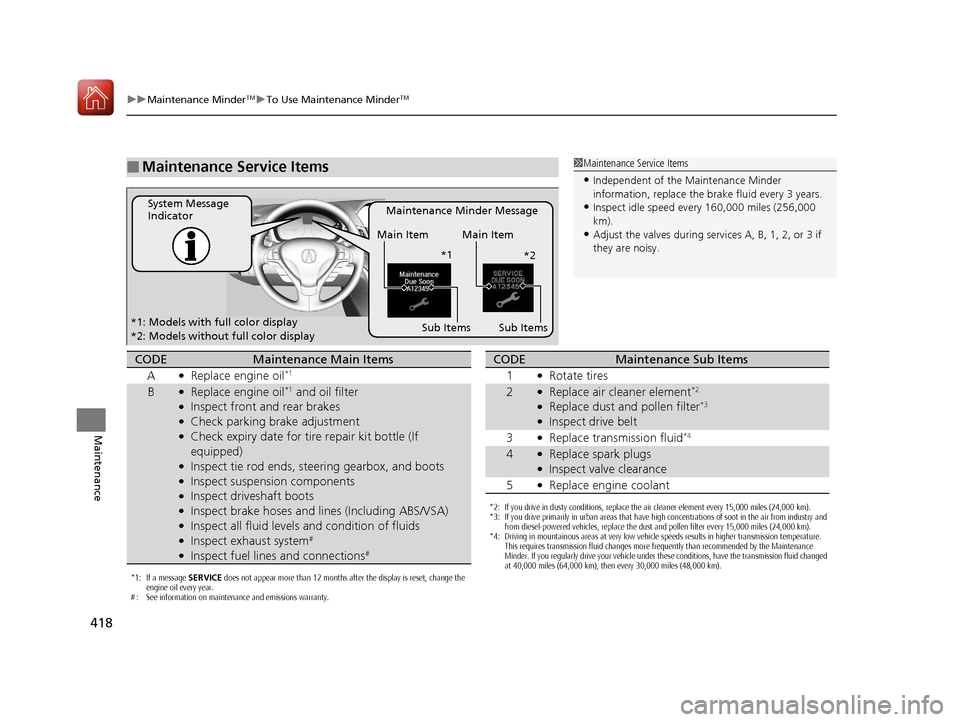
■Maintenance Service Items1Maintenance Service Items
•Independent of the Maintenance Minder
information, replace the brake fluid every 3 years.
•Inspect idle speed every 160,000 miles (256,000
km).
•Adjust the valves during services A, B, 1, 2, or 3 if
they are noisy.
Maintenance Minder Message
System Message
Indicator
Sub Items
Main Item Main Item
Sub Items
*1: Models with full color display
*2: Models without full color display *1
*2
*1: If a message SERVICE does not appear more than 12 months after the display is reset, change the
engine oil every year.
# : See information on maintenance and emissions warranty.
CODEMaintenance Main Items
A
●Replace engine oil*1
B●Replace engine oil*1 and oil filter●Inspect front and rear brakes●Check parking brake adjustment●Check expiry date for ti re repair kit bottle (If
equipped)
●Inspect tie rod ends, steering gearbox, and boots●Inspect suspension components●Inspect driveshaft boots●Inspect brake hoses and li nes (Including ABS/VSA)●Inspect all fluid levels and condition of fluids●Inspect exhaust system#
●Inspect fuel lines and connections#
*2: If you drive in dusty conditions, replace the air cleaner element every 15,000 miles (24,000 km).
*3: If you drive primarily in urban areas that have high concentrations of soot in the air from industry and
from diesel-powered vehicles, replace the dust and pollen filter every 15,000 miles (24,000 km).
*4: Driving in mountainous areas at very low vehicle speeds results in higher transmission temperature. This requires transmission fluid changes more frequently than recommended by the Maintenance
Minder. If you regularly drive your vehicle under these conditions, have the transmission fluid changed
at 40,000 miles (64,000 km), then every 30,000 miles (48,000 km).
CODEMaintenance Sub Items
1
●Rotate tires
2●Replace air cleaner element*2
●Replace dust and pollen filter*3
●Inspect drive belt
3
●Replace transmission fluid*4
4●Replace spark plugs●Inspect valve clearance
5
●Replace engine coolant
17 ACURA ILX-31TX66400.book 418 ページ 2016年3月15日 火曜日 午後5時0分
Page 420 of 521
419
uuMaintenance MinderTMuTo Use Maintenance MinderTM
Maintenance
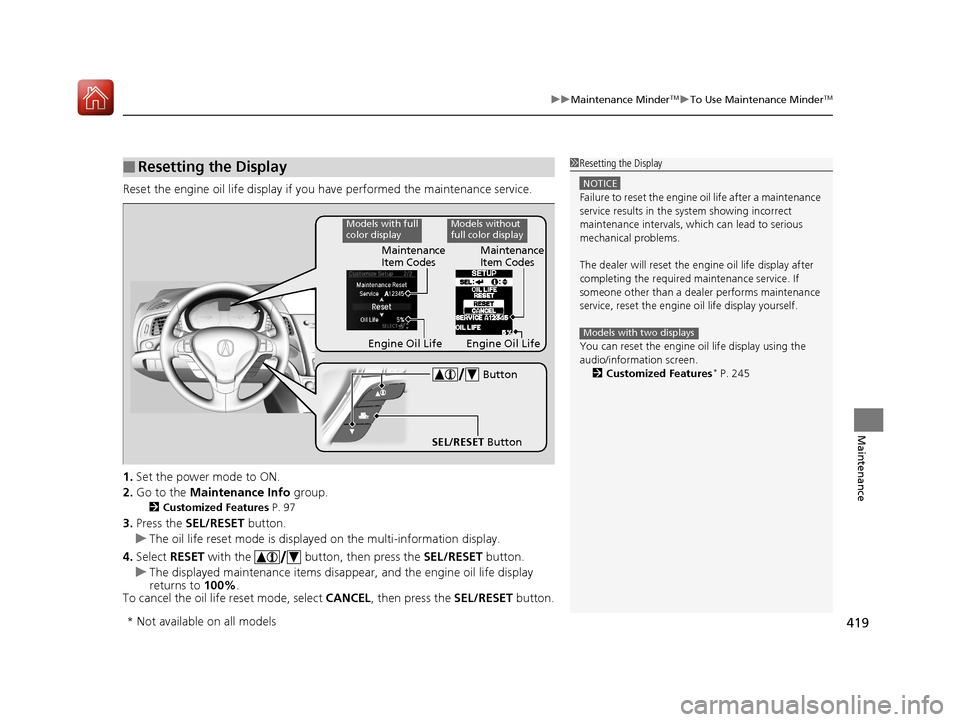
Reset the engine oil life display if you have performed the maintenance service.
1. Set the power mode to ON.
2. Go to the Maintenance Info group.
2Customized Features P. 97
3.Press the SEL/RESET button.
u The oil life reset mode is displayed on the multi-information display.
4. Select RESET with the button, then press the SEL/RESET button.
u The displayed maintenance items disapp ear, and the engine oil life display
returns to 100%.
To cancel the oil life reset mode, select CANCEL, then press the SEL/RESET button.
■Resetting the Display1Resetting the Display
NOTICE
Failure to reset the engine oil life after a maintenance
service results in the sy stem showing incorrect
maintenance intervals, which can lead to serious
mechanical problems.
The dealer will reset the en gine oil life display after
completing the required ma intenance service. If
someone other than a deal er performs maintenance
service, reset the engine oil life display yourself.
You can reset the engine oi l life display using the
audio/information screen. 2 Customized Features
* P. 245
Models with two displaysEngine Oil LifeMaintenance
Item Codes
SEL/RESET Button Button
Models with full
color displayModels without
full color display
Maintenance
Item Codes
Engine Oil Life
* Not available on all models
17 ACURA ILX-31TX66400.book 419 ページ 2016年3月15日 火曜日 午後5時0分
Page 446 of 521
445
uuChecking and Maintaining Tires uDOT Tire Quality Grading (U.S. Vehicles)
Continued
Maintenance
DOT Tire Quality Grading (U.S. Vehicles)
The tires on your vehicle m eet all U.S. Federal Safety
Requirements. All tires are also graded for treadwear, traction,
and temperature performance according to Department of
Transportation (DOT) standards. The following explains these
gradings.
Quality grades can be found where applicable on th e tire sidewall
between tread shoulder and maximum section width.
The treadwear grade is a comparative rating based on the wear
rate of the tire when tested un der controlled conditions on a
specified government test course. For example, a tire graded 150
would wear one and one-half (1 1/2) times as well on the
government course as a tire graded 100. The relative performance
of tires depends upon the actual co nditions of their use, however,
and may depart significantly from the norm due to variations in
driving habits, service practi ces and differences in road
characteristics and climate.
■Uniform Tire Quality Grading
■Treadwear
1 Uniform Tire Quality Grading
For example:
Treadwear 200
Traction AA
Temperature A
All passenger car tires must conform
to Federal Safety Requirements in
addition to these grades.
17 ACURA ILX-31TX66400.book 445 ページ 2016年3月15日 火曜日 午後5時0分
Page 448 of 521
447
uuChecking and Maintaining Tires uWear Indicators
Maintenance
Wear Indicators
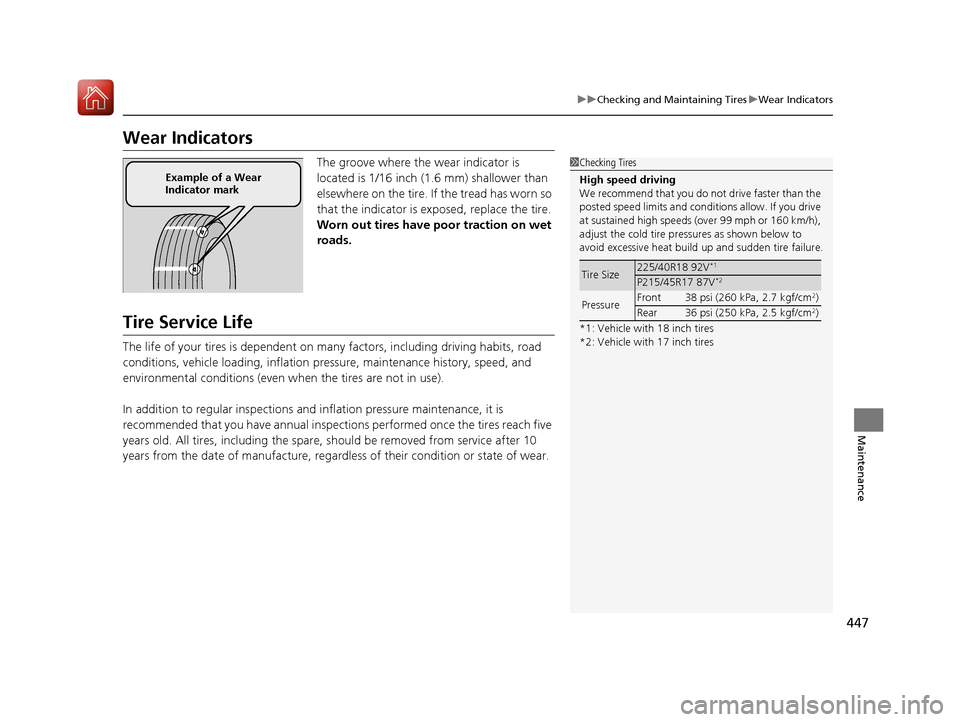
The groove where the wear indicator is
located is 1/16 inch (1.6 mm) shallower than
elsewhere on the tire. If the tread has worn so
that the indicator is ex posed, replace the tire.
Worn out tires have po or traction on wet
roads.
Tire Service Life
The life of your tires is dependent on many factors, including driving habits, road
conditions, vehicle loading, inflation pressure, maintenance history, speed, and
environmental conditions (even wh en the tires are not in use).
In addition to regular inspections and inflation pressure maintenance, it is
recommended that you have annual inspections performed once the tires reach five
years old. All tires, including the spare, should be removed from service after 10
years from the date of manufacture, regardle ss of their condition or state of wear.
1Checking Tires
High speed driving
We recommend that you do not drive faster than the
posted speed limits and conditions allow. If you drive
at sustained high speeds (over 99 mph or 160 km/h),
adjust the cold tire pressures as shown below to
avoid excessive heat build up and sudden tire failure.
*1: Vehicle with 18 inch tires
*2: Vehicle with 17 inch tires
Tire Size225/40R18 92V*1
P215/45R17 87V*2
Pressure Front 38 psi (260 kPa, 2.7 kgf/cm2)
Rear 36 psi (250 kPa, 2.5 kgf/cm2)
Example of a Wear
Indicator mark
17 ACURA ILX-31TX66400.book 447 ページ 2016年3月15日 火曜日 午後5時0分
Page 464 of 521
463Continued
Handling the Unexpected
If a Tire Goes Flat
Temporarily Repairing a Flat Tire
If the tire has a large cut or is otherwise severely damaged, you will need to have the
vehicle towed. If the tire only has a small puncture, from a nail for instance, you can
use the temporary tire repair kit so that you can drive to the nearest service station
for a more permanent repair.
If a tire goes flat while driving, grasp the steering wheel firmly, and brake gradually
to reduce speed. Then stop in a safe place.
1. Park the vehicle on a firm, level, and n on-slippery surface and apply the parking
brake.
2. Move the shift lever to
(P.
3. Turn on the hazard warning lights an d set the power mode to VEHICLE OFF
(LOCK).
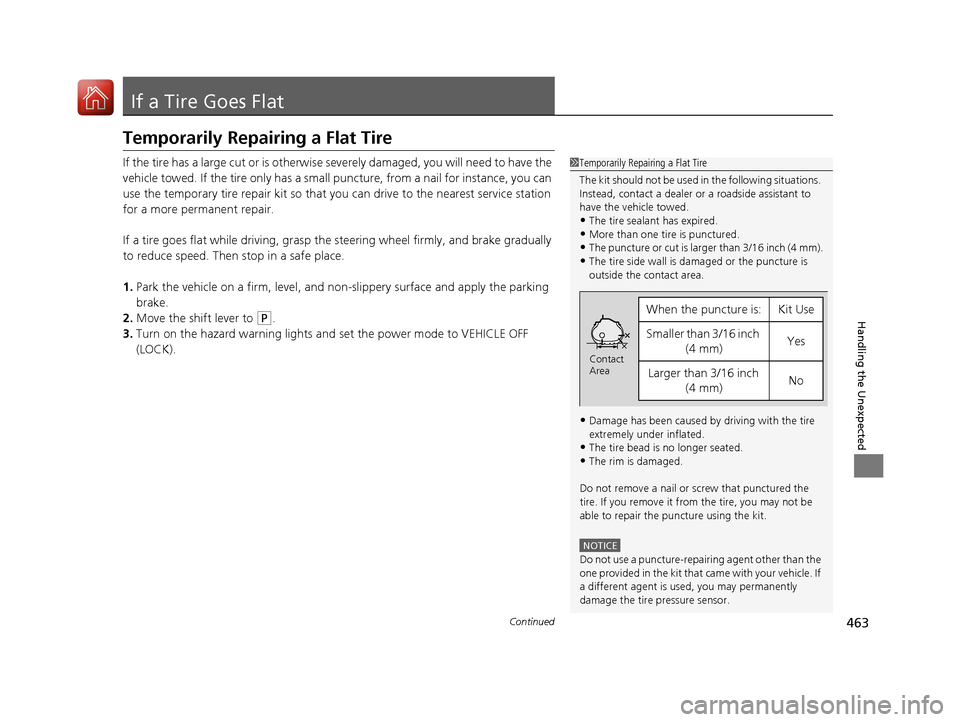
1 Temporarily Repairing a Flat Tire
The kit should not be used in the following situations.
Instead, contact a dealer or a roadside assistant to
have the vehicle towed.
•The tire sealant has expired.
•More than one tire is punctured.•The puncture or cut is larger than 3/16 inch (4 mm).
•The tire side wall is da maged or the puncture is
outside the contact area.
•Damage has been caused by driving with the tire
extremely under inflated.
•The tire bead is no longer seated.
•The rim is damaged.
Do not remove a nail or screw that punctured the
tire. If you remove it from the tire, you may not be
able to repair the puncture using the kit.
NOTICE
Do not use a puncture-repairing agent other than the
one provided in the kit that came with your vehicle. If
a different agent is used, you may permanently
damage the tire pressure sensor.
When the puncture is:Kit Use
Smaller than 3/16 inch (4 mm)Yes
Larger than 3/16 inch (4 mm)No
Contact
Area
17 ACURA ILX-31TX66400.book 463 ページ 2016年3月15日 火曜日 午後5時0分
Page 471 of 521
470
uuIf a Tire Goes Flat uTemporarily Repairing a Flat Tire
Handling the Unexpected
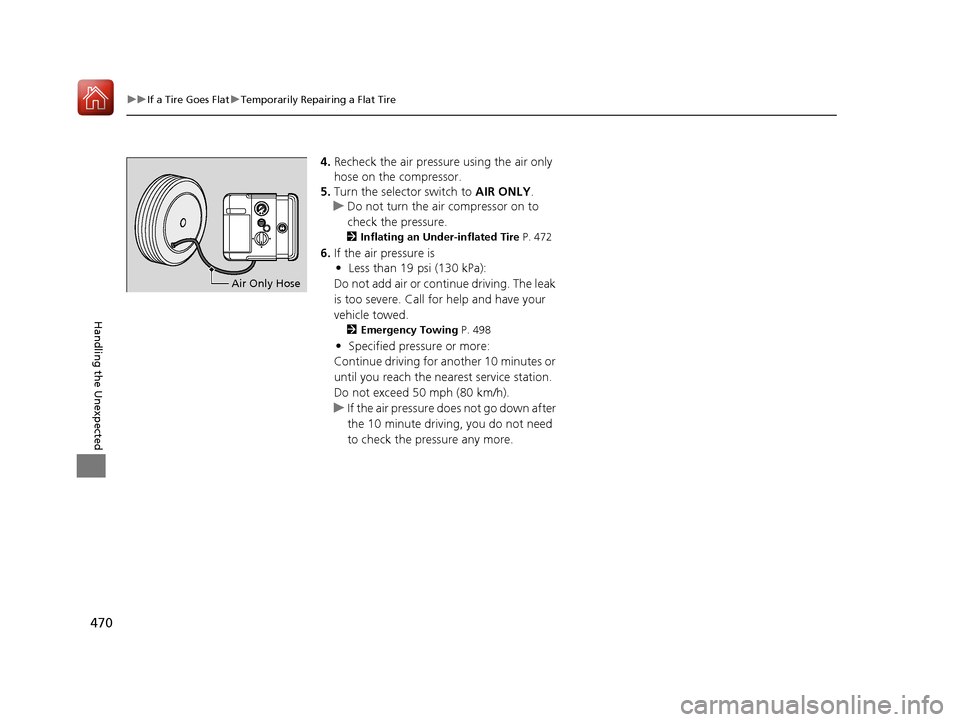
4. Recheck the air pressure using the air only
hose on the compressor.
5. Turn the selector switch to AIR ONLY.
u Do not turn the air compressor on to
check the pressure.
2 Inflating an Under-inflated Tire P. 472
6.If the air pressure is
• Less than 19 psi (130 kPa):
Do not add air or continue driving. The leak
is too severe. Call for help and have your
vehicle towed.
2 Emergency Towing P. 498
•Specified pressure or more:
Continue driving for another 10 minutes or
until you reach the nearest service station.
Do not exceed 50 mph (80 km/h).
u If the air pressure does not go down after
the 10 minute driving, you do not need
to check the pressure any more.
Air Only Hose
17 ACURA ILX-31TX66400.book 470 ページ 2016年3月15日 火曜日 午後5時0分
Page 472 of 521
Continued471
uuIf a Tire Goes Flat uTemporarily Repairing a Flat Tire
Handling the Unexpected
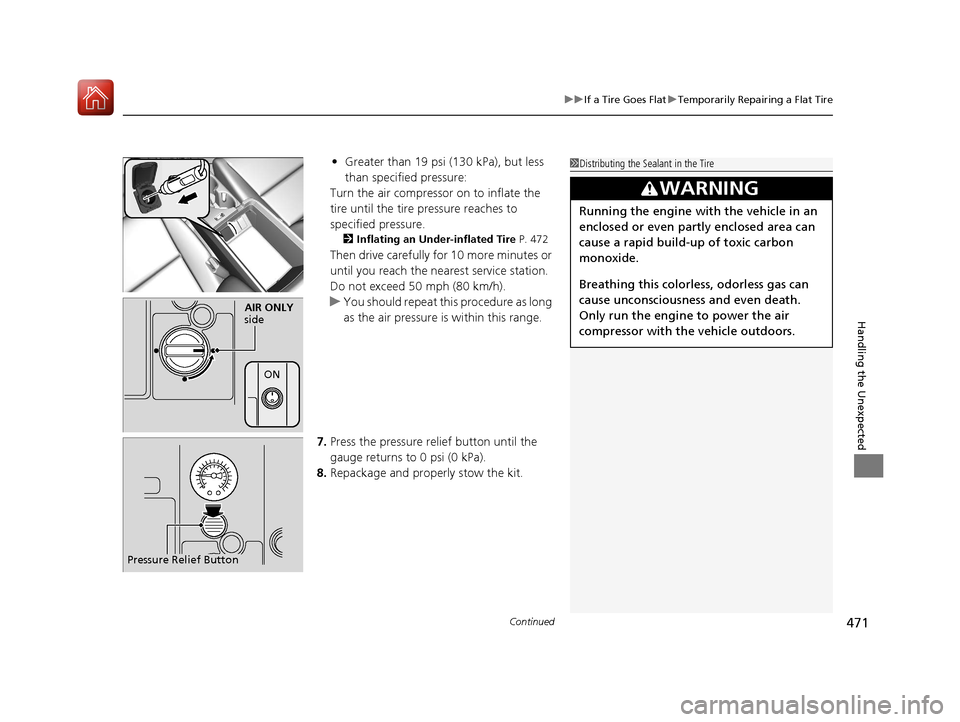
• Greater than 19 psi (130 kPa), but less
than specified pressure:
Turn the air compressor on to inflate the
tire until the tire pressure reaches to
specified pressure.
2 Inflating an Under-inflated Tire P. 472
Then drive carefully for 10 more minutes or
until you reach the nearest service station.
Do not exceed 50 mph (80 km/h).
u You should repeat this procedure as long
as the air pressure is within this range.
7. Press the pressure relief button until the
gauge returns to 0 psi (0 kPa).
8. Repackage and properly stow the kit.
AIR ONLY
side
ON
Pressure Relief Button
1 Distributing the Sealant in the Tire
3WARNING
Running the engine with the vehicle in an
enclosed or even partly enclosed area can
cause a rapid build-up of toxic carbon
monoxide.
Breathing this colorless, odorless gas can
cause unconsciousness and even death.
Only run the engine to power the air
compressor with th e vehicle outdoors.
17 ACURA ILX-31TX66400.book 471 ページ 2016年3月15日 火曜日 午後5時0分
Page 488 of 521
487
uuJump Starting u
Handling the Unexpected
Once your vehicle's engine has started, re move the jumper cables in the following
order.
1. Disconnect the jumper cable from your vehicle's ground.
2. Disconnect the other end of the jumper cable from the assisting vehicle's battery
- terminal.
3. Disconnect the jumper cable from your vehicle's battery + terminal.
4. Disconnect the other end of the jumper cable from the assisting vehicle's battery
+ terminal.
Have your vehicle inspected by a n earby service station or a dealer.
■What to Do After the Engine Starts
17 ACURA ILX-31TX66400.book 487 ページ 2016年3月15日 火曜日 午後5時0分
Page 499 of 521
498
Handling the Unexpected
Emergency Towing
Call a professional towing service if you need to tow your vehicle.
■Flat bed equipment
The operator loads your vehicle on the back of a truck.
This is the best way to transport your vehicle.
■Wheel lift equipment
The tow truck uses two pivoti ng arms that go under the front tires and lift them off
the ground. The rear tires remain on the ground. This is an acceptable way to
tow your vehicle.
1 Emergency Towing
NOTICE
Trying to lift or tow your vehicle by the bumpers will
cause serious damage. The bumpers are not designed
to support the vehicle's weight.
NOTICE
Improper towing such as towing behind a
motorhome or other motor vehicle can damage the
transmission.
Never tow your vehicle with just a rope or chain.
It is very dangerous since ropes or chains may shift
from side to side or break.
17 ACURA ILX-31TX66400.book 498 ページ 2016年3月15日 火曜日 午後5時0分
Page 500 of 521
499
Information
This chapter includes your vehicle's specifications, locations of identification numbers, and other
information required by regulation.
Specifications.................................... 500
Identification Numbers Vehicle Identification Number (VIN), Engine Number, and Transmission
Number ......................................... 502
Devices that Emit Radio Waves ....... 503
Reporting Safety Defects ................. 504Emissions Testing
Testing of Readiness Codes.............. 505
Warranty Coverages ........................ 507
Authorized Manuals ......................... 509
Client Service Information ............... 510
17 ACURA ILX-31TX66400.book 499 ページ 2016年3月15日 火曜日 午後5時0分