Driving Acura ILX 2017 Repair Manual
[x] Cancel search | Manufacturer: ACURA, Model Year: 2017, Model line: ILX, Model: Acura ILX 2017Pages: 521, PDF Size: 29.65 MB
Page 98 of 521
Continued97
uuGauges and Multi-Information Display uMulti-Information Display
Instrument Panel
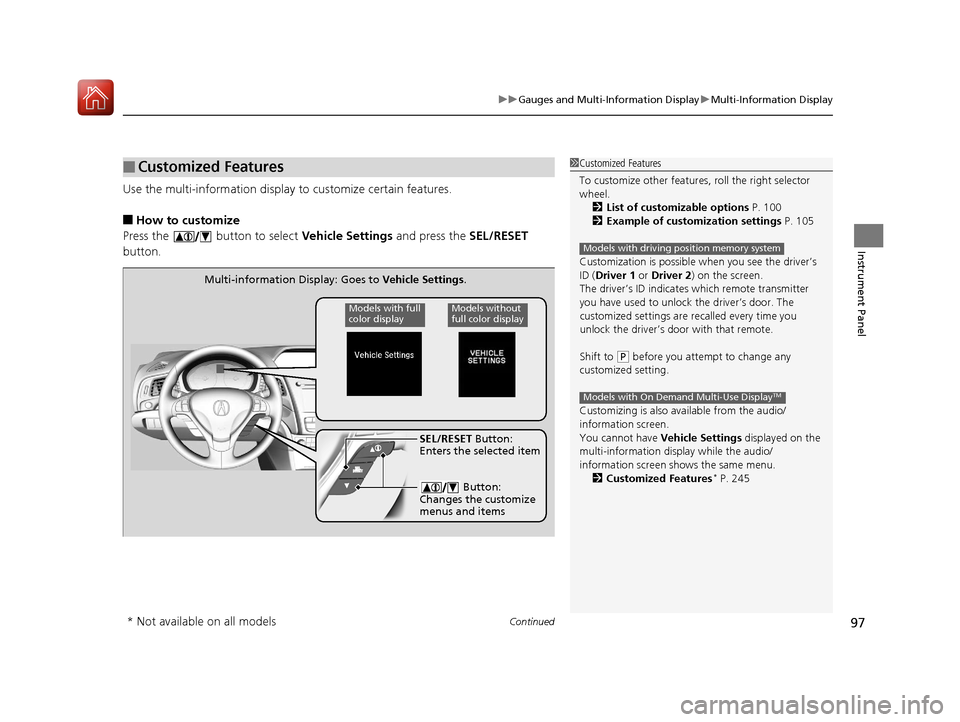
Use the multi-information display to customize certain features.
■How to customize
Press the button to select Vehicle Settings and press the SEL/RESET
button.
■Customized Features1 Customized Features
To customize other features , roll the right selector
wheel.
2 List of customizable options P. 100
2 Example of customization settings P. 105
Customization is possible when you see the driver’s
ID ( Driver 1 or Driver 2 ) on the screen.
The driver’s ID indicates which remote transmitter
you have used to unlock the driver’s door. The
customized settings are recalled every time you
unlock the driver’s door with that remote.
Shift to
( P before you attempt to change any
customized setting.
Customizing is also av ailable from the audio/
information screen.
You cannot have Vehicle Settings displayed on the
multi-information display while the audio/
information screen shows the same menu.
2 Customized Features
* P. 245
Models with driving position memory system
Models with On Demand Multi-Use DisplayTM
Multi-information Display: Goes to Vehicle Settings.
Models without
full color displayModels with full
color display
SEL/RESET Button:
Enters the selected item
Button:
Changes the customize
menus and items
* Not available on all models
17 ACURA ILX-31TX66400.book 97 ページ 2016年3月15日 火曜日 午後5時0分
Page 99 of 521
98
uuGauges and Multi-Information Display uMulti-Information Display
Instrument Panel
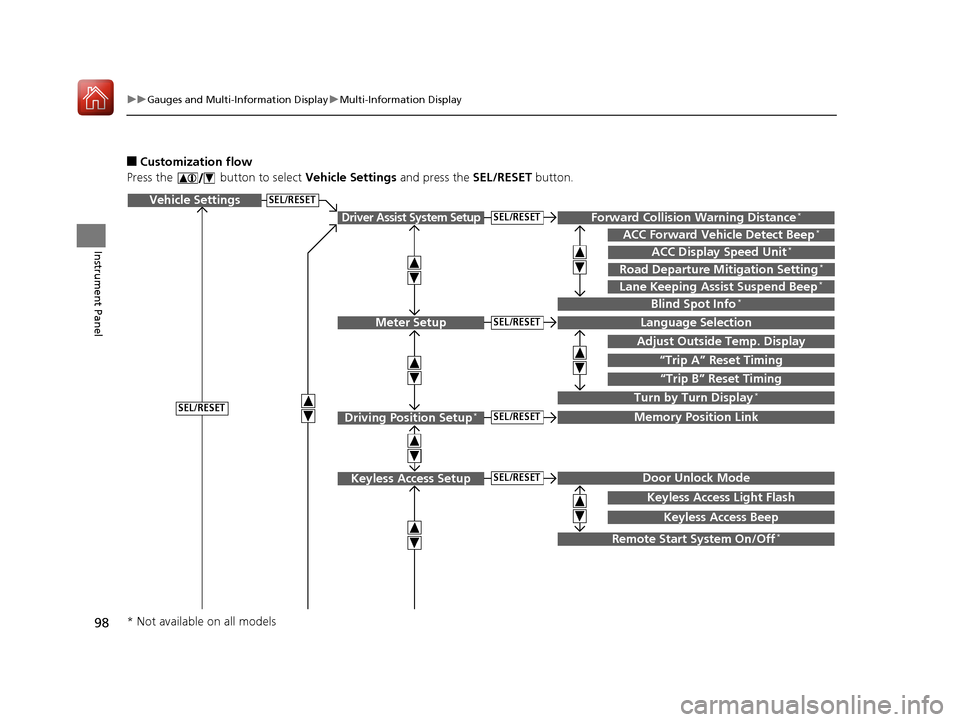
■Customization flow
Press the button to select Vehicle Settings and press the SEL/RESET button.
Vehicle Settings
“Trip A” Reset Timing
Language Selection
Adjust Outside Temp. Display
Memory Position Link
Door Unlock Mode
Keyless Access Light Flash
Driver Assist System Setup
Meter Setup
Driving Position Setup*
Keyless Access Setup
“Trip B” Reset Timing
Turn by Turn Display*
Forward Collision Warning Distance*
ACC Forward Vehicle Detect Beep*
Lane Keeping Assist Suspend Beep*
Blind Spot Info*
Keyless Access Beep
ACC Display Speed Unit*
Road Departure Mitigation Setting*
SEL/RESET
SEL/RESET
SEL/RESET
SEL/RESET
SEL/RESET
SEL/RESET
Remote Start System On/Off*
* Not available on all models
17 ACURA ILX-31TX66400.book 98 ページ 2016年3月15日 火曜日 午後5時0分
Page 103 of 521
102
uuGauges and Multi-Information Display uMulti-Information Display
Instrument Panel
*1:Default SettingSetup Group Customizable Features Description Selectable Settings
Driving
Position
Setup
*Memory Position LinkTurns the driving position memory system on and
off.On*1/
Off
Keyless
Access
Setup Door Unlock Mode
Changes which doors unlock when you grab the
driver’s door handle.
Driver Door Only
*1/
All Doors
Keyless Access Light
Flash Causes some exterior lights to flash when you
unlock/lock the doors.
On
*1/
Off
Keyless Access Beep Causes the beeper to sound when you unlock/lock
the doors. On
*1/
Off
Remote Start System On/
Off
*Turns the remote engine start feature on and off. On*1/Off
* Not available on all models
17 ACURA ILX-31TX66400.book 102 ページ 2016年3月15日 火曜日 午後5時0分
Page 108 of 521
107
Controls
This chapter explains how to operate the various controls necessary for driving.
Clock.................................................. 108
Locking and Unlocking the Doors
Key Types and Functions .................. 110
Low Keyless Access Remote Signal Strength ......................................... 112
Locking/Unlocking the Doors from the Outside .......................................... 113
Locking/Unlocking the Doors from the
Inside ............................................. 118
Childproof Door Locks ..................... 120
Auto Door Locking/Unlocking .......... 121
Opening and Closing the Trunk ....... 122
Security System ................................ 126
Immobilizer System .......................... 126 Security System Alarm...................... 126Opening and Closing the Windows
.... 129Opening and Closing the Moonroof....... 132Operating the Switches Around the
Steering Wheel
ENGINE START/STOP Button............. 133
Turn Signals ..................................... 136
Light Switches.................................. 136
Fog Lights
*...................................... 139
Daytime Running Lights ................... 139
Wipers and Washers ........................ 140
Brightness Control ........................... 142
Rear Defogger/Heated Door Mirror Button...143
Adjusting the Steering Wheel........... 143 Driving Position Memory System
*.... 144
Adjusting the Mirrors ....................... 146
Interior Rearview Mirror ................... 146
Power Door Mirrors ......................... 147
Adjusting the Seats .......................... 148
Adjusting the Seat Positions ............. 148
Interior Lights/Interior Convenience Items ................................................ 156
Interior Lights .................................. 156
Interior Convenience Items .............. 157
Climate Control System ................... 161
Using Automatic Climate Control .... 161
Synchronized Mode ......................... 163
Automatic Climate Control Sensors......164
* Not available on all models
17 ACURA ILX-31TX66400.book 107 ページ 2016年3月15日 火曜日 午後5時0分
Page 123 of 521
122
Controls
Opening and Closing the Trunk
Precautions for Opening/Closing the Trunk
■Opening the trunk
Open the trunk all the way. u If it is not fully opened, the trunk lid may begin to close under its own weight.
■Closing the trunk
Keep the trunk lid clos ed while driving to:
u Avoid possible damage.
u Prevent exhaust gas from leaking into the vehicle.
2 Exhaust Gas Hazard P. 60
Using the Trunk Opener
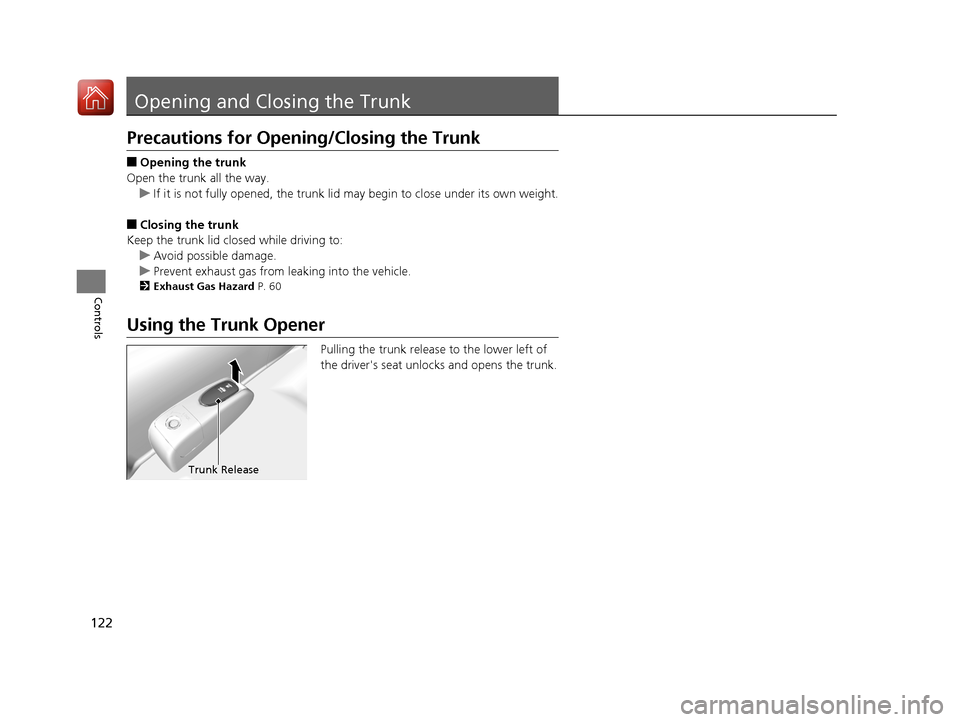
Pulling the trunk release to the lower left of
the driver's seat unlocks and opens the trunk.
Trunk Release
17 ACURA ILX-31TX66400.book 122 ページ 2016年3月15日 火曜日 午後5時0分
Page 138 of 521
Continued137
uuOperating the Switches Around the Steering Wheel uLight Switches
Controls
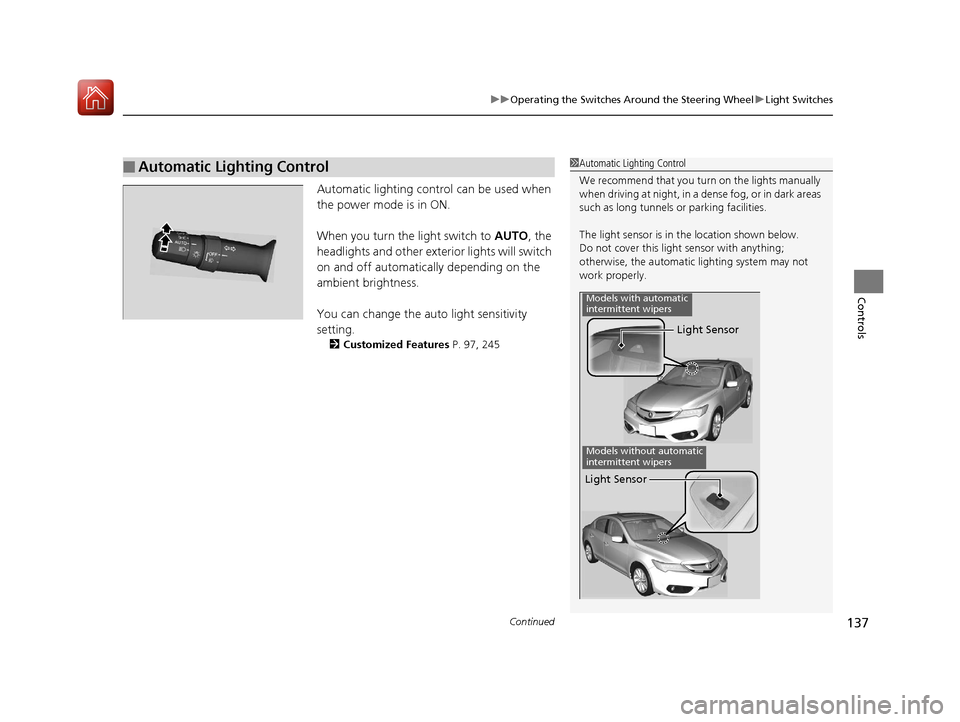
Automatic lighting control can be used when
the power mode is in ON.
When you turn the light switch to AUTO, the
headlights and other exterior lights will switch
on and off automatically depending on the
ambient brightness.
You can change the auto light sensitivity
setting.
2 Customized Features P. 97, 245
■Automatic Lighting Control1Automatic Lighting Control
We recommend that you tu rn on the lights manually
when driving at night, in a dense fog, or in dark areas
such as long tunnels or parking facilities.
The light sensor is in the location shown below.
Do not cover this light sensor with anything;
otherwise, the automatic lighting system may not
work properly.
Light Sensor
Models with automatic
intermittent wipers
Models without automatic
intermittent wipers
Light Sensor
17 ACURA ILX-31TX66400.book 137 ページ 2016年3月15日 火曜日 午後5時0分
Page 142 of 521
141
uuOperating the Switches Around the Steering Wheel uWipers and Washers
Controls
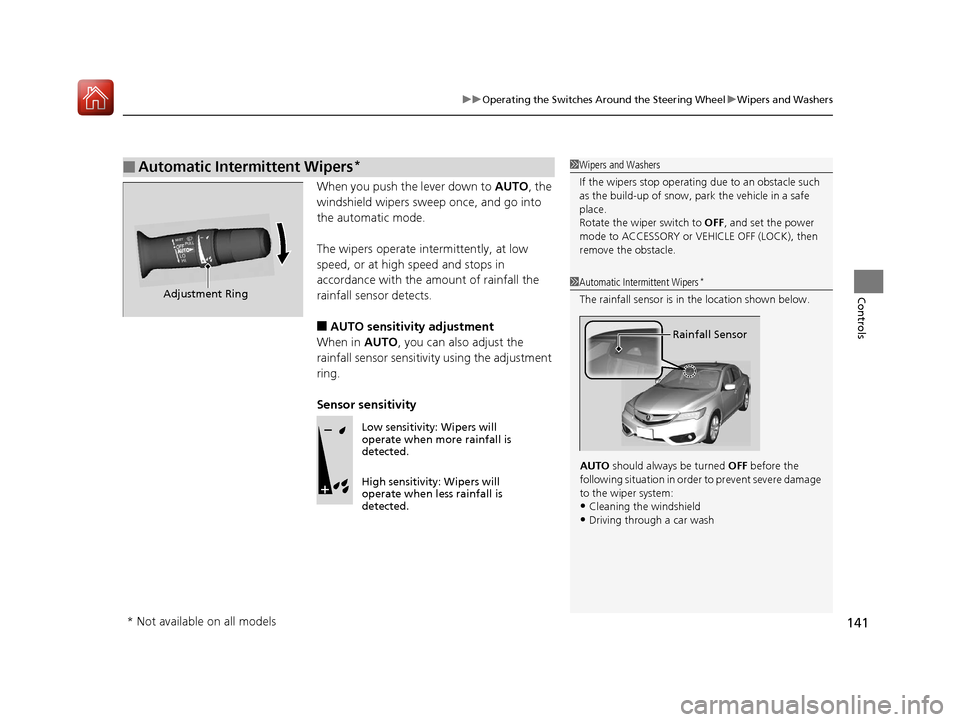
When you push the lever down to AUTO, the
windshield wipers sweep once, and go into
the automatic mode.
The wipers operate intermittently, at low
speed, or at high speed and stops in
accordance with the amount of rainfall the
rainfall sensor detects.
■AUTO sensitivity adjustment
When in AUTO, you can also adjust the
rainfall sensor sensitivity using the adjustment
ring.
Sensor sensitivity
■Automatic Intermittent Wipers*1 Wipers and Washers
If the wipers st op operating due to an obstacle such
as the build-up of snow, pa rk the vehicle in a safe
place.
Rotate the wiper switch to OFF, and set the power
mode to ACCESSORY or VEHICLE OFF (LOCK), then
remove the obstacle.
1 Automatic Intermittent Wipers*
The rainfall sensor is in the location shown below.
AUTO should always be turned OFF before the
following situation in order to prevent severe damage
to the wiper system:
•Cleaning the windshield
•Driving through a car wash
Rainfall Sensor
Adjustment Ring
Low sensitivity: Wipers will
operate when more rainfall is
detected.
High sensitivity: Wipers will
operate when less rainfall is
detected.
* Not available on all models
17 ACURA ILX-31TX66400.book 141 ページ 2016年3月15日 火曜日 午後5時0分
Page 144 of 521
143
uuOperating the Switches Around the Steering Wheel uRear Defogger/Heated Door Mirror Button
Controls
Rear Defogger/Heated Door Mirror Button
Press the rear defogger and heated door
mirror button to defog the rear window and
mirrors when the power mode is in ON.
The rear defogger and heated door mirrors
automatically switch off after 10-30 minutes
depending on the outside temperature.
Adjusting the Steering Wheel
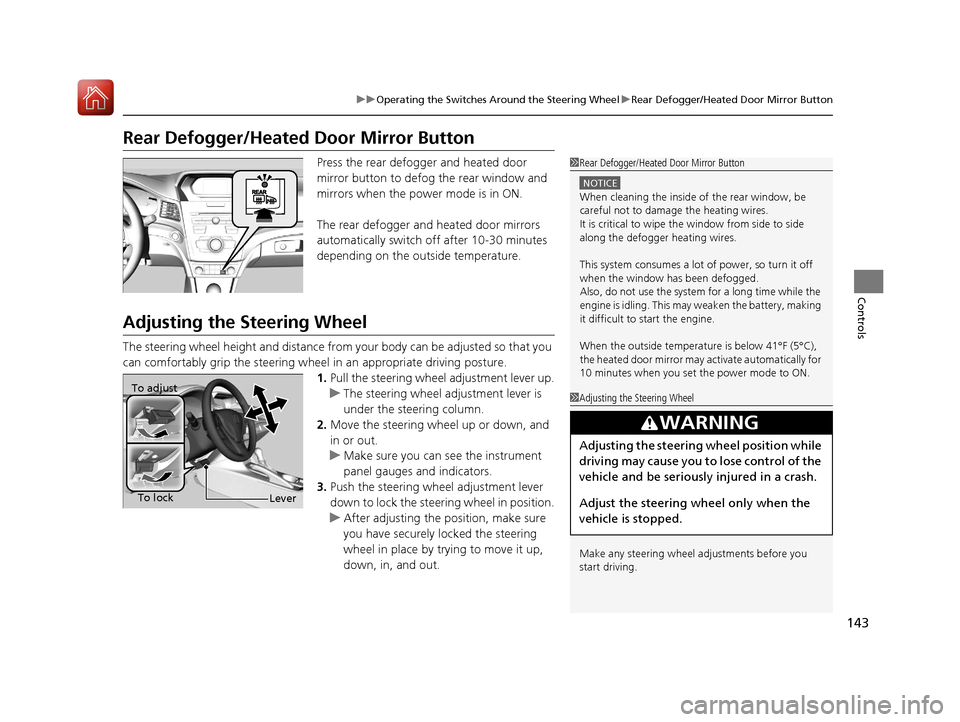
The steering wheel height and distance from your body can be adjusted so that you
can comfortably grip the steering wheel in an appropriate driving posture.
1. Pull the steering wheel adjustment lever up.
u The steering wheel adjustment lever is
under the steering column.
2. Move the steering wheel up or down, and
in or out.
u Make sure you can see the instrument
panel gauges and indicators.
3. Push the steering wheel adjustment lever
down to lock the steering wheel in position.
u After adjusting the position, make sure
you have securely locked the steering
wheel in place by trying to move it up,
down, in, and out.
1Rear Defogger/Heated Door Mirror Button
NOTICE
When cleaning the inside of the rear window, be
careful not to damage the heating wires.
It is critical to wipe the window from side to side
along the defogger heating wires.
This system consumes a lot of power, so turn it off
when the window has been defogged.
Also, do not use the system for a long time while the
engine is idling. This may weaken the battery, making
it difficult to start the engine.
When the outside temperature is below 41°F (5°C),
the heated door mirror may activate automatically for
10 minutes when you set the power mode to ON.
1 Adjusting the Steering Wheel
Make any steering wheel adjustments before you
start driving.
3WARNING
Adjusting the steering wheel position while
driving may cause you to lose control of the
vehicle and be seriously injured in a crash.
Adjust the steering wh eel only when the
vehicle is stopped.
To adjust
To lock
Lever
17 ACURA ILX-31TX66400.book 143 ページ 2016年3月15日 火曜日 午後5時0分
Page 145 of 521
144
uuOperating the Switches Around the Steering Wheel uDriving Position Memory System*
Controls
Driving Position Memory System*
You can store two driver’s seat positions with the driving position memory system.
When you unlock and open th e driver’s door with a remote transmitter, or keyless
access system, the seat adjust automatica lly to one of the two preset positions.
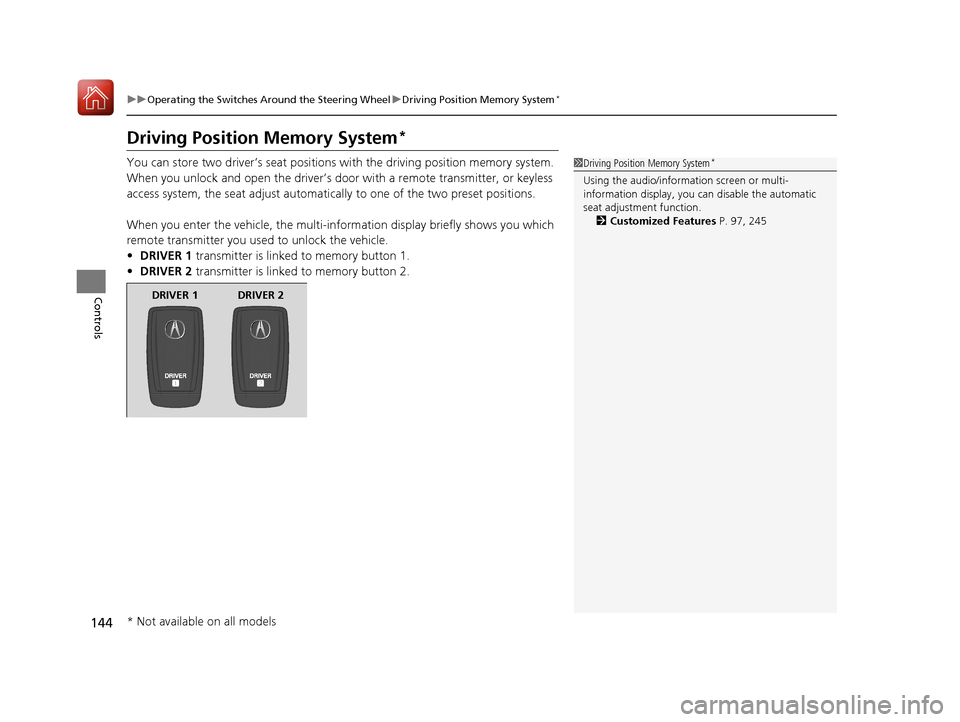
When you enter the vehicle, the multi-in formation display briefly shows you which
remote transmitter you used to unlock the vehicle.
• DRIVER 1 transmitter is linked to memory button 1.
• DRIVER 2 transmitter is linked to memory button 2.1Driving Position Memory System*
Using the audio/information screen or multi-
information display, you can disable the automatic
seat adjustment function. 2 Customized Features P. 97, 245
DRIVER 1 DRIVER 2
* Not available on all models
17 ACURA ILX-31TX66400.book 144 ページ 2016年3月15日 火曜日 午後5時0分
Page 146 of 521
145
uuOperating the Switches Around the Steering Wheel uDriving Position Memory System*
Controls
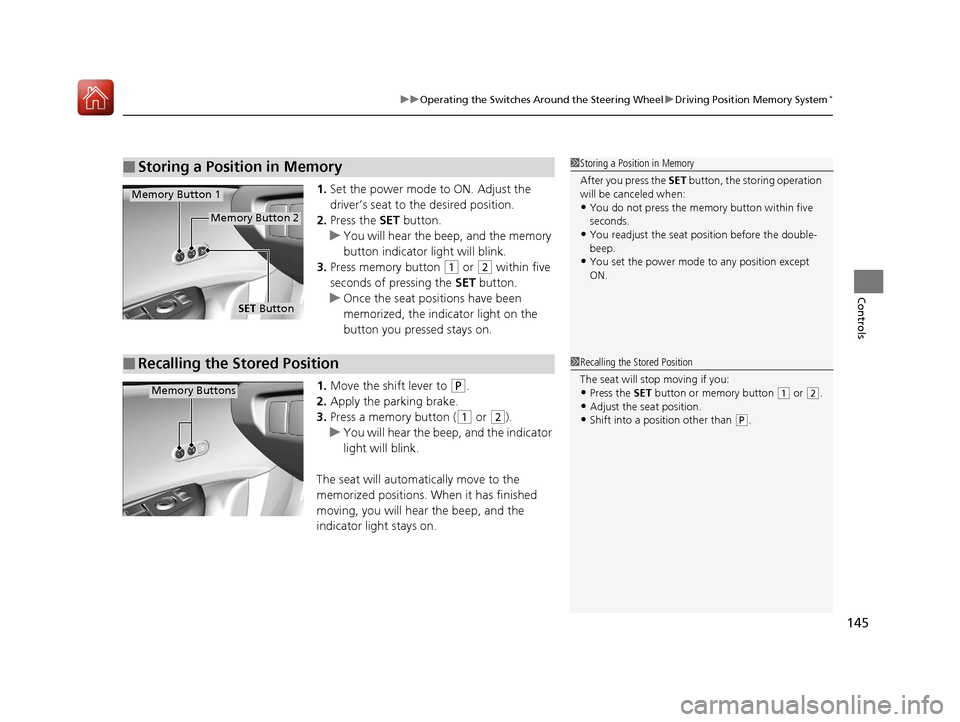
1. Set the power mode to ON. Adjust the
driver’s seat to the desired position.
2. Press the SET button.
u You will hear the beep, and the memory
button indicator light will blink.
3. Press memory button
(1 or (2 within five
seconds of pressing the SET button.
u Once the seat positions have been
memorized, the indicator light on the
button you pressed stays on.
1. Move the shift lever to
(P.
2. Apply the parking brake.
3. Press a memory button (
(1 or (2).
u You will hear the beep, and the indicator
light will blink.
The seat will automatically move to the
memorized positions. When it has finished
moving, you will hear the beep, and the
indicator light stays on.
■Storing a Position in Memory1 Storing a Position in Memory
After you press the SET button, the storing operation
will be canceled when:
•You do not press the memory button within five
seconds.
•You readjust the seat position before the double-
beep.
•You set the power mode to any position except
ON.
SET Button
Memory Button 1
Memory Button 2
■Recalling the Stored Position1Recalling the Stored Position
The seat will st op moving if you:
•Press the SET button or memory button (1 or (2.
•Adjust the seat position.•Shift into a position other than (P.
Memory Buttons
17 ACURA ILX-31TX66400.book 145 ページ 2016年3月15日 火曜日 午後5時0分