audio Acura ILX 2017 Owner's Manual
[x] Cancel search | Manufacturer: ACURA, Model Year: 2017, Model line: ILX, Model: Acura ILX 2017Pages: 521, PDF Size: 29.65 MB
Page 3 of 521
Contents
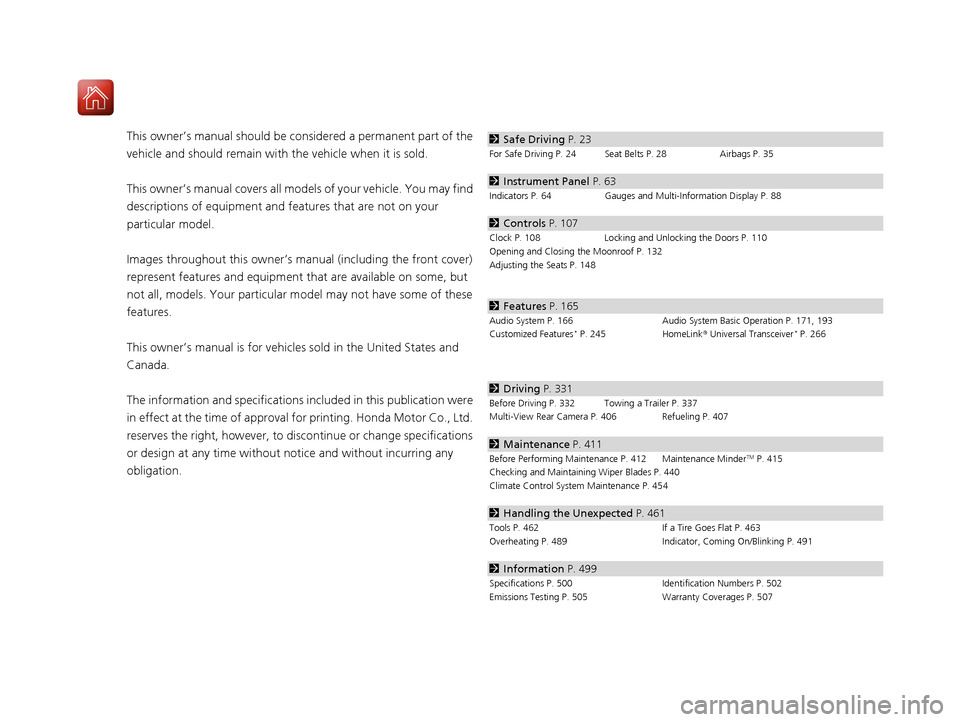
This owner’s manual should be considered a permanent part of the
vehicle and should remain with the vehicle when it is sold.
This owner’s manual covers all models of your vehicle. You may find
descriptions of equipment and features that are not on your
particular model.
Images throughout this owner’s manu al (including the front cover)
represent features and equipment that are available on some, but
not all, models. Your particular mo del may not have some of these
features.
This owner’s manual is for vehicles sold in the United States and
Canada.
The information and specifications in cluded in this publication were
in effect at the time of approval for printing. Honda Motor Co., Ltd.
reserves the right, however, to discontinue or change specifications
or design at any time without notice and without incurring any
obligation.2 Safe Driving P. 23
For Safe Driving P. 24 Seat Belts P. 28 Airbags P. 35
2Instrument Panel P. 63
Indicators P. 64 Gauges and Multi-Information Display P. 88
2Controls P. 107
Clock P. 108 Locking and Unlocking the Doors P. 110
Opening and Closing the Moonroof P. 132
Adjusting the Seats P. 148
2 Features P. 165
Audio System P. 166 Audio System Basic Operation P. 171, 193
Customized Features* P. 245 HomeLink® Universal Transceiver* P. 266
2 Driving P. 331
Before Driving P. 332 Towing a Trailer P. 337
Multi-View Rear Camera P. 406 Refueling P. 407
2Maintenance P. 411
Before Performing Maintenance P. 412 Maintenance MinderTM P. 415
Checking and Maintaining Wiper Blades P. 440
Climate Control System Maintenance P. 454
2Handling the Unexpected P. 461
Tools P. 462 If a Tire Goes Flat P. 463
Overheating P. 489 Indicator, Coming On/Blinking P. 491
2Information P. 499
Specifications P. 500 Identification Numbers P. 502
Emissions Testing P. 505 Warranty Coverages P. 507
17 ACURA ILX-31TX66400.book 2 ページ 2016年3月15日 火曜日 午後5時0分
Page 4 of 521
Contents
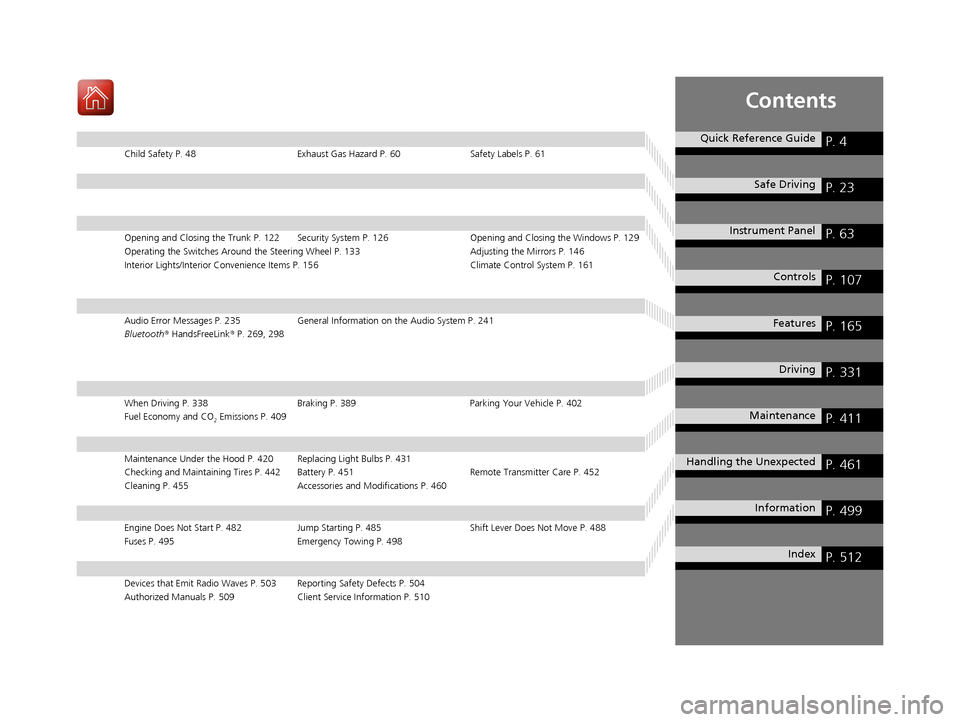
Child Safety P. 48Exhaust Gas Hazard P. 60Safety Labels P. 61
Opening and Closing the Trunk P. 122 Security System P. 126 Opening and Closing the Windows P. 129
Operating the Switches Around the Steering Wheel P. 133 Adjusting the Mirrors P. 146
Interior Lights/Interior Convenience It ems P. 156 Climate Control System P. 161
Audio Error Messages P. 235General Information on the Audio System P. 241
Bluetooth® HandsFreeLink ® P. 269, 298
When Driving P. 338 Braking P. 389Parking Your Vehicle P. 402
Fuel Economy and CO
2 Emissions P. 409
Maintenance Under the Hood P. 420 Replacing Light Bulbs P. 431
Checking and Maintaining Tires P. 442 Battery P. 451 Remote Transmitter Care P. 452
Cleaning P. 455 Accessories and Modifications P. 460
Engine Does Not Start P. 482 Jump Starting P. 485 Shift Lever Does Not Move P. 488
Fuses P. 495 Emergency Towing P. 498
Devices that Emit Radio Waves P. 503 Reporting Safety Defects P. 504
Authorized Manuals P. 509 Client Service Information P. 510
Quick Reference GuideP. 4
Safe DrivingP. 23
Instrument PanelP. 63
ControlsP. 107
FeaturesP. 165
DrivingP. 331
MaintenanceP. 411
Handling the UnexpectedP. 461
InformationP. 499
IndexP. 512
17 ACURA ILX-31TX66400.book 3 ページ 2016年3月15日 火曜日 午後5時0分
Page 5 of 521
4
Quick Reference Guide
Quick Reference Guide
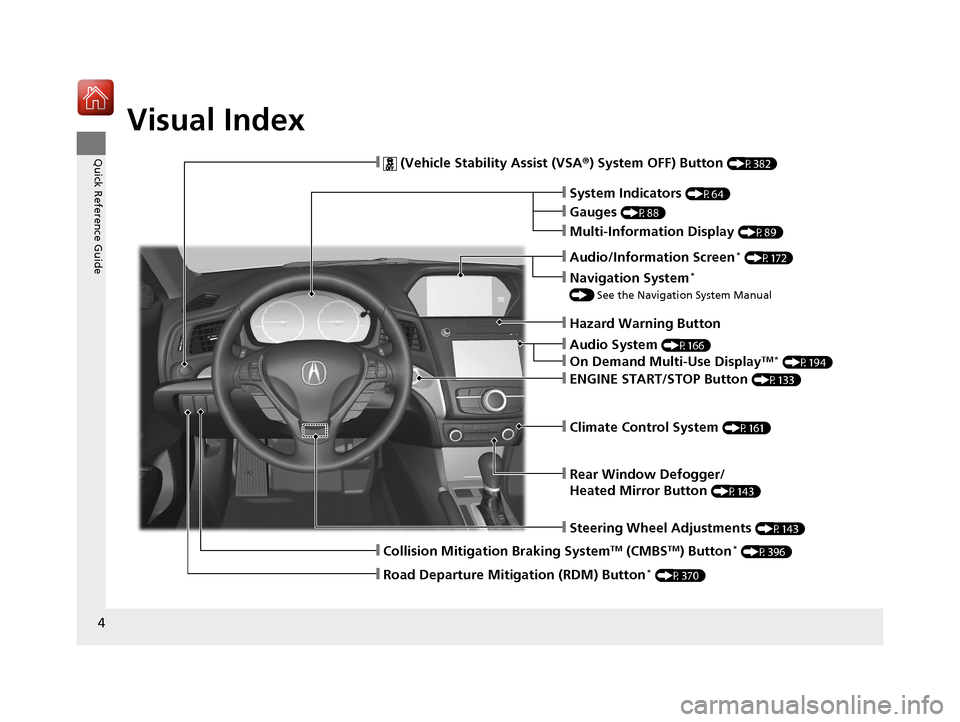
Visual Index
❙Audio System (P166)
❙Rear Window Defogger/
Heated Mirror Button
(P143)
❙Steering Wheel Adjustments (P143)
❙ (Vehicle Stability Assist (VSA®) System OFF) Button (P382)
❙Climate Control System (P161)
❙System Indicators (P64)
❙Gauges (P88)
❙Multi-Information Display (P89)
❙Hazard Warning Button
❙ENGINE START/STOP Button (P133)
❙Navigation System*
() See the Navigation System Manual
❙Audio/Information Screen* (P172)
❙On Demand Multi-Use DisplayTM * (P194)
❙Collision Mitigation Braking SystemTM (CMBSTM) Button* (P396)
❙Road Departure Mitigation (RDM) Button* (P370)
17 ACURA ILX-31TX66400.book 4 ページ 2016年3月15日 火曜日 午後5時0分
Page 6 of 521
5
Quick Reference Guide
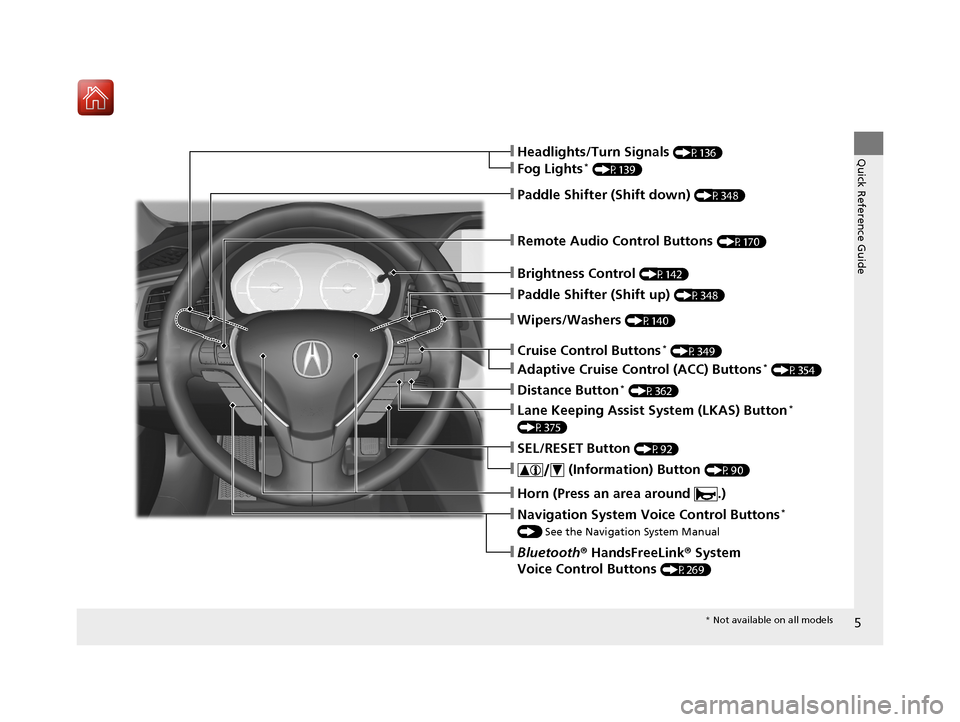
❙Wipers/Washers (P140)
❙Cruise Control Buttons* (P349)
❙Remote Audio Control Buttons (P170)
❙Brightness Control (P142)
❙Headlights/Turn Signals (P136)
❙Fog Lights* (P139)
❙Paddle Shifter (Shift down) (P348)
❙Paddle Shifter (Shift up) (P348)
❙Horn (Press an area around .)
❙Navigation System Voice Control Buttons*
() See the Navigation System Manual
❙Bluetooth ® HandsFreeLink ® System
Voice Control Buttons
(P269)
❙SEL/RESET Button (P92)
❙ (Information) Button (P90)
❙Lane Keeping Assist System (LKAS) Button*
(P375)
❙Adaptive Cruise Control (ACC) Buttons* (P354)
❙Distance Button* (P362)
* Not available on all models
17 ACURA ILX-31TX66400.book 5 ページ 2016年3月15日 火曜日 午後5時0分
Page 15 of 521
14
Quick Reference Guide
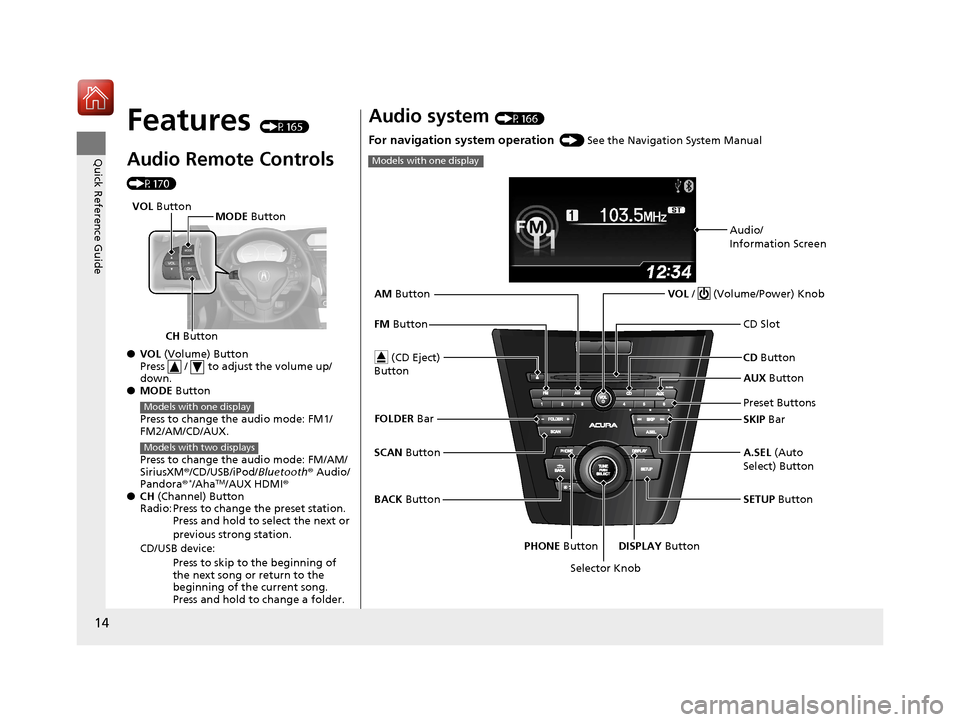
Features (P165)
Audio Remote Controls
(P170)
●VOL (Volume) Button
Press / to adjust the volume up/
down.
● MODE Button
Press to change the audio mode: FM1/
FM2/AM/CD/AUX.
Press to change the audio mode: FM/AM/
SiriusXM ®/CD/USB/iPod/Bluetooth ® Audio/
Pandora®
*/AhaTM/AUX HDMI®
● CH (Channel) Button
Radio: Press to change the preset station. Press and hold to select the next or
previous strong station.
CD/USB device: Press to skip to the beginning of
the next song or return to the
beginning of the current song.
Press and hold to change a folder.
CH Button MODE
Button
VOL
Button
Models with one display
Models with two displays
Audio system (P166)
For navigation system operation () See the Navigation System Manual
Models with one display
Audio/
Information Screen
Selector Knob VOL
/ (Volume/Power) Knob
CD Button
CD Slot
(CD Eject)
Button
Preset Buttons
SETUP Button
PHONE Button DISPLAY Button A.SEL (Auto
Select) Button SKIP Bar AUX
Button
BACK Button
SCAN
Button
FM
Button
AM
Button
FOLDER Bar
17 ACURA ILX-31TX66400.book 14 ページ 2016年3月15日 火曜日 午後5時0分
Page 16 of 521
15
Quick Reference Guide
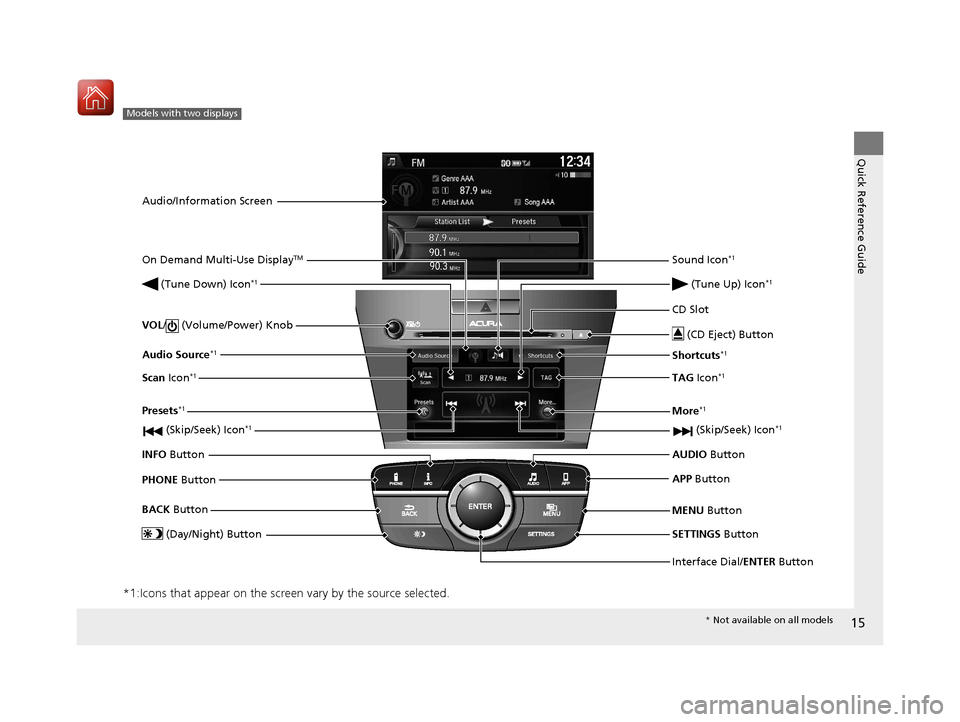
*1:Icons that appear on the screen vary by the source selected.
Models with two displays
Audio/Information ScreenInterface Dial/ENTER Button
VOL
/ (Volume/Power) Knob
CD Slot
(CD Eject) Button
SETTINGS Button
BACK
Button
MENU Button
AUDIO
Button
INFO Button
On Demand Multi-Use Display
TM
PHONE
Button
(Tune Down) Icon
*1
(Skip/Seek) Icon*1
Audio Source*1
(Skip/Seek) Icon*1
Presets*1
(Tune Up) Icon*1
More*1
(Day/Night) Button
Shortcuts*1
APP
Button
Sound Icon*1
Scan Icon*1TAG Icon*1
* Not available on all models
17 ACURA ILX-31TX66400.book 15 ページ 2016年3月15日 火曜日 午後5時0分
Page 98 of 521
Continued97
uuGauges and Multi-Information Display uMulti-Information Display
Instrument Panel
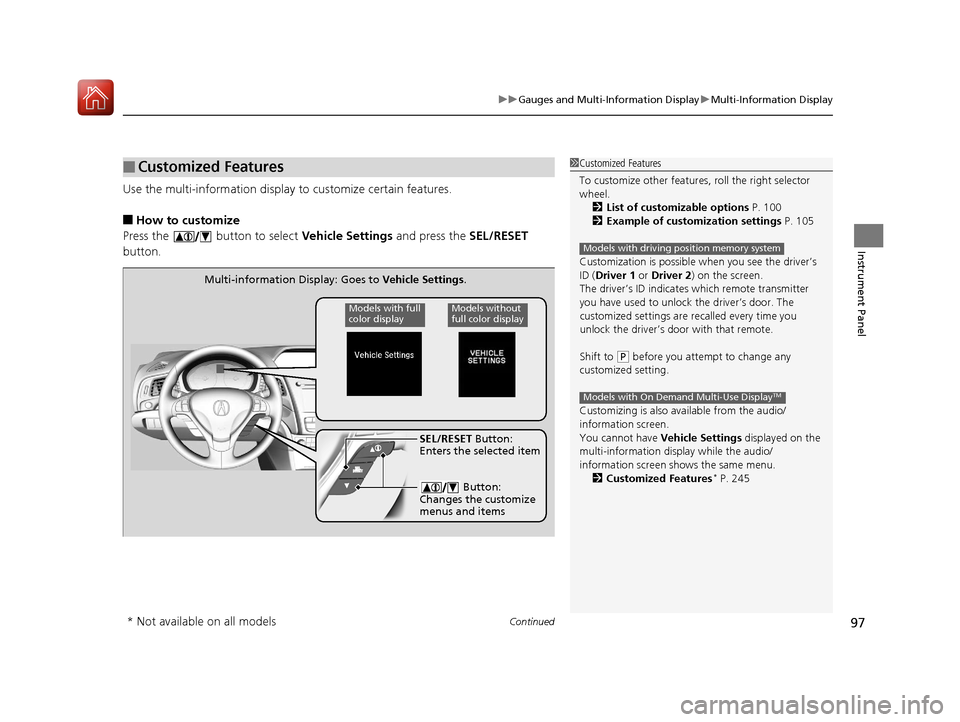
Use the multi-information display to customize certain features.
■How to customize
Press the button to select Vehicle Settings and press the SEL/RESET
button.
■Customized Features1 Customized Features
To customize other features , roll the right selector
wheel.
2 List of customizable options P. 100
2 Example of customization settings P. 105
Customization is possible when you see the driver’s
ID ( Driver 1 or Driver 2 ) on the screen.
The driver’s ID indicates which remote transmitter
you have used to unlock the driver’s door. The
customized settings are recalled every time you
unlock the driver’s door with that remote.
Shift to
( P before you attempt to change any
customized setting.
Customizing is also av ailable from the audio/
information screen.
You cannot have Vehicle Settings displayed on the
multi-information display while the audio/
information screen shows the same menu.
2 Customized Features
* P. 245
Models with driving position memory system
Models with On Demand Multi-Use DisplayTM
Multi-information Display: Goes to Vehicle Settings.
Models without
full color displayModels with full
color display
SEL/RESET Button:
Enters the selected item
Button:
Changes the customize
menus and items
* Not available on all models
17 ACURA ILX-31TX66400.book 97 ページ 2016年3月15日 火曜日 午後5時0分
Page 110 of 521
109
uuClock uAdjusting the Clock
Controls
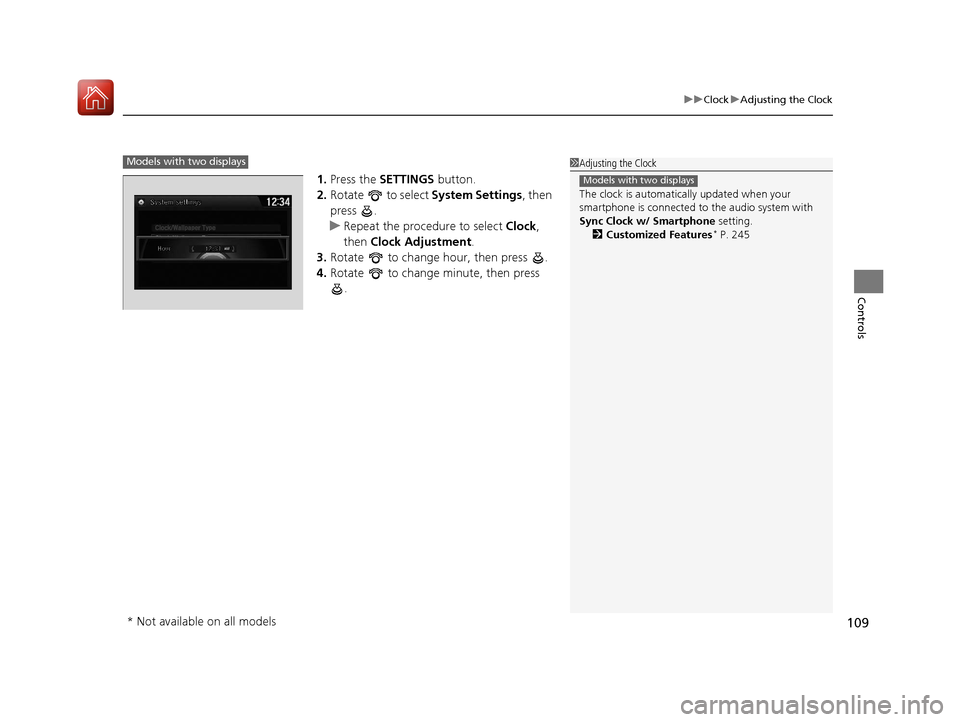
1. Press the SETTINGS button.
2. Rotate to select System Settings, then
press .
u Repeat the procedure to select Clock,
then Clock Adjustment .
3. Rotate to change hour, then press .
4. Rotate to change minute, then press
.
1Adjusting the Clock
The clock is automatica lly updated when your
smartphone is connected to the audio system with
Sync Clock w/ Smartphone setting.
2 Customized Features
* P. 245
Models with two displays
Models with two displays
* Not available on all models
17 ACURA ILX-31TX66400.book 109 ページ 2016年3月15日 火曜日 午後5時0分
Page 115 of 521
uuLocking and Unlocking the Doors uLocking/Unlocking the Doors from the Outside
114
Controls
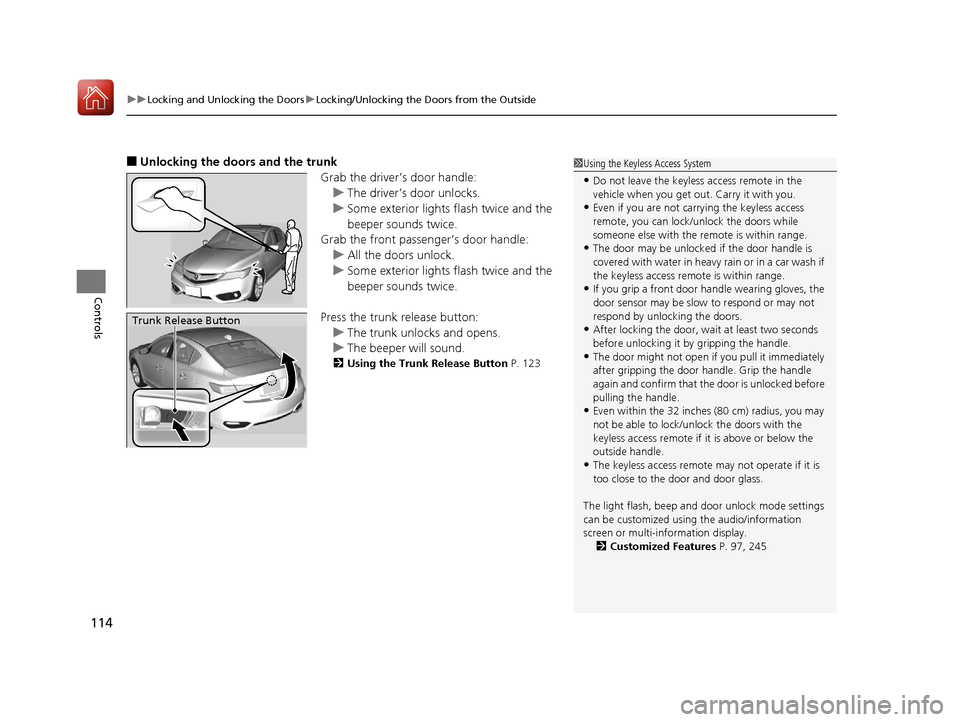
■Unlocking the doors and the trunk
Grab the driver’s door handle:u The driver’s door unlocks.
u Some exterior lights flash twice and the
beeper sounds twice.
Grab the front passenger’s door handle:
u All the doors unlock.
u Some exterior lights flash twice and the
beeper sounds twice.
Press the trunk release button: u The trunk unlocks and opens.
u The beeper will sound.
2 Using the Trunk Release Button P. 123
Trunk Release Button
1Using the Keyless Access System
•Do not leave the keyless access remote in the
vehicle when you get out . Carry it with you.
•Even if you are not carrying the keyless access
remote, you can lock/unlock the doors while
someone else with the remote is within range.
•The door may be unlocked if the door handle is
covered with water in heavy rain or in a car wash if
the keyless access remote is within range.
•If you grip a front door handle wearing gloves, the
door sensor may be slow to respond or may not
respond by unlocking the doors.
•After locking the door, wait at least two seconds
before unlocking it by gripping the handle.
•The door might not open if you pull it immediately
after gripping the door handle. Grip the handle
again and confirm that th e door is unlocked before
pulling the handle.
•Even within the 32 inches (80 cm) radius, you may
not be able to lock/unl ock the doors with the
keyless access remote if it is above or below the
outside handle.
•The keyless access remote may not operate if it is
too close to the door and door glass.
The light flash, beep and door unlock mode settings
can be customized using the audio/information
screen or multi-information display.
2 Customized Features P. 97, 245
17 ACURA ILX-31TX66400.book 114 ページ 2016年3月15日 火曜日 午後5時0分
Page 120 of 521
Continued119
uuLocking and Unlocking the Doors uLocking/Unlocking the Doors from the Inside
Controls
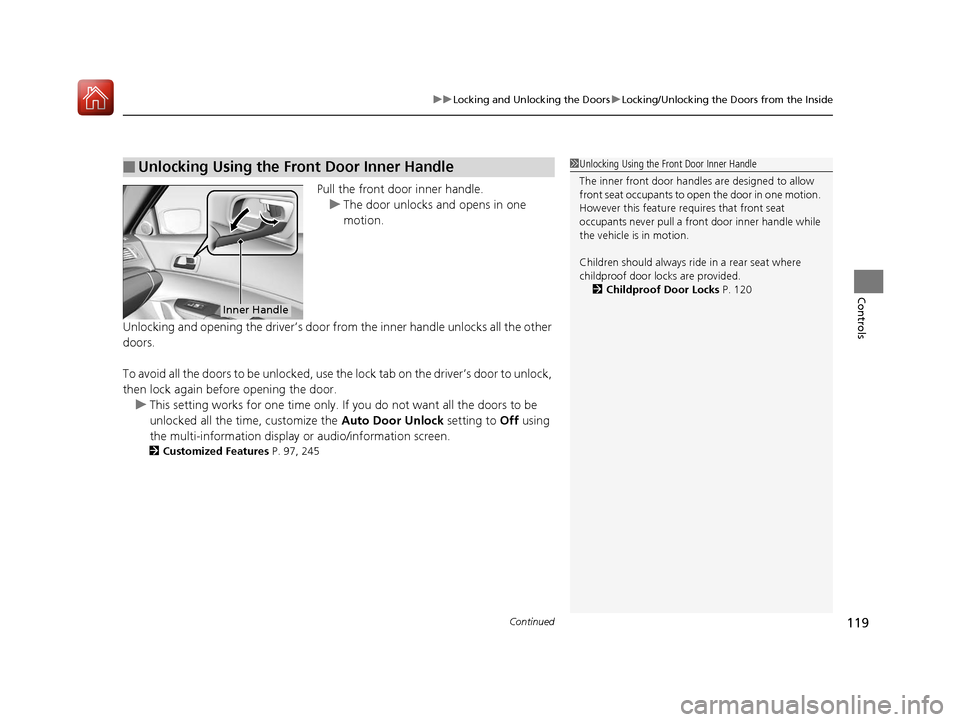
Pull the front door inner handle.
u The door unlocks and opens in one
motion.
Unlocking and opening the driver’s door from the inner handle unlocks all the other
doors.
To avoid all the doors to be unlocked, use the lock tab on the driver’s door to unlock,
then lock again before opening the door. u This setting works for one time only. If you do not want all the doors to be
unlocked all the time, customize the Auto Door Unlock setting to Off using
the multi-information display or audio/information screen.
2 Customized Features P. 97, 245
■Unlocking Using the Front Door Inner Handle1Unlocking Using the Front Door Inner Handle
The inner front door handl es are designed to allow
front seat occupants to open the door in one motion.
However this feature requires that front seat
occupants never pull a front door inner handle while
the vehicle is in motion.
Children should always ride in a rear seat where
childproof door locks are provided. 2 Childproof Door Locks P. 120
Inner Handle
17 ACURA ILX-31TX66400.book 119 ページ 2016年3月15日 火曜日 午後5時0分