audio Acura ILX 2019 User Guide
[x] Cancel search | Manufacturer: ACURA, Model Year: 2019, Model line: ILX, Model: Acura ILX 2019Pages: 621, PDF Size: 34.8 MB
Page 136 of 621
135Continued
Controls
Operating the Switches Around the Steering Wheel
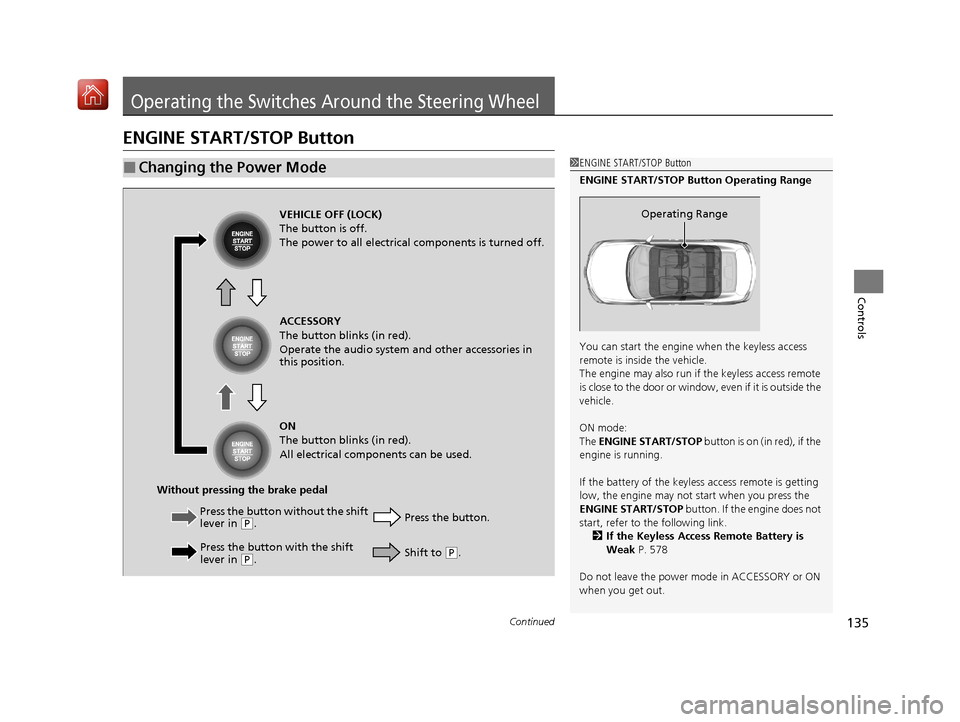
ENGINE START/STOP Button
■Changing the Power Mode1ENGINE START/STOP Button
ENGINE START/STOP Button Operating Range
You can start the engine when the keyless access
remote is inside the vehicle.
The engine may also run if the keyless access remote
is close to the door or window, even if it is outside the
vehicle.
ON mode:
The ENGINE START/STOP button is on (in red), if the
engine is running.
If the battery of the keyless access remote is getting
low, the engine may not start when you press the
ENGINE START/STOP button. If the engine does not
start, refer to the following link.
2 If the Keyless Access Remote Battery is
Weak P. 578
Do not leave the power mode in ACCESSORY or ON
when you get out.
Operating RangeVEHICLE OFF (LOCK)
The button is off.
The power to all electrical components is turned off.
Press the button without the shift
lever in
( P.
Press the button with the shift
lever in
( P. Press the button.
Without pressing the brake pedal ACCESSORY
The button blinks (in red).
Operate the audio system and other accessories in
this position.
ON
The button blinks (in red).
All electrical components can be used.
Shift to (P.
19 ACURA ILX-31TX66610.book 135 ページ 2020年4月17日 金曜日 午前8時52分
Page 176 of 621
175
Features
This chapter describes how to operate technology features.
Audio System.................................... 176
Auxiliary Input Jack .......................... 177
USB Adapter Cable
*........................ 178
USB Port*........................................ 179
Audio System Theft Protection ......... 180
Audio Remote Controls .................... 181
Audio System Basic Operation ........ 183
Audio/Information Screen ................ 184
Playing AM/FM Radio ....................... 190
Playing a CD .................................... 192
Playing an iPod ................................ 195
Playing Pandora ®
*1........................... 198
Playing a USB Flash Drive ................. 201
Models with one display
Playing Bluetooth ® Audio................. 204
Audio System Basic Operation ........ 206
On Demand Multi-Use Display
TM...... 207
Information Screen .......................... 211
Display Setup ................................... 217
Playing AM/FM Radio ....................... 221
Playing SiriusXM ® Radio ................... 224
Playing a CD .................................... 235
Playing Hard Disk Drive (HDD) Audio ... 238
Playing an iPod ................................ 251
Song By Voice
TM (SBV) ...................... 254
Playing Pandora ®*1........................... 258
Playing a USB Flash Drive ................. 260
Models with two displaysPlaying Bluetooth ® Audio ................ 263
Siri Eyes Free .................................... 265
Apple CarPlay .................................. 266
Android Auto .................................. 270
Audio Error Messages ...................... 275
General Information on the Audio System ............................................. 286
HomeLink® Universal Transceiver*......336Customized Features ................ 304, 310
Bluetooth ® HandsFreeLink® ..... 339, 368
AcuraLink®
*....................................... 410
*1: Available only on U.S. models.
* Not available on all models
19 ACURA ILX-31TX66610.book 175 ページ 2020年4月17日 金曜日 午前8時52分
Page 177 of 621
176
Features
Audio System
About Your Audio System
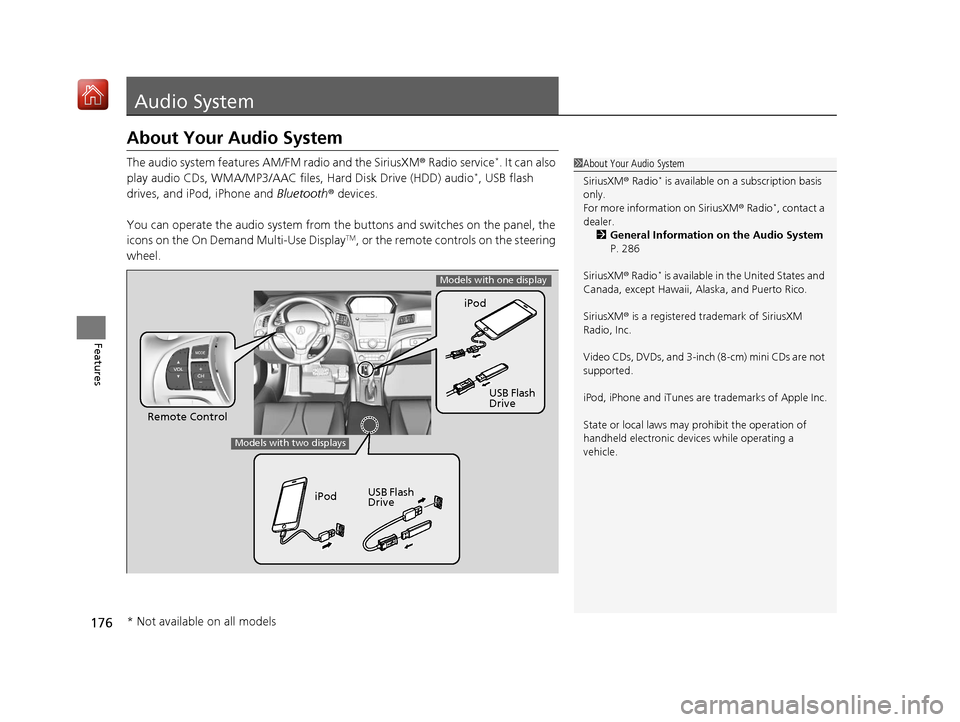
The audio system features AM/FM radio and the SiriusXM® Radio service*. It can also
play audio CDs, WMA/MP3/AAC files, Hard Disk Drive (HDD) audio*, USB flash
drives, and iPod, iPhone and Bluetooth® devices.
You can operate the audio system from the buttons and switches on the panel, the
icons on the On Demand Multi-Use Display
TM, or the remote controls on the steering
wheel.
1 About Your Audio System
SiriusXM ® Radio
* is available on a subscription basis
only.
For more information on SiriusXM ® Radio
*, contact a
dealer. 2 General Information on the Audio System
P. 286
SiriusXM ® Radio
* is available in the United States and
Canada, except Ha waii, Alaska, and Puerto Rico.
SiriusXM ® is a registered trademark of SiriusXM
Radio, Inc.
Video CDs, DVDs, and 3-inch (8-cm) mini CDs are not
supported.
iPod, iPhone and iTunes are trademarks of Apple Inc.
State or local laws may prohibit the operation of
handheld electronic devi ces while operating a
vehicle.
Remote Control iPod
USB Flash
Drive
iPod USB Flash
Drive
Models with one display
Models with two displays
* Not available on all models
19 ACURA ILX-31TX66610.book 176 ページ 2020年4月17日 金曜日 午前8時52分
Page 178 of 621

177
uuAudio System uAuxiliary Input Jack
Features
Auxiliary Input Jack
Use the jack to connect standard audio devices.
1.Open the AUX cover.
2. Connect a standard audio device to the
input jack using a 1/8 inch (3.5 mm) stereo
miniplug.
u The audio system auto matically switches
to the AUX mode.
Connect a standard audio device to the input
jack using a 1/8 inch (3.5 mm) stereo
miniplug. u The audio system auto matically switches
to the AUX mode.1 Auxiliary Input Jack
To switch the mode, pres s any of the audio mode
buttons. You can return to the AUX mode by
pressing the AUX button.
You can return to the AUX mode by selecting Source
on the On Demand Multi-Use Display
TM.
Models with one display
Models with two displays
Models with one display
Models with two displays
19 ACURA ILX-31TX66610.book 177 ページ 2020年4月17日 金曜日 午前8時52分
Page 179 of 621

178
uuAudio System uUSB Adapter Cable*
Features
USB Adapter Cable*
1. Unclip the USB connec tor and loosen the
adapter cable.
2. Install the iPod USB connector or the USB
flash drive to the USB connector.1USB Adapter Cable*
•Do not leave the iPod or USB flash drive in the
vehicle. Direct sunlight and high temperatures may
damage it.
•Do not use an extension cable with the USB
adapter cable.
•Do not connect the iPod or USB flash drive using a
hub.
•Do not use a device such as a card reader or hard
disk drive, as the device or your files may be
damaged.
•We recommend backing up yo ur data before using
the device in your vehicle.
•Displayed messages may vary depending on the
device model and software version.
If the audio system does not recognize the iPod, try
reconnecting it a few times or reboot the device. To
reboot, follow the manufac turer’s instructions
provided with the iPod or visit www.apple.com/ipod.
* Not available on all models
19 ACURA ILX-31TX66610.book 178 ページ 2020年4月17日 金曜日 午前8時52分
Page 180 of 621
179
uuAudio System uUSB Port*
Features
USB Port*
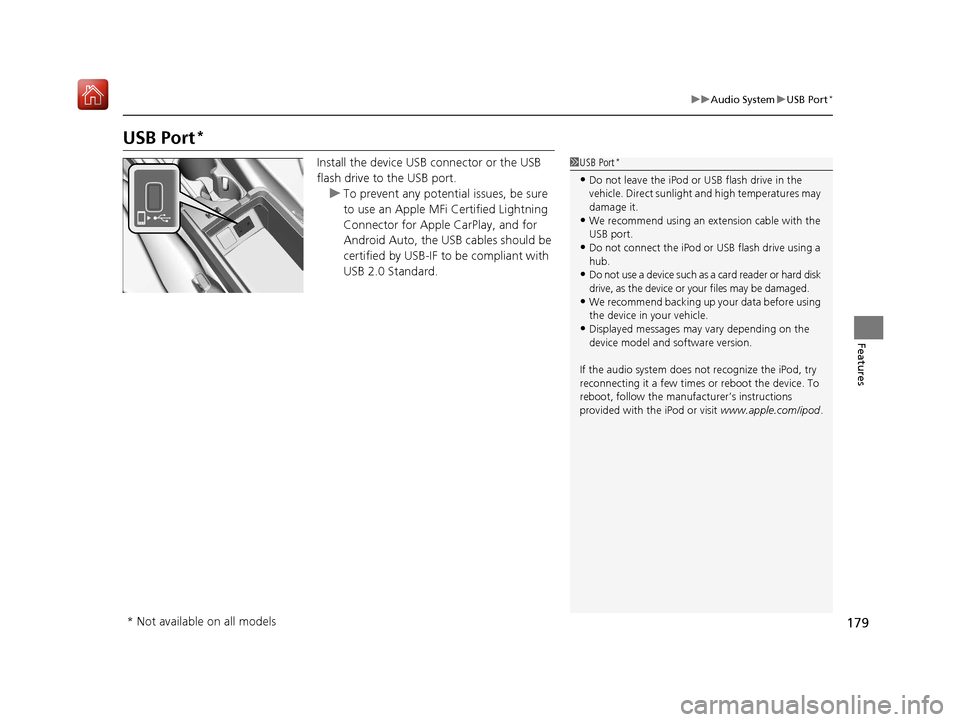
Install the device USB connector or the USB
flash drive to the USB port.
u To prevent any potenti al issues, be sure
to use an Apple MFi Certified Lightning
Connector for Apple CarPlay, and for
Android Auto, the USB cables should be
certified by USB-IF to be compliant with
USB 2.0 Standard.1 USB Port*
•Do not leave the iPod or USB flash drive in the
vehicle. Direct sunlight and high temperatures may
damage it.
•We recommend using an extension cable with the
USB port.
•Do not connect the iPod or USB flash drive using a
hub.
•Do not use a device such as a card reader or hard disk
drive, as the device or your files may be damaged.
•We recommend backing up yo ur data before using
the device in your vehicle.
•Displayed messages may vary depending on the
device model and software version.
If the audio system does not recognize the iPod, try
reconnecting it a few times or reboot the device. To
reboot, follow the manufac turer’s instructions
provided with the iPod or visit www.apple.com/ipod.
* Not available on all models
19 ACURA ILX-31TX66610.book 179 ページ 2020年4月17日 金曜日 午前8時52分
Page 181 of 621
180
uuAudio System uAudio System Theft Protection
Features
Audio System Theft Protection
The audio system is disabled when it is disconnected from the power source, such as
when the battery is disconnected or goes dead. In certain conditions, the system
may display a code entry screen. If this occurs, reactivate the audio system.
■Reactivating the audio system
1. Set the power mode to ON.
2. Turn on the audio system.
3. Press and hold the audio system power button for more than two seconds.
u The audio system is reac tivated when the audio co ntrol unit establishes a
connection with the vehicle control unit. If the control unit fails to recognize
the audio unit, you must go to a dealer and have the audio unit checked.
19 ACURA ILX-31TX66610.book 180 ページ 2020年4月17日 金曜日 午前8時52分
Page 182 of 621
181
uuAudio System uAudio Remote Controls
Continued
Features
Audio Remote Controls
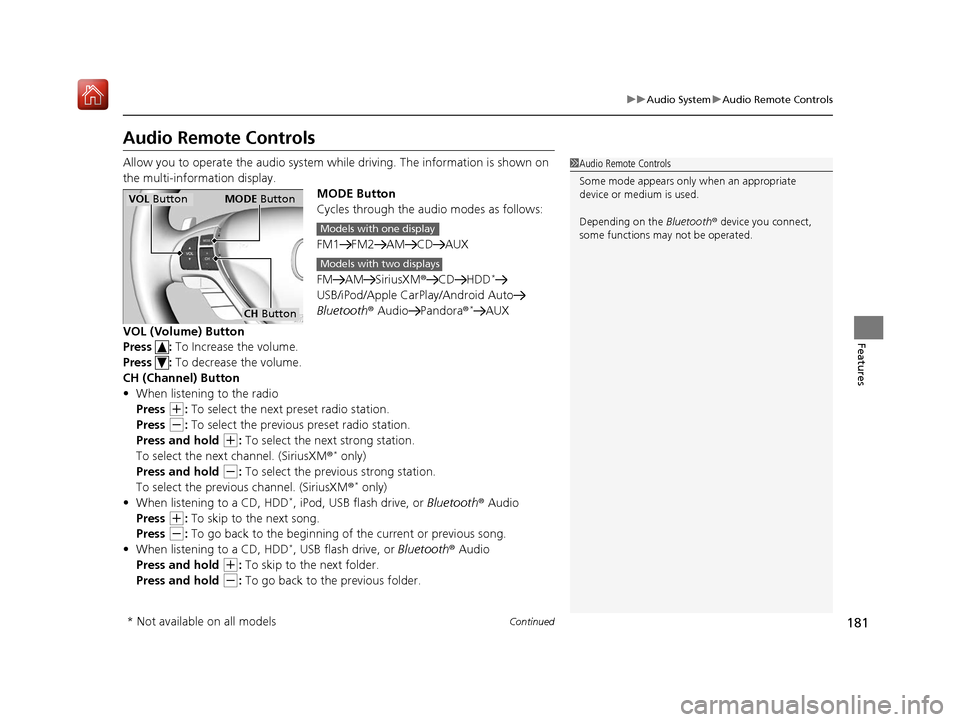
Allow you to operate the audio system whil e driving. The information is shown on
the multi-information display. MODE Button
Cycles through the audio modes as follows:
FM1 FM2 AM CD AUX
FM AM SiriusXM®CD HDD
*
USB/iPod/Apple CarPlay/Android Auto
Bluetooth ® Audio Pandora ®*AUX
VOL (Volume) Button
Press : To Increase the volume.
Press : To decrease the volume.
CH (Channel) Button
• When listening to the radio
Press
(+: To select the next preset radio station.
Press
(-: To select the previous preset radio station.
Press and hold
(+: To select the next strong station.
To select the next channel. (SiriusXM ®* only)
Press and hold
(-: To select the previous strong station.
To select the previous channel. (SiriusXM ®* only)
• When listening to a CD, HDD*, iPod, USB flash drive, or Bluetooth ® Audio
Press
(+: To skip to the next song.
Press
(-: To go back to the beginning of the current or previous song.
• When listening to a CD, HDD*, USB flash drive, or Bluetooth ® Audio
Press and hold
(+: To skip to the next folder.
Press and hold
(-: To go back to the previous folder.
1 Audio Remote Controls
Some mode appears only when an appropriate
device or medium is used.
Depending on the Bluetooth® device you connect,
some functions ma y not be operated.
VOL Button MODE Button
CH Button
Models with one display
Models with two displays
* Not available on all models
19 ACURA ILX-31TX66610.book 181 ページ 2020年4月17日 金曜日 午前8時52分
Page 183 of 621
182
uuAudio System uAudio Remote Controls
Features
• When listening to Pandora ®*
Press (+: To skip to the next track.
Press and hold
(+: To select the next station.
Press and hold
(-: To select the previous station.
* Not available on all models
19 ACURA ILX-31TX66610.book 182 ページ 2020年4月17日 金曜日 午前8時52分
Page 184 of 621
183
Features
Audio System Basic Operation
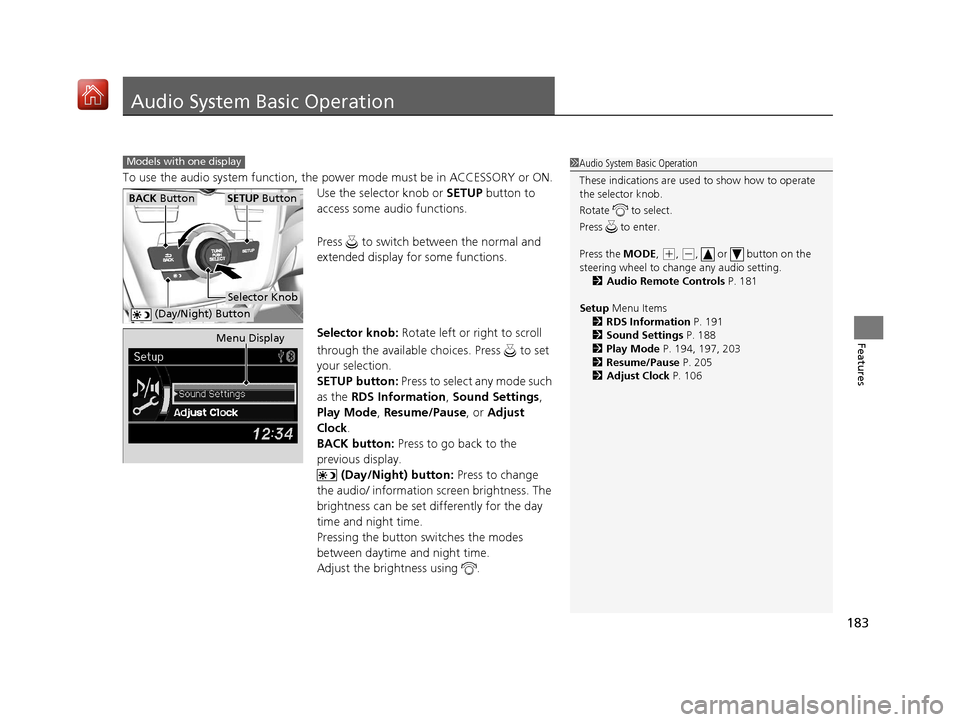
To use the audio system function, the power mode must be in ACCESSORY or ON.
Use the selector knob or SETUP button to
access some audio functions.
Press to switch between the normal and
extended display fo r some functions.
Selector knob: Rotate left or right to scroll
through the available ch oices. Press to set
your selection.
SETUP button: Press to select any mode such
as the RDS Information , Sound Settings,
Play Mode , Resume/Pause , or Adjust
Clock .
BACK button: Press to go back to the
previous display.
(Day/Night) button: Press to change
the audio/ information screen brightness. The
brightness can be set differently for the day
time and night time.
Pressing the button switches the modes
between daytime and night time.
Adjust the brightness using .
Models with one display1 Audio System Basic Operation
These indications are used to show how to operate
the selector knob.
Rotate to select.
Press to enter.
Press the MODE,
( +, (-, or button on the
steering wheel to cha nge any audio setting.
2 Audio Remote Controls P. 181
Setup Menu Items
2 RDS Information P. 191
2 Sound Settings P. 188
2 Play Mode P. 194, 197, 203
2 Resume/Pause P. 205
2 Adjust Clock P. 106
BACK ButtonSETUP Button
Selector Knob
(Day/Night) Button
Menu Display
19 ACURA ILX-31TX66610.book 183 ページ 2020年4月17日 金曜日 午前8時52分