change time Acura ILX 2019 Owner's Guide
[x] Cancel search | Manufacturer: ACURA, Model Year: 2019, Model line: ILX, Model: Acura ILX 2019Pages: 621, PDF Size: 34.8 MB
Page 324 of 621
323
uuCustomized Features u
Continued
Features
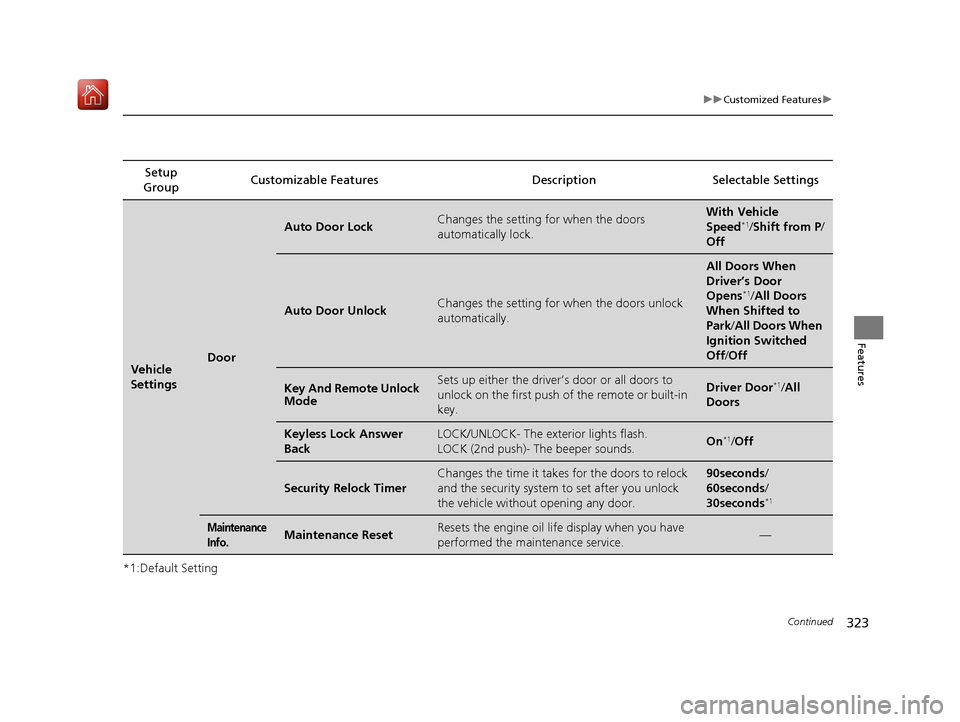
*1:Default SettingSetup
Group Customizable Features Desc
ription Selectable Settings
Vehicle
SettingsDoor
Auto Door LockChanges the setting for when the doors
automatically lock.With Vehicle
Speed*1/Shift from P /
Off
Auto Door UnlockChanges the setting for when the doors unlock
automatically.
All Doors When
Driver’s Door
Opens
*1/ All Doors
When Shifted to
Park /All Doors When
Ignition Switched
Off /Off
Key And Remote Unlock
ModeSets up either the driver’s door or all doors to
unlock on the first push of the remote or built-in
key.Driver Door*1/All
Doors
Keyless Lock Answer
BackLOCK/UNLOCK- The exterior lights flash.
LOCK (2nd push)- The beeper sounds.On*1/ Off
Security Relock Timer
Changes the time it takes for the doors to relock
and the security system to set after you unlock
the vehicle without opening any door.90seconds/
60seconds/
30seconds
*1
Maintenance
Info.Maintenance ResetResets the engine oil life display when you have
performed the maintenance service.—
19 ACURA ILX-31TX66610.book 323 ページ 2020年4月17日 金曜日 午前8時52分
Page 325 of 621
324
uuCustomized Features u
Features
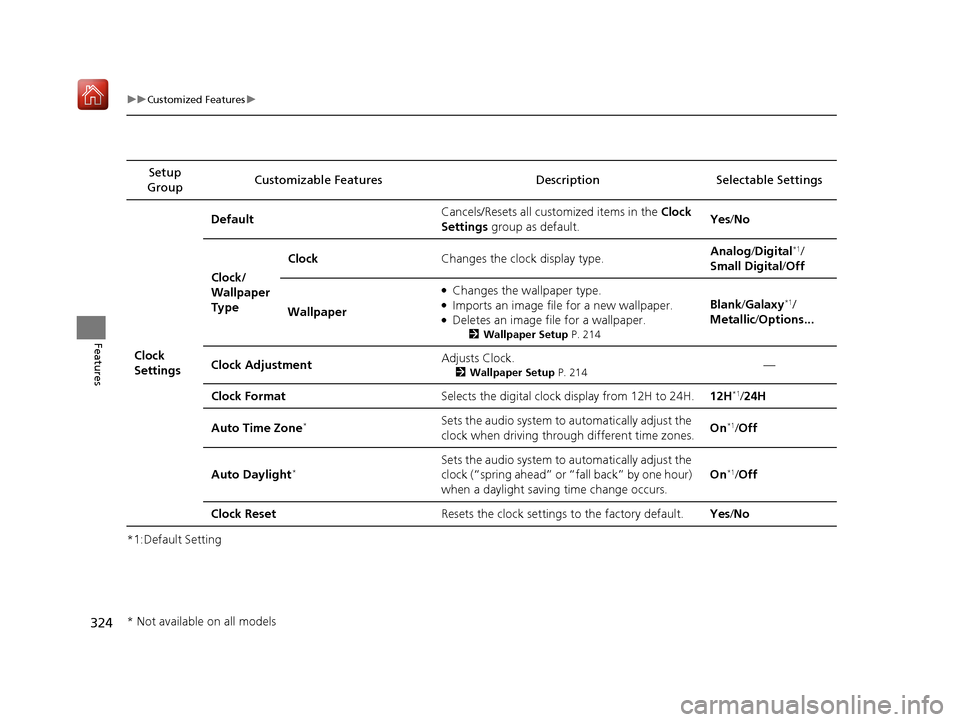
*1:Default SettingSetup
Group Customizable Features Desc
ription Selectable Settings
Clock
Settings Default
Cancels/Resets all cust
omized items in the Clock
Settings group as default. Yes
/No
Clock/
Wallpaper
Type Clock
Changes the clock display type. Analog
/Digital
*1/
Small Digital /Off
Wallpaper
●Changes the wallpaper type.●Imports an image file for a new wallpaper.●Deletes an image file for a wallpaper.
2 Wallpaper Setup P. 214
Blank/Galaxy*1/
Metallic /Options...
Clock Adjustment Adjusts Clock.
2
Wallpaper Setup P. 214—
Clock Format Selects the digital clock display from 12H to 24H. 12H
*1/24H
Auto Time Zone
*Sets the audio system to automatically adjust the
clock when driving through different time zones. On*1/
Off
Auto Daylight
*Sets the audio system to automatically adjust the
clock (“spring ahead” or “fall back” by one hour)
when a daylight saving time change occurs. On*1/
Off
Clock Reset Resets the clock settings to the factory default. Yes/No
* Not available on all models
19 ACURA ILX-31TX66610.book 324 ページ 2020年4月17日 金曜日 午前8時52分
Page 335 of 621
334
uuCustomized Features u
Features
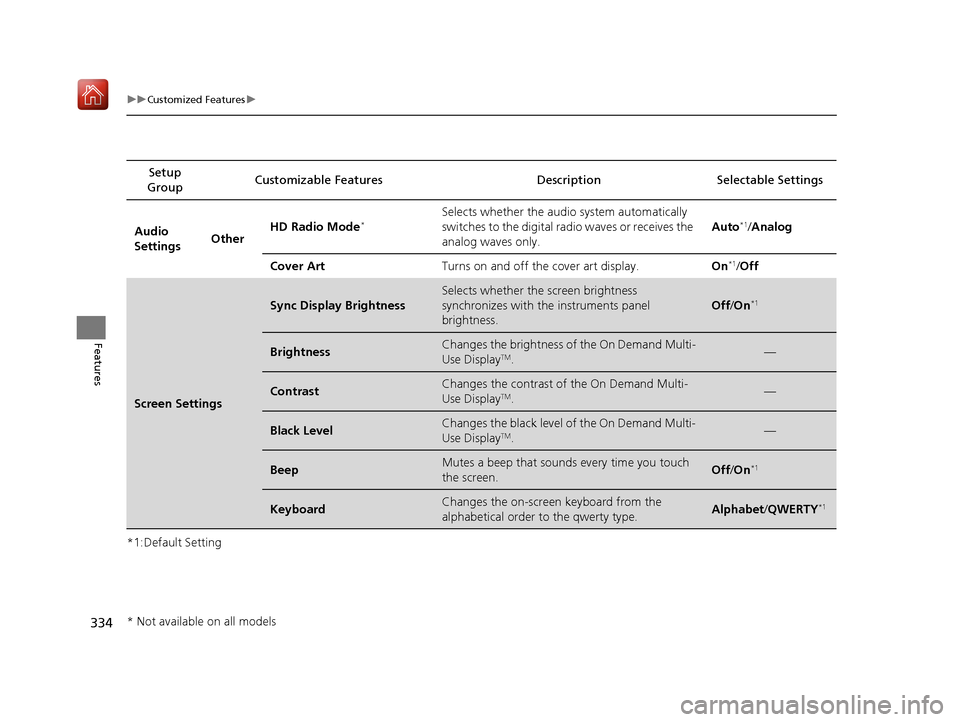
*1:Default SettingSetup
Group Customizable Features
Description Selectable Settings
Audio
SettingsOtherHD Radio Mode*Selects whether the audio system automatically
switches to the digital radio waves or receives the
analog waves only. Auto*1/
Analog
Cover Art Turns on and off the cover art display. On
*1/Off
Screen Settings
Sync Display Brightness
Selects whether the screen brightness
synchronizes with the instruments panel
brightness.
Off /On*1
BrightnessChanges the brightness of the On Demand Multi-
Use DisplayTM.—
ContrastChanges the contrast of the On Demand Multi-
Use DisplayTM.—
Black LevelChanges the black level of the On Demand Multi-
Use DisplayTM.—
BeepMutes a beep that sounds every time you touch
the screen.Off /On*1
KeyboardChanges the on-screen keyboard from the
alphabetical order to the qwerty type.Alphabet /QWERTY*1
* Not available on all models
19 ACURA ILX-31TX66610.book 334 ページ 2020年4月17日 金曜日 午前8時52分
Page 350 of 621
Continued349
uuBluetooth ® HandsFreeLink ®u HFL Menus
Features
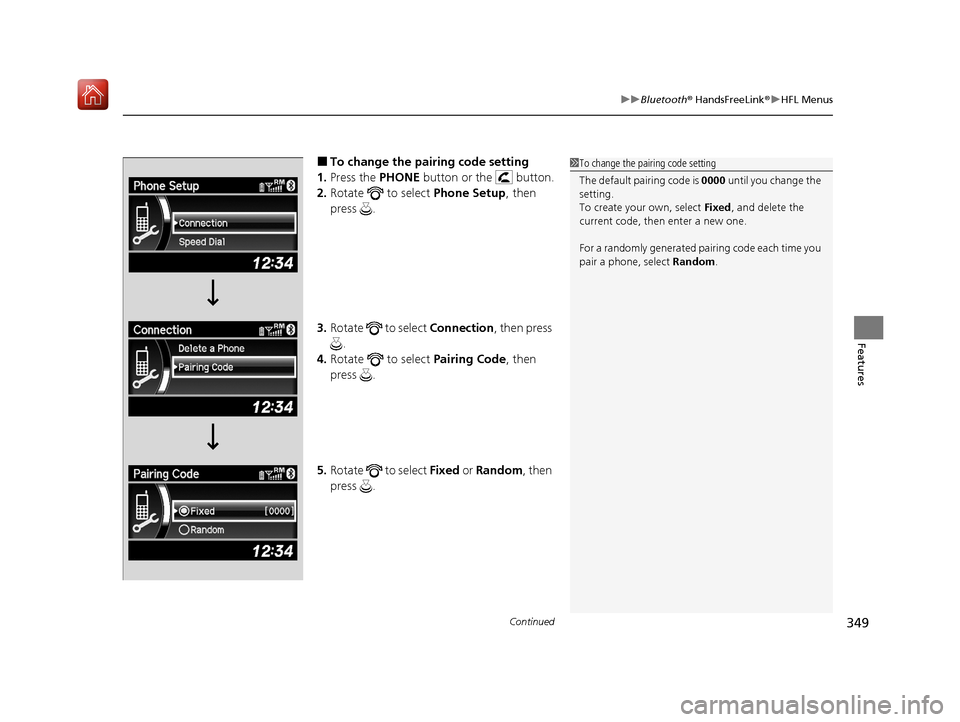
■To change the pairing code setting
1. Press the PHONE button or the button.
2. Rotate to select Phone Setup, then
press .
3. Rotate to select Connection, then press
.
4. Rotate to select Pairing Code, then
press .
5. Rotate to select Fixed or Random , then
press .1 To change the pairing code setting
The default pairing code is 0000 until you change the
setting.
To create your own, select Fixed, and delete the
current code, then enter a new one.
For a randomly generated pair ing code each time you
pair a phone, select Random.
19 ACURA ILX-31TX66610.book 349 ページ 2020年4月17日 金曜日 午前8時52分
Page 379 of 621
uuBluetooth ® HandsFreeLink ®u HFL Menus
378
Features
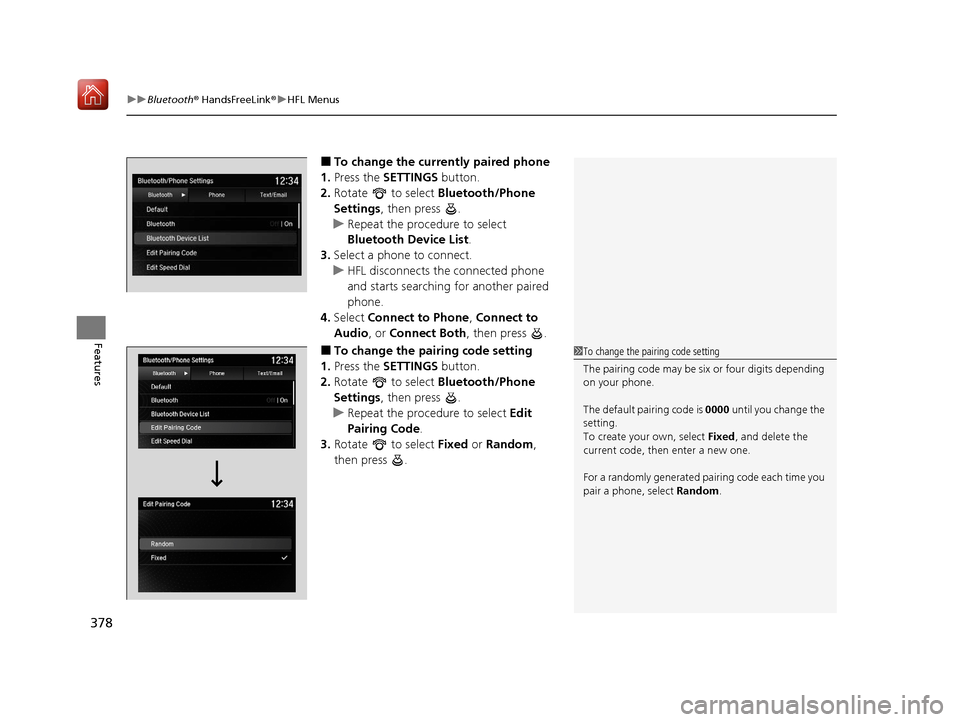
■To change the currently paired phone
1. Press the SETTINGS button.
2. Rotate to select Bluetooth/Phone
Settings , then press .
u Repeat the procedure to select
Bluetooth Device List.
3. Select a phone to connect.
u HFL disconnects the connected phone
and starts searching for another paired
phone.
4. Select Connect to Phone , Connect to
Audio , or Connect Both , then press .
■To change the pairing code setting
1. Press the SETTINGS button.
2. Rotate to select Bluetooth/Phone
Settings , then press .
u Repeat the procedure to select Edit
Pairing Code .
3. Rotate to select Fixed or Random ,
then press .1 To change the pairing code setting
The pairing code may be si x or four digits depending
on your phone.
The default pairing code is 0000 until you change the
setting.
To create your own, select Fixed, and delete the
current code, then enter a new one.
For a randomly generated pair ing code each time you
pair a phone, select Random.
19 ACURA ILX-31TX66610.book 378 ページ 2020年4月17日 金曜日 午前8時52分
Page 464 of 621
Continued463
uuAcuraWatchTMuAdaptive Cruise Control (ACC)
Driving
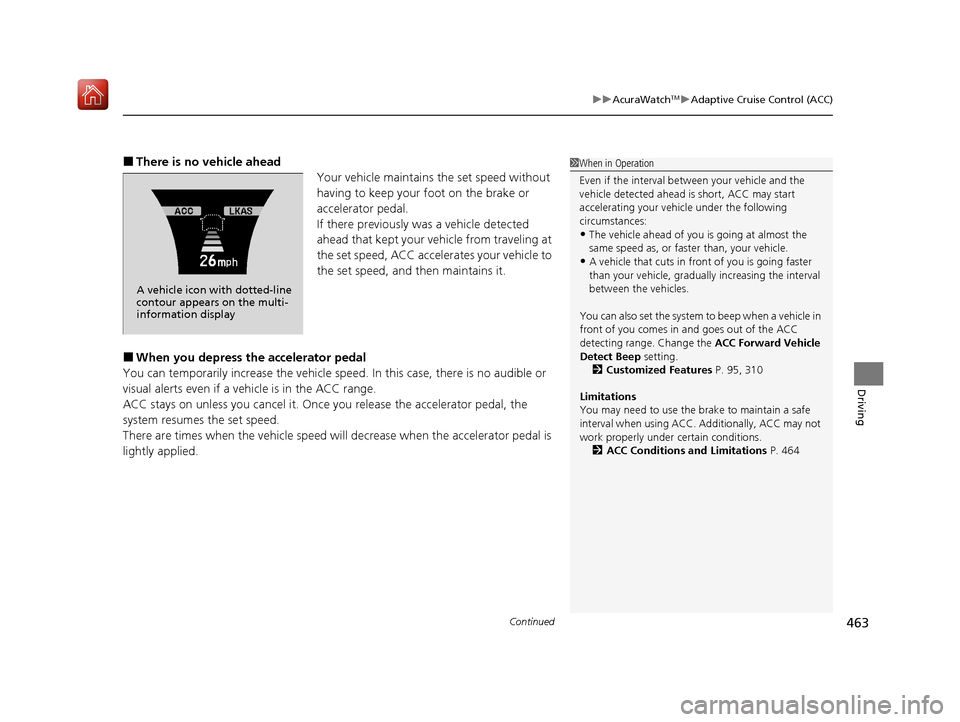
■There is no vehicle ahead
Your vehicle maintains the set speed without
having to keep your foot on the brake or
accelerator pedal.
If there previously was a vehicle detected
ahead that kept your vehicle from traveling at
the set speed, ACC accelerates your vehicle to
the set speed, and then maintains it.
■When you depress the accelerator pedal
You can temporarily increase the vehicle speed . In this case, there is no audible or
visual alerts even if a vehicle is in the ACC range.
ACC stays on unless you cancel it. Once you release the accelerator pedal, the
system resumes the set speed.
There are times when the vehicle speed will decrease when the accelerator pedal is
lightly applied.
1 When in Operation
Even if the interval betw een your vehicle and the
vehicle detected ahead is short, ACC may start
accelerating your vehicle under the following
circumstances:
•The vehicle ahead of you is going at almost the
same speed as, or faster than, your vehicle.
•A vehicle that cuts in front of you is going faster
than your vehicle, gradua lly increasing the interval
between the vehicles.
You can also set the system to beep when a vehicle in
front of you comes in and goes out of the ACC
detecting range. Change the ACC Forward Vehicle
Detect Beep setting.
2 Customized Features P. 95, 310
Limitations
You may need to use the brake to maintain a safe
interval when using ACC. Additionally, ACC may not
work properly under certain conditions.
2 ACC Conditions and Limitations P. 464
A vehicle icon with dotted-line
contour appears on the multi-
information display
19 ACURA ILX-31TX66610.book 463 ページ 2020年4月17日 金曜日 午前8時52分
Page 469 of 621
468
uuAcuraWatchTMuAdaptive Cruise Control (ACC)
Driving
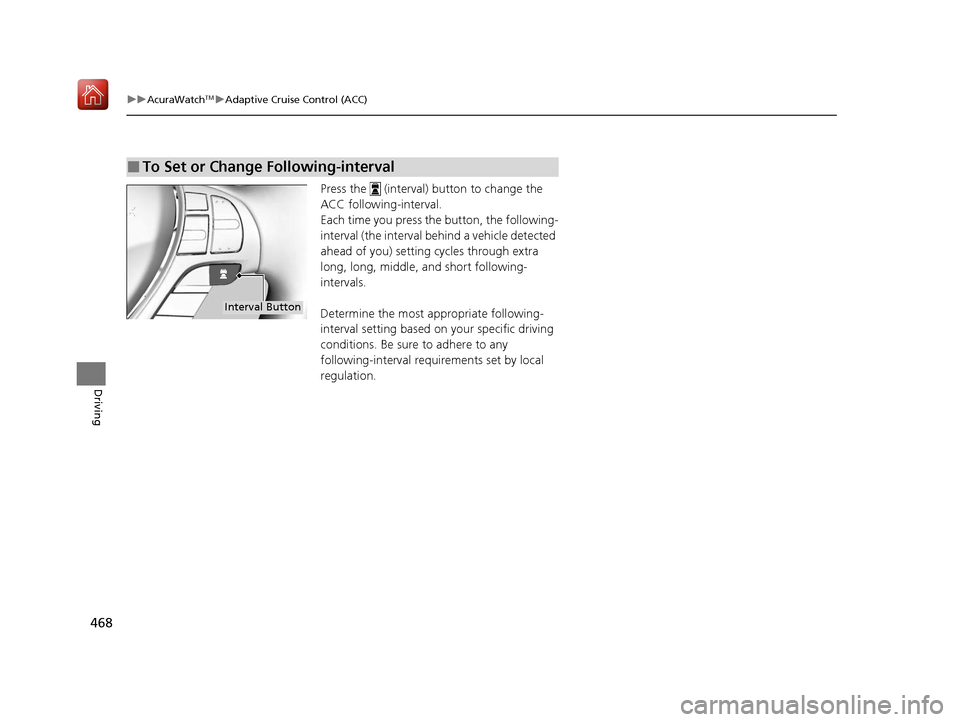
Press the (interval) button to change the
ACC following-interval.
Each time you press the button, the following-
interval (the interval behind a vehicle detected
ahead of you) setting cycles through extra
long, long, middle, and short following-
intervals.
Determine the most appropriate following-
interval setting based on your specific driving
conditions. Be sure to adhere to any
following-interval requ irements set by local
regulation.
■To Set or Change Following-interval
Interval Button
19 ACURA ILX-31TX66610.book 468 ページ 2020年4月17日 金曜日 午前8時52分
Page 478 of 621
Continued477
uuAcuraWatchTMuLane Keeping Assist System (LKAS)
Driving
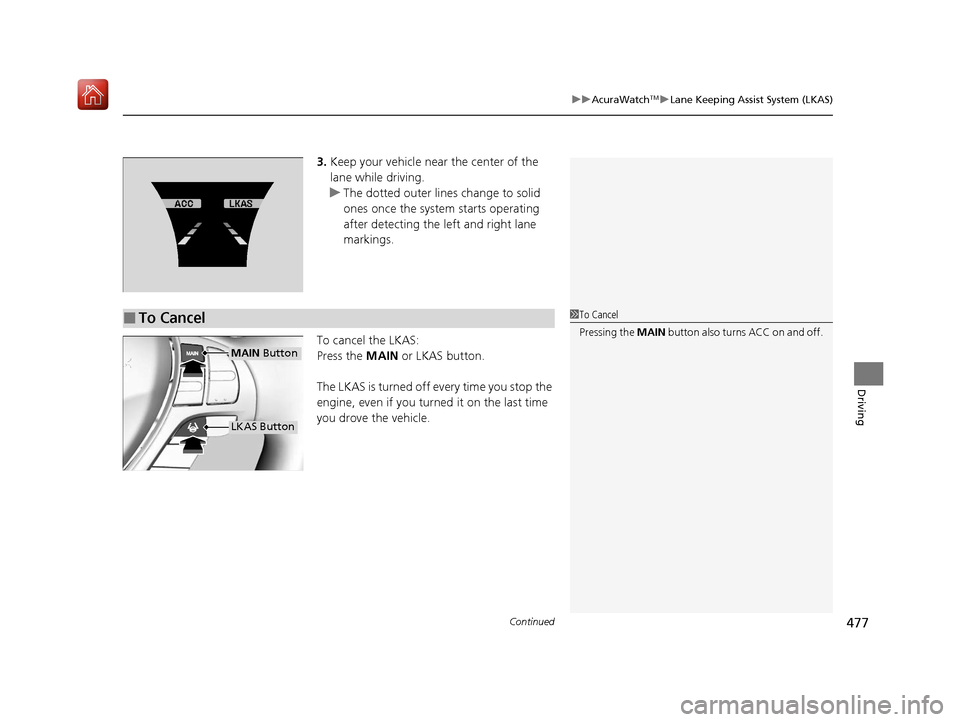
3. Keep your vehicle near the center of the
lane while driving.
u The dotted outer lines change to solid
ones once the system starts operating
after detecting the left and right lane
markings.
To cancel the LKAS:
Press the MAIN or LKAS button.
The LKAS is turned off every time you stop the
engine, even if you turned it on the last time
you drove the vehicle.
■To Cancel1 To Cancel
Pressing the MAIN button also turns ACC on and off.
MAIN Button
LKAS Button
19 ACURA ILX-31TX66610.book 477 ページ 2020年4月17日 金曜日 午前8時52分
Page 502 of 621
501
uuMulti-View Rear Camera uAbout Your Multi-View Rear Camera
Driving
You can view three different camera mode s on the rearview display. Press the
selector knob to switch the mode. : Wide view mode
: Normal view mode
: Top down view mode
• If the last used viewing mode was Wide or Normal view mode, the same mode is
selected the next time you put the transmission into
(R.
• If Top down view mode was last used be fore you turned the power mode to OFF,
Wide View mode is selected next time you set the power mode to ON and put the
transmission into
(R.
• If Top down view mode was last used more than 10 seconds after you change
from
(R, Wide View mode is selected the next time you put the transmission into
(R.
19 ACURA ILX-31TX66610.book 501 ページ 2020年4月17日 金曜日 午前8時52分
Page 510 of 621
509
Maintenance
Maintenance MinderTM
If the engine oil life is less than 15%, you will see the Maintenance Minder messages
appear on the multi-information display ev ery time you set the power mode to ON.
The messages notify you when to change th e engine oil, or when to bring your
vehicle to a dealer for indicated maintenance services.
19 ACURA ILX-31TX66610.book 509 ページ 2020年4月17日 金曜日 午前8時52分