reset Acura ILX 2019 Service Manual
[x] Cancel search | Manufacturer: ACURA, Model Year: 2019, Model line: ILX, Model: Acura ILX 2019Pages: 621, PDF Size: 34.8 MB
Page 324 of 621
323
uuCustomized Features u
Continued
Features
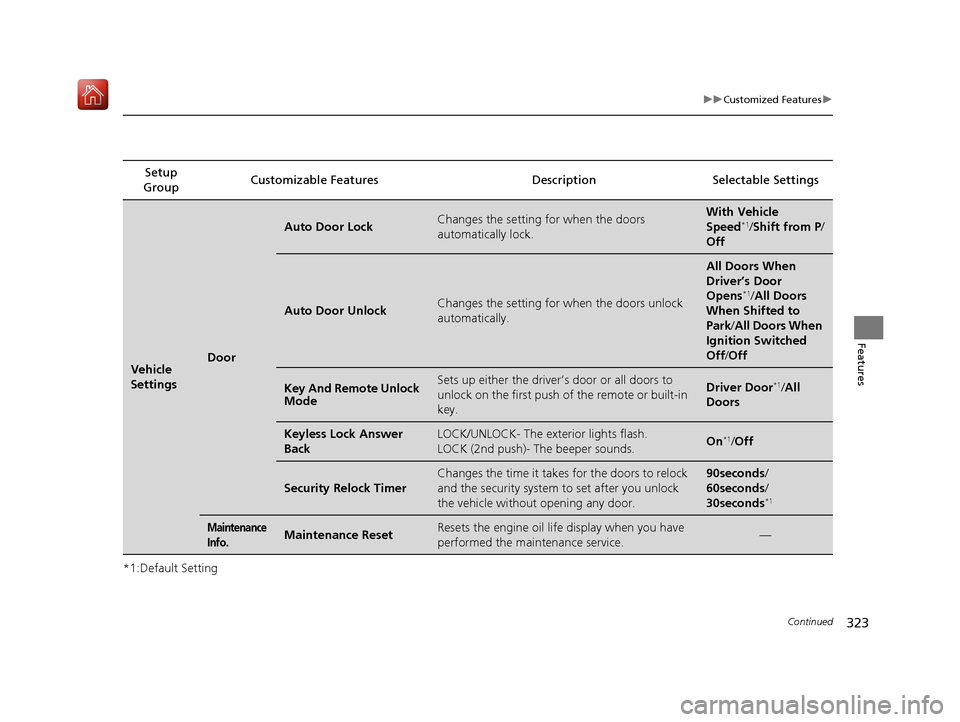
*1:Default SettingSetup
Group Customizable Features Desc
ription Selectable Settings
Vehicle
SettingsDoor
Auto Door LockChanges the setting for when the doors
automatically lock.With Vehicle
Speed*1/Shift from P /
Off
Auto Door UnlockChanges the setting for when the doors unlock
automatically.
All Doors When
Driver’s Door
Opens
*1/ All Doors
When Shifted to
Park /All Doors When
Ignition Switched
Off /Off
Key And Remote Unlock
ModeSets up either the driver’s door or all doors to
unlock on the first push of the remote or built-in
key.Driver Door*1/All
Doors
Keyless Lock Answer
BackLOCK/UNLOCK- The exterior lights flash.
LOCK (2nd push)- The beeper sounds.On*1/ Off
Security Relock Timer
Changes the time it takes for the doors to relock
and the security system to set after you unlock
the vehicle without opening any door.90seconds/
60seconds/
30seconds
*1
Maintenance
Info.Maintenance ResetResets the engine oil life display when you have
performed the maintenance service.—
19 ACURA ILX-31TX66610.book 323 ページ 2020年4月17日 金曜日 午前8時52分
Page 325 of 621
324
uuCustomized Features u
Features
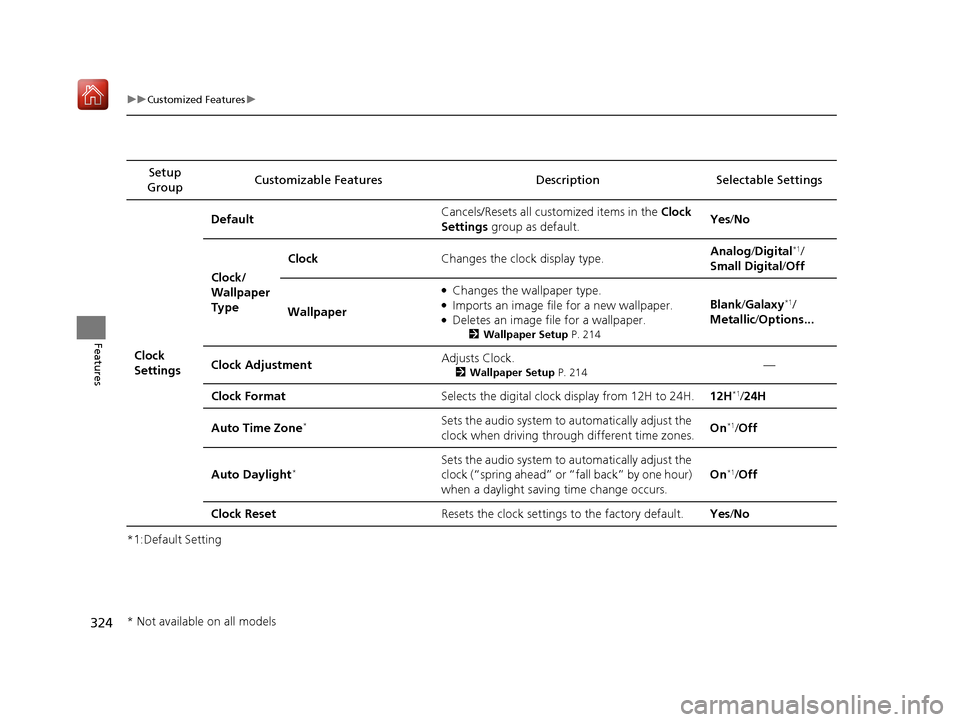
*1:Default SettingSetup
Group Customizable Features Desc
ription Selectable Settings
Clock
Settings Default
Cancels/Resets all cust
omized items in the Clock
Settings group as default. Yes
/No
Clock/
Wallpaper
Type Clock
Changes the clock display type. Analog
/Digital
*1/
Small Digital /Off
Wallpaper
●Changes the wallpaper type.●Imports an image file for a new wallpaper.●Deletes an image file for a wallpaper.
2 Wallpaper Setup P. 214
Blank/Galaxy*1/
Metallic /Options...
Clock Adjustment Adjusts Clock.
2
Wallpaper Setup P. 214—
Clock Format Selects the digital clock display from 12H to 24H. 12H
*1/24H
Auto Time Zone
*Sets the audio system to automatically adjust the
clock when driving through different time zones. On*1/
Off
Auto Daylight
*Sets the audio system to automatically adjust the
clock (“spring ahead” or “fall back” by one hour)
when a daylight saving time change occurs. On*1/
Off
Clock Reset Resets the clock settings to the factory default. Yes/No
* Not available on all models
19 ACURA ILX-31TX66610.book 324 ページ 2020年4月17日 金曜日 午前8時52分
Page 326 of 621
325
uuCustomized Features u
Continued
Features
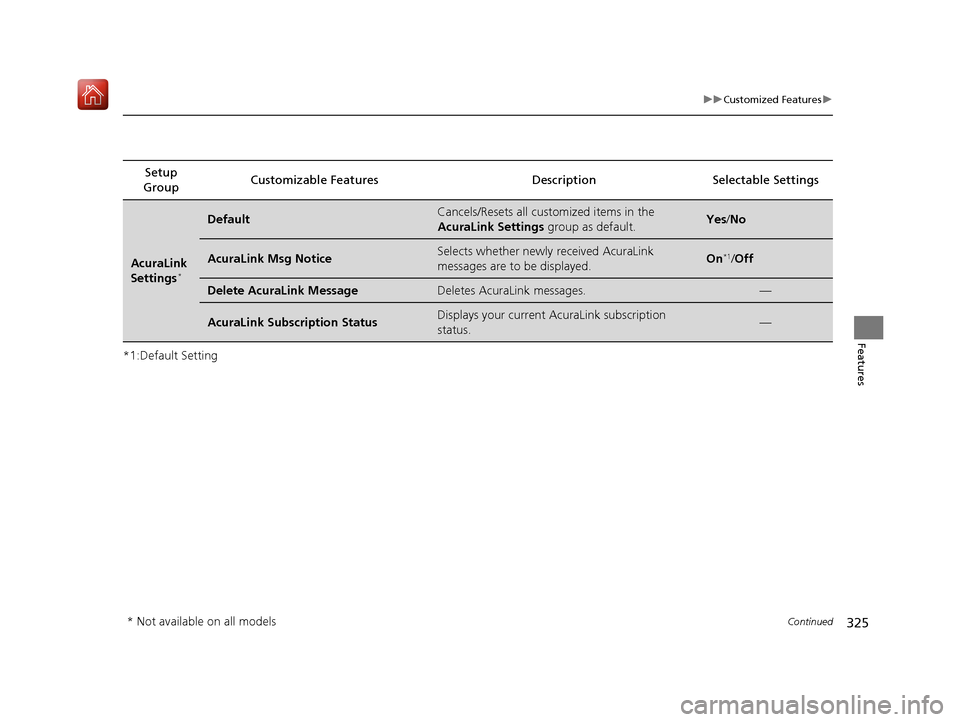
*1:Default SettingSetup
Group Customizable Features
Description Selectable Settings
AcuraLink
Settings*
DefaultCancels/Resets all customized items in the
AcuraLink Settings group as default.Yes/No
AcuraLink Msg NoticeSelects whether newly received AcuraLink
messages are to be displayed.On*1/ Off
Delete AcuraLink MessageDeletes AcuraLink messages.—
AcuraLink Subscription StatusDisplays your current AcuraLink subscription
status.—
* Not available on all models
19 ACURA ILX-31TX66610.book 325 ページ 2020年4月17日 金曜日 午前8時52分
Page 327 of 621
326
uuCustomized Features u
Features
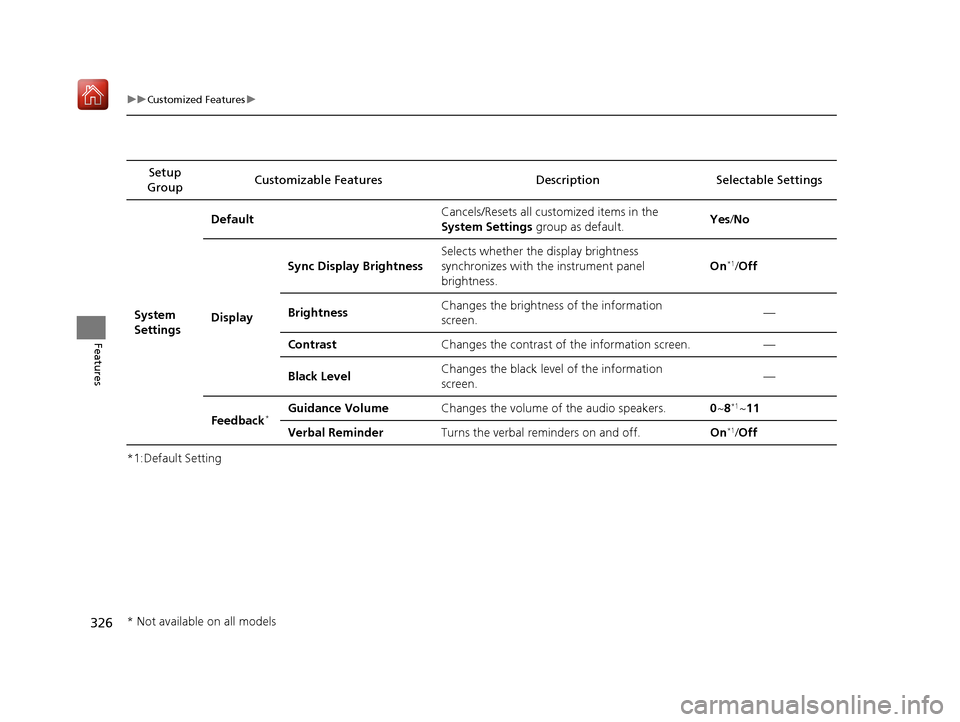
*1:Default SettingSetup
Group Customizable Features Desc
ription Selectable Settings
System
Settings Default
Cancels/Resets all customized items in the
System Settings group as default. Yes
/No
Display Sync Display Brightness
Selects whether the display brightness
synchronizes with the instrument panel
brightness. On
*1/
Off
Brightness Changes the brightness of the information
screen. —
Contrast Changes the contrast of the information screen. —
Black Level Changes the black leve
l of the information
screen. —
Feedback
*Guidance Volume Changes the volume of the audio speakers. 0~8*1~11
Verbal Reminder Turns the verbal reminders on and off. On
*1/Off
* Not available on all models
19 ACURA ILX-31TX66610.book 326 ページ 2020年4月17日 金曜日 午前8時52分
Page 329 of 621
328
uuCustomized Features u
Features
*1:Default SettingSetup
Group Customizable Features Desc
ription Selectable Settings
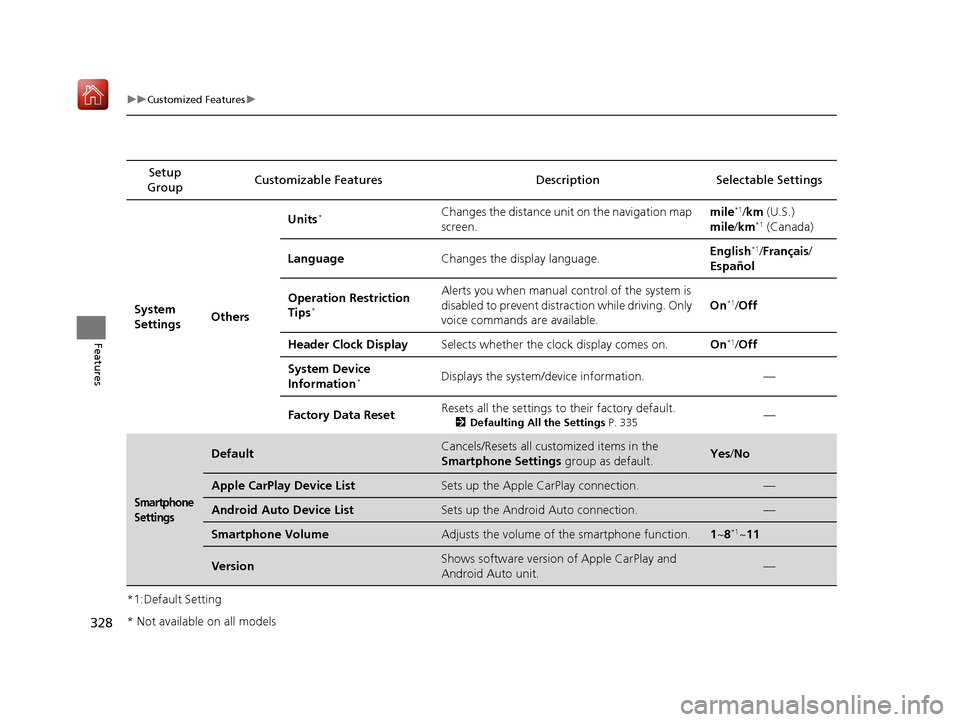
System
Settings OthersUnits
*Changes the distance unit on the navigation map
screen.
mile*1/
km (U.S.)
mile /km*1 (Canada)
Language Changes the display language. English
*1/
Français /
Español
Operation Restriction
Tips
*
Alerts you when manual control of the system is
disabled to prevent distraction while driving. Only
voice commands are available. On*1/
Off
Header Clock Display Selects whether the clock display comes on. On
*1/Off
System Device
Information
*Displays the system/device information. —
Factory Data Reset Resets all the settings to their factory default.
2
Defaulting All the Settings P. 335—
Smartphone
Settings
DefaultCancels/Resets all customized items in the
Smartphone Settings group as default.Yes/No
Apple CarPlay Device ListSets up the Apple CarPlay connection.—
Android Auto Device ListSets up the Android Auto connection.—
Smartphone VolumeAdjusts the volume of the smartphone function.1 ~8*1~11
VersionShows software version of Apple CarPlay and
Android Auto unit.—
* Not available on all models
19 ACURA ILX-31TX66610.book 328 ページ 2020年4月17日 金曜日 午前8時52分
Page 334 of 621
333
uuCustomized Features u
Continued
Features
*1:Default SettingSetup
Group Customizable Features
DescriptionSelectable Settings
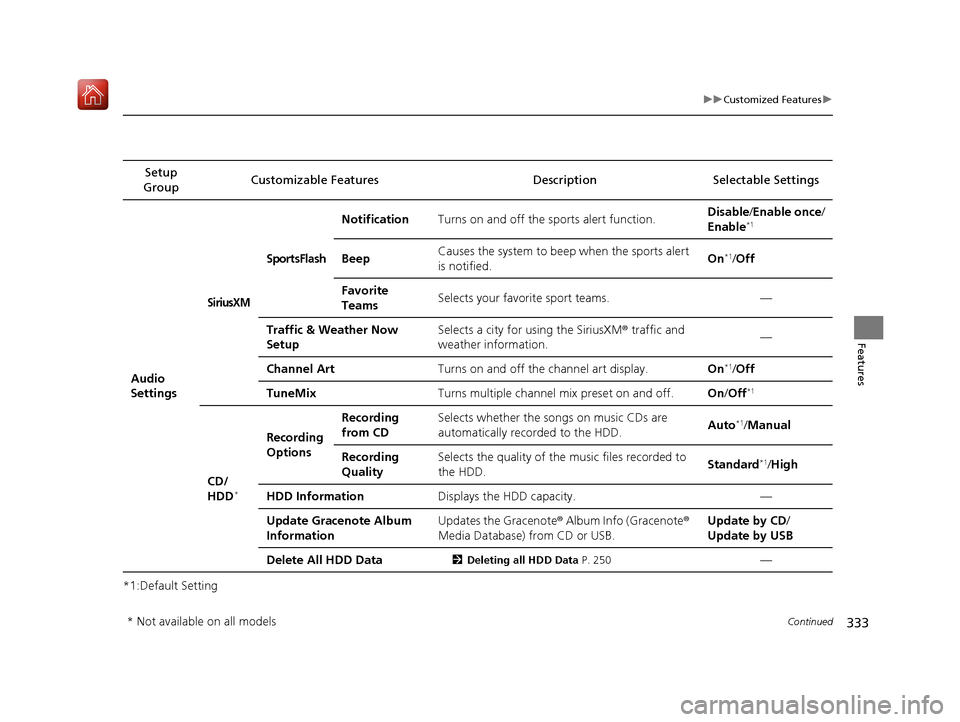
Audio
Settings
SiriusXM
SportsFlash
NotificationTurns on and off the sports alert function.Disable/Enable once /
Enable*1
BeepCauses the system to beep when the sports alert
is notified.On*1/ Off
Favorite
TeamsSelects your favorite sport teams.—
Traffic & Weather Now
SetupSelects a city for using the SiriusXM ® traffic and
weather information.—
Channel ArtTurns on and off the channel art display.On*1/ Off
TuneMixTurns multiple channel mix preset on and off.On /Off*1
CD/
HDD*
Recording
Options
Recording
from CDSelects whether the songs on music CDs are
automatically recorded to the HDD.Auto*1/Manual
Recording
QualitySelects the quality of the music files recorded to
the HDD.Standard*1/High
HDD InformationDisplays the HDD capacity.—
Update Gracenote Album
InformationUpdates the Gracenote ® Album Info (Gracenote®
Media Database) from CD or USB.Update by CD /
Update by USB
Delete All HDD Data2 Deleting all HDD Data P. 250—
* Not available on all models
19 ACURA ILX-31TX66610.book 333 ページ 2020年4月17日 金曜日 午前8時52分
Page 336 of 621
335
uuCustomized Features uDefaulting All the Settings
Features
Defaulting All the Settings
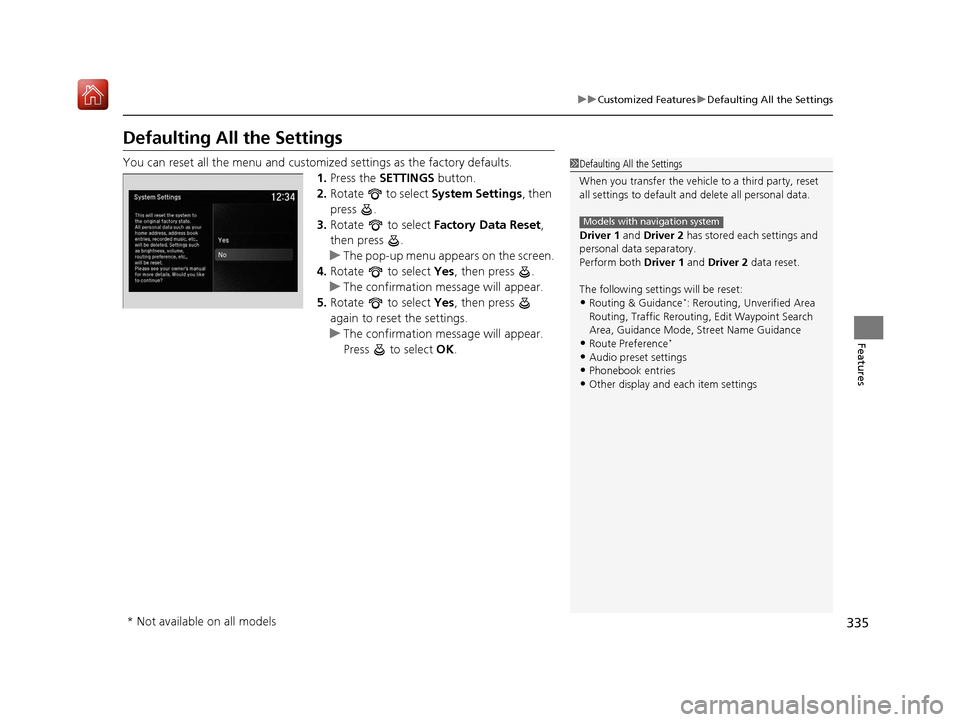
You can reset all the menu and customiz ed settings as the factory defaults.
1. Press the SETTINGS button.
2. Rotate to select System Settings, then
press .
3. Rotate to select Factory Data Reset ,
then press .
u The pop-up menu appears on the screen.
4. Rotate to select Yes, then press .
u The confirmation message will appear.
5. Rotate to select Yes, then press
again to reset the settings.
u The confirmation message will appear.
Press to select OK.1Defaulting All the Settings
When you transfer the vehicle to a third party, reset
all settings to default a nd delete all personal data.
Driver 1 and Driver 2 has stored each settings and
personal data separatory.
Perform both Driver 1 and Driver 2 data reset.
The following settin gs will be reset:
•Routing & Guidance*: Rerouting, Unverified Area
Routing, Traffic Re routing, Edit Waypoint Search
Area, Guidance Mode, Street Name Guidance
•Route Preference*
•Audio preset settings•Phonebook entries
•Other display and each item settings
Models with navigation system
* Not available on all models
19 ACURA ILX-31TX66610.book 335 ページ 2020年4月17日 金曜日 午前8時52分
Page 357 of 621
uuBluetooth ® HandsFreeLink ®u HFL Menus
356
Features
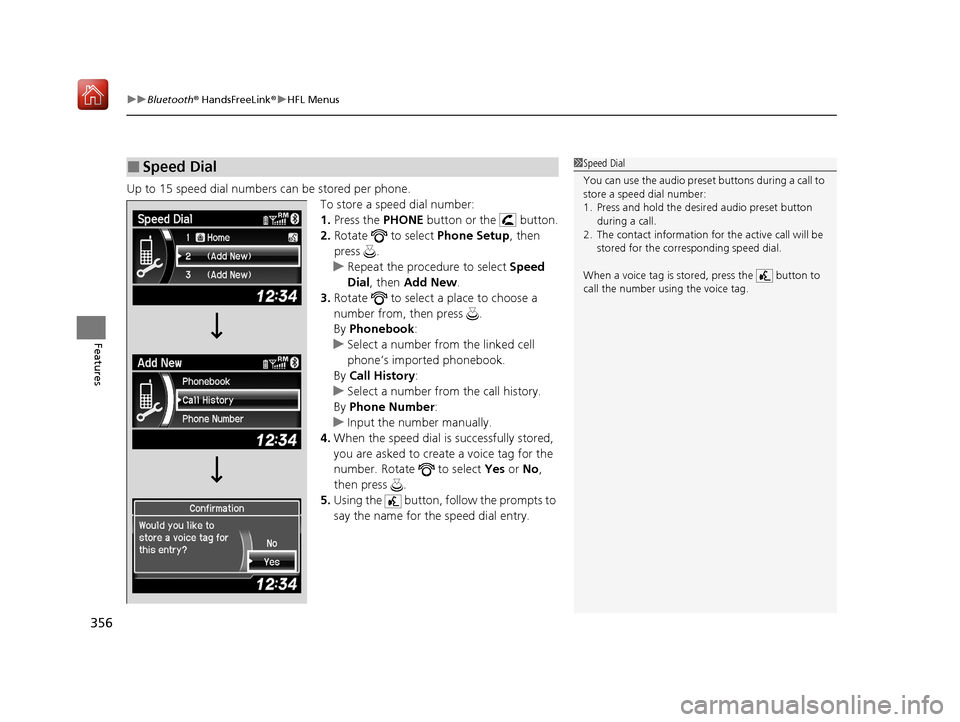
Up to 15 speed dial numbers can be stored per phone.
To store a speed dial number:
1.Press the PHONE button or the button.
2. Rotate to select Phone Setup, then
press .
u Repeat the procedure to select Speed
Dial , then Add New .
3. Rotate to select a place to choose a
number from, then press .
By Phonebook :
u Select a number from the linked cell
phone’s imported phonebook.
By Call History :
u Select a number from the call history.
By Phone Number :
u Input the number manually.
4. When the speed dial is successfully stored,
you are asked to create a voice tag for the
number. Rotate to select Yes or No,
then press .
5. Using the button, follow the prompts to
say the name for the speed dial entry.
■Speed Dial1Speed Dial
You can use the audio preset buttons during a call to
store a speed dial number:
1. Press and hold the desired audio preset button
during a call.
2. The contact information for the active call will be
stored for the corresponding speed dial.
When a voice tag is stored, press the button to
call the number using the voice tag.
19 ACURA ILX-31TX66610.book 356 ページ 2020年4月17日 金曜日 午前8時52分
Page 361 of 621
uuBluetooth ® HandsFreeLink ®u HFL Menus
360
Features
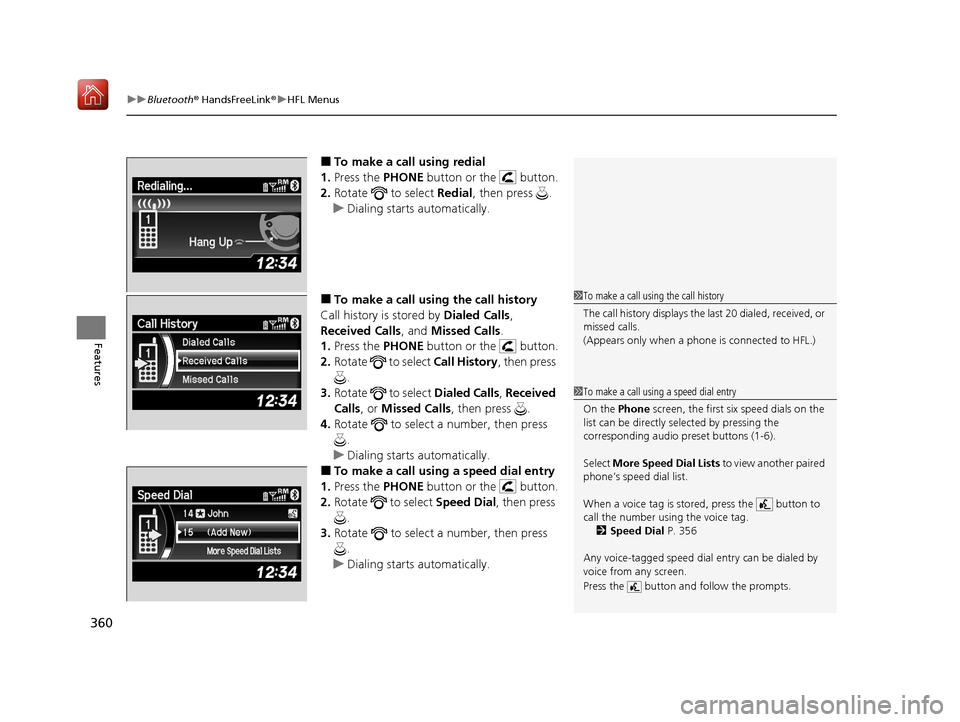
■To make a call using redial
1. Press the PHONE button or the button.
2. Rotate to select Redial, then press .
u Dialing starts automatically.
■To make a call usin g the call history
Call history is stored by Dialed Calls,
Received Calls , and Missed Calls .
1. Press the PHONE button or the button.
2. Rotate to select Call History, then press
.
3. Rotate to select Dialed Calls, Received
Calls , or Missed Calls, then press .
4. Rotate to select a number, then press
.
u Dialing starts automatically.
■To make a call using a speed dial entry
1. Press the PHONE button or the button.
2. Rotate to select Speed Dial, then press
.
3. Rotate to select a number, then press
.
u Dialing starts automatically.
1To make a call using the call history
The call history displays the last 20 dialed, received, or
missed calls.
(Appears only when a phone is connected to HFL.)
1To make a call using a speed dial entry
On the Phone screen, the first six speed dials on the
list can be directly selected by pressing the
corresponding audio preset buttons (1-6).
Select More Speed Dial Lists to view another paired
phone’s speed dial list.
When a voice tag is stored, press the button to
call the number using the voice tag. 2 Speed Dial P. 356
Any voice-tagged speed dial entry can be dialed by
voice from any screen.
Press the button and follow the prompts.
19 ACURA ILX-31TX66610.book 360 ページ 2020年4月17日 金曜日 午前8時52分
Page 372 of 621
371
uuBluetooth ® HandsFreeLink ®u HFL Menus
Continued
Features
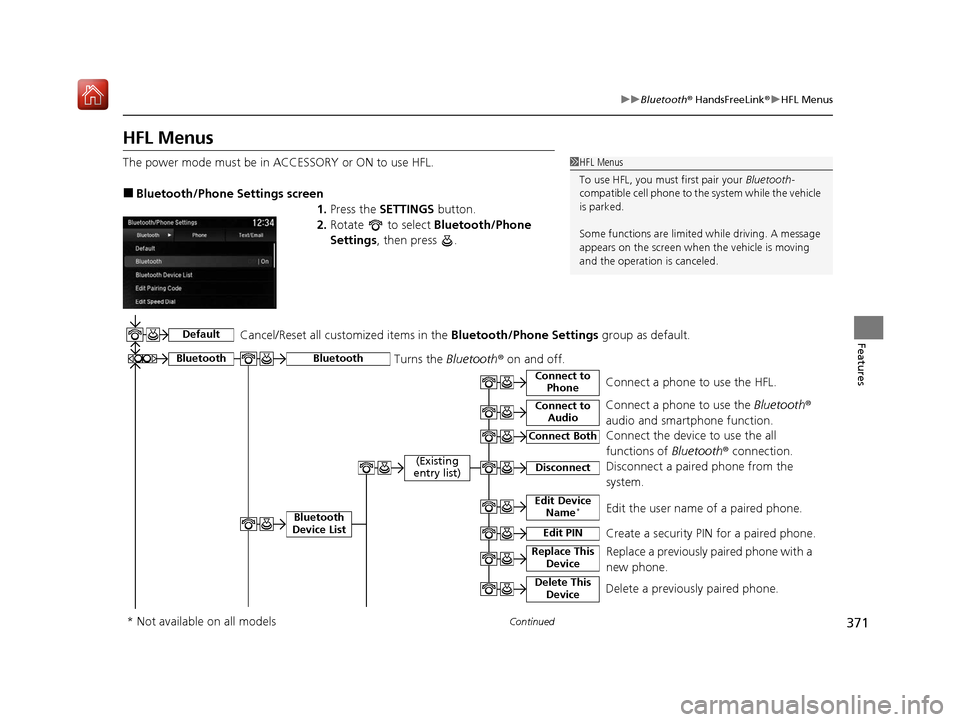
HFL Menus
The power mode must be in ACCESSORY or ON to use HFL.
■Bluetooth/Phone Settings screen
1.Press the SETTINGS button.
2. Rotate to select Bluetooth/Phone
Settings , then press .
1HFL Menus
To use HFL, you must first pair your Bluetooth-
compatible cell phone to th e system while the vehicle
is parked.
Some functions are limited while driving. A message
appears on the screen when the vehicle is moving
and the operation is canceled.
Bluetooth
Replace This Device
Turns the Bluetooth ® on and off.Bluetooth
Edit PIN Create a security PIN for a paired phoneM
Replace a previously paired phone with a
new phone.
Delete This DeviceDelete a previously paired phone.
Connect to AudioConnect a phone to use the Bluetooth®
audio and smartphone function.
Connect to PhoneConnect a phone to use the HFL.
Disconnect Disconnect a paired phone from the
systemM
Connect Both Connect the device to use the all
functions of Bluetooth® connection.
Cancel/Reset all customized items in the
Bluetooth/Phone Settings group as default.
Default
(Existing
entry list)
Bluetooth
Device List Edit Device Name*Edit the user name of a paired phone.
* Not available on all models
19 ACURA ILX-31TX66610.book 371 ページ 2020年4月17日 金曜日 午前8時52分