audio Acura ILX 2019 Manual Online
[x] Cancel search | Manufacturer: ACURA, Model Year: 2019, Model line: ILX, Model: Acura ILX 2019Pages: 621, PDF Size: 34.8 MB
Page 245 of 621
uuAudio System Basic Operation uPlaying Hard Disk Drive (HDD) Audio
244
Features
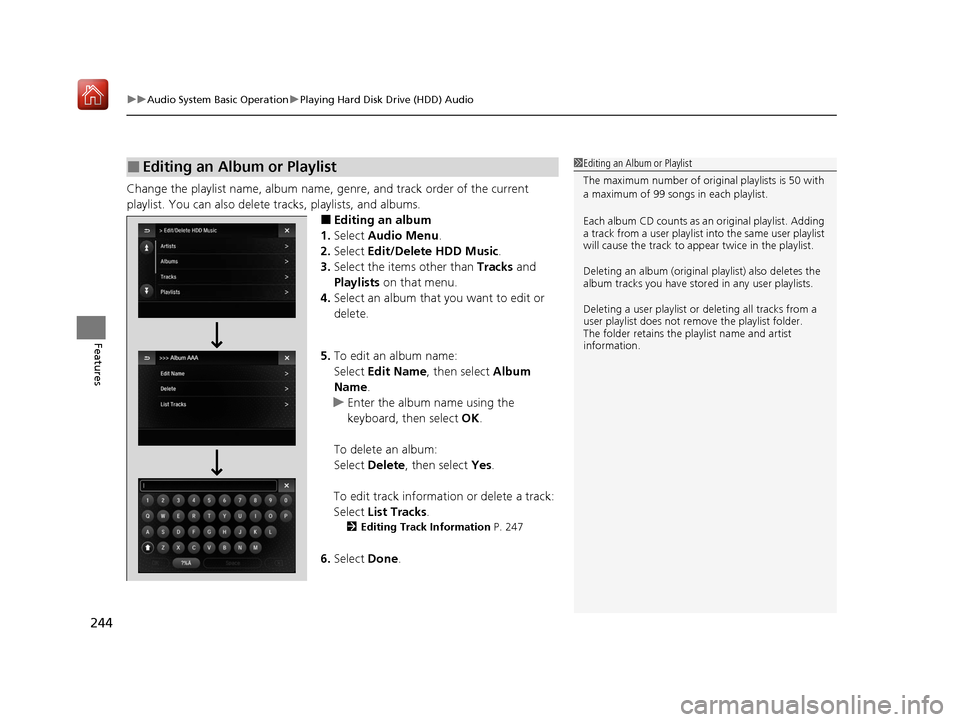
Change the playlist name, album name, ge nre, and track order of the current
playlist. You can also delete tracks, playlists, and albums.
■Editing an album
1. Select Audio Menu .
2. Select Edit/Delete HDD Music.
3. Select the items other than Tracks and
Playlists on that menu.
4. Select an album that you want to edit or
delete.
5. To edit an album name:
Select Edit Name , then select Album
Name.
u Enter the album name using the
keyboard, then select OK.
To delete an album:
Select Delete, then select Yes.
To edit track information or delete a track:
Select List Tracks .
2Editing Track Information P. 247
6.Select Done.
■Editing an Album or Playlist1Editing an Album or Playlist
The maximum number of original playlists is 50 with
a maximum of 99 songs in each playlist.
Each album CD counts as an original playlist. Adding
a track from a user playlist into the same user playlist
will cause the track to appear twice in the playlist.
Deleting an album (original playlist) also deletes the
album tracks you have stor ed in any user playlists.
Deleting a user playlist or deleting all tracks from a
user playlist does not remove the playlist folder.
The folder retains the playlist name and artist
information.
19 ACURA ILX-31TX66610.book 244 ページ 2020年4月17日 金曜日 午前8時52分
Page 246 of 621
245
uuAudio System Basic Operation uPlaying Hard Disk Drive (HDD) Audio
Continued
Features
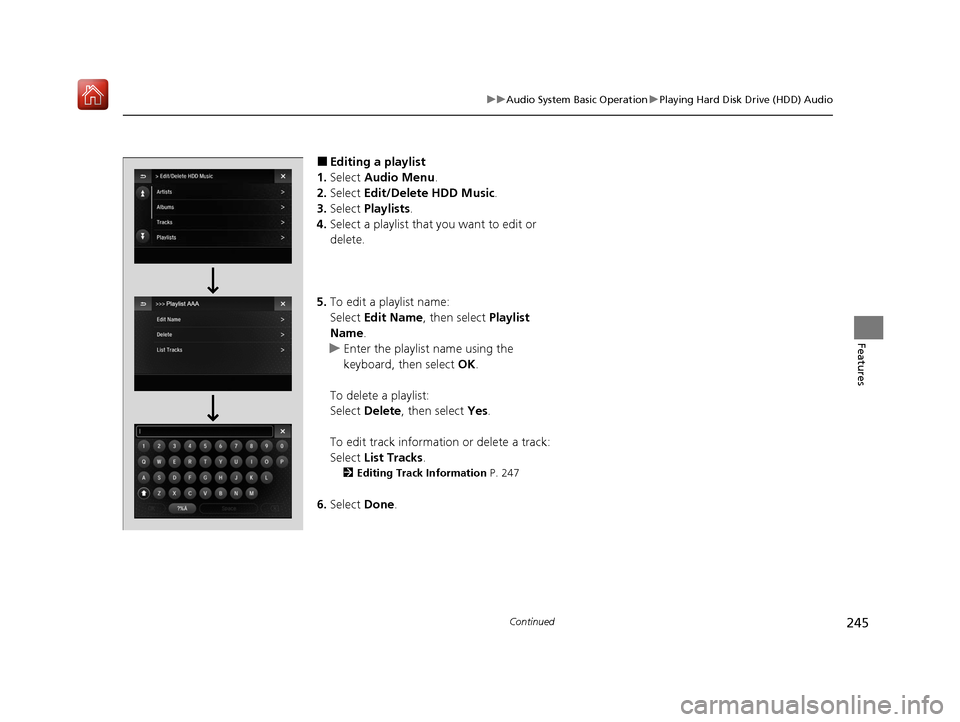
■Editing a playlist
1. Select Audio Menu .
2. Select Edit/Delete HDD Music .
3. Select Playlists .
4. Select a playlist that you want to edit or
delete.
5. To edit a playlist name:
Select Edit Name , then select Playlist
Name.
u Enter the playlist name using the
keyboard, then select OK.
To delete a playlist:
Select Delete , then select Yes.
To edit track information or delete a track:
Select List Tracks .
2Editing Track Information P. 247
6.Select Done.
19 ACURA ILX-31TX66610.book 245 ページ 2020年4月17日 金曜日 午前8時52分
Page 247 of 621
246
uuAudio System Basic Operation uPlaying Hard Disk Drive (HDD) Audio
Features
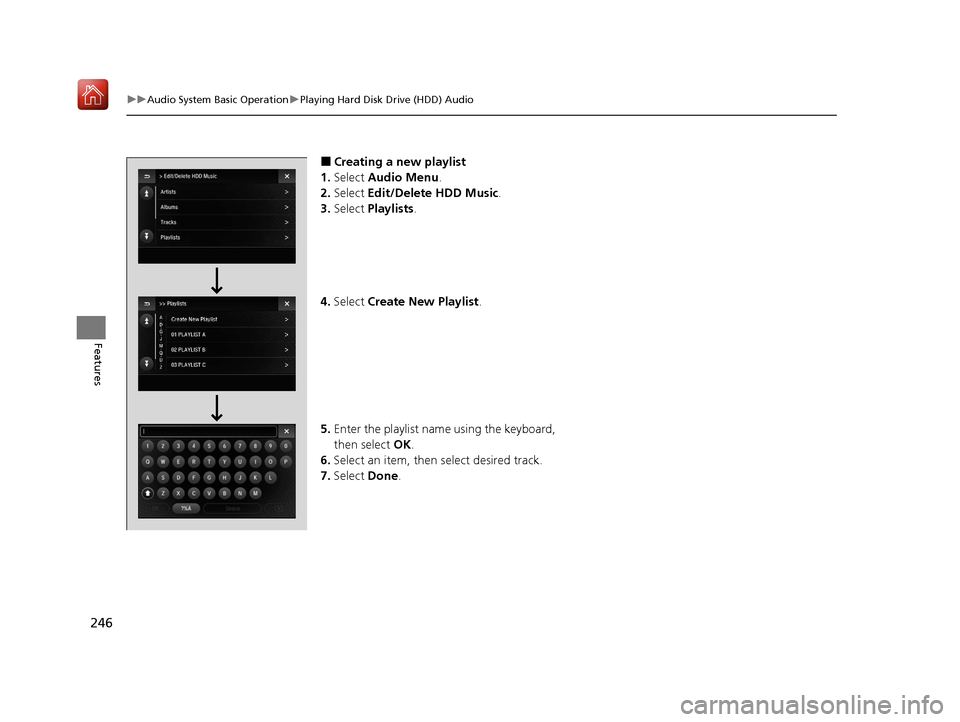
■Creating a new playlist
1. Select Audio Menu .
2. Select Edit/Delete HDD Music.
3. Select Playlists .
4. Select Create New Playlist .
5. Enter the playlist name using the keyboard,
then select OK.
6. Select an item, then select desired track.
7. Select Done.
19 ACURA ILX-31TX66610.book 246 ページ 2020年4月17日 金曜日 午前8時52分
Page 248 of 621
247
uuAudio System Basic Operation uPlaying Hard Disk Drive (HDD) Audio
Continued
Features
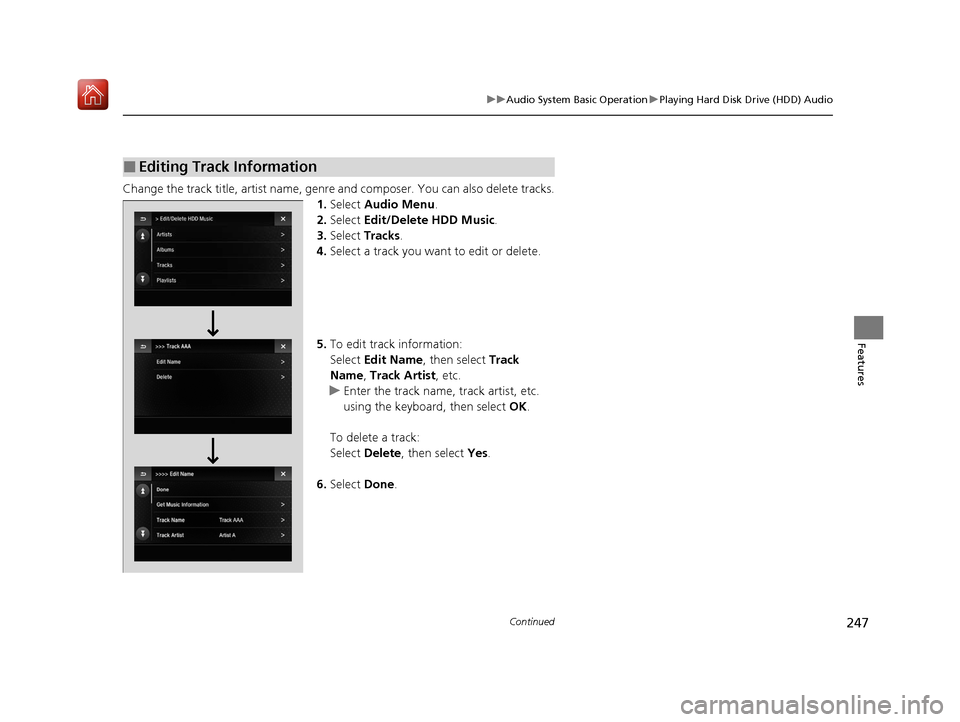
Change the track title, artist name, genr e and composer. You can also delete tracks.
1. Select Audio Menu .
2. Select Edit/Delete HDD Music .
3. Select Tracks .
4. Select a track you want to edit or delete.
5. To edit track information:
Select Edit Name , then select Track
Name, Track Artist , etc.
u Enter the track name, track artist, etc.
using the keyboard, then select OK.
To delete a track:
Select Delete , then select Yes.
6. Select Done.
■Editing Track Information
19 ACURA ILX-31TX66610.book 247 ページ 2020年4月17日 金曜日 午前8時52分
Page 249 of 621
248
uuAudio System Basic Operation uPlaying Hard Disk Drive (HDD) Audio
Features
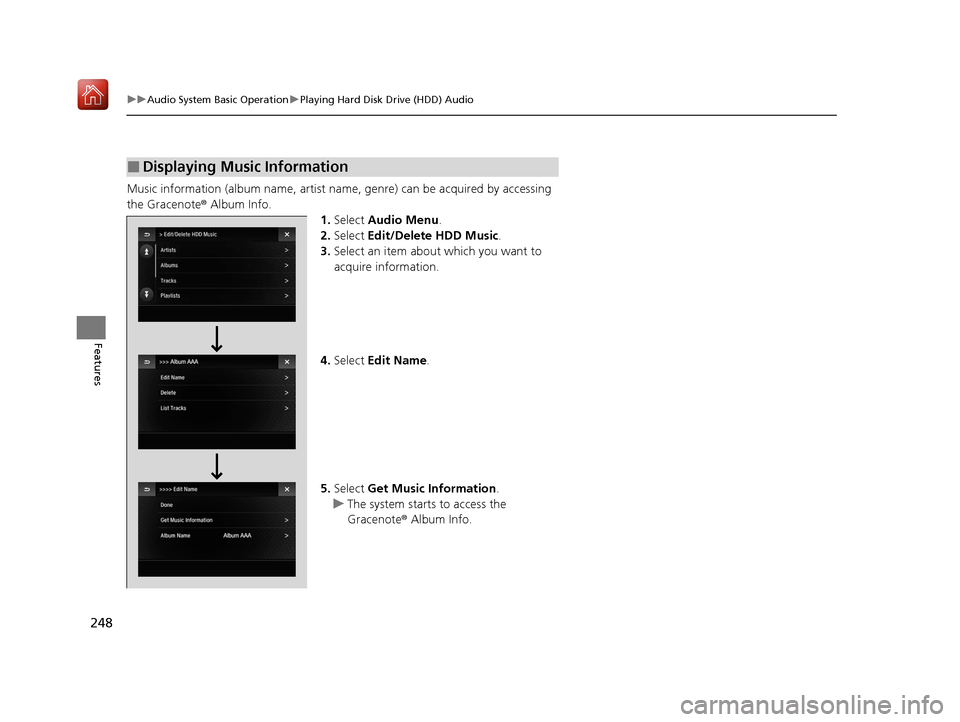
Music information (album name, artist name, genre) can be acquired by accessing
the Gracenote ® Album Info.
1.Select Audio Menu .
2. Select Edit/Delete HDD Music.
3. Select an item about which you want to
acquire information.
4. Select Edit Name .
5. Select Get Music Information .
u The system starts to access the
Gracenote ® Album Info.
■Displaying Music Information
19 ACURA ILX-31TX66610.book 248 ページ 2020年4月17日 金曜日 午前8時52分
Page 250 of 621
Continued249
uuAudio System Basic Operation uPlaying Hard Disk Drive (HDD) Audio
Features
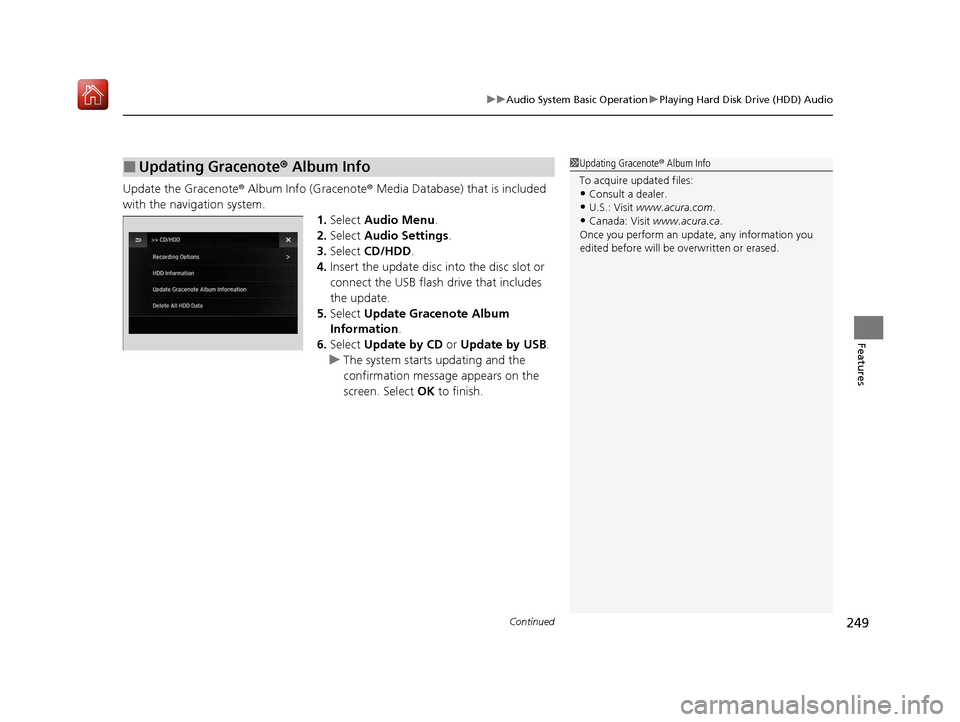
Update the Gracenote ® Album Info (Gracenote® Media Database) that is included
with the navigation system. 1.Select Audio Menu .
2. Select Audio Settings.
3. Select CD/HDD .
4. Insert the update disc into the disc slot or
connect the USB flash drive that includes
the update.
5. Select Update Gracenote Album
Information .
6. Select Update by CD or Update by USB .
u The system starts updating and the
confirmation message appears on the
screen. Select OK to finish.
■Updating Gracenote® Album Info1Updating Gracenote ® Album Info
To acquire updated files:
•Consult a dealer.
•U.S.: Visit www.acura.com .
•Canada: Visit www.acura.ca .
Once you perform an update, any information you
edited before will be overwritten or erased.
19 ACURA ILX-31TX66610.book 249 ページ 2020年4月17日 金曜日 午前8時52分
Page 251 of 621
250
uuAudio System Basic Operation uPlaying Hard Disk Drive (HDD) Audio
Features
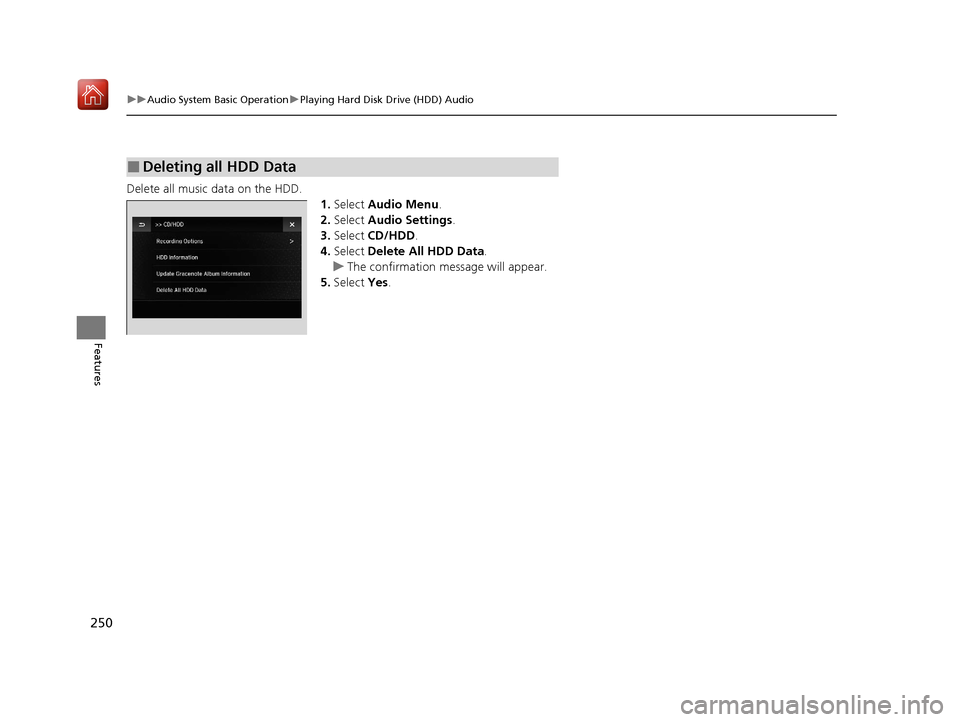
Delete all music data on the HDD.
1.Select Audio Menu .
2. Select Audio Settings .
3. Select CD/HDD .
4. Select Delete All HDD Data .
u The confirmation message will appear.
5. Select Yes.
■Deleting all HDD Data
19 ACURA ILX-31TX66610.book 250 ページ 2020年4月17日 金曜日 午前8時52分
Page 252 of 621
251
uuAudio System Basic Operation uPlaying an iPod
Continued
Features
Playing an iPod
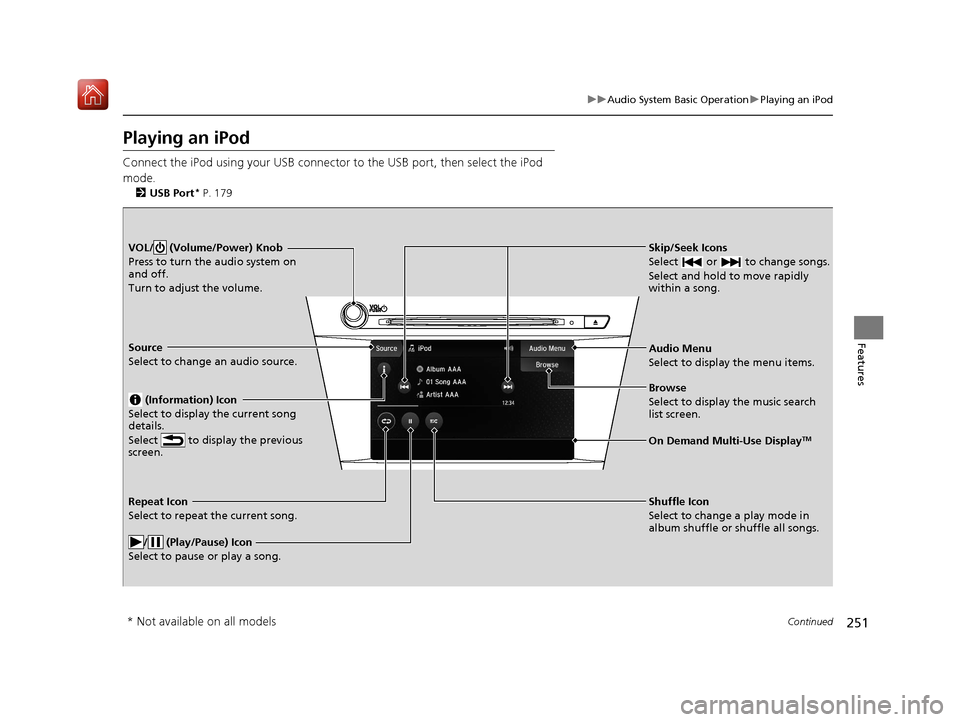
Connect the iPod using your USB connector to the USB port, then select the iPod
mode.
2 USB Port* P. 179
Skip/Seek Icons
Select or to change songs.
Select and hold to move rapidly
within a song.VOL/ (Volume/Power) Knob
Press to turn the audio system on
and off.
Turn to adjust the volume.
Audio Menu
Select to display the menu items.
Source
Select to change an audio source.
(Information) Icon
Select to display the current song
details.
Select to display the previous
screen.
Browse
Select to display the music search
list screen.
On Demand Multi-Use DisplayTM
Repeat Icon
Select to repeat the current song.
/ (Play/Pause) Icon
Select to pause or play a song.Shuffle Icon
Select to change a play mode in
album shuffle or shuffle all songs.
* Not available on all models
19 ACURA ILX-31TX66610.book 251 ページ 2020年4月17日 金曜日 午前8時52分
Page 253 of 621
uuAudio System Basic Operation uPlaying an iPod
252
Features
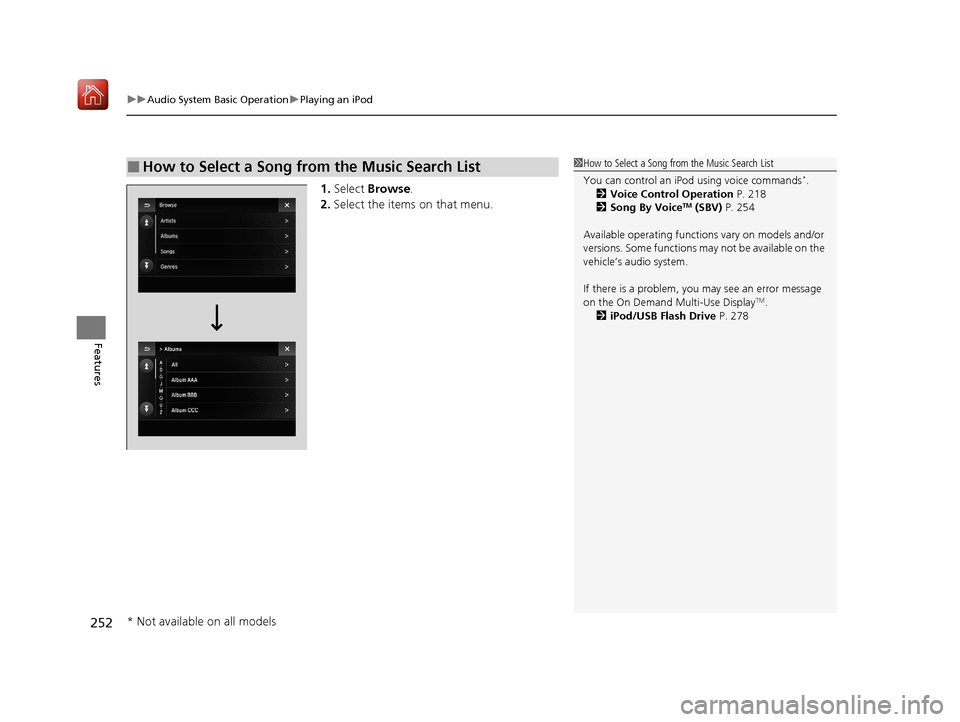
1. Select Browse .
2. Select the items on that menu.
■How to Select a Song from the Music Search List1How to Select a Song from the Music Search List
You can control an iPod using voice commands
*.
2 Voice Control Operation P. 218
2 Song By Voice
TM (SBV) P. 254
Available operating function s vary on models and/or
versions. Some functions ma y not be available on the
vehicle’s audio system.
If there is a problem, you may see an error message
on the On Demand Multi-Use Display
TM.
2 iPod/USB Flash Drive P. 278
* Not available on all models
19 ACURA ILX-31TX66610.book 252 ページ 2020年4月17日 金曜日 午前8時52分
Page 254 of 621
253
uuAudio System Basic Operation uPlaying an iPod
Features
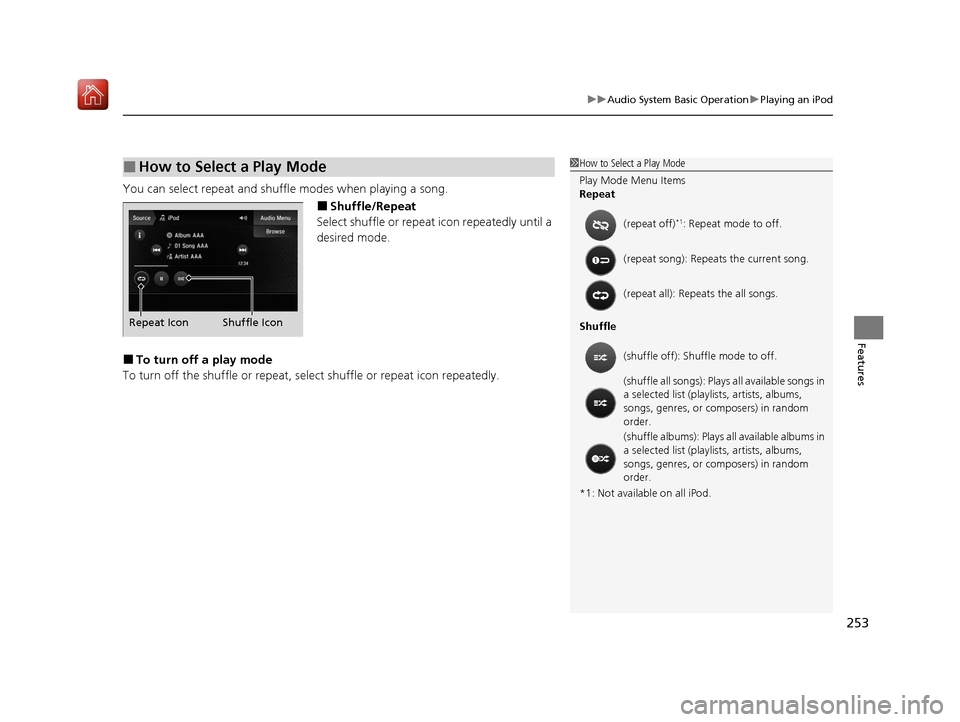
You can select repeat and shu ffle modes when playing a song.
■Shuffle/Repeat
Select shuffle or repeat icon repeatedly until a
desired mode.
■To turn off a play mode
To turn off the shuffle or repeat, select shuffle or repeat icon repeatedly.
■How to Select a Play Mode1How to Select a Play Mode
Play Mode Menu Items
Repeat
Shuffle
*1: Not available on all iPod. (repeat off)
*1: Repeat mode to off.
(repeat song): Repeat s the current song.
(repeat all): Repeats the all songs.
(shuffle off): Shuf fle mode to off.
(shuffle all songs): Plays all available songs in
a selected list (playlists, artists, albums,
songs, genres, or composers) in random
order.
(shuffle albums): Plays all available albums in
a selected list (playlists, artists, albums,
songs, genres, or composers) in random
order.
Shuffle Icon
Repeat Icon
19 ACURA ILX-31TX66610.book 253 ページ 2020年4月17日 金曜日 午前8時52分