remote battery Acura ILX 2019 Owner's Manual
[x] Cancel search | Manufacturer: ACURA, Model Year: 2019, Model line: ILX, Model: Acura ILX 2019Pages: 621, PDF Size: 34.8 MB
Page 4 of 621
Contents
Child Safety P. 52Exhaust Gas Hazard P. 65Safety Labels P. 66
Opening and Closing the Trunk P. 124 Security System P. 128 Opening and Closing the Windows P. 131
Operating the Switches Around the Steering Wheel P. 135 Adjusting the Mirrors P. 152
Interior Lights/Interior Convenience It ems P. 164 Climate Control System P. 171
Audio Error Messages P. 275General Information on the Audio System P. 286
Bluetooth ® HandsFreeLink ® P. 339, 368 AcuraLink ®* P. 410
When Driving P. 426 AcuraWatchTM P. 446Braking P. 491
Refueling P. 502 Fuel Economy and CO
2 Emissions P. 504
Maintenance Under the Hood P. 514 Replacing Light Bulbs P. 525
Checking and Maintaining Tires P. 532 Battery P. 541 Remote Transmitter Care P. 542
Accessories and Modifications P. 551
Engine Does Not Start P. 577Jump Starting P. 580 Shift Lever Does Not Move P. 583
Fuses P. 590 Emergency Towing P. 593
Devices that Emit Radio Waves P. 599 Reporting Safety Defects P. 600 Emissions Testing P. 601
Client Service Information P. 606
Quick Reference GuideP. 4
Safe DrivingP. 27
Instrument PanelP. 67
ControlsP. 105
FeaturesP. 175
DrivingP. 419
MaintenanceP. 505
Handling the UnexpectedP. 553
InformationP. 595
IndexP. 610
19 ACURA ILX-31TX66610.book 3 ページ 2020年4月17日 金曜日 午前8時52分
Page 85 of 621
84
uuIndicators uMulti-Information Display Warn ing and Information Messages
Instrument Panel
MessageConditionExplanation
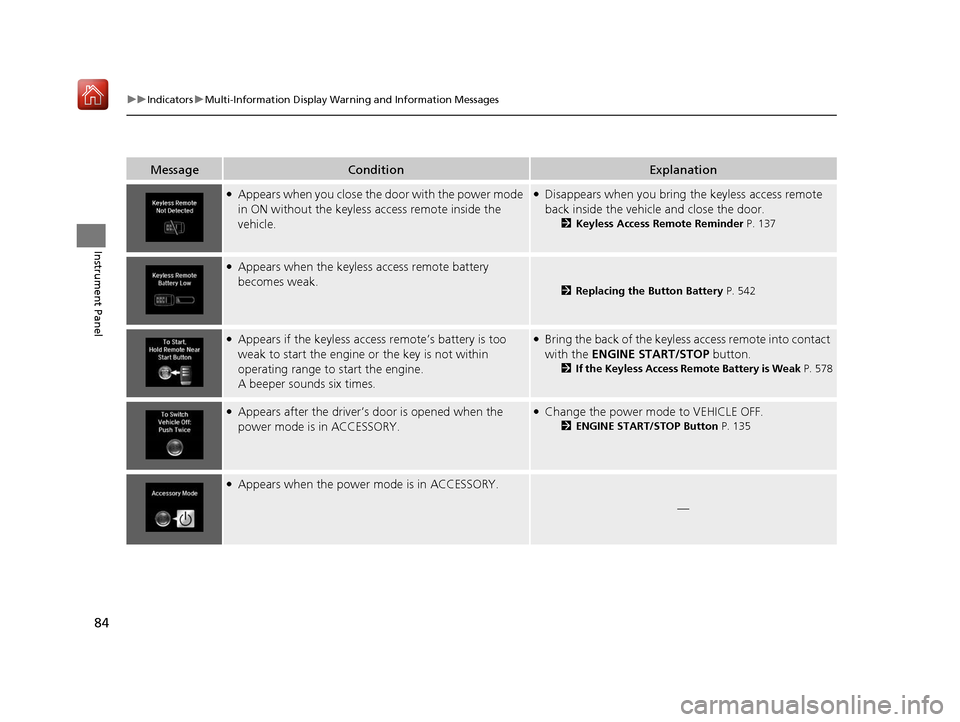
●Appears when you close the door with the power mode
in ON without the keyless access remote inside the
vehicle.●Disappears when you bring the keyless access remote
back inside the vehicle and close the door.
2Keyless Access Remote Reminder P. 137
●Appears when the keyless access remote battery
becomes weak.
2Replacing the Button Battery P. 542
●Appears if the keyless access remote’s battery is too
weak to start the engine or the key is not within
operating range to start the engine.
A beeper sounds six times.●Bring the back of the keyless access remote into contact
with the ENGINE START/STOP button.
2If the Keyless Access Remote Battery is Weak P. 578
●Appears after the driver’s door is opened when the
power mode is in ACCESSORY.●Change the power mode to VEHICLE OFF.
2 ENGINE START/STOP Button P. 135
●Appears when the power mode is in ACCESSORY.
—
19 ACURA ILX-31TX66610.book 84 ページ 2020年4月17日 金曜日 午前8時52分
Page 109 of 621
108
Controls
Locking and Unlocking the Doors
Key Types and Functions
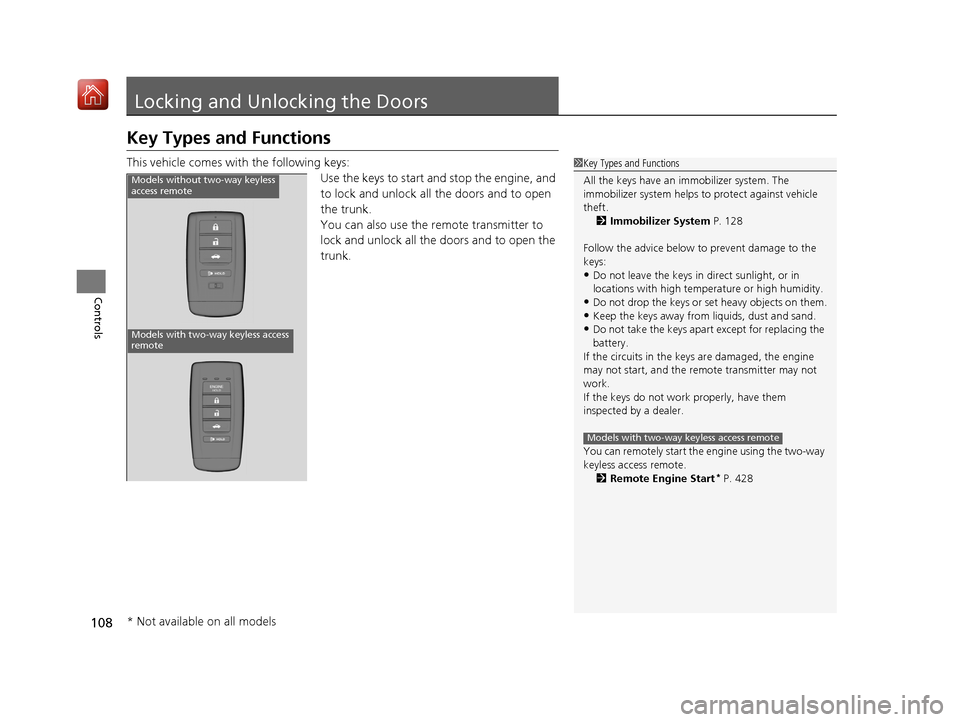
This vehicle comes with the following keys:Use the keys to start and stop the engine, and
to lock and unlock all the doors and to open
the trunk.
You can also use the remote transmitter to
lock and unlock all the doors and to open the
trunk.1 Key Types and Functions
All the keys have an immobilizer system. The
immobilizer system helps to protect against vehicle
theft. 2 Immobilizer System P. 128
Follow the advice below to prevent damage to the
keys:
•Do not leave the keys in direct sunlight, or in
locations with high temperature or high humidity.
•Do not drop the keys or set heavy objects on them.•Keep the keys away from liquids, dust and sand.
•Do not take the keys apart except for replacing the
battery.
If the circuits in the keys are damaged, the engine
may not start, and the remote transmitter may not
work.
If the keys do not work properly, have them
inspected by a dealer.
You can remotely start the engine using the two-way
keyless access remote. 2 Remote Engine Start
* P. 428
Models with two-way keyless access remote
Models without two-way keyless
access remote
Models with two-way keyless access
remote
* Not available on all models
19 ACURA ILX-31TX66610.book 108 ページ 2020年4月17日 金曜日 午前8時52分
Page 110 of 621
109
uuLocking and Unlocking the Doors uKey Types and Functions
Continued
Controls
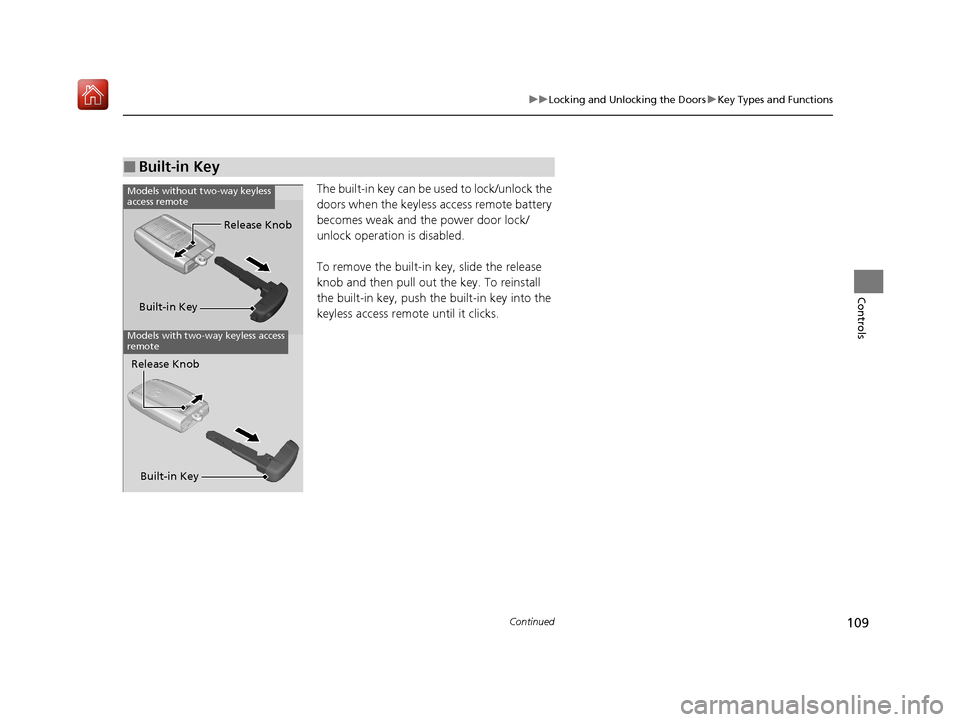
The built-in key can be used to lock/unlock the
doors when the keyless access remote battery
becomes weak and the power door lock/
unlock operation is disabled.
To remove the built-in key, slide the release
knob and then pull out the key. To reinstall
the built-in key, push th e built-in key into the
keyless access remote until it clicks.
■Built-in Key
Built-in Key Release Knob
Models without two-way keyless
access remote
Models with two-way keyless access
remote
Release Knob
Built-in Key
19 ACURA ILX-31TX66610.book 109 ページ 2020年4月17日 金曜日 午前8時52分
Page 111 of 621
uuLocking and Unlocking the Doors uLow Keyless Access Remote Signal Strength
110
Controls
Contains a number that you will need if you
purchase a replacement key.
Low Keyless Access Remo te Signal Strength
The vehicle transmits radio waves to loca te the keyless access remote when locking/
unlocking the doors, opening the trunk, or to start the engine.
In the following cases, locking/unlocking the doors, opening the trunk, or starting
the engine may be inhibited or operation may be unstable:
• Strong radio waves are being tra nsmitted by nearby equipment.
• You are carrying the keyless access remote together with telecommunications
equipment, laptop computers, ce ll phones, or wireless devices.
• A metallic object is touching or co vering the keyless access remote.
■Key Number Tag1Key Number Tag
Keep the key number tag separate from the key in a
safe place outside of your vehicle.
If you wish to purchase an additional key, contact a
dealer.
If you lose your key and you cannot start the engine,
contact a dealer.
1 Low Keyless Access Remote Signal Strength
Communication between the keyless access remote
and the vehicle consumes th e keyless access remote’s
battery.
Battery life is about two years, but this varies
depending on regularity of use.
The battery is consumed whenever the keyless access
remote is receivi ng strong radio wave s. Avoid placing
it near electrical appliances such as televisions and
personal computers.
19 ACURA ILX-31TX66610.book 110 ページ 2020年4月17日 金曜日 午前8時52分
Page 117 of 621
uuLocking and Unlocking the Doors uLocking/Unlocking the Doors from the Outside
116
Controls
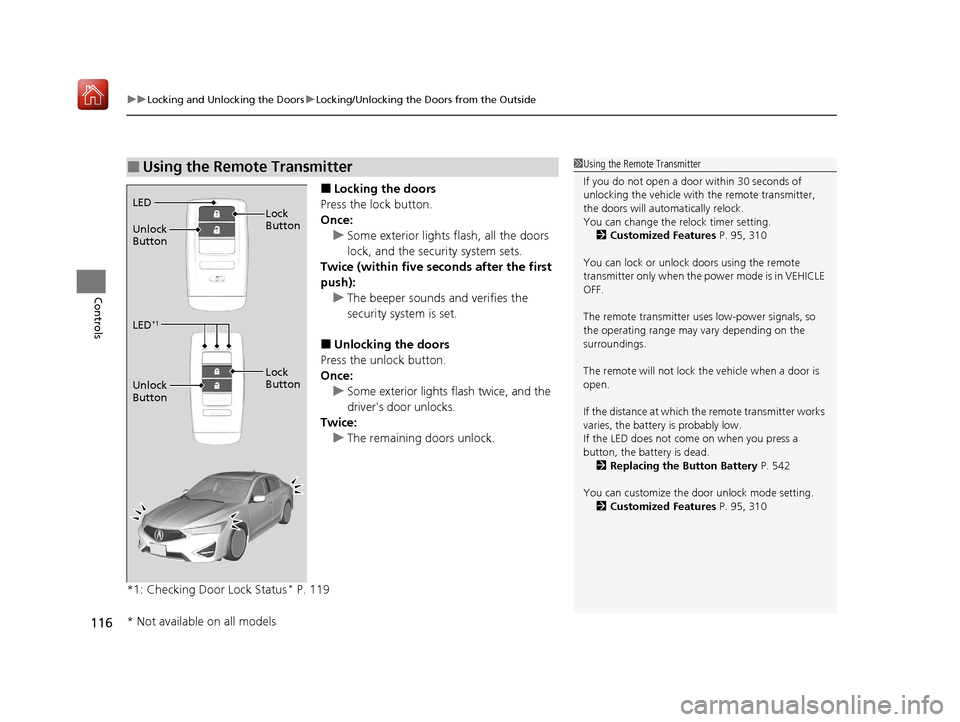
■Locking the doors
Press the lock button.
Once: u Some exterior lights flash, all the doors
lock, and the security system sets.
Twice (within five se conds after the first
push):
u The beeper sounds and verifies the
security system is set.
■Unlocking the doors
Press the unlock button.
Once: u Some exterior lights flash twice, and the
driver's door unlocks.
Twice:
u The remaining doors unlock.
*1: Checking Door Lock Status
* P. 119
■Using the Remote Transmitter1 Using the Remote Transmitter
If you do not open a door within 30 seconds of
unlocking the vehicle with the remote transmitter,
the doors will automatically relock.
You can change the relock timer setting. 2 Customized Features P. 95, 310
You can lock or unlock doors using the remote
transmitter only when the power mode is in VEHICLE
OFF.
The remote transmitter us es low-power signals, so
the operating range may vary depending on the
surroundings.
The remote will not lock th e vehicle when a door is
open.
If the distance at which the remote transmitter works
varies, the batter y is probably low.
If the LED does not come on when you press a
button, the battery is dead.
2 Replacing the Button Battery P. 542
You can customize the door unlock mode setting. 2 Customized Features P. 95, 310
LED
Unlock
Button Lock
Button
LED*1
Unlock
Button
Lock
Button
* Not available on all models
19 ACURA ILX-31TX66610.book 116 ページ 2020年4月17日 金曜日 午前8時52分
Page 118 of 621

Continued117
uuLocking and Unlocking the Doors uLocking/Unlocking the Doors from the Outside
Controls
If the lock or unlock button of the keyless access remote does not work, use the key
instead.
2 Replacing the Button Battery P. 542
Fully insert the key and turn it.
■Locking/Unlocking the Doors Using a Key1Locking/Unlocking the Doors Using a Key
When you lock the driver's door with a key, all the
other doors lock at the sa me time. When unlocking,
the driver's door unlocks first. Turn the key a second
time within a few seconds to unlock the remaining
doors.
You can customize the door unlock mode setting. 2 Customized Features P. 95, 310
Lock
Unlock
19 ACURA ILX-31TX66610.book 117 ページ 2020年4月17日 金曜日 午前8時52分
Page 130 of 621
Continued129
uuSecurity System uSecurity System Alarm
Controls
■To deactivate the security system alarm
Unlock the vehicle using the key, remote transmitter or keyless access system. The
system, along with the horn and flashing lights, is deactivated.
■Setting the security system alarm
The security system alarm automatically sets when the following conditions have
been met:
• The power mode is set to VEHICLE OFF (LOCK).
• The hood is closed.
• All doors and the trunk are locked from ou tside with the key, remote transmitter
or keyless access system.
■When the security system alarm sets
The security system alarm in dicator in the instrument panel blinks. The blinking
interval changes after about 15 seconds.
■To cancel the security system alarm
The security system alarm is canceled when the vehicle is unlocked using the remote
transmitter, keyless access system, or th e power mode is set to ON. The security
system alarm indicator goes off at the same time.
1 Security System Alarm
Do not set the security system alarm when someone
is in the vehicle or a window is open. The system can
accidentally activate when:
•Unlocking the door with the lock tab.•Opening the trunk with the trunk opener or the
emergency trunk opener.
•Opening the hood with the hood release.•Taking the transmission out of ( P.
If the battery goes dead after you have set the
security system alarm, the security alarm may go off
once the battery is re charged or replaced.
If this occurs, deactivate the security system alarm by
unlocking a door using the ke y, remote transmitter,
or keyless access system.
19 ACURA ILX-31TX66610.book 129 ページ 2020年4月17日 金曜日 午前8時52分
Page 136 of 621
135Continued
Controls
Operating the Switches Around the Steering Wheel
ENGINE START/STOP Button
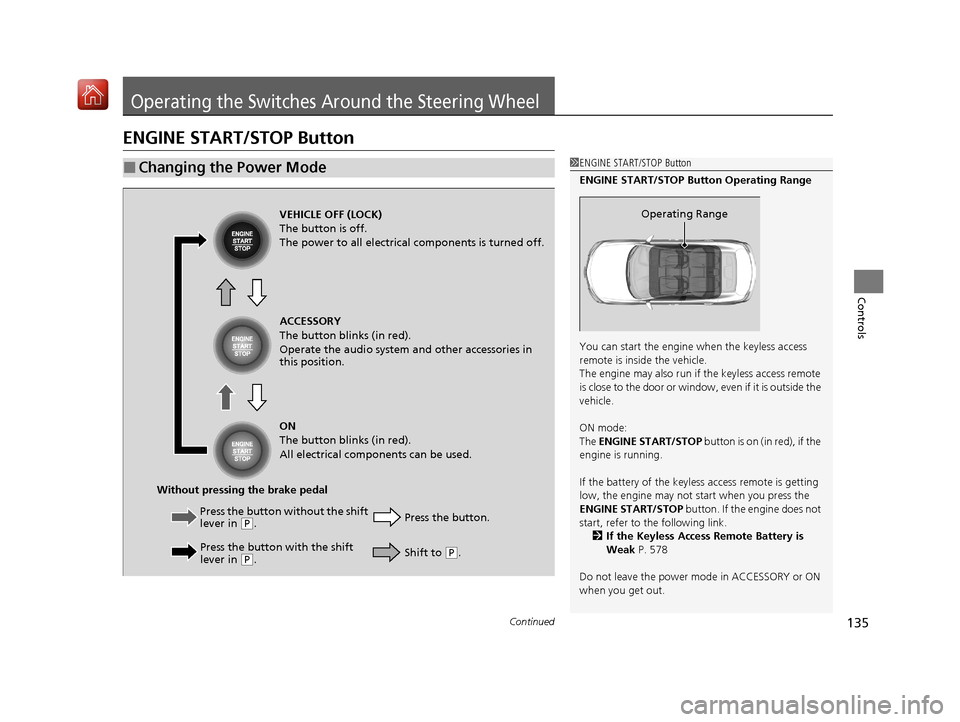
■Changing the Power Mode1ENGINE START/STOP Button
ENGINE START/STOP Button Operating Range
You can start the engine when the keyless access
remote is inside the vehicle.
The engine may also run if the keyless access remote
is close to the door or window, even if it is outside the
vehicle.
ON mode:
The ENGINE START/STOP button is on (in red), if the
engine is running.
If the battery of the keyless access remote is getting
low, the engine may not start when you press the
ENGINE START/STOP button. If the engine does not
start, refer to the following link.
2 If the Keyless Access Remote Battery is
Weak P. 578
Do not leave the power mode in ACCESSORY or ON
when you get out.
Operating RangeVEHICLE OFF (LOCK)
The button is off.
The power to all electrical components is turned off.
Press the button without the shift
lever in
( P.
Press the button with the shift
lever in
( P. Press the button.
Without pressing the brake pedal ACCESSORY
The button blinks (in red).
Operate the audio system and other accessories in
this position.
ON
The button blinks (in red).
All electrical components can be used.
Shift to (P.
19 ACURA ILX-31TX66610.book 135 ページ 2020年4月17日 金曜日 午前8時52分
Page 297 of 621
296
uuGeneral Information on the Audio System uHonda App License Agreement
Features
E. Information Collection and Storage
1. Information Collection , Use, Transmission and Storage of Data. Consent to Use of Data:
You agree that HONDA and PROVIDERS may
collect and use your information gathered in any manner as part of product support services related to the SOFTWARE or related services.
HONDA may share such information with third parties, including, without limitation, PROV IDERS, third party software and service s
suppliers, their affiliates and/or their design ated agents, solely to improve their products or to provide services or technologies to you.
HONDA, third party software and systems supp liers, their affiliates and/or their designated agent may disclose this information to others,
but not in a form that pe rsonally identifies you.
2. Information Storage.
Depending on the type of multimedia system you have in your VEHICLE, certain information may be stored for ease
of use of the SOFTWARE including, without limitation, search hi story, location history in certain applications, previous and saved
destinations, map locations within certain applications, and device numbers and contact information.
(a) Vehicle Health Information.
Your VEHICLE may remotely trans mit information regarding the status and health of your VEHICLE
(“VEHICLE INFORMATION”) to HONDA without notification to you. VEHICLE INFORMATION may contain VEHICLE maintenance and
malfunction status that is derived from VEHICLE diagnostic data and includes, but is not limited to, status of powered doors and windows,
battery life data, battery charging data, VEHICLE speed, coolant temperat ure, air compressor revolution, output power, warning codes,
diagnostic trouble codes, fuel injection volu me, and engine rotations per minute. VEHICL E HEALTH INFORMATION may be used by HON DA
for research and development, to deliver HO NDA SERVICES and information to you, and to contact you, and is retained only for a period
of time necessary to fulfill these goals.
(b) VEHICLE Geolocation Data (non-navigation/map based).
If you opt-in to geolocation-based SERVICES, your vehicle’s geolocation data
(latitude and longitude) will be automatically sent from your VEHICLE to HONDA and PROVIDERS.
(c) You understand that the inputting or uploading of information to your VEHICLE’s multimedia system or the SOFTWARE or SERVICES is
at your own risk and that HONDA is not resp onsible for unauthorized access to or use of any personal or other information. All information
uploaded to the SOFTWARE and SERVICES may be stored on your VEHI CLES’s multimedia system and you understand that the security and
safety of your VEHICLE’s multimedia system is your sole responsibility.
19 ACURA ILX-31TX66610.book 296 ページ 2020年4月17日 金曜日 午前8時52分