USB port Acura ILX 2020 User Guide
[x] Cancel search | Manufacturer: ACURA, Model Year: 2020, Model line: ILX, Model: Acura ILX 2020Pages: 621, PDF Size: 34.94 MB
Page 267 of 621

266
uuAudio System Basic Operation uApple CarPlay
Features
Apple CarPlay
If you connect an Apple CarPlay-compatible iPhone to the system via the USB port,
you can use the information screen, instead of the iPhone display, to make a phone
call, listen to music, view maps (navigation), and access messages.
2USB Port* P. 178
*1:The operation methods may differ from your connected iPhone.
■Apple CarPlay Menu
1Apple CarPlay
Only iPhone 5 or newer versi ons with iOS 8.4 or later
are compatible with Apple CarPlay.
Park in a safe place before connecting your iPhone to
Apple CarPlay and when launching any compatible
apps.
To use Apple CarPlay, connect the USB cable to the
USB port. 2 USB Port
* P. 178
To directly access the Appl e CarPlay phone function,
press the PHONE button. While connected to Apple
CarPlay, calls are only made through Apple CarPlay. If
you want to make a call with Bluetooth®
HandsFreeLink ®, turn Apple CarPlay OFF or detach
the USB cable from your iPhone.
2 Setting Up Apple CarPlay P. 268
When your iPhone is connected to Apple CarPlay, it is
not possible to use the Bluetooth® Audio or
Bluetooth ® HandsFreeLink ®. However, other
previously paired phones can stream audio via
Bluetooth ® while Apple CarPlay is connected.
2 Phone Setup P. 376
For details on c ountries and regions where Apple
CarPlay is available, as well as information pertaining
to function, refer to the Apple homepage.
Go back to the previous
screen of this audio system.
Information Screen
Apple CarPlay menu screen
Go back to the Apple CarPlay menu screen
SMARTPHONE Button
Press to display the Apple CarPlay menu screen.
Interface Dial ( ENTER/MENU Button)
*1
Move and rotate the interface dial to select the item.
Press to enter the item.
BACK Button*1
Press to go back to the previous display.
* Not available on all models
20 ACURA ILX-31TX66710.book 266 ページ 2020年4月16日 木曜日 午後8時46分
Page 269 of 621
uuAudio System Basic Operation uApple CarPlay
268
Features
After you have connected your iPhone to the system via the USB port, use the
following procedure to set up Apple CarPlay. Use of Apple CarPlay will result in the
transmission of certain user and vehicle information (such as vehicle location, speed,
and status) to your iPhone to enhance th e Apple CarPlay experience. You will need
to consent to the sharin g of this information on the information screen.
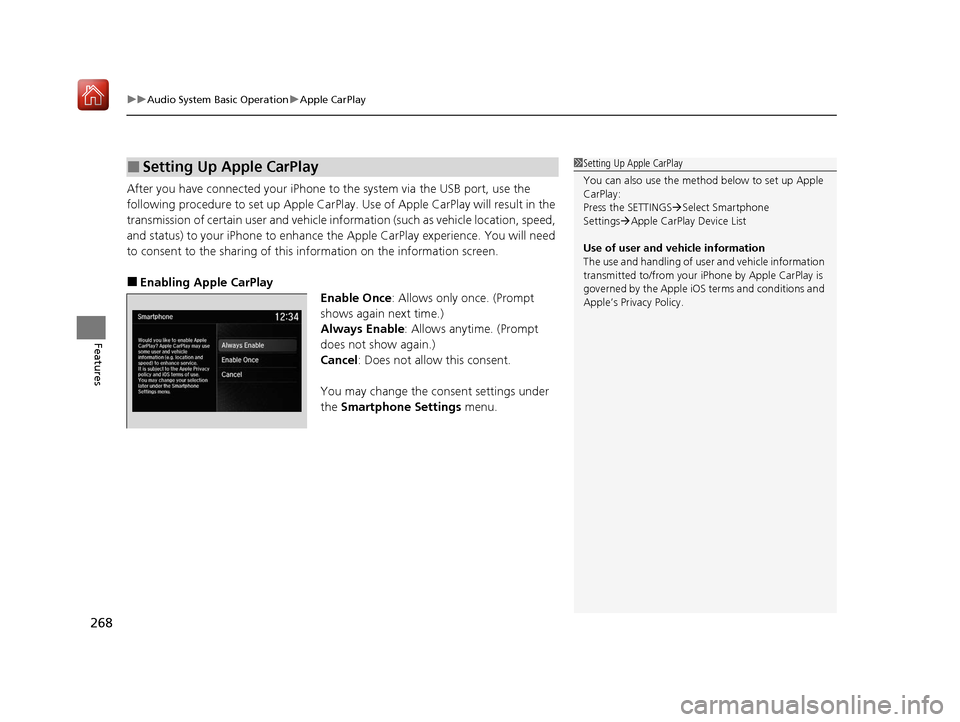
■Enabling Apple CarPlay
Enable Once: Allows only once. (Prompt
shows again next time.)
Always Enable : Allows anytime. (Prompt
does not show again.)
Cancel : Does not allow this consent.
You may change the consent settings under
the Smartphone Settings menu.
■Setting Up Apple CarPlay1Setting Up Apple CarPlay
You can also use the method below to set up Apple
CarPlay:
Press the SETTINGS Select Smartphone
Settings Apple CarPlay Device List
Use of user and vehicle information
The use and handling of user and vehicle information
transmitted to/from your iP hone by Apple CarPlay is
governed by the Apple iOS terms and conditions and
Apple’s Privacy Policy.
20 ACURA ILX-31TX66710.book 268 ページ 2020年4月16日 木曜日 午後8時46分
Page 271 of 621
270
uuAudio System Basic Operation uAndroid Auto
Features
Android Auto
When you connect an Android phone to the audio system via the USB port, Android
Auto is automatically initia ted. When connected via Android Auto, you can use the
information screen to access the Phone, Google Maps (Navigation), Google Play
Music, and Google Now functions. When yo u first use Android Auto, a tutorial will
appear on the screen.
We recommend that you complete this tuto rial while safely parked before using
Android Auto.
2 USB Port* P. 178
2 Auto Pairing Connection P. 273
1Android Auto
To use Android Auto, you need to download the
Android Auto app from Google Play to your
smartphone.
Only Android 5.0 (Lollipop) or later versions are
compatible with Android Auto.
Bluetooth A2DP cannot be used with Android Auto
phone.
Park in a safe place befo re connecting your Android
phone to Android Auto and when launching any
compatible apps.
To use Android Auto, connect the USB cable to the
USB port.
2 USB Port
* P. 178
When your Android phone is connected to Android
Auto, it is not possible to use the Bluetooth® Audio.
However, other previously paired phones can stream
audio via Bluetooth ® while Android Auto is
connected. 2 Phone Setup P. 376
* Not available on all models
20 ACURA ILX-31TX66710.book 270 ページ 2020年4月16日 木曜日 午後8時46分
Page 274 of 621
Continued273
uuAudio System Basic Operation uAndroid Auto
Features
When you connect an Android phone to the unit via the USB port, Android Auto is
automatically initiated.
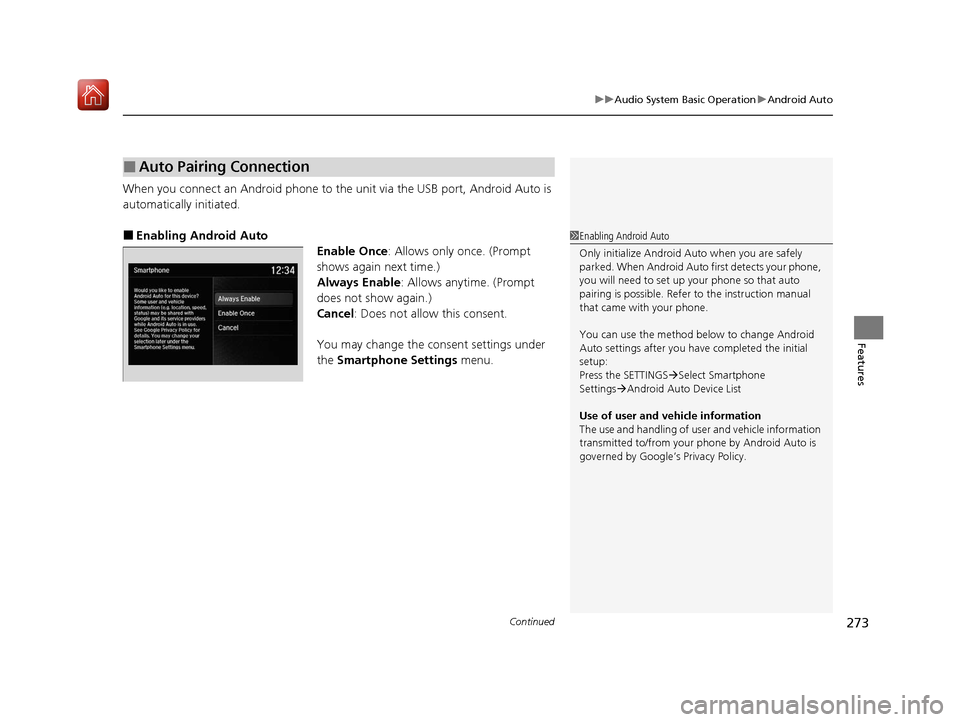
■Enabling Android Auto
Enable Once: Allows only once. (Prompt
shows again next time.)
Always Enable: Allows anytime. (Prompt
does not show again.)
Cancel : Does not allow this consent.
You may change the consent settings under
the Smartphone Settings menu.
■Auto Pairing Connection
1Enabling Android Auto
Only initialize Android Au to when you are safely
parked. When Android Auto first detects your phone,
you will need to set up your phone so that auto
pairing is possibl e. Refer to the instruction manual
that came with your phone.
You can use the method below to change Android
Auto settings after you have completed the initial
setup:
Press the SETTINGS Select Smartphone
Settings Android Auto Device List
Use of user and vehicle information
The use and handling of user and vehicle information
transmitted to/from your phone by Android Auto is
governed by Google’s Privacy Policy.
20 ACURA ILX-31TX66710.book 273 ページ 2020年4月16日 木曜日 午後8時46分
Page 279 of 621
278
uuAudio Error Messages uiPod/USB Flash Drive
Features
iPod/USB Flash Drive
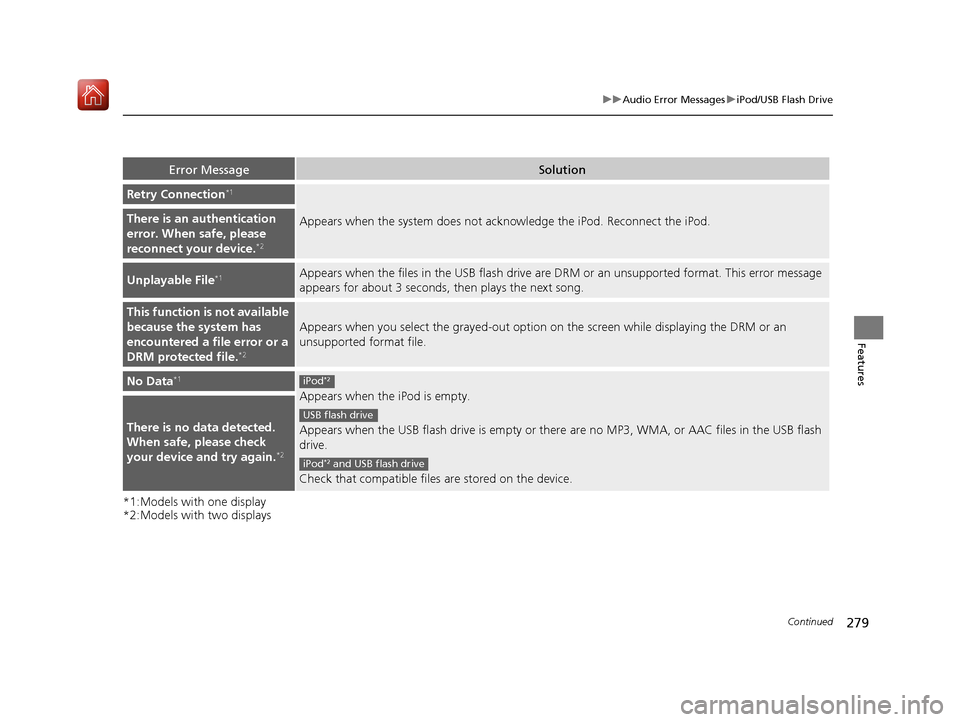
If an error occurs while play ing an iPod or USB flash driv e, you may see the following
error messages. If you cannot clear the error message, contact a dealer.
*1:Models with one display
*2:Models with two displays
Error MessageSolution
USB Error*1
Appears when there is a probl em with the USB adapter unit*1 or audio unit*2. Check if the device is
compatible with the USB adapter unit*1 or audio unit*2.Communication error
detected. When safe, please
reconnect your device.
*2
Bad USB Device
Please check owners
manual.
*1
Appears when an incompatible device is connected. Disconnect the device. Then turn the audio system
off, and turn it on again. Do not reco nnect the device that caused the error.This USB device is
incompatible. Please see
your owner’s manual for
more details.
*2
No Song*1Appears when the iPod is empty. Check that compatible files are stored on the device.
Unsupported Ver*1
Appears when an unsupported iPod is connected. If it appears when a supported iPod is connected,
update the iPod software to the newer version.This version of iOS is not
supported.*2
20 ACURA ILX-31TX66710.book 278 ページ 2020年4月16日 木曜日 午後8時46分
Page 280 of 621
279
uuAudio Error Messages uiPod/USB Flash Drive
Continued
Features
*1:Models with one display
*2:Models with two displays
Error MessageSolution
Retry Connection*1
Appears when the system does not acknowledge the iPod. Reconnect the iPod.There is an authentication
error. When safe, please
reconnect your device.
*2
Unplayable File*1Appears when the files in the USB flash drive are DRM or an unsupported format. This error message
appears for about 3 seconds, then plays the next song.
This function is not available
because the system has
encountered a file error or a
DRM protected file.
*2
Appears when you select the grayed-out option on the screen while displaying the DRM or an
unsupported format file.
No Data*1
Appears when the iPod is empty.
Appears when the USB flash drive is empty or there are no MP3, WMA, or AAC files in the USB flash
drive.
Check that compatible files are stored on the device.
There is no data detected.
When safe, please check
your device and try again.
*2
iPod*2
USB flash drive
iPod*2 and USB flash drive
20 ACURA ILX-31TX66710.book 279 ページ 2020年4月16日 木曜日 午後8時46分
Page 281 of 621
280
uuAudio Error Messages u
Features
*2:Models with two displays
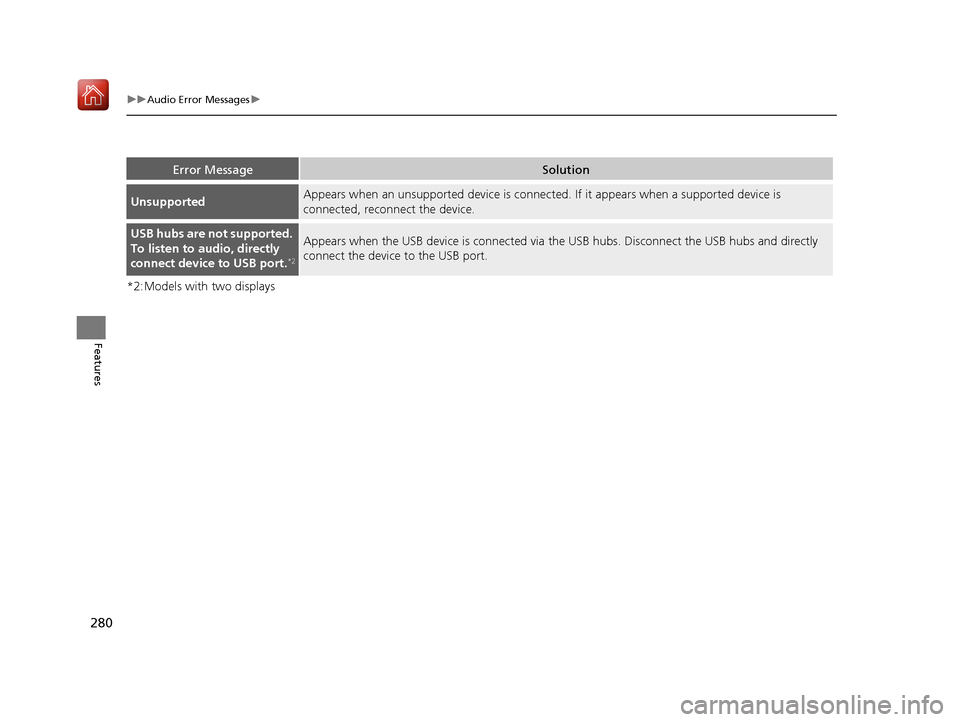
Error MessageSolution
UnsupportedAppears when an unsupported device is connect ed. If it appears when a supported device is
connected, reconnect the device.
USB hubs are not supported.
To listen to audio, directly
connect device to USB port.
*2
Appears when the USB device is connected via the USB hubs. Disconnect the USB hubs and directly
connect the device to the USB port.
20 ACURA ILX-31TX66710.book 280 ページ 2020年4月16日 木曜日 午後8時46分
Page 283 of 621
282
uuAudio Error Messages uPandora®
Features
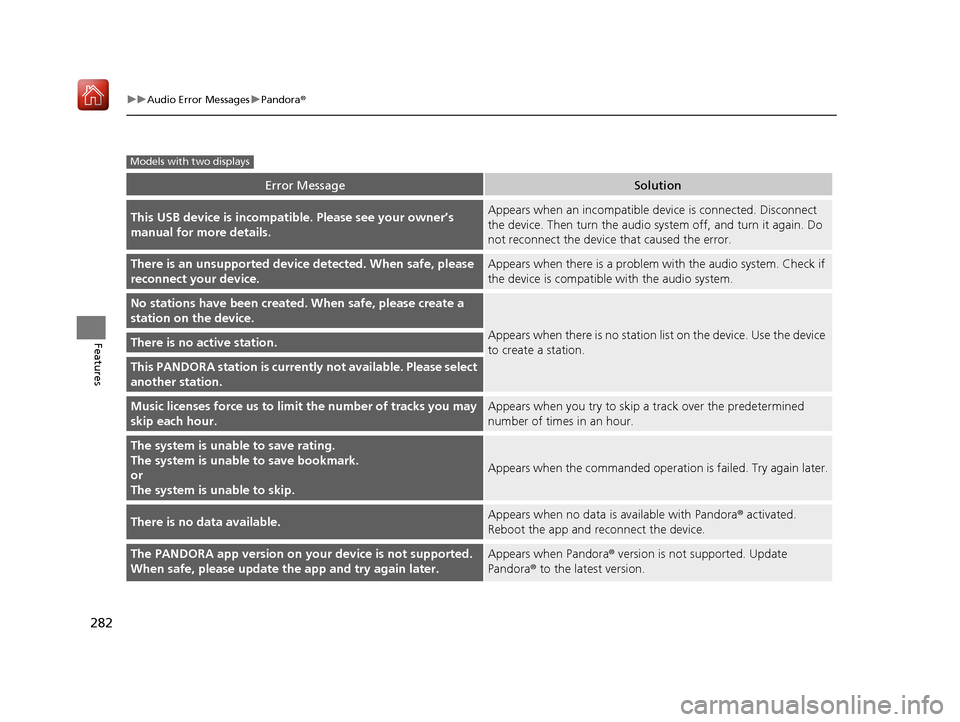
Error MessageSolution
This USB device is incompatib le. Please see your owner’s
manual for more details.Appears when an incompatible device is connected. Disconnect
the device. Then turn the audio system off, and turn it again. Do
not reconnect the device that caused the error.
There is an unsupported device detected. When safe, please
reconnect your device.Appears when there is a problem with the audio system. Check if
the device is compatible with the audio system.
No stations have been created. When safe, please create a
station on the device.
Appears when there is no station list on the device. Use the device
to create a station.There is no active station.
This PANDORA station is currently not available. Please select
another station.
Music licenses force us to limi t the number of tracks you may
skip each hour.Appears when you try to skip a track over the predetermined
number of times in an hour.
The system is unable to save rating.
The system is unable to save bookmark.
or
The system is unable to skip.
Appears when the commanded operation is failed. Try again later.
There is no data available.Appears when no data is available with Pandora® activated.
Reboot the app and reconnect the device.
The PANDORA app version on your device is not supported.
When safe, please update the app and try again later.Appears when Pandora ® version is not supported. Update
Pandora® to the latest version.
Models with two displays
20 ACURA ILX-31TX66710.book 282 ページ 2020年4月16日 木曜日 午後8時46分
Page 290 of 621
289
uuGeneral Information on the Audio System uCompatible iPod, iPhone, and USB Flash Drives
Features
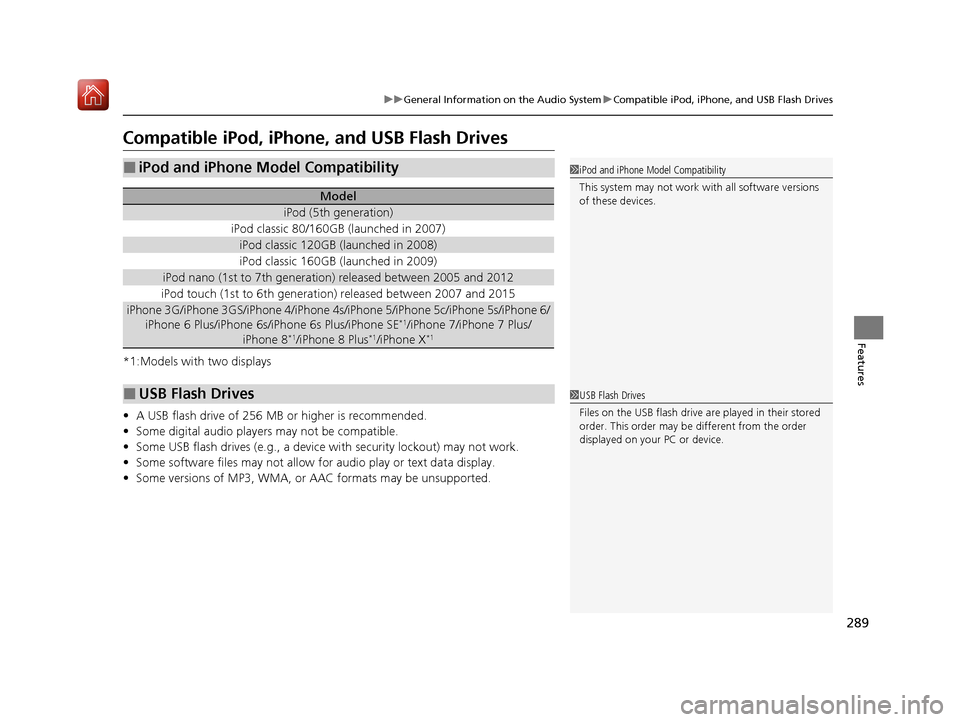
Compatible iPod, iPhone , and USB Flash Drives
*1:Models with two displays
•A USB flash drive of 256 MB or higher is recommended.
• Some digital audio players may not be compatible.
• Some USB flash drives (e.g., a device with security lockout) may not work.
• Some software files may not allow for audio play or text data display.
• Some versions of MP3, WMA, or AAC formats may be unsupported.
■iPod and iPhone Model Compatibility
Model
iPod (5th generation)
iPod classic 80/160GB (launched in 2007)
iPod classic 120GB (launched in 2008)
iPod classic 160GB (launched in 2009)
iPod nano (1st to 7th generation) released between 2005 and 2012
iPod touch (1st to 6th generation) released between 2007 and 2015
iPhone 3G/iPhone 3GS/iPhone 4/iPhone 4s/iPhone 5/iPhone 5c/iPhone 5s/iPhone 6/
iPhone 6 Plus/iPhone 6s/iPhone 6s Plus/iPhone SE*1/iPhone 7/iPhone 7 Plus/
iPhone 8*1/iPhone 8 Plus*1/iPhone X*1
■USB Flash Drives
1 iPod and iPhone Model Compatibility
This system may not work with all software versions
of these devices.
1USB Flash Drives
Files on the USB flash drive are played in their stored
order. This order may be different from the order
displayed on your PC or device.
20 ACURA ILX-31TX66710.book 289 ページ 2020年4月16日 木曜日 午後8時46分
Page 334 of 621
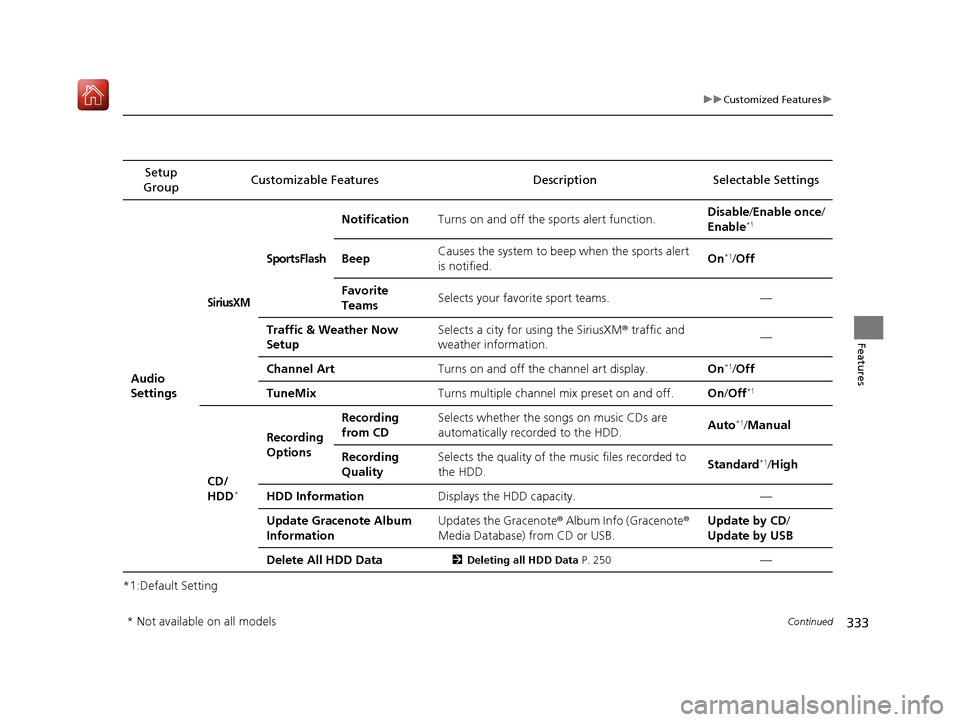
333
uuCustomized Features u
Continued
Features
*1:Default SettingSetup
Group Customizable Features
DescriptionSelectable Settings
Audio
Settings
SiriusXM
SportsFlash
NotificationTurns on and off the sports alert function.Disable/Enable once /
Enable*1
BeepCauses the system to beep when the sports alert
is notified.On*1/ Off
Favorite
TeamsSelects your favorite sport teams.—
Traffic & Weather Now
SetupSelects a city for using the SiriusXM ® traffic and
weather information.—
Channel ArtTurns on and off the channel art display.On*1/ Off
TuneMixTurns multiple channel mix preset on and off.On /Off*1
CD/
HDD*
Recording
Options
Recording
from CDSelects whether the songs on music CDs are
automatically recorded to the HDD.Auto*1/Manual
Recording
QualitySelects the quality of the music files recorded to
the HDD.Standard*1/High
HDD InformationDisplays the HDD capacity.—
Update Gracenote Album
InformationUpdates the Gracenote ® Album Info (Gracenote®
Media Database) from CD or USB.Update by CD /
Update by USB
Delete All HDD Data2 Deleting all HDD Data P. 250—
* Not available on all models
20 ACURA ILX-31TX66710.book 333 ページ 2020年4月16日 木曜日 午後8時46分