fuel Acura ILX 2020 User Guide
[x] Cancel search | Manufacturer: ACURA, Model Year: 2020, Model line: ILX, Model: Acura ILX 2020Pages: 621, PDF Size: 34.94 MB
Page 94 of 621
Continued93
uuGauges and Multi-Information Display uMulti-Information Display
Instrument Panel
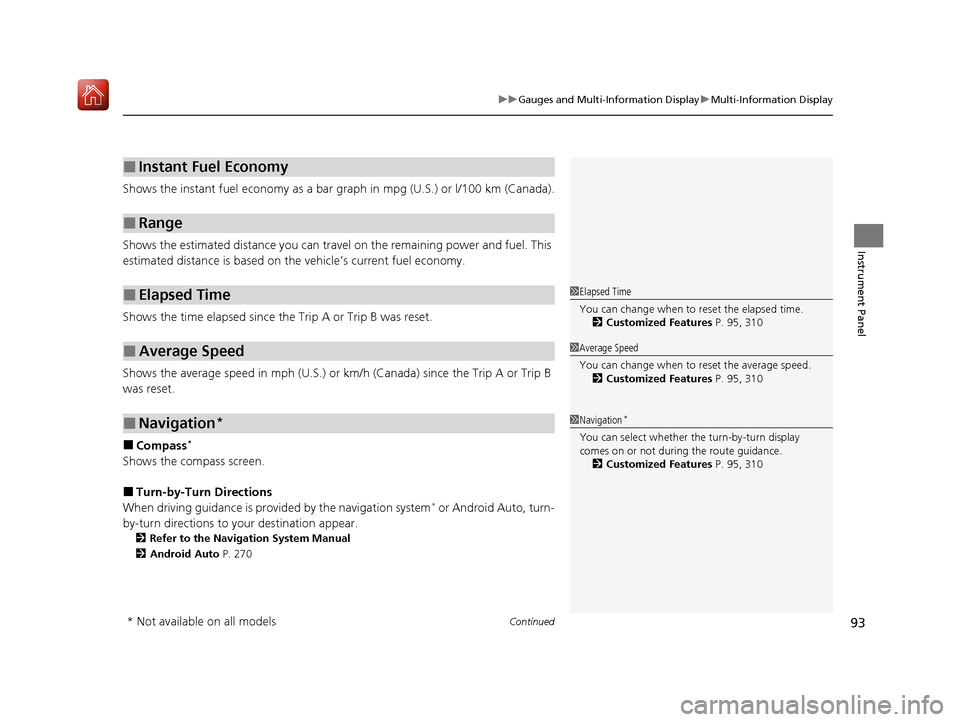
Shows the instant fuel economy as a bar gr aph in mpg (U.S.) or l/100 km (Canada).
Shows the estimated distance you can travel on the remaining power and fuel. This
estimated distance is based on the vehicle’s current fuel economy.
Shows the time elapsed since the Trip A or Trip B was reset.
Shows the average speed in mph (U.S.) or km /h (Canada) since the Trip A or Trip B
was reset.
■Compass*
Shows the compass screen.
■Turn-by-Turn Directions
When driving guidance is provided by the navigation system* or Android Auto, turn-
by-turn directions to your destination appear.
2 Refer to the Navigation System Manual
2 Android Auto P. 270
■Instant Fuel Economy
■Range
■Elapsed Time
■Average Speed
■Navigation*
1Elapsed Time
You can change when to reset the elapsed time.
2 Customized Features P. 95, 310
1Average Speed
You can change when to reset the average speed.
2 Customized Features P. 95, 310
1Navigation*
You can select whether the turn-by-turn display
comes on or not during the route guidance.
2 Customized Features P. 95, 310
* Not available on all models
20 ACURA ILX-31TX66710.book 93 ページ 2020年4月16日 木曜日 午後8時46分
Page 100 of 621
99
uuGauges and Multi-Information Display uMulti-Information Display
Continued
Instrument Panel
*1:Default SettingSetup Group Customizable Features
Description Selectable Settings
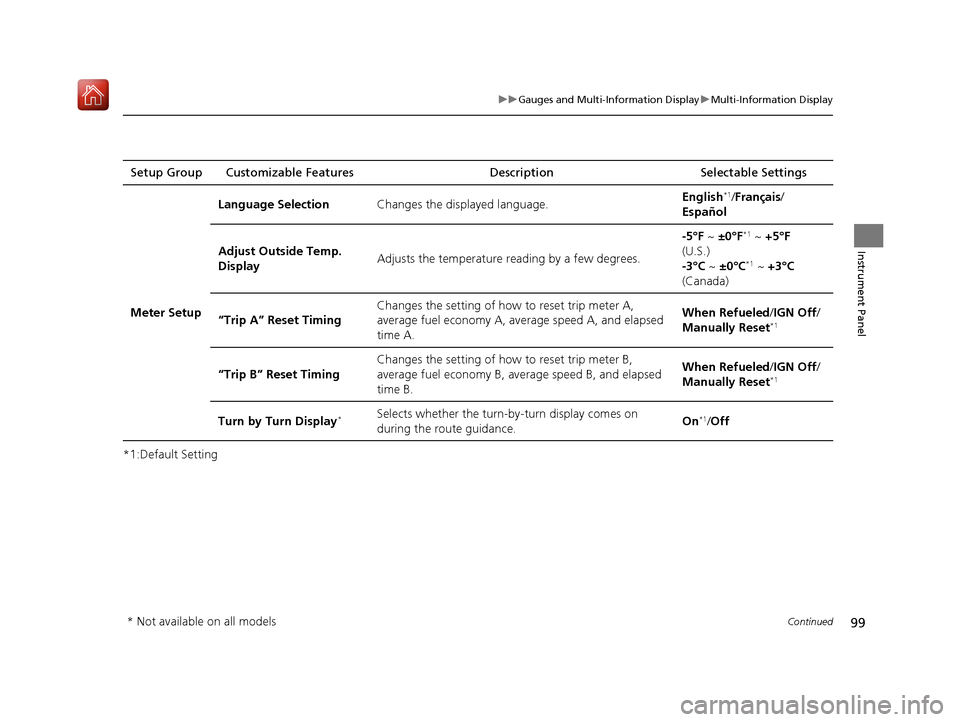
Meter Setup Language Selection
Changes the displayed language. English
*1/
Français /
Español
Adjust Outside Temp.
Display Adjusts the temperature r
eading by a few degrees. -5°F ~
±0°F
*1 ~ +5°F
(U.S.)
-3°C ~ ±0°C
*1 ~ +3°C
(Canada)
“Trip A” Reset Timing Changes the setting of how to reset trip meter A,
average fuel economy A, av
erage speed A, and elapsed
time A. When Refueled
/IGN Off /
Manually Reset
*1
“Trip B” Reset Timing Changes the setting of ho
w to reset trip meter B,
average fuel economy B, av erage speed B, and elapsed
time B. When Refueled
/IGN Off /
Manually Reset*1
Turn by Turn Display*Selects whether the turn-b y-turn display comes on
during the route guidance. On*1/
Off
* Not available on all models
20 ACURA ILX-31TX66710.book 99 ページ 2020年4月16日 木曜日 午後8時46分
Page 103 of 621

102
uuGauges and Multi-Information Display uMulti-Information Display
Instrument Panel
■Example of customization settings
The steps for changing the “Trip A” Reset Timing setting to When Refueled are
shown below. The default setting for “Trip A” Reset Timing is Manually Reset .
1. Press and release the button to
select Vehicle Settings , then press the
SEL/RESET button.
2. Press and release the button until
Meter Setup appears on the display.
3. Press the SEL/RESET button.
u Language Selection appears first on
the display.
20 ACURA ILX-31TX66710.book 102 ページ 2020年4月16日 木曜日 午後8時46分
Page 104 of 621
103
uuGauges and Multi-Information Display uMulti-Information Display
Instrument Panel
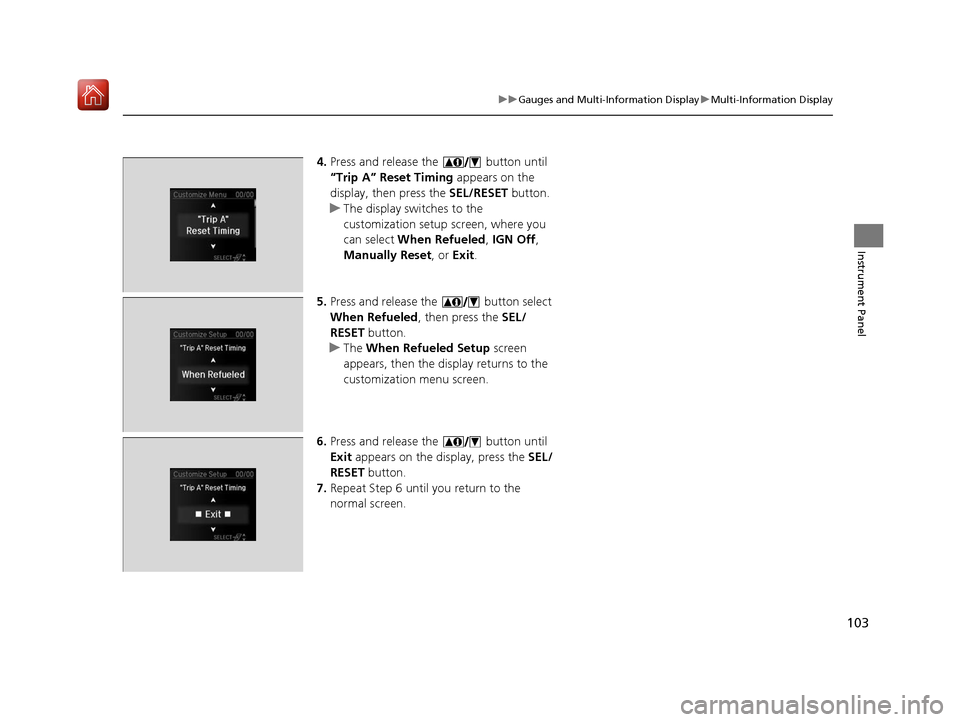
4. Press and release the button until
“Trip A” Reset Timing appears on the
display, then press the SEL/RESET button.
u The display swit ches to the
customization setup screen, where you
can select When Refueled , IGN Off,
Manually Reset , or Exit .
5. Press and release the button select
When Refueled , then press the SEL/
RESET button.
u The When Refueled Setup screen
appears, then the di splay returns to the
customization menu screen.
6. Press and release the button until
Exit appears on the display, press the SEL/
RESET button.
7. Repeat Step 6 until you return to the
normal screen.
20 ACURA ILX-31TX66710.book 103 ページ 2020年4月16日 木曜日 午後8時46分
Page 213 of 621
212
uuAudio System Basic Operation uInformation Screen
Features
■Navigation*
Shows the navigation screen.
2 Refer to the Navigation System Manual
■Phone
Shows the HFL information.
2 Bluetooth ® HandsFreeLink ® P. 368
■Info
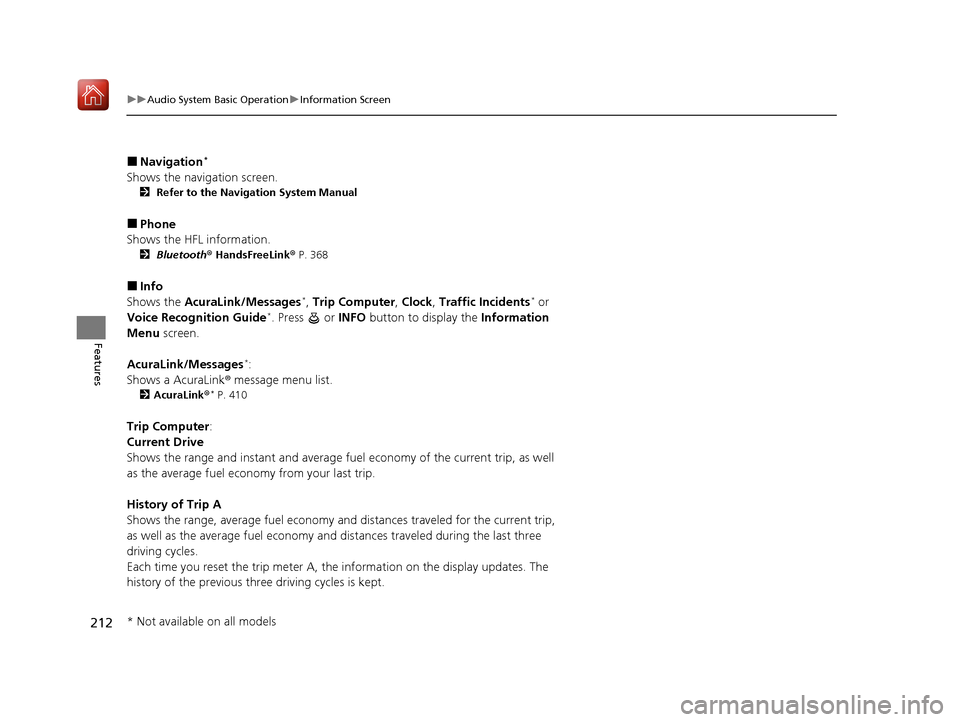
Shows the AcuraLink/Messages*, Trip Computer , Clock, Traffic Incidents* or
Voice Recognition Guide*. Press or INFO button to display the Information
Menu screen.
AcuraLink/Messages
*:
Shows a AcuraLink ® message menu list.
2AcuraLink®* P. 410
Trip Computer :
Current Drive
Shows the range and instant and average fuel economy of the current trip, as well
as the average fuel economy from your last trip.
History of Trip A
Shows the range, average fuel economy an d distances traveled for the current trip,
as well as the average fuel economy and distances traveled during the last three
driving cycles.
Each time you reset the trip meter A, the information on the display updates. The
history of the previous th ree driving cycles is kept.
* Not available on all models
20 ACURA ILX-31TX66710.book 212 ページ 2020年4月16日 木曜日 午後8時46分
Page 297 of 621
296
uuGeneral Information on the Audio System uHonda App License Agreement
Features
E. Information Collection and Storage
1. Information Collection , Use, Transmission and Storage of Data. Consent to Use of Data:
You agree that HONDA and PROVIDERS may
collect and use your information gathered in any manner as part of product support services related to the SOFTWARE or related services.
HONDA may share such information with third parties, including, without limitation, PROV IDERS, third party software and service s
suppliers, their affiliates and/or their design ated agents, solely to improve their products or to provide services or technologies to you.
HONDA, third party software and systems supp liers, their affiliates and/or their designated agent may disclose this information to others,
but not in a form that pe rsonally identifies you.
2. Information Storage.
Depending on the type of multimedia system you have in your VEHICLE, certain information may be stored for ease
of use of the SOFTWARE including, without limitation, search hi story, location history in certain applications, previous and saved
destinations, map locations within certain applications, and device numbers and contact information.
(a) Vehicle Health Information.
Your VEHICLE may remotely trans mit information regarding the status and health of your VEHICLE
(“VEHICLE INFORMATION”) to HONDA without notification to you. VEHICLE INFORMATION may contain VEHICLE maintenance and
malfunction status that is derived from VEHICLE diagnostic data and includes, but is not limited to, status of powered doors and windows,
battery life data, battery charging data, VEHICLE speed, coolant temperat ure, air compressor revolution, output power, warning codes,
diagnostic trouble codes, fuel injection volu me, and engine rotations per minute. VEHICL E HEALTH INFORMATION may be used by HON DA
for research and development, to deliver HO NDA SERVICES and information to you, and to contact you, and is retained only for a period
of time necessary to fulfill these goals.
(b) VEHICLE Geolocation Data (non-navigation/map based).
If you opt-in to geolocation-based SERVICES, your vehicle’s geolocation data
(latitude and longitude) will be automatically sent from your VEHICLE to HONDA and PROVIDERS.
(c) You understand that the inputting or uploading of information to your VEHICLE’s multimedia system or the SOFTWARE or SERVICES is
at your own risk and that HONDA is not resp onsible for unauthorized access to or use of any personal or other information. All information
uploaded to the SOFTWARE and SERVICES may be stored on your VEHI CLES’s multimedia system and you understand that the security and
safety of your VEHICLE’s multimedia system is your sole responsibility.
20 ACURA ILX-31TX66710.book 296 ページ 2020年4月16日 木曜日 午後8時46分
Page 321 of 621
320
uuCustomized Features u
Features
*1:Default SettingSetup
Group Customizable Features Desc
ription Selectable Settings
Vehicle
SettingsMeter
Language SelectionChanges the displayed language on the multi-
information display.English*1/Français /
Español
Adjust Outside Temp.
DisplayAdjusts the temperature reading by a few
degrees.
-5°F ~ ±0°F*1 ~ +5°F
(U.S.)
-3°C ~ ±0°C
*1 ~ +3°C
(Canada)
“Trip A” Reset Timing
Changes the setting of how to reset trip meter A,
average fuel economy A, average speed A, and
elapsed time A.When Refueled /IGN
Off /Manually Reset*1
“Trip B” Reset Timing
Changes the setting of how to reset trip meter B,
average fuel economy B, average speed B, and
elapsed time B.When Refueled /IGN
Off /Manually Reset*1
Turn by Turn Display*Selects whether the turn-by-turn display comes
on during the route guidance.On*1/Off
* Not available on all models
20 ACURA ILX-31TX66710.book 320 ページ 2020年4月16日 木曜日 午後8時46分
Page 420 of 621
419
Driving
This chapter discusses driving and refueling.
Before Driving................................... 420
Maximum Load Limit........................ 423
Towing a Trailer ................................ 425
When Driving Starting the Engine .......................... 426
Dual Clutch Transmission ................. 432
Shifting ............................................ 433
Vehicle Stability AssistTM (VSA ®), aka Electronic
Stability Control (ESC), System ............... 437
Blind spot information System*........... 439
Tire Pressure Monitoring System (TPMS) .. 442
Tire Pressure Monitoring System (TPMS) - Required Federal Explanation ......... 444
AcuraWatch
TM................................... 446
Collision Mitigati on Braking SystemTM
(CMBSTM) ....................................... 449
Adaptive Cruise Control (ACC)......... 459
Lane Keeping Assist System (LKAS).... 474
Road Departure Mitigation (RDM) System . 484
Front Sensor Camera ....................... 489
Radar Sensor.................................... 491
Braking Brake System ................................... 492 Anti-lock Brake System (ABS) ........... 494
Parking Your Vehicle When Stopped ................................ 496
Cross Traffic Monitor
*..................... 498
Multi-View Rear Camera .................. 501
Refueling Fuel Information .............................. 503
How to Refuel ................................. 504
Fuel Economy and CO
2 Emissions .... 505
Improving Fuel Economy and Reducing CO
2 Emissions ................................ 505
* Not available on all models
20 ACURA ILX-31TX66710.book 419 ページ 2020年4月16日 木曜日 午後8時46分
Page 428 of 621

Continued427
uuWhen Driving uStarting the Engine
Driving
3. Press the ENGINE START/STOP button
without depressing the accelerator pedal.
You can turn the engine off when the vehicle is completely stopped.
1. Put the transmission into
(P.
2. Press the ENGINE START/STOP button.
■Stopping the Engine
1Starting the Engine
Bring the keyless access remote close to the ENGINE
START/STOP button if the batte ry in the keyless
access remote is weak. 2 If the Keyless Access Remote Battery is
Weak P. 580
The engine may not start if the keyless access remote
is subjected to strong radio waves.
Do not hold the ENGINE START/STOP button to
start the engine.
If the engine does not start, wait at least 30 seconds
before starting the engine again.
The immobilizer system pr otects your vehicle from
theft.
If an improperly c oded device is used, the engine’s
fuel system is disabled. 2 Immobilizer System P. 128
20 ACURA ILX-31TX66710.book 427 ページ 2020年4月16日 木曜日 午後8時46分
Page 435 of 621
uuWhen Driving uShifting
434
Driving
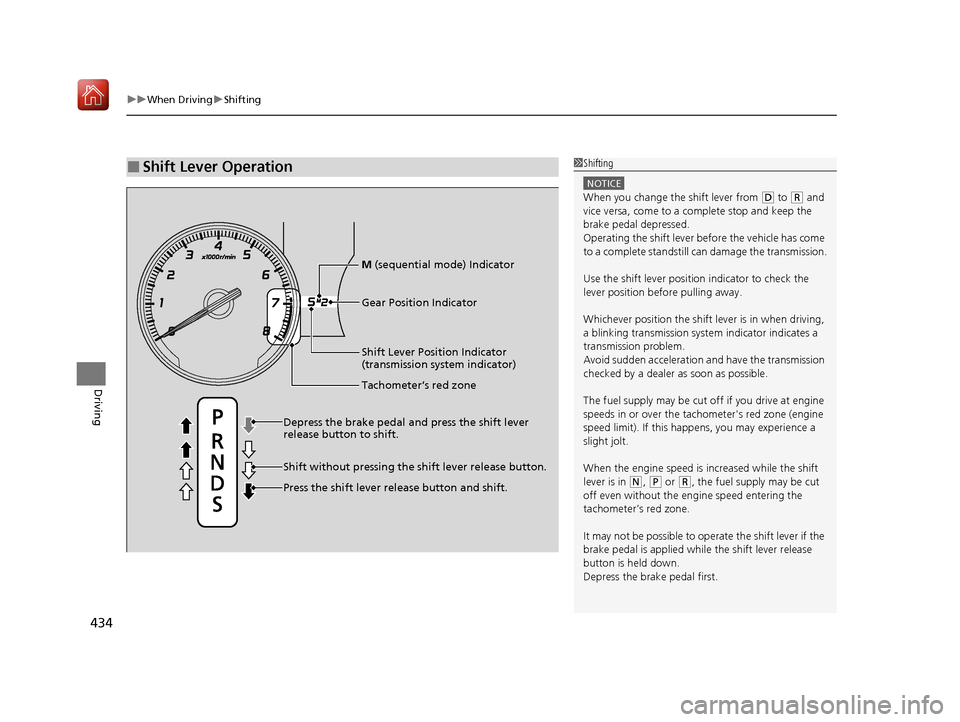
■Shift Lever Operation1Shifting
NOTICE
When you change the shift lever from (D to (R and
vice versa, come to a complete stop and keep the
brake pedal depressed.
Operating the shift lever be fore the vehicle has come
to a complete standstill can damage the transmission.
Use the shift lever positi on indicator to check the
lever position befo re pulling away.
Whichever position the shift lever is in when driving,
a blinking transmission syst em indicator indicates a
transmission problem.
Avoid sudden acceleration and have the transmission
checked by a dealer as soon as possible.
The fuel supply may be cut of f if you drive at engine
speeds in or over the tachometer's red zone (engine
speed limit). If this happe ns, you may experience a
slight jolt.
When the engine speed is increased while the shift
lever is in
( N, (P or (R, the fuel supply may be cut
off even without the engine speed entering the
tachometer’s red zone.
It may not be possible to operate the shift lever if the
brake pedal is applied while the shift lever release
button is held down.
Depress the brake pedal first.
Shift Lever Position Indicator
(transmission system indicator)
Depress the brake pedal and press the shift lever
release button to shift.
Shift without pressing the shift lever release button.
Press the shift lever re lease button and shift.
Tachometer’s red zone
Gear Position Indicator
M (sequential mode) Indicator
20 ACURA ILX-31TX66710.book 434 ページ 2020年4月16日 木曜日 午後8時46分