audio ACURA ILX 2022 Owners Manual
[x] Cancel search | Manufacturer: ACURA, Model Year: 2022, Model line: ILX, Model: ACURA ILX 2022Pages: 632, PDF Size: 20.56 MB
Page 310 of 632

308
uuGeneral Information on the Audio System uAbout Open Source Licenses
Features
About Open Source Licenses
About the software license of the product
The software installed in the product contains open source software.
See the following website for details on the open source software.
http://hondaopensource6.com/oss/ww/index.html
■Important Information on the Software
Models with two displays
22 ACURA ILX-31TX66900.book 308 ページ 2021年4月26日 月曜日 午前11時27分
Page 311 of 632
309
uuGeneral Information on the Audio System uLicense information*
Features
License information*
For DTS patents, see http://patents.dts.com . Manufactured under license from DTS
Licensing Limited. DTS, the Symbol, & DTS and the Symbol together are registered
trademarks, and DTS Digital Surround and Neural Surround are trademarks of DTS,
Inc. © DTS, Inc. All Rights Reserved.
■DTS
* Not available on all models
22 ACURA ILX-31TX66900.book 309 ページ 2021年4月26日 月曜日 午前11時27分
Page 312 of 632

310
Features
Customized Features
Use the audio/information screen to customize certain features.
■How to customize
While the vehicle is at a complete stop with the power mode is ON, press the SETUP
button, rotate to select a setting item, and press .
1 Customized Features
When you customize settings:
•Make sure that the vehicle is at a complete stop.
•Shift to (P.
Models with one display
1 How to customize
To customize other featur es, rotate , and press
.
2 List of customizable options P. 313
Audio/Information Screen
SETUP Button
22 ACURA ILX-31TX66900.book 310 ページ 2021年4月26日 月曜日 午前11時27分
Page 315 of 632
313
uuCustomized Features u
Continued
Features
■List of customizable options
*1:Default Setting
*2:Appears only when you select the FM mode. Setup
Group Customizable Features
Description Selectable Settings
Sound
Settings
BAS
Adjusts the settings of the audio speaker’s
sound.
2Adjusting the Sound P. 192
—
TRE
FAD
BAL
SVC
RDS Information
*2Turns on and off the RDS information. On*1/Off
Adjust ClockAdjust Clock.
2Adjusting the Clock P. 110—
22 ACURA ILX-31TX66900.book 313 ページ 2021年4月26日 月曜日 午前11時27分
Page 316 of 632
314
uuCustomized Features u
Features
*1:Default SettingSetup
Group Customizable Features Desc
ription Selectable Settings
Display
Setup Brightness
Changes the brightness of the audio/information
screen. —
Wallpaper Select
Changes the wallpaper type. Clock
*1/
Image 1 /
Image 2 /Image 3
Import Imports an image file for a new wallpaper.
2
Wallpaper Setup P. 190—
Delete Deletes an image file for a wallpaper. Image 1
/Image 2 /
Image 3
Color Theme Changes the background color of the audio/
information screen. Blue
*1/
Red /Gray
Language SelectionChange the display language.English*1/ Français /
Español
22 ACURA ILX-31TX66900.book 314 ページ 2021年4月26日 月曜日 午前11時27分
Page 318 of 632

316
Features
Customized Features
Use the information screen and On Demand Multi-Use DisplayTM to customize
certain features.
■How to customize
Select your desired setting item by pressing the SETTINGS button, then rotating
while the power mode is ON and the ve hicle is at a complete stop. Press .
1Customized Features
When you customize settings:
•Make sure that the vehicle is at a complete stop.•Shift to (P.
To customize other featur es, rotate , move , ,
or , and press .
2 List of customizable options P. 322
Information Screen
1How to customize
The following settings can be customized on the On
Demand Multi-Use Display
TM.
•Edit Source Order
•Sound Settings•Edit/Delete HDD Music*
•Audio Settings
•Screen Settings 2How to customize P. 335
Models with two displays
Information Screen
Information Screen
SETTINGS Button
* Not available on all models
22 ACURA ILX-31TX66900.book 316 ページ 2021年4月26日 月曜日 午前11時27分
Page 332 of 632

330
uuCustomized Features u
Features
*1:Default SettingSetup
Group Customizable Features Desc
ription Selectable Settings
Clock
Settings Default
Cancels/Resets all cust
omized items in the Clock
Settings group as default. Yes
/No
Clock/
Wallpaper
Type Clock
Changes the clock display type. Analog
/Digital
*1/
Small Digital /Off
Wallpaper
●Changes the wallpaper type.●Imports an image file for a new wallpaper.●Deletes an image file for a wallpaper.
2 Wallpaper Setup P. 218
Blank/Galaxy*1/
Metallic /Options...
Clock Adjustment Adjusts Clock.
2
Wallpaper Setup P. 218—
Clock Format Selects the digital clock display from 12H to 24H. 12H
*1/24H
Auto Time Zone
*Sets the audio system to automatically adjust the
clock when driving through different time zones. On*1/
Off
Auto Daylight
*Sets the audio system to automatically adjust the
clock (“spring ahead” or “fall back” by one hour)
when a daylight saving time change occurs. On*1/
Off
Clock Reset Resets the clock settings to the factory default. Yes/No
* Not available on all models
22 ACURA ILX-31TX66900.book 330 ページ 2021年4月26日 月曜日 午前11時27分
Page 334 of 632

332
uuCustomized Features u
Features
*1:Default SettingSetup
Group Customizable Features Desc
ription Selectable Settings
System
Settings Default
Cancels/Resets all customized items in the
System Settings group as default. Yes
/No
Display Sync Display Brightness
Selects whether the display brightness
synchronizes with the instrument panel
brightness. On
*1/
Off
Brightness Changes the brightness of the information
screen. —
Contrast Changes the contrast of the information screen. —
Black Level Changes the black leve
l of the information
screen. —
Feedback
*Guidance Volume Changes the volume of the audio speakers. 0~8*1~11
Verbal Reminder Turns the verbal reminders on and off. On
*1/Off
* Not available on all models
22 ACURA ILX-31TX66900.book 332 ページ 2021年4月26日 月曜日 午前11時27分
Page 337 of 632
335
uuCustomized Features u
Continued
Features
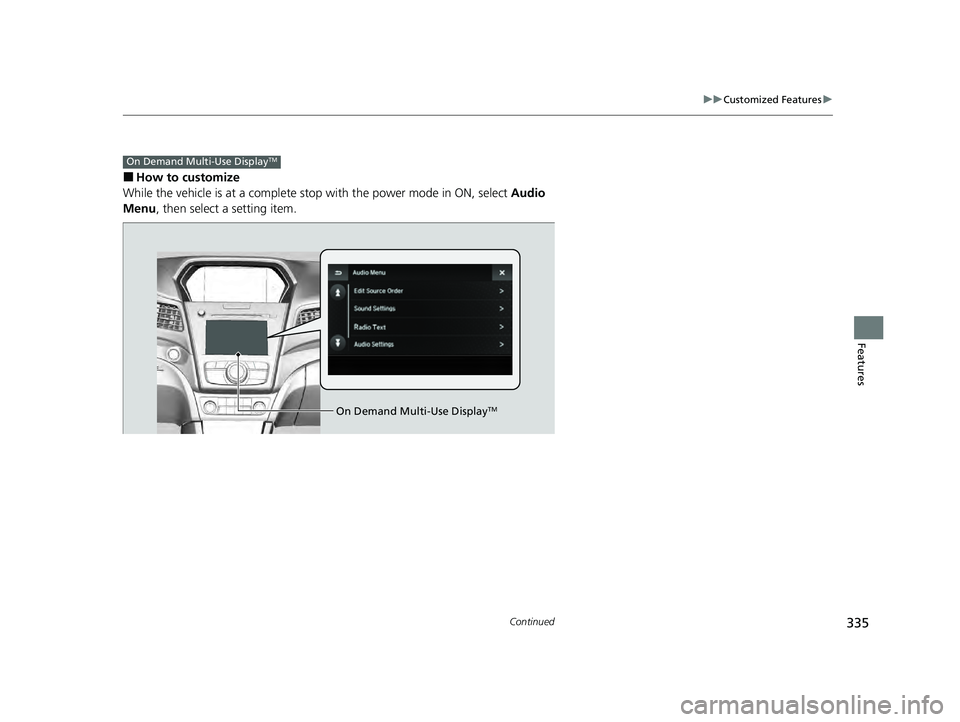
■How to customize
While the vehicle is at a complete stop with the power mode in ON, select Audio
Menu , then select a setting item.
On Demand Multi-Use DisplayTM
On Demand Multi-Use DisplayTM
22 ACURA ILX-31TX66900.book 335 ページ 2021年4月26日 月曜日 午前11時27分
Page 338 of 632

336
uuCustomized Features u
Features
■Customization flow
Select Audio Menu .
On Demand Multi-Use DisplayTM
Play the Song from the Beginning
SportsFlash
Traffic & Weather Now Setup
Channel Art
TuneMix
SiriusXM
Bass
Treble
Fader
Balance
Subwoofer
SVC
Edit Source Order
Sound Settings
Audio Settings
CD/HDD*
Recording Quality
Recording from CDRecording
Options
HDD Information
Update Gracenote Album Information
Delete All HDD Data
DTS Neural Surround*
Edit/Delete HDD
Music*
Center*
* Not available on all models
22 ACURA ILX-31TX66900.book 336 ページ 2021年4月26日 月曜日 午前11時27分