ad blue ACURA ILX 2022 User Guide
[x] Cancel search | Manufacturer: ACURA, Model Year: 2022, Model line: ILX, Model: ACURA ILX 2022Pages: 632, PDF Size: 20.56 MB
Page 264 of 632

262
uuAudio System Basic Operation uPlaying Pandora ®*1
Features
Playing Pandora ®*1
Your audio system allows you to listen to music from the Pandora ® app on a
compatible smartphone.
This function is available when the phone is paired and connected to the vehicle’s
Bluetooth ® HandsFreeLink ® (HFL) system, or with an iPhone, you can connect using
your USB cable to the USB port.
2 Phone Setup P. 382
2 USB Port* P. 182
*1:Available only on U.S. models.
1Playing Pandora ®*1
Pandora®, the Pandora logo, and the Pandora trade
dress are trademarks or registered trademarks of
Pandora Media, Inc., used with permission. Pandora
is currently available exclusively in the United States.
To find out if your phone is compatible with this
feature, visit www.handsfreelink.com/Acura , or call
1-888-528-7876.
VOL/ (Volume/Power) Knob
Press to turn the audio system on
and off.
Turn to adjust the volume.
Audio Menu
Select to display the menu items.
Source
Select to change an audio source.
(Information) Icon
Select to display the current track
details.
Select to display the previous
screen.
Stations
Select to display the station list
screen.
On Demand Multi-Use DisplayTMLike/Dislike Icons
Select to evaluate a track.
Skip Icon
Select to skip a track.
Play/Pause Icon
Select to pause or play a track.Station Up/Down Icons
Select to change a station.
Bookmark Track Icon
Bookmarks the current track.
Bookmark Artist Icon
Bookmarks the current artist.
* Not available on all models
22 ACURA ILX-31TX66900.book 262 ページ 2021年4月26日 月曜日 午前11時27分
Page 265 of 632
263
uuAudio System Basic Operation uPlaying Pandora ®*1
Features
1.Select Stations .
2. Select an item to select a track.
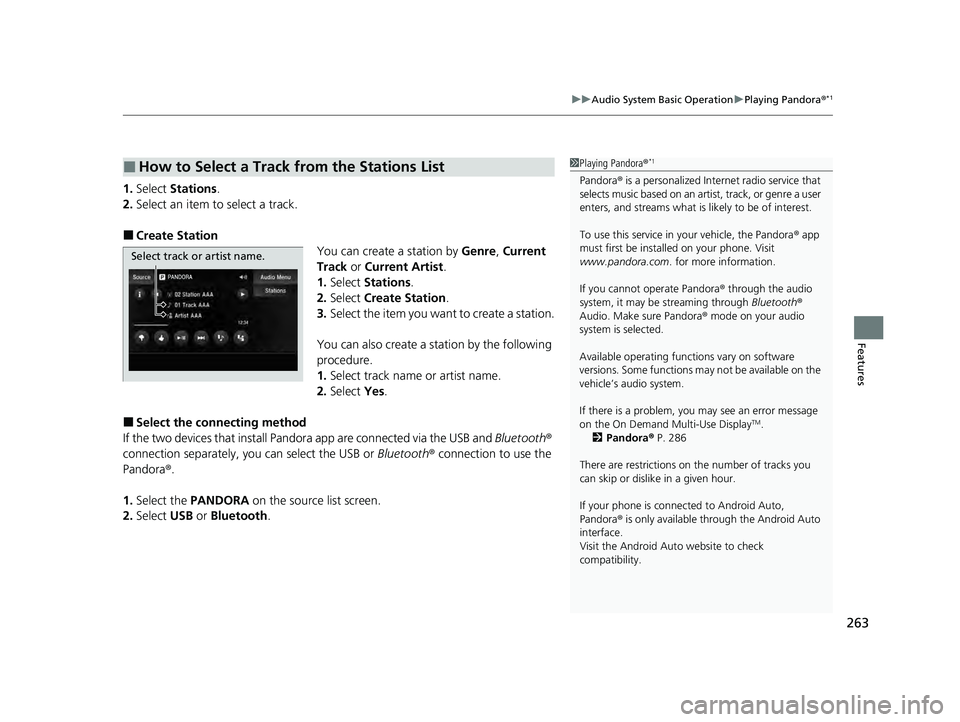
■Create Station
You can create a station by Genre, Current
Track or Current Artist .
1. Select Stations .
2. Select Create Station.
3. Select the item you want to create a station.
You can also create a station by the following
procedure.
1. Select track name or artist name.
2. Select Yes.
■Select the conn ecting method
If the two devices that install Pandora app are connected via the USB and Bluetooth®
connection separately, you can select the USB or Bluetooth® connection to use the
Pandora ®.
1. Select the PANDORA on the source list screen.
2. Select USB or Bluetooth .
■How to Select a Track from the Stations List1Playing Pandora ®*1
Pandora® is a personalized Intern et radio service that
selects music based on an artist, track, or genre a user
enters, and streams what is likely to be of interest.
To use this service in your vehicle, the Pandora ® app
must first be installed on your phone. Visit
www.pandora.com . for more information.
If you cannot operate Pandora ® through the audio
system, it may be streaming through Bluetooth®
Audio. Make sure Pandora ® mode on your audio
system is selected.
Available operating functi ons vary on software
versions. Some functions ma y not be available on the
vehicle’s audio system.
If there is a problem, you may see an error message
on the On Demand Multi-Use Display
TM.
2 Pandora ® P. 286
There are restrictions on the number of tracks you
can skip or dislike in a given hour.
If your phone is connec ted to Android Auto,
Pandora ® is only available through the Android Auto
interface.
Visit the Android Auto website to check
compatibility.
Select track or artist name.
22 ACURA ILX-31TX66900.book 263 ページ 2021年4月26日 月曜日 午前11時27分
Page 269 of 632
267
uuAudio System Basic Operation uPlaying Bluetooth ® Audio
Continued
Features
Playing Bluetooth ® Audio
Your audio system allows you to listen to music from your Bluetooth-compatible
phone.
This function is available when the phone is paired and connected to the vehicle’s
Bluetooth ® HandsFreeLink ® (HFL) system.
2Phone Setup P. 382
1Playing Bluetooth ® Audio
Not all Bluetooth -enabled phones with streaming
audio capabilities are compatible with the system.
For a list of compatible phones:
•U.S.: Visit www.handsfreeli nk.com/Acura, or call 1-
888-528-7876.
•Canada: For more info rmation on smartphone
compatibility, call 1-855-490-7351.
In some states, it may be il legal to perform some data
device functions while driving.
If more than one phone is paired to the HFL system,
there will be a delay before the system begins to play.
Some functions may not be available on some
devices.
If a phone is currently conne cted via Apple CarPlay or
Android Auto, Bluetooth® Audio from that phone is
unavailable. However, a se cond previously paired
phone can stream Bluetooth® Audio by selecting
Connect to Audio from the Edit Bluetooth
Device .
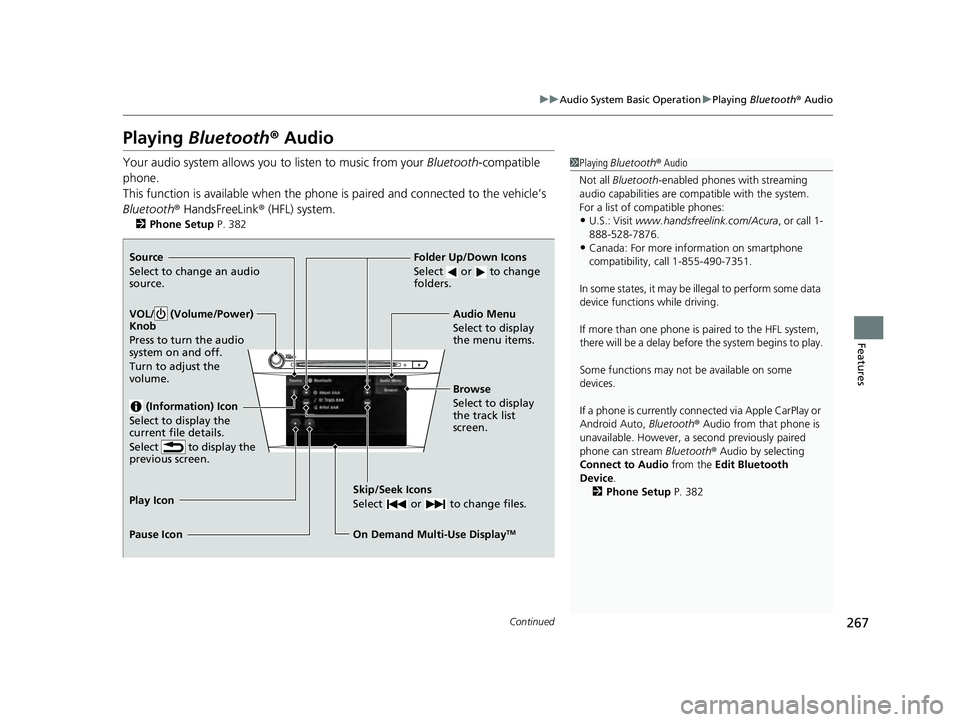
2 Phone Setup P. 382Source
Select to change an audio
source.
VOL/ (Volume/Power)
Knob
Press to turn the audio
system on and off.
Turn to adjust the
volume.
(Information) Icon
Select to display the
current file details.
Select to display the
previous screen.
Skip/Seek Icons
Select or to change files.
On Demand Multi-Use DisplayTM
Play Icon
Pause Icon Browse
Select to display
the track list
screen. Audio Menu
Select to display
the menu items.
Folder Up/Down Icons
Select or to change
folders.
22 ACURA ILX-31TX66900.book 267 ページ 2021年4月26日 月曜日 午前11時27分
Page 270 of 632

uuAudio System Basic Operation uPlaying Bluetooth ® Audio
268
Features
1. Make sure that your phone is paired and
connected to HFL.
2. Select the Bluetooth® Audio mode.
If the phone is not recognized, another HFL-
compatible phone, which is not compatible
for Bluetooth ® Audio, may already be
connected.
■To play or pause a file
Select the play icon or pause icon.
1.Select Browse .
2. Select a search category (e.g., Albums).
3. Select an item.
u The selection begins playing.
■To Play Bluetooth ® Audio Files1 To Play Bluetooth ® Audio Files
To play the audio files, y ou may need to operate your
phone. If so, follow the phone maker’s operating
instructions.
The pause function may no t be available on some
phones.
Switching to another mode pauses the music playing
from your phone. This functi on may not be available
on some phones.
Play Icon Pause Icon
■Searching for Music1 Searching for Music
Depending on the Bluetooth® device you connect,
some or all of the list s may not be displayed.
22 ACURA ILX-31TX66900.book 268 ページ 2021年4月26日 月曜日 午前11時27分
Page 271 of 632
269
uuAudio System Basic Operation uSiri Eyes Free
Features
Siri Eyes Free
You can talk to Siri using the Talk bu tton on the steering wheel when your
compatible iPhone is paired to Bluetooth® HandsFreeLink ®.
2Phone Setup P. 382
■Using Siri Eyes Free
1Siri Eyes Free
Siri is a trademark of Apple Inc.
Check Apple Inc. website for features available for
Siri.
We recommend against using Si ri other than in Siri
Eyes Free while operating a vehicle.
1 Using Siri Eyes Free
Some commands work only on specific phone
features or apps.
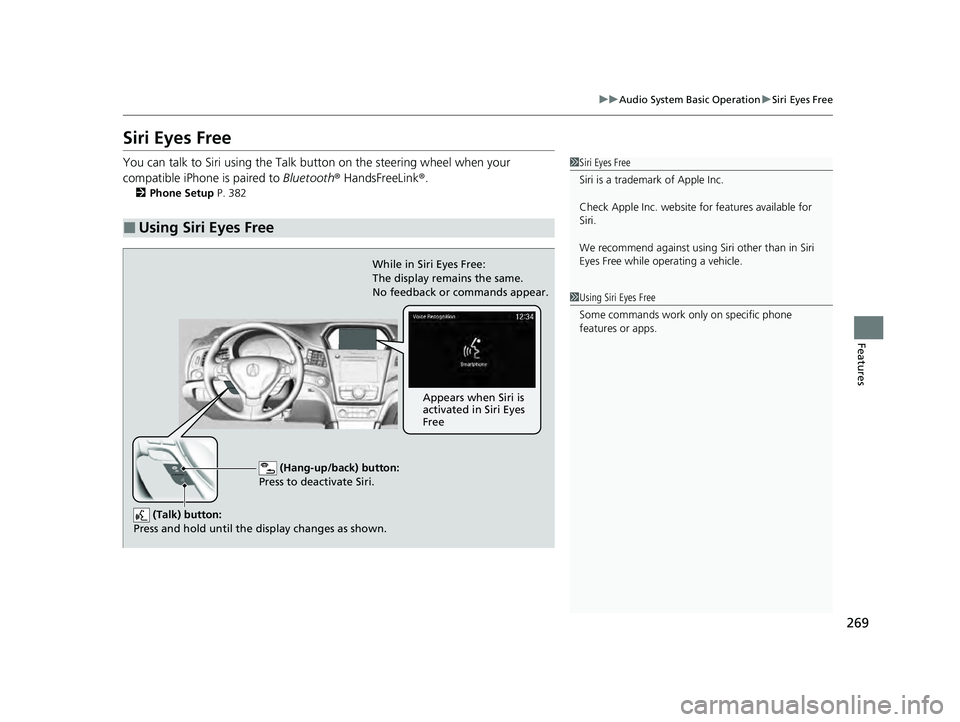
(Hang-up/back) button:
Press to deactivate Siri.
(Talk) buttonY
Press and hold until the display changes as shown.
While in Siri Eyes Free:
The display remains the same.
No feedback or commands appear.
Appears when Siri is
activated in Siri Eyes
Free
22 ACURA ILX-31TX66900.book 269 ページ 2021年4月26日 月曜日 午前11時27分
Page 272 of 632
270
uuAudio System Basic Operation uApple CarPlay
Features
Apple CarPlay
If you connect an Apple CarPlay-compatible iPhone to the system via the USB port,
you can use the information screen, instead of the iPhone display, to make a phone
call, listen to music, view maps (navigation), and access messages.
2USB Port* P. 182
1Apple CarPlay
Only iPhone 5 or newer versi ons with iOS 8.4 or later
are compatible with Apple CarPlay.
Park in a safe place before connecting your iPhone to
Apple CarPlay and when launching any compatible
apps.
To use Apple CarPlay, connect the USB cable to the
USB port. 2 USB Port
* P. 182
To directly access the Appl e CarPlay phone function,
press the PHONE button. While connected to Apple
CarPlay, calls are only made through Apple CarPlay. If
you want to make a call with Bluetooth®
HandsFreeLink ®, turn Apple CarPlay OFF or detach
the USB cable from your iPhone.
2 Setting Up Apple CarPlay P. 273
When your iPhone is connected to Apple CarPlay, it is
not possible to use the Bluetooth® Audio or
Bluetooth ® HandsFreeLink ®. However, other
previously paired phones can stream audio via
Bluetooth ® while Apple CarPlay is connected.
2 Phone Setup P. 382
For details on c ountries and regions where Apple
CarPlay is available, as well as information pertaining
to function, refer to the Apple homepage.
* Not available on all models
22 ACURA ILX-31TX66900.book 270 ページ 2021年4月26日 月曜日 午前11時27分
Page 277 of 632
275
uuAudio System Basic Operation uAndroid Auto
Continued
Features
Android Auto
When you connect an Android phone to the audio system via the USB port, Android
Auto is automatically initiated. When connected via Android Auto, you can use the
information screen to access the Phone, Google Maps (Navigation), and Google
Now functions. When you first use Andr oid Auto, a tutorial will appear on the
screen.
We recommend that you complete this tuto rial while safely parked before using
Android Auto.
2 USB Port* P. 182
2 Auto Pairing Connection P. 278
1Android Auto
We recommend that you upda te Android OS to the
latest version when using Android Auto.
Bluetooth A2DP cannot be used while your phone is
connected to Android Auto.
To use Android Auto on a smartphone with Android
9.0 (Pie) or earl ier, you need to download the
Android Auto app from Google Play to your
smartphone.
Park in a safe place befo re connecting your Android
phone to Android Auto and when launching any
compatible apps.
To use Android Auto, connect the USB cable to the
USB port. 2 USB Port
* P. 182
When your Android phone is connected to Android
Auto, it is not possible to use the Bluetooth® Audio.
However, other previously paired phones can stream
audio via Bluetooth ® while Android Auto is
connected.
2 Phone Setup P. 382
* Not available on all models
22 ACURA ILX-31TX66900.book 275 ページ 2021年4月26日 月曜日 午前11時27分
Page 292 of 632

290
uuAudio Error Messages uApple CarPlay/Android Auto
Features
Error MessageSolution
This device is not compatible with Android Auto.
Appears when your connected device is incompatible with
Android Auto.
Check if your device is compatible with Android Auto or the latest
version of the app is installed on your device.
Please update to the latest version of Android Auto.Appears when your version of the Android Auto is not supported.
Update Android Auto to the latest version.
Connection failed. Please confirm Bluetooth connection
status and try again.Appears when Bluetooth® connection is failed.
Check the Bluetooth® connection of this audio system and your
connected device.
22 ACURA ILX-31TX66900.book 290 ページ 2021年4月26日 月曜日 午前11時27分
Page 313 of 632
311
uuCustomized Features u
Continued
Features
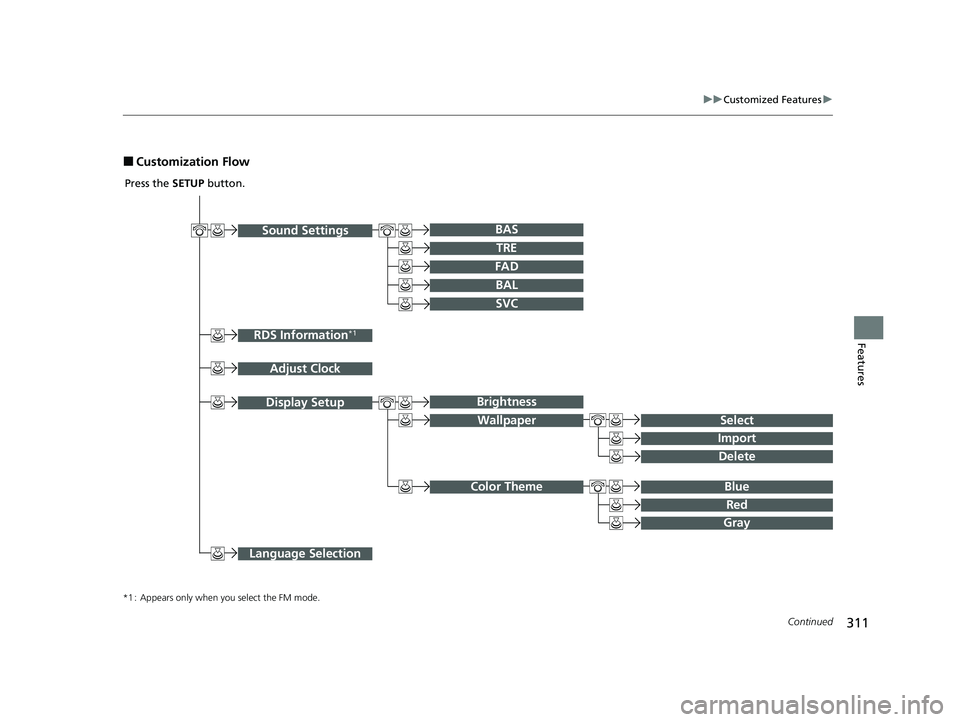
■Customization Flow
Sound SettingsBAr
RDS Information*1
Adjust Clock
TRE
FAD
BAL
SVC
Display Setup
Select
Brightness
Wallpaper
Import
Delete
Blue Color Theme
Red
Gray
Language Selection
Press the SETUP button.
*1 : Appears only when you select the FM mode.
22 ACURA ILX-31TX66900.book 311 ページ 2021年4月26日 月曜日 午前11時27分
Page 316 of 632
314
uuCustomized Features u
Features
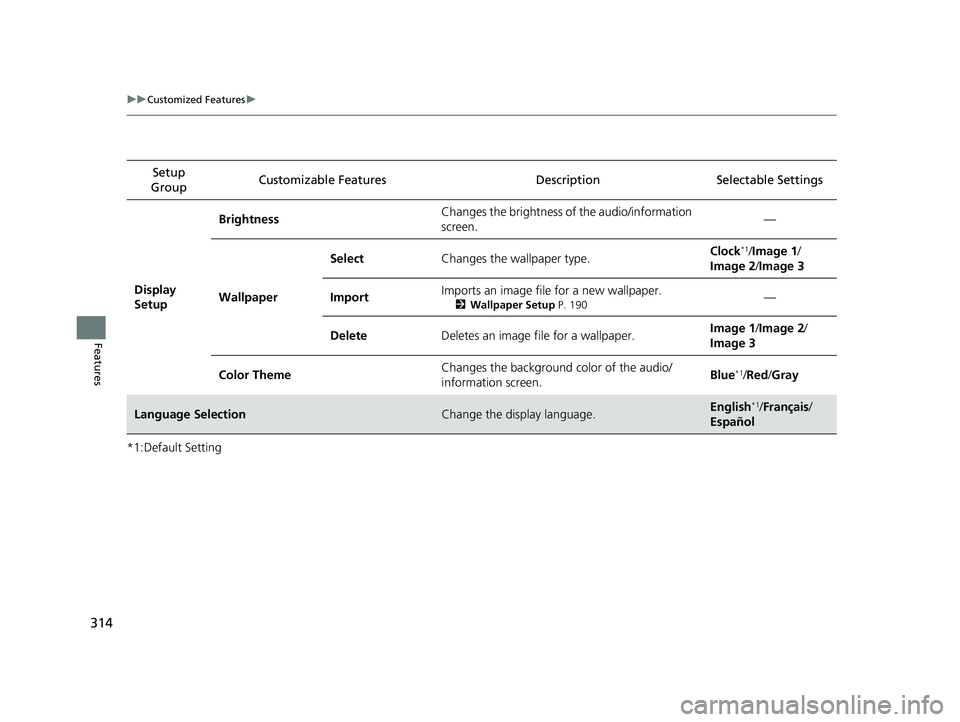
*1:Default SettingSetup
Group Customizable Features Desc
ription Selectable Settings
Display
Setup Brightness
Changes the brightness of the audio/information
screen. —
Wallpaper Select
Changes the wallpaper type. Clock
*1/
Image 1 /
Image 2 /Image 3
Import Imports an image file for a new wallpaper.
2
Wallpaper Setup P. 190—
Delete Deletes an image file for a wallpaper. Image 1
/Image 2 /
Image 3
Color Theme Changes the background color of the audio/
information screen. Blue
*1/
Red /Gray
Language SelectionChange the display language.English*1/ Français /
Español
22 ACURA ILX-31TX66900.book 314 ページ 2021年4月26日 月曜日 午前11時27分