android ACURA ILX 2022 User Guide
[x] Cancel search | Manufacturer: ACURA, Model Year: 2022, Model line: ILX, Model: ACURA ILX 2022Pages: 632, PDF Size: 20.56 MB
Page 278 of 632
uuAudio System Basic Operation uAndroid Auto
276
Features
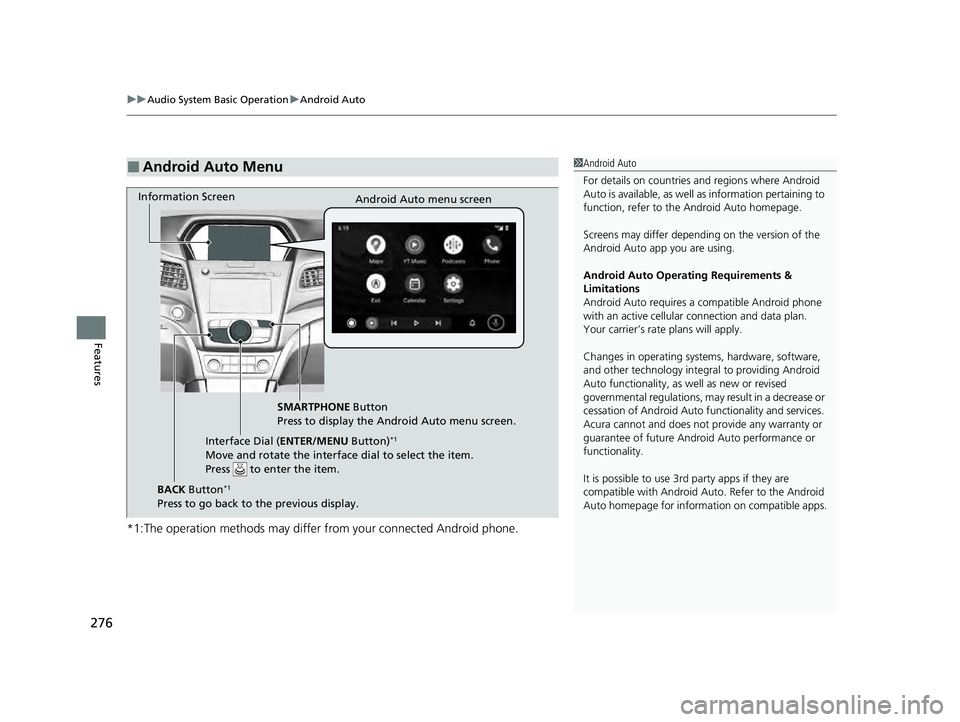
*1:The operation methods may differ from your connected Android phone.
■Android Auto Menu1Android Auto
For details on c ountries and regions where Android
Auto is available, as well as information pertaining to
function, refer to the Android Auto homepage.
Screens may differ depending on the version of the
Android Auto app you are using.
Android Auto Operating Requirements &
Limitations
Android Auto requires a compatible Android phone
with an active cellular connection and data plan.
Your carrier’s rate plans will apply.
Changes in operating systems, hardware, software,
and other technology integral to providing Android
Auto functionality, as well as new or revised
governmental regulations, may result in a decrease or
cessation of Android Auto functionality and services.
Acura cannot and does not provide any warranty or
guarantee of future Android Auto performance or
functionality.
It is possible to use 3r d party apps if they are
compatible with Android Auto. Refer to the Android
Auto homepage for informat ion on compatible apps.
Information Screen
Android Auto menu screen
SMARTPHONE Button
Press to display the Android Auto menu screen.
Interface Dial ( ENTER/MENU Button)
*1
Move and rotate the interface dial to select the item.
Press to enter the item.
BACK Button*1
Press to go back to the previous display.
22 ACURA ILX-31TX66900.book 276 ページ 2021年4月26日 月曜日 午前11時27分
Page 279 of 632
277
uuAudio System Basic Operation uAndroid Auto
Continued
Features
• Maps
Display Google Maps and use the navigation function just as you would with your
Android phone. When the vehicle is in motion, it is not possible to make keyboard
entries. Stop the vehicle in a safe locati on to undertake a search or provide other
inputs.
Only one navigation system (pre-installed navigation or Android Auto) can give
directions at a time. When you are using one system, directions to any prior
destination set on the other system will be canceled, and the system you are
currently using will direct you to your destination.
The information screen show s you turn-by-turn driving directions to your
destination.
• Phone
Make and receive phone calls as well as listen to voicemail.
• Exit
Select the Exit icon to go back to the home screen.
•
Operate Android Auto with your voice.
•
You can check Android notifications.
• (Android Auto Home)
Display useful information organized by Android Auto into simple cards that appear
just when they’re needed.
Models with navigation system
22 ACURA ILX-31TX66900.book 277 ページ 2021年4月26日 月曜日 午前11時27分
Page 280 of 632
uuAudio System Basic Operation uAndroid Auto
278
Features
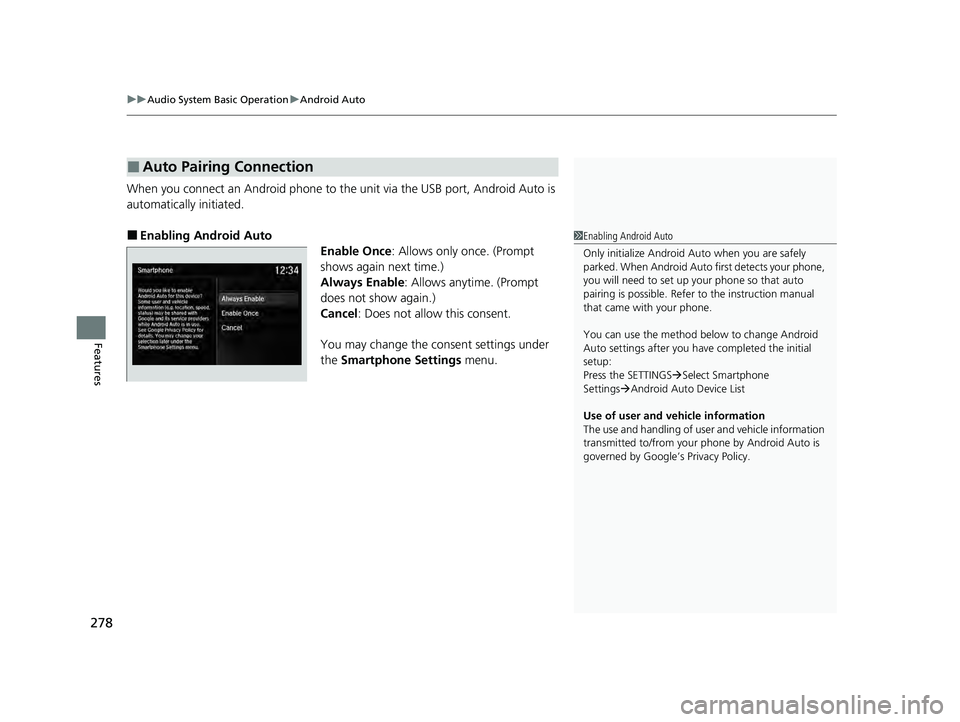
When you connect an Android phone to the unit via the USB port, Android Auto is
automatically initiated.
■Enabling Android Auto
Enable Once: Allows only once. (Prompt
shows again next time.)
Always Enable : Allows anytime. (Prompt
does not show again.)
Cancel : Does not allow this consent.
You may change the consent settings under
the Smartphone Settings menu.
■Auto Pairing Connection
1Enabling Android Auto
Only initialize Android Auto when you are safely
parked. When Android Auto first detects your phone,
you will need to set up your phone so that auto
pairing is possibl e. Refer to the instruction manual
that came with your phone.
You can use the method below to change Android
Auto settings after you ha ve completed the initial
setup:
Press the SETTINGS Select Smartphone
Settings Android Auto Device List
Use of user and vehicle information
The use and handling of user and vehicle information
transmitted to/from your phone by Android Auto is
governed by Google’s Privacy Policy.
22 ACURA ILX-31TX66900.book 278 ページ 2021年4月26日 月曜日 午前11時27分
Page 281 of 632
279
uuAudio System Basic Operation uAndroid Auto
Features
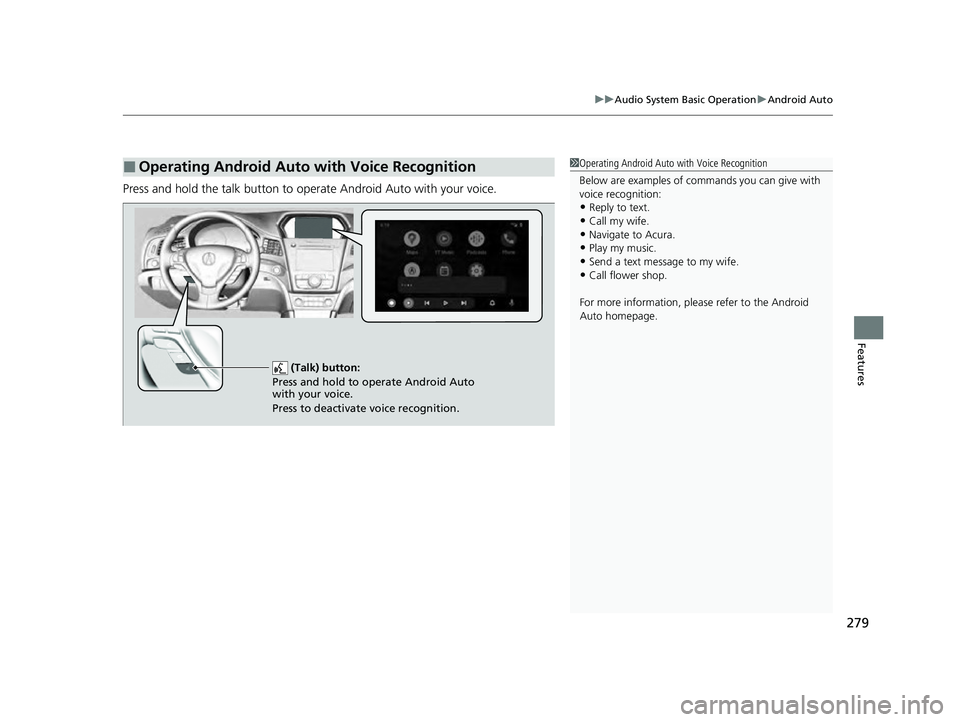
Press and hold the talk button to operate Android Auto with your voice.
■Operating Android Auto with Voice Recognition1Operating Android Auto with Voice Recognition
Below are examples of co mmands you can give with
voice recognition:
•Reply to text.
•Call my wife.•Navigate to Acura.
•Play my music.
•Send a text message to my wife.•Call flower shop.
For more information, please refer to the Android
Auto homepage.
(Talk) button:
Press and hold to operate Android Auto
with your voice.
Press to deactivate voice recognition.
22 ACURA ILX-31TX66900.book 279 ページ 2021年4月26日 月曜日 午前11時27分
Page 291 of 632

289
uuAudio Error Messages uApple CarPlay/Android Auto
Continued
Features
Apple CarPlay/Android Auto
If an error occurs while using the Apple CarPlay or Android Auto, you may see the
following error messages. If you cannot cl ear the error message, contact a dealer.
Error MessageSolution
A charging error has occurred with the connected device.
When safe, please check the comp atibility of the device and
USB cable. Please see your owner's manual for more details.
This USB device is incompat ible. Please see your owner's
manual for more details.
Appears when an incompatible device is connected. Disconnect
the device. Then, turn the audio sy stem off and turn it again. Do
not reconnect the device that caused the error.
Unable to start Apple CarPlay. When safe, please confirm the
USB connection.Appears when Apple CarPlay or Android Auto fails to recognize
your device.
Check if your device is compatible with Apple CarPlay or Android
Auto, or the latest version of the app is installed on your device.
Unable to start Android Auto. When safe, please confirm the
USB connection.
Unable to start Apple CarPlay. When safe, please try again.Appears when Apple CarPlay or Android Auto fails to recognize
your device.
Reconnect your device and try again.
Unable to start Android Auto. When safe, please try again.
Unable to start Apple CarPlay with your device. Your device is
connected in digital audio mode.Appears when your connected devi ce is incompatible with Apple
CarPlay.
Check if your device is comp atible with Apple CarPlay.
Models with two displays
Information Screen
On Demand Multi-Use DisplayTM
22 ACURA ILX-31TX66900.book 289 ページ 2021年4月26日 月曜日 午前11時27分
Page 292 of 632

290
uuAudio Error Messages uApple CarPlay/Android Auto
Features
Error MessageSolution
This device is not compatible with Android Auto.
Appears when your connected device is incompatible with
Android Auto.
Check if your device is compatible with Android Auto or the latest
version of the app is installed on your device.
Please update to the latest version of Android Auto.Appears when your version of the Android Auto is not supported.
Update Android Auto to the latest version.
Connection failed. Please confirm Bluetooth connection
status and try again.Appears when Bluetooth® connection is failed.
Check the Bluetooth® connection of this audio system and your
connected device.
22 ACURA ILX-31TX66900.book 290 ページ 2021年4月26日 月曜日 午前11時27分
Page 323 of 632
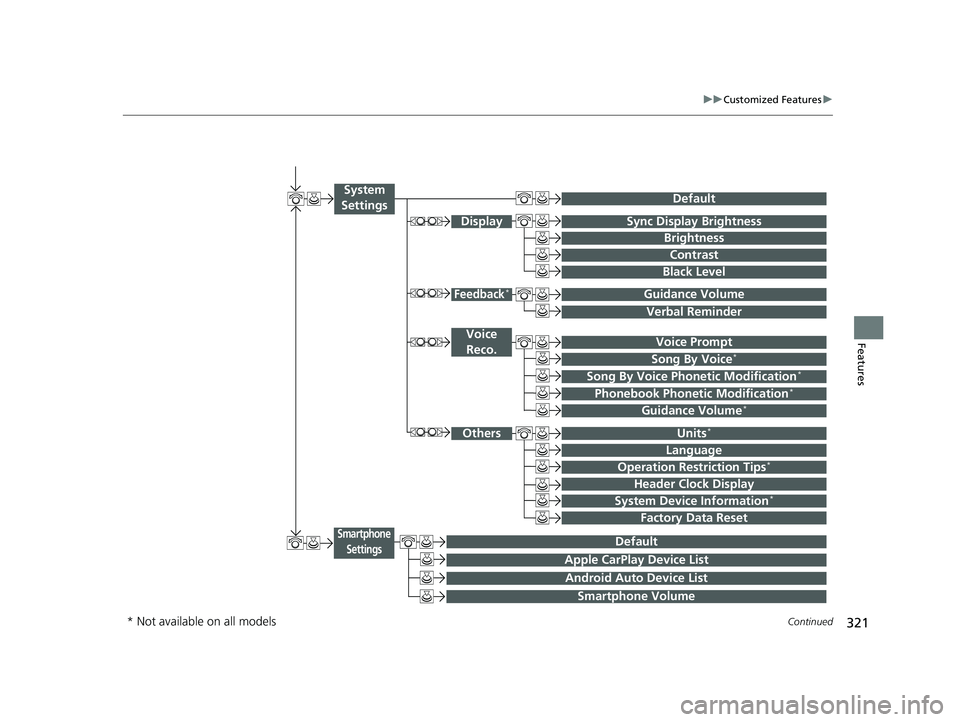
321
uuCustomized Features u
Continued
Features
Voice Prompt
Brightness
Contrast
Black Level
Default
Display
System
Settings
Voice Reco.
Sync Display Brightness
System Device Information*Header Clock Display
Language
Operation Restriction Tips*
Others
Default
Apple CarPlay Device List
Android Auto Device List
Smartphone
Settings
Smartphone Volume
Factory Data Reset
Units*
Song By Voice*
Song By Voice Phonetic Modification*
Phonebook Phoneti c Modification*
Guidance Volume*
Feedback*Guidance Volume
Verbal Reminder
* Not available on all models
22 ACURA ILX-31TX66900.book 321 ページ 2021年4月26日 月曜日 午前11時27分
Page 336 of 632

334
uuCustomized Features u
Features
*1:Default SettingSetup
Group Customizable Features Desc
ription Selectable Settings
System
Settings OthersUnits
*Changes the distance unit on the navigation map
screen.
mile*1/
km (U.S.)
mile /km*1 (Canada)
Language Changes the display language. English
*1/
Français /
Español
Operation Restriction
Tips
*
Alerts you when manual control of the system is
disabled to prevent distraction while driving. Only
voice commands are available. On*1/
Off
Header Clock Display Selects whether the clock display comes on. On
*1/Off
System Device
Information
*Displays the system/device information. —
Factory Data Reset Resets all the settings to their factory default.
2
Defaulting All the Settings P. 341—
Smartphone
Settings
DefaultCancels/Resets all customized items in the
Smartphone Settings group as default.Yes/No
Apple CarPlay Device ListSets up the Apple CarPlay connection.—
Android Auto Device ListSets up the Android Auto connection.—
Smartphone VolumeAdjusts the volume of the smartphone function.1 ~8*1~11
VersionShows software version of Apple CarPlay and
Android Auto unit.—
* Not available on all models
22 ACURA ILX-31TX66900.book 334 ページ 2021年4月26日 月曜日 午前11時27分
Page 622 of 632
620
uuClient Service Information u
Information
Requirements to access Pandora ®
• Latest version of the Pandora app
installed on your Android, Blackberry, or
iPhone.
• Registered Pandora account (you can
create a free account at
www.pandora.com < http://
www.pandora.com/ > or on your
smartphone)
• Connection to the internet via Wi-Fi or
cellular data network.
■Disclaimer of Pandora ®*Limitations
•Access to Pandora requires an active
internet connection
• Ability to access Pandora through this
system is subject to change without
notice
• Certain functionality of Pandora service is
not available when accessing the service
through this system including, but not
limited to, creating new stations, deleting
stations, emailing current stations,
buying tracks, viewing additional text
information, logging in to Pandora, and
adjusting Cell Network Audio Quality.
Pandora internet radio is a music service
not affiliated with HONDA. More
information is available at http://
www.pandora.com
Pandora logo, and the Pandora trade
dress are trademarks or registered
trademarks of Pandora Media, Inc., used
with permission.
• Mobile access requires a smartphone
with an active data plan. Standard data
rates may apply.
• Pandora is only available in the United
States.
* Not available on all models
22 ACURA ILX-31TX66900.book 620 ページ 2021年4月26日 月曜日 午前11時27分
Page 623 of 632

Index
621
Index
Index
A
AAC................................................... 239, 264
ABS (Anti-lock Brake System) .................. 501
Accessories and Modifications ................ 561
Accessory Power Sockets ......................... 173
AcuraLink ................................................. 416
AcuraWatch
TM.................................... 22, 452
Adaptive Cruise Control (ACC) .......... 80, 466
Additives Coolant .................................................. 531
Engine Oil ............................................... 526
Washer ................................................... 534
Additives, Engine Oil ............................... 526
Adjusting
Armrest .................................................. 167
Front Seats.............................................. 158
Head Restraints ....................................... 162
Mirrors.................................................... 156
Rear Seat ................................................ 166
Steering Wheel ....................................... 153
Temperature ............................................. 96
Air Conditioning System (Climate Control
System) .................................................... 175
Changing the Mode................................ 175
Defrosting the Windshield and
Windows .............................................. 176
Maintenance........................................... 554
Recirculation/Fresh Air Mode................... 175
Sensors ................................................... 178
Synchronization Mode ............................ 177
Using Automatic Climate Control............ 175 Air Pressure
....................................... 543, 607
Airbags ........................................................ 41
Advanced Airbags ..................................... 47
After a Collision ......................................... 44
Airbag Care ............................................... 55
Event Data Recorder .................................... 0
Front Airbags (SRS) .................................... 44
Indicator .............................................. 52, 76
Passenger Airbag Off Indicator .................. 53
Sensors ...................................................... 41
Side Airbags .............................................. 49
Side Curtain Airbags .................................. 51
AM/FM Radio .................................... 194, 225
Android Auto ............................................ 275
Anti-lock Brake System (ABS) .................. 501
Indicator .................................................... 75
Apple CarPlay ........................................... 270
Armrest ..................................................... 167
Audio Remote Controls ............................ 185
Audio System ............................................ 180
Adjusting the Sound ........................ 192, 220
Auxiliary Input Jack .................................. 183
Bluetooth ® Audio ............................ 208, 267
CD .................................................. 196, 239
Display Setup ................................... 193, 221
Error Messages ........................................ 280
General Information ................................ 291
HDD ........................................................ 242
iPhone ............................................. 262, 294
iPod ................................................. 199, 255
MP3/WMA/AAC ...................... 205, 239, 264 Pandora
®....................................... 202, 262
Reactivating ............................................ 184
Recommended CDs ................................. 292
Recommended Devices............................ 294
Security Code .......................................... 184
Siri Eyes Free ........................................... 269
SiriusXM ® Radio ...................................... 228
Song By VoiceTM (SBV) ............................. 258
Theft Protection ...................................... 184
USB Adapter Cable.................................. 181
USB Flash Drives ...................... 205, 264, 295
USB Port.................................................. 182
Audio/Information Screen ....................... 188
Authorized Manuals ................................ 616
Auto Door Locking/Unlocking ................. 127
Customize ....................................... 105, 329
Auto High-Beam ....................................... 147
Automatic Lighting .................................. 144
Auxiliary Input Jack .................................. 183
Average Fuel Economy .............................. 96
Average Speed ........................................... 97
B
Battery...................................................... 551
Charging System Indicator................. 74, 596
If the Battery Is Dead ............................... 590
Maintenance (Checki ng the Battery) ........ 551
Maintenance (Replacing) ......................... 552
Belts (Seat) .................................................. 34
Beverage Holders ..................................... 172
22 ACURA ILX-31TX66900.book 621 ページ 2021年4月26日 月曜日 午前11時27分