phone ACURA ILX 2022 User Guide
[x] Cancel search | Manufacturer: ACURA, Model Year: 2022, Model line: ILX, Model: ACURA ILX 2022Pages: 632, PDF Size: 20.56 MB
Page 210 of 632

208
uuAudio System Basic Operation uPlaying Bluetooth ® Audio
Features
Playing Bluetooth ® Audio
Your audio system allows you to listen to music from your Bluetooth-compatible
phone.
This function is available when the phone is paired and linked to the vehicle's
Bluetooth ® HandsFreeLink ® (HFL) system.
2 Phone Setup P. 352
1Playing Bluetooth ® Audio
Not all Bluetooth-enabled phones with streaming
audio capabilities are compatible with the system.
For a list of compatible phones:
•U.S.: Visit www.handsfreeli nk.com/Acura, or call 1-
888-528-7876.
•Canada: For more info rmation on smartphone
compatibility, call 1-855-490-7351.
In some states, it may be il legal to perform some data
device functions while driving.
If more than one phone is paired to the HFL system,
there will be a delay before the system begins to play.
In some cases, the name of the artist, album, or track
may not appear correctly.
Some functions may not be available on some
devices.
BACK Button
Press to go back to the
previous display. SETUP Button
Press to display menu
items.SKIP Bar
Press or to
change files.
AUX Button
Press to
Bluetooth®
Audio.
VOL/
(Volume/Power) Knob
Press to turn the audio
system on and off.
Selector Knob
Turn to change files.
Turn to select an item, then press to
set your selection.
Press to display the device’s name.
Bluetooth Indicator
Comes on when your
phone is connected to
HFL.
Preset 1 Button
Press to switch the mode
between pause and
resume.
22 ACURA ILX-31TX66900.book 208 ページ 2021年4月26日 月曜日 午前11時27分
Page 211 of 632

209
uuAudio System Basic Operation uPlaying Bluetooth ® Audio
Features
1. Make sure that your phone is paired and
linked to HFL.
2. Press the AUX button.
If the phone is not recognized, another HFL-
compatible phone, which is not compatible
for Bluetooth ® Audio, may already be
connected.
■To pause or resume a file
1. Press the SETUP button.
2. Rotate to select Resume/Pause, then press .
Each time you press , the setting switches between pause and resume.
■To Play Bluetooth® Audio Files1To Play Bluetooth ® Audio Files
To play the audio files, y ou may need to operate your
phone. If so, follow the phone maker's operating
instructions.
The pause function may no t be available on some
phones.
If any audio device is conne cted to the auxiliary input
jack, you may need to press the AUX button
repeatedly to select the Bluetooth® Audio system.
Switching to another mode pauses the music playing
from your phone.
22 ACURA ILX-31TX66900.book 209 ページ 2021年4月26日 月曜日 午前11時27分
Page 212 of 632
210
Features
Audio System Basic Operation
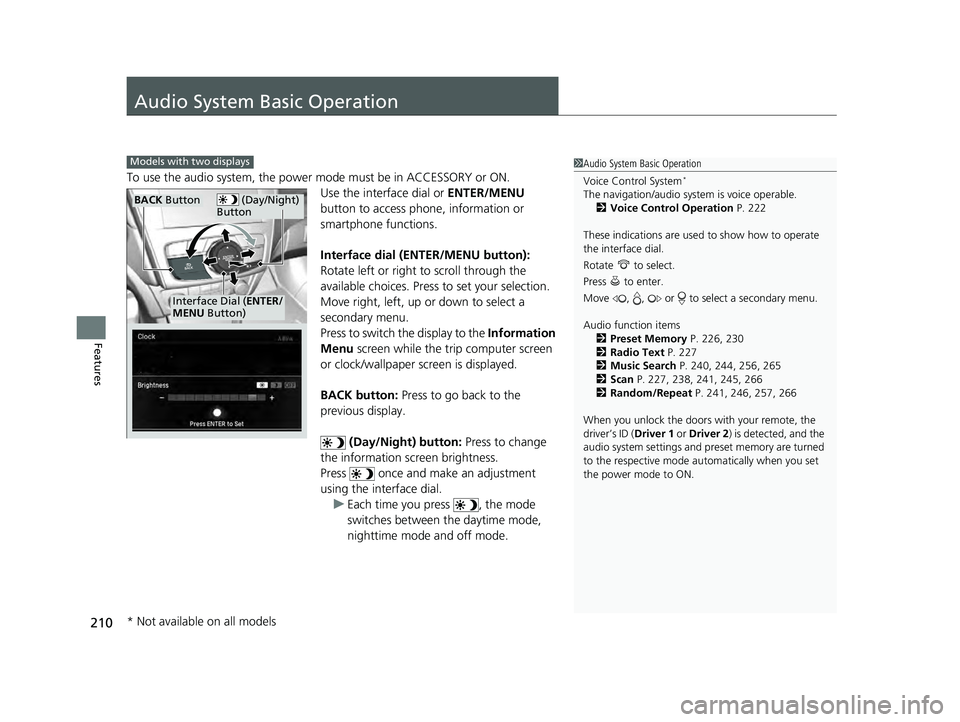
To use the audio system, the power mode must be in ACCESSORY or ON.Use the interface dial or ENTER/MENU
button to access phone, information or
smartphone functions.
Interface dial (ENTER/MENU button):
Rotate left or right to scroll through the
available choices. Press to set your selection.
Move right, left, up or down to select a
secondary menu.
Press to switch the display to the Information
Menu screen while the trip computer screen
or clock/wallpaper screen is displayed.
BACK button: Press to go back to the
previous display.
(Day/Night) button: Press to change
the information screen brightness.
Press once and make an adjustment
using the interface dial. u Each time you press , the mode
switches between the daytime mode,
nighttime mode and off mode.
1Audio System Basic Operation
Voice Control System
*
The navigation/audio system is voice operable.
2 Voice Control Operation P. 222
These indications are used to show how to operate
the interface dial.
Rotate to select.
Press to enter.
Move , , or to se lect a secondary menu.
Audio function items 2 Preset Memory P. 226, 230
2 Radio Text P. 227
2 Music Search P. 240, 244, 256, 265
2 Scan P. 227, 238, 241, 245, 266
2 Random/Repeat P. 241, 246, 257, 266
When you unlock the doors with your remote, the
driver’s ID (Driver 1 or Driver 2) is detected, and the
audio system settings and pr eset memory are turned
to the respective mode automatically when you set
the power mode to ON.
Models with two displays
(Day/Night)
ButtonBACK Button
Interface Dial ( ENTER/
MENU Button)
* Not available on all models
22 ACURA ILX-31TX66900.book 210 ページ 2021年4月26日 月曜日 午前11時27分
Page 217 of 632
215
uuAudio System Basic Operation uInformation Screen
Continued
Features
Information Screen
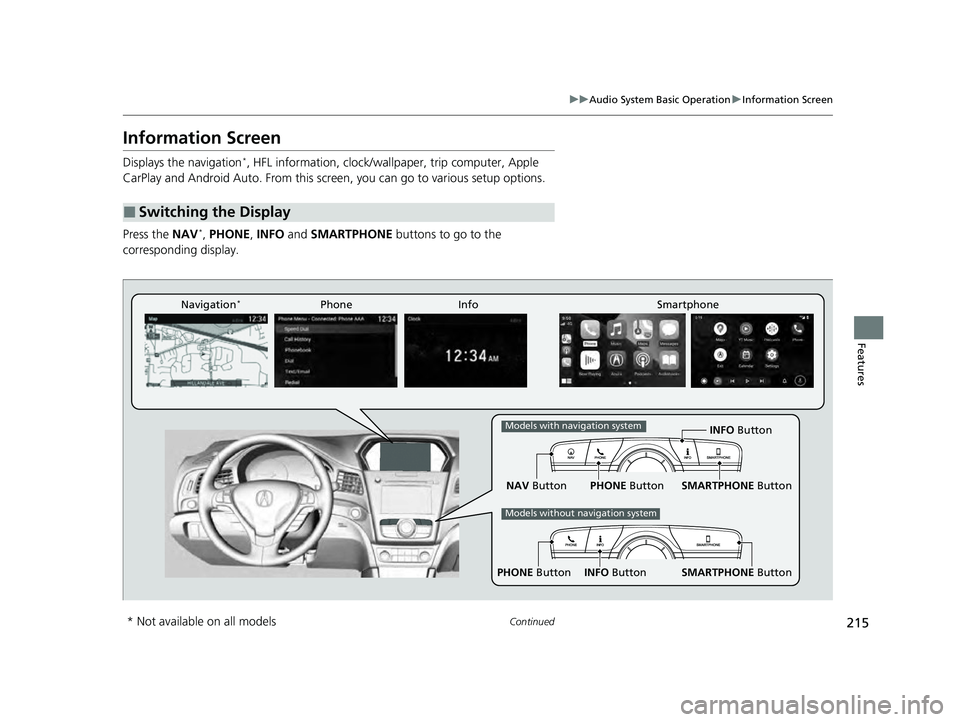
Displays the navigation*, HFL information, clock/wallp aper, trip computer, Apple
CarPlay and Android Auto. From this screen, you can go to various setup options.
Press the NAV
*, PHONE, INFO and SMARTPHONE buttons to go to the
corresponding display.
■Switching the Display
SMARTPHONE Button
PHONE Button INFO Button
Phone Info Smartphone
SMARTPHONE Button
PHONE Button
NAV Button INFO Button
Models with navigation system
Models without navigation system
Navigation*
* Not available on all models
22 ACURA ILX-31TX66900.book 215 ページ 2021年4月26日 月曜日 午前11時27分
Page 218 of 632
216
uuAudio System Basic Operation uInformation Screen
Features
■Navigation*
Shows the navigation screen.
2 Refer to the Navigation System Manual
■Phone
Shows the HFL information.
2 Bluetooth ® HandsFreeLink ® P. 374
■Info
Shows the AcuraLink/Messages*, Trip Computer , Clock, Traffic Incidents* or
Voice Recognition Guide*. Press or INFO button to display the Information
Menu screen.
AcuraLink/Messages
*:
Shows a AcuraLink ® message menu list.
2AcuraLink®* P. 416
Trip Computer :
Current Drive
Shows the range and instant and average fuel economy of the current trip, as well
as the average fuel economy from your last trip.
History of Trip A
Shows the range, average fuel economy an d distances traveled for the current trip,
as well as the average fuel economy and distances traveled during the last three
driving cycles.
Each time you reset the trip meter A, th e information on the display updates. The
history of the previous th ree driving cycles is kept.
* Not available on all models
22 ACURA ILX-31TX66900.book 216 ページ 2021年4月26日 月曜日 午前11時27分
Page 219 of 632
217
uuAudio System Basic Operation uInformation Screen
Continued
Features
Deleting the history manually
1. Press on the History of Trip A screen to select Delete History.
2. A confirmation message appears on the screen. Rotate to select Yes, then
press .
Clock :
Shows a clock screen and an image you import.
Traffic Incidents
*:
Shows a traffic incidents list.
2 Refer to the Navigation System Manual
Voice Recognition Guide*:
Shows a voice recognition guide screen.
■Smartphone
Displays the Apple CarPlay or Android Auto.
2 Apple CarPlay P. 270
2 Android Auto P. 275
* Not available on all models
22 ACURA ILX-31TX66900.book 217 ページ 2021年4月26日 月曜日 午前11時27分
Page 224 of 632

222
uuAudio System Basic Operation uVoice Control Operation
Features
Voice Control Operation
Your vehicle has a voice control system that allows hands-free operation.
The voice control system uses the (Tal k) and (hang-up/back) buttons on the
steering wheel and a microphone near the map lights in the ceiling.
To achieve optimum voice recognition when using the voice control system:
• Make sure the correct screen is displa yed for the voice command that you are
using.
The system recognizes only certain commands.
Available voice command P. 223
• Close the windows and moonroof.
• Adjust the dashboard and side vents so air does not blow onto the microphone in
the ceiling.
• Speak clearly in a natural speaking vo ice without pausing between words.
• Reduce any background noise if possible. The system may misinterpret your
command if more than one person is speaking at the same time.
■Voice Recognition
Models with navigation system
1Voice Control Operation
When you press the button, a helpful prompt asks
what you would like to do. Press and release the
button again to bypass this prompt and give a
command.
1 Voice Recognition
The voice control system can only be used from the
driver’s seat because the microphone unit removes
noises from the front passenger’s side.
22 ACURA ILX-31TX66900.book 222 ページ 2021年4月26日 月曜日 午前11時27分
Page 226 of 632

224
uuAudio System Basic Operation uVoice Control Operation
Features
These commands can only be used when a
phone is connected. When the system
recognizes a phone command, the screen
will change to the dedicated phone voice
recognition screen.
• Dial by Number
• Redial
• Back
• Cancel
• Call
• Dial
• Call
• Dial
• Call
• Dial
Phone commands are not available if using
Apple CarPlay.
You can see a list of the available
commands on the screen.
• Phone Commands
• Audio Commands
• Navigation Commands
• Voice Settings
• Voice Recognition Guide
■Phone
■Voice Help
22 ACURA ILX-31TX66900.book 224 ページ 2021年4月26日 月曜日 午前11時27分
Page 261 of 632
Continued259
uuAudio System Basic Operation uSong By VoiceTM (SBV)
Features
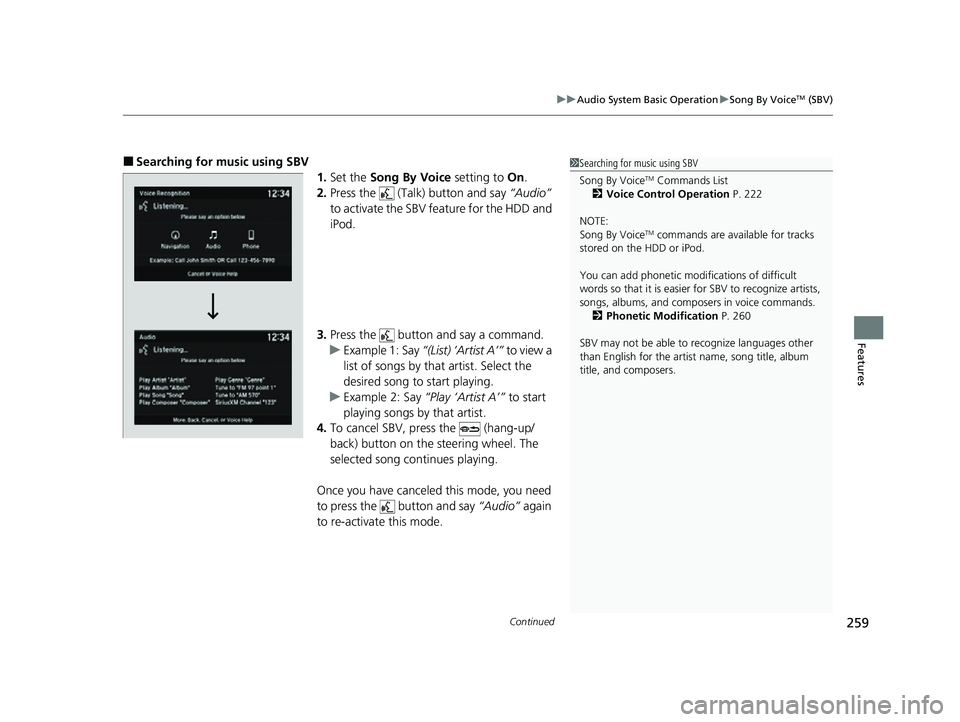
■Searching for music using SBV
1.Set the Song By Voice setting to On.
2. Press the (Talk) button and say “Audio”
to activate the SBV feature for the HDD and
iPod.
3. Press the button and say a command.
u Example 1: Say “(List) ‘Artist A’” to view a
list of songs by that artist. Select the
desired song to start playing.
u Example 2: Say “Play ‘Artist A’” to start
playing songs by that artist.
4. To cancel SBV, press the (hang-up/
back) button on the steering wheel. The
selected song continues playing.
Once you have canceled this mode, you need
to press the button and say “Audio” again
to re-activate this mode.1 Searching for music using SBV
Song By Voice
TM Commands List
2 Voice Control Operation P. 222
NOTE:
Song By Voice
TM commands are available for tracks
stored on the HDD or iPod.
You can add phonetic modi fications of difficult
words so that it is easier for SBV to recognize artists,
songs, albums, and composers in voice commands. 2 Phonetic Modification P. 260
SBV may not be able to recognize languages other
than English for the artist name, song title, album
title, and composers.
22 ACURA ILX-31TX66900.book 259 ページ 2021年4月26日 月曜日 午前11時27分
Page 262 of 632
uuAudio System Basic Operation uSong By VoiceTM (SBV)
260
Features
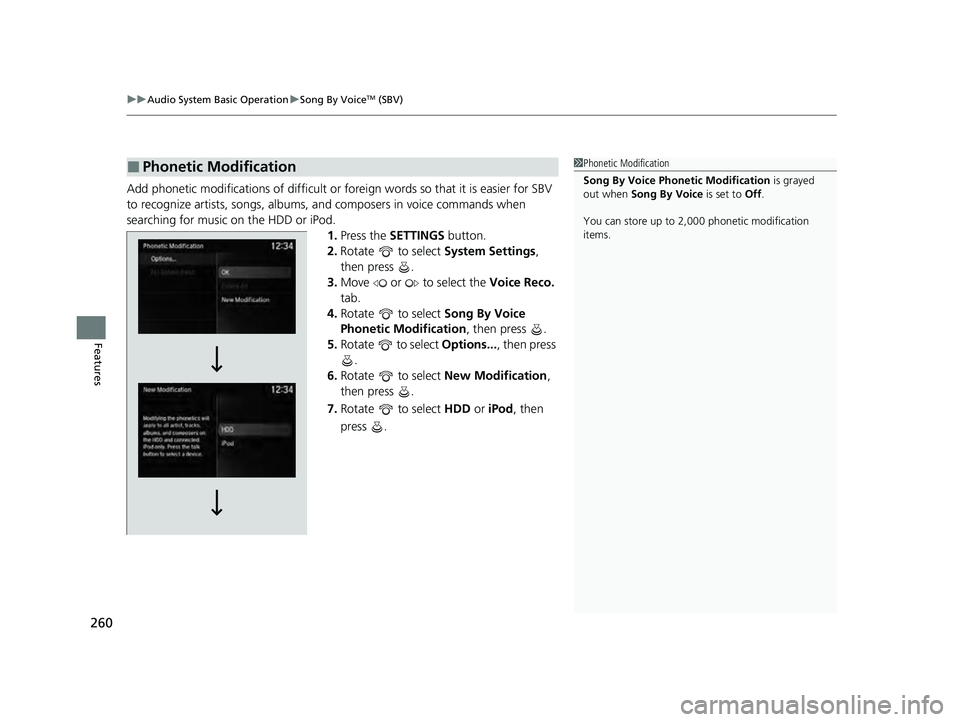
Add phonetic modifications of difficult or fo reign words so that it is easier for SBV
to recognize artists, songs, albums, and composers in voice commands when
searching for music on the HDD or iPod. 1.Press the SETTINGS button.
2. Rotate to select System Settings,
then press .
3. Move or to select the Voice Reco.
tab.
4. Rotate to select Song By Voice
Phonetic Modification , then press .
5. Rotate to select Options..., then press
.
6. Rotate to select New Modification,
then press .
7. Rotate to select HDD or iPod, then
press .
■Phonetic Modification1 Phonetic Modification
Song By Voice Phonetic Modification is grayed
out when Song By Voice is set to Off.
You can store up to 2, 000 phonetic modification
items.
22 ACURA ILX-31TX66900.book 260 ページ 2021年4月26日 月曜日 午前11時27分