radio ACURA ILX 2022 User Guide
[x] Cancel search | Manufacturer: ACURA, Model Year: 2022, Model line: ILX, Model: ACURA ILX 2022Pages: 632, PDF Size: 20.56 MB
Page 196 of 632

194
uuAudio System Basic Operation uPlaying AM/FM Radio
Features
Playing AM/FM Radio
SCAN Button
Press to sample each of the strongest stations
on the selected band for 10 seconds. To turn
off scan, press the button again. VOL/ (Volume/Power) Knob
Press to turn the audi o system on and off.
Turn to adjust the volume.
A.SEL (Auto Select) Button
Press to scan both bands and store the
strongest station in each preset. To turn
off auto select, press the button again. This
restores the presets you originally set.
SETUP Button
Press to display menu items.
Selector Knob
Turn to tune the radio frequency.
FM Button
Press to select a band.AM Button
BACK Button
Press to go back to the previous display.
SKIP Bar
Press to search up and down the selected
band for a station with a strong signal.
Preset Buttons (1-6)
To store a station:
1. Tune to the desired station.
2. Pick a preset button and hold it until
you hear a beep.
To listen to a stored station, select a band,
then press the preset button.
FOLDER Bar
Press either side to display and select an
RDS category.
22 ACURA ILX-31TX66900.book 194 ページ 2021年4月26日 月曜日 午前11時27分
Page 197 of 632

195
uuAudio System Basic Operation uPlaying AM/FM Radio
Features
Provides text data information related to your selected RDS-capable FM station.
■RDS Information
1.Press the SETUP button and rotate to
select RDS Information .
2. Each time you press , the RDS
Information switches between on and off.
■To find an RDS station from your selected program category
1.Press the FOLDER bar to display and select
an RDS category.
2. Use SKIP or SCAN to select an RDS station.
■Radio Data System (RDS)
RDS Category
1Playing AM/FM Radio
The ST indicator appears on the display indicating
stereo FM broadcasts.
Stereo reproduction in AM is not available.
Switching the Audio Mode
Press the MODE button on the steering wheel.
2 Audio Remote Controls P. 185
You can store 6 AM stations and 12 FM stations into
the preset button memory. FM1 and FM2 let you
store 6 stations each.
Auto Select function scans and stores up to 6 AM
stations and 12 FM stations with a strong signal into
the preset button memory.
If you do not like the stati ons auto select has stored,
you can manually store your preferred frequencies.
22 ACURA ILX-31TX66900.book 195 ページ 2021年4月26日 月曜日 午前11時27分
Page 205 of 632
Continued203
uuAudio System Basic Operation uPlaying Pandora ®*1
Features
You can operate some of the Pandora menu items from your vehicle’s audio system.
The available items are:
•Station List (QuickMix is also available)
• Like
• Dislike
• Resume/Pause
• SKIP
• Bookmark This Song
• Bookmark This Artist
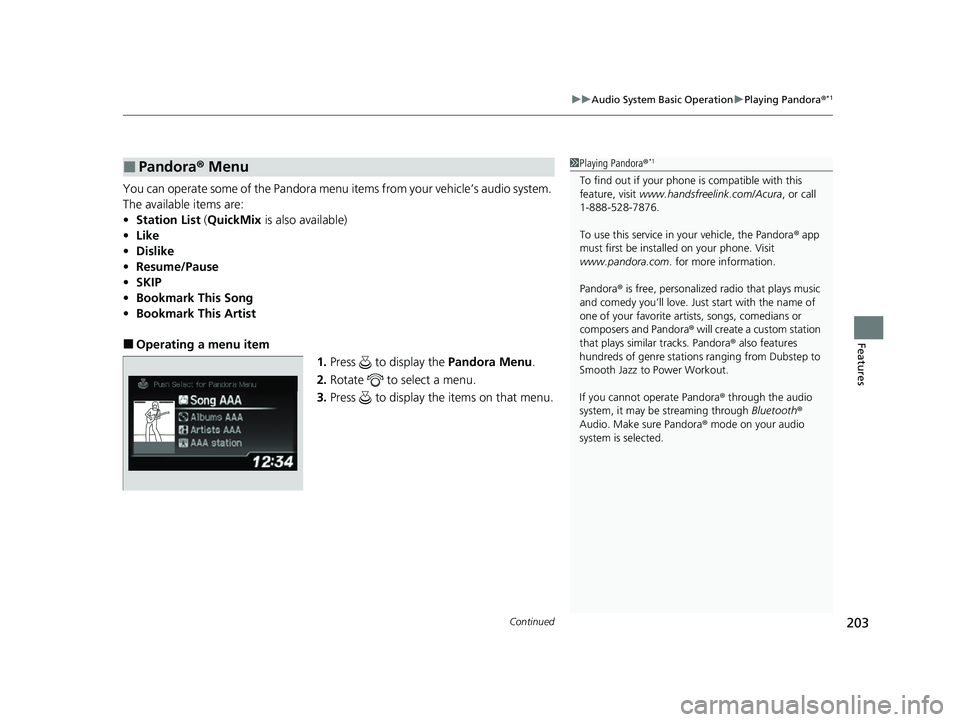
■Operating a menu item
1.Press to display the Pandora Menu.
2. Rotate to select a menu.
3. Press to display the items on that menu.
■Pandora® Menu1Playing Pandora ®*1
To find out if your phone is compatible with this
feature, visit www.handsfreelink.com/Acura , or call
1-888-528-7876.
To use this service in your vehicle, the Pandora ® app
must first be installed on your phone. Visit
www.pandora.com . for more information.
Pandora ® is free, personalized radio that plays music
and comedy you’ll love. Just start with the name of
one of your favorite arti sts, songs, comedians or
composers and Pandora ® will create a custom station
that plays similar tracks. Pandora ® also features
hundreds of genre stations ranging from Dubstep to
Smooth Jazz to Power Workout.
If you cannot operate Pandora ® through the audio
system, it may be streaming through Bluetooth®
Audio. Make sure Pandora ® mode on your audio
system is selected.
22 ACURA ILX-31TX66900.book 203 ページ 2021年4月26日 月曜日 午前11時27分
Page 212 of 632
210
Features
Audio System Basic Operation
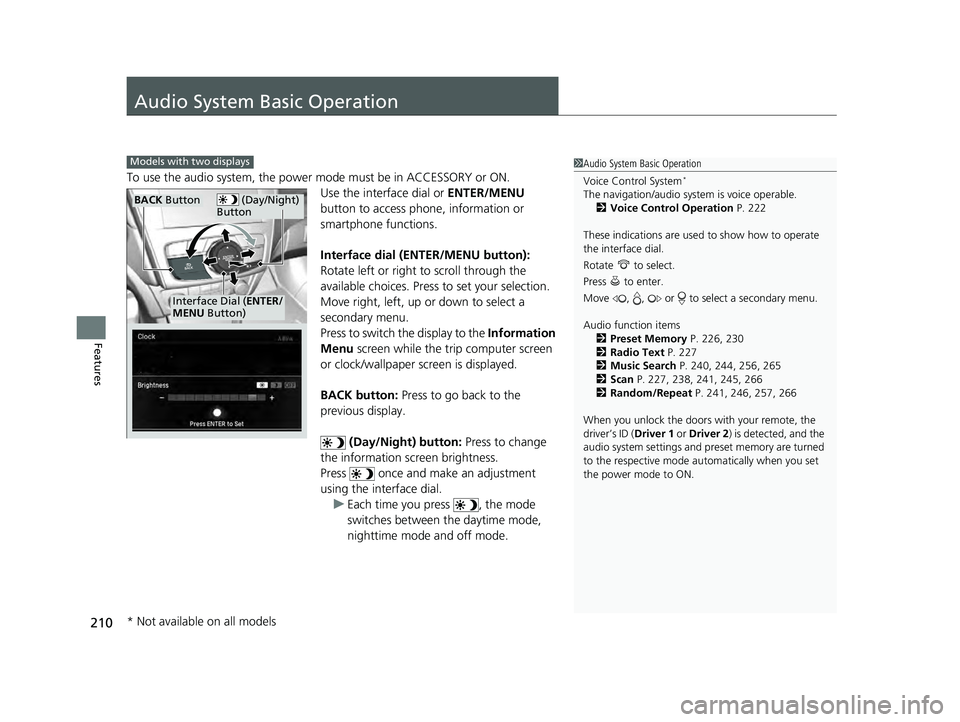
To use the audio system, the power mode must be in ACCESSORY or ON.Use the interface dial or ENTER/MENU
button to access phone, information or
smartphone functions.
Interface dial (ENTER/MENU button):
Rotate left or right to scroll through the
available choices. Press to set your selection.
Move right, left, up or down to select a
secondary menu.
Press to switch the display to the Information
Menu screen while the trip computer screen
or clock/wallpaper screen is displayed.
BACK button: Press to go back to the
previous display.
(Day/Night) button: Press to change
the information screen brightness.
Press once and make an adjustment
using the interface dial. u Each time you press , the mode
switches between the daytime mode,
nighttime mode and off mode.
1Audio System Basic Operation
Voice Control System
*
The navigation/audio system is voice operable.
2 Voice Control Operation P. 222
These indications are used to show how to operate
the interface dial.
Rotate to select.
Press to enter.
Move , , or to se lect a secondary menu.
Audio function items 2 Preset Memory P. 226, 230
2 Radio Text P. 227
2 Music Search P. 240, 244, 256, 265
2 Scan P. 227, 238, 241, 245, 266
2 Random/Repeat P. 241, 246, 257, 266
When you unlock the doors with your remote, the
driver’s ID (Driver 1 or Driver 2) is detected, and the
audio system settings and pr eset memory are turned
to the respective mode automatically when you set
the power mode to ON.
Models with two displays
(Day/Night)
ButtonBACK Button
Interface Dial ( ENTER/
MENU Button)
* Not available on all models
22 ACURA ILX-31TX66900.book 210 ページ 2021年4月26日 月曜日 午前11時27分
Page 214 of 632
212
uuAudio System Basic Operation uOn Demand Multi-Use DisplayTM
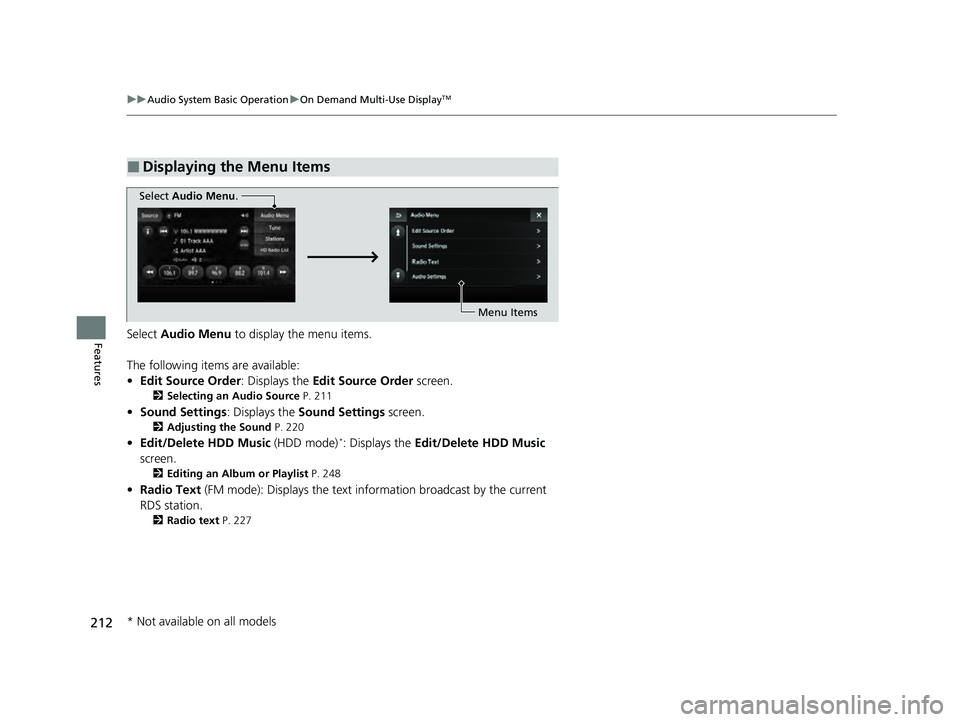
FeaturesSelect Audio Menu to display the menu items.
The following items are available:
• Edit Source Order: Displays the Edit Source Order screen.
2Selecting an Audio Source P. 211
•Sound Settings : Displays the Sound Settings screen.
2Adjusting the Sound P. 220
•Edit/Delete HDD Music (HDD mode)*: Displays the Edit/Delete HDD Music
screen.
2 Editing an Album or Playlist P. 248
•Radio Text (FM mode): Displays the text in formation broadcast by the current
RDS station.
2 Radio text P. 227
■Displaying the Menu Items
Select Audio Menu .
Menu Items
* Not available on all models
22 ACURA ILX-31TX66900.book 212 ページ 2021年4月26日 月曜日 午前11時27分
Page 227 of 632

225
uuAudio System Basic Operation uPlaying AM/FM Radio
Continued
Features
Playing AM/FM Radio
On Demand Multi-Use DisplayTM
VOL/ (Volume/Power) Knob
Press to turn the audio system on
and off.
Turn to adjust the volume.
Skip/Seek Icons
Select or to search up and
down the selected band for a
station with a strong signal.
Audio Menu
Select to display the menu items.
Source
Select to change a band or
change an audio source. (Information) Icon
Select to display the current station
details.
Select to display the previous
screen.
Preset Icons
Tune the preset radio frequency. Select and
hold the preset icon to store that station.
Select or to display preset 6 onwards.
Tune
Select to display the manual input
screen of radio frequency.
Stations
Select to display the station list
screen.
HD Radio List
Select to display the sub-channel
list screen.
Models with HD RadioTM feature
22 ACURA ILX-31TX66900.book 225 ページ 2021年4月26日 月曜日 午前11時27分
Page 228 of 632

uuAudio System Basic Operation uPlaying AM/FM Radio
226
Features
To store a station:
1. Tune to the selected station.
2. Select and hold the preset number you want to store that station.
Provides text data information related to your selected RDS-capable FM station.
■To find an RDS station from Station List
1. Select Stations .
2. Select station on the list.
■Manual update
Updates your available station list at any time.
1. Select Stations .
2. Select Refresh on the list.
■Preset Memory
■Radio Data System (RDS)
1Playing AM/FM Radio
You can control the AM/FM radio using voice
commands
*.
2 Voice Control Operation P. 222
The ST indicator appears on the display indicating
stereo FM broadcasts.
Stereo reproduction in AM is not available.
Switching the Audio Mode
Press the MODE button on the steering wheel.
2 Audio Remote Controls P. 185
You can store 6 AM stations and 12 FM stations into
the preset memory.
HD Radio Technology manufactured under license
from iBiquity Digi tal Corporation. U.S. and Foreign
Patents. HD Radio
TM and the HD, HD Radio, and
“Arc” logos are proprietary trademarks of iBiquity
Digital Corp.
Models with HD RadioTM feature
* Not available on all models
22 ACURA ILX-31TX66900.book 226 ページ 2021年4月26日 月曜日 午前11時27分
Page 229 of 632
227
uuAudio System Basic Operation uPlaying AM/FM Radio
Features
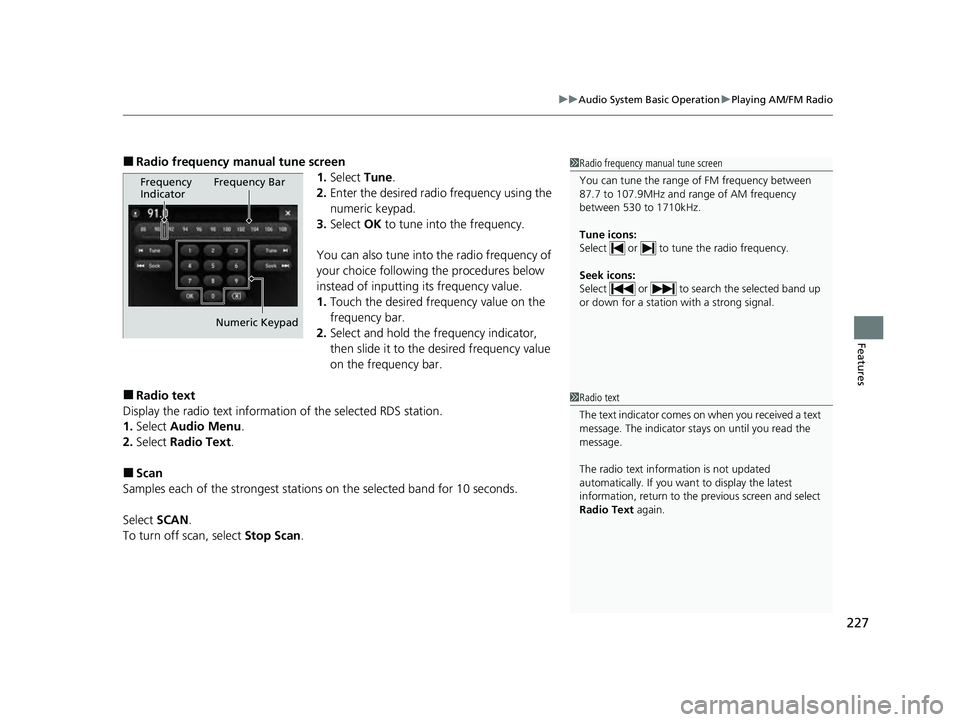
■Radio frequency manual tune screen
1.Select Tune.
2. Enter the desired radio frequency using the
numeric keypad.
3. Select OK to tune into the frequency.
You can also tune into the radio frequency of
your choice following the procedures below
instead of inputting its frequency value.
1. Touch the desired frequency value on the
frequency bar.
2. Select and hold the frequency indicator,
then slide it to the desired frequency value
on the frequency bar.
■Radio text
Display the radio text information of the selected RDS station.
1. Select Audio Menu .
2. Select Radio Text .
■Scan
Samples each of the strongest stations on the selected band for 10 seconds.
Select SCAN.
To turn off scan, select Stop Scan.
1Radio frequency manual tune screen
You can tune the range of FM frequency between
87.7 to 107.9MHz and range of AM frequency
between 530 to 1710kHz.
Tune icons:
Select or to tune the radio frequency.
Seek icons:
Select or to search the selected band up
or down for a station with a strong signal.
Frequency
Indicator Frequency Bar
Numeric Keypad
1 Radio text
The text indicator comes on when you received a text
message. The indicator stays on until you read the
message.
The radio text inform ation is not updated
automatically. If you want to display the latest
information, return to the previous screen and select
Radio Text again.
22 ACURA ILX-31TX66900.book 227 ページ 2021年4月26日 月曜日 午前11時27分
Page 230 of 632

228
uuAudio System Basic Operation uPlaying SiriusXM ® Radio
Features
Playing SiriusXM ® Radio
On Demand Multi-Use DisplayTM
VOL/ (Volume/Power) Knob
Press to turn the audio system on
and off.
Turn to adjust the volume.
Category Up/Down Icons
Select or to display and select
a SiriusXM ® Radio category.
Audio Menu
Select to display the menu items.
Source
Select to change an audio source. (Information) Icon
Select to display the current
channel details.
Select to display the previous
screen.
Preset Icons
Tune the preset channel. Select and hold the
preset icon to store that channel. Select or to display preset 4 onwards.
Tune
Select to display the channel
number input screen.
Presets/Controls
Select to change between the
Presets mode and Controls mode
of the Replay function.
Browse
Select to display the channel list of
Categories, Channels or Featured
Channels types.
Channel Up/Down Icons
Select or to the previous or
next channel.
Select and hold to rapidly skip 10
channels at a time.
22 ACURA ILX-31TX66900.book 228 ページ 2021年4月26日 月曜日 午前11時27分
Page 231 of 632
Continued229
uuAudio System Basic Operation uPlaying SiriusXM ® Radio
Features
1. Select the SiriusXM® mode.
2 Audio Remote Controls P. 185
2 On Demand Multi-Use DisplayTM P. 211
2.Select a channel using the , icons or the preset numbers ( 1-12) on the preset
mode screen.
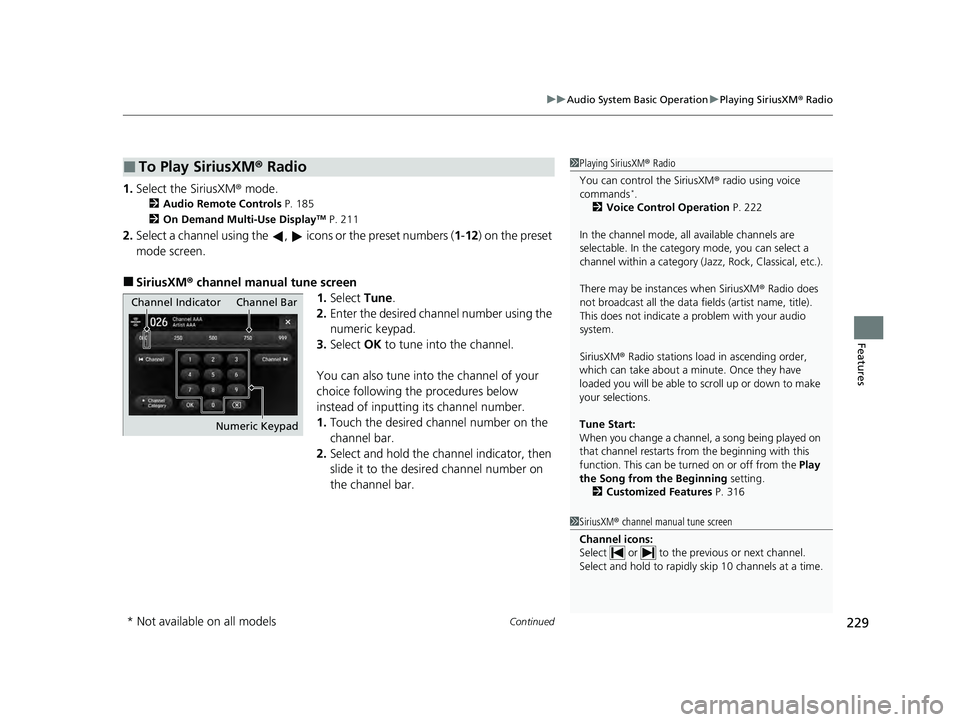
■SiriusXM ® channel manual tune screen
1.Select Tune.
2. Enter the desired channel number using the
numeric keypad.
3. Select OK to tune into the channel.
You can also tune into the channel of your
choice following the procedures below
instead of inputting its channel number.
1. Touch the desired channel number on the
channel bar.
2. Select and hold the channel indicator, then
slide it to the desire d channel number on
the channel bar.
■To Play SiriusXM® Radio1Playing SiriusXM ® Radio
You can control the SiriusXM ® radio using voice
commands
*.
2 Voice Control Operation P. 222
In the channel mode, all available channels are
selectable. In the categor y mode, you can select a
channel within a ca tegory (Jazz, Rock, Classical, etc.).
There may be instances when SiriusXM ® Radio does
not broadcast all the data fi elds (artist name, title).
This does not indicate a problem with your audio
system.
SiriusXM ® Radio stations load in ascending order,
which can take about a minute. Once they have
loaded you will be able to scroll up or down to make
your selections.
Tune Start:
When you change a channel, a song being played on
that channel restarts from the beginning with this
function. This can be turned on or off from the Play
the Song from the Beginning setting.
2 Customized Features P. 316
1SiriusXM ® channel manual tune screen
Channel icons:
Select or to the prev ious or next channel.
Select and hold to rapidly sk ip 10 channels at a time.
Channel Indicator Channel Bar
Numeric Keypad
* Not available on all models
22 ACURA ILX-31TX66900.book 229 ページ 2021年4月26日 月曜日 午前11時27分