ECU ACURA ILX 2022 Owner's Manual
[x] Cancel search | Manufacturer: ACURA, Model Year: 2022, Model line: ILX, Model: ACURA ILX 2022Pages: 632, PDF Size: 20.56 MB
Page 111 of 632
109
Controls
This chapter explains how to operate the various controls necessary for driving.
Clock.................................................. 110
Locking and Unlocking the Doors
Key .................................................. 112
Low Keyless Remote Signal Strength ... 114
Locking/Unlocking the Doors from the Outside .......................................... 115
Locking/Unlocking the Doors from the Inside ............................................. 124
Childproof Door Locks ..................... 126
Auto Door Locking/Unlocking .......... 127
Opening and Closing the Trunk ....... 128
Security System ................................ 132
Immobilizer System .......................... 132
Security System Alarm ...................... 132 Windows
........................................... 135Moonroof............................................. 138Operating the Switches Around the
Steering Wheel ENGINE START/STOP Button............. 139
Turn Signals ..................................... 142
Light Switches.................................. 143
Fog Lights
*...................................... 146
Daytime Running Lights ................... 146
Auto High-Beam .............................. 147
Wipers and Washers ........................ 150
Brightness Control ........................... 152
Rear Defogger/Heated Door Mirror Button ..153
Adjusting the Steering Wheel........... 153 Driving Position Memory System
*.... 154
Mirrors ............................................... 156
Interior Rearview Mirror ................... 156
Power Door Mirrors ......................... 157
Adjusting the Seats .......................... 158
Front Seats ...................................... 158
Interior Convenience Items .............. 168
Interior Lights .................................. 168
Storage Items .................................. 170
Other Interior Convenience Items..... 173
Climate Control System ................... 175
Using Automatic Climate Control .... 175
Automatic Climate Control Sensors......178
* Not available on all models
22 ACURA ILX-31TX66900.book 109 ページ 2021年4月26日 月曜日 午前11時27分
Page 117 of 632

115
uuLocking and Unlocking the Doors uLocking/Unlocking the Doors from the Outside
Continued
Controls
Locking/Unlocking the Doors from the Outside
When you carry the keyless remote, you can
lock/unlock the doors and open the trunk.
You can lock/unlock the doors within a radius
of about 32 inches (80 cm) of the outside door
handle. You can open the trunk within about
32 inches (80 cm) radius from the trunk
release button.
■Locking the doors
Press the door lock button on the front door.u Some exterior lights flash; the beeper
sounds; all the doors lock; and the
security system sets.
■Using the Keyless Access System1Locking/Unlocking the Doors from the Outside
If the interior light switch is in the door activated
position, the interior light comes on when you unlock
the doors.
No doors opened: The li ght fades out after 30
seconds.
Doors relocked: The light goes off immediately.
2 Interior Lights P. 168
Door Lock Button
1Using the Keyless Access System
If you do not open a door within 30 seconds of
unlocking the vehicle with the keyless access system,
the doors will automatically relock.
You can lock or unlock doors using the keyless access
system only when the power mode is in VEHICLE OFF.
The keyless access system will not lock the vehicle
when a door is open.
•Do not leave the keyless remote in the vehicle
when you get out. Carry it with you.
•Even if you are not carrying the keyless remote, you
can lock/unlock the doors while someone else with
the remote is within range.
•The door may be unlocked if the door handle is
covered with water in heavy rain or in a car wash if
the keyless remote is within range.
•If you grip a front door handle wearing gloves, the
door sensor may be slow to respond or may not
respond by unlocking the doors.
22 ACURA ILX-31TX66900.book 115 ページ 2021年4月26日 月曜日 午前11時27分
Page 122 of 632
uuLocking and Unlocking the Doors uLocking/Unlocking the Doors from the Outside
120
Controls
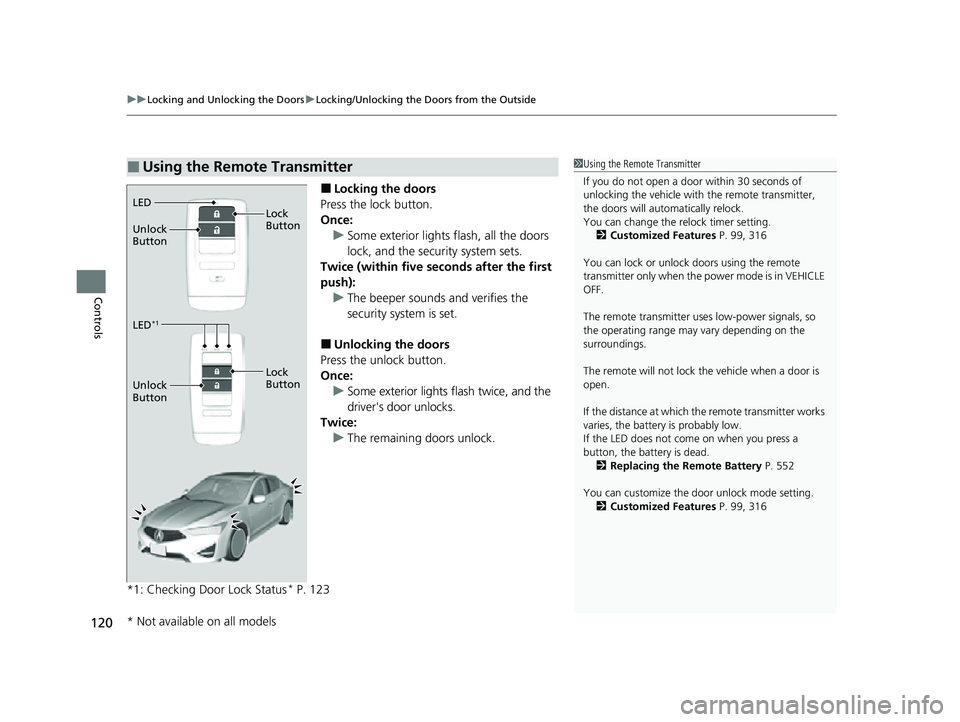
■Locking the doors
Press the lock button.
Once: u Some exterior lights flash, all the doors
lock, and the security system sets.
Twice (within five seco nds after the first
push):
u The beeper sounds and verifies the
security system is set.
■Unlocking the doors
Press the unlock button.
Once: u Some exterior lights flash twice, and the
driver's door unlocks.
Twice:
u The remaining doors unlock.
*1: Checking Door Lock Status
* P. 123
■Using the Remote Transmitter1 Using the Remote Transmitter
If you do not open a door within 30 seconds of
unlocking the vehicle with the remote transmitter,
the doors will automatically relock.
You can change the relock timer setting. 2 Customized Features P. 99, 316
You can lock or unlock doors using the remote
transmitter only when the power mode is in VEHICLE
OFF.
The remote transmitter us es low-power signals, so
the operating range may vary depending on the
surroundings.
The remote will not lock th e vehicle when a door is
open.
If the distance at which the remote transmitter works
varies, the batter y is probably low.
If the LED does not come on when you press a
button, the battery is dead.
2 Replacing the Remote Battery P. 552
You can customize the door unlock mode setting. 2 Customized Features P. 99, 316
LED
Unlock
Button Lock
Button
LED*1
Unlock
Button
Lock
Button
* Not available on all models
22 ACURA ILX-31TX66900.book 120 ページ 2021年4月26日 月曜日 午前11時27分
Page 134 of 632

132
Controls
Security System
Immobilizer System
This system prevents a key that has not been pre-registered from starting the
engine.
Pay attention to the follo wing when pressing the ENGINE START/STOP button:
• Do not allow objects that emit strong radio waves near the ENGINE START/
STOP button.
• Make sure the key is not covered by or touching a metal object.
• Do not bring a key from another vehi cle’s immobilizer system near the ENGINE
START/STOP button.
• Do not put the key near magnetic items. Electronic devices, such as televisions
and audio systems emit strong magnetic fields. Note that even a key chain can
become magnetic.
Security System Alarm
The security system alarm activates wh en the trunk, hood or doors are forcibly
opened. The alarm does not activate if th e trunk or doors are opened with the key,
remote transmitter or keyless access system.
However, the alarm activates if a door is opened with the key and then the
transmission is taken out of
(P or the hood is opened before the power mode is set
to ON.
■When the security sy stem alarm activates
The horn sounds intermittently and some exterior lights flash.
1 Immobilizer System
NOTICE
Leaving the key in the vehicl e can result in theft or
accidental movement of the vehicle.
Always take the key with you whenever you leave the
vehicle unattendedM
Do not alter the system or add other devices to itM
Doing so may damage the system and make your
vehicle inoperableM
1 Security System Alarm
Do not alter the system or add other devices to it.
Doing so may damage the system and make your
vehicle inoperable.
The security system alarm continues for a maximum
of two minutes until the security system alarm
deactivates.
22 ACURA ILX-31TX66900.book 132 ページ 2021年4月26日 月曜日 午前11時27分
Page 135 of 632

Continued133
uuSecurity System uSecurity System Alarm
Controls
■To deactivate the security system alarm
Unlock the vehicle using the key, remote tra nsmitter or keyless access system, or set
the power mode to ON. The system, along with the horn and flashing lights, is
deactivated.
■Setting the security system alarm
The security system alarm automatically sets when the following conditions have
been met:
• The power mode is set to VEHICLE OFF (LOCK).
• The hood is closed.
• All doors and the trunk are locked from ou tside with the key, remote transmitter,
or keyless access system.
■When the security system alarm sets
The security system alarm in dicator in the instrument panel blinks and the blinking
interval changes after about 15 seconds.
■To cancel the security system alarm
The security system alarm is canceled wh en the vehicle is unlocked using the key,
remote transmitter or keyless access system, or when the power mode is set to ON.
The security system alarm indica tor goes off at the same time.
1Security System Alarm
Do not set the security system alarm when someone
is in the vehicle or a window is open. The system can
accidentally activate when:
•Unlocking the door with the lock tab.•Opening the trunk with the trunk opener or the
emergency trunk opener.
•Opening the hood with the hood release.•Taking the transmission out of ( P.
If the battery goes dead after you have set the
security system alarm, the security alarm may go off
once the battery is re charged or replaced.
If this occurs, deactivate the security system alarm by
unlocking a door using the ke y, remote transmitter,
or keyless access system.
22 ACURA ILX-31TX66900.book 133 ページ 2021年4月26日 月曜日 午前11時27分
Page 136 of 632
134
uuSecurity System uSecurity System Alarm
Controls
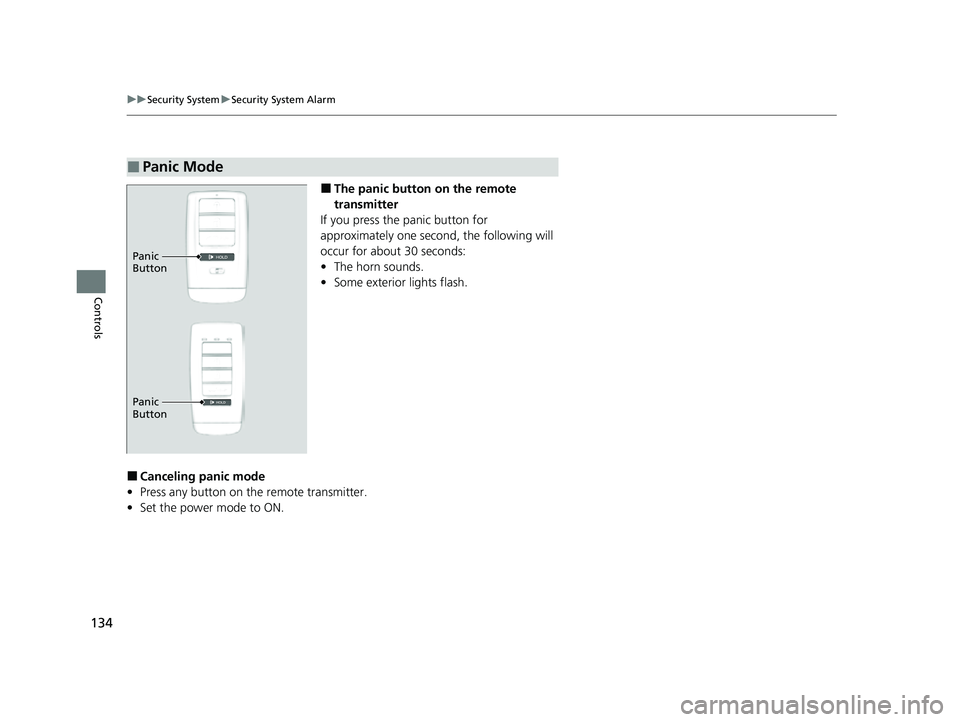
■The panic button on the remote
transmitter
If you press the panic button for
approximately one seco nd, the following will
occur for about 30 seconds:
• The horn sounds.
• Some exterior lights flash.
■Canceling panic mode
• Press any button on the remote transmitter.
• Set the power mode to ON.
■Panic Mode
Panic
Button
Panic
Button
22 ACURA ILX-31TX66900.book 134 ページ 2021年4月26日 月曜日 午前11時27分
Page 155 of 632

153
uuOperating the Switches Around the Steering Wheel uRear Defogger/Heated Door Mirror Button
Controls
Rear Defogger/Heated Door Mirror Button
Press the rear defogger and heated door
mirror button to defog the rear window and
mirrors when the power mode is in ON.
The rear defogger and heated door mirrors
automatically switch off after 10-30 minutes
depending on the outside temperature.
However, if the outsid e temperature is 32°F
(0°C) or below, it does not automatically
switch off.
Adjusting the Steering Wheel
The steering wheel height and distance from your body can be adjusted so that you
can comfortably grip the steering wheel in an appropriate driving posture.
1. While the vehicle is stopped, pull the
steering wheel adjustment lever up.
u The steering wheel adjustment lever is
under the steering column.
2. Move the steering wheel up or down, and
in or out.
u Make sure you can see the instrument
panel gauges and indicators.
3. Push the steering wheel adjustment lever
down to lock the steering wheel in position.
u After adjusting the position, make sure
you have securely locked the steering
wheel in place by trying to move it up,
down, in, and out.
1Rear Defogger/Heated Door Mirror Button
This system consumes a lot of power, so turn it off
when the window has been defogged.
Also, do not use the system for a long time while the
engine is idling. This may weaken the battery, making
it difficult to start the engine.
When the power mode is se t to ON and the outside
temperature is below 41°F (5°C), the heated door
mirror may automatically activate for 10 minutes.
1 Adjusting the Steering Wheel
3WARNING
Adjusting the steering wheel position while
driving may cause you to lose control of the
vehicle and be seriously injured in a crash.
Adjust the steering wheel only when the
vehicle is stopped.To adjust
To lock
Lever
22 ACURA ILX-31TX66900.book 153 ページ 2021年4月26日 月曜日 午前11時27分
Page 168 of 632
166
uuAdjusting the Seats uRear Seat
Controls
Rear Seat
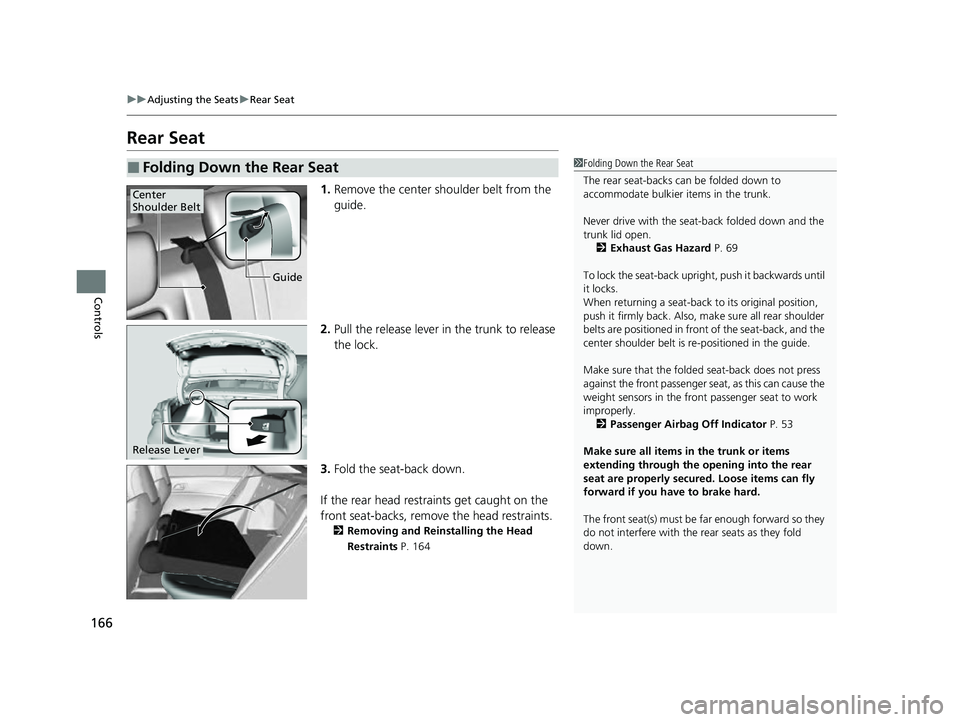
1. Remove the center shoulder belt from the
guide.
2. Pull the release lever in the trunk to release
the lock.
3. Fold the seat-back down.
If the rear head restraints get caught on the
front seat-backs, remove the head restraints.
2 Removing and Reinstalling the Head
Restraints P. 164
■Folding Down the Rear Seat1Folding Down the Rear Seat
The rear seat-backs can be folded down to
accommodate bulkier items in the trunk.
Never drive with the seat-back folded down and the
trunk lid open.
2 Exhaust Gas Hazard P. 69
To lock the seat-back upri ght, push it backwards until
it locks.
When returning a seat-back to its original position,
push it firmly back. Also, m ake sure all rear shoulder
belts are positioned in front of the seat-back, and the
center shoulder belt is re -positioned in the guide.
Make sure that the folded seat-back does not press
against the front passenger seat, as this can cause the
weight sensors in the front passenger seat to work
improperly. 2 Passenger Airbag Off Indicator P. 53
Make sure all items in the trunk or items
extending through the opening into the rear
seat are properly secured. Loose items can fly
forward if you have to brake hard.
The front seat(s) must be far enough forward so they
do not interfere with the rear seats as they fold
down.
Guide
Center
Shoulder Belt
Release Lever
22 ACURA ILX-31TX66900.book 166 ページ 2021年4月26日 月曜日 午前11時27分
Page 297 of 632

295
uuGeneral Information on the Audio System uCompatible iPod, iPhone, and USB Flash Drives
Features
• A USB flash drive of 256 MB or higher is recommended.
• Some digital audio players may not be compatible.
• Some USB flash drives (e.g., a device with security lockout) may not work.
• Some software files may not allow for audio play or text data display.
• Some versions of MP3, WMA, or AAC formats may be unsupported.
■USB Flash Drives1USB Flash Drives
Files on the USB flash drive are played in their stored
order. This order may be different from the order
displayed on your PC or device.
22 ACURA ILX-31TX66900.book 295 ページ 2021年4月26日 月曜日 午前11時27分
Page 298 of 632
296
uuGeneral Information on the Audio System uHonda App License Agreement
Features
Honda App License Agreement
PLEASE CAREFULLY READ THIS END USER LICENSE AGREEMENT (T HIS “AGREEMENT”) WHICH GOVERNS YOUR USE OF THE SOFTWARE
INSTALLED ON YOUR HONDA OR ACURA VEHICLE (YOUR “VEHICLE”) AS WELL AS THE APPLICATIONS, SERVICES, FUNCTIONS, AND
CONTENT PROVIDED THROUGH THE SOFTWARE (COLLECTIVELY, THE “SERVICES”). YOUR USE OF THE SOFTWARE OR SERVICES WILL
SERVE AS YOUR CONSENT TO THE TERMS OF THIS AGREEMENT. THE SOFTWARE IS OWNED (OR LICENSED), PROVIDED, AND/OR
OPERATED BY AMERICAN HONDA MOTOR CO. INC., (“HONDA,” “U S,” “WE,” OR “OUR”), WITH ITS BUSINESS ADDRESS AT 1919
TORRANCE BLVD., TORRANCE, CA 90501. REFERENCE TO “HONDA ” IN THIS AGREEMENT INCLUDES HONDA’S PARENT COMPANY AND
ITS AFFILIATES AND DESIGNATED AGENTS. TH E SERVICES ARE OWNED (OR LICENSED), PROV IDED, AND/OR OPERATED BY HONDA OR A
THIRD-PARTY SERVICE PROVIDER (A “PROVIDER”). REFERENCE TO A “PROVIDER” IN THIS AGREEMENT INCLUDES SUCH PROVIDER’S
PARENT COMPANY, AFFILIATES, AND DESIGNATED AGENTS.
A. Description of the Software. The SOFTWARE includes the software, firmware and the like, installe d and executing on your VEHICLE
during manufacture, and thereafter updated from time to time by HONDA, you or an authorized HONDA dealer (a “DEALER”). The
SOFTWARE allows you to access and use a va riety of SERVICES, including but not limited to: (a) HONDA applications, services, an d content
provided through the SOFTWARE (together, “H ONDA SERVICES”); and (b) PROVIDER applications, services, and content provided through
the SOFTWARE (together, “PROVIDER SERVICES” ), each of which may provide access to various information, media, content, and services.
B. SOFTWARE Licensing and Intellectual Property.
1. SOFTWARE. This AGREEMENT grants you a non-exclusive, limited, and re vocable license to use the SOFTWARE and SERVICES solely (a)
as installed on your VEHICLE by HONDA, (b) as updated on your Vehicle by HONDA, you (but only as and when directed by HONDA), o r a
DEALER and (c) as permitted unde r the terms of this AGREEMENT.
2. HONDA Services. The SOFTWARE may provide you with access to various HONDA SERVICES. Installation, activation, or use of HONDA
SERVICES may require your consent to additi onal terms, conditions, and privacy policies applicable to those HONDA SERVICES (the
“HONDA TERMS”). You acknowledge a nd agree that any collection, use, sharing of data generated by your VEHICLE or your use of your
VEHICLE, and your use of the HONDA SERVI CES shall be subject to this AGREEMENT and any additional HONDA TERMS that may be
specifically applicable to such HONDA SERVI CES or data generation. The HONDA SERVICES may collect, use, and share such data whi le
you are using the SOFTWARE.
■END USER LICENSE AGREEMENT
22 ACURA ILX-31TX66900.book 296 ページ 2021年4月26日 月曜日 午前11時27分