cruise control ACURA ILX 2022 Owner's Manual
[x] Cancel search | Manufacturer: ACURA, Model Year: 2022, Model line: ILX, Model: ACURA ILX 2022Pages: 632, PDF Size: 20.56 MB
Page 480 of 632

uuAcuraWatchTMuAdaptive Cruise Control (ACC)
478
Driving
■Automatic cancellation
The beeper sounds and a me ssage appears on the multi-information display when
ACC is automatically canceled. Any of these conditions may cause the ACC to
automatically cancel:
• Bad weather (rain, fog, snow, etc.)
• When the radar sensor behind the emblem gets dirty.
• The vehicle ahead of you cannot be detected.
• An abnormal tire condition is detected, or the tires are skidding.
• Driving on a mountainous road, or driving off road for extended periods.
• Abrupt steering wheel movement.
• When the ABS, VSA ® or CMBS
TM is activated.
• When the ABS or VSA ® system indicator comes on.
• When you manually apply the parking brake.
• When the detected vehicle within the ACC range is too close to your vehicle.
• The camera behind the rearview mirror, or the area around the camera, including
the windshield, gets dirty.
1Automatic cancellation
Even though ACC has been automatically canceled,
you can still resume the prior set speed. Wait until the
condition that caused ACC to cancel improves, then
press the RES/ACCEL button.
22 ACURA ILX-31TX66900.book 478 ページ 2021年4月26日 月曜日 午前11時27分
Page 481 of 632
Continued479
uuAcuraWatchTMuAdaptive Cruise Control (ACC)
Driving
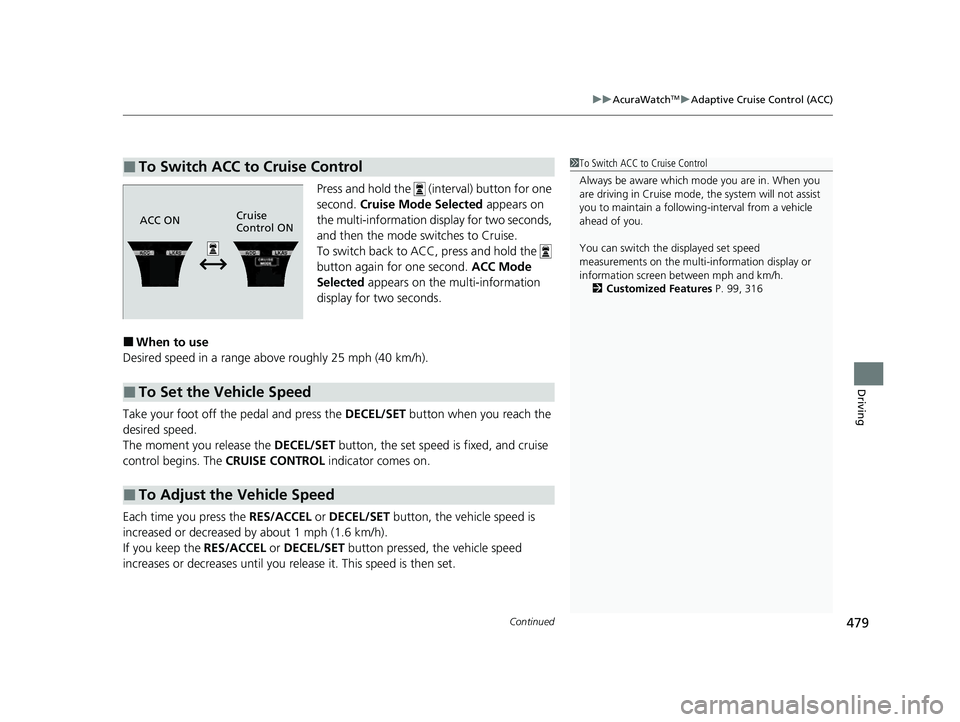
Press and hold the (interval) button for one
second. Cruise Mode Selected appears on
the multi-information display for two seconds,
and then the mode switches to Cruise.
To switch back to ACC, press and hold the
button again for one second. ACC Mode
Selected appears on the multi-information
display for two seconds.
■When to use
Desired speed in a range above roughly 25 mph (40 km/h).
Take your foot off the pedal and press the DECEL/SET button when you reach the
desired speed.
The moment you release the DECEL/SET button, the set speed is fixed, and cruise
control begins. The CRUISE CONTROL indicator comes on.
Each time you press the RES/ACCEL or DECEL/SET button, the vehicle speed is
increased or decreased by about 1 mph (1.6 km/h).
If you keep the RES/ACCEL or DECEL/SET button pressed, the vehicle speed
increases or decreases until you re lease it. This speed is then set.
■To Switch ACC to Cruise Control1To Switch ACC to Cruise Control
Always be aware which mode you are in. When you
are driving in Cruise mode, the system will not assist
you to maintain a following-interval from a vehicle
ahead of you.
You can switch the displayed set speed
measurements on the multi- information display or
information screen between mph and km/h.
2 Customized Features P. 99, 316
ACC ONCruise
Control ON
■To Set the Vehicle Speed
■To Adjust the Vehicle Speed
22 ACURA ILX-31TX66900.book 479 ページ 2021年4月26日 月曜日 午前11時27分
Page 482 of 632
uuAcuraWatchTMuAdaptive Cruise Control (ACC)
480
Driving
To cancel cruise control, do any of the following:
• Press the CANCEL button.
• Press the MAIN button.
• Depress the brake pedal.
The CRUISE CONTROL indicator goes off.
■To Cancel1To Cancel
Resuming the prior set speed:
After cruise control has be en canceled, you can still
resume the prior set speed by pressing the RES/
ACCEL button while driving at a speed of at least 25
mph (40 km/h) or more.
You cannot set or resume in the following situations:
•When vehicle speed is less than 25 mph (40 km/h).
•When the MAIN button is turned off.
At vehicle speeds of 22 m ph (35 km/h) or less, cruise
control is canceled automatically.
22 ACURA ILX-31TX66900.book 480 ページ 2021年4月26日 月曜日 午前11時27分
Page 614 of 632

612
uuEmissions Testing uTesting of Readiness Codes
Information
7. Select a nearby, lightly traveled major hi ghway where you can maintain a speed
of 50 to 60 mph (80 to 97 km/h) for at least 20 minutes. Drive on the highway in
(D. Do not use cruise control. When tra ffic allows, drive for 90 seconds without
moving the accelerator pedal. (Vehicle spee d may vary slightly; this is okay.) If you
cannot do this for a continuous 90 seconds because of traffic conditions, drive for
at least 30 seconds, then repeat it two mo re times (for a total of 90 seconds).
8. Drive in city or suburban traffic for at le ast 10 minutes. When traffic conditions
allow, let the vehicle coast for several se conds without using the accelerator pedal
or the brake pedal.
9. Park the vehicle and leave the engine off for 30 minutes.
22 ACURA ILX-31TX66900.book 612 ページ 2021年4月26日 月曜日 午前11時27分
Page 623 of 632

Index
621
Index
Index
A
AAC................................................... 239, 264
ABS (Anti-lock Brake System) .................. 501
Accessories and Modifications ................ 561
Accessory Power Sockets ......................... 173
AcuraLink ................................................. 416
AcuraWatch
TM.................................... 22, 452
Adaptive Cruise Control (ACC) .......... 80, 466
Additives Coolant .................................................. 531
Engine Oil ............................................... 526
Washer ................................................... 534
Additives, Engine Oil ............................... 526
Adjusting
Armrest .................................................. 167
Front Seats.............................................. 158
Head Restraints ....................................... 162
Mirrors.................................................... 156
Rear Seat ................................................ 166
Steering Wheel ....................................... 153
Temperature ............................................. 96
Air Conditioning System (Climate Control
System) .................................................... 175
Changing the Mode................................ 175
Defrosting the Windshield and
Windows .............................................. 176
Maintenance........................................... 554
Recirculation/Fresh Air Mode................... 175
Sensors ................................................... 178
Synchronization Mode ............................ 177
Using Automatic Climate Control............ 175 Air Pressure
....................................... 543, 607
Airbags ........................................................ 41
Advanced Airbags ..................................... 47
After a Collision ......................................... 44
Airbag Care ............................................... 55
Event Data Recorder .................................... 0
Front Airbags (SRS) .................................... 44
Indicator .............................................. 52, 76
Passenger Airbag Off Indicator .................. 53
Sensors ...................................................... 41
Side Airbags .............................................. 49
Side Curtain Airbags .................................. 51
AM/FM Radio .................................... 194, 225
Android Auto ............................................ 275
Anti-lock Brake System (ABS) .................. 501
Indicator .................................................... 75
Apple CarPlay ........................................... 270
Armrest ..................................................... 167
Audio Remote Controls ............................ 185
Audio System ............................................ 180
Adjusting the Sound ........................ 192, 220
Auxiliary Input Jack .................................. 183
Bluetooth ® Audio ............................ 208, 267
CD .................................................. 196, 239
Display Setup ................................... 193, 221
Error Messages ........................................ 280
General Information ................................ 291
HDD ........................................................ 242
iPhone ............................................. 262, 294
iPod ................................................. 199, 255
MP3/WMA/AAC ...................... 205, 239, 264 Pandora
®....................................... 202, 262
Reactivating ............................................ 184
Recommended CDs ................................. 292
Recommended Devices............................ 294
Security Code .......................................... 184
Siri Eyes Free ........................................... 269
SiriusXM ® Radio ...................................... 228
Song By VoiceTM (SBV) ............................. 258
Theft Protection ...................................... 184
USB Adapter Cable.................................. 181
USB Flash Drives ...................... 205, 264, 295
USB Port.................................................. 182
Audio/Information Screen ....................... 188
Authorized Manuals ................................ 616
Auto Door Locking/Unlocking ................. 127
Customize ....................................... 105, 329
Auto High-Beam ....................................... 147
Automatic Lighting .................................. 144
Auxiliary Input Jack .................................. 183
Average Fuel Economy .............................. 96
Average Speed ........................................... 97
B
Battery...................................................... 551
Charging System Indicator................. 74, 596
If the Battery Is Dead ............................... 590
Maintenance (Checki ng the Battery) ........ 551
Maintenance (Replacing) ......................... 552
Belts (Seat) .................................................. 34
Beverage Holders ..................................... 172
22 ACURA ILX-31TX66900.book 621 ページ 2021年4月26日 月曜日 午前11時27分
Page 626 of 632
624
Index
G
Gasoline (Fuel)Economy ................................................. 513
Gauge ....................................................... 92
Information ............................................. 510
Instant Fuel Economy ................................. 97
Low Fuel Indicator ..................................... 75
Refueling ................................................. 510
Gauges ......................................................... 92
Gear Position Indicator ............................... 73
Glass (care) ................................................ 559
Glove Box .................................................. 170
H
Handling the Unexpected ........................ 563
HandsFreeLink® (HFL)....................... 345, 374
Auto Answer ........................................... 391
Automatic Import of Cellular
Phonebook and Call History ........... 361, 393
Automatic Transferring .................... 359, 391
Caller’s ID Information ............................. 359
Displaying Messages ........................ 370, 411
HFL Buttons ..................................... 345, 374
HFL Menus ...................................... 347, 377
HFL Status Display............................ 346, 375
Limitations for Manual Operation .... 346, 376
Making a Call .................................. 364, 402
Options During a Call ...................... 368, 408
Phone Setup .................................... 352, 382
Phonebook Phonetic M odification ........... 397 Receiving a Call ............................... 367, 407
Receiving a Text Message ........................ 369
Receiving a Text/E-mail Message.............. 409
Ring Tone................................................ 392
Roadside Assistance ................................ 415
Selecting a Text/E-mail Message
Account ................................................ 410
Speed Dial ....................................... 362, 394
Text Message .................................. 357, 369
To Clear the System ................................ 360
To Create a Security PIN .................. 358, 389
To Set Up a Text Message Notice Option................................................... 357
To Set Up a Text/E-mail Message
Option................................................... 387
Use Contact Photo .................................. 392
Hard Disk Drive (HDD) Audio .................. 242
Hazard Warning Button .............................. 6
Head Restraints ........................................ 162
Headlights ................................................. 143
Auto High-Beam System.......................... 147
Automatic Operation............................... 144
Dimming ......................................... 143, 146
Operating................................................ 143
Heaters (Seat) ........................................... 174
HFL (HandsFreeLink ®)....................... 345, 374
High-Beam Indicator .................................. 78
Hill Start Assist System ............................. 436
HomeLink ® Universal Transceiver ............ 342
Honda App License Agreement .............. 296
I
Identification Numbers............................ 608
Engine and Transmission ......................... 608
Vehicle Identification............................... 608
Illumination Control ................................ 152
Knob ...................................................... 152
Immobilizer System .................................. 132
Indicator ................................................... 79
Indicators .................................................... 72
Adaptive Cruise Control (ACC).... 80, 81, 466
Anti-lock Brake System (ABS) .................... 75
Auto High-Beam ....................................... 78
Blind spot information System ........... 83, 446
Brake System (Amber) ............................... 72
Brake System (Red) ........................... 72, 598
Charging System............................... 74, 596
Collision Mitigati on Braking System
TM
(CMBSTM) .......................................... 83, 84
Electric Power Steering (EPS)
System ............................................ 76, 598
Fog Light .................................................. 78
Gear Position ............................................ 73
High Beam ................................................ 78
Immobilizer System ................................... 79
Keyless Access System............................... 79
Lane Keeping Assist System (LKAS) ... 82, 484
Lights On .................................................. 78
Low Fuel ................................................... 75
Low Oil Pressure ............................... 73, 596
Low Tire Pressure/TPMS .... 77, 448, 450, 599
Maintenance Minder............................... 519
22 ACURA ILX-31TX66900.book 624 ページ 2021年4月26日 月曜日 午前11時27分