lock ACURA ILX 2022 Manual PDF
[x] Cancel search | Manufacturer: ACURA, Model Year: 2022, Model line: ILX, Model: ACURA ILX 2022Pages: 632, PDF Size: 20.56 MB
Page 168 of 632
166
uuAdjusting the Seats uRear Seat
Controls
Rear Seat
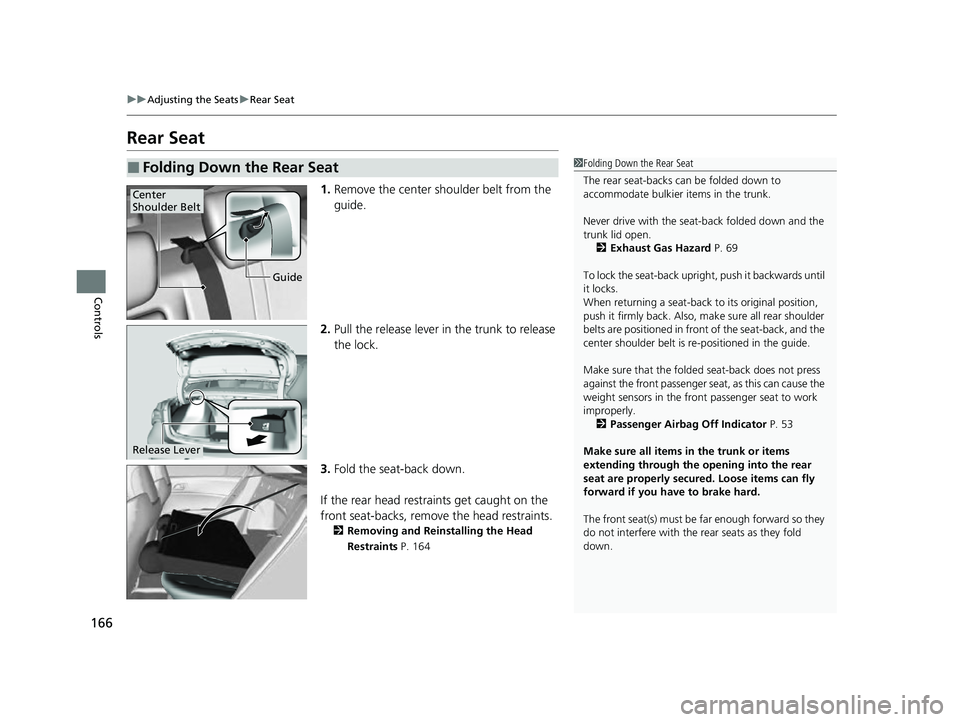
1. Remove the center shoulder belt from the
guide.
2. Pull the release lever in the trunk to release
the lock.
3. Fold the seat-back down.
If the rear head restraints get caught on the
front seat-backs, remove the head restraints.
2 Removing and Reinstalling the Head
Restraints P. 164
■Folding Down the Rear Seat1Folding Down the Rear Seat
The rear seat-backs can be folded down to
accommodate bulkier items in the trunk.
Never drive with the seat-back folded down and the
trunk lid open.
2 Exhaust Gas Hazard P. 69
To lock the seat-back upri ght, push it backwards until
it locks.
When returning a seat-back to its original position,
push it firmly back. Also, m ake sure all rear shoulder
belts are positioned in front of the seat-back, and the
center shoulder belt is re -positioned in the guide.
Make sure that the folded seat-back does not press
against the front passenger seat, as this can cause the
weight sensors in the front passenger seat to work
improperly. 2 Passenger Airbag Off Indicator P. 53
Make sure all items in the trunk or items
extending through the opening into the rear
seat are properly secured. Loose items can fly
forward if you have to brake hard.
The front seat(s) must be far enough forward so they
do not interfere with the rear seats as they fold
down.
Guide
Center
Shoulder Belt
Release Lever
22 ACURA ILX-31TX66900.book 166 ページ 2021年4月26日 月曜日 午前11時27分
Page 170 of 632

168
Controls
Interior Convenience Items
Interior Lights
■ON
The interior lights come on regardless of
whether the doors are open or closed.
■Door activated
The interior lights come on in the following
situations:
• When any of the doors are opened.
• You unlock the driver’s door.
• When the power mode is set to VEHICLE
OFF (LOCK).
■OFF
The interior lights remain off regardless of
whether the doors are open or closed.
■Interior Light Switches1 Interior Light Switches
In the door activated position, the interior lights fade
out and go off about 30 seconds after the doors are
closed.
The lights go off after about 30 seconds in the
following situations:
•When you unlock the driver’s door but do not open
it.
•When you set the power mode to VEHICLE OFF
(LOCK) but do not open a door.
You can change the interi or lights dimming time.
2 Customized Features P. 99, 316
The interior lights go off im mediately in the following
situations:
•When you lock the driver’s door.•When you close the driver’s door in ACCESSORY
mode.
•When you set the power mode to ON.
To avoid draining the ba ttery, do not leave the
interior light on for an extended length of time when
the engine is off.
If you leave any of the doors open in VEHICLE OFF
(LOCK) mode, the interior lights go off after about 15
minutes.
Door Activated Position
Off
Front
On
Off
Rear
On
Door Activated Position
22 ACURA ILX-31TX66900.book 168 ページ 2021年4月26日 月曜日 午前11時27分
Page 172 of 632
170
uuInterior Convenience Items uStorage Items
Controls
Storage Items
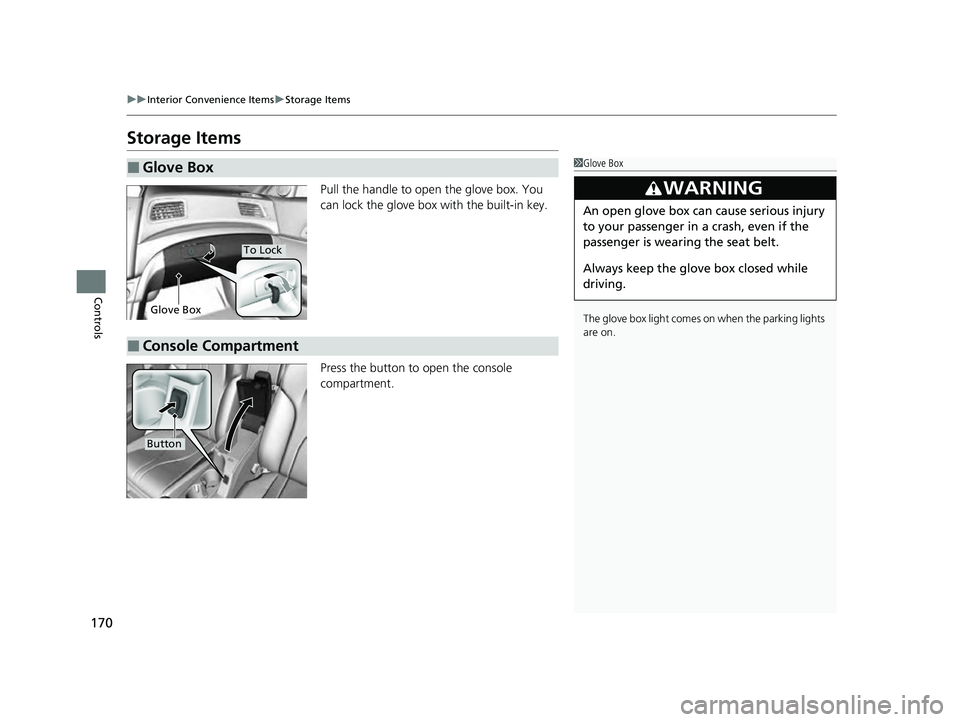
Pull the handle to open the glove box. You
can lock the glove box with the built-in key.
Press the button to open the console
compartment.
■Glove Box1Glove Box
The glove box light comes on when the parking lights
are on.
3WARNING
An open glove box can cause serious injury
to your passenger in a crash, even if the
passenger is wearing the seat belt.
Always keep the glove box closed while
driving.
Glove Box
To Lock
■Console Compartment
Button
22 ACURA ILX-31TX66900.book 170 ページ 2021年4月26日 月曜日 午前11時27分
Page 189 of 632
187
Features
Audio System Basic Operation
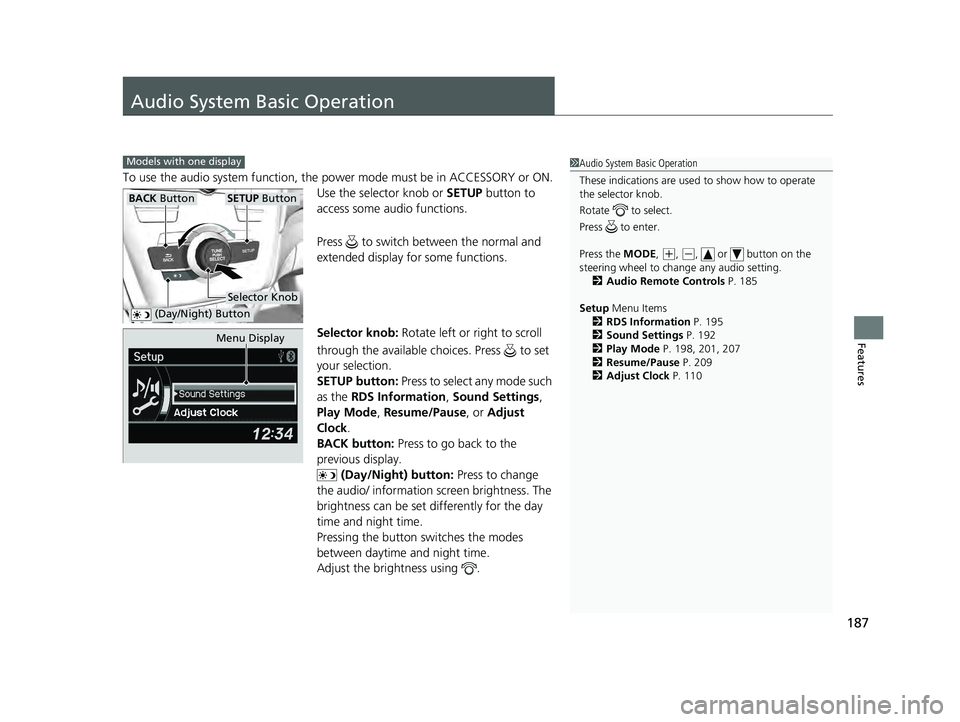
To use the audio system function, the power mode must be in ACCESSORY or ON.
Use the selector knob or SETUP button to
access some au dio functions.
Press to switch between the normal and
extended display fo r some functions.
Selector knob: Rotate left or right to scroll
through the available choices. Press to set
your selection.
SETUP button: Press to select any mode such
as the RDS Information , Sound Settings,
Play Mode , Resume/Pause , or Adjust
Clock .
BACK button: Press to go back to the
previous display. (Day/Night) button: Press to change
the audio/ information screen brightness. The
brightness can be set differently for the day
time and night time.
Pressing the button switches the modes
between daytime and night time.
Adjust the brightness using .
Models with one display1 Audio System Basic Operation
These indications are used to show how to operate
the selector knob.
Rotate to select.
Press to enter.
Press the MODE,
( +, (-, or button on the
steering wheel to cha nge any audio setting.
2 Audio Remote Controls P. 185
Setup Menu Items
2 RDS Information P. 195
2 Sound Settings P. 192
2 Play Mode P. 198, 201, 207
2 Resume/Pause P. 209
2 Adjust Clock P. 110
BACK ButtonSETUP Button
Selector Knob
(Day/Night) Button
Menu Display
22 ACURA ILX-31TX66900.book 187 ページ 2021年4月26日 月曜日 午前11時27分
Page 191 of 632
189
uuAudio System Basic Operation uAudio/Information Screen
Continued
Features
■Audio display
Shows the current audio information.
2 Audio System Basic Operation P. 187
■Wallpaper
Shows a clock screen or an image you import.
2 Wallpaper Setup P. 190
■Minimum display
Minimizes the display by only showing the clock and audio status on the display.
22 ACURA ILX-31TX66900.book 189 ページ 2021年4月26日 月曜日 午前11時27分
Page 212 of 632
210
Features
Audio System Basic Operation
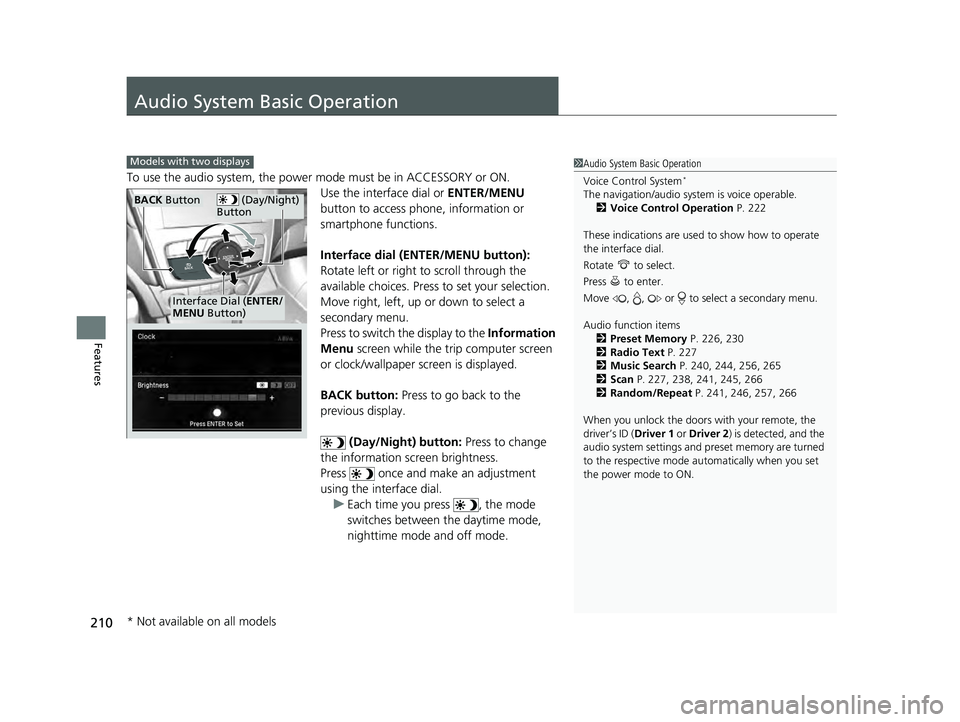
To use the audio system, the power mode must be in ACCESSORY or ON.Use the interface dial or ENTER/MENU
button to access phone, information or
smartphone functions.
Interface dial (ENTER/MENU button):
Rotate left or right to scroll through the
available choices. Press to set your selection.
Move right, left, up or down to select a
secondary menu.
Press to switch the display to the Information
Menu screen while the trip computer screen
or clock/wallpaper screen is displayed.
BACK button: Press to go back to the
previous display.
(Day/Night) button: Press to change
the information screen brightness.
Press once and make an adjustment
using the interface dial. u Each time you press , the mode
switches between the daytime mode,
nighttime mode and off mode.
1Audio System Basic Operation
Voice Control System
*
The navigation/audio system is voice operable.
2 Voice Control Operation P. 222
These indications are used to show how to operate
the interface dial.
Rotate to select.
Press to enter.
Move , , or to se lect a secondary menu.
Audio function items 2 Preset Memory P. 226, 230
2 Radio Text P. 227
2 Music Search P. 240, 244, 256, 265
2 Scan P. 227, 238, 241, 245, 266
2 Random/Repeat P. 241, 246, 257, 266
When you unlock the doors with your remote, the
driver’s ID (Driver 1 or Driver 2) is detected, and the
audio system settings and pr eset memory are turned
to the respective mode automatically when you set
the power mode to ON.
Models with two displays
(Day/Night)
ButtonBACK Button
Interface Dial ( ENTER/
MENU Button)
* Not available on all models
22 ACURA ILX-31TX66900.book 210 ページ 2021年4月26日 月曜日 午前11時27分
Page 217 of 632
215
uuAudio System Basic Operation uInformation Screen
Continued
Features
Information Screen
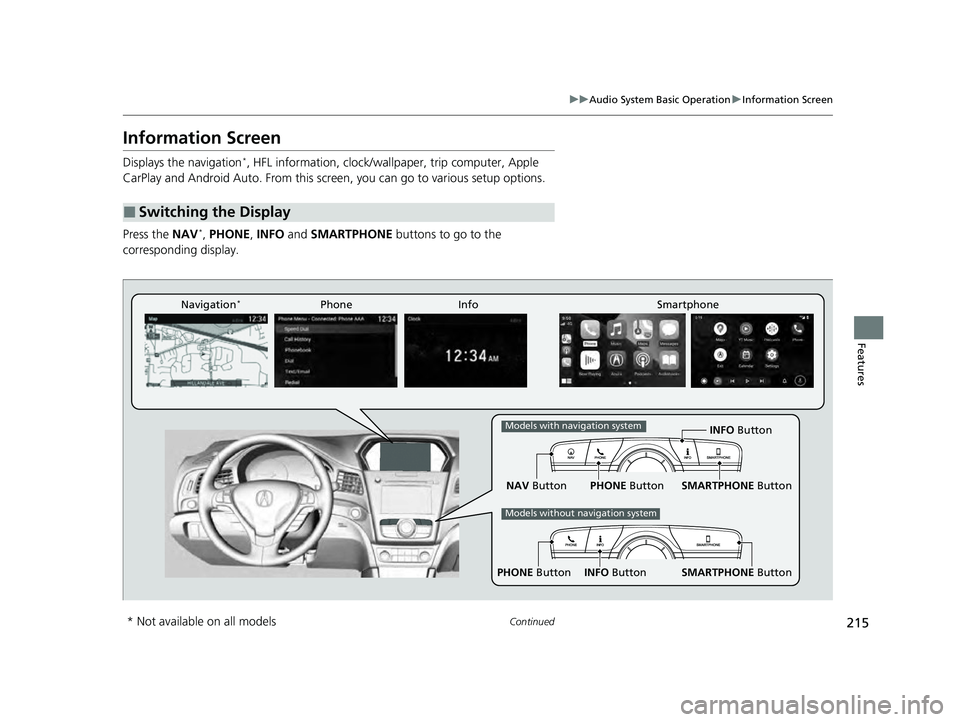
Displays the navigation*, HFL information, clock/wallp aper, trip computer, Apple
CarPlay and Android Auto. From this screen, you can go to various setup options.
Press the NAV
*, PHONE, INFO and SMARTPHONE buttons to go to the
corresponding display.
■Switching the Display
SMARTPHONE Button
PHONE Button INFO Button
Phone Info Smartphone
SMARTPHONE Button
PHONE Button
NAV Button INFO Button
Models with navigation system
Models without navigation system
Navigation*
* Not available on all models
22 ACURA ILX-31TX66900.book 215 ページ 2021年4月26日 月曜日 午前11時27分
Page 218 of 632
216
uuAudio System Basic Operation uInformation Screen
Features
■Navigation*
Shows the navigation screen.
2 Refer to the Navigation System Manual
■Phone
Shows the HFL information.
2 Bluetooth ® HandsFreeLink ® P. 374
■Info
Shows the AcuraLink/Messages*, Trip Computer , Clock, Traffic Incidents* or
Voice Recognition Guide*. Press or INFO button to display the Information
Menu screen.
AcuraLink/Messages
*:
Shows a AcuraLink ® message menu list.
2AcuraLink®* P. 416
Trip Computer :
Current Drive
Shows the range and instant and average fuel economy of the current trip, as well
as the average fuel economy from your last trip.
History of Trip A
Shows the range, average fuel economy an d distances traveled for the current trip,
as well as the average fuel economy and distances traveled during the last three
driving cycles.
Each time you reset the trip meter A, th e information on the display updates. The
history of the previous th ree driving cycles is kept.
* Not available on all models
22 ACURA ILX-31TX66900.book 216 ページ 2021年4月26日 月曜日 午前11時27分
Page 219 of 632
217
uuAudio System Basic Operation uInformation Screen
Continued
Features
Deleting the history manually
1. Press on the History of Trip A screen to select Delete History.
2. A confirmation message appears on the screen. Rotate to select Yes, then
press .
Clock :
Shows a clock screen and an image you import.
Traffic Incidents
*:
Shows a traffic incidents list.
2 Refer to the Navigation System Manual
Voice Recognition Guide*:
Shows a voice recognition guide screen.
■Smartphone
Displays the Apple CarPlay or Android Auto.
2 Apple CarPlay P. 270
2 Android Auto P. 275
* Not available on all models
22 ACURA ILX-31TX66900.book 217 ページ 2021年4月26日 月曜日 午前11時27分
Page 220 of 632
uuAudio System Basic Operation uInformation Screen
218
Features
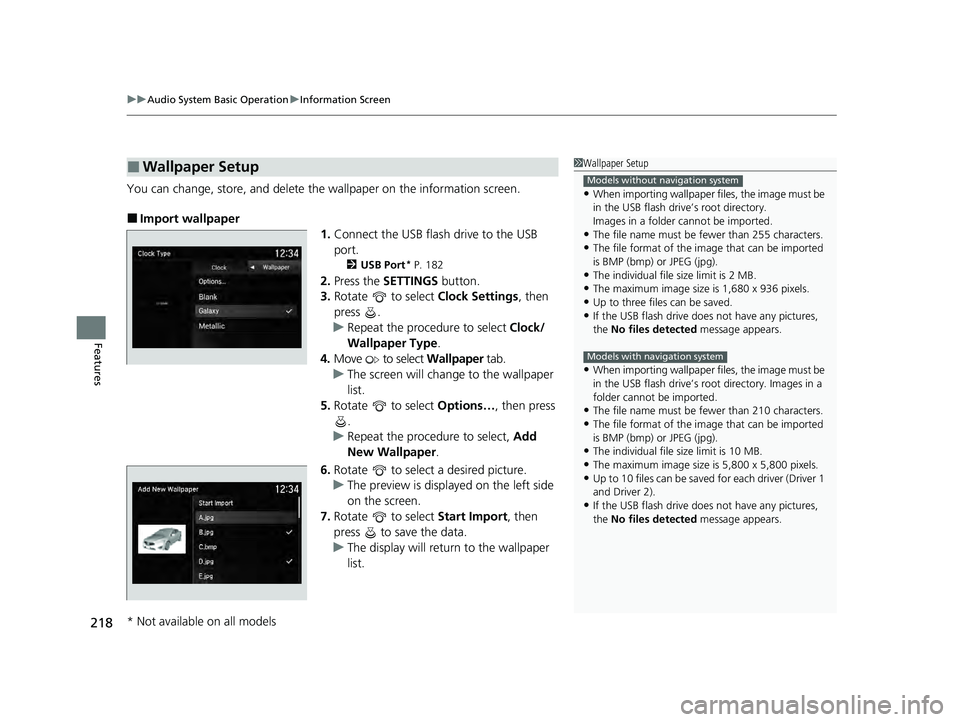
You can change, store, and delete the wallpaper on the information screen.
■Import wallpaper
1.Connect the USB flash drive to the USB
port.
2 USB Port* P. 182
2.Press the SETTINGS button.
3. Rotate to select Clock Settings, then
press .
u Repeat the procedure to select Clock/
Wallpaper Type .
4. Move to select Wallpaper tab.
u The screen will change to the wallpaper
list.
5. Rotate to select Options…, then press
.
u Repeat the procedure to select, Add
New Wallpaper .
6. Rotate to select a desired picture.
u The preview is displayed on the left side
on the screen.
7. Rotate to select Start Import, then
press to save the data.
u The display will return to the wallpaper
list.
■Wallpaper Setup1Wallpaper Setup
•When importing wallpaper f iles, the image must be
in the USB flash drive’s root directory.
Images in a folder cannot be imported.
•The file name must be fewer than 255 characters.
•The file format of the im age that can be imported
is BMP (bmp) or JPEG (jpg).
•The individual file size limit is 2 MB.
•The maximum image size is 1,680 x 936 pixels.
•Up to three files can be saved.•If the USB flash drive doe s not have any pictures,
the No files detected message appears.
•When importing wallpaper f iles, the image must be
in the USB flash drive’s root directory. Images in a
folder cannot be imported.
•The file name must be fewer than 210 characters.
•The file format of the im age that can be imported
is BMP (bmp) or JPEG (jpg).
•The individual file size limit is 10 MB.
•The maximum image size is 5,800 x 5,800 pixels.
•Up to 10 files can be saved for each driver (Driver 1
and Driver 2).
•If the USB flash drive doe s not have any pictures,
the No files detected message appears.
Models without navigation system
Models with navigation system
* Not available on all models
22 ACURA ILX-31TX66900.book 218 ページ 2021年4月26日 月曜日 午前11時27分