AUX ACURA ILX 2022 Owners Manual
[x] Cancel search | Manufacturer: ACURA, Model Year: 2022, Model line: ILX, Model: ACURA ILX 2022Pages: 632, PDF Size: 20.56 MB
Page 10 of 632
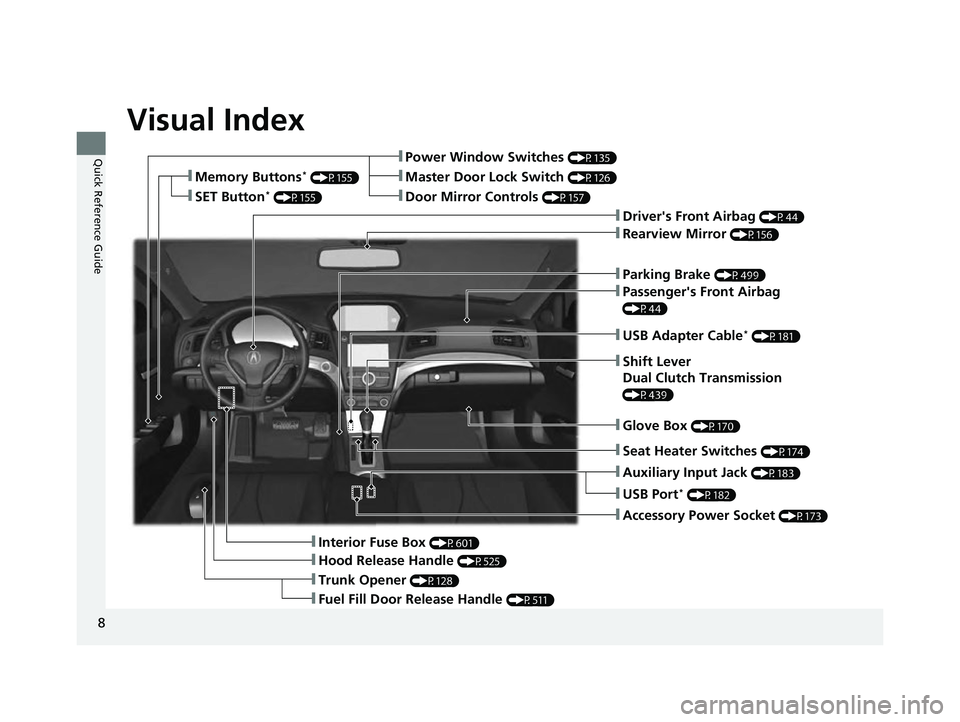
Visual Index
8
Quick Reference Guide
❚Parking Brake (P499)
❚Power Window Switches (P135)
❚Driver's Front Airbag (P44)
❚Trunk Opener (P128)
❚Hood Release Handle (P525)
❚Interior Fuse Box (P601)
❚Passenger's Front Airbag
(P44)
❚USB Adapter Cable* (P181)
❚Shift Lever
Dual Clutch Transmission
(P439)
❚Glove Box (P170)
❚Accessory Power Socket (P173)
❚Rearview Mirror (P156)
❚Auxiliary Input Jack (P183)
❚Door Mirror Controls (P157)
❚Master Door Lock Switch (P126)❚Memory Buttons* (P155)
❚SET Button* (P155)
❚Fuel Fill Door Release Handle (P511)
❚USB Port* (P182)
❚Seat Heater Switches (P174)
22 ACURA ILX-31TX66900.book 8 ページ 2021年4月26日 月曜日 午前11時27分
Page 15 of 632
13
Quick Reference Guide
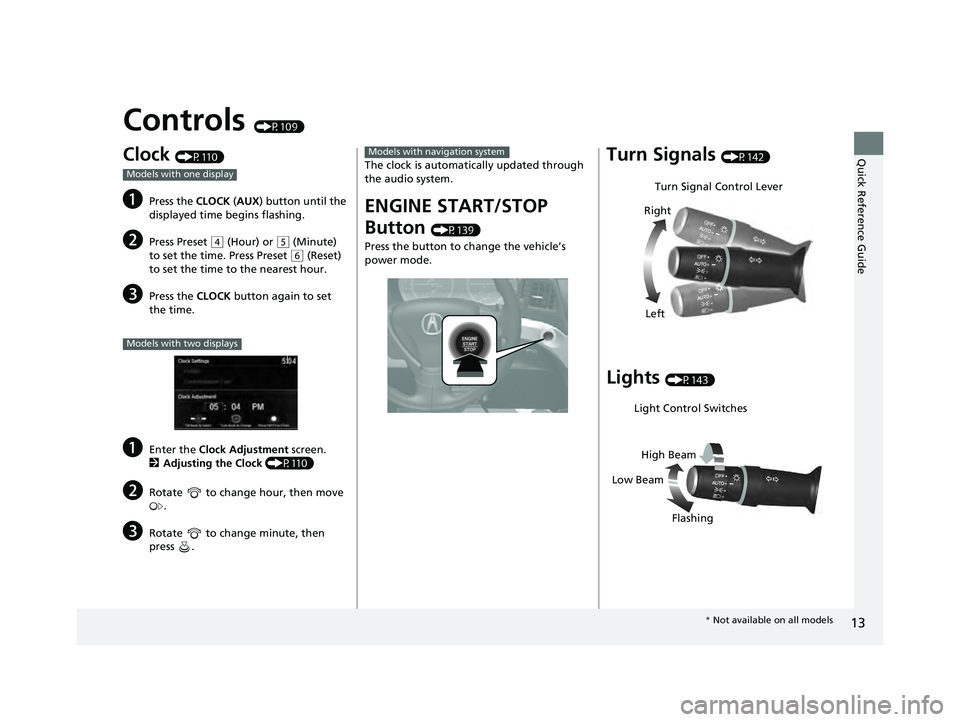
Controls (P109)
Clock (P110)
aPress the CLOCK (AUX ) button until the
displayed time begins flashing.
bPress Preset ( 4 (Hour) or (5 (Minute)
to set the time. Press Preset
( 6 (Reset)
to set the time to the nearest hour.
cPress the CLOCK button again to set
the time.
aEnter the Clock Adjustment screen.
2 Adjusting the Clock (P110)
bRotate to change hour, then move
.
cRotate to change minute, then
press .
Models with one display
Models with two displays
The clock is automati cally updated through
the audio system.
ENGINE START/STOP
Button
(P139)
Press the button to ch ange the vehicle’s
power mode.
Models with navigation systemTurn Signals (P142)
Lights (P143)
Turn Signal Control Lever
Right
Left
Light Control Switches
Low Beam High Beam
Flashing
* Not available on all models
22 ACURA ILX-31TX66900.book 13 ページ 2021年4月26日 月曜日 午前11時27分
Page 19 of 632
17
Quick Reference Guide
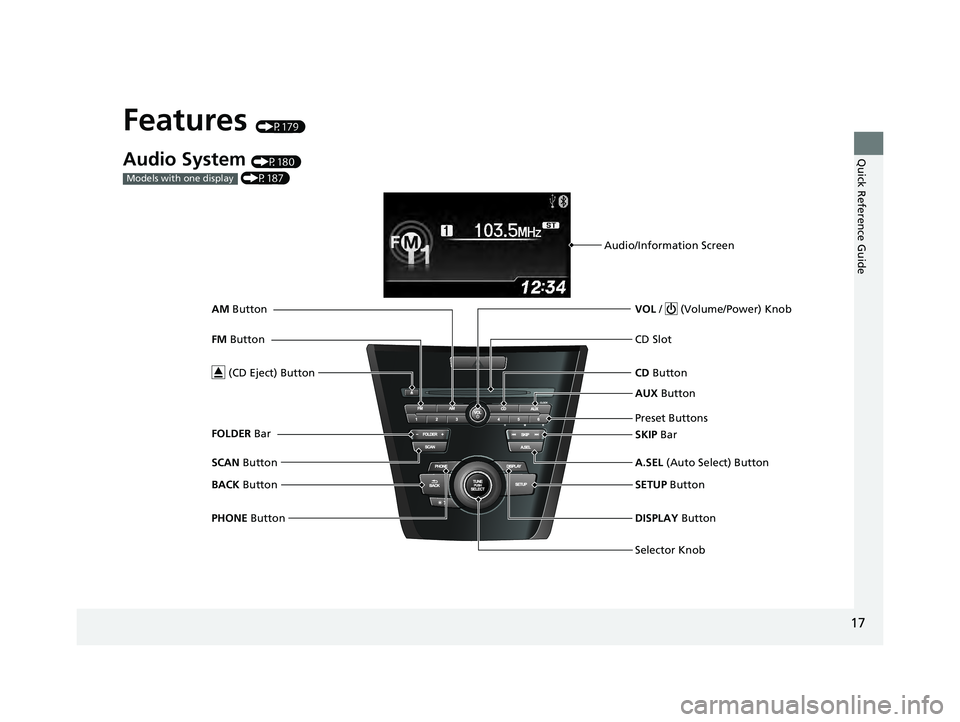
Features (P179)
Audio System (P180)
(P187)
Models with one display
Audio/Information Screen
Selector Knob VOL / (Volume/Power) Knob
CD Button
CD Slot
(CD Eject) Button
Preset Buttons
SETUP Button
PHONE Button DISPLAY Button
A.SEL
(Auto Select) Button
SKIP Bar AUX
Button
BACK Button
SCAN
Button
FM
Button
AM
Button
FOLDER Bar
22 ACURA ILX-31TX66900.book 17 ページ 2021年4月26日 月曜日 午前11時27分
Page 21 of 632
19
Quick Reference Guide
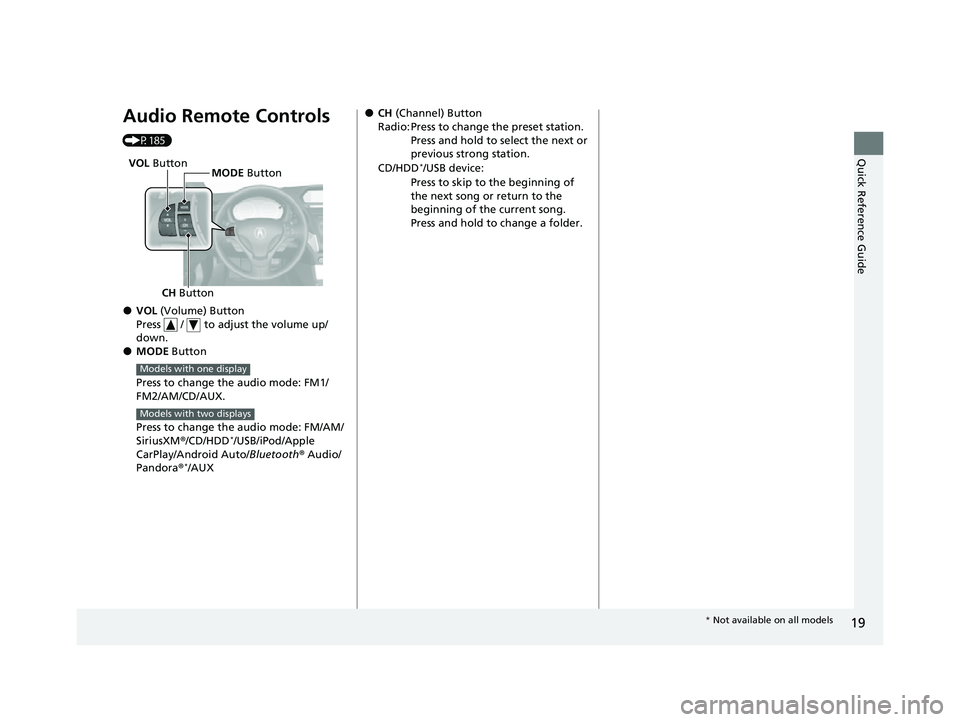
Audio Remote Controls
(P185)
●VOL (Volume) Button
Press / to adjust the volume up/
down.
●MODE Button
Press to change the audio mode: FM1/
FM2/AM/CD/AUX.
Press to change the audio mode: FM/AM/
SiriusXM ®/CD/HDD
*/USB/iPod/Apple
CarPlay/Android Auto/ Bluetooth® Audio/
Pandora ®
*/AUX
CH Button MODE
Button
VOL
Button
Models with one display
Models with two displays
●CH (Channel) Button
Radio: Press to change the preset station. Press and hold to select the next or
previous strong station.
CD/HDD
*/USB device:
Press to skip to the beginning of
the next song or return to the
beginning of the current song.
Press and hold to change a folder.
* Not available on all models
22 ACURA ILX-31TX66900.book 19 ページ 2021年4月26日 月曜日 午前11時27分
Page 181 of 632
179
Features
This chapter describes how to operate technology features.
Audio System.................................... 180
USB Adapter Cable*........................ 181
USB Port*........................................ 182
Auxiliary Input Jack .......................... 183
Audio System Theft Protection ......... 184
Audio Remote Controls .................... 185
Audio System Basic Operation ........ 187
Audio/Information Screen ................ 188
Playing AM/FM Radio ....................... 194
Playing a CD .................................... 196
Playing an iPod ................................ 199
Playing Pandora ®
*1........................... 202
Playing a USB Flash Drive ................. 205
Models with one display
Playing Bluetooth ® Audio................. 208
Audio System Basic Operation ........ 210
On Demand Multi-Use Display
TM...... 211
Information Screen .......................... 215
Display Setup ................................... 221
Playing AM/FM Radio ....................... 225
Playing SiriusXM ® Radio ................... 228
Playing a CD .................................... 239
Playing Hard Disk Drive (HDD) Audio ... 242
Playing an iPod ................................ 255
Song By Voice
TM (SBV) ...................... 258
Playing Pandora ®*1........................... 262
Playing a USB Flash Drive ................. 264
Models with two displaysPlaying Bluetooth ® Audio ................ 267
Siri Eyes Free .................................... 269
Apple CarPlay .................................. 270
Android Auto .................................. 275
Audio Error Messages ...................... 280
General Information on the Audio System ............................................. 291
HomeLink® Universal Transceiver*......342Customized Features ................ 310, 316
Bluetooth® HandsFreeLink® ..... 345, 374
AcuraLink®
*....................................... 416
*1: Available only on U.S. models.
* Not available on all models
22 ACURA ILX-31TX66900.book 179 ページ 2021年4月26日 月曜日 午前11時27分
Page 185 of 632

183
uuAudio System uAuxiliary Input Jack
Features
Auxiliary Input Jack
Use the jack to connect a standard audio device.
1.Open the AUX cover.
2. Connect a standard audio device to the
input jack using a 1/8 inch (3.5 mm) stereo
miniplug.
u The audio system auto matically switches
to the AUX mode.
Connect a standard audio device to the input
jack using a 1/8 inch (3.5 mm) stereo
miniplug. u The audio system auto matically switches
to the AUX mode.1 Auxiliary Input Jack
To switch to another mode, press the MODE button
on the steering wheel or any of the audio mode
buttons.
To return to the AUX mode, press the MODE button
on the steering wheel or AUX button.
To switch to another mode or return to the AUX
mode, press the MODE button on the steering wheel
or select Source on the On Demand Multi-Use
Display
TM.
Models with one display
Models with two displays
Models with one display
Models with two displays
22 ACURA ILX-31TX66900.book 183 ページ 2021年4月26日 月曜日 午前11時27分
Page 187 of 632
185
uuAudio System uAudio Remote Controls
Continued
Features
Audio Remote Controls
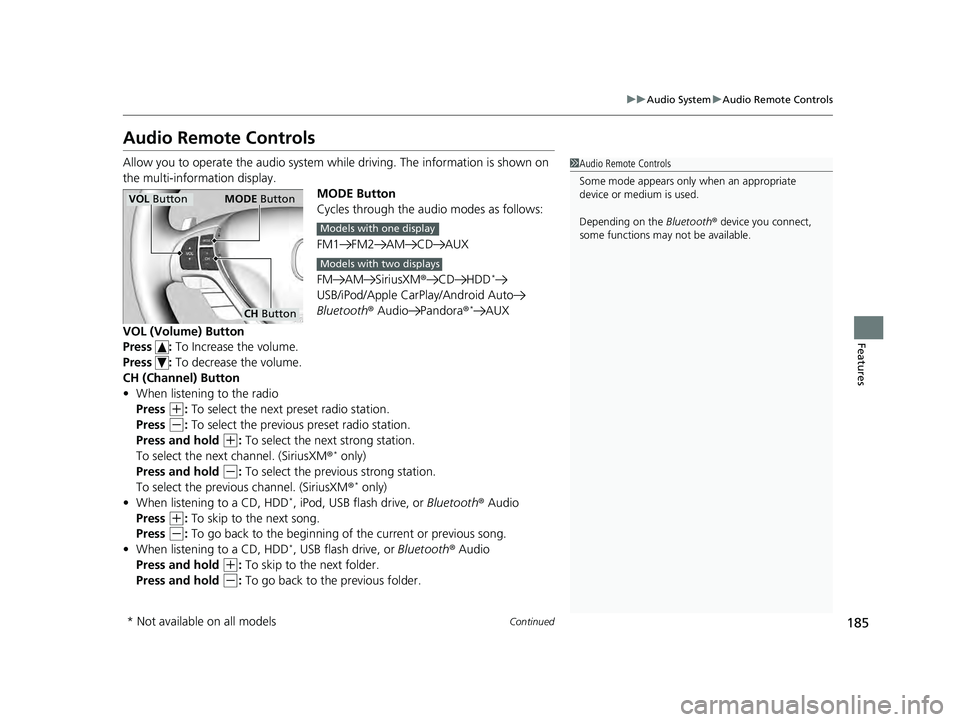
Allow you to operate the audio system whil e driving. The information is shown on
the multi-information display. MODE Button
Cycles through the audio modes as follows:
FM1 FM2 AM CD AUX
FM AM SiriusXM®CD HDD
*
USB/iPod/Apple CarPlay/Android Auto
Bluetooth ® Audio Pandora ®*AUX
VOL (Volume) Button
Press : To Increase the volume.
Press : To decrease the volume.
CH (Channel) Button
• When listening to the radio
Press
(+: To select the next preset radio station.
Press
(-: To select the previous preset radio station.
Press and hold
(+: To select the next strong station.
To select the next channel. (SiriusXM ®* only)
Press and hold
(-: To select the previous strong station.
To select the previous channel. (SiriusXM ®* only)
• When listening to a CD, HDD*, iPod, USB flash drive, or Bluetooth® Audio
Press
(+: To skip to the next song.
Press
(-: To go back to the beginning of the current or previous song.
• When listening to a CD, HDD*, USB flash drive, or Bluetooth ® Audio
Press and hold
(+: To skip to the next folder.
Press and hold
(-: To go back to the previous folder.
1 Audio Remote Controls
Some mode appears only when an appropriate
device or medium is used.
Depending on the Bluetooth® device you connect,
some functions may not be available.
VOL Button MODE Button
CH Button
Models with one display
Models with two displays
* Not available on all models
22 ACURA ILX-31TX66900.book 185 ページ 2021年4月26日 月曜日 午前11時27分
Page 201 of 632

199
uuAudio System Basic Operation uPlaying an iPod
Continued
Features
Playing an iPod
Using your USB connector, connect the iPod to the USB adapter cable, then select
the USB mode.
2 USB Adapter Cable* P. 181
AUX Button
Press to select iP od (if connected).
Album Art
USB Indicator
Appears when an iPod is connected.
Selector Knob
Turn to change songs. Turn to select an item,
then press to set your selection. BACK Button
Press to go back to the previous display. VOL/ (Volume/Power) Knob
Press to turn the audio system on and off.
Turn to adjust the volume.
SKIP Bar
Press or to change songs.
Press and hold to move rapidly within a
song.
SETUP Button
Press to display menu items.
* Not available on all models
22 ACURA ILX-31TX66900.book 199 ページ 2021年4月26日 月曜日 午前11時27分
Page 204 of 632
202
uuAudio System Basic Operation uPlaying Pandora ®*1
Features
Playing Pandora ®*1
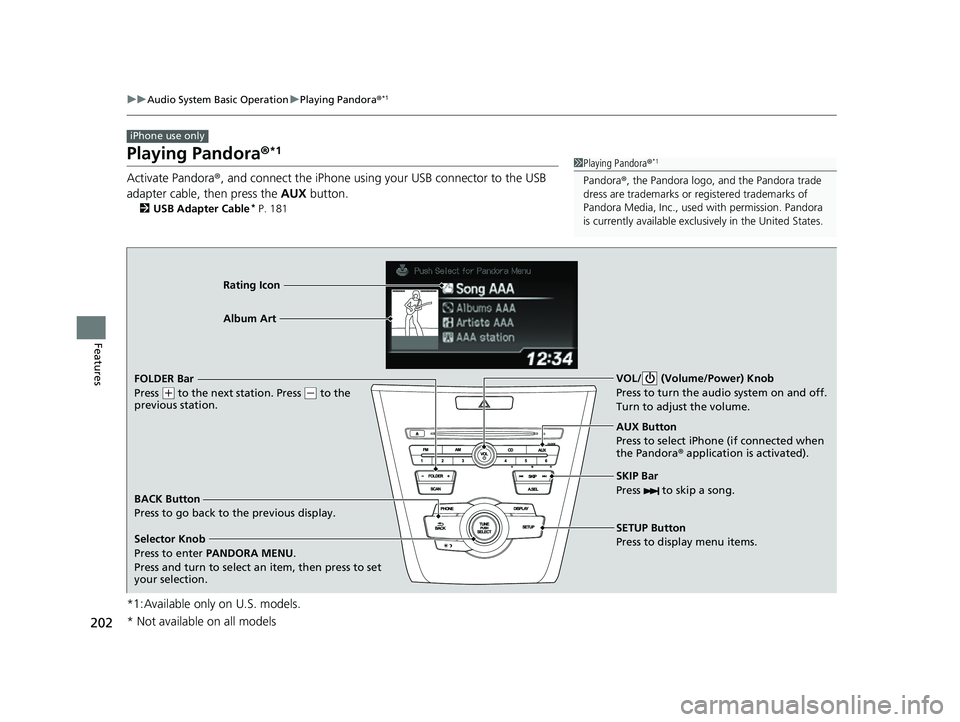
Activate Pandora®, and connect the iPhone using your USB connector to the USB
adapter cable, then press the AUX button.
2USB Adapter Cable* P. 181
*1:Available only on U.S. models.
iPhone use only
1Playing Pandora ®*1
Pandora®, the Pandora logo, and the Pandora trade
dress are trademarks or registered trademarks of
Pandora Media, Inc., used with permission. Pandora
is currently available exclusively in the United States.
AUX Button
Press to select iPhone (if connected when
the Pandora ® application is activated).
Rating Icon
Selector Knob
Press to enter PANDORA MENU .
Press and turn to select an item, then press to set
your selection. BACK Button
Press to go back to the previous display. VOL/ (Volume/Power) Knob
Press to turn the audi
o system on and off.
Turn to adjust the volume.
SKIP Bar
Press to skip a song.
SETUP Button
Press to display menu items.
FOLDER Bar
Press
(
+ to the next station. Press (- to the
previous station. Album Art
* Not available on all models
22 ACURA ILX-31TX66900.book 202 ページ 2021年4月26日 月曜日 午前11時27分
Page 207 of 632

205
uuAudio System Basic Operation uPlaying a USB Flash Drive
Continued
Features
Playing a USB Flash Drive
Your audio system reads and plays sound files on a USB flash drive in either MP3,
WMA or AAC*1 format.
Connect your USB flash drive to the USB adapter cable, then press the AUX button.
2USB Adapter Cable* P. 181
*1:Only AAC format files recorded with iTunes are playable on this unit.
BACK Button
Press to go back to the previous display. SKIP Bar
Press or to change files.
Press and hold to move rapidly within a
file.
SETUP Button
Press to display menu items.
Selector Knob
Press and turn to select a file, then press
to set your selection. AUX Button
Press to select USB flash drive
(if connected). VOL/ (Volume/Power) Knob
Press to turn the audi
o system on and off.
Turn to adjust the volume.
FOLDER Bar
Press
( + to skip to the next folder, and (-
to skip to the beginning of the previous
folder.
SCAN Button
You will get a 10-second sampling of each file.
●Press to sample all files in the current folder.●Press and hold to sample the first file in each
of the main folders.
●To turn off scan, press the button.
USB Indicator
Appears when a USB flash drive is
connected.
* Not available on all models
22 ACURA ILX-31TX66900.book 205 ページ 2021年4月26日 月曜日 午前11時27分