alarm ACURA ILX 2022 Owners Manual
[x] Cancel search | Manufacturer: ACURA, Model Year: 2022, Model line: ILX, Model: ACURA ILX 2022Pages: 632, PDF Size: 20.56 MB
Page 14 of 632
12
Quick Reference Guide
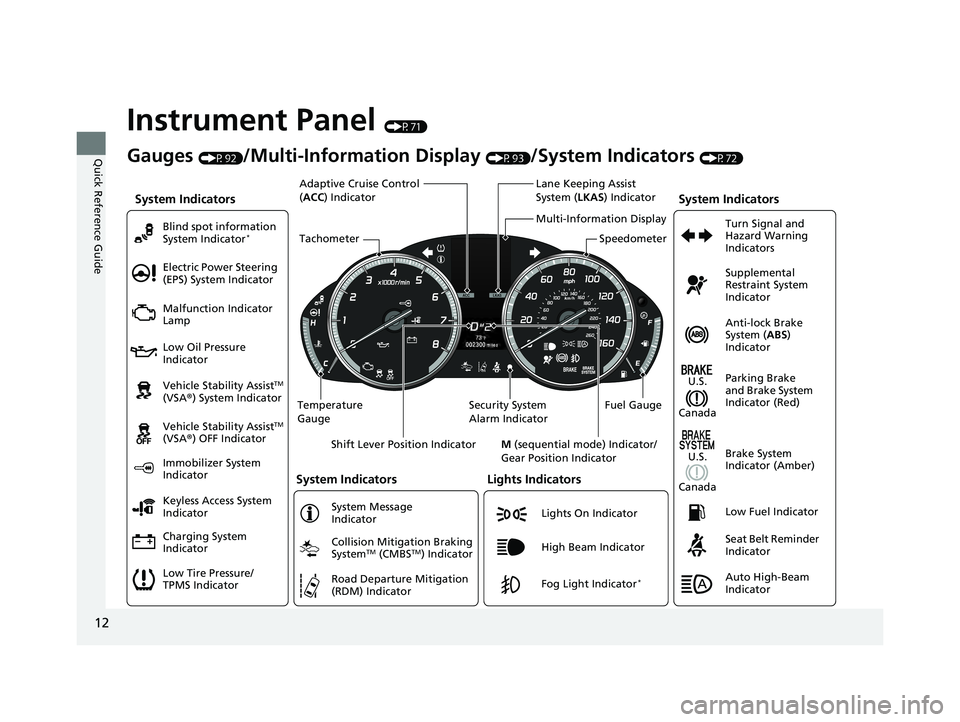
Instrument Panel (P71)
System Indicators
Malfunction Indicator
Lamp
Low Oil Pressure
Indicator
Charging System
Indicator Vehicle Stability Assist
TM
(VSA ®) System Indicator
Vehicle Stability Assist
TM
(VSA ®) OFF Indicator
Electric Power Steering
(EPS) System Indicator
Lights Indicators
Lights On Indicator
High Beam Indicator
Immobilizer System
Indicator
System Indicators
System Message
Indicator
Gauges (P92)/Multi-Information Display (P93)/System Indicators (P72)
Low Tire Pressure/
TPMS Indicator Keyless Access System
Indicator Blind spot information
System Indicator
*
Collision Mitigation Braking
SystemTM (CMBSTM) Indicator
Road Departure Mitigation
(RDM) IndicatorFog Light Indicator*
Temperature
Gauge Security System
Alarm IndicatorFuel Gauge
Tachometer
Multi-Information Display
Speedometer
Shift Lever Position Indicator M (sequential mode) Indicator/
Gear Position Indicator
System Indicators
Lane Keeping Assist
System ( LKAS) Indicator
Adaptive Cruise Control
(
ACC ) Indicator
Anti-lock Brake
System ( ABS)
Indicator
Seat Belt Reminder
Indicator Parking Brake
and Brake System
Indicator (Red) Supplemental
Restraint System
Indicator
Low Fuel Indicator Turn Signal and
Hazard Warning
Indicators
Brake System
Indicator (Amber)
U.S.
Canada
U.S.
Canada
Auto High-Beam
Indicator
22 ACURA ILX-31TX66900.book 12 ページ 2021年4月26日 月曜日 午前11時27分
Page 81 of 632

79
uuIndicators u
Continued
Instrument Panel
IndicatorNameOn/BlinkingExplanationMessage
Immobilizer
System Indicator
●Comes on briefly when you set the
power mode to ON, then goes off.
●Comes on if the immobilizer system
cannot recognize the key
information.
●Blinks - You cannot start the engine. Set
the power mode to VEHICLE OFF (LOCK),
then select the ON mode again.
●Repeatedly blinks - The system may be
malfunctioning. Have your vehicle checked
by a dealer.
●Do not attempt to alter this system or add
other devices to it. Electrical problems can
occur.
—
Security System
Alarm Indicator
●Blinks when the Security System
Alarm has been set.
2 Security System Alarm P. 132—
Keyless Access
System Indicator
●Comes on for a few seconds when
you set the power mode to ON, then
goes off.
●Comes on as soon as a problem is
detected in the keyless access system
or keyless starting system.
●Stays on constantly or does not come
on at all - Have your vehicle checked by a
dealer.
Indicator
22 ACURA ILX-31TX66900.book 79 ページ 2021年4月26日 月曜日 午前11時27分
Page 111 of 632
109
Controls
This chapter explains how to operate the various controls necessary for driving.
Clock.................................................. 110
Locking and Unlocking the Doors
Key .................................................. 112
Low Keyless Remote Signal Strength ... 114
Locking/Unlocking the Doors from the Outside .......................................... 115
Locking/Unlocking the Doors from the Inside ............................................. 124
Childproof Door Locks ..................... 126
Auto Door Locking/Unlocking .......... 127
Opening and Closing the Trunk ....... 128
Security System ................................ 132
Immobilizer System .......................... 132
Security System Alarm ...................... 132 Windows
........................................... 135Moonroof............................................. 138Operating the Switches Around the
Steering Wheel ENGINE START/STOP Button............. 139
Turn Signals ..................................... 142
Light Switches.................................. 143
Fog Lights
*...................................... 146
Daytime Running Lights ................... 146
Auto High-Beam .............................. 147
Wipers and Washers ........................ 150
Brightness Control ........................... 152
Rear Defogger/Heated Door Mirror Button ..153
Adjusting the Steering Wheel........... 153 Driving Position Memory System
*.... 154
Mirrors ............................................... 156
Interior Rearview Mirror ................... 156
Power Door Mirrors ......................... 157
Adjusting the Seats .......................... 158
Front Seats ...................................... 158
Interior Convenience Items .............. 168
Interior Lights .................................. 168
Storage Items .................................. 170
Other Interior Convenience Items..... 173
Climate Control System ................... 175
Using Automatic Climate Control .... 175
Automatic Climate Control Sensors......178
* Not available on all models
22 ACURA ILX-31TX66900.book 109 ページ 2021年4月26日 月曜日 午前11時27分
Page 134 of 632

132
Controls
Security System
Immobilizer System
This system prevents a key that has not been pre-registered from starting the
engine.
Pay attention to the follo wing when pressing the ENGINE START/STOP button:
• Do not allow objects that emit strong radio waves near the ENGINE START/
STOP button.
• Make sure the key is not covered by or touching a metal object.
• Do not bring a key from another vehi cle’s immobilizer system near the ENGINE
START/STOP button.
• Do not put the key near magnetic items. Electronic devices, such as televisions
and audio systems emit strong magnetic fields. Note that even a key chain can
become magnetic.
Security System Alarm
The security system alarm activates wh en the trunk, hood or doors are forcibly
opened. The alarm does not activate if th e trunk or doors are opened with the key,
remote transmitter or keyless access system.
However, the alarm activates if a door is opened with the key and then the
transmission is taken out of
(P or the hood is opened before the power mode is set
to ON.
■When the security sy stem alarm activates
The horn sounds intermittently and some exterior lights flash.
1 Immobilizer System
NOTICE
Leaving the key in the vehicl e can result in theft or
accidental movement of the vehicle.
Always take the key with you whenever you leave the
vehicle unattendedM
Do not alter the system or add other devices to itM
Doing so may damage the system and make your
vehicle inoperableM
1 Security System Alarm
Do not alter the system or add other devices to it.
Doing so may damage the system and make your
vehicle inoperable.
The security system alarm continues for a maximum
of two minutes until the security system alarm
deactivates.
22 ACURA ILX-31TX66900.book 132 ページ 2021年4月26日 月曜日 午前11時27分
Page 135 of 632

Continued133
uuSecurity System uSecurity System Alarm
Controls
■To deactivate the security system alarm
Unlock the vehicle using the key, remote tra nsmitter or keyless access system, or set
the power mode to ON. The system, along with the horn and flashing lights, is
deactivated.
■Setting the security system alarm
The security system alarm automatically sets when the following conditions have
been met:
• The power mode is set to VEHICLE OFF (LOCK).
• The hood is closed.
• All doors and the trunk are locked from ou tside with the key, remote transmitter,
or keyless access system.
■When the security system alarm sets
The security system alarm in dicator in the instrument panel blinks and the blinking
interval changes after about 15 seconds.
■To cancel the security system alarm
The security system alarm is canceled wh en the vehicle is unlocked using the key,
remote transmitter or keyless access system, or when the power mode is set to ON.
The security system alarm indica tor goes off at the same time.
1Security System Alarm
Do not set the security system alarm when someone
is in the vehicle or a window is open. The system can
accidentally activate when:
•Unlocking the door with the lock tab.•Opening the trunk with the trunk opener or the
emergency trunk opener.
•Opening the hood with the hood release.•Taking the transmission out of ( P.
If the battery goes dead after you have set the
security system alarm, the security alarm may go off
once the battery is re charged or replaced.
If this occurs, deactivate the security system alarm by
unlocking a door using the ke y, remote transmitter,
or keyless access system.
22 ACURA ILX-31TX66900.book 133 ページ 2021年4月26日 月曜日 午前11時27分
Page 136 of 632
134
uuSecurity System uSecurity System Alarm
Controls
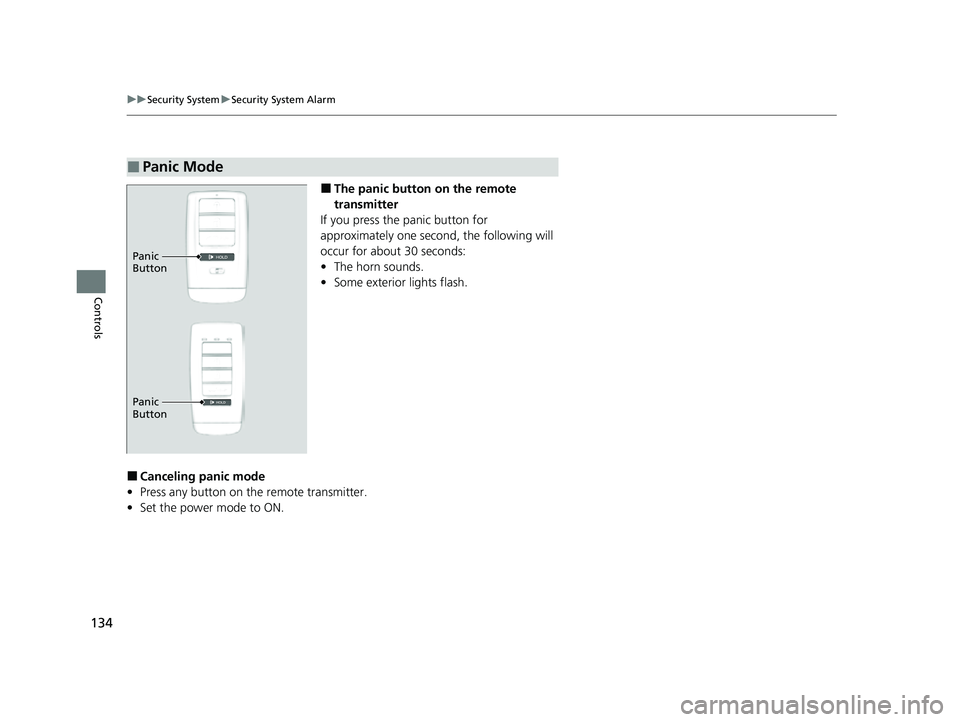
■The panic button on the remote
transmitter
If you press the panic button for
approximately one seco nd, the following will
occur for about 30 seconds:
• The horn sounds.
• Some exterior lights flash.
■Canceling panic mode
• Press any button on the remote transmitter.
• Set the power mode to ON.
■Panic Mode
Panic
Button
Panic
Button
22 ACURA ILX-31TX66900.book 134 ページ 2021年4月26日 月曜日 午前11時27分
Page 143 of 632

141
uuOperating the Switches Around the Steering Wheel uENGINE START/STOP Button
Controls
When the power mode is set to any mode
other than OFF and yo u remove the keyless
remote from the vehicle and shut the door, an
alarm will sound. If the alarm continues to
sound, place the keyless remote in another
location.
■When the power mode is in
ACCESSORY
The alarm will sound from outside the vehicle.
■When the power mode is in ON
An alarm will sound both inside and outside
the vehicle. In additi on, a warning indicator
will appear on the instrument panel.
■Keyless Remote Reminder1 Keyless Remote Reminder
When the keyless remote is within the system’s
operational range, and the driv er’s door is closed, the
warning function cancels.
If the keyless remote is taken out of the vehicle after
the engine has been st arted, you can no longer
change the ENGINE START/STOP button mode or
restart the engine. Always make sure if the remote is
in your vehicle when you operate the ENGINE
START/STOP button.
Removing the keyless remote from the vehicle
through a window does not activate the warning
buzzer.
Do not put the keyless remo te on the dashboard or in
the glove box. It may cause the warning buzzer to go
off. Under some other cond itions that can prevent
the vehicle from locating the remote, the warning
buzzer may also go off even if the remote is within
the system’s operational range.
22 ACURA ILX-31TX66900.book 141 ページ 2021年4月26日 月曜日 午前11時27分
Page 420 of 632

uuAcuraLink ®*u
418
Features
Your subscribed telematics service provider can track your vehicle’s location,
remotely lock or unlock doors, and help you find your vehicle.
To use these features, you need your us er ID and personal identification number
(PIN).
■Stolen vehicle tracking
This feature searches and tracks down your ve hicle position even if it is on the move.
If you believe that your vehicle has been stolen, contact the police as well as the
provider.
■Remote door lock/unlock
The provider can remotely lock or unlock doors upon your request.
■Vehicle finder
This feature is convenient to use when trying to locate yo ur vehicle in large areas,
such as a crowded parking lot. If you cannot locate your vehicle after using the
remote transmitter’s answerback function, you can contact the provider which can
then flash your vehicle’s exterior lights and sound the horn.
■Security alarm notification
If the security system in your vehicle detects an abnormal condition, such as
someone tampering with the lock on your ve hicle, the provider notifies you by your
preferred method.
■Security Features1 Security Features
The contact information of your provider, your user
ID and PIN will be given when you subscribe to
AcuraLink. If you forget any of the above, contact a
dealer, or visit owners.acura.com (U.S.) or
www.acura.ca/owners/acuralink (Canada).
You can also activate the remote door lock/unlock
and vehicle finder features from the Internet or using
your smartphone app. As k a dealer, or visit
owners.acura.com (U.S.) or www.acura.ca/owners/
acuralink (Canada) for details.
1Vehicle finder
The lights will stop flas hing and horn will stop
sounding under the foll owing conditions:
•When 30 seconds have elapsed.
•You unlock the doors using the remote transmitter.•You unlock the doors using the keyless access
system.
•You unlock the doors us ing the built-in key.•The power mode is set to ACCESSORY or ON.
22 ACURA ILX-31TX66900.book 418 ページ 2021年4月26日 月曜日 午前11時27分
Page 437 of 632

Continued435
uuWhen Driving uStarting the Engine
Driving
■To stop the engine1Remote Engine Start*
•You have already used the remote twice to start
the engine.
•Another registered keyless remote is in the vehicle.
•There is any antenna failure.•The door is unlocked with the built-in key.
•The engine oil pressure is low.
•The engine coolant temper ature is extremely high.•The telematics* unit malfunctions.
•The security system alarm is not set.
Before starting the engine, make sure to check the
door lock status using the remote. When you press
the button, wait for the green LED to blink. If
the red LED turns on, the doors and trunk did not
lock, and the engine does not start.
While the engine is running, the vehicle will
automatically preconditi on inside the vehicle.
When it is warm outside:
•The climate control system is activated in
recirculation mode.
When it is cold outside:
•The defroster is activated at a moderately warm
temperature.
•The rear defogger and door mirror heaters are
activated.
•The seat heater is activated. 2Seat Heaters P. 174
Press and hold the button
for one second.
Go within the range,
and try again.
Amber LED: Blinks when any
button is pressed. Red LED:
●Comes on for one second to let you
know that the engine has stopped.
●Blinks when the remote is out of
the keyless access system range.
The engine will not stop.
* Not available on all models
22 ACURA ILX-31TX66900.book 435 ページ 2021年4月26日 月曜日 午前11時27分
Page 627 of 632
625
Index
Malfunction Indicator Lamp .............. 74, 597
Parking Brake and Brake System ....... 72, 598
Road Departure Mitigation (RDM) ............. 80
Seat Belt Reminder.............................. 35, 75
Security System Alarm............................... 79
Sequential mode ..................................... 442
Shift Lever Position.................................... 73
Supplemental Restraint System ........... 52, 76
System Message ....................................... 77
Transmission System ................................. 73
Turn Signal ............................................... 78
Vehicle Stability Assist
TM (VSA®)
System ............................................ 76, 443
VSA ® OFF.......................................... 77, 444
Information .............................................. 605
Information Screen .................................. 215
Instant Fuel Economy ................................ 97
Instrument Panel ........................................ 71
Brightness Control .................................. 152
Interface Dial ............................................ 210
Interior Lights ........................................... 168
Interior Rearview Mirror ......................... 156
iPhone ............................................... 262, 294
iPod ................................................... 199, 255
J
Jack (Wheel Nut Wrench) ........................ 583
Jump Starting ........................................... 590
K
Key Number Tag ....................................... 114
Keyless Access System ............................... 115
Keyless Lockout Prevention ..................... 122
Keys ........................................................... 112
Lockout Prevention .................................. 122
Number Tag ............................................ 114
Rear Door Won’t Open ............................ 126
Remote Transmitter ................................. 120
Two-way Keyless Access Remote ..... 123, 434
Types and Functions ................................ 112
Kickdown (Dual Clutch Transmission) ..... 438
L
Lane Keeping Assist System (LKAS)......... 481
LATCH (Child Seats) .................................... 61
License information .................................. 309
Lights ................................................. 143, 535
Automatic ............................................... 144
Bulb Replacement .................................... 535
Daytime Running Lights ........................... 146
Fog Lights ................................................ 146
High-Beam Indicator .................................. 78
Interior .................................................... 168
Light Switches ......................................... 143
Lights On Indicator .................................... 78
Turn Signals ............................................. 142
Limitations for Manual Operation .. 346, 376
Load Limits ................................................ 429 Locking/Unlocking
.................................... 112
Auto Door Locking/Unlocking.................. 127
Childproof Door Locks............................. 126
From Inside ............................................. 124
From Outside .......................................... 115
Keys ........................................................ 112
Using a Key ............................................. 121
Lockout Prevention System ..................... 122
Low Battery Charge ................................. 596
Low Fuel Indicator ...................................... 75
Low Keyless Access Remote Signal
Strength .................................................. 114
Low Oil Pressure Indicator ................. 73, 596
Lower Anchors ............................................ 61
Luggage (Maximum Load Limit) ............. 429
22 ACURA ILX-31TX66900.book 625 ページ 2021年4月26日 月曜日 午前11時27分