interior lights ACURA ILX 2022 Owners Manual
[x] Cancel search | Manufacturer: ACURA, Model Year: 2022, Model line: ILX, Model: ACURA ILX 2022Pages: 632, PDF Size: 20.56 MB
Page 11 of 632
9
Quick Reference Guide
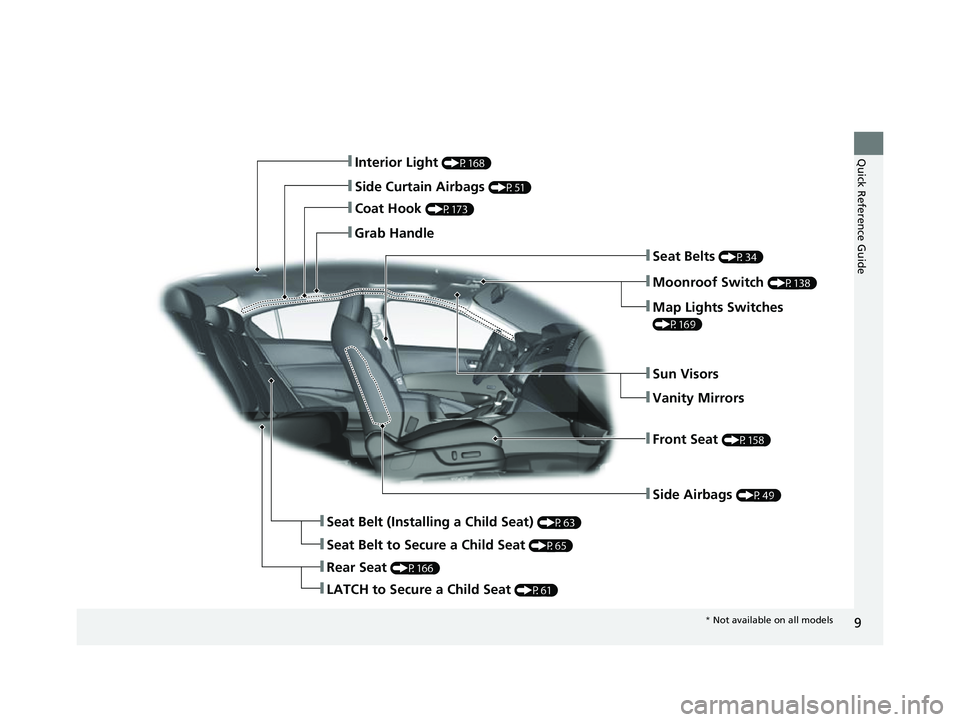
❚Side Airbags (P49)
❚Interior Light (P168)
❚Side Curtain Airbags (P51)
❚Coat Hook (P173)
❚Grab Handle
❚Moonroof Switch (P138)
❚Seat Belts (P34)
❚Seat Belt (Installing a Child Seat) (P63)
❚Rear Seat (P166)
❚Front Seat (P158)
❚Sun Visors
❚Vanity Mirrors
❚Seat Belt to Secure a Child Seat (P65)
❚LATCH to Secure a Child Seat (P61)
❚Map Lights Switches
(P169)
* Not available on all models
22 ACURA ILX-31TX66900.book 9 ページ 2021年4月26日 月曜日 午前11時27分
Page 106 of 632
104
uuGauges and Multi-Information Display uMulti-Information Display
Instrument Panel
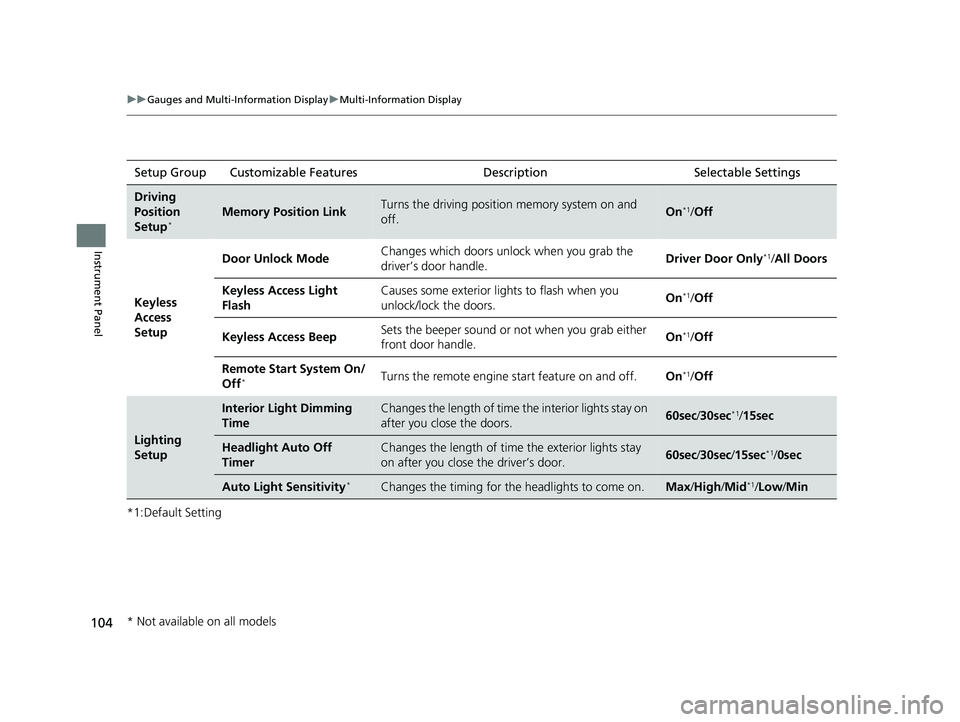
*1:Default SettingSetup Group Customizable Features
DescriptionSelectable Settings
Driving
Position
Setup
*Memory Position LinkTurns the driving position memory system on and
off.On*1/Off
Keyless
Access
Setup Door Unlock Mode
Changes which doors unlock when you grab the
driver’s door handle.
Driver Door Only
*1/
All Doors
Keyless Access Light
Flash Causes some exterior lights to flash when you
unlock/lock the doors.
On
*1/
Off
Keyless Access Beep Sets the beeper sound or not when you grab either
front door handle. On
*1/
Off
Remote Start System On/
Off
*Turns the remote engine start feature on and off. On*1/Off
Lighting
Setup
Interior Light Dimming
TimeChanges the length of time th e interior lights stay on
after you close the doors.60sec /30sec*1/15sec
Headlight Auto Off
TimerChanges the length of time the exterior lights stay
on after you close the driver’s door.60sec /30sec /15sec*1/ 0sec
Auto Light Sensitivity*Changes the timing for the headlights to come on.Max/High /Mid*1/Low/ Min
* Not available on all models
22 ACURA ILX-31TX66900.book 104 ページ 2021年4月26日 月曜日 午前11時27分
Page 111 of 632
109
Controls
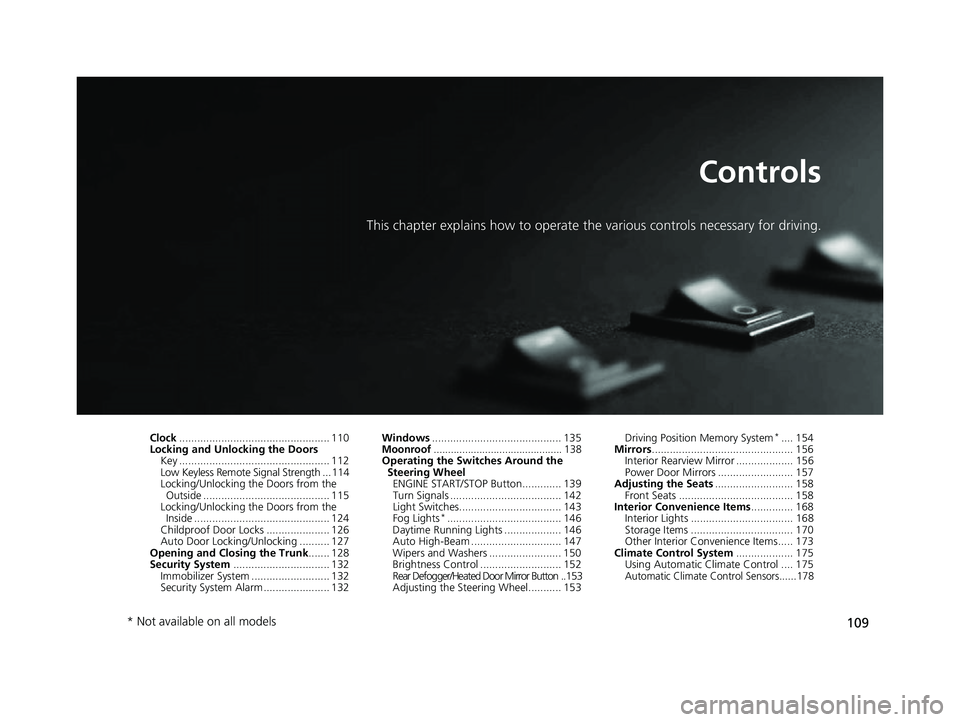
This chapter explains how to operate the various controls necessary for driving.
Clock.................................................. 110
Locking and Unlocking the Doors
Key .................................................. 112
Low Keyless Remote Signal Strength ... 114
Locking/Unlocking the Doors from the Outside .......................................... 115
Locking/Unlocking the Doors from the Inside ............................................. 124
Childproof Door Locks ..................... 126
Auto Door Locking/Unlocking .......... 127
Opening and Closing the Trunk ....... 128
Security System ................................ 132
Immobilizer System .......................... 132
Security System Alarm ...................... 132 Windows
........................................... 135Moonroof............................................. 138Operating the Switches Around the
Steering Wheel ENGINE START/STOP Button............. 139
Turn Signals ..................................... 142
Light Switches.................................. 143
Fog Lights
*...................................... 146
Daytime Running Lights ................... 146
Auto High-Beam .............................. 147
Wipers and Washers ........................ 150
Brightness Control ........................... 152
Rear Defogger/Heated Door Mirror Button ..153
Adjusting the Steering Wheel........... 153 Driving Position Memory System
*.... 154
Mirrors ............................................... 156
Interior Rearview Mirror ................... 156
Power Door Mirrors ......................... 157
Adjusting the Seats .......................... 158
Front Seats ...................................... 158
Interior Convenience Items .............. 168
Interior Lights .................................. 168
Storage Items .................................. 170
Other Interior Convenience Items..... 173
Climate Control System ................... 175
Using Automatic Climate Control .... 175
Automatic Climate Control Sensors......178
* Not available on all models
22 ACURA ILX-31TX66900.book 109 ページ 2021年4月26日 月曜日 午前11時27分
Page 117 of 632

115
uuLocking and Unlocking the Doors uLocking/Unlocking the Doors from the Outside
Continued
Controls
Locking/Unlocking the Doors from the Outside
When you carry the keyless remote, you can
lock/unlock the doors and open the trunk.
You can lock/unlock the doors within a radius
of about 32 inches (80 cm) of the outside door
handle. You can open the trunk within about
32 inches (80 cm) radius from the trunk
release button.
■Locking the doors
Press the door lock button on the front door.u Some exterior lights flash; the beeper
sounds; all the doors lock; and the
security system sets.
■Using the Keyless Access System1Locking/Unlocking the Doors from the Outside
If the interior light switch is in the door activated
position, the interior light comes on when you unlock
the doors.
No doors opened: The li ght fades out after 30
seconds.
Doors relocked: The light goes off immediately.
2 Interior Lights P. 168
Door Lock Button
1Using the Keyless Access System
If you do not open a door within 30 seconds of
unlocking the vehicle with the keyless access system,
the doors will automatically relock.
You can lock or unlock doors using the keyless access
system only when the power mode is in VEHICLE OFF.
The keyless access system will not lock the vehicle
when a door is open.
•Do not leave the keyless remote in the vehicle
when you get out. Carry it with you.
•Even if you are not carrying the keyless remote, you
can lock/unlock the doors while someone else with
the remote is within range.
•The door may be unlocked if the door handle is
covered with water in heavy rain or in a car wash if
the keyless remote is within range.
•If you grip a front door handle wearing gloves, the
door sensor may be slow to respond or may not
respond by unlocking the doors.
22 ACURA ILX-31TX66900.book 115 ページ 2021年4月26日 月曜日 午前11時27分
Page 158 of 632
156
Controls
Mirrors
Interior Rearview Mirror
Adjust the angle of the rearview mirror when you are sitting in the correct driving
position.
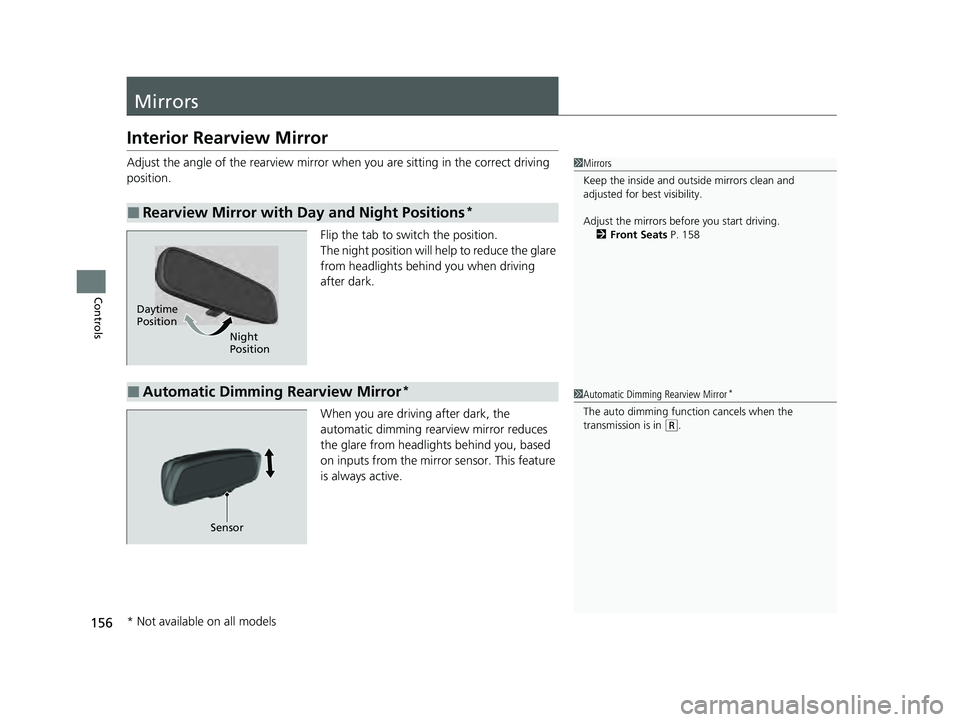
Flip the tab to switch the position.
The night position will help to reduce the glare
from headlights behind you when driving
after dark.
When you are driving after dark, the
automatic dimming rearview mirror reduces
the glare from headlights behind you, based
on inputs from the mirror sensor. This feature
is always active.
■Rearview Mirror with Day and Night Positions*
1Mirrors
Keep the inside and out side mirrors clean and
adjusted for best visibility.
Adjust the mirrors before you start driving. 2 Front Seats P. 158
Daytime
Position
Night
Position
■Automatic Dimming Rearview Mirror*1Automatic Dimming Rearview Mirror*
The auto dimming function cancels when the
transmission is in
(R.
Sensor
* Not available on all models
22 ACURA ILX-31TX66900.book 156 ページ 2021年4月26日 月曜日 午前11時27分
Page 170 of 632

168
Controls
Interior Convenience Items
Interior Lights
■ON
The interior lights come on regardless of
whether the doors are open or closed.
■Door activated
The interior lights come on in the following
situations:
• When any of the doors are opened.
• You unlock the driver’s door.
• When the power mode is set to VEHICLE
OFF (LOCK).
■OFF
The interior lights remain off regardless of
whether the doors are open or closed.
■Interior Light Switches1 Interior Light Switches
In the door activated position, the interior lights fade
out and go off about 30 seconds after the doors are
closed.
The lights go off after about 30 seconds in the
following situations:
•When you unlock the driver’s door but do not open
it.
•When you set the power mode to VEHICLE OFF
(LOCK) but do not open a door.
You can change the interi or lights dimming time.
2 Customized Features P. 99, 316
The interior lights go off im mediately in the following
situations:
•When you lock the driver’s door.•When you close the driver’s door in ACCESSORY
mode.
•When you set the power mode to ON.
To avoid draining the ba ttery, do not leave the
interior light on for an extended length of time when
the engine is off.
If you leave any of the doors open in VEHICLE OFF
(LOCK) mode, the interior lights go off after about 15
minutes.
Door Activated Position
Off
Front
On
Off
Rear
On
Door Activated Position
22 ACURA ILX-31TX66900.book 168 ページ 2021年4月26日 月曜日 午前11時27分
Page 171 of 632
169
uuInterior Convenience Items uInterior Lights
Controls
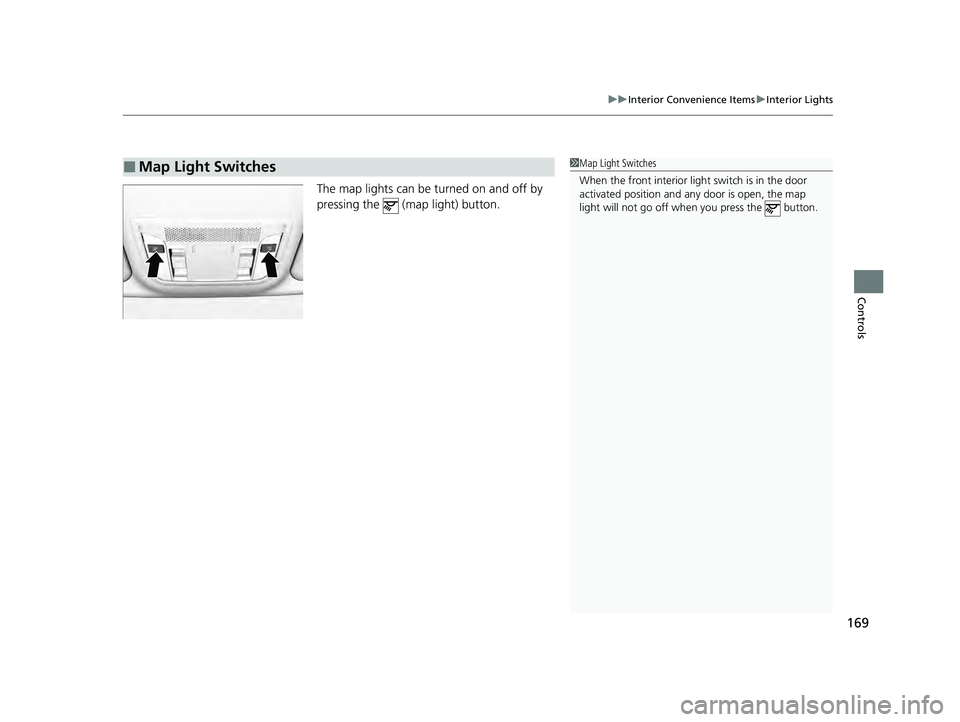
The map lights can be turned on and off by
pressing the (map light) button.
■Map Light Switches1Map Light Switches
When the front interior li ght switch is in the door
activated position and any door is open, the map
light will not go off when you press the button.
22 ACURA ILX-31TX66900.book 169 ページ 2021年4月26日 月曜日 午前11時27分
Page 172 of 632
170
uuInterior Convenience Items uStorage Items
Controls
Storage Items
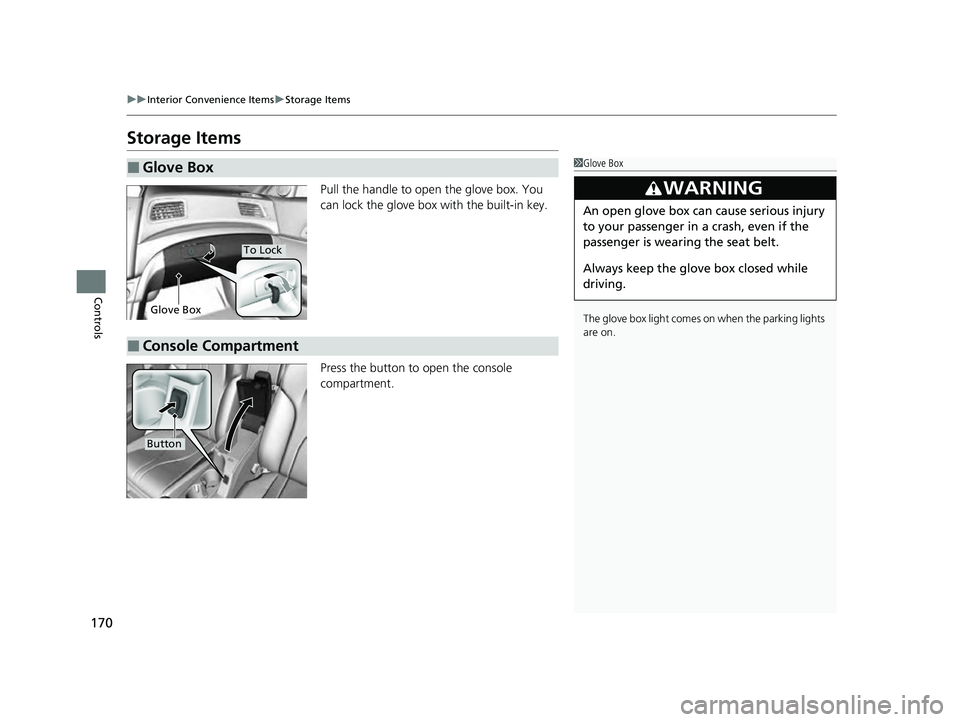
Pull the handle to open the glove box. You
can lock the glove box with the built-in key.
Press the button to open the console
compartment.
■Glove Box1Glove Box
The glove box light comes on when the parking lights
are on.
3WARNING
An open glove box can cause serious injury
to your passenger in a crash, even if the
passenger is wearing the seat belt.
Always keep the glove box closed while
driving.
Glove Box
To Lock
■Console Compartment
Button
22 ACURA ILX-31TX66900.book 170 ページ 2021年4月26日 月曜日 午前11時27分
Page 330 of 632
328
uuCustomized Features u
Features
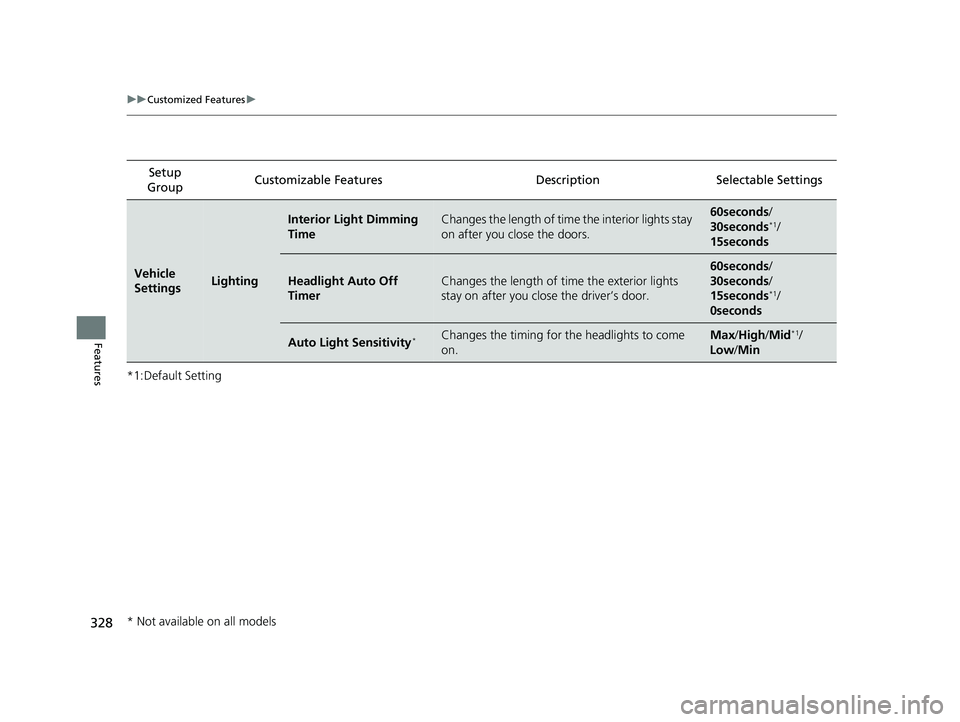
*1:Default SettingSetup
Group Customizable Features
Description Selectable Settings
Vehicle
SettingsLighting
Interior Light Dimming
TimeChanges the length of time the interior lights stay
on after you close the doors.60seconds /
30seconds*1/
15seconds
Headlight Auto Off
TimerChanges the length of time the exterior lights
stay on after you clos e the driver’s door.
60seconds/
30seconds /
15seconds
*1/
0seconds
Auto Light Sensitivity*Changes the timing for th e headlights to come
on.Max /High /Mid*1/
Low /Min
* Not available on all models
22 ACURA ILX-31TX66900.book 328 ページ 2021年4月26日 月曜日 午前11時27分
Page 589 of 632

587
Handling the Unexpected
Engine Does Not Start
Checking the Engine
If the engine does not start, check the starter.
Starter conditionChecklist
Starter doesn’t turn or turns
over slowly.
The battery may be dead. Check
each of the items on the right and
respond accordingly.Check for a message on the multi-information display.
●If the To Start, Hold Remote Near Start Button message appears
2If the Keyless Remote Battery is Weak P. 588
uMake sure the keyless remote is in its operating range.
2ENGINE START/STOP Button Operating Range P. 139
Check the brightness of the interior lights.
Turn on the interior lights and check the brightness.
●If the interior lights do not come on at all
2Battery P. 551●If the interior lights come on normally 2 Fuses P. 600
The starter turns over normally
but the engine doesn’t start.
There may be a problem with a
fuse. Check each of the items on
the right and respond accordingly. Review the engine start procedure.
Follow its instructions, and try
to start the engine again.
2 Starting the Engine P. 432
Check the immobilize r system indicator.
When the immobilizer system indicator is blinking, the engine cannot be started.
2 Immobilizer System P. 132
Check the fuel level.
There should be enough fuel in the tank.
2 Fuel Gauge P. 92
Check the fuses.
Check all fuses, or have the vehicle checked by a dealer.
2 Inspecting and Changing Fuses P. 602
If the problem continues:
2Emergency Towing P. 603
1Checking the Engine
If you must start the vehi cle immediately, use an
assisting vehicle or booster battery to jump start it.
2 If the Battery Is Dead P. 590
22 ACURA ILX-31TX66900.book 587 ページ 2021年4月26日 月曜日 午前11時27分