ignition Acura Integra 2000 Sedan Owner's Guide
[x] Cancel search | Manufacturer: ACURA, Model Year: 2000, Model line: Integra, Model: Acura Integra 2000Pages: 273, PDF Size: 4.4 MB
Page 109 of 273
Audi
o Syste m
If you turn the system off while a CD
is playing, either with the PWR/VOL
knob or by turning off the ignition,
the disc will stay in the drive. When
you turn the system back on, the CD
will begin playing where it left off.
Press the eject button to remove the
disc from the drive.
If you eject the disc, but do not
remove it from the slot, the system
will automatically reload the disc
after 15 seconds and put the CD
player in pause mode. To begin
playing the disc, press the CD button.
You can use the TUNE and SEEK
bars while a disc is playing to select
passages and change tracks.
To move rapidly within a track, press
and hold the TUNE bar. Press the
side to move forward, or the
side to move backward.
Release the bar when the system
reaches the point you want.
Each time you press the side of
the SEEK bar, the system skips
forward to the beginning of the next track. Press the side to skip
backward to the beginning of the
current track. Press it again to skip
to the beginning of the previous track.
REPEA T — To activate the Repeat
feature, press and release the Repeat
button. You will see RPT in the
display. The system continuously
replays the current track. Press the
Repeat button again to turn it off. RANDO
M PLA Y — This feature,
when activated, plays the tracks on the CD in random order, rather than
in the order they are recorded on the
CD. To activate Random Play, press and hold the A. SEL/RPT button
until you see A. SEL in the display.
The system will then select and play tracks randomly. This continuesuntil you deactivate Random Play by
pressing A. SEL/RPT again.
If the system is in Repeat mode, you
must turn it off by pressing A. SEL/
RPT before you can select Random
Play. Then press and hold the button
again until you see A. SEL displayed.
Comfor t an d Convenienc e Feature s
Page 114 of 273

Audi
o Syste m
Operatin g th e Optiona l Cassett e
Playe r
The cassette system features Dolby
B* noise reduction, automatic sensing of chromium-dioxide (CrO 2)
tape, and autoreverse for continuous
play.
Make sure the tape opening on the
cassette is facing to the right, then
insert the cassette most of the way
into the slot. The system will pull itin the rest of the way, and begin to
play.
* Dolby noise reduction manufactured under
license from Dolby Laboratories Licensing Corpo-
ration. "DOLBY" and the double-D symbol
are trademarks of Dolby Laboratories
Licensing Corporation.
The tape direction indicator will light
to show you which side of the cassette is playing. The indicates
the side you inserted facing upward is now playing. If you want to play
the other side, press the PROG
button.
Dolby B noise reduction turns onwhen you insert a cassette. If the
tape was not recorded with Dolby B noise reduction, turn it off by
pressing the NR button.
When the system reaches the end of
the tape, it will automatically reverse direction and play the other side. If
you want to remove the cassette
from the drive, press the EJECT
button.
If you turn the system off while a
tape is playing, either with the PWR/
VOL knob or by turning off the
ignition, the cassette will remain in
the drive. When you turn the system
back on, the tape will begin playing
where it left off.
To switch to the radio or CD player
while a tape is playing, press the AM/FM1-2 or CD button. To change
back to the cassette player, push theCD button.
Comfor t an d Convenienc e Feature s
Page 135 of 273

Preparin
g to Driv e
You should do the following checks and adjustments every day before
you drive your car.
1. Make sure all windows, mirrors, and outside lights are clean and
unobstructed. Remove frost, snow,
or ice.
2. Check that the hood and trunk are fully closed.
3. Visually check the tires. If a tire looks low, use a gauge to check its
pressure.
4. Check that any items you may be carrying with you inside are stored
properly or fastened down
securely.
5. Check the adjustment of the seat
(see page 75 ).
6. Check the adjustment of the inside and outside mirrors (see
page 81 ).
7. Check the adjustment of the steering wheel (see page 65 ).
8. Make sure the doors are securely
closed and locked.
9. Fasten your seat belt. Check that
your passengers have fastened
their seat belts (see page 15 ). 10.Turn the ignition switch ON (II).
Check the indicator lights in the
instrument panel.
11.Start the engine (see page 133 ).
12.Check the gauges and indicator lights in the instrument panel (see
page 53 ).
Drivin g
Page 136 of 273

Startin
g th e Engin e
1. Apply the parking brake.
2. In cold weather, turn off all electrical accessories to reduce
the drain on the battery.
3. Manual Transmission:
Push the clutch pedal down all the
way. START (III) does not
function unless the clutch pedal is
depressed.
Automatic Transmission:
Make sure the shift lever is in
Park. Press on the brake pedal.
4. Without touching the accelerator pedal, turn the ignition key to the
START (III) position. If the enginedoes not start right away, do not
hold the key in START (III) for
more than 15 seconds at a time.
Pause for at least 10 seconds
before trying again. 5. If the engine does not start within
15 seconds, or starts but stalls
right away, repeat step 4 with the
accelerator pedal pressed half-way
down. If the engine starts, release
pressure on the accelerator pedal
so the engine does not race.
6. If the engine still does not start, press the accelerator pedal all the
way down and hold it there while
starting in order to clear flooding.
As before, keep the ignition key in
the START (III) position for no
more than 15 seconds. Return to
step 5 if the engine does not start.
If it starts, lift your foot off the
accelerator pedal so the engine
does not race.
Startin g in Col d Weathe r a t Hig h
Altitud e (Abov e 8,00 0 feet /
2,40 0 meters )
An engine is harder to start in cold weather. The thinner air found at
high altitude above 8,000 feet (2,400 meters) adds to the problem.
Use the following procedure:
1. Turn off all electrical accessories to reduce the drain on the battery.
2. Push the accelerator pedal half- way to the floor and hold it there
while starting the engine. Do not
hold the ignition key in START
(III) for more than 15 seconds.
When the engine starts, release
the accelerator pedal gradually as
the engine speeds up and smooths
out.
3. If the engine fails to start in step 2, push the accelerator pedal to the
floor and hold it there while you
try to start the engine for no more
than 15 seconds. If the engine
does not start, return to step 2.
Driving
Page 139 of 273

Automati
c Transmissio n
Your Acura's transmission has four
forward speeds, and is electronically controlled for smoother shifting. It
also has a "lock-up" torque converter
for better fuel economy. You may
feel what seems like another shift when the converter locks. Shif
t Leve r Positio n Indicato r
This indicator on the instrument
panel shows which position the shift
lever is in.
The "D4" indicator comes on for a
few seconds when you turn the
ignition switch ON (II). If it flashes
while driving (in any shift position),
it indicates a possible problem in the
transmission. Avoid rapid acceler-
ation and have the transmission
checked by an authorized Acura
dealer as soon as possible. Shif
t Leve r Position s
The shift lever has seven positions.
It must be in Park or Neutral to start the engine. When you are stopped in
D4, D3, 2,1, N or R, press firmly on
the brake pedal, and keep your foot
off the accelerator pedal.
Drivin g
SHIF
T
LEVE R
Page 140 of 273

Automati
c Transmissio n
Par k (P ) — This position mechani-
cally locks the transmission. Use
Park whenever you are turning off or starting the engine. To shift out of
Park, you must press on the brake
pedal and have your foot off the accelerator pedal. Press the release
button on the side of the shift lever
to move it. If you have done all of the above and
still cannot move the lever out of
Park, see Shift Lock Release on page
139.
You must also press the release button to shift into Park. To avoid
transmission damage, come to a
complete stop before shifting into
Park. The shift lever must be in Park
before you can remove the key from
the ignition switch. Revers
e (R ) — To shift to Reverse
from Park, see the explanation under Park. To shift to Reverse from
Neutral, come to a complete stop and
then shift. Press the release button before shifting into Reverse from
Neutral.
Neutra l (N ) — Use Neutral if you
need to restart a stalled engine, or if
it is necessary to stop briefly with
the engine idling. Shift to Park posi-
tion if you need to leave the car for any reason. Press on the brake pedal
when you are moving the shift lever
from Neutral to another gear.
Driv e (D 4) — Use this position for
your normal driving. The transmis- sion automatically selects a suitable
gear for your speed and acceleration.
You may notice the transmission shifting up at higher speeds when
the engine is cold. This helps the
engine warm up faster.
Driving
CONTINUED
Page 142 of 273

Automati
c Transmissio n
Shif t Loc k Releas e
This allows you to move the shift
lever out of Park if the normal
method of pushing on the brake
pedal and pressing the release
button does not work.
1. Set the Parking brake.
2. Remove the key from the ignition
switch.
3. Put a cloth on the edge of the Shift Lock Release slot cover next to
the shift lever.
Use a small flat-tipped screwdriveror small metal plate (neither are
included in the tool kit) to remove
the cover. Carefully pry off the
edge of the cover. 4. Insert the key in the Shift Lock
Release slot.
5. Push down on the key while you press the release button on the
shift lever and move the shift lever
out of Park to Neutral. 6. Remove the key from the shift
lock release slot, then reinstall the
cover.
Depress the brake pedal and
restart the engine.
If you need to use the Shift Lock
Release, it means your car is developing a problem. Have the car
checked by your Acura dealer.
Driving
RELEAS
E BUTTO N
SHIF T LOC K
RELEAS E SLO T
Page 177 of 273

Coolin
g Syste m
Do not add any rust inhibitors or other additives to your car's coolingsystem. They may not be compatible
with the coolant or engine compo-
nents.
Replacin g Engin e Coolan t
The cooling system should be completely drained and refilled with
new coolant according to the time
and distance recommendations in
the maintenance schedule. Only use Genuine Honda Antifreeze/Coolant.
Draining the coolant requires access to the underside of the car. Unless
you have the tools and knowledge,
you should have this maintenance done by a skilled mechanic. 1. Turn the ignition ON (II). Slide
the heater temperature controllever to maximum heat. Turn theignition off.
2. Open the hood. Make sure the engine and radiator are cool to the
touch.
3. Remove the radiator cap. 4. Loosen the drain plug on the
bottom of the radiator. Thecoolant will drain through thesplash guard. Remove the drain
bolt and washer from the engine
block.
Maintenanc e DRAI
N
BOL T
DRAIN PLU G
Page 224 of 273
Changin
g a Fla t Tir e
If you have a flat tire while driving,
stop in a safe place to change it.
Stopping in traffic or on the shoulder
of a busy road is dangerous. Drive slowly along the shoulder until you
get to an exit or an area to stop that is far away from the traffic lanes.
1. Park the car on firm, level, non-slippery ground away from traffic.
Put the transmission in Park.
Apply the parking brake.
2. Turn on the hazard warning lights and turn the ignition switch to
LOCK (0). Have all the
passengers get out of the car while
you change the tire. 3. Open the trunk. Raise the trunk
floor by lifting up on the back edge.
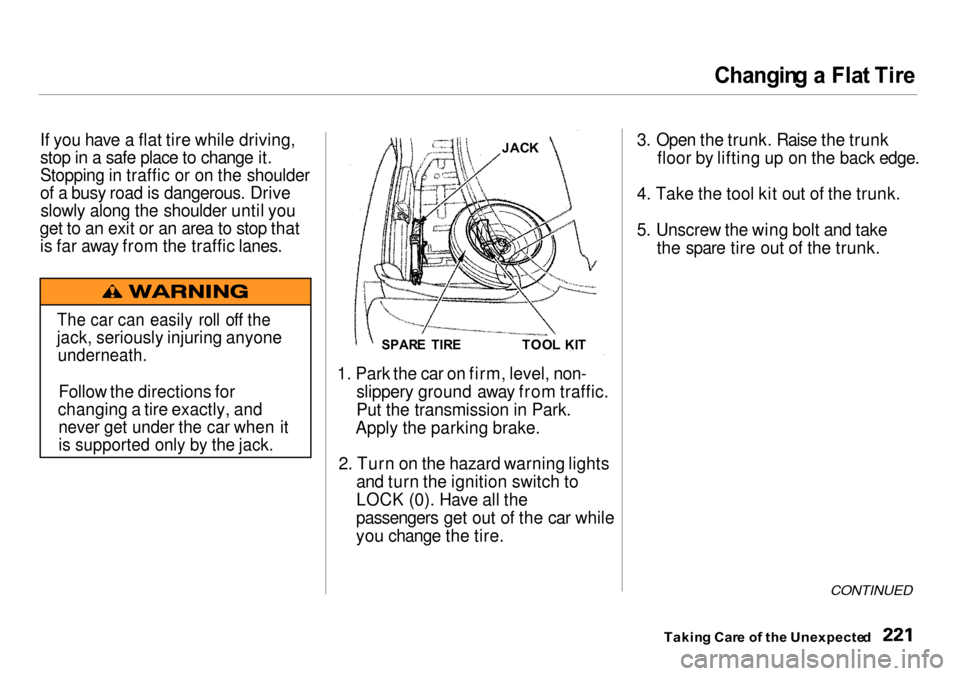
4. Take the tool kit out of the trunk.
5. Unscrew the wing bolt and take the spare tire out of the trunk.
CONTINUED
Takin g Car e o f th e Unexpecte d
TOO
L KI T
SPAR E TIR E
JAC
K
The car can easily roll off the
jack, seriously injuring anyone
underneath.
Follow the directions for
changing a tire exactly, and
never get under the car when it
is supported only by the jack.
Page 229 of 273

I
f You r Engin e Won' t Star t
Diagnosing why your engine won't start falls into two areas, depending
on what you hear when you turn the
key to START (III): You hear nothing, or almost
nothing. The engine's starter
motor does not operate at all, or
operates very slowly. You can hear the starter motor
operating normally, or the starter
motor sounds like it is spinning faster than normal, but the engine
does not start up and run.
Nothin g Happen s o r th e Starte r
Moto r Operate s Ver y Slowl y
When you turn the ignition switch to
START (III), you do not hear the
normal noise of the engine trying to start. You may hear a clicking sound
or series of clicks, or nothing at all.
Check these things: Your car has the Immobilizer
System. You should use a
properly-coded master or valet key
to start the engine (see page 69 ).
A key that is not properly coded will cause the immobilizer system indicator in the dash panel to blink
rapidly. Check the transmission interlock.
If you have a manual transmission,
the clutch pedal must be pushed all the way to the floor or thestarter will not operate. With an
automatic transmission, it must be in Park or Neutral. Turn the ignition switch to ON (II).
Turn on the headlights and check
their brightness. If the headlightsare very dun or don't light at all,
the battery is discharged. See
Jum p Startin g on page 227. Turn the ignition switch to START
(III). If the headlights do not dim, check the condition of the fuses. If
the fuses are OK, there is proba-
bly something wrong with the electrical circuit for the ignitionswitch or starter motor. You will
need a qualified technician to determine the problem. (See
Emergenc y Towin g on page 241 .)
If the headlights dim noticeably or
go out when you try to start the engine, either the battery is dis-
charged or the connections are corroded. Check the condition of
the battery and terminal connec-
tions (see page 186 ). You can
then try jump starting the car from a booster battery (see page 227 ).
Takin g Car e o f th e Unexpecte d