fuel Acura Integra 2000 Sedan Owner's Manual
[x] Cancel search | Manufacturer: ACURA, Model Year: 2000, Model line: Integra, Model: Acura Integra 2000Pages: 273, PDF Size: 4.4 MB
Page 1 of 273

2000 Integra Sedan Online Reference Owner's Manual
Use these links (and links throughout this manual) to navigate through this reference.
For a printed owner's manual, click on authorized manuals or go to www.helminc.com. Contents
Owner's Identification Form
Introduction........................................................................\
...................................................... .................... i
A Few Words About Safety ........................................................................\
................................................ ii
Your Vehicle at a Glance........................................................................\
.................................................... 2
Driver and Passenger Safety ........................................................................\
.............................................
5
Proper use and care of your vehicle's seat belts, and Supplemental Restraint System.
Instruments and Controls........................................................................\
................................................. 51
Instrument panel indica tor and gauge, and how to use dashboard and steering column controls.
Comfort and Convenience Features........................................................................\
...............................
89
How to operate the climate control system, the audio system, and other convenience features.
Before Driving ........................................................................\
.....................................................................117
What gasoline to use, how to break-in your new vehicle, and how to load luggage and other cargo.
Driving........................................................................\
...................................................................................131
The proper way to start the engine, shift the transmission, and park, plus towing a trailer.
Maintenance........................................................................\
.........................................................................153
The Maintenance Schedule shows you when you need to take your vehicle to the dealer.
Appearance Care........................................................................\
.................................................................211
Tips on cleaning and protecting your vehicle. Things to look for if your car ever needs body repairs.
Taking Care of the Unexpected........................................................................\
.......................................219
This section covers several problems motorists sometimes experience, and how to handle them.
Technical Information........................................................................\
.......................................................243
ID numbers, dimensions, capaciti es, and technical information.
Warranty and Customer Relations (U.S. & Canada)..........................................................................255
A summary of the warranties covering your new Honda, and how to contact us.
Authorized Manuals (U.S. only)........................................................................\
.......................................259
How to order manuals and other technical literature.
Index ........................................................................\
......................................................................................... I
Service Information Summary
A summary of information you need when you pull up to the fuel pump.
Page 54 of 273

Instrument
s an d Control s
This section gives information about the controls and displays that
contribute to the daily operation of
your Acura. All the essential controls
are within easy reach.
Control Locations............................ 52
Indicator Lights................................ 53
Gauges.............................................. 57
Speedometer................................ 57
Tachometer.................................. 57
Odometer...................................... 57
Trip Meter.................................... 57
Fuel Gauge................................... 58
Temperature Gauge....................
58
Maintenance Require
d
Indicator.................................... 59
Controls Near the Steering
Wheel........................................ 60
Headlights.................................... 61
Instrument Panel Brightness.....
62
Turn S
ignals.................................
62
Windshield Wipers.
..................... 63
Windshield Washers..................
. 63
Hazard Warning...........................
64
Rear Windo
w Defogger.............. 64
Steering Wheel Adjustment....... 65
Steering Wheel Controls................ 66
Cruise Control.............................. 66
Keys and Locks................................ 69
Keys............................................... 69
Immobilizer System..................... 69
Ignition Switch............................. 70
Power Door Locks....................... 72
Childproof Door Locks............... 73
Trunk............................................ 73
Glove Box..................................... 75
Seat Adjustments............................. 75
Driver's Seat Height
Adjustment............................... 76
Driver's Lumbar Support............ 76
Head Restraints........................... 77
Folding Rear Seat............................ 77
Power Windows............................... 79
Moonroof.......................................... 80
Mirrors.............................................. 81
Adjusting the Power Mirrors..... 81
Parking Brake.................................. 82
Digital Clock..................................... 83
Beverage Holder.............................. 84 Console Compartment.................... 85
Cigarette Lighter............................. 85
Ashtrays............................................ 86
Interior Lights.................................. 87
Instrument s an d Control s
Page 58 of 273

Indicato
r Light s
Supplementa l Restrain t
Syste m Indicato r
This indicator lights when you turn
the ignition switch ON (II). If it comes on at any other time, it
indicates a problem in the supplemental restraint system. For
complete information, see page 45.
Anti-lock Brak e Syste m
(ABS ) Indicato r
This light normally comes on for a
few seconds when you turn the ignition switch ON (II), and when
the ignition switch is turned to START (III). If this light comes on at
any other time, there is a problem in the ABS. If this happens, take the
car to your dealer to have it checked.
With the light on, your car still has normal braking ability but no anti-
lock. For complete information, see
page 144.
Lo
w Fue l Indicato r
This light comes on as a reminder
that you must refuel soon. Immobilize r Syste m
Indicato r
This indicator comes on for a few
seconds when you turn the ignition
switch ON (II). It will then go off if
you have inserted a properly-coded
ignition key. If it is not a properly-
coded key, the indicator will blink
and the engine will not start (see
page 69 ).
This indicator also blinks several
times when you turn the ignition switch from ON (II) to ACCESSORY
(I) or LOCK (0).
Malfunctio
n Indicato r
Lam p
See page 233.
Trunk-ope n Indicato r
This light comes on if the trunk lid is
not closed tightly.
Door-ope n Indicato r
This light comes on if a door is not
closed tightly.
Instrument s an d Control s
S
R
S
A
B S
Page 61 of 273

Gauge
s
Fue l Gaug e
This shows how much fuel you have.
It is most accurate when the car is on
level ground. It may show slightly
more or less than the actual amount
when you are driving on curvy or
hilly roads. The gauge stays at the same fuel
level reading after you turn off the
ignition. When you add fuel, the
gauge slowly changes to the new reading after you turn the ignitionswitch back ON (II). Temperatur
e Gaug e
This shows the temperature of the
engine's coolant. During normal
operation, the pointer should rise from the bottom white mark to about
the middle white mark. In severe
driving conditions, such as very hot weather or a long period of uphill
driving, the pointer may rise to the
upper white mark. If it reaches the red (Hot) mark, pull safely to the
side of the road. Turn to page 229 for
instructions and precautions on
checking the engine's cooling
system.
Instrument s an d Control s
TRI
P METE R
ODOMETE R
TRI
P METE R
RESE T BUTTO N FUE
L GAUG E
SPEEDOMETE R
TACHOMETE
R
TEMPERATUR
E
GAUG E
Page 72 of 273

Key
s an d Lock s
Key s
Your car comes with two master
keys and a valet key.
The master key fits all the locks on
your car: Ignition
Doors
Trunk
Trunk release handle
Rear seat trunk access
Glove box
The valet key works only in the
ignition and the door locks. You can
keep the trunk, trunk release handle,
rear seat trunk access and the glove
box locked when you leave your car
and the valet key at a parking facility.
You should have received a key
number plate with your keys. You
will need this key number if you ever have to get a lost key replaced. Keep
the plate stored in a safe place. If youneed to replace a key, use only an
Acura-approved key blank.
Immobilize r Syste m
The Immobilizer System protects
your car from theft. A properly- coded master or valet key must be
used in the ignition switch for the
engine to start. If an improperly- coded key (or other device) is used,
the engine's fuel system is disabled. When you turn the ignition switch to
ON (II), the Immobilizer System
indicator should come on for a few
seconds, then go out. If the indicator
starts to blink, it means the system
does not recognize the coding of the
key. Turn the ignition switch to
LOCK (0), remove the key, reinsert
it, and turn the switch to ON (II)
again.
The system may not recognize your key's coding if another immobilizerkey or other metal object is near the
ignition switch when you insert the
key. To make sure the system
recognizes the key code: Do not keep other immobilizer
keys on the same key ring. Use a plastic or leather key fob,
not metal. Keep other keys away from your
vehicle's key and the ignition
switch while trying to start the
engine.
CONTINUED
Instrument s an d Control s
MASTE
R KE Y
(GRAY )
VALE
T KE Y
(BLACK )
KE
Y
NUMBE R
PLAT E
Page 120 of 273

Befor
e Drivin g
Before you begin driving your Acura,
you should know what gasoline to use, and how to check the levels of
important fluids. You also need to
know how to properly store luggage or packages. The information in this
section will help you. If you plan to
add any accessories to your car,
please read the information in this section first. Break-in Period.............................. 118
Gasoline.......................................... 118
Service Station Procedures.......... 119
Filling the Fuel Tank................. 119
Opening the Hood..................... 120 Oil Check................................ 122
Engine Coolant Check.......... 123
Fuel Economy................................ 124
Vehicle Condition...................... 124
Driving Habits............................ 124
Accessories and Modifications.... 125
Carrying Cargo.............................. 127
Before Drivin g
Page 121 of 273

Break-i
n Period , Gasolin e
Break-i n Perio d
Help assure your car's future
reliability and performance by paying
extra attention to how you drive
during the first 600 miles (1,000 km).
During this period:
Avoid full-throttle starts and rapid
acceleration.
Avoid hard braking. New brakes
need to be broken-in by moderate
use for the first 200 miles (300
km).
You should follow these same re-
commendations with an overhauled
or exchanged engine, or when the
brakes are relined.
Gasolin
e
Your Acura is designed to operate on
unleaded gasoline.
We recommend gasolines containing
detergent additives that help prevent
fuel system and engine deposits.
Using gasoline containing lead will
damage your car's emissions
controls. This contributes to air
pollution.
(LS and GS models)
Use an unleaded gasoline with a
pump octane number of 86 or higher. Use of a lower octane gasoline can
cause a persistent, heavy metallic
rapping noise in the engine that can
lead to mechanical damage.
(GS-R model)
Use a premium unleaded gasoline
with a pump octane number of 91 or
higher.
If you are unable to find premium
unleaded gasoline, you may substi-
tute an unleaded regular gasoline. The engine will compensate for the
lower octane, but you may notice a slight decrease in power as a result.
Befor e Drivin g
Page 122 of 273
Servic
e Statio n Procedure s
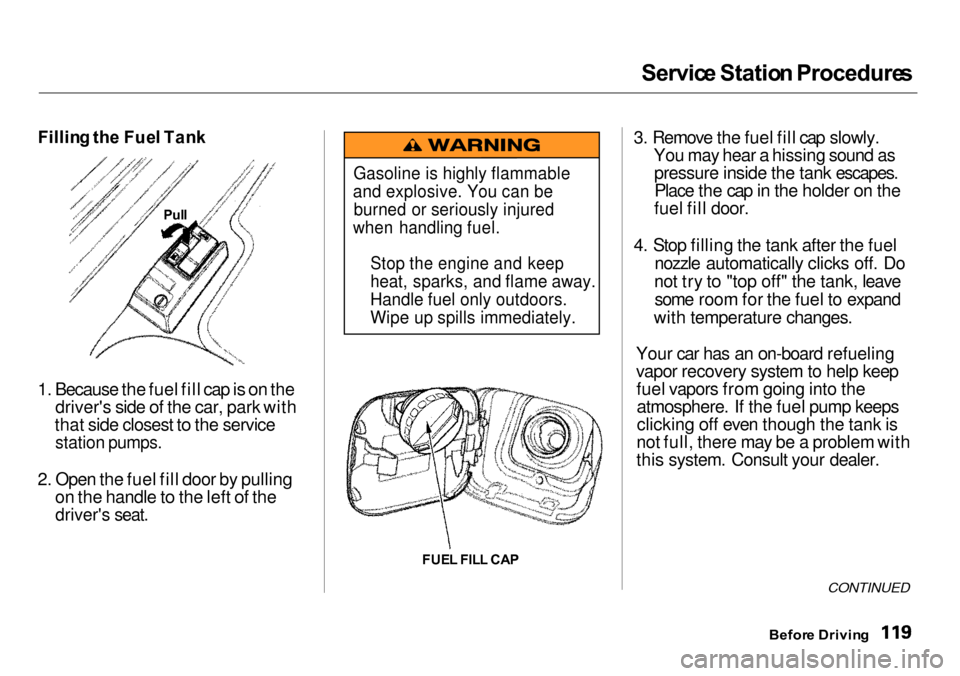
Fillin g th e Fue l Tan k
1. Because the fuel fill cap is on the driver's side of the car, park with
that side closest to the service
station pumps.
2. Open the fuel fill door by pulling on the handle to the left of the
driver's seat.
FUEL FIL L CA P 3. Remove the fuel fill cap slowly.
You may hear a hissing sound aspressure inside the tank escapes.Place the cap in the holder on the
fuel fill door.
4. Stop filling the tank after the fuel nozzle automatically clicks off. Do
not try to "top off" the tank, leave some room for the fuel to expand
with temperature changes.
Your car has an on-board refueling
vapor recovery system to help keep fuel vapors from going into theatmosphere. If the fuel pump keeps
clicking off even though the tank is
not full, there may be a problem with
this system. Consult your dealer.
CONTINUED
Befor e Drivin g
Gasoline is highly flammable
and explosive. You can be
burned or seriously injured
when handling fuel.
Stop the engine and keep
heat, sparks, and flame away.
Handle fuel only outdoors.
Wipe up spills immediately.
Pul
l
Page 123 of 273
Servic
e Statio n Procedure s
5. Screw the fuel fill cap back on, tighten it until it clicks several
times. If you do not properly
tighten the cap, the Malfunction
Indicator Lamp may come on (see
page 233 ).
6. Push the fuel fill door closed until it latches. Openin
g th e Hoo d
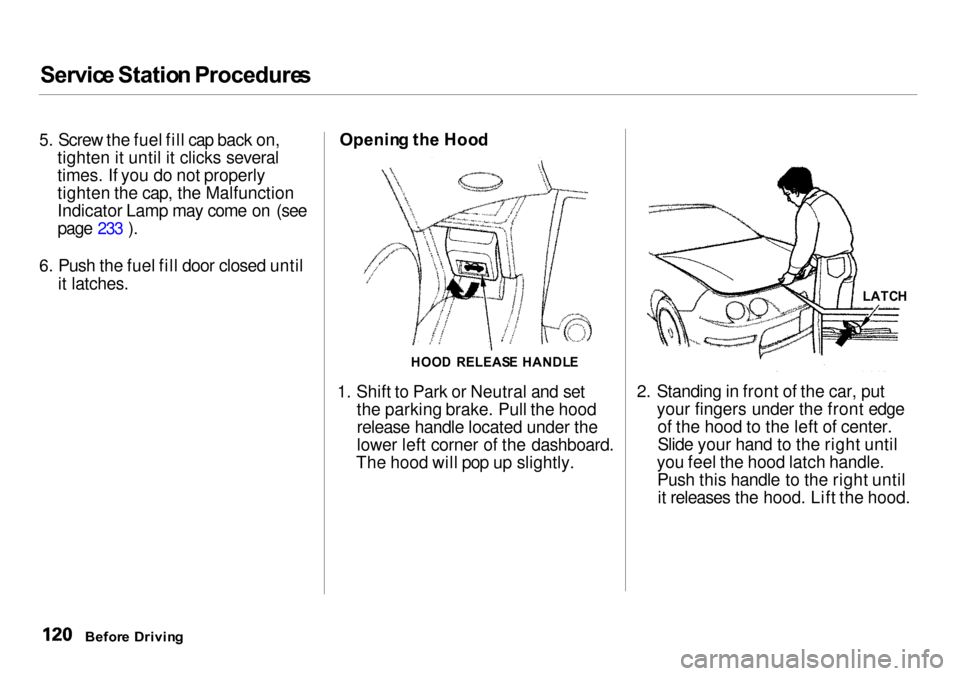
1. Shift to Park or Neutral and set the parking brake. Pull the hood
release handle located under the
lower left corner of the dashboard.
The hood will pop up slightly. 2. Standing in front of the car, put
your fingers under the front edgeof the hood to the left of center.
Slide your hand to the right until
you feel the hood latch handle. Push this handle to the right untilit releases the hood. Lift the hood.
Befor e Drivin g
HOO
D RELEAS E HANDL E LATC
H
Page 125 of 273
Servic
e Statio n Procedure s
Oil Check
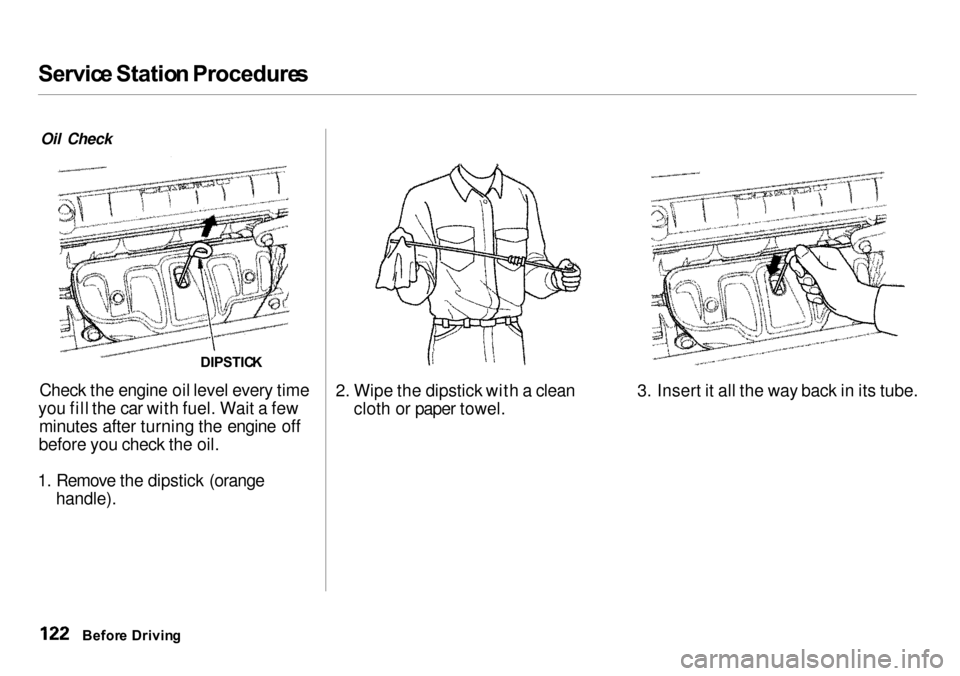
Check the engine oil level every time
you fill the car with fuel. Wait a few minutes after turning the engine off
before you check the oil.
1. Remove the dipstick (orange
handle).
2. Wipe the dipstick with a clean
cloth or paper towel. 3. Insert it all the way back in its tube.
Befor e Drivin g
DIPSTIC
K