light ACURA INTEGRA 2023 Owners Manual
[x] Cancel search | Manufacturer: ACURA, Model Year: 2023, Model line: INTEGRA, Model: ACURA INTEGRA 2023Pages: 740, PDF Size: 22.94 MB
Page 533 of 740

Continued531
uuAcuraWatchTMuAdaptive Cruise Control (ACC)*
Driving
■There is no vehicle ahead
Your vehicle maintains the set speed without
having to keep your foot on the brake or
accelerator pedal.
If there previously was a vehicle detected
ahead that kept your vehicle from traveling at
the set speed, ACC accelerates your vehicle to
the set speed, and then maintains it.
On steep downhill during ACC, it brakes to
inhibit excessive acceleration for maintaining
the set speed. However, the vehicle speed
may become faster than the set speed.
■When you depress the accelerator pedal
You can temporarily increase the vehicle speed . In this case, there is no audible or
visual alert even if a vehicle is in the ACC range.
ACC stays on unless you cancel it. Once you release the accelerator pedal, the
system resumes the set speed.
There are times when the vehicle speed will decrease when the accelerator pedal is
lightly applied.
1 When in Operation
•ACC may temporarily contro l the interval between
your vehicle and the vehicl e in adjacent lane or
surroundings of your vehicle depending on the
road conditions (e.g. curv es) or vehicle conditions
(e.g. operating the steeri ng wheel or the vehicle
location in the lane).
•When the vehicle ahead of you moves away, such
as when entering an interchange or rest area, ACC
may continue to maintain the set following-interval
for a short time.
23 ACURA INTEGRA-313S56000_03.book 531 ページ 2022年3月18日 金曜日 午前11時47分
Page 534 of 740

532
uuAcuraWatchTMuAdaptive Cruise Control (ACC)*
Driving
The system may automatically shut off under certain conditions. Some examples of
these conditions are listed below. Other conditions may reduce some of the ACC
functions.
2 Front Wide View Camera P. 581
■Environmental conditions
• Driving in bad weather (rain, fog, snow, etc.).
• Sudden changes between light and dark, such as the entrance or exit of a tunnel
or the shadows of trees, buildings, etc.
• Strong light is reflected onto vehicles or road surfaces.
• Water is sprayed by or snow blown from a vehicle ahead.
• Driving at night or in a dark place such as a tunnel (due to low-light conditions,
the whole vehicle may not be illuminated).
• Driving into low sunlight (e.g., at dawn or dusk).
■ACC Conditions and Limitations
23 ACURA INTEGRA-313S56000_03.book 532 ページ 2022年3月18日 金曜日 午前11時47分
Page 535 of 740
533
uuAcuraWatchTMuAdaptive Cruise Control (ACC)*
Continued
Driving
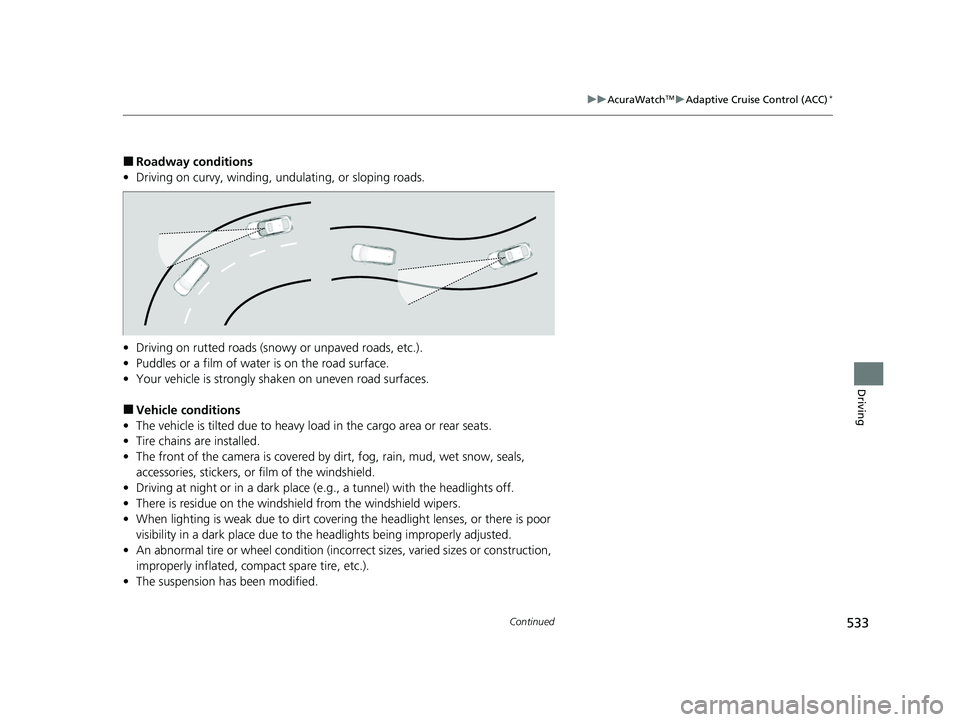
■Roadway conditions
• Driving on curvy, winding, undulating, or sloping roads.
• Driving on rutted roads (snowy or unpaved roads, etc.).
• Puddles or a film of water is on the road surface.
• Your vehicle is strongly shaken on uneven road surfaces.
■Vehicle conditions
• The vehicle is tilted due to heavy load in the cargo area or rear seats.
• Tire chains are installed.
• The front of the camera is covered by dirt, fog, rain, mud, wet snow, seals,
accessories, stickers, or film of the windshield.
• Driving at night or in a dark place (e.g., a tunnel) with the headlights off.
• There is residue on the windshie ld from the windshield wipers.
• When lighting is weak due to dirt coveri ng the headlight lenses, or there is poor
visibility in a dark place due to the headlights being improperly adjusted.
• An abnormal tire or wheel condition (inco rrect sizes, varied sizes or construction,
improperly inflated, co mpact spare tire, etc.).
• The suspension has been modified.
23 ACURA INTEGRA-313S56000_03.book 533 ページ 2022年3月18日 金曜日 午前11時47分
Page 536 of 740

534
uuAcuraWatchTMuAdaptive Cruise Control (ACC)*
Driving
■Examples of conditions under which the camera may not correctly detect
the vehicle ahead of you
• A vehicle suddenly crosses in front of you.
• The interval between your vehicle and the vehicle ahead of you is too short.
• When the vehicle ahead of you blends in with the background, preventing the
system from recognizing it.
• The headlights of the vehicle ahead of you are lit on one side or not lit on either
side in a dark place.
23 ACURA INTEGRA-313S56000_03.book 534 ページ 2022年3月18日 金曜日 午前11時47分
Page 542 of 740

uuAcuraWatchTMuAdaptive Cruise Control (ACC)*
540
Driving
■Automatic cancellation
The beeper sounds and a message appears on the driver information interface when
ACC is automatically canceled. Any of these conditions may cause the ACC to
automatically cancel:
• Bad weather (rain, fog, snow, etc.)
• The vehicle ahead of you cannot be detected.
• An abnormal tire condition is detected, or the tires are skidding.
• Driving on a mountainous road, or driving off road for extended periods.
• Abrupt steering wheel movement.
• When the ABS, VSA ®, CMBS
TM, or Low Speed Braking Control is activated.
• When the VSA ® system indicator comes on.
• When you manually apply the parking brake.
• When vehicle speed is less than 22 mph (35 km/h).
• Water is sprayed by or snow blown from a vehicle ahead.
• Driving into low sunlight (e.g., at dawn or dusk).
• When the detected vehicle within the ACC range is too close to your vehicle.
• When accelerating rapidly.
• The front of the camera is covered by dirt, fog, rain, mud, wet snow, seals,
accessories, stickers, or film on the windshield.
• The engine is turned off.
• The vehicle is loaded heavy load in the cargo area or rear seats.
• When passing through a dark place, such as tunnel.
• When the parking brake and brake system indicator (amber) comes on.
• The vehicle has repeatedly applied the brakes to maintain the set speed (for
example, you are descending a long slope).
• When the system doesn't detect any driv ing actions from the driver for a certain
amount of time while the LKAS is also activated.
1 To Cancel
The set speed cannot be set or resumed when ACC
has been turned off usi ng the button. Press the
button to activate the system, then set the
desired speed.
If the vehicle speed is less than 25 mph (40 km/h) you
cannot resume.
Prior Set Speed (gray)
(white)
23 ACURA INTEGRA-313S56000_03.book 540 ページ 2022年3月18日 金曜日 午前11時47分
Page 549 of 740

547
uuAcuraWatchTMuLane Keeping Assist System (LKAS)
Continued
Driving
When the vehicle enters the warning area, the LKAS alerts you with slight steering
wheel vibration as well as a warning display.
■Lane Departure Warning Function
LKAS indicator (green)
Amber line Warning Area
Warning Ar
ea
23 ACURA INTEGRA-313S56000_03.book 547 ページ 2022年3月18日 金曜日 午前11時47分
Page 550 of 740

uuAcuraWatchTMuLane Keeping Assist System (LKAS)
548
Driving
The system can be used when the following conditions are met.
• The lane in which you are driving has dete ctable lane markers on both sides, and
your vehicle is in the center of the lane.
• The vehicle is traveling between about 45 and 90 mph (72 and 145 km/h).
• You are driving on a straight or slightly curved road.
• The turn signals are off.
• The brake pedal is not depressed.
■How to activate the system
1.Press the LKAS button.
u LKAS indicator (white) appears on the
gauge.
The system is standby.
u If traffic lane lines are detected, white
lines appear on the gauge.
■When the System can be Used1When the System can be Used
If the vehicle drifts toward ei t h e r l ef t o r r ight lane line
due to the system applying torque, turn off the LKAS
and have your vehicle checked by a dealer.
Be sure to keep the following below to activate the
system properly;
•Always keep the windshi eld around the camera
clean.
•When cleaning the windshield, be careful not to
apply windshield cleanser to the camera lens.
•Do not touch the camera lens.
•Do not attach a sticker to the area around the
camera.
If LKAS button is pressed when the system can be
used, LKAS is on without standby.LKAS
indicator
(white)
White lines
LKAS Button
23 ACURA INTEGRA-313S56000_03.book 548 ページ 2022年3月18日 金曜日 午前11時47分
Page 555 of 740

553
uuAcuraWatchTMuLane Keeping Assist System (LKAS)
Continued
Driving
The system may not detect lane markings and therefore may not keep the vehicle in
the middle of the lane under certain conditions, including the following:
■Environmental conditions
• There is little contrast between lane lines and the roadway surface.
• Driving in bad weather (rain, fog, snow, etc.).
• Driving on a snowy or wet roadway.
• Driving into low sunlight (e.g., at dawn or dusk).
• Shadows of adjacent object s (trees, buildings, guard rails, vehicles, etc.) are
parallel to white (or yellow) lines.
• Sudden changes between light and dark, such as the entrance or exit of a tunnel
or the shadows of trees, buildings, etc.
• Driving at night or in a dark place such as a tunnel (due to low-light conditions,
lane lines or the road surface may not be illuminated).
• The distance between your vehicle and the vehicle ahead of you is too short, and
lane lines and the road surface are not visible.
• Strong light is reflec ted onto the roadway.
■LKAS Conditions and Limitations
23 ACURA INTEGRA-313S56000_03.book 553 ページ 2022年3月18日 金曜日 午前11時47分
Page 558 of 740

556
uuAcuraWatchTMuLane Keeping Assist System (LKAS)
Driving
■Vehicle conditions
• When lighting is weak due to dirt covering the headlight lenses, or there is poor
visibility in a dark place due to th e headlights being improperly adjusted.
• The front of the camera is covered by dirt, fog, rain, mud, wet snow, seals,
accessories, stickers, or film on the windshield.
• Driving at night or in a dark place (e .g., a tunnel) with the headlights off.
• There is residue on the windshie ld from the windshield wipers.
• An abnormal tire or wheel condition (incor rect sizes, varied sizes or construction,
improperly inflated, comp act spare tire, etc.).
• The vehicle is tilted due to a heavy load in the cargo area or rear seats.
• The suspension ha s been modified.
• Tire chains are installed.
23 ACURA INTEGRA-313S56000_03.book 556 ページ 2022年3月18日 金曜日 午前11時47分
Page 561 of 740

Continued559
uuAcuraWatchTMuTraffic Jam Assist*
Driving
Traffic Jam Assist is activated when all of the following conditions exist:
• LKAS is activated.
• The lane in which you are driving has detectable lane markers on both sides, and
your vehicle is in the center of the lane.
• The vehicle is traveling between about 0 and 45mph (0 and 72km/h).
• You are driving on a straight or slightly curved road.
• The driver is grippi ng the steering wheel.
• The shift position is in
(D or (S.
Do not use Traffic Jam Assist in any of the following situations:
• You are traveling on a ro ad with sharp curves.
u The system may not allow your vehicle to respond in a manner best suited for
the road conditions.
• You are entering a toll booth, inte rchange, service area, or parking area.
• You are driving in adverse weat her (rain, fog, snow, etc.).
• The surface of the road is slippery; for example, it is icy or covered with snow.
u The tires may slip, causing you to lose control of the vehicle.
■Traffic Jam Assist Activation1Traffic Jam Assist Activation
Refer to the following pa ge for proper handling of
the Lane Keeping Assist System (LKAS):
2 Lane Keeping Assist System (LKAS) P. 545
Refer to the following page for steering buttons and
displays: 2 Operation Switches for the Adaptive
Cruise Control (ACC) with Low Speed
Follow
*/Adaptive Cruise Control (ACC)*/
Lane Keeping Assist System (LKAS)/Traffic
Jam Assist
* P. 479
* Not available on all models
23 ACURA INTEGRA-313S56000_03.book 559 ページ 2022年3月18日 金曜日 午前11時47分