fuel ACURA INTEGRA 2023 Owner's Manual
[x] Cancel search | Manufacturer: ACURA, Model Year: 2023, Model line: INTEGRA, Model: ACURA INTEGRA 2023Pages: 740, PDF Size: 22.94 MB
Page 151 of 740
Continued149
uuLocking and Unlocking the Doors uLocking/Unlocking the Doors from the Outside
Controls
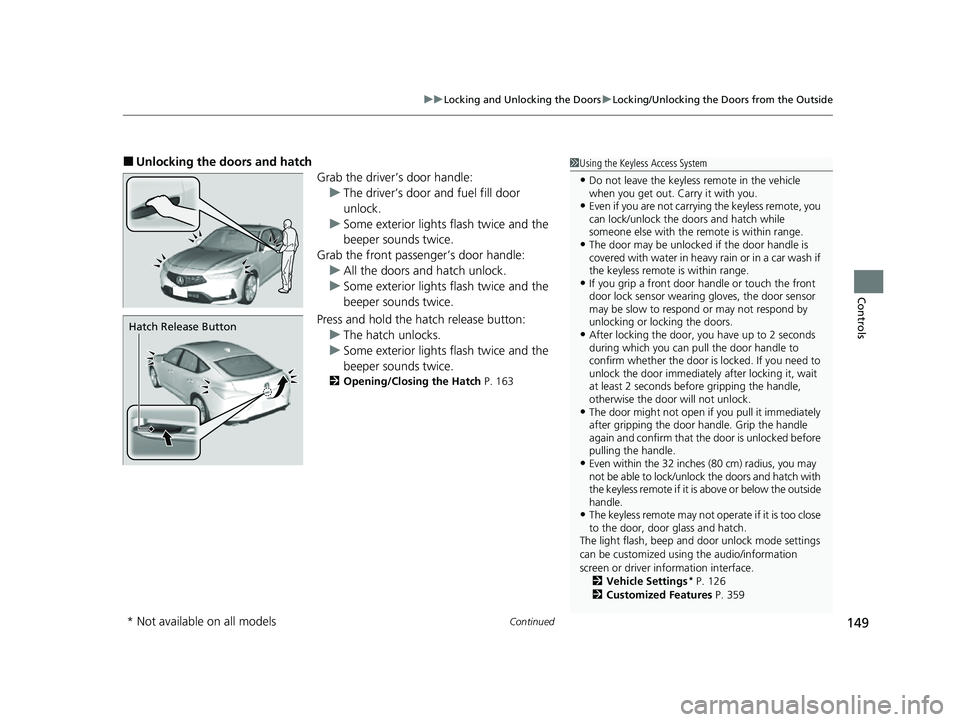
■Unlocking the doors and hatch
Grab the driver’s door handle:u The driver’s door and fuel fill door
unlock.
u Some exterior lights flash twice and the
beeper sounds twice.
Grab the front passenger’s door handle: u All the doors and hatch unlock.
u Some exterior lights flash twice and the
beeper sounds twice.
Press and hold the hatch release button:
u The hatch unlocks.
u Some exterior lights flash twice and the
beeper sounds twice.
2 Opening/Closing the Hatch P. 163
1Using the Keyless Access System
•Do not leave the keyless remote in the vehicle
when you get out. Carry it with you.
•Even if you are not carrying the keyless remote, you
can lock/unlock the do ors and hatch while
someone else with the remote is within range.
•The door may be unlocked if the door handle is
covered with water in heavy rain or in a car wash if
the keyless remote is within range.
•If you grip a front door handle or touch the front
door lock sensor wearing gloves, the door sensor
may be slow to respon d or may not respond by
unlocking or locking the doors.
•After locking the door, you have up to 2 seconds
during which you can pull the door handle to
confirm whether the door is locked. If you need to
unlock the door immediately after locking it, wait
at least 2 seconds befo re gripping the handle,
otherwise the door will not unlock.
•The door might not open if you pull it immediately
after gripping the door handle. Grip the handle
again and confirm that th e door is unlocked before
pulling the handle.
•Even within the 32 inches (80 cm) radius, you may
not be able to lock/unlock the doors and hatch with
the keyless remote if it is above or below the outside
handle.
•The keyless remote may not operate if it is too close
to the door, door glass and hatch.
The light flash, beep and door unlock mode settings
can be customized using the audio/information
screen or driver information interface. 2 Vehicle Settings
* P. 126
2 Customized Features P. 359
Hatch Release Button
* Not available on all models
23 ACURA INTEGRA-313S56000_03.book 149 ページ 2022年3月18日 金曜日 午前11時47分
Page 155 of 740

Continued153
uuLocking and Unlocking the Doors uLocking/Unlocking the Doors from the Outside
Controls
■Locking the doors and hatch
Press the lock button.
Once: u Some exterior lights flash, all the doors,
hatch, and fuel fill door lock, and the
security system sets.
Twice (within five se conds after the first
push): u Some exterior lights flash, the beeper
sounds, and verifies th e security system is
set.
■Unlocking the doors and hatch
Press the unlock button.
Once: u Some exterior lights flash twice, and the
driver’s door and fuel fill door unlock.
Twice: u The remaining doors and hatch unlock.
*1 : Checking Door Lock Status* P. 154
■Using the Remote Transmitter1Using the Remote Transmitter
If you do not open a door or the hatch within 30
seconds of unlocking the vehicle with the remote
transmitter, the doors and hatch will automatically
relock.
You can lock or unlock doors using the remote
transmitter only when the power mode is in VEHICLE
OFF.
The remote transmitter us es low-power signals, so
the operating range may vary depending on the
surroundings.
The remote will not lock th e vehicle when a door is
open.
If the distance at which the remote transmitter works
varies, the batter y is probably low.
If the LED does not come on when you press a
button, the battery is dead. 2 Replacing the Remote Battery P. 653
LED
Unlock
Button
Lock
Button
Lock
Button
Unlock
Button
LED*1
* Not available on all models
23 ACURA INTEGRA-313S56000_03.book 153 ページ 2022年3月18日 金曜日 午前11時47分
Page 157 of 740

Continued155
uuLocking and Unlocking the Doors uLocking/Unlocking the Doors from the Outside
Controls
If the unlock button of the keyless remo te does not work, use the built-in key
instead. The keyhole is on the back of the door handle. Insert the built-in key into the key cylinder
from below the handle and then turn it.
■Unlocking the Doors Using a Key1 Unlocking the Doors Using a Key
When unlocking, the driver’s door and fuel fill door
unlock first. Turn the key a second time within a few
seconds to unlock the remaining doors and the
hatch.
If the lock button of th e keyless remote does not
work, refer to the following. 2 Locking a Door Without Using a Key P. 156
23 ACURA INTEGRA-313S56000_03.book 155 ページ 2022年3月18日 金曜日 午前11時47分
Page 158 of 740

uuLocking and Unlocking the Doors uLocking/Unlocking the Doors from the Outside
156
Controls
If you do not have the key on you, or if fo r some reason you cannot lock a door using
the key, you can lock the door without it.
■Locking the front door
Push the lock tab forward
a or push the
master door lock switch in the lock direction
b, and close the door.
■Locking the rear doors
Push the lock tab forward and close the door.
■Locking a Door Without Using a Key1 Locking a Door Without Using a Key
When you lock the driver’s door, all the other doors,
hatch and fuel fill door lock at the same time.
Before locking a door, make sure that the key is not
inside the vehicle.
23 ACURA INTEGRA-313S56000_03.book 156 ページ 2022年3月18日 金曜日 午前11時47分
Page 160 of 740

158
uuLocking and Unlocking the Doors uLocking/Unlocking the Doors from the Inside
Controls
Locking/Unlocking the Doors from the Inside
■Locking a door
Push the lock tab forward.
■Unlocking a door
Pull the lock tab rearward.
■Using the Lock Tab1 Using the Lock Tab
When you lock the door using the lock tab on the
driver’s door, all of the othe r doors, hatch and fuel fill
door lock at the same time.
When you unlock the door using the lock tab on the
driver’s door, only the driver ’s door and fuel fill door
will unlock.
To unlock
Lock TabTo lock
23 ACURA INTEGRA-313S56000_03.book 158 ページ 2022年3月18日 金曜日 午前11時47分
Page 162 of 740

uuLocking and Unlocking the Doors uChildproof Door Locks
160
Controls
Press the master door lock switch in as shown
to lock or unlock all doors, hatch and fuel fill
door.
Childproof Door Locks
The childproof door locks prevent the rear doors from being opened from the inside
regardless of the position of the lock tab.
Slide the lever in the rear door to the lock
position, and close the door.
■When opening the door
Open the door using the outside door handle.
■Using the Master Door Lock Switch1 Using the Master Door Lock Switch
When you lock/unlock either of the front doors using
the master lock switch, al l the other doors, hatch and
fuel fill door lock/unl ock at the same time.
To unlock
Master Door Lock Switch
To lock
■Setting the Childproof Door Locks
1Childproof Door Locks
To open the door from the inside when the
childproof door lock is on, put the lock tab in the
unlock position, lower the rear window, put your
hand out of the window, and pull the outside door
handle.
Lock
Unlock
23 ACURA INTEGRA-313S56000_03.book 160 ページ 2022年3月18日 金曜日 午前11時47分
Page 340 of 740

338
uuGeneral Information on the Audio System uHonda App License Agreement
Features
E. Information Collection and Storage
1. Information Collection , Use, Transmission and Storage of Data. Consent to Use of Data:
You agree that HONDA and PROVIDERS may
collect and use your information gathered in any manner as part of product support services related to the SOFTWARE or related services.
HONDA may share such information with third parties, including, without limitation, PROV IDERS, third party software and service s
suppliers, their affiliates and/or their design ated agents, solely to improve their products or to provide services or technologies to you.
HONDA, third party software and systems supp liers, their affiliates and/or their designated agent may disclose this information to others,
but not in a form that pe rsonally identifies you.
2. Information Storage.
Depending on the type of multimedia system you have in your VEHICLE, certain information may be stored for ease
of use of the SOFTWARE including, without limitation, search hi story, location history in certain applications, previous and saved
destinations, map locations within certain applications, and device numbers and contact information.
(a) Vehicle Health Information.
Your VEHICLE may remotely trans mit information regarding the status and health of your VEHICLE
(“VEHICLE INFORMATION”) to HONDA without notification to you. VEHICLE INFORMATION may contain VEHICLE maintenance and
malfunction status that is derived from VEHICLE diagnostic data and includes, but is not limited to, status of powered doors and windows,
battery life data, battery charging data, VEHICLE speed, coolant temperat ure, air compressor revolution, output power, warning codes,
diagnostic trouble codes, fuel injection volu me, and engine rotations per minute. VEHICL E HEALTH INFORMATION may be used by HON DA
for research and development, to deliver HO NDA SERVICES and information to you, and to contact you, and is retained only for a period
of time necessary to fulfill these goals.
(b) VEHICLE Geolocation Data (non-navigation/map based).
If you opt-in to geolocation-based SERVICES, your vehicle’s geolocation data
(latitude and longitude) will be automatically sent from your VEHICLE to HONDA and PROVIDERS.
(c) You understand that the inputting or uploading of information to your VEHICLE’s multimedia system or the SOFTWARE or SERVICES is
at your own risk and that HONDA is not resp onsible for unauthorized access to or use of any personal or other information. All information
uploaded to the SOFTWARE and SERVICES may be stored on your VEHI CLES’s multimedia system and you understand that the security and
safety of your VEHICLE’s multimedia system is your sole responsibility.
23 ACURA INTEGRA-313S56000_03.book 338 ページ 2022年3月18日 金曜日 午前11時47分
Page 379 of 740

377
uuCustomized Features u
Continued
Features
■Meter/HUD Setup
*1:Default Setting
Customizable Features DescriptionSelectable Settings
Adjust Outside Temp.
DisplaySelects to adjust outside temperature reading by a few degrees.
2Outside Temperature P. 106
-5°F ~ ±0°F*1 ~ +5°F (U.S.)
-3°C ~ ±0°C*1 ~ +3°C (Canada)
“Trip A” Reset Timing Selects the timing to reset Trip A.
2
Range/Fuel/Trip Meter P. 113
2 Speed/Time/Trip Meter P. 115When Fully Refueled/IGN OFF /
Manually Reset*1
“Trip B” Reset TimingSelects the timing to reset Trip B.
2 Range/Fuel/Trip Meter P. 113
2 Speed/Time/Trip Meter P. 115When Fully Refueled/IGN OFF /
Manually Reset*1
Adjust Alarm Volume Changes volume level of all system warnings, door opening
warning and indicator.
High
/Mid*1/Low
Turn By Turn Auto Display
Turns on/off the pop-up information in the turn-by-turn
navigation in the driver information interface.
2Turn-by-Turn Directions P. 116
ON*1/OFF
Speed/Distance Units Selects the speed/distance units.
2
Speed/Distance Units P. 123
km/h · km/mph · miles*1
(U.S.)
km/h · km
*1/ mph · miles
(Canada)
Rear Seat ReminderTurns the Rear Seat Reminder feature on and off.ON*1/ OFF
23 ACURA INTEGRA-313S56000_03.book 377 ページ 2022年3月18日 金曜日 午前11時47分
Page 425 of 740
423
Driving
This chapter discusses driving and refueling.
Before Driving................................... 424
Towing a Trailer ................................ 429
When Driving
Starting the Engine .......................... 430
Precautions While Driving................. 438
Continuously Variable Transmission*... 439Shifting .................................... 440 , 444Acura Integrated Dynamics System .. 447, 449Auto Idle Stop .......................... 455, 461Vehicle Stability AssistTM (VSA®), aka
Electronic Stability Control (ESC),
System ........................................ 466
Agile Handling Assist ....................... 468 Limited Slip Differential (LSD) ........... 469
Tire Pressure Monitoring System (TPMS)
with Tire Fill Assist .......................... 470
Tire Pressure Monitoring System (TPMS) - Required Federal Explanation ......... 472
Blind Spot Information System ......... 474
AcuraWatch
TM................................... 478
Collision Mitigati on Braking SystemTM
(CMBSTM) ....................................... 481
Low Speed Braking Control*.... 493, 499
Adaptive Cruise Control (ACC) with Low Speed Follow
*............................... 504
Adaptive Cruise Control (ACC)*....... 525 Lane Keeping Assist System (LKAS).... 545
Traffic Jam Assist
*........................... 557
Road Departure Miti gation System... 566
Traffic Sign Recognition System ....... 574
Front Wide View Camera ................. 581
Sonar Sensors
*................................ 583
Braking .............................................. 584
Parking Your Vehicle ........................ 596
Multi-View Rear Camera .................. 606
Refueling ........................................... 608
Fuel Economy and CO
2 Emissions .... 611
Turbo Engine Vehicle ....................... 612
* Not available on all models
23 ACURA INTEGRA-313S56000_03.book 423 ページ 2022年3月18日 金曜日 午前11時47分
Page 433 of 740

Continued431
uuWhen Driving uStarting the Engine
Driving
3. Press the ENGINE START/STOP button
without depressing the accelerator pedal.
1 Starting the Engine
The immobilizer system pr otects your vehicle from
theft. If an improperly c oded device is used, the
engine’s fuel system is disabled. 2 Immobilizer System P. 165All models
23 ACURA INTEGRA-313S56000_03.book 431 ページ 2022年3月18日 金曜日 午前11時47分