ECO mode ACURA INTEGRA 2023 Repair Manual
[x] Cancel search | Manufacturer: ACURA, Model Year: 2023, Model line: INTEGRA, Model: ACURA INTEGRA 2023Pages: 740, PDF Size: 22.94 MB
Page 333 of 740

331
uuGeneral Information on the Audio System uCompatible iPod, iPhone, and USB Flash Drives
Features
Compatible iPod, iPhone , and USB Flash Drives
•A USB flash drive of 256 MB or higher is recommended.
• Some digital audio players may not be compatible.
• Some USB flash drives (e.g., a device with security lockout) may not work.
• Some software files may not allow for audio play or text data display.
• Some versions of MP3, WMA, AAC, FLAC, or WAV formats may be unsupported.
*1: Models with 9-in. Color Touchscreen
*2: Models with 7-in. Color Touchscreen
■iPod and iPhone Model Compatibility
Model
Made for iPod touch (6th to 7th generation) released between 2015 and 2019
Made for iPhone 5s/iPhone 6/iPhone 6 Plus/iPhone 6s/iPhone 6s Plus/iPhone SE/
iPhone 7/iPhone 7 Plus/iPhone 8/iPhone 8 Plus/iPhone X/iPhone XS/iPhone XS Max/
iPhone XR/iPhone 11/iPhone 11 Pro/iPhone 11 Pro Max /iPhone SE (2nd generation)
Model
Made for iPod touch (5th to 6th generation) released between 2012 and 2015
Made for iPhone 4s/iPhone 5/iPhone 5s/iPhone 5c/iPhone 6/iPhone 6 Plus/iPhone 6s/
iPhone 6s Plus/iPhone SE/iPhone 7/iPhone 7 Plus/iPhone 8/iPhone 8 Plus/iPhone X/
iPhone XS/iPhone XS Max/iP hone XR/iPhone 11/iPhone 11 Pro/iPhone 11 Pro Max
1iPod and iPhone Model Compatibility
This system may not work with all software versions
of these devices.
The Lightning connector works with iPhone 5
*1,
iPhone 5s, iPhone 5c*1, iPhone 6, iPhone 6 Plus,
iPhone 6s, iPhone 6s Plus , iPhone SE, iPhone 7,
iPhone 7 Plus, iPhone 8, iPhone 8 Plus, iPhone X,
iPhone XS, iPhone XS Max, iPhone XR, iPhone 11,
iPhone 11 Pro, iPhone 11 Pr o Max, iPhone SE (2nd
generation)
*2, iPod touch (5th*1, 6th, 7th*2
generation).
The 30-pin connector works with iPhone 4s
*1.
USB works with iPhone 4s
*1, iPhone 5*1, iPhone 5s,
iPhone 5c*1, iPhone 6, iPhone 6 Plus, iPhone 6s,
iPhone 6s Plus, iPhone SE, iPhone 7, iPhone 7 Plus,
iPhone 8, iPhone 8 Plus, iP hone X, iPhone XS, iPhone
XS Max, iPhone XR, iPhone 11, iPhone 11 Pro, iPhone
11 Pro Max, iPhone SE (2nd generation)
*2, iPod touch
(5th*1, 6th, 7th*2 generation).
Models with 7-in. Color Touchscreen
Models with 9-in. Color Touchscreen
■USB Flash Drives1 USB Flash Drives
Files on the USB flash drive are played in their stored
order. This order may be different from the order
displayed on your PC or device.
23 ACURA INTEGRA-313S56000_03.book 331 ページ 2022年3月18日 金曜日 午前11時47分
Page 374 of 740

372
uuCustomized Features u
Features
■Customization flow
Press the button.
Forward Collision Warning Distance
ACC Forward Vehicle Detect Beep
Traffic Sign Recognition System Display Setting
Road Departure Mitigation Setting
Lane Keeping Assist Suspend Beep
Blind Spot Inf–
Traffic Sign Recognition System Speed Limit Warning
Speed Limit Warning Threshold Setting
Driver Attention Monitor
Driver Assist System Setup
Select Vehicle Settings .
Rev Match System*
Rear Sensor Setting
Head-up Warning
* Not available on all models
23 ACURA INTEGRA-313S56000_03.book 372 ページ 2022年3月18日 金曜日 午前11時47分
Page 377 of 740

375
uuCustomized Features u
Continued
Features
■Driver Assist System Setup
*1:Default Setting
Customizable Features Description Selectable Settings
Forward Collision Warning
DistanceSelects distance for Forward Collision Warning audible and visual
alerts.
2Collision Mitigation Braking SystemTM (CMBSTM) P. 481
Long /Normal*1/Short
Head-up WarningTurn On/Off warning light for head-up flash alert. ON*1/OFF
ACC Forward Vehicle Detect
Beep
Turns On/Off audible notification when vehicle has moved in/out of
Adaptive Cruise Control with Low Speed Follow* range.
2 Adaptive Cruise Control (ACC) with Low Speed Follow* P. 504
2 Adaptive Cruise Control (ACC)* P. 525
ON /OFF*1
Road Departure Mitigation
Setting Selects operating mode of the Ro
ad Departure Mitigation system.
2Road Departure Mitigation System P. 566
Narrow /Normal*1/Wide /
Warning Only
Lane Keeping Assist
Suspend BeepSelects On/Off the LKAS alert for not detecting road lines.
2Lane Keeping Assist System (LKAS) P. 545ON/OFF*1
Blind Spot Info Selects On/Off the blind spot in
formation system audible alert.2Blind Spot Information System P. 474
Audible And Visual Alert*1/
Visual Alert
Traffic Sign Recognition
System Display SettingDisplays the traffic sign recognition system on instrument panel.
2 Traffic Sign Recognition System P. 574Display*1/None
* Not available on all models
23 ACURA INTEGRA-313S56000_03.book 375 ページ 2022年3月18日 金曜日 午前11時47分
Page 378 of 740

376
uuCustomized Features u
Features
*1:Default Setting
Customizable Features DescriptionSelectable Settings
Traffic Sign Recognition
System Speed Limit
Warning Enables over speed limit warning when speed limi
t is exceeded.
2Traffic Sign Recognition System P. 574ON*1/OFF
Speed Limit Warning
Threshold SettingSelect speed limit warning threshol d based on personal preference.
2Traffic Sign Recognition System P. 574
Speed Limit*1/
Speed Limit+3mph /
Speed Limit+5mph /
Speed Limit+10mph
(When mph is selected)
Speed Limit
*1/
Speed Limit+5km/h /
Speed Limit+10km/h /
Speed Limit+15km/h
(When km/h is selected)
Driver Attention Monitor Changes the setting for the driver attention monitor.
2
Driver Attention Monitor P. 117
OFF/Tactile Alert /Tactile
And Audible Alert*1
Rev Match System*Selects On/Off the rev match system.
2 Rev Match System P. 445ON*1/OFF
Rear Sensor Setting
Selects to turn ON or OFF the rear Parking Sensor. This selection will
also affect the rear Low Speed Braking Control.
2 Parking Sensor System* P. 598
2 Low Speed Braking Control* P. 493, 499
ON*1/OFF
* Not available on all models
23 ACURA INTEGRA-313S56000_03.book 376 ページ 2022年3月18日 金曜日 午前11時47分
Page 388 of 740

386
uuBluetooth ® HandsFreeLink ®u HFL Menus
Features
HFL Menus
The power mode must be in ACCESSORY or ON to use the system.1HFL Menus
To use HFL, you must first pair your Bluetooth-
compatible cell phone to th e system while the vehicle
is parked.
Some functions are limited while driving. A message
appears on the screen when the vehicle is moving
and the operation is canceled.
PHONE button
Recent Calls
*1All
Pair a phone to the system.Connect New Device
Change DeviceConnects a paired phone.
Priority Device
Sets a device as the priority device.
Bluetooth Settings
Keypad*1
Settings
Favorite
Contacts*1(Existing entry list)
Contacts*1
Dialed
Missed
Received
Display the last outgoing, incoming and missed calls.
Display the last outgoing calls.
Display the last missed calls.
Display the last incoming calls.
Dial the selected number in the favorite contacts list.
Display the phonebook of the paired phone.
Enter a phone number to dial.
Disconnect All DeviceDisconnect a paired phone from the system.
Delete Device
Delete a previously paired phone.*1 : Available only when a phone is connected to HFL.
23 ACURA INTEGRA-313S56000_03.book 386 ページ 2022年3月18日 金曜日 午前11時47分
Page 425 of 740
423
Driving
This chapter discusses driving and refueling.
Before Driving................................... 424
Towing a Trailer ................................ 429
When Driving
Starting the Engine .......................... 430
Precautions While Driving................. 438
Continuously Variable Transmission*... 439Shifting .................................... 440 , 444Acura Integrated Dynamics System .. 447, 449Auto Idle Stop .......................... 455, 461Vehicle Stability AssistTM (VSA®), aka
Electronic Stability Control (ESC),
System ........................................ 466
Agile Handling Assist ....................... 468 Limited Slip Differential (LSD) ........... 469
Tire Pressure Monitoring System (TPMS)
with Tire Fill Assist .......................... 470
Tire Pressure Monitoring System (TPMS) - Required Federal Explanation ......... 472
Blind Spot Information System ......... 474
AcuraWatch
TM................................... 478
Collision Mitigati on Braking SystemTM
(CMBSTM) ....................................... 481
Low Speed Braking Control*.... 493, 499
Adaptive Cruise Control (ACC) with Low Speed Follow
*............................... 504
Adaptive Cruise Control (ACC)*....... 525 Lane Keeping Assist System (LKAS).... 545
Traffic Jam Assist
*........................... 557
Road Departure Miti gation System... 566
Traffic Sign Recognition System ....... 574
Front Wide View Camera ................. 581
Sonar Sensors
*................................ 583
Braking .............................................. 584
Parking Your Vehicle ........................ 596
Multi-View Rear Camera .................. 606
Refueling ........................................... 608
Fuel Economy and CO
2 Emissions .... 611
Turbo Engine Vehicle ....................... 612
* Not available on all models
23 ACURA INTEGRA-313S56000_03.book 423 ページ 2022年3月18日 金曜日 午前11時47分
Page 432 of 740

430
Driving
When Driving
Starting the Engine
1.Make sure the parking brake is applied.
u The parking brake and brake system
indicator (red) comes on for 30 seconds
when you pull up the electric parking
brake switch.
2. Check that the tr ansmission is in
(P, then
depress the brake pedal.
u Although it is possible to start the vehicle
in
(N, it is safer to start it in (P.
2. Check that the shift lever is in
(N. Then
depress the brake pedal with your right
foot, and the clutch pedal with your left
foot.
u The clutch pedal must be fully depressed
to start the engine.
1Starting the Engine
Keep your foot firmly on the brake pedal when
starting the engine.
The engine is harder to st art in cold weather and in
thinner air found at altit udes above 8,000 feet (2,400
meters).
When starting the engine in cold weather, turn off all
electrical accessories such as the lights, climate
control system, and rear de fogger in order to reduce
battery drain.
If you live in a region where winter is extremely cold,
an engine block heater will improve starting and
warming of the engine. Cons ult a dealer for details.
If the exhaust system sounds abnormal or you can
smell exhaust gas inside the vehicle, have your vehicle
checked by a dealer. There may be a problem with
the engine or exhaust system.
Bring the keyless remote close to the ENGINE
START/STOP button if the batte ry in the keyless
remote is weak.
2 If the Keyless Remote Battery is Weak P. 691
The engine may not start if the keyless remote is
subjected to strong radio waves.
Do not hold the ENGINE START/STOP button to
start the engine.
If the engine does not start, wait at least 30 seconds
before starting the engine again.
Electric Parking Brake Switch
Brake Pedal
Continuously variable transmission models
Brake Pedal
Clutch Pedal
Manual transmission models
23 ACURA INTEGRA-313S56000_03.book 430 ページ 2022年3月18日 金曜日 午前11時47分
Page 436 of 740
uuWhen Driving uStarting the Engine
434
Driving
■To stop the engine
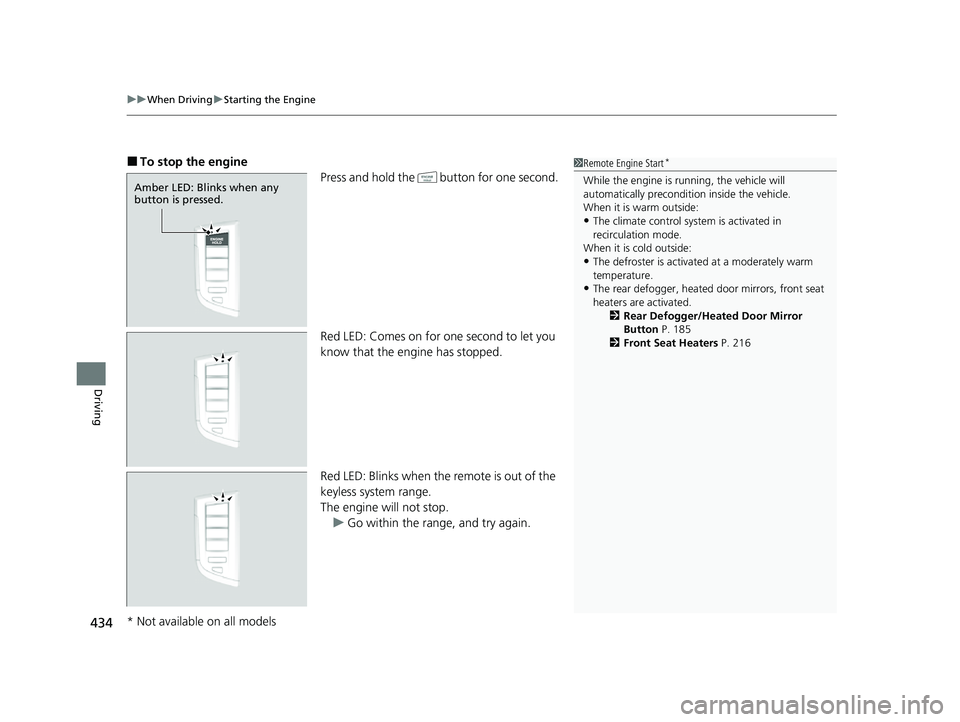
Press and hold the button for one second.
Red LED: Comes on for one second to let you
know that the engine has stopped.
Red LED: Blinks when the remote is out of the
keyless system range.
The engine will not stop. u Go within the rang e, and try again.1Remote Engine Start*
While the engine is running, the vehicle will
automatically preconditi on inside the vehicle.
When it is warm outside:
•The climate control system is activated in
recirculation mode.
When it is cold outside:
•The defroster is activated at a moderately warm
temperature.
•The rear defogger, heated door mirrors, front seat
heaters are activated. 2Rear Defogger/Heated Door Mirror
Button P. 185
2 Front Seat Heaters P. 216
Amber LED: Blinks when any
button is pressed.
* Not available on all models
23 ACURA INTEGRA-313S56000_03.book 434 ページ 2022年3月18日 金曜日 午前11時47分
Page 437 of 740

Continued435
uuWhen Driving uStarting the Engine
Driving
1. Depress and hold the brake pedal, then press the ENGINE START/STOP button.
2. Keeping your right foot on the br ake pedal, put the transmission into
(D. Select
(R when reversing.
3. With the parking brake applied, release the brake pedal and gently depress the
accelerator pedal.
u Make sure the parking brake and brake system indicator (red) goes off.
2 Parking Brake P. 584
■Starting to Drive1Starting to Drive
Engine Restart Function
If the engine stalls, full y depress the clutch pedal
within three seconds. The engine may automatically
restart under certain conditi ons. Otherwise, follow
the standard procedure. 2 Starting the Engine P. 430
The engine stops when th e transmission is taken out
of
( P before the ENGINE START/STOP button is
pressed. Follow step 1 when starting to drive.
You can also release the parking brake by pressing
the electric parking brake sw itch while depressing the
brake pedal.
When facing downhill, you can start your vehicle
more smoothly by manually releasing it with the
electric parking brake switch than by releasing it with
the accelerator pedal.
Manual transmission models
Continuously variable transmission models
When the engine was started using the button on
the keyless remote
All models
Continuously variable transmission models
When the engine was started using the button on the keyless remote
When the engine was started in any case
23 ACURA INTEGRA-313S56000_03.book 435 ページ 2022年3月18日 金曜日 午前11時47分
Page 440 of 740

438
uuWhen Driving uPrecautions While Driving
Driving
Precautions While Driving
Avoid driving in deep water and on flooded roads. This can damage the engine or
driveline, or cause elec trical component failure.
If there is a strong impact with something under the vehicle, stop in a safe location.
Check the underside of the vehicle for damage or any fluid leaks.
■In Rain
■Other Precautions
1 Precautions While Driving
NOTICE
Do not operate the shift lever while pressing the
accelerator pedal. You could damage the
transmission.
NOTICE
If you repeatedly turn the steering wheel at an
extremely low speed, or hold the steering wheel in
the full left or right position for a while, the electric
power steering (EPS) system heats up. The system
goes into a protective mode, and limits its
performance. The steering wheel becomes harder
and harder to operate. Once the system cools down,
the EPS system is restored.
Repeated operation under these conditions can
eventually damage the system.
If the power mode is set to ACCESSORY while
driving, the engine will shut down and all steering
and brake power assist functi ons will stop, making it
difficult to control the vehicle.
Do not select
( N while driving as you will lose engine
braking (and accelera tion) performance.
During the first 600 miles (1,000 km) of operation,
avoid sudden acceleration or full throttle operation so
as not to damage the engine or powertrain.
Continuously variable transmission models
23 ACURA INTEGRA-313S56000_03.book 438 ページ 2022年3月18日 金曜日 午前11時47分