ACURA INTEGRA 2023 Manual PDF
INTEGRA 2023
ACURA
ACURA
https://www.carmanualsonline.info/img/32/58627/w960_58627-0.png
ACURA INTEGRA 2023 Manual PDF
Page 394 of 740
392
uuBluetooth ® HandsFreeLink ®u HFL Menus
Features
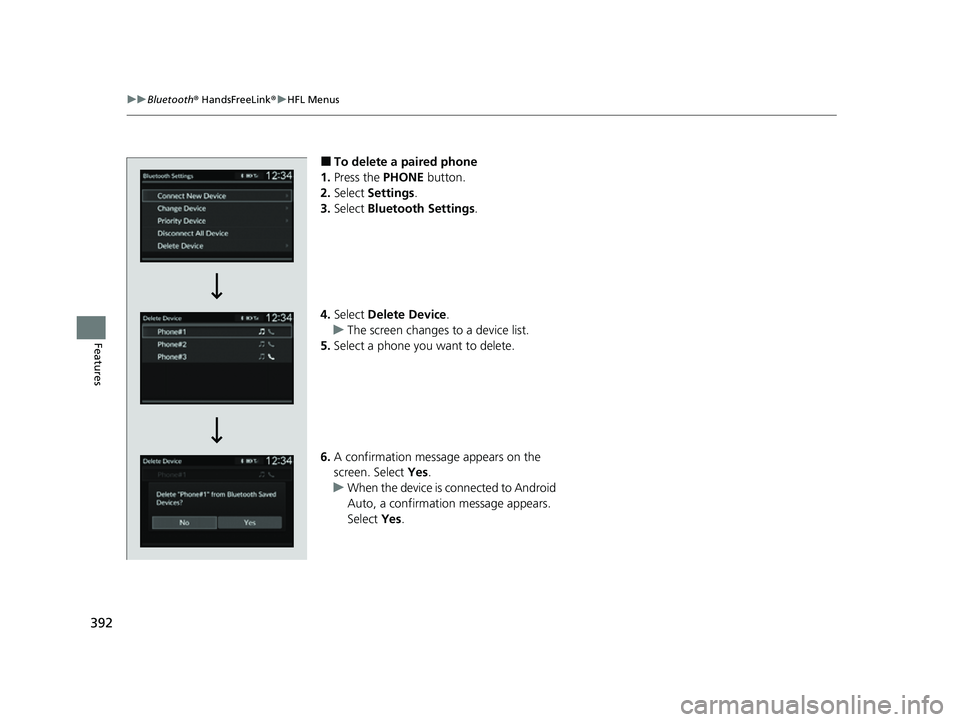
■To delete a paired phone
1. Press the PHONE button.
2. Select Settings .
3. Select Bluetooth Settings .
4. Select Delete Device .
u The screen changes to a device list.
5. Select a phone you want to delete.
6. A confirmation message appears on the
screen. Select Yes.
u When the device is connected to Android
Auto, a confirmation message appears.
Select Yes.
23 ACURA INTEGRA-313S56000_03.book 392 ページ 2022年3月18日 金曜日 午前11時47分
Page 395 of 740
Continued393
uuBluetooth ® HandsFreeLink ®u HFL Menus
Features
If paring between your phone and the system is executed while you are on the
phone, the call can be automatically transferred to HFL.
1.Press the PHONE button.
2. Select Settings .
3. Select Auto Phone Call Transfer .
4. Select ON or OFF .
You can change the ring tone setting. 1.Press the PHONE button.
2. Select Settings .
3. Select Ringtone .
4. Select Phone or Vehicle.
■Automatic Transferring
■Ring Tone1Ring Tone
Phone: Depending on the make and model of the
cell phone, the ring tone st ored in the phone will
sound if the phone is connected.
Vehicle: The fixed ring tone sounds from the
speakers.
23 ACURA INTEGRA-313S56000_03.book 393 ページ 2022年3月18日 金曜日 午前11時47分
Page 396 of 740
394
uuBluetooth ® HandsFreeLink ®u HFL Menus
Features
Phone settings, paired phones, all favorite co ntacts entries, all call history data, and
all imported phoneboo k data are erased.
1.Press the PHONE button.
2. Select Settings .
3. Select Hands-Free System Clear .
4. Select Yes.
5. A confirmation message appears on the
screen. Select Yes.
6. A notification appears on the screen. Select
OK .
■To Clear the System
23 ACURA INTEGRA-313S56000_03.book 394 ページ 2022年3月18日 金曜日 午前11時47分
Page 397 of 740
Continued395
uuBluetooth ® HandsFreeLink ®u HFL Menus
Features
When your phone is paired, the contents of its phonebook and call history are
automatically imported to HFL.
■Automatic Import of Cellular Phonebook and Call History1Automatic Import of Cellular Phonebook and Call History
When you select a person from the list in the cellular
phonebook, you can see up to five category icons.
The icons indicate what types of numbers are stored
for that name.
On some phones, it may no t be possible to import the
category icons to HFL.
The phonebook is updated af ter every connection.
Call history is updated after every connection or call.
Pref
Home
Mobile
Pager WorkFax
Car
Other Voice
23 ACURA INTEGRA-313S56000_03.book 395 ページ 2022年3月18日 金曜日 午前11時47分
Page 398 of 740
396
uuBluetooth ® HandsFreeLink ®u HFL Menus
Features
■To add a favorite contacts
1. Press the PHONE button.
2. Select Recent Calls , Contacts , or Keypad .
3. Select the star icon.
3. Select Add to Favorite .
u A notification appears on the screen if
the favorite contact is successfully stored.
u To remove the favorite contact, select
the star icon again.
■Favorite Contacts
Recent Calls Screen
Star IconContacts Screen
Star Icon
Keypad Screen
Add to Favorite
On the Recent Calls or Contacts screen
On the Keypad screen
23 ACURA INTEGRA-313S56000_03.book 396 ページ 2022年3月18日 金曜日 午前11時47分
Page 399 of 740
397
uuBluetooth ® HandsFreeLink ®u HFL Menus
Continued
Features
■To delete a favorite contact
1. Press the PHONE button.
2. Select Favorite Contacts .
3. Select the star icon.
4. A confirmation message appears on the
screen. Select Yes.
Star Icon
23 ACURA INTEGRA-313S56000_03.book 397 ページ 2022年3月18日 金曜日 午前11時47分
Page 400 of 740
uuBluetooth ® HandsFreeLink ®u HFL Menus
398
Features
You can make calls by inputting any phone number, or by using the imported
Recent Calls , Favorite Contacts , and Contacts entries.
■To make a call using the imported
phonebook
When your phone is paired, the contents of its
phonebook are automatically imported to
HFL.
1. Press the PHONE button.
2. Select Contacts .
3. The phonebook is stored alphabetically.
Select a name.
4. Select a number.
u Dialing starts automatically.
■Making a Call1Making a Call
Once a call is connected, you can hear the voice of
the person you are call ing through the audio
speakers.
23 ACURA INTEGRA-313S56000_03.book 398 ページ 2022年3月18日 金曜日 午前11時47分
Page 401 of 740
Continued399
uuBluetooth ® HandsFreeLink ®u HFL Menus
Features
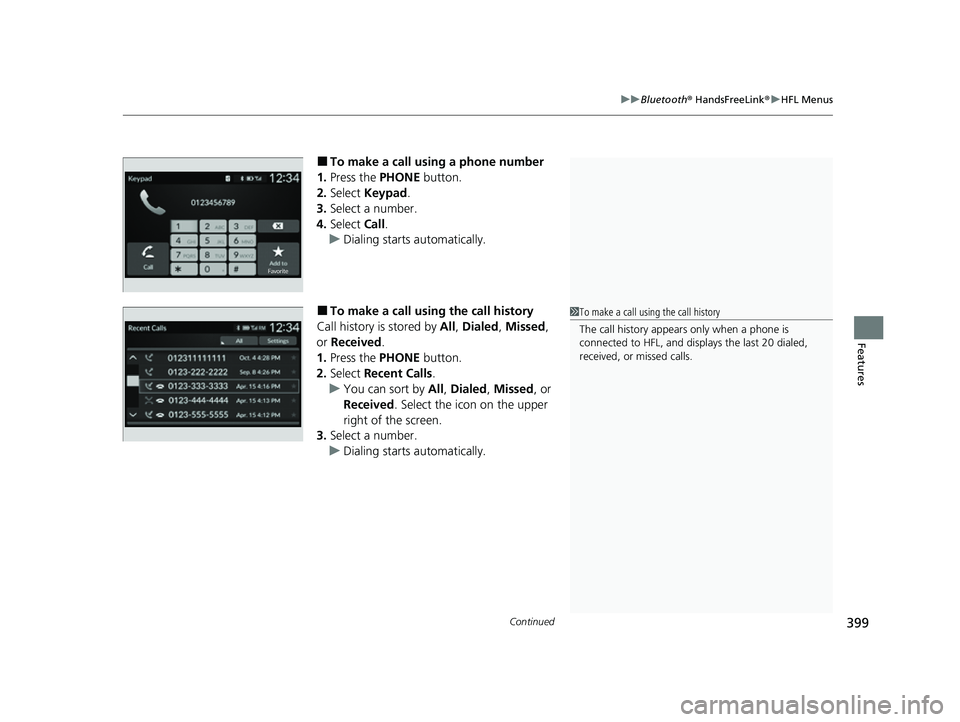
■To make a call using a phone number
1. Press the PHONE button.
2. Select Keypad .
3. Select a number.
4. Select Call.
u Dialing starts automatically.
■To make a call using the call history
Call history is stored by All, Dialed , Missed ,
or Received .
1. Press the PHONE button.
2. Select Recent Calls .
u You can sort by All, Dialed , Missed , or
Received . Select the icon on the upper
right of the screen.
3. Select a number.
u Dialing starts automatically.1To make a call using the call history
The call history appears only when a phone is
connected to HFL, and displays the last 20 dialed,
received, or missed calls.
23 ACURA INTEGRA-313S56000_03.book 399 ページ 2022年3月18日 金曜日 午前11時47分
Page 402 of 740
400
uuBluetooth ® HandsFreeLink ®u HFL Menus
Features
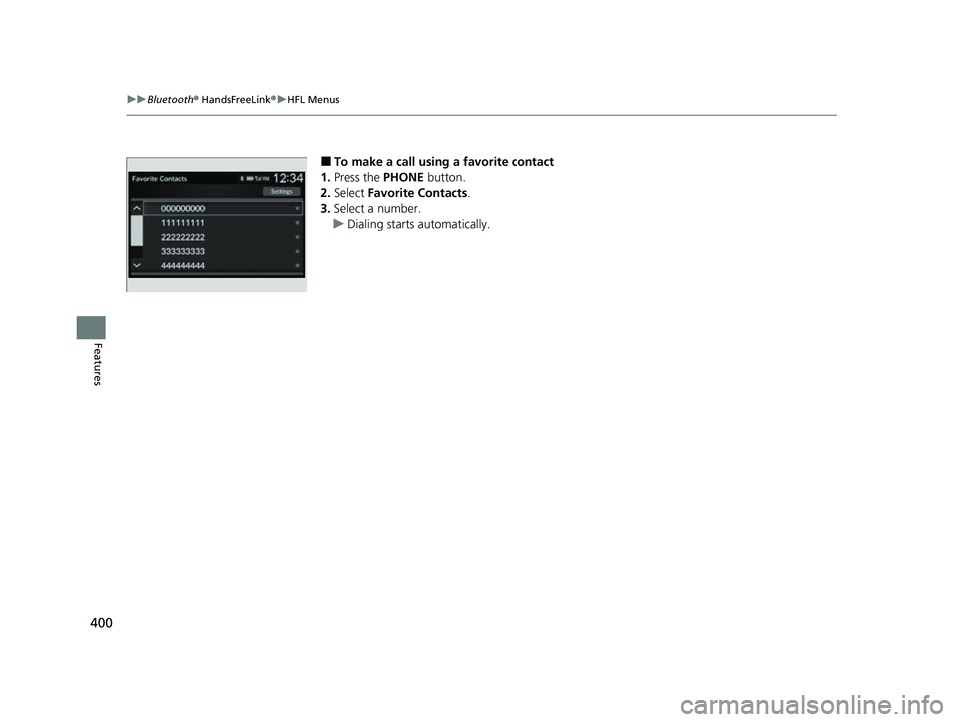
■To make a call using a favorite contact
1. Press the PHONE button.
2. Select Favorite Contacts .
3. Select a number.
u Dialing starts automatically.
23 ACURA INTEGRA-313S56000_03.book 400 ページ 2022年3月18日 金曜日 午前11時47分
Page 404 of 740
uuBluetooth ® HandsFreeLink ®u HFL Menus
402
Features
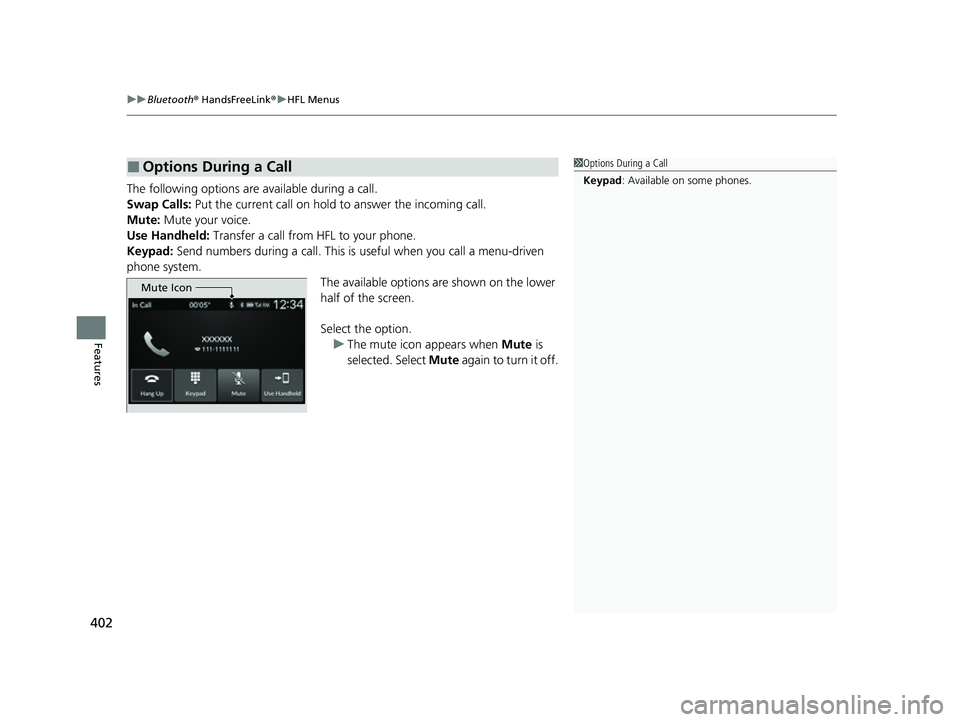
The following options are available during a call.
Swap Calls: Put the current call on hold to answer the incoming call.
Mute: Mute your voice.
Use Handheld: Transfer a call from HFL to your phone.
Keypad: Send numbers during a call. This is useful when you call a menu-driven
phone system. The available options are shown on the lower
half of the screen.
Select the option.
u The mute icon appears when Mute is
selected. Select Mute again to turn it off.
■Options During a Call1Options During a Call
Keypad : Available on some phones.
Mute Icon
23 ACURA INTEGRA-313S56000_03.book 402 ページ 2022年3月18日 金曜日 午前11時47分