manual transmission ACURA INTEGRA 2023 Owners Manual
[x] Cancel search | Manufacturer: ACURA, Model Year: 2023, Model line: INTEGRA, Model: ACURA INTEGRA 2023Pages: 740, PDF Size: 22.94 MB
Page 10 of 740
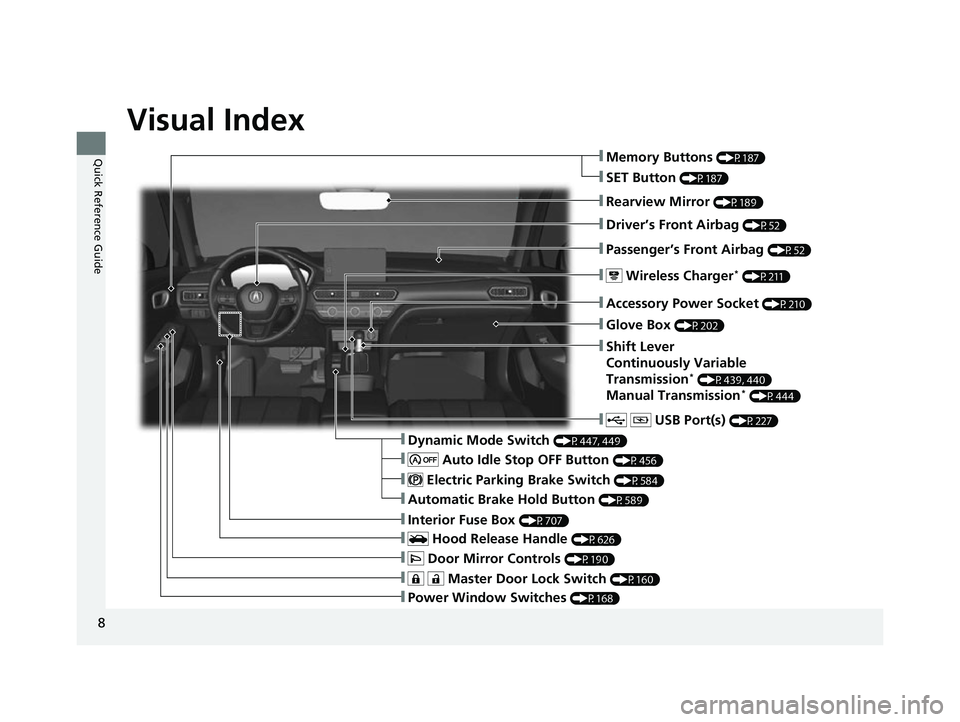
Visual Index
8
Quick Reference Guide
❚Power Window Switches (P168)
❚ Master Door Lock Switch (P160)
❚ Door Mirror Controls (P190)
❚Interior Fuse Box (P707)
❚ Hood Release Handle (P626)
❚Driver’s Front Airbag (P52)
❚Rearview Mirror (P189)
❚Passenger’s Front Airbag (P52)
❚ Wireless Charger* (P211)
❚ USB Port(s) (P227)
❚Accessory Power Socket (P210)
❚Dynamic Mode Switch (P447, 449)
❚Automatic Brake Hold Button (P589)
❚Glove Box (P202)
❚Shift Lever
Continuously Variable
Transmission
* (P439, 440)
Manual Transmission* (P444)
❚ Electric Parking Brake Switch (P584)
❚ Auto Idle Stop OFF Button (P456)
❚Memory Buttons (P187)
❚SET Button (P187)
23 ACURA INTEGRA-313S56000_03.book 8 ページ 2022年3月18日 金曜日 午前11時47分
Page 14 of 740

12
Quick Reference Guide
AtManual transmissionEngine status
Deceleration
Stop
Start-up
1. Depress the brake pedal.
2. Fully depress the clutch pedal.
On
●Continue to depress the brake pedal.●Move the shift lever to (N.●Release the clutch pedal.
Off
1. Depress the clutch pedal fully again.
2. Move the shift lever to
( 1.
3. Depress the accelerator pedal to resume driving.
Restarting
23 ACURA INTEGRA-313S56000_03.book 12 ページ 2022年3月18日 金曜日 午前11 時47分
Page 16 of 740
14
Quick Reference Guide
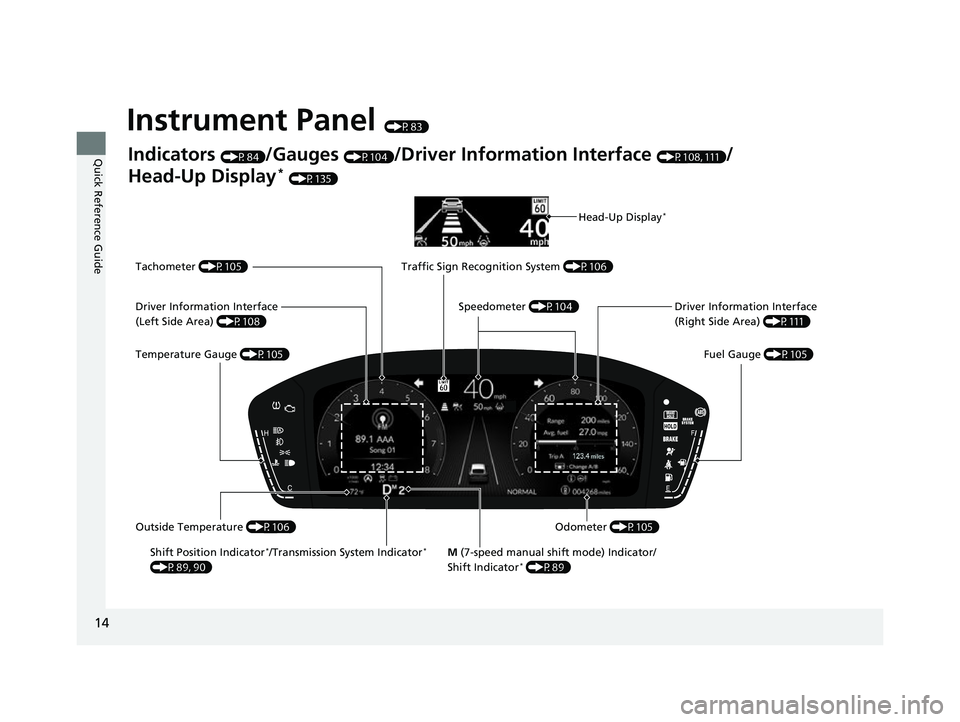
Instrument Panel (P83)
Indicators (P84)/Gauges (P104)/Driver Information Interface (P108, 111)/
Head-Up Display
* (P135)
Shift Position Indicator
*/Transmission System Indicator*
(P89, 90) M
(7-speed manual shift mode) Indicator/
Shift Indicator* (P89) Fuel Gauge
(P105)
Driver Information Interface
(Right Side Area)
(P111)
Tachometer
(P105)
Speedometer (P104)
Traffic Sign Recognition System
(P106)
Odometer (P105)
Temperature Gauge
(P105)
Driver Information Interface
(Left Side Area)
(P108)
Outside Temperature (P106)
Head-Up Display*
23 ACURA INTEGRA-313S56000_03.book 14 ページ 2022年3月18日 金曜日 午前11 時47分
Page 26 of 740

24
Quick Reference Guide
Driving (P423)
Manual Transmission* (P444)
Continuously Variable Transmission*
(P439, 440)
●Shift to (P and depress the brake pedal when starting the engine.●Shifting
ParkUsed when parking or starting the engine.
NeutralTransmission is not locked.
Drive (S)Used:
●For better acceleration.●To increase engine braking.●When going up or down hills.
Depress the brake pedal and press the
shift lever release button to shift.
Press the shift lever release button and
shift.
Shift without pressing the shift lever
release button.
ReverseUsed when reversing.
DriveUsed:
●For normal driving.●When temporarily driving in the 7-speed manual shift mode.
Release Button Shift Lever
23 ACURA INTEGRA-313S56000_03.book 24 ページ 2022年3月18日 金曜日 午前11
時47分
Page 27 of 740
25
Quick Reference Guide
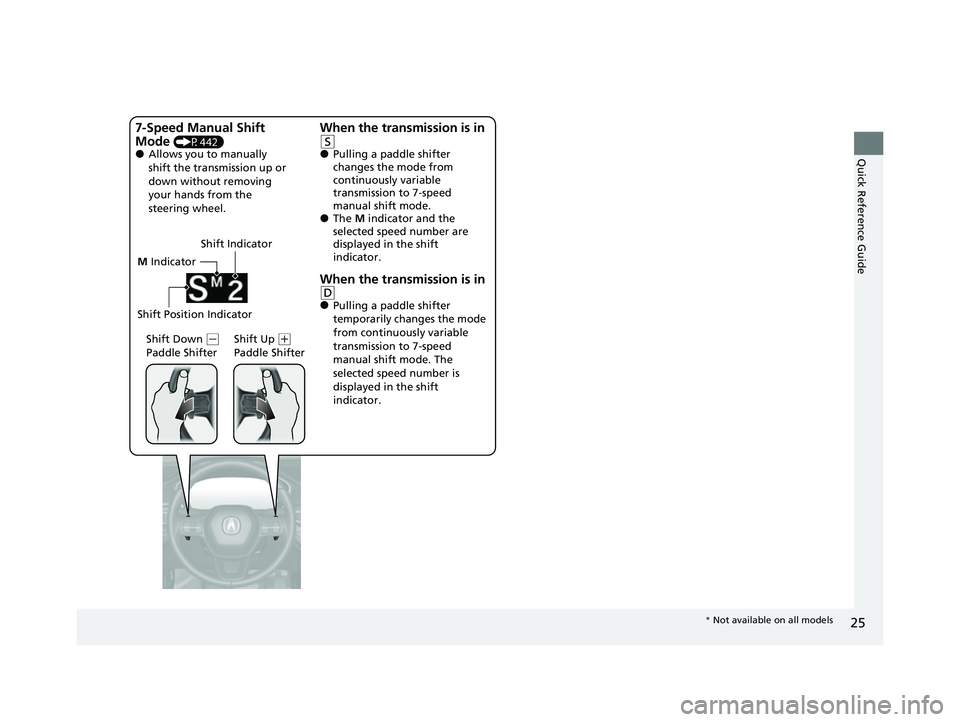
M Indicator
Shift Down
( -
Paddle Shifter Shift Up (
+
Paddle Shifter
7-Speed Manual Shift
Mode
(P442)●Allows you to manually
shift the transmission up or
down without removing
your hands from the
steering wheel.
When the transmission is in
(S●Pulling a paddle shifter
changes the mode from
continuously variable
transmission to 7-speed
manual shift mode.
●The M indicator and the
selected speed number are
displayed in the shift
indicator.
When the transmission is in (D●Pulling a paddle shifter
temporarily changes the mode
from continuously variable
transmission to 7-speed
manual shift mode. The
selected speed number is
displayed in the shift
indicator.
Shift Position Indicator
Shift Indicator
*
Not available on all models
23 ACURA INTEGRA-313S56000_03.book 25 ページ 2022年3月18日 金曜日 午前11 時47分
Page 29 of 740

27
Quick Reference Guide
AcuraWatchTM (P478)
AcuraWatch
TM is a driver support system
which employs the use of two distinctly
different kinds of sens ors: the sonar sensors
located in the front an d rear bumpers, and
the front grille, and a front wide view
camera mounted to the interior side of the
windshield, behind the rearview mirror.
AcuraWatch
TM is a driver support system
which employs the use of a front wide view
camera mounted to the interior side of the
windshield, behind the rearview mirror.
Models with Low Speed Braking Control
Models without Low Speed Braking Control
Front Wide View
Camera
Sonar Sensors
*
Collision Mitigation
Braking System
TM
(CMBS
TM) (P481)
The system can assist you when it
determines there is a possibility of your
vehicle colliding with a vehicle (including
motorcycles) ahead from behind, an
oncoming vehicle in front, a pedestrian, or
someone riding a bicycle (moving bicycle).
The CMBS
TM is designed to alert you when
the potential for a collision is determined, as
well as assist in reducing speed, avoiding
collisions, and reducing collision severity.
Low Speed Braking
Control
* (P493)
Using sonar sensors located on the front and
rear bumpers, and the front grille, this
system detects if there is danger of a
potential collision with a wall or other
obstacle during normal driving or when the
accelerator pedal is depressed with too
much force. The system then assists in
avoiding collisions and reducing damage
from impact through assistive braking and/
or assistive driving power suppression.
Continuously variable transmission models
with parking sensor system
Low Speed Braking
Control
* (P499)
Using sonar sensors located on the front and
rear bumpers and the front grille, this
system detects if there is danger of a
potential collision with a wall or other
obstacle during normal driving. The system
then assists in avoiding collisions and
reducing damage from impact through
assistive braking.
Adaptive Cruise Control
(ACC) with Low Speed
Follow
* (P504)
Helps maintain a constant vehicle speed and
a set following-interval behind a vehicle
detected ahead of yours and, if the detected
vehicle comes to a stop, can decelerate and
stop your vehicle, without you having to
keep your foot on the brake or the
accelerator.
Manual transmission models
* Not available on all models
23 ACURA INTEGRA-313S56000_03.book 27 ページ 2022年3月18日 金曜日 午前11 時47分
Page 33 of 740
31
Quick Reference Guide
What to Do If
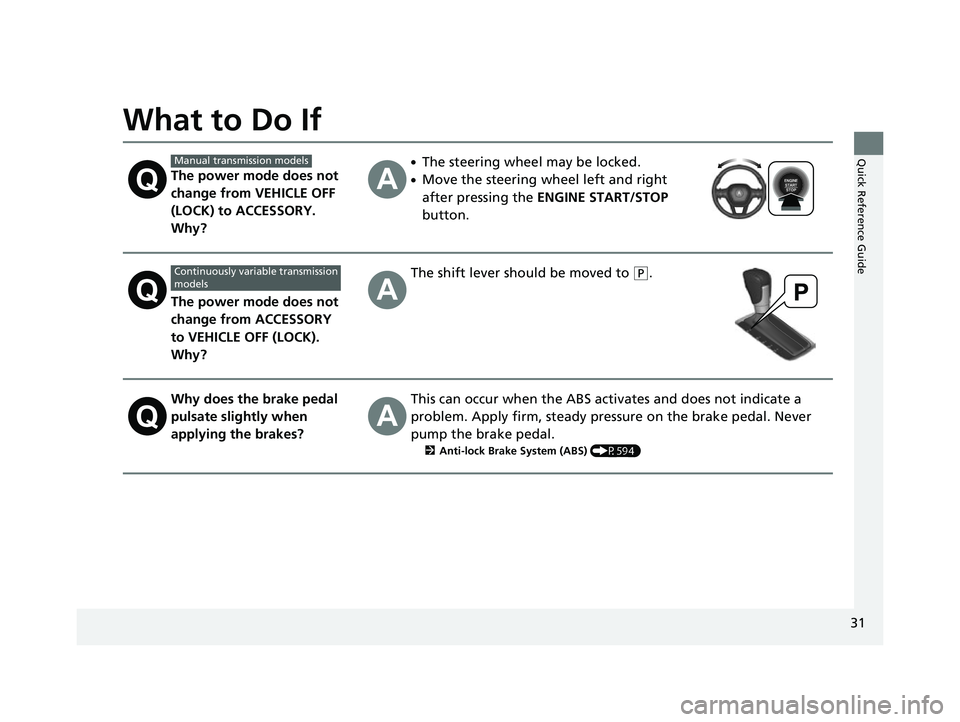
The power mode does not
change from VEHICLE OFF
(LOCK) to ACCESSORY.
Why?
●The steering wheel may be locked.
●Move the steering wheel left and right
after pressing the ENGINE START/STOP
button.
The power mode does not
change from ACCESSORY
to VEHICLE OFF (LOCK).
Why?
The shift lever should be moved to (P.
Why does the brake pedal
pulsate slightly when
applying the brakes?This can occur when the ABS activates and does not indicate a
problem. Apply firm, steady pressure on the brake pedal. Never
pump the brake pedal.
2 Anti-lock Brake System (ABS) (P594)
Manual transmission models
Continuously variable transmission
models
23 ACURA INTEGRA-313S56000_03.book 31 ページ 2022年3月18日 金曜日 午前11 時47分
Page 86 of 740
84
Instrument Panel
Indicators
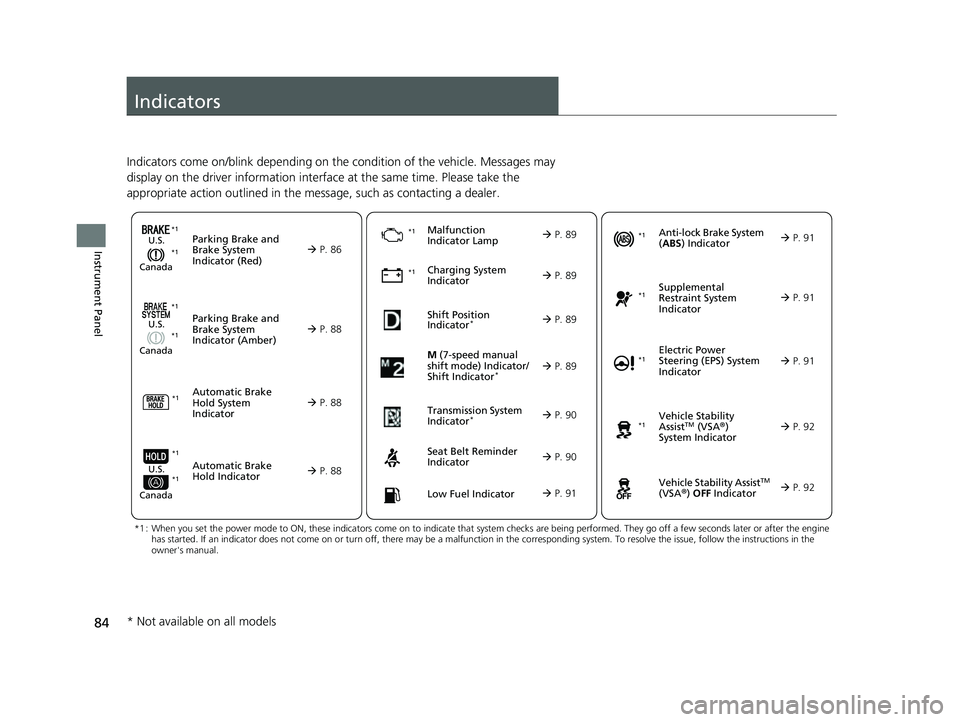
Indicators come on/blink depending on the condition of the vehicle. Messages may
display on the driver information interface at the same time. Please take the
appropriate action outlined in the message, such as contacting a dealer.
M (7-speed manual
shift mode) Indicator/
Shift Indicator
* P. 89
Parking Brake and
Brake System
Indicator (Red)
Parking Brake and
Brake System
Indicator (Amber)U.S.
Canada
U.S.
Canada
Automatic Brake
Hold System
Indicator
Automatic Brake
Hold IndicatorU.S.
Canada
*1 : When you set the power mode to ON, these indicators come on to indicate that system checks are being perf ormed. They go off a few seconds later or after the engine
has started. If an indicator does not come on or turn off, th ere may be a malfunction in the corresponding system. To resolve the issue, follow the instructions in the
owner's manual.
P. 86
*1Malfunction
Indicator Lamp
Charging System
Indicator
Seat Belt Reminder
Indicator
Low Fuel Indicator
P. 88
P. 88
P. 88
P.
89
P. 89
*1 *1
*1Shift Position
Indicator*
P. 89
Transmission System
Indicator
* P. 90
P. 90
P. 91
*1
Anti-lock Brake System
(ABS ) Indicator
Vehicle Stability
AssistTM (VSA®)
System Indicator
Vehicle Stability Assist
TM
(VSA®) OFF Indicator
Supplemental
Restraint System
Indicator
Electric Power
Steering (EPS) System
Indicator
*1
P. 91
P. 91
P. 92*1
*1
P. 92
*1 P. 91
*1 *1
*1 *1
* Not available on all models
23 ACURA INTEGRA-313S56000_03.book 84 ページ 2022年3月18日 金曜日 午前11 時47分
Page 111 of 740
Continued109
uuGauges and Displays uDriver Information Interface (Left Side Area)
Instrument Panel
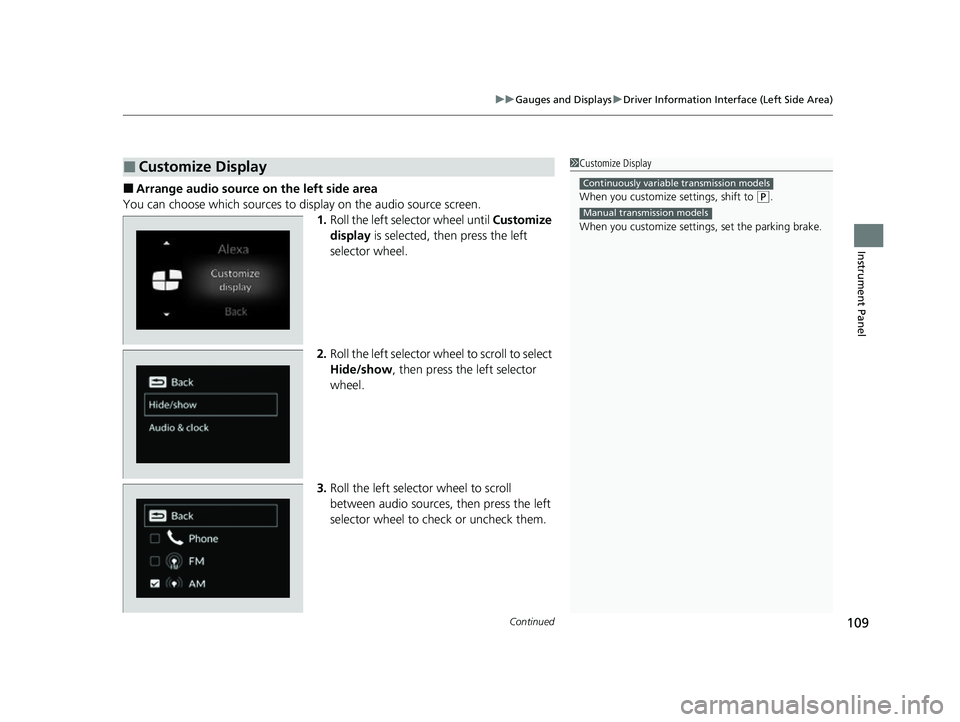
■Arrange audio source on the left side area
You can choose which sources to display on the audio source screen. 1.Roll the left selector wheel until Customize
display is selected, then press the left
selector wheel.
2. Roll the left selector wheel to scroll to select
Hide/show , then press the left selector
wheel.
3. Roll the left selector wheel to scroll
between audio sources, then press the left
selector wheel to check or uncheck them.
■Customize Display1Customize Display
When you customize settings, shift to
(P.
When you customize setti ngs, set the parking brake.
Continuously variable transmission models
Manual transmission models
23 ACURA INTEGRA-313S56000_03.book 109 ページ 2022年3月18日 金曜日 午前11時47分
Page 127 of 740
Continued125
uuGauges and Displays uDriver Information Interface (Right Side Area)
Instrument Panel
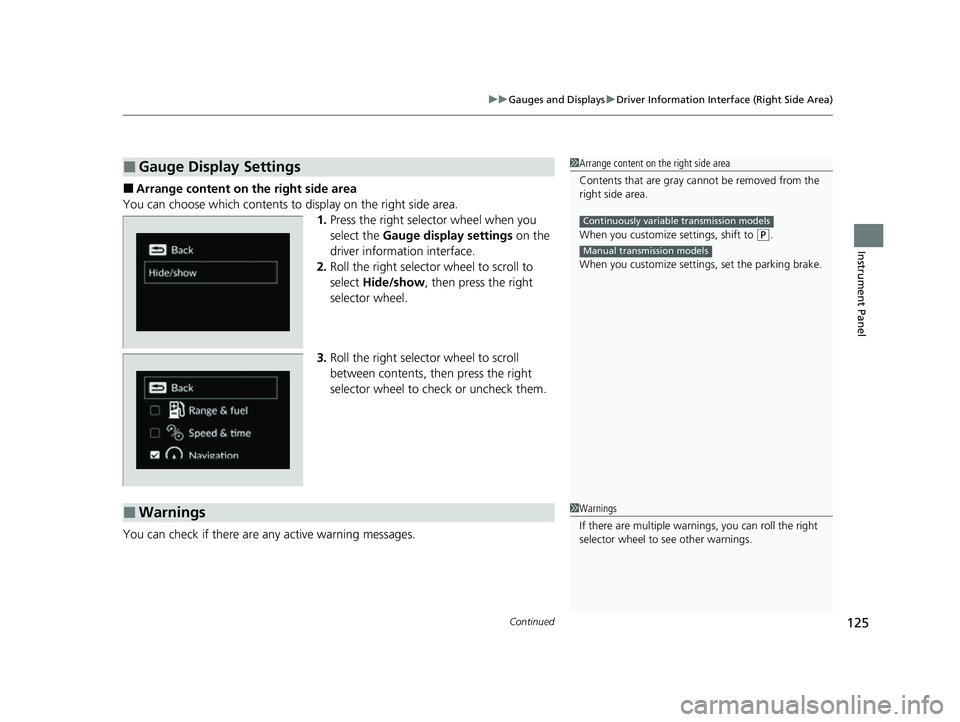
■Arrange content on the right side area
You can choose which contents to display on the right side area. 1.Press the right selector wheel when you
select the Gauge display settings on the
driver information interface.
2. Roll the right selector wheel to scroll to
select Hide/show , then press the right
selector wheel.
3. Roll the right selector wheel to scroll
between contents, then press the right
selector wheel to check or uncheck them.
You can check if there are any active warning messages.
■Gauge Display Settings1 Arrange content on the right side area
Contents that are gray ca nnot be removed from the
right side area.
When you customize settings, shift to
( P.
When you customize setti ngs, set the parking brake.
Continuously variable transmission models
Manual transmission models
■Warnings1Warnings
If there are multiple warnings, you can roll the right
selector wheel to see other warnings.
23 ACURA INTEGRA-313S56000_03.book 125 ページ 2022年3月18日 金曜日 午前11時47分