phone ACURA INTEGRA 2024 Owners Manual
[x] Cancel search | Manufacturer: ACURA, Model Year: 2024, Model line: INTEGRA, Model: ACURA INTEGRA 2024Pages: 766, PDF Size: 28.39 MB
Page 419 of 766

417
uuBluetooth ® HandsFreeLink ®u HFL Menus
Continued
Features
■To edit a favorite contact
1. Select Phone.
2. Select Favorite Contacts .
3. Select Edit on the favorite contact entry
you want to edit.
4. Select a setting you want.
5. Select Done.
■To delete a favorite contact
1. Select Phone.
2. Select Favorite Contacts .
3. Select Edit on the favorite contact entry
you want to delete.
4. Select Remove .
5. A confirmation message appears on the
screen. Select Yes.
24 ACURA INTEGRA-313S56100.book 417 ページ 2023年2月13日 月曜日 午後2時41分
Page 420 of 766
uuBluetooth ® HandsFreeLink ®u HFL Menus
418
Features
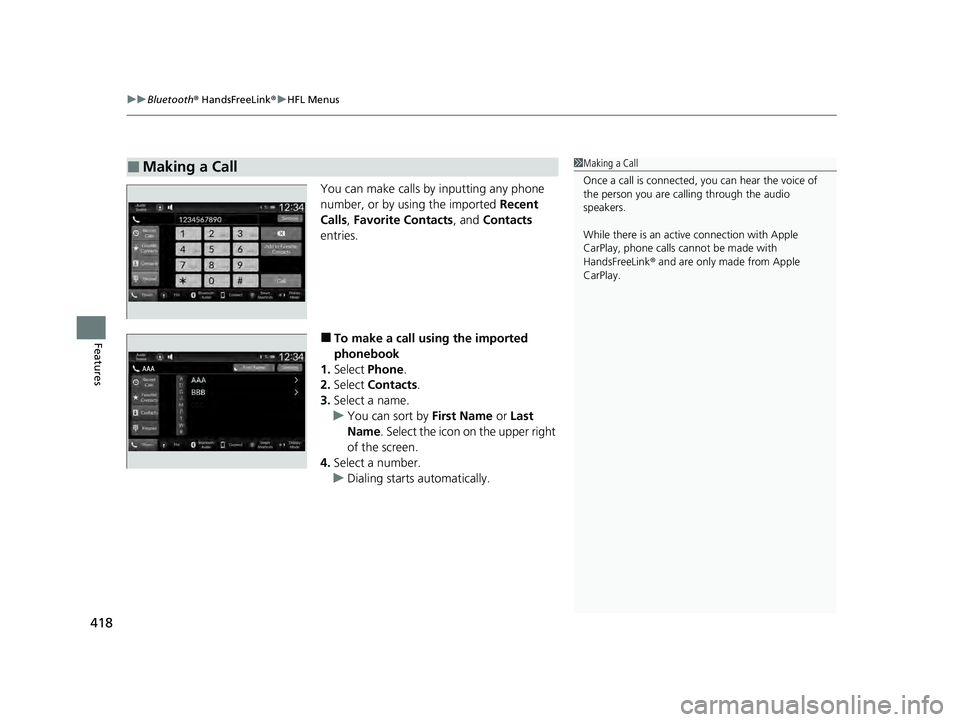
You can make calls by inputting any phone
number, or by using the imported Recent
Calls, Favorite Contacts, and Contacts
entries.
■To make a call using the imported
phonebook
1. Select Phone .
2. Select Contacts .
3. Select a name.
u You can sort by First Name or Last
Name . Select the icon on the upper right
of the screen.
4. Select a number.
u Dialing starts automatically.
■Making a Call1Making a Call
Once a call is connected, you can hear the voice of
the person you are call ing through the audio
speakers.
While there is an active connection with Apple
CarPlay, phone calls ca nnot be made with
HandsFreeLink ® and are only made from Apple
CarPlay.
24 ACURA INTEGRA-313S56100.book 418 ページ 2023年2月13日 月曜日 午後2時41分
Page 421 of 766
Continued419
uuBluetooth ® HandsFreeLink ®u HFL Menus
Features
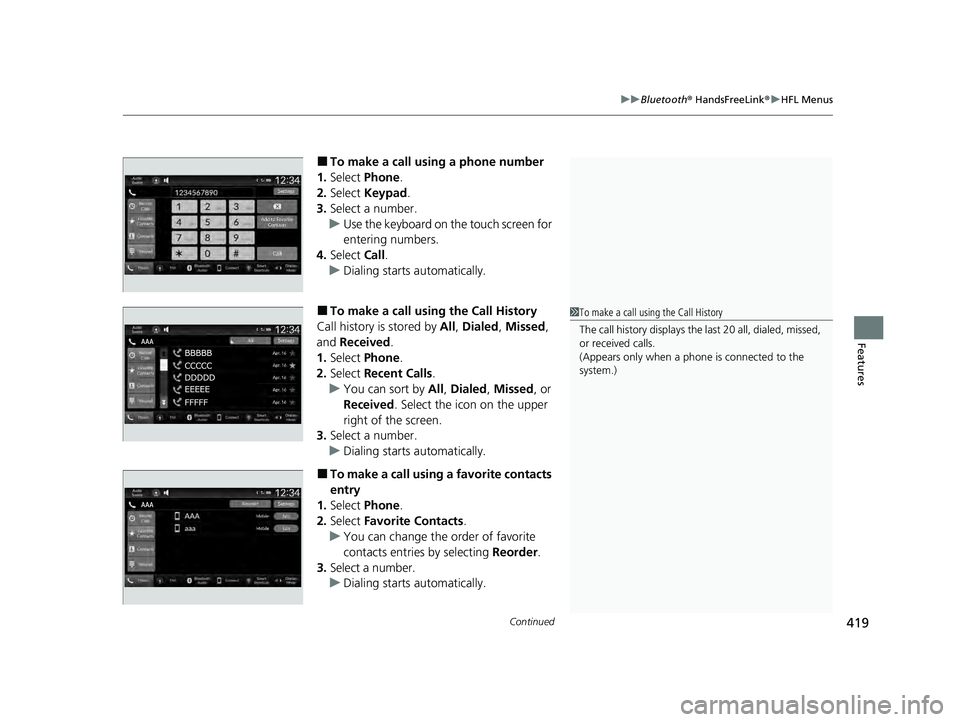
■To make a call using a phone number
1. Select Phone.
2. Select Keypad .
3. Select a number.
u Use the keyboard on the touch screen for
entering numbers.
4. Select Call.
u Dialing starts automatically.
■To make a call using the Call History
Call history is stored by All, Dialed , Missed ,
and Received.
1. Select Phone.
2. Select Recent Calls .
u You can sort by All, Dialed , Missed , or
Received . Select the icon on the upper
right of the screen.
3. Select a number.
u Dialing starts automatically.
■To make a call using a favorite contacts
entry
1. Select Phone.
2. Select Favorite Contacts .
u You can change the order of favorite
contacts entries by selecting Reorder.
3. Select a number.
u Dialing starts automatically.
1To make a call using the Call History
The call history disp lays the last 20 all, dialed, missed,
or received calls.
(Appears only when a phone is connected to the
system.)
24 ACURA INTEGRA-313S56100.book 419 ページ 2023年2月13日 月曜日 午後2時41分
Page 423 of 766

421
uuBluetooth ® HandsFreeLink ®u HFL Menus
Features
The following options are available during a call.
Mute: Mute your voice.
Use Handheld : Transfer a call from the system to your phone.
Keypad : Send numbers during a call. This is useful when you call a menu-driven
phone system. The available options are shown on the lower
half of the screen.
Select the option. u The mute icon appears when Mute is
selected when the other source screen
other than the phone screen is displayed.
Select Mute again to turn it off.
■Options During a Call1Options During a Call
Keypad : Available on some phones.
You can select the icons on the audio/information
screen.
24 ACURA INTEGRA-313S56100.book 421 ページ 2023年2月13日 月曜日 午後2時41分
Page 424 of 766

422
uuBluetooth ® HandsFreeLink ®u AcuraLink ® Assist
Features
AcuraLink ® Assist
■Automatic collision notification
If your vehicle’s airbags deploy or if the unit
detects that the vehicle is severely impacted,
your vehicle automatically will attempt to
connect to an E911 operator through your
connected cellular phone. If connected,
information about your vehicle and its
location can be sent to the operator
*1; you
also can speak to th e operator when
connected.
IMPORTANT: For the vehicle equipped with AcuraLink Assist, owner activation
constitutes authorization for Acura to collect information from your vehicle needed
to provide the service. In a crash, AcuraLink Assist wi ll attempt to notify emergency
services but ACURA CANNOT GUARANTEE THAT SUCH NOTIFICATION WILL
OCCUR.
Acura reserves the right to te rminate AcuraLink Assist servic es at any time or for any
reason, and in the future may not be able to provide services due to changes in, or
obsolescence of, technology integral to the service or changes in governmental
regulation.
*1: Depending on your phone and it s cellular coverage, your vehicle’s location may not be sent
to the operator.
■In Case of Emergency
Models with 9-in. Color Touchscreen
1 In Case of Emergency
Your vehicle may not be able to connect to the
operator if its, or your cellular phone’s, battery level is
low, the line is disconnected, or you do not have
adequate cellul ar coverage.
You cannot use this emergency service when:
•You travel outside your cell ular provider’s coverage
areas.
•There is a problem with the connecting devices,
such as the microphones or speakers, or your
connected phone itself.
You cannot operate othe r phone-related functions
using the screen while talking to the operator.
Select Hang Up to terminate the connection to your
vehicle.
1 Automatic collision notification
If the unit fails to connect to the operator, it
repeatedly tries until it succeeds.
24 ACURA INTEGRA-313S56100.book 422 ページ 2023年2月13日 月曜日 午後2時41分
Page 425 of 766

423
uuBluetooth ® HandsFreeLink ®u AcuraLink ® Assist
Features
■To enable notification
1.Go to the phone settings screen.
2 Phone settings screen P. 408
2.Select AcuraLink Assist .
3. Select Yes or No.
1To enable notification
Setting options:
•Yes : Notification is available.
•No: Disable the feature.
24 ACURA INTEGRA-313S56100.book 423 ページ 2023年2月13日 月曜日 午後2時41分
Page 754 of 766
752
Information
Authorized Manuals
■Service Express
For electronic copies of se rvice publications, you can purchase a subscription to
Service Express. Visit www.techinfo.acura.com for pricing and options.
■For U.S. Owners
Manuals can be purchased from Helm Incorporated. You can order a manual by
phone at 1 (800) 782-4356 (credit ca rd orders only), or online at www.helminc.com.
■For Canadian Owners
Please contact a dealer to order any manuals that you may require.
24 ACURA INTEGRA-313S56100.book 752 ページ 2023年2月13日 月曜日 午後2時41分
Page 755 of 766

753
Information
Client Service Information
Acura dealership personnel are trained professionals able to deal with any problems
you may encounter with your vehicle. If, however, you are faced with a problem that
they cannot resolve to your satisfaction, contact Acura Client Relations/Services.
U.S. Owners
American Honda Motor Co., Inc.
Acura Client Relations
Mail Stop CHI-4
1919 Torrance Blvd.
Torrance, CA 90501-2746
Tel: 1 (800) 382-2238 Canadian Owners
Honda Canada Inc.
Acura Client Services
180 Honda Boulevard
Markham, ON
L6C 0H9
Tel: 1-888-9-ACURA-9
Fax: 1-877-939-0909
E-mail: [email protected]
In Puerto Rico and the U.S. Virgin Islands
Bella International
P.O. Box 190816
San Juan, PR 00919-0816
Tel: 1 (787) 620-7546 In Guam
Triple J Autogroup
157 S. Marine Corps Drive
Tamuning, GU 96913
Tel: (671) 648-22771
Client Service Information
When you call or write, pl ease give us the following
information:
•Vehicle Identification Number
2Vehicle Identification Number (VIN),
Engine Number, and Transmission
Number P. 742
•Date of purchase•Odometer reading of your vehicle
•Your name, address, and telephone number
•A detailed description of the problem•Name of the dealer who sold the vehicle to you
24 ACURA INTEGRA-313S56100.book 753 ページ 2023年2月13日 月曜日 午後2時41分
Page 760 of 766

758
Index
F
Features..................................................... 233
Filters Dust and Pollen ....................................... 675
Oil ........................................................... 644
Flat Tire ..................................................... 688
Floor Mats ................................................. 677
Fluids
Brake ....................................................... 653
Continuously Variable Transmission ......... 652
Engine Coolant ................................ 648, 650
Manual Transmission ............................... 652
Windshield Washer .................................. 654
FM/AM Radio .................................... 245, 292
Fog Light Indicator ..................................... 96
Folding Down the Rear Seats ................... 203
Foot Brake ................................................. 599
Front Airbags (SRS) ..................................... 52
Front Head Restraints ............................... 206
Front Seat Heaters .................................... 224
Front Seats Adjusting ................................................. 199
Front Wide View Camera ......................... 590
Fuel ...................................................... 26, 619
Average Fuel Economy............................. 120
Economy ................................................. 623
Gauge ..................................................... 108
Instant Fuel Economy ............................... 120
Low Fuel Indicator ..................................... 94
Range ...................................................... 120
Recommendation .................................... 619 Refueling......................................... 619, 737
Fuel Economy ........................................... 623
Fuel Fill Door ...................................... 26, 621
Fuses .......................................................... 728
Inspecting and Changing......................... 732
Locations......................................... 728, 730
G
Gasoline (Fuel)
Average Fuel Economy ............................ 120
Economy ................................................. 623
Gauge ..................................................... 108
Information ............................................. 619
Instant Fuel Economy .............................. 120
Low Fuel Indicator ..................................... 94
Refueling......................................... 619, 737
Gauge Display Settings ............................ 133
Gauges ...................................................... 107
Gear Shift Lever Positions Manual Transmission ............................... 448
Glass (care) ........................................ 677, 680
Glove Box .................................................. 210
G-Meter ..................................................... 127
H
Handling the Unexpected ........................ 685
HandsFreeLink ® (HFL) ....................... 385, 405
Automatic Import of Cellular Phonebook and Call History........... 397, 415 Automatic Transferring ................... 395, 414
Favorite Contacts ............................ 398, 416
HFL Buttons .................................... 385, 405
HFL Menus...................................... 388, 408
HFL Status Display ........................... 387, 407
In Case of Emergency ............................. 422
Limitations for Manual Operation .... 387, 407
Making a Call ................................. 400, 418
Options During a Call...................... 404, 421
Phone Setup ................................... 390, 410
Receiving a Call............................... 403, 420
Ringtone ......................................... 395, 414
Hatch ........................................................ 170
Light Bulb ............................................... 740
Unable to Open ...................................... 736
Hazard Warning Button .............................. 6
HD Radio
TM............................................... 293
Headlights ................................................ 184
Aiming.................................................... 655
Auto High-Beam ..................................... 188
Automatic Operation .............................. 185
Dimming................................................. 184
Operating ............................................... 184
Head-Up Display ...................................... 143
Heated Steering Wheel ........................... 223
Heaters (Front Seat) ................................. 224
Heaters (Rear Seat) .................................. 225
HFL (HandsFreeLink ®) ...................... 385, 405
High Beam Indicator .................................. 96
Hill Start Assist System ............................. 439
Honda App License Agreement .............. 343
24 ACURA INTEGRA-313S56100.book 758 ページ 2023年2月13日 月曜日 午後2時41分
Page 765 of 766

763
Index
Using the Keyless Access System............. 155
V
Vanity Mirrors.............................................. 9
Vehicle Identification Number ................ 742
Vehicle Settings ........................................ 134
Vehicle Stability Assist
TM (VSA® ).............. 474
Off Button .............................................. 475
Off Indicator ............................................. 95
System Indicator ....................................... 95
Viscosity (Oil) .................................... 640, 741
Voice Control Operation ......................... 288
Audio Commands ................................... 289
General Commands ................................ 289
List Commands ....................................... 290
Phone Commands .................................. 289
Standard Commands .............................. 290
Voice Portal Screen ................................. 289
Voice Recognition ................................... 288
VSA ® (Vehicle Stability Assist
TM).............. 474
W
Wallpaper ................................................. 272
Warning Indicator On/Blinking ............... 722
Warning Labels .......................................... 84
Warnings .................................................. 133
Warranties (Warranty Manual provided
separately) .............................................. 749
Watts ........................................................ 740 Wear Indicators (Tire)
............................... 665
Wheel Nut Wrench (Jack Handle) ........... 707
Wi-Fi Connection ...................................... 323
Window Washers ...................................... 191
Adding/Refilling Fluid ............................... 654
Switch ..................................................... 191
Windows (Opening and Closing) ............. 176
Windshield ................................................ 191
Cleaning .......................................... 677, 680
Defrosting/Defogging .............................. 228
Washer Fluid ........................................... 654
Wiper Blades ........................................... 657
Wipers and Washers ................................ 191
Winter Tires
Snow Tires ............................................... 668
Tire Chains .............................................. 668
Wipers and Washers ................................. 191
Checking and Replacing Wiper Blades ..... 657
Wireless Charger ....................................... 219
Worn Tires ................................................. 659
24 ACURA INTEGRA-313S56100.book 763 ページ 2023年2月13日 月曜日 午後2時41分