carplay ACURA INTEGRA 2024 Owner's Guide
[x] Cancel search | Manufacturer: ACURA, Model Year: 2024, Model line: INTEGRA, Model: ACURA INTEGRA 2024Pages: 766, PDF Size: 28.39 MB
Page 361 of 766

359
uuGeneral Information on the Audio System uLicense Information
Continued
Features
This product is protected by certain intellectual property rights of Microsoft. Use or
distribution of such technology outside of this product is prohibited without a
license from Microsoft.
“Made for iPod,” and “Made for iPhone,” mean that an electronic accessory has
been designed to connect specifically to iP od, or iPhone, respectively, and has been
certified by the developer to meet Appl e performance standards. Apple is not
responsible for the operation of this devi ce or its compliance with safety and
regulatory standards. Please no te that the use of this accessory with iPod, or iPhone,
may affect wireless performance.
Apple, the Apple Logo, iPhone, iPod touch are trademarks of Apple Inc., registered
in the U.S. and other countries. Apple CarPlay, iPod, iPhone, iTunes, Siri and
Lightning are trademarks of Apple Inc. A pp Store is a service mark of Apple Inc.
■Windows Media
■Apple
24 ACURA INTEGRA-313S56100.book 359 ページ 2023年2月13日 月曜日 午後2時41分
Page 365 of 766
363
uuCustomized Features u
Continued
Features
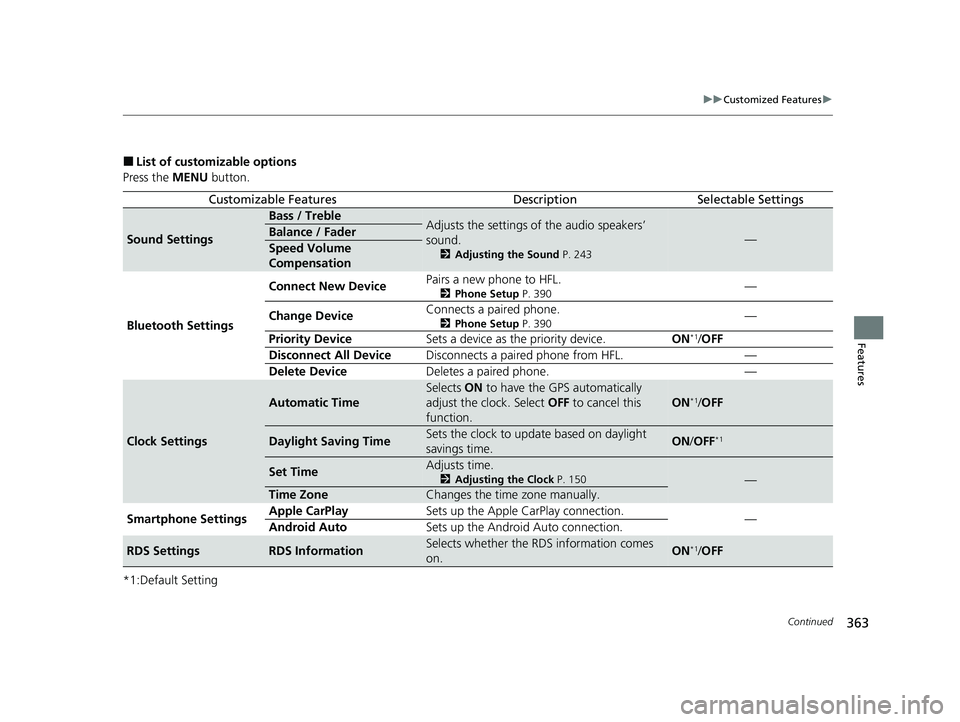
■List of customizable options
Press the MENU button.
*1:Default Setting
Customizable FeaturesDescriptionSelectable Settings
Sound Settings
Bass / TrebleAdjusts the settings of the audio speakers’
sound.
2 Adjusting the Sound P. 243
—Balance / Fader
Speed Volume
Compensation
Bluetooth Settings Connect New Device
Pairs a new phone to HFL.
2
Phone Setup P. 390—
Change Device Connects a paired phone.
2
Phone Setup P. 390—
Priority Device Sets a device as the priority device. ON
*1/OFF
Disconnect All Device Disconnects a paired phone from HFL. —
Delete Device Deletes a paired phone. —
Clock Settings
Automatic Time
Selects ON to have the GPS automatically
adjust the clock. Select OFF to cancel this
function.
ON*1/ OFF
Daylight Saving TimeSets the clock to update based on daylight
savings time.ON /OFF*1
Set TimeAdjusts time.
2 Adjusting the Clock P. 150—
Time ZoneChanges the time zone manually.
Smartphone Settings Apple CarPlay
Sets up the Apple CarPlay connection.
—
Android Auto Sets up the Android Auto connection.
RDS SettingsRDS InformationSelects whether the RDS information comes
on.ON*1/OFF
24 ACURA INTEGRA-313S56100.book 363 ページ 2023年2月13日 月曜日 午後2時41分
Page 373 of 766

371
uuCustomized Features u
Continued
Features
■Smartphone Connection
Customizable Features Descri ption Selectable Settings
Apple CarPlay
+ Connect New DevicePairs a new phone to Apple CarPlay.
2Phone Setup P. 410—
(Saved Devices)Connects, disconnects, or deletes a paired phone.
2Phone Setup P. 410—
Android Auto + Connect New Device
Pairs a new phone to Android Auto.
2
Phone Setup P. 410—
(Saved Devices) Connects, disconnects, or deletes a paired phone.
2
Phone Setup P. 410—
24 ACURA INTEGRA-313S56100.book 371 ページ 2023年2月13日 月曜日 午後2時41分
Page 374 of 766

372
uuCustomized Features u
Features
■Connections
*1:Default Setting
*2:Appears only when Apple CarPlay or Android Auto is connected wirelessly. Customizable Features Description Selectable Settings
Wi-Fi
Change ModeChanges the Wi-Fi mode.Network*1/
Smartphone*2/ OFF
(Available Networks/Connected
Devices)Displays the available network(s) or current connected
device(s).—
OptionsAdd NetworkAdds a new network to connect Wi-Fi.—
Saved NetworksSaves the connected network.—
Setup
Network SSIDSets the network name.—
SecurityDisplays the network security.—
PasswordSets password for require entering password when
connecting Wi-Fi device to the network.—
Wi-Fi BandDisplays the Wi-Fi band.—
Bluetooth
OptionsBluetoothTurns the Bluetooth® on and off.ON*1/OFF
Priority DeviceDisplays the priority device.—
+ Connect New DevicePairs a new phone to HFL.
2 Phone Setup P. 410—
(Saved Devices)Connects, disconnects, or deletes a paired phone.
2Phone Setup P. 410—
24 ACURA INTEGRA-313S56100.book 372 ページ 2023年2月13日 月曜日 午後2時41分
Page 407 of 766

405Continued
Features
Bluetooth® HandsFreeLink ®
Bluetooth® HandsFreeLink ® (HFL) allows you to place and receive phone calls using
your vehicle’s audio system, without handling your cell phone.
Using HFL
■HFL Buttons
1 Bluetooth ® HandsFreeLink ®
Place your phone where y ou can get good reception.
To use HFL, you need a Bluetooth-compatible cell
phone. For a list of compatible phones, pairing
procedures, and special feature capabilities:
•U.S.: Visit www.handsfreelink.com/Acura , or call 1-
888-528-7876.
•Canada: For more info rmation on smartphone
compatibility, call 1-855-490-7351.
To use the system, the Bluetooth setting must be
ON . If there is an active c onnection to Apple CarPlay,
HFL is unavailable. 2 Customized Features P. 367
Voice control tips
•Aim the vents away from the ceiling and close the
windows, as noise coming from them may interfere
with the microphone.
•If the microphone picks up vo ices other than yours,
the command may be misinterpreted.
•To change the volume level, the volume level is able
to change by the audio system's volume.
If there is no Favorite Contact entry in the system, the
pop-up notification appears on the screen. 2 Favorite Contacts P. 416
Models with 9-in. Color Touchscreen
Left Selector Wheel
VOL
(
+/VOL(- (Volume) Switch
24 ACURA INTEGRA-313S56100.book 405 ページ 2023年2月13日 月曜日 午後2時41分
Page 412 of 766

uuBluetooth ® HandsFreeLink ®u HFL Menus
410
Features
■Bluetooth ® setup
You can turn Bluetooth® function on and off.
1. Press the button.
2. Select General Settings .
3. Select Connections .
4. Select Bluetooth .
5. Select Options.
6. Select Bluetooth , then select ON.
■To pair a cell phone (when there is no
phone paired to the system)
1. Select Phone .
2. Select Connect New Device .
3. Make sure your phone is in search or
discoverable mode.
4. Select Acura Integra from your phone.
u If you want to pair a phone from this
audio system, select Search for
Devices , and then select your phone
when it appears on the list.
5. The system gives you a pairing code on the
audio/information screen.
u Confirm if the pairing codes on the
screen and your phone match.
This may vary by phone.
6. Select desired functions and then select
Connect .
■Phone Setup1Phone Setup
Your Bluetooth -compatible phone must be paired to
the system before you ca n make and receive hands-
free calls.
Phone Pairing Tips:
•You cannot pair your phone while the vehicle is
moving.
•Up to six phones can be paired.
•Your phone's battery may dr ain faster when it is
paired to the system.
Once you have paired a phone, you can see it
displayed on the screen with one or more icons on
the right side.
These icons indicate the following: : The phone is compatible with Bluetooth ® Audio.
: The phone can be used with HFL.
: The phone is compatib le with Apple CarPlay.
: The phone is compatible with Android Auto.
If there is an active connection to Appl e CarPlay or
Android Auto, pairing of additional Bluetooth-
compatible devices is unavailable.
24 ACURA INTEGRA-313S56100.book 410 ページ 2023年2月13日 月曜日 午後2時41分
Page 420 of 766
uuBluetooth ® HandsFreeLink ®u HFL Menus
418
Features
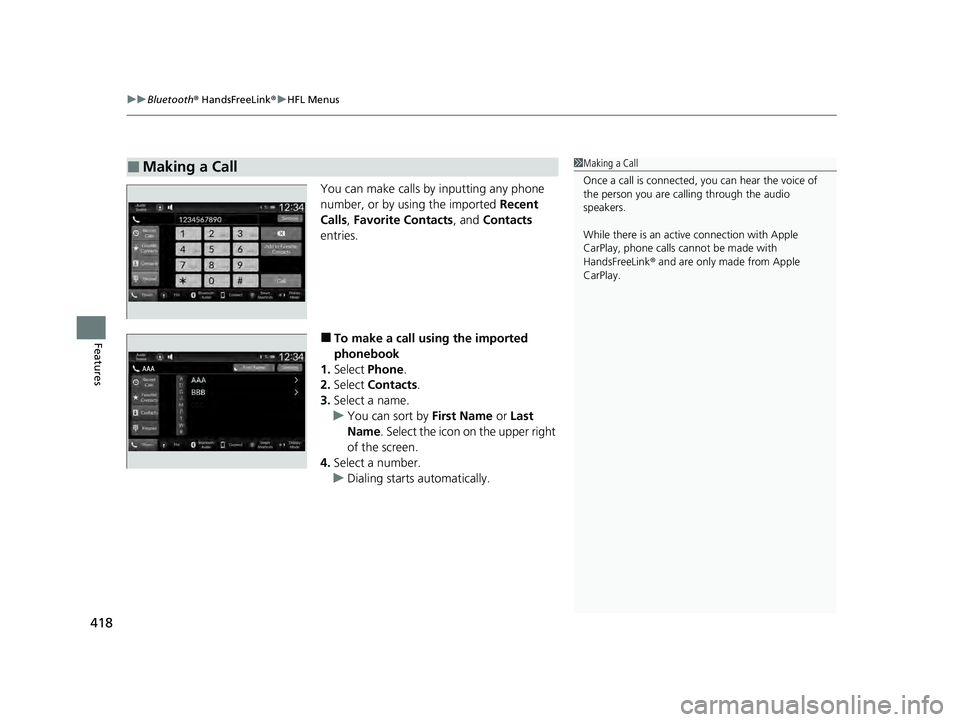
You can make calls by inputting any phone
number, or by using the imported Recent
Calls, Favorite Contacts, and Contacts
entries.
■To make a call using the imported
phonebook
1. Select Phone .
2. Select Contacts .
3. Select a name.
u You can sort by First Name or Last
Name . Select the icon on the upper right
of the screen.
4. Select a number.
u Dialing starts automatically.
■Making a Call1Making a Call
Once a call is connected, you can hear the voice of
the person you are call ing through the audio
speakers.
While there is an active connection with Apple
CarPlay, phone calls ca nnot be made with
HandsFreeLink ® and are only made from Apple
CarPlay.
24 ACURA INTEGRA-313S56100.book 418 ページ 2023年2月13日 月曜日 午後2時41分
Page 757 of 766

Index
755
Index
Index
Numbers
7-Speed Manual Shift Mode................... 446
Operation ............................................... 447
A
ABS (Anti-lock Brake System) .................. 605
Accelerator Position Meter ..................... 126
Accessories and Modifications ................ 682
Accessory Power Socket ........................... 218
Acura Integrated Dynamics System ............................................. 452, 454
AcuraLink® .............................................. 316
AcuraWatch
TM.................................... 27, 486
Adaptive Cruise Control (ACC) ................ 533
Adaptive Cruise Control (ACC) with Low
Speed Follow .......................................... 512
Adding the Coolant ......................... 648, 651
Additives Coolant .......................................... 648, 651
Engine Oil ............................................... 640
Washer ................................................... 654
Additives, Engine Oil ............................... 640
Adjusting
Armrest .................................................. 208
Clock ...................................................... 150
Front Head Restraints .............................. 206
Front Seats.............................................. 199
Mirrors.................................................... 197
Rear Seats ............................................... 203
Sound ............................................. 243, 285 Steering Wheel ........................................ 196
Agile Handling Assist ............................... 476
Air Conditioning System (Climate Control System) .................................................... 226
Changing the Mode ........................ 226, 227
Defrosting the Windshield and Windows ............................................... 228
Dust and Pollen Filter ............................... 675
Recirculation/Fresh Air Mode ................... 227
Sensor ..................................................... 231
Synchronization Mode ............................. 230
Using Automatic Climate Control ............ 226
Air Pressure ....................................... 661, 741
Airbags ........................................................ 49
Advanced Airbags ..................................... 55
After a Collision ......................................... 52
Airbag Care ............................................... 67
Driver’s Knee Airbag .................................. 57
Event Data Recorder .................................... 0
Front Airbags (SRS) .................................... 52
Indicator .............................................. 64, 94
Passenger Airbag Off Indicator .................. 65
Sensors ...................................................... 49
Side Airbags .............................................. 60
Side Curtain Airbags .................................. 63
AM/FM Radio .................................... 245, 292
Android Auto
TM................................ 263, 333
Anti-lock Brake System (ABS) .................. 605
Indicator .................................................... 94
Apple CarPlay ................................... 259, 326
Armrest ..................................................... 208 Audio Remote Controls
........................... 238
Audio System ............................ 234, 242, 267
Adjusting the Sound........................ 243, 285
Alexa Built-In ........................................... 291
Android Auto
TM............................... 263, 333
Apple CarPlay.................................. 259, 326
Audio/Information Screen........................ 269
Display Setup .................................. 244, 286
Error Messages ........................................ 339
General Information ................................ 341
Home Screen........................................... 274
How to Update ....................................... 280
How to Update Wirelessly ....................... 283
How to Update with a USB Device........... 284
iPod ................................................ 247, 307
Limitations for Manual Operation .............................. 287, 387, 407
Radio Data System (RDS) ................. 246, 294
Reactivating ............................................ 237
Recommended Devices............................ 342
Remote Controls ..................................... 238
Security Code .......................................... 237
Selecting an Audio Source ....................... 287
Start Up .................................................. 268
Status Area ............................................. 279
System Updates....................................... 280
System Updates Settings ......................... 281
Theft Protection ...................................... 237
USB Flash Drives ...................................... 342
USB Port(s) .............................................. 235
Wallpaper Setup...................................... 272
24 ACURA INTEGRA-313S56100.book 755 ページ 2023年2月13日 月曜日 午後2時41分