battery ACURA INTEGRA 2024 Service Manual
[x] Cancel search | Manufacturer: ACURA, Model Year: 2024, Model line: INTEGRA, Model: ACURA INTEGRA 2024Pages: 766, PDF Size: 28.39 MB
Page 476 of 766
474
uuWhen Driving uVehicle Stability AssistTM (VSA ®), aka Electronic Stability Control (ESC), System
Driving
Vehicle Stability AssistTM (VSA ®), aka Electronic
Stability Control (ESC), System
VSA ® helps stabilize the vehicle during cornering if the vehicle turns more or less
than what was intended. It also assists in maintaining traction on slippery surfaces.
It does so by regulating engine output and selectively applying the brakes.
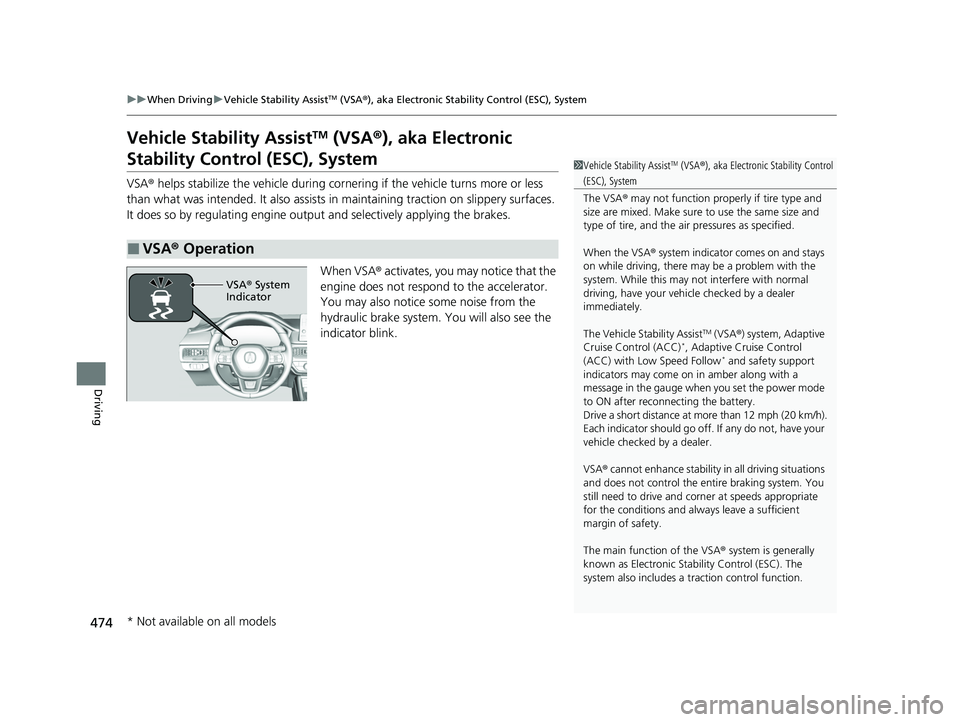
When VSA® activates, you may notice that the
engine does not respond to the accelerator.
You may also notice some noise from the
hydraulic brake system. You will also see the
indicator blink.
■VSA ® Operation
1 Vehicle Stability AssistTM (VSA ®), aka Electronic Stability Control
(ESC), System
The VSA ® may not function properl y if tire type and
size are mixed. Make sure to use the same size and
type of tire, and the air pressures as specified.
When the VSA ® system indicator comes on and stays
on while driving, there may be a problem with the
system. While this may not interfere with normal
driving, have your vehi cle checked by a dealer
immediately.
The Vehicle Stability Assist
TM (VSA ®) system, Adaptive
Cruise Control (ACC)*, Adaptive Cruise Control
(ACC) with Low Speed Follow* and safety support
indicators may come on in amber along with a
message in the gauge when you set the power mode
to ON after reconnecting the battery.
Drive a short distance at more than 12 mph (20 km/h).
Each indicator should go off. If any do not, have your
vehicle checked by a dealer.
VSA ® cannot enhance stability in all driving situations
and does not control the entire braking system. You
still need to drive and corner at speeds appropriate
for the conditions and always leave a sufficient
margin of safety.
The main function of the VSA ® system is generally
known as Electronic Stab ility Control (ESC). The
system also includes a traction control function.
VSA® System
Indicator
* Not available on all models
24 ACURA INTEGRA-313S56100.book 474 ページ 2023年2月13日 月曜日 午後2時41分
Page 495 of 766

Continued493
uuAcuraWatchTMuCollision Mitigation Braking SystemTM (CMBSTM)
Driving
You can turn the system on and off using the driver information interface.
2 Switching the Display P. 117
2 Safety Support P. 129
The CMBSTM is turned on every time you start th e engine, even if you turned it off
the last time you drove the vehicle.
■CMBSTM On and Off1 Collision Mitigation Braking SystemTM (CMBSTM)
You cannot turn the CMBS
TM off while driving.
The CMBS
TM may automatically shut off, and the
safety support indicator (amb er) will come and stay
on under certain conditions: 2 CMBS
TM Conditions and Limitations P. 494
The CMBS
TM is not activated for about 15 seconds
after the engine starts.
The Vehicle Stability Assist
TM (VSA ®) system, Adaptive
Cruise Control (ACC)*, Adaptive Cruise Control
(ACC) with Low Speed Follow* and safety support
indicators may come on in amber along with a
message in the gauge when you set the power mode
to ON after reconnecting the battery.
Drive a short distance at more than 12 mph (20 km/h).
Each indicator should go off. If any do not, have your
vehicle checked by a dealer.
* Not available on all models
24 ACURA INTEGRA-313S56100.book 493 ページ 2023年2月13日 月曜日 午後2時41分
Page 506 of 766

uuAcuraWatchTMuLow Speed Braking Control*
504
Driving
You can turn the system on and off us ing the driver information interface.
2Switching the Display P. 117
2 Safety Support P. 129
The system is turned on every time you start the engine, even if you turned it off the
last time you drove the vehicle.
■System On and Off 1System On and Off
The system may temporarily turn off after
reconnecting the battery.
The system will automatically turn ON after the
vehicle has been moving at over 12 mph (20 km/h)
for some time.
If the system does not turn on, have your vehicle
checked by a dealer.
24 ACURA INTEGRA-313S56100.book 504 ページ 2023年2月13日 月曜日 午後2時41分
Page 511 of 766

Continued509
uuAcuraWatchTMuLow Speed Braking Control*
Driving
You can turn the system on and off using the driver information interface.
2 Switching the Display P. 117
2 Safety Support P. 129
The system is turned on every time you start the engine, even if you turned it off the
last time you drove the vehicle.
■System On and Off 1System On and Off
The system may temporarily turn off after
reconnecting the battery.
The system will automatically turn ON after the
vehicle has been moving at over 12 mph (20 km/h)
for some time.
If the system does not turn on, have your vehicle
checked by a dealer.
24 ACURA INTEGRA-313S56100.book 509 ページ 2023年2月13日 月曜日 午後2時41分
Page 516 of 766
uuAcuraWatchTMuAdaptive Cruise Control (ACC) with Low Speed Follow*
514
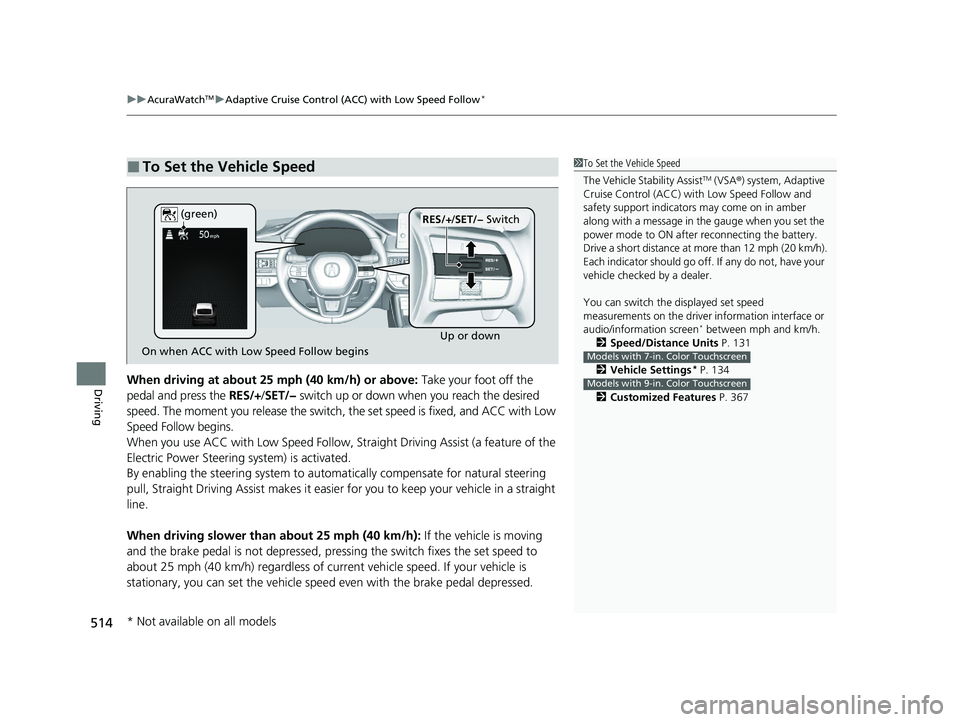
DrivingWhen driving at about 25 mph (40 km/h) or above: Take your foot off the
pedal and press the RES/+/SET/− switch up or down when you reach the desired
speed. The moment you release the switch, the set speed is fixed, and ACC with Low
Speed Follow begins.
When you use ACC with Low Speed Follow, Stra ight Driving Assist (a feature of the
Electric Power Steering system) is activated.
By enabling the steering system to automa tically compensate for natural steering
pull, Straight Driving Assist makes it easier for you to keep your vehicle in a straight
line.
When driving slower than about 25 mph (40 km/h): If the vehicle is moving
and the brake pedal is not depressed, pres sing the switch fixes the set speed to
about 25 mph (40 km/h) regardless of current vehicle speed. If your vehicle is
stationary, you can set the vehicle speed even with the brake pedal depressed.
■To Set the Vehicle Speed1 To Set the Vehicle Speed
The Vehicle Stability Assist
TM (VSA ®) system, Adaptive
Cruise Control (ACC) with Low Speed Follow and
safety support indicators may come on in amber
along with a message in the gauge when you set the
power mode to ON after reconnecting the battery.
Drive a short distance at more than 12 mph (20 km/h).
Each indicator should go off. If any do not, have your
vehicle checked by a dealer.
You can switch the displayed set speed
measurements on the driver information interface or
audio/information screen
* between mph and km/h.
2 Speed/Distance Units P. 131
2 Vehicle Settings
* P. 134
2 Customized Features P. 367
Models with 7-in. Color Touchscreen
Models with 9-in. Color Touchscreen
On when ACC with Low Speed Follow begins Up or down
RES/+
/SET/− Switch
(green)
* Not available on all models
24 ACURA INTEGRA-313S56100.book 514 ページ 2023年2月13日 月曜日 午後2時41分
Page 537 of 766

Continued535
uuAcuraWatchTMuAdaptive Cruise Control (ACC)*
DrivingTake your foot off the pedal and press the RES/+/SET/- switch up or down when
you reach the desired speed. The moment you release the button, the set speed is
fixed, and ACC begins.
When you use ACC, Straight Dr iving Assist (a feature of the Electric Power Steering
system) is activated.
By enabling the steering system to automa tically compensate for natural steering
pull, Straight Driv ing Assist makes it easier for you to keep your vehicle in a straight
line.
■To Set the Vehicle Speed1 To Set the Vehicle Speed
The Vehicle Stability Assist
TM (VSA ®) system, Adaptive
Cruise Control (ACC) and safety support indicators
may come on in amber along with a message in the
gauge when you set the power mode to ON after
reconnecting the battery.
Drive a short distance at more than 12 mph (20 km/h).
Each indicator should go off. If any do not, have your
vehicle checked by a dealer.
You can switch the displayed set speed
measurements on the driver information interface or
audio/information screen between mph and km/h.
2 Speed/Distance Units P. 131
2 Customized Features P. 367
On when ACC begins Up or down
RES/+
/SET/− Switch
(green)
24 ACURA INTEGRA-313S56100.book 535 ページ 2023年2月13日 月曜日 午後2時41分
Page 580 of 766

uuAcuraWatchTMuRoad Departure Mitigation System
578
Driving
You can turn the system on and off us ing the driver information interface.
2Switching the Display P. 117
2 Safety Support P. 129
The Road Departure Mitigation system is in the previously selected on or off setting
each time you start the engine.
■Road Departure Mitigation system On and Off1Road Departure Mitigation system On and Off
When you have selected Warning Only , the system
does not operate the steering wheel.
2 Vehicle Settings
* P. 134
2 Customized Features P. 367
The Vehicle Stability Assist
TM (VSA ®) system, Adaptive
Cruise Control (ACC)*, Adaptive Cruise Control
(ACC) with Low Speed Follow* and safety support
indicators may come on in amber along with a
message in the gauge when you set the power mode
to ON after reconnecting the battery.
Drive a short distance at more than 12 mph (20 km/h).
Each indicator should go off. If any do not, have your
vehicle checked by a dealer.
Models with 7-in. Color Touchscreen
Models with 9-in. Color Touchscreen
* Not available on all models
24 ACURA INTEGRA-313S56100.book 578 ページ 2023年2月13日 月曜日 午後2時41分
Page 596 of 766
594
Driving
Braking
Brake System
Use the parking brake to keep the vehicle stationary when parked. When the
parking brake is applied, you can manually or automatically release it.
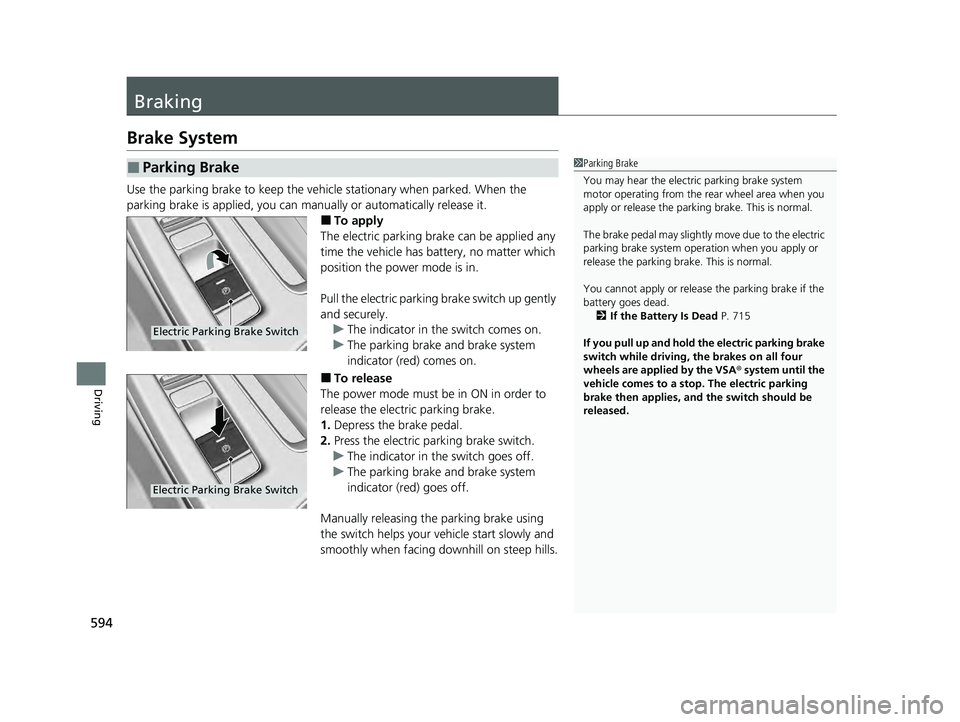
■To apply
The electric parking brake can be applied any
time the vehicle has battery, no matter which
position the power mode is in.
Pull the electric parking brake switch up gently
and securely. u The indicator in th e switch comes on.
u The parking brake and brake system
indicator (red) comes on.
■To release
The power mode must be in ON in order to
release the electric parking brake.
1. Depress the brake pedal.
2. Press the electric parking brake switch.
u The indicator in th e switch goes off.
u The parking brake and brake system
indicator (red) goes off.
Manually releasing the parking brake using
the switch helps your ve hicle start slowly and
smoothly when facing downhill on steep hills.
■Parking Brake1 Parking Brake
You may hear the electric parking brake system
motor operating from the re ar wheel area when you
apply or release the parki ng brake. This is normal.
The brake pedal may slightly move due to the electric
parking brake system opera tion when you apply or
release the parking br ake. This is normal.
You cannot apply or release the parking brake if the
battery goes dead. 2 If the Battery Is Dead P. 715
If you pull up and hold the electric parking brake
switch while driving, the brakes on all four
wheels are applied by the VSA ® system until the
vehicle comes to a stop. The electric parking
brake then applies, and the switch should be
released.
Electric Parking Brake Switch
Electric Parking Brake Switch
24 ACURA INTEGRA-313S56100.book 594 ページ 2023年2月13日 月曜日 午後2時41分
Page 627 of 766
625
Maintenance
This chapter discusses basic maintenance.
Before Performing MaintenanceInspection and Maintenance ............ 626
Safety When Performing Maintenance .... 627Parts and Fluids Used in Maintenance Service ........................................... 628
Maintenance Minder
TM..................... 629
Maintenance Under the Hood
Maintenance Items Un der the Hood .... 637Opening the Hood ........................... 639
Recommended Engine Oil ................ 640
Oil Check ......................................... 641
Adding Engine Oil ............................ 643
Changing the Engine Oil and Oil Filter..... 644
Engine Coolant ................................ 648
Transmission Fluid ............................ 652
Brake/Clutch
* Fluid .......................... 653
Refilling Window Washer Fluid......... 654
Replacing Light Bulbs ....................... 655
Checking and Maintaining Wiper Blades.... 657
Checking and Maintaining Tires
Checking Tires ................................. 659
Tire and Loading Information Label ... 661
Tire Labeling .................................... 661
DOT Tire Quality Grading (U.S. Vehicles) .... 663Wear Indicators................................ 665
Tire Service Life ................................ 665 Tire and Wheel Replacement ........... 666
Tire Rotation .................................... 667
Winter Tires ..................................... 668
Battery ............................................... 671
Remote Transmitter Care Replacing the Remote Battery .......... 673
Climate Control System Maintenance .... 675Cleaning
Interior Care .................................... 676
Exterior Care.................................... 679
Accessories and Modifications Accessories ...................................... 682
Modifications................................... 683
* Not available on all models
24 ACURA INTEGRA-313S56100.book 625 ページ 2023年2月13日 月曜日 午後2時41分
Page 629 of 766

627
uuBefore Performing Maintenance uSafety When Performing Maintenance
Continued
Maintenance
Safety When Performing Maintenance
Some of the most important safety precau tions are given here. However, we cannot
warn you of every conceivable hazard that can arise in performing maintenance.
Only you can decide whether you should perform a given task.
• To reduce the possibility of fire or explos ion, keep cigarettes, sparks, and flames
away from the battery and all fuel related parts.
• Never leave rags, towels, or other flammable objects under the hood.
u Heat from the engine and exhaust can ignite them, causing a fire.
• To clean parts, use a co mmercially available degreaser or parts cleaner, not
gasoline.
• Wear eye protection and prot ective clothing when working with the battery or
compressed air.
• Engine exhaust contains carbon monoxide, which is poisonous and can kill you.
u Only operate the engine if th ere is sufficient ventilation.
■Maintenance Safety
1Safety When Performing Maintenance
3WARNING
Improperly maintaining this vehicle or
failing to correct a pr oblem before driving
can cause a crash in which you can be
seriously hurt or killed.
Always follow the inspection and
maintenance recommendations according
to the schedules in this owner’s manual.
3WARNING
Failure to properly follow maintenance
instructions and prec autions can cause you
to be seriously hurt or killed.
Always follow the procedures and
precautions in this owner’s manual.
24 ACURA INTEGRA-313S56100.book 627 ページ 2023年2月13日 月曜日 午後2時41分