air condition ACURA INTEGRA 2024 Owners Manual
[x] Cancel search | Manufacturer: ACURA, Model Year: 2024, Model line: INTEGRA, Model: ACURA INTEGRA 2024Pages: 766, PDF Size: 28.39 MB
Page 2 of 766
Event Data RecordersThis vehicle is equipped with an event data recorder (EDR).
The main purpose of an EDR is to record, in certain crash or near
crash-like situations, such as an air bag deployment or hitting a
road obstacle, data that will assi st in understanding how a vehicle’s
systems performed. The EDR is designed to record data related
to vehicle dynamics and safety systems for a short period of
time, typically 30 seconds or less. The EDR in this vehicle is
designed to record such data as:
• How various systems in your vehicle were operating;
• Whether or not the driver and passenger safety belts were
buckled/fastened;
• How far (if at all) the driver was depressing the accelerator
and/or brake pedal; and,
• How fast the vehicle was traveling.
These data can help provide a better understanding of the
circumstances in which crashes and injuries occur. NOTE: EDR data
are recorded by your vehicle only if a non-trivial crash situation
occurs; no data are recorded by the EDR under normal driving
conditions and no personal data (e.g., name, gender, age, and
crash location) are recorded. Howeve r, other parties, such as law
enforcement, could co mbine the EDR data with the type of
personally identifying data rout inely acquired during a crash
investigation.
To read data recorded by an ED R, special equipment is required,
and access to the vehicle or the EDR is needed. In addition to the
vehicle manufacturer, other parties, such as law enforcement, that
have the special equipment, can re ad the information if they have
access to the vehicle or the EDR.
The data belongs to the vehicle ow ner and may not be accessed by
anyone else except as legally requir ed or with the permission of the
vehicle owner.
24 ACURA INTEGRA-313S56100.book 0 ページ 2023年2月13日 月曜日 午後2時41分
Page 3 of 766
Service Diagnostic Recorders
This vehicle is equipped with service-related devices that record
information about powertrain perfo rmance. The data can be used
to verify emissions law requirem ents and/or help technicians
diagnose and solve service problems . It may also be combined with
data from other sources for research purposes, but it remains
confidential. Some diagnostic and maintenance information is
uploaded to Acura upon vehicle start up.
California Perchlorate Contamination Prevention Act
The airbags, seat belt tensioners , and CR type batteries in this
vehicle may contain perchlorate materials - special handling may
apply. See www.dtsc.ca.gov/hazard ouswaste/perchlorate/
As you read this manual, you will find information that is preceded
by a symbol. This information is intended to help you avoid
damage to your vehicle, othe r property, or the environment.
NOTICE
Software End User License Agreement
Your vehicle comes equipped with software, which is governed by
the End User License Agreement in this Owner’s Manual, and
which contains a binding arbitration clause. Please refer to the End
User License Agreement for the terms and conditions governing
your use of the installed software, as well as the applications,
services, functions, and content provided through the software.
Your use of the installed software will serve as your consent to the
terms and conditions of the End User License Agreement.
You may opt out within 30 days of your initial use of the Software
by sending a signed, written noti ce to Acura at American Honda
Motor Co., Inc., Acura Client Rela tions, Mail Stop CHI-4, 1919
Torrance Blvd., Torrance, CA 90501-2746.
Privacy Notice
This vehicle may share location an d usage information. To manage
this setting, visit www.acuralink.com/vehicle-data-choices .
To learn more about how we collect and use Personal
Information including precise geolocation data, please read
our Privacy Notice and Vehicle Data Privacy Notice, accessible
at www.acura.com.
24 ACURA INTEGRA-313S56100.book 1 ページ 2023年2月13日 月曜日 午後2時41分
Page 20 of 766

18
Quick Reference Guide
Climate Control System (P226)
●Press the AUTO button to activate the climate control system.●Press the button to turn the system on or off.●Press the button to defrost the windshield.
Fan Control Dial
(Windshield Defroster) ButtonDriver’s Side Temperature
Control Dial (Recirculation) Button
(ON/OFF) Button
AUTO Button A/C (Air Conditioning) Button
Dashboard
vents
Da
sh
board
and floor
vents Floor vents Floor and
defroster
vents
Passenger’s Side Temperature
Control Dial
SYNC Button
Models with SYNC button
24 ACURA INTEGRA-313S56100.book 18 ページ 2023年2月13日 月曜日 午後2時41分
Page 21 of 766

19
Quick Reference Guide
(Windshield Defroster) Button
(Recirculation) Button
Fan Control Dial
Temperature Control Dial
(ON/OFF) Button
AUTO Button A/C
(Air Conditioning) Button
Dashboard
vents
Dashboard
and floor
ven
ts Fl
oor vents Floor and
defroster
vents
Models without SYNC button
24 ACURA INTEGRA-313S56100.book 19 ページ 2023年2月13日 月曜日 午後2時41分
Page 38 of 766
36
Safe Driving
For Safe Driving
The following pages explain your vehicle's safety features and how to use them
properly. The safety precautions below are ones that we consider to be among the
most important.
Important Safety Precautions
■Always wear your seat belt
A seat belt is your best protection in all types of collisions. Airbags are designed to
supplement seat belts, not replace them. So even though your vehicle is equipped
with airbags, make sure you and your passengers always wear your seat belts, and
wear them properly.
■Restrain all children
Children ages 12 and under should ride prop erly restrained in a back seat, not the
front seat. Infants and small children should be restrained in a child seat. Larger
children should use a booster seat and a lap/shoulder seat belt until they can use the
belt properly without a booster seat.
■Be aware of airbag hazards
While airbags can save lives, they can cause serious or fatal injuries to occupants
who sit too close to them, or are not prop erly restrained. Infants, young children,
and short adults are at the greatest risk. Be sure to follow all instructions and
warnings in this manual.
■Don't drink and drive
Alcohol and driving don't mix. Even one dr ink can reduce your ability to respond to
changing conditions, and your reaction time gets worse with every additional drink.
So don't drink and drive, and don't let your friends drink and drive, either.
1Important Safety Precautions
Some states, provinces, a nd territories prohibit the
use of cell phones other th an hands-free devices by
the driver while driving.
24 ACURA INTEGRA-313S56100.book 36 ページ 2023年2月13日 月曜日 午後2時41分
Page 68 of 766

uuAirbags uAirbag System Indicators
66
Safe Driving
1Passenger Airbag Off Indicator
The passenger airbag off indicator may come on and
go off periodically if the tota l weight on the seat is
near the airbag cutoff threshold. For a small adult,
depending on physique and posture, the system may
not recognize him/her as an adult and thus deactivate
the passenger’s airbag.
If this occurs, please confirm that the conditions set
forth in the above bullet points on the previous page
are met.
If the above conditions are met and the indicator is
still on, then with the transmission in park, set the
power mode to OFF and back to ON.
Have your vehicle checked by a dealer as soon as
possible if:
•All of the above conditions are met, and the
indicator comes on with an adult seated in the
front passenger seat.
•The seat is empty and the indicator is off.
•The indicator does not come on and go off after
setting the power mode to ON as described.
Do not allow an adult passe nger to ride in the front
seat when the indicator is on.
24 ACURA INTEGRA-313S56100.book 66 ページ 2023年2月13日 月曜日 午後2時41分
Page 86 of 766

84
Safe Driving
Safety Labels
Label Locations
These labels are in the locations shown. They warn you of potential hazards that can cause serious injury or death. Read these labels
carefully.
If a label comes off or becomes hard to read (except for the U. S. dashboard label, which may be removed by the owner), contact a dealer
for a replacement.
Dashboard
U.S. models only
Radiator Cap
Sun Visor
U.S. models Canadian models
Air Conditioner System
2.0 L engine models for U.S.
Canadian models
1.5 L engine models for U.S.
Radiator Tank Cap
2.0 L engine models
1.5 L engine models
24 ACURA INTEGRA-313S56100.book 84 ページ 2023年2月13日 月曜日 午後2時41分
Page 190 of 766

188
uuOperating the Switches Around the Steering Wheel uAuto High-Beam
Controls
Auto High-Beam
The front wide view camera detects the lig ht sources ahead of the vehicle such as
the lights of a preceding or on coming vehicle, or street lights. When you are driving
at night, the system automatically switch es the headlights between low beam and
high beam depending on the situation.
■Activating the system
When all of the following conditions have been met, the auto high-beam indicator
comes on and automatically switches between the high beam and low beam,
depending on the situation. •The power mode is in ON.
• The light switch is in AUTO.
• The lever is in the low beam position.
• The headlights have been automatically
activated.
• It is dark outside the vehicle.
If the auto high-beam indicator does not co me on even when all the conditions have
been met, carry out either of the procedur es below and the indicator will come on.
• Pull the lever toward you and release it.
• Turn the light switch to th en turn the light switch to AUTO.
■How to Use the Auto High-Beam
1Auto High-Beam
The auto high-beam system does not always operate
in every situation. This syst em is just for assisting the
driver. Always observe your surroundings and switch
the headlights between high beam and low beam
manually if necessary.
If you find the timing of beam changes inconvenient
for driving, change the headlight beams manually.
The range and the distance at which the camera can
recognize varies de pending on conditions
surrounding your vehicle.
Regarding the handling of the camera mounted to
the inside of the windshiel d, refer to the following.
2 Front Wide View Camera P. 590
For the auto high-beam to work properly:
•Do not place an object that reflects light on the
dashboard.
•Keep the windshield around the camera clean.
•When cleaning the windshield, be careful not to
apply the windshield cleans er to the camera lens.
•Do not attach an object, sticker, or film to the area
around the camera.
•Do not touch the camera lens.
If the camera receives a st rong impact, or repairing of
the area near the camera is required, consult a dealer.
Light Switch
Auto High-Beam
Indicator
24 ACURA INTEGRA-313S56100.book 188 ページ 2023年2月13日 月曜日 午後2時41分
Page 192 of 766

uuOperating the Switches Around the Steering Wheel uAuto High-Beam
190
Controls
■Manual switching between high-beam and low-beam
If you want to manually switch the headlights between high beam and low beam,
follow either of the proced ures below. Note that when you do this, the auto high-
beam indicator will turn off and the auto high-beam will be deactivated.
Using the lever:
Pull the lever toward you for flashi ng the high beams then release it.
u To reactivate the auto high-beam, follo w either of the procedures below and
the auto high-beam indicator will come on.
• Pull the lever toward you and release it.
• Turn the light switch to and then to AUTO when the lever is in the low beam
position.
Using the light switch:
Turn the light switch to . u To reactivate the auto high-be am, turn the light switch to AUTO when the
lever is in the low beam position, and the auto high-beam indicator will come
on.1 How to Use the Auto High-Beam
How to turn off the Auto High-Beam System
You can turn the auto high- beam system on and off.
2 Vehicle Settings
* P. 134
2 Customized Features P. 367
If the Some driver assist systems cannot operate:
Camera temperature too high message appears:
•Use the climate control system to cool down the
interior and, if necessary, also use defroster mode
with the airflow directed toward the camera.
•Start driving the vehicle to lower the windshield
temperature, which cool s down the area around
the camera.
If the Some driver assist systems cannot operate:
Clean front windshield or poor viewing
condition. message appears:
•Park your vehicle in a safe place, and make sure the
windshield is clean.
Clean the windshield if it is dirty. If the message
does not disappear after dr iven for a while, have
your vehicle checked by a dealer.
Models with 7-in. Color Touchscreen
Models with 9-in. Color Touchscreen
* Not available on all models
24 ACURA INTEGRA-313S56100.book 190 ページ 2023年2月13日 月曜日 午後2時41分
Page 228 of 766
226
Controls
Climate Control System
Using Automatic Climate Control
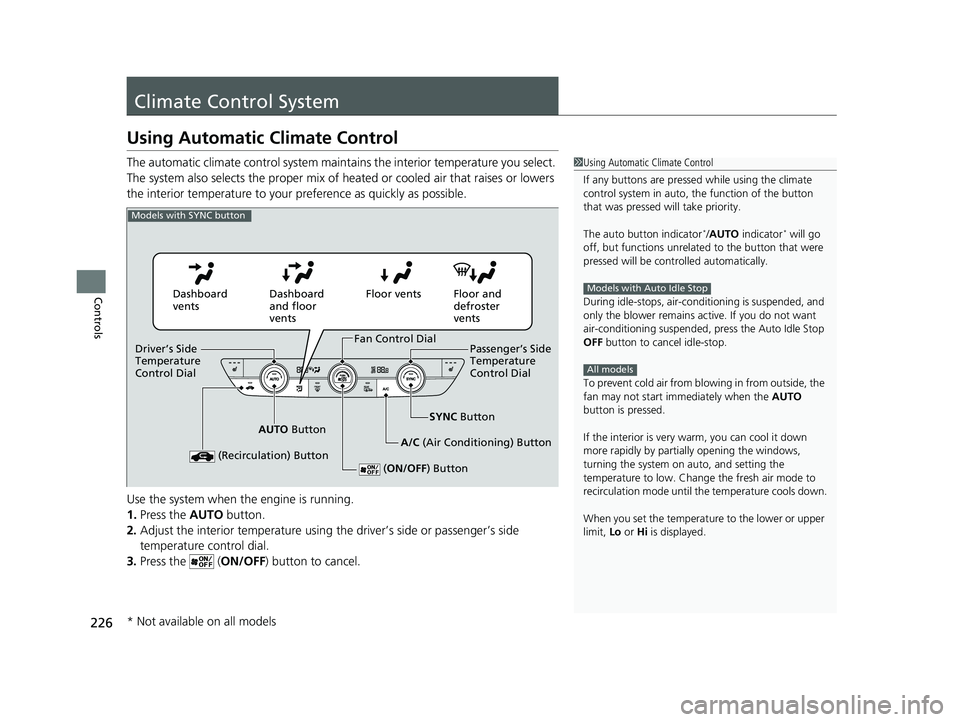
The automatic climate control system maintains the interior temperature you select.
The system also selects the proper mix of heated or cooled air that raises or lowers
the interior temperature to your pr eference as quickly as possible.
Use the system when the engine is running.
1. Press the AUTO button.
2. Adjust the interior temperature using the driver’s side or passenger’s side
temperature control dial.
3. Press the ( ON/OFF) button to cancel.1Using Automatic Climate Control
If any buttons are presse d while using the climate
control system in auto, the function of the button
that was pressed will take priority.
The auto button indicator
*/AUTO indicator* will go
off, but functions unrelated to the button that were
pressed will be cont rolled automatically.
During idle-stops, air-conditioning is suspended, and
only the blower remains ac tive. If you do not want
air-conditioning suspended, press the Auto Idle Stop
OFF button to cancel idle-stop.
To prevent cold air from bl owing in from outside, the
fan may not start i mmediately when the AUTO
button is pressed.
If the interior is very warm, you can cool it down
more rapidly by partial ly opening the windows,
turning the system on auto, and setting the
temperature to low. Change the fresh air mode to
recirculation mode until the temperature cools down.
When you set the temperat ure to the lower or upper
limit, Lo or Hi is displayed.
Models with Auto Idle Stop
All models
Models with SYNC button
Dashboard
vents Dashboard
and floor
ventsFloor vents Floor and
defroster
vents
AUTO Button SYNC
Button
A/C (Air Conditioning) Button
(Recirculation) Button
( ON/OFF ) Button
Fan Control Dial
Driver’s Side
Temperature
Control Dial Passenger’s Side
Temperature
Control Dial
* Not available on all models
24 ACURA INTEGRA-313S56100.book 226 ページ 2023年2月13日 月曜日 午後2時41分