CD changer Acura MDX 2009 User Guide
[x] Cancel search | Manufacturer: ACURA, Model Year: 2009, Model line: MDX, Model: Acura MDX 2009Pages: 489, PDF Size: 11.91 MB
Page 231 of 489

Removing Discs from the Changer
To remove the disc that is currently
playing, press the eject button. You
will see‘‘EJECT ’’in the audio
display. When you remove the disc
from the slot, the system
automatically enters the previous
mode AM, FM1, FM2, or XM
Satellite Radio. The system also
begins the load sequence so you can
load another disc. If you do not load
another disc, the load sequence is
canceled, and the system continues
playing in the previous mode.
If you do not remove the disc from
the slot, the system will reload the
disc after 10 seconds. To begin
playing the disc, press the disc
button. To remove a different disc from the
changer, first select it by pressing
the corresponding number on the
preset button or turning the interface
knob, and pressing ENTER on the
interface selector. When that disc
begins playing, press the eject
button.
When you press the eject button
while listening to the radio, or with
the audio system turned off, the disc
that was last selected is ejected. After
that disc is ejected, pressing the eject
button again will eject the next disc
in numerical order. By doing this six
times, you can remove all the discs
from the changer.
You can also eject discs when the
ignition switch is off:
To eject one disc, press and release
the eject button.
To eject all discs, press and hold the
eject button.
Playing Discs (Models with navigation system)
227
Feat ures
08/06/06 16:58:07 09 ACURA MDX MMC North America Owner's M 50 31STX620 enu
2009 MDX
Page 232 of 489
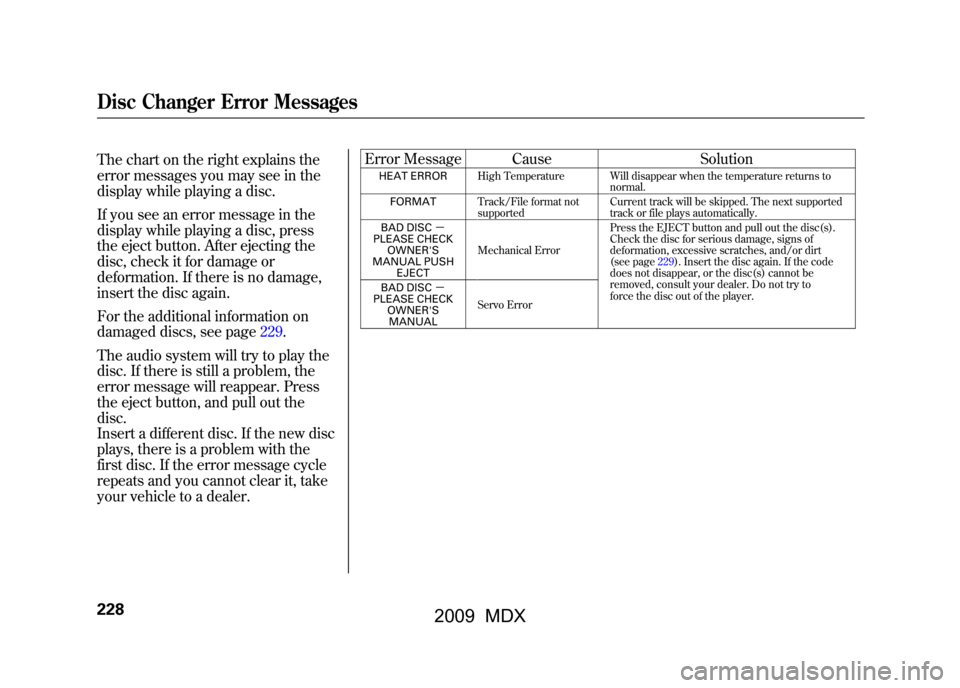
The chart on the right explains the
error messages you may see in the
display while playing a disc.
If you see an error message in the
display while playing a disc, press
the eject button. After ejecting the
disc, check it for damage or
deformation. If there is no damage,
insert the disc again.
For the additional information on
damaged discs, see page229.
The audio system will try to play the
disc. If there is still a problem, the
error message will reappear. Press
the eject button, and pull out the
disc.
Insert a different disc. If the new disc
plays, there is a problem with the
first disc. If the error message cycle
repeats and you cannot clear it, take
your vehicle to a dealer.Error Message Cause
Solution
HEAT ERRORHigh Temperature Will disappear when the temperature returns to
normal.
FORMAT Track/File format not
supported Current track will be skipped. The next supported
track or file plays automatically.
BAD DISC -
PLEASE CHECK OWNER'S
MANUAL PUSH EJECT Mechanical Error
Press the EJECT button and pull out the disc(s).
Check the disc for serious damage, signs of
deformation, excessive scratches, and/or dirt
(see page229).Insert the disc again. If the code
does not disappear, or the disc(s) cannot be
removed, consult your dealer. Do not try to
force the disc out of the player.
BAD DISC
-
PLEASE CHECK
OWNER'SMANUAL Servo Error
Disc Changer Error Messages22808/06/06 16:58:07 09 ACURA MDX MMC North America Owner's M 50 31STX620 enu
2009 MDX
Page 233 of 489
General Information●When using CD-R or CD-RW
discs, use only high quality discs
labeled for audio use.●When recording a CD-R or
CD-RW, the recording must be
closed for it to be used by the disc
changer.●Play only standard, round, 5-inch
(12 cm) discs. Smaller or odd-
shaped discs may jam in the drive
or cause other problems.●Handle your discs properly to
prevent damage and skipping.Do not use discs with adhesive labels.
The label can curl up and cause the
disc to jam in the unit.Protecting Discs
When a disc is not being played,
store it in its case to protect it from
dust and other contamination. To
prevent warpage, keep discs out of
direct sunlight and extreme heat.
To clean a disc, use a clean soft cloth.
Wipe across the disc from the center
to the outside edge.
A new disc may be rough on the
inner and outer edges. The small
plastic pieces causing this roughness
can flake off and fall on the recording
surface of the disc, causing skipping
or other problems. Remove these
pieces by rubbing the inner and
outer edges with the side of a pencil
or pen.
Never try to insert foreign objects in
the disc changer.
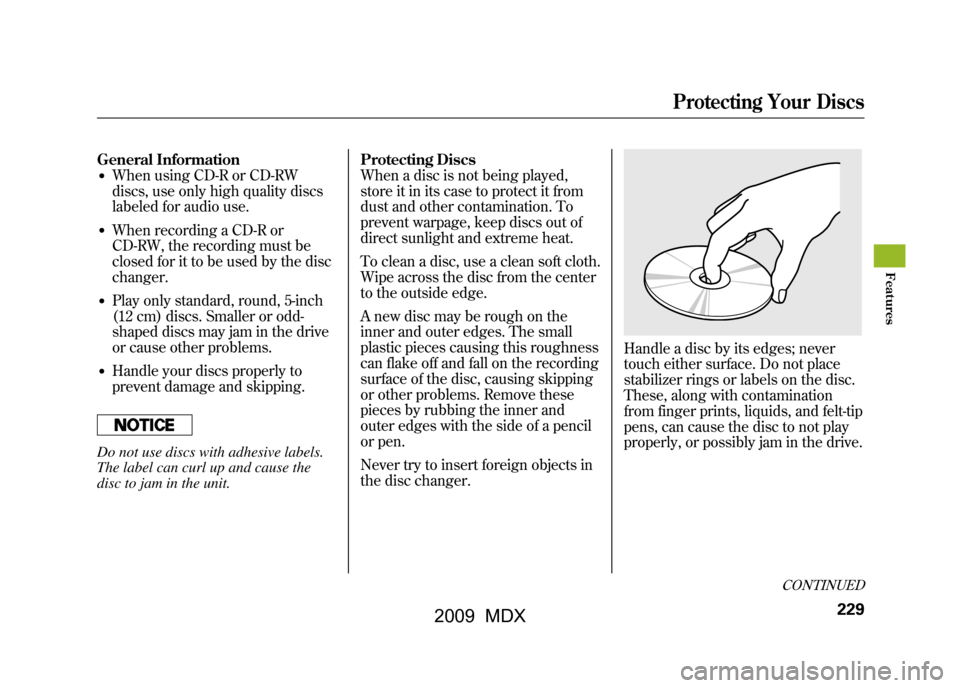
Handle a disc by its edges; never
touch either surface. Do not place
stabilizer rings or labels on the disc.
These, along with contamination
from finger prints, liquids, and felt-tip
pens, can cause the disc to not play
properly, or possibly jam in the drive.
CONTINUED
Protecting Your Discs
229
Feat ures
08/06/06 16:58:07 09 ACURA MDX MMC North America Owner's M 50 31STX620 enu
2009 MDX
Page 234 of 489
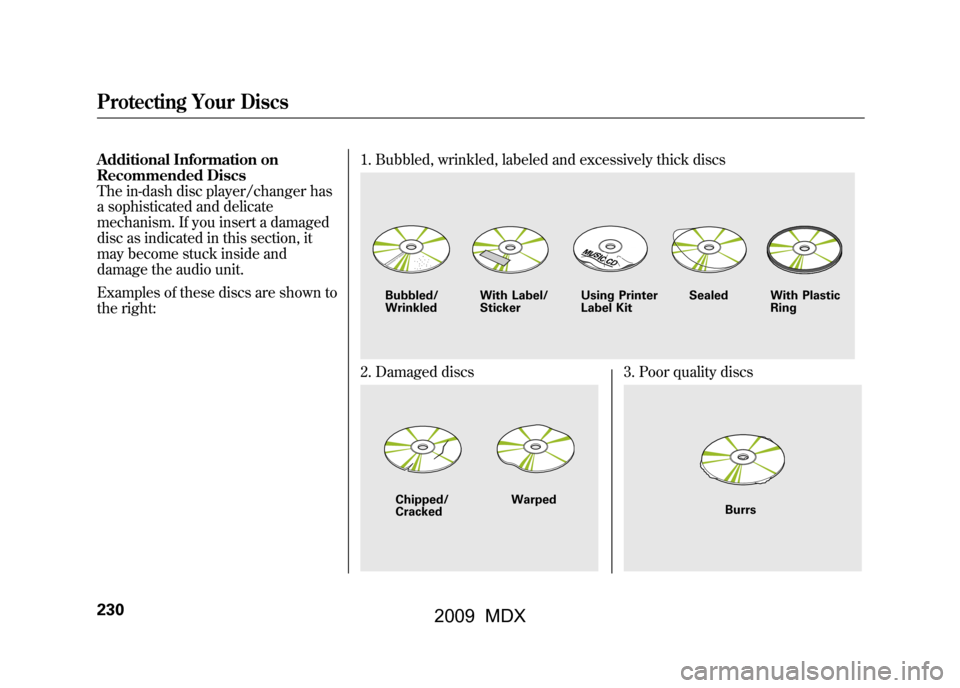
Additional Information on
Recommended Discs
The in-dash disc player/changer has
a sophisticated and delicate
mechanism. If you insert a damaged
disc as indicated in this section, it
may become stuck inside and
damage the audio unit.
Examples of these discs are shown to
the right:1. Bubbled, wrinkled, labeled and excessively thick discs
2. Damaged discs
3. Poor quality discs
Bubbled/
Wrinkled
With Label/
Sticker Using Printer
Label Kit Sealed With Plastic
RingChipped/
Cracked Warped
Burrs
Protecting Your Discs23008/06/06 16:58:07 09 ACURA MDX MMC North America Owner's M 50 31STX620 enu
2009 MDX
Page 241 of 489

Available on U.S. Entertainment Packageand Canadian Elite Package modelsYour vehicle is equipped with a rear
entertainment system that includes a
DVD player for the enjoyment of the
rear passengers.
With this system, the rear
passengers can enjoy a different
entertainment source (radio, disc
changer, DVD player, XM Radio, or
optional CD changer/tape player)
than the front seat occupants. The
audio is broadcast through the
supplied wireless headphones.
The ignition switch must be in the
ACCESSORY (I) or the ON (II)
position to operate the rear
entertainment system. To Turn On the System
Press the REAR PWR button. The
indicator on the REAR PWR button
will come on, as well as the indicator
on the FRONT SOURCE button. The
rear seat passengers can then
operate the rear system from the
control panel in the ceiling. The rear
control panel can also be detached
and used as a remote control, by
pushing the RELEASE button, and
pulling the remote toward you.
Pressing the REAR CTRL OFF
button disables rear control. The
indicator in the button comes on and
your passengers can no longer
operate the system with the rear
control panel. When the button is
pressed, the
‘‘CTRL OFF ’’message
appears in the overhead screen to let
your passengers know that the
control panel is disabled. The rear system selects the source it
was last set to. If that source has
been removed (the DVD has been
ejected from the player, for example),
you will see
‘‘DVD EJECT ’’in the
display. You should select another
source or insert a DVD.
Rear Speakers
When you turn on the system, the rear
speakers are automatically turned off if
the rear system selects a different
entertainment source than the front
system. You will see the Rear Speakers
Off icon both in the audio display and the
overhead screen. The sound for the rear
system is sent to the wireless
headphones.
If you want to turn the rear speakers on
again, press and hold the REAR PWR
button until the Rear Speakers Off icon
goes off.
NOTE: The rear speakers are connected
to the front system, so they will always
play the source that the front system is
set to.
CONTINUED
Rear Entertainment System
237
Feat ures
08/06/06 16:58:07 09 ACURA MDX MMC North America Owner's M 50 31STX620 enu
2009 MDX
Page 243 of 489
To Select Rear Entertainment
from the Front Control Panel
To operate the rear entertainment
system from the front panel, press
the REAR SOURCE button. You will
hear two beeps and the indicator in
the button comes on to show that the
control panel is enabled.
If you do not operate the rear
entertainment system from the front
panel within 10 seconds, the
indicator goes off and the FRONT
SOURCE indicator comes on
automatically.
To play the radio, the buttons for the
front entertainment system have the
same functions.
If discs are loaded in the disc
changer of the upper part, select the
6 DISC button. If a disc is loaded in
the lower player, select the DVD
button.Operating the DVD Player from
the Front Control Panel
The DVD player in your rear
entertainment system can play DVD
video discs, audio CDs MP3/WMA
discs and DTS CDs.
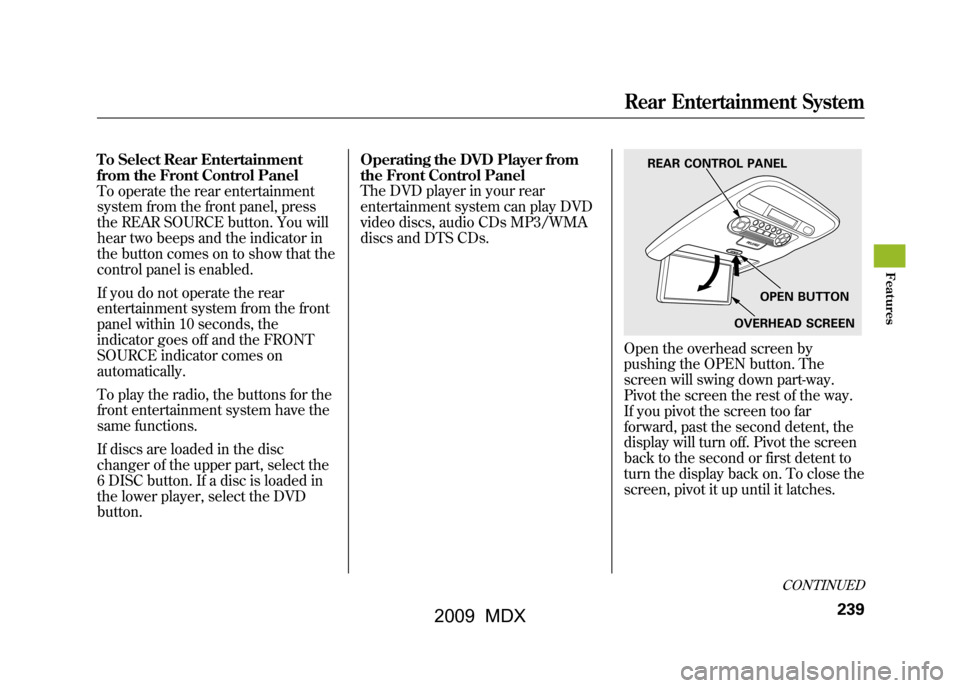
Open the overhead screen by
pushing the OPEN button. The
screen will swing down part-way.
Pivot the screen the rest of the way.
If you pivot the screen too far
forward, past the second detent, the
display will turn off. Pivot the screen
back to the second or first detent to
turn the display back on. To close the
screen, pivot it up until it latches.
REAR CONTROL PANEL
OPEN BUTTON
OVERHEAD SCREEN
CONTINUED
Rear Entertainment System
239
Feat ures
08/06/06 16:58:07 09 ACURA MDX MMC North America Owner's M 50 31STX620 enu
2009 MDX
Page 247 of 489

While the overhead screen is closed,
you can see the XM radio
information in the subsidiary display
in the ceiling. Pressing the DISP
MODE button repeatedly changes
the subsidiary display from the
channel number, to the category
name, to the music title, to the artist
name, and to the channel name, and
then back to the channel number.
To change mode, press and hold the
DISP MODE button for 5 seconds.To Play a Disc in the 6-Disc
Changer from the Rear Control
Panel
If discs are loaded in the disc
changer, select them by pressing the
6 DISC button.
Use the
▲,▼ ,
,or
button to
highlight REPEAT, RANDOM,
SCAN,
,
(skip),
,or
(cue) on the overhead screen. You
can enter the highlighted function by
pressing the ENT button. These
functions have the same features as
those of the front audio system. To change the disc currently playing,
use the
▲,▼ ,
,or
button to
highlight your selected disc icon, and
press ENT.
If CDs are loaded in the CD changer
and the overhead screen is not open,
pressing the ▲or▼ button changes
the discs.CONTINUED
Rear Entertainment System
243
Feat ures
08/06/06 16:58:07 09 ACURA MDX MMC North America Owner's M 50 31STX620 enu
2009 MDX
Page 309 of 489

To change from French to English, dothis:1. Press and release the Talk button. After the beep, say ‘‘Changer
Langue. ’’The HFL response is,
‘‘ Anglais ou Français?’’
2. Press and release the Talk button. After the beep, say ‘‘Anglais.’’ The
HFL response is, ‘‘You have
selected English. Name tags that
were stored while in French mode
will not be accessible in English
mode. Would you like to continue?
Vous avez selectionne Anglais. Les
noms enregistres en mode
Français ne seront pas accessible
en mode Anglais. Voulez-vous
contnuez? ’’ 3. Press and release the Talk button.
After the beep, say ‘‘Yes ’’or ‘‘Oui. ’’
If there are no paired phones
without English name tags, the
HFL response is ‘‘Please wait while
the language is changed. Venillez
attendre que le systeme change de
langue. ’’ ‘‘The language has been
changed. Returning to the main
menu.’’
NOTE: If there are paired phones
without English name tags, the
following prompts will continue.
If there are paired phones without
English name tags, the HFL
response is ‘‘The language has been
changed. For the system to identify
phones that were paired while in
another language, the phone names
need to be re-recorded. ’’4. The HFL says, for example,
‘‘What
is the English name for
< Téléphone de Paul >?’’ Press
and release the Talk button. After
the beep, say ‘‘Paul's phone. ’’The
HFL response is ‘‘What is the
English name for <Téléphone de
Pat >?’’ Press and release the Talk
button. After the beep, say ‘‘Pat's
phone. ’’After all paired phones
missing an English name tag are
re-recorded, the HFL will say
‘‘ Returning to the main menu. ’’
HFL Limitations
In addition, you cannot use the HFL
while using AcuraLink.
CONTINUED
Bluetooth
®HandsFreeLink
®
305
Feat ures
08/06/06 16:58:07 09 ACURA MDX MMC North America Owner's M 50 31STX620 enu
2009 MDX
Page 477 of 489
D
DANGER, Explanation of
..............
iii
Dashboard
...............................
3, 62
Daytime Running Lights
............
120
Dead Battery
..............................
432
Defects, Reporting Safety
...........
468
Defogger, Rear Window
.............
122
Defrosting the Windows
............
174
Differential Fluid
........................
452
Dimensions
................................
452
Dimming the Headlights
............
118
Dipstick Automatic Transmission
.........
399
Engine Oil
...............................
326
Directional Signals
.......................
67
Disc Brake Wear Indicators
.......
357
Disc Care
........ ...........................
229
Disc Changer
......................
190, 218
Disc Changer Error Messages
........................
199, 228
Disc Player
..........................
190, 218
Disposal of Used Oil
...................
395
Doors Childproof Door Locks
............
131 Locking and Unlocking
...........
130
Lockout Prevention
.................
131
Monitor
................ ....................
11
Power Door Locks
..................
130
DOT Tire Quality Grading (U.S. Vehicles)
................................
454
Driver and Passenger Safety
..........
5
Driving
.......................................
337
Economy
.................................
327
Driving Guidelines
.....................
338
Driving Position Memory System
...................................
157
Dust and Pollen Filter
................
409
DVD Player
................................
239
DVD Player Error Messages
...............................
265
E
Economy, Fuel
...........................
327
Emergencies on the Road
..........
423
Battery, Jump Starting
.............
432
Brake System Indicator
...........
438
Changing a Flat Tire
...............
425
Charging System Indicator
.....
436 Checking the Fuses
................
440
Driving with a Flat Tire
...........
424
Hazard Warning Flashers
.......
122
Jump Starting
..........................
432
Low Oil Pressure Indicator
.....
436
Malfunction Indicator Lamp
...................................
437
Opening the Fuel Fill Door Manually
.............................
446
Overheated Engine
.................
434
Towing
....................................
446
Emergency Brake
......................
153
Emergency Flashers
..................
122
Emergency Towing
....................
446
Emissions Controls
....................
460
Emissions Testing
......................
463
CONTINUED
Index
III
INDEX
08/06/06 16:58:07 09 ACURA MDX MMC North America Owner's M 50 31STX620 enu
2009 MDX