battery Acura MDX 2009 User Guide
[x] Cancel search | Manufacturer: ACURA, Model Year: 2009, Model line: MDX, Model: Acura MDX 2009Pages: 489, PDF Size: 11.91 MB
Page 187 of 489

Preset-Each preset button can
store one frequency on AM and two
frequencies on FM.
1. Select the desired band, AM or FM. FM1 and FM2 let you store
two frequencies with each preset
button.
2. Use the tune, seek, or scan function to tune the radio to a
desired station.
3. Pick a preset button, and hold it until you hear a beep.
4. Repeat steps 1 through 3 to store a total of six stations on AM and
twelve stations on FM. AUTO SELECT
-If you are
traveling far from home and can no
longer receive your preset stations,
you can use the auto select feature to
find stations in the local area.
Press the A.SEL button. ‘‘A.SEL ’’
flashes in the display, and the system
goes into scan mode for several
seconds. It stores the frequencies of
six AM and twelve FM stations in the
preset buttons.
You will see a ‘‘0’’ displayed after
pressing a preset button if auto select
cannot find a strong station for that
preset button.
If you do not like the stations auto
select has stored, you can store other
frequencies on the preset buttons as
previously described.
To turn off auto select,
press the A.SEL
(auto select) button. This restores
the presets you originally set.
The presets may be lost if your
vehicle's battery goes dead, is
disconnected, or the radio fuse is
removed.
For information on AM/FM radio
frequencies and reception, see page
205.
CONTINUED
Playing the AM/FM Radio (Models without navigation system)
183
Feat ures
08/06/06 16:58:07 09 ACURA MDX MMC North America Owner's M 50 31STX620 enu
2009 MDX
Page 191 of 489

SCAN-The SCAN function gives
you a sampling of all channels while
in the channel mode. In the category
mode, only the stations within that
category are scanned. To activate
scan, press the SCAN button. The
system plays each channel in
numerical order for a few seconds,
then selects the next channel. When
you hear a channel you want to
continue listening to, press the
button again.
Preset -You can store up to 12
preset channels using the six preset
buttons. Each button stores one
channel from the XM1 band and one
channel from the XM2 band.
To store a channel:
1. Press the XM button. Either XM1 or XM2 will show in the display. 2. Use the TUNE knob, the
CATEGORY buttons, or the SCAN
buttons to tune to a desired
channel.
In category mode, only channels
within that category can be selected.
In channel mode, all channels can be
selected.
3. Pick the preset button you want for that channel. Press and hold the
button until you hear a beep.
4. Repeat steps 2 and 3 to store the first six channels.
5. Press the XM button again. The other XM band will show. Store
the next six channels using steps 2
and 3.
Once a channel is stored, simply
press and release the proper preset
button to tune to it. The presets may be lost if your
vehicle's battery goes dead, is
disconnected, or the radio fuse is
removed.
XM Radio Display Messages
‘‘LOADING
’’- XM is loading the
audio or program information.
‘‘OFF AIR ’’- The channel
currently selected is no longer
broadcasting.
‘‘UPDATING ’’- The encryption
code is being updated. Wait until the
encryption code is fully updated.
Channels 0 and 1 should still work
normally.
CONTINUED
Playing the XM
®Satellite Radio (Models without navigation system)
187
Feat ures
08/06/06 16:58:07 09 ACURA MDX MMC North America Owner's M 50 31STX620 enu
2009 MDX
Page 239 of 489

Your vehicle's audio system may
disable itself if it is disconnected
from electrical power for any reason.
To make it work again, you must
enter a specific five-digit code with
the preset buttons. Because there are
hundreds of number combinations
possible from the five digits, making
the system work without knowing
the exact code is nearly impossible.
You should have received a card that
lists your audio system code number
and serial number. It is best to store
this card in a safe place at home. In
addition, you should write the audio
system's serial number in this
owner's manual.
If you lose the card, you must obtain
the code number from your dealer.
To do this, you will need the audio
system's serial number.If your vehicle's battery is
disconnected or goes dead, or the
radio fuse is removed, the audio
system will disable itself. If this
happens, you will see
‘‘
’’in
the audio display the next time you
turn on the system. Use the preset
buttons to enter the five-digit code.
The code is located on the radio code
card included in your owner's
manual kit. When it is entered
correctly, the radio will start playing.
If you make a mistake entering the
code, do not start over; complete the
five-digit sequence, then enter the
correct code. You have 10 tries to
enter the correct code. If you are
unsuccessful in 10 attempts, you
must then leave the system on for 1
hour before trying again. The system will retain your AM and
FM presets even if power is
disconnected.
Radio Theft Protection
235
Feat ures
08/06/06 16:58:07 09 ACURA MDX MMC North America Owner's M 50 31STX620 enu
2009 MDX
Page 267 of 489
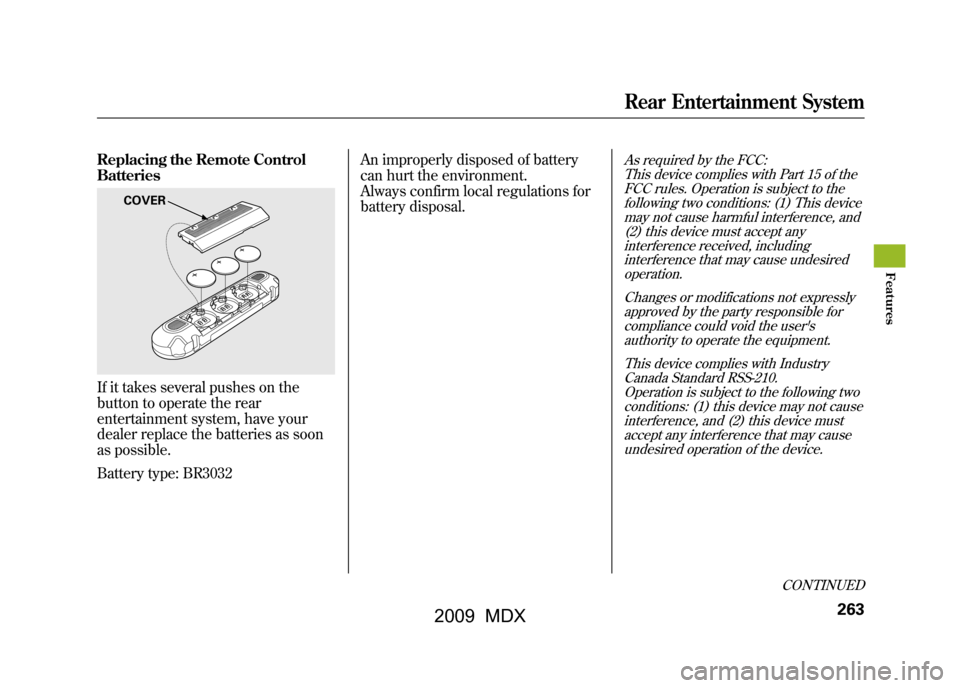
Replacing the Remote Control
BatteriesIf it takes several pushes on the
button to operate the rear
entertainment system, have your
dealer replace the batteries as soon
as possible.
Battery type: BR3032An improperly disposed of battery
can hurt the environment.
Always confirm local regulations for
battery disposal.
As required by the FCC:
This device complies with Part 15 of theFCC rules. Operation is subject to the
following two conditions: (1) This devicemay not cause harmful interference, and(2) this device must accept any
interference received, includinginterference that may cause undesiredoperation.
Changes or modifications not expresslyapproved by the party responsible for
compliance could void the user'sauthority to operate the equipment.
This device complies with IndustryCanada Standard RSS-210.
Operation is subject to the following twoconditions: (1) this device may not causeinterference, and (2) this device must
accept any interference that may causeundesired operation of the device.
COVER
CONTINUED
Rear Entertainment System
263
Feat ures
08/06/06 16:58:07 09 ACURA MDX MMC North America Owner's M 50 31STX620 enu
2009 MDX
Page 271 of 489
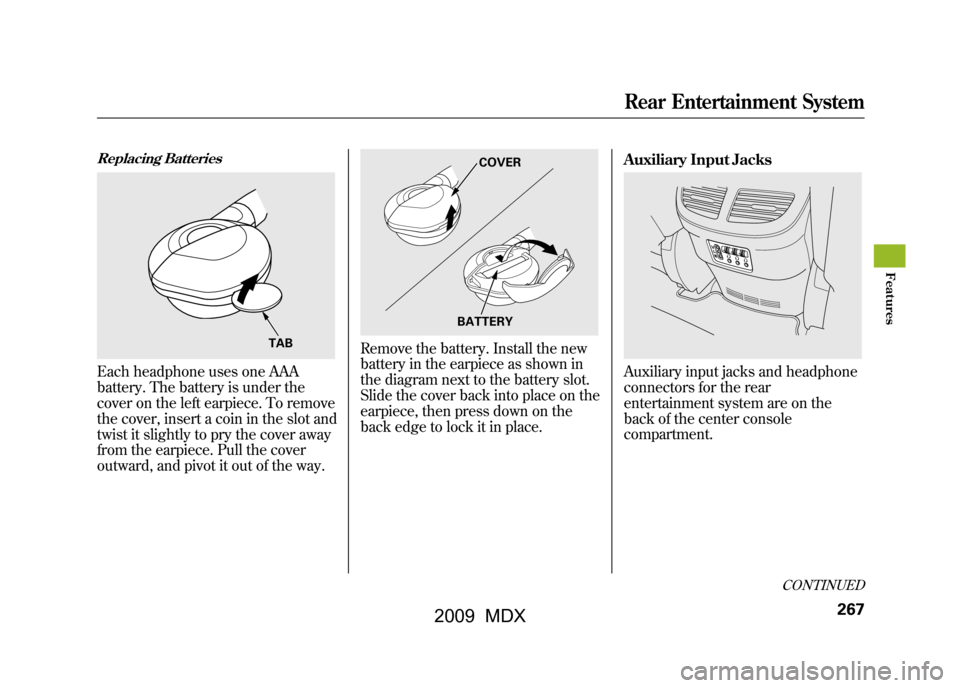
Replacing BatteriesEach headphone uses one AAA
battery. The battery is under the
cover on the left earpiece. To remove
the cover, insert a coin in the slot and
twist it slightly to pry the cover away
from the earpiece. Pull the cover
outward, and pivot it out of the way.
Remove the battery. Install the new
battery in the earpiece as shown in
the diagram next to the battery slot.
Slide the cover back into place on the
earpiece, then press down on the
back edge to lock it in place.Auxiliary Input Jacks
Auxiliary input jacks and headphone
connectors for the rear
entertainment system are on the
back of the center console
compartment.
TAB
COVER
BATTERY
CONTINUED
Rear Entertainment System
267
Feat ures
08/06/06 16:58:07 09 ACURA MDX MMC North America Owner's M 50 31STX620 enu
2009 MDX
Page 285 of 489
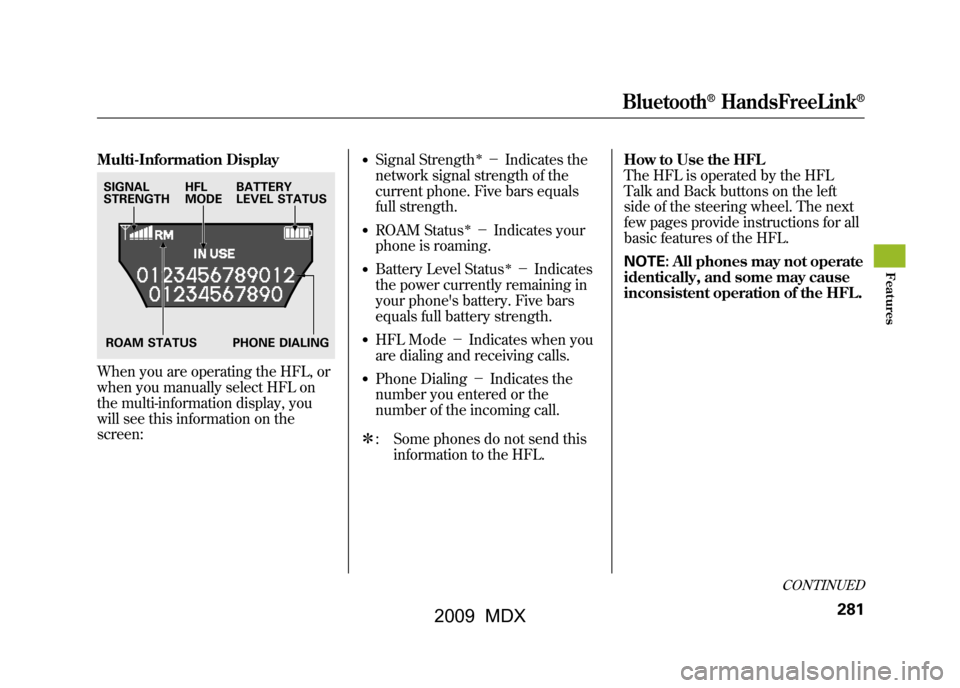
Multi-Information DisplayWhen you are operating the HFL, or
when you manually select HFL on
the multi-information display, you
will see this information on the
screen:
●Signal Strength
ꭧ-Indicates the
network signal strength of the
current phone. Five bars equals
full strength.
●ROAM Status
ꭧ- Indicates your
phone is roaming.
●Battery Level Status
ꭧ- Indicates
the power currently remaining in
your phone's battery. Five bars
equals full battery strength.
●HFL Mode -Indicates when you
are dialing and receiving calls.●Phone Dialing -Indicates the
number you entered or the
number of the incoming call.
ꭧ : Some phones do not send this
information to the HFL. How to Use the HFL
The HFL is operated by the HFL
Talk and Back buttons on the left
side of the steering wheel. The next
few pages provide instructions for all
basic features of the HFL.
NOTE:
All phones may not operate
identically, and some may cause
inconsistent operation of the HFL.
SIGNAL
STRENGTH HFL
MODEBATTERY
LEVEL STATUS
ROAM STATUS PHONE DIALING
CONTINUED
Bluetooth
®HandsFreeLink
®
281
Feat ures
08/06/06 16:58:07 09 ACURA MDX MMC North America Owner's M 50 31STX620 enu
2009 MDX
Page 292 of 489

5. Press and release the Talk button.If you say ‘‘OK ’’after the beep, the
HFL response is ‘‘The phone has
been deleted. Returning to the
main menu. ’’If you say ‘‘Go back, ’’
or ‘‘Cancel,’’ the phone will not be
deleted.To list all paired phones, do this:1. Press and release the Talk button. After the beep, say ‘‘Phone setup. ’’
The HFL response is ‘‘Phone setup
options are status, pair, edit,
delete, and list. ’’
2. Press and release the Talk button. After the beep, say ‘‘List. ’’The
HFL responds by listing the name
of each paired phone. When all
phones paired to the system have
been read, the HFL response is
‘‘ The entire list has been read.
Returning to the main menu.’’
To find out the status of the phone being
used, do this:1. Press and release the Talk button. After the beep, say ‘‘Phone setup. ’’
The HFL response is, ‘‘Phone
setup options are status, pair, edit,
delete, and list. ’’
2. Press and release the Talk button. After the beep, say ‘‘Status. ’’An
example of the HFL response is,
‘‘ Eric's phone is linked. Battery
strength is three bars. Signal
strength is five bars, and the
phone is roaming. Returning to the
main menu.’’
To change from the currently linked
phone to another paired phone, do this:1. Press and release the Talk button. After the beep, say ‘‘Next phone. ’’
The HFL response is ‘‘Searching
for the next phone. ’’The HFL then
disconnects the linked phone and
searches for another paired phone.
If no other phones are found, the
first phone remains linked.
Bluetooth
®HandsFreeLink
®
28808/06/06 16:58:07 09 ACURA MDX MMC North America Owner's M 50 31STX620 enu
2009 MDX
Page 293 of 489

Making a Call
You can make calls using any phone
number, or by using a name in the
HFL phonebook. You can also redial
the last number called. During a call,
the HFL allows you to talk up to 30
minutes after you remove the key
from the ignition switch. Continuing
a call without running the engine
may discharge and weaken the
vehicle's battery.To make a call using a phone number,do this:1. With your phone on and the ignition in the ACCESSORY (I) or
ON (II) position, press and release
the Talk button. After the beep,
say ‘‘Call’’ or‘‘Dial.’’ The HFL
response is, ‘‘What name or
number would you like to call/
dial? ’’ 2. Press and release the Talk button.
After the beep, say the number
you want to call. For example, say
‘‘123 456 7891.’’ The HFL response
is ‘‘123 456 7891. Say call, dial, or
continue to add numbers.’’
On models with navigation systemYou can also make a call directly
from the list shown on the
navigation display.
3. Press and release the Talk button. After the beep, say ‘‘Call’’ or‘‘Dial.’’
The HFL response is ‘‘Calling ’’or
‘‘ Dialing. ’’Once connected, you
will hear the person you called
through the audio speakers. To
change the volume, use the audio
system volume knob, or the
steering wheel volume controls.
4. To end the call, press the Back button.
To make a call using a name in the HFL
phonebook, do this:1. With your phone on and the ignition in the ACCESSORY (I) or
ON (II) position, press and release
the Talk button. After the beep,
say ‘‘Call’’ or‘‘Dial. ’’The HFL
response is, ‘‘What name or
number would you like to call/
dial? ’’
2. Press and release the Talk button. After the beep, say the name you
want to call. For example, say
‘‘Eric. ’’The HFL response is
‘‘ Would you like to call Eric?’’
3. Press and release the Talk button. After the beep, say ‘‘Yes. ’’The
HFL response is ‘‘Calling ’’or
‘‘ Dialing. ’’Once connected, you
will hear the person you called
through the audio speakers. To
change the volume, use the audio
system volume knob, or the
steering wheel volume controls.
CONTINUED
Bluetooth
®HandsFreeLink
®
289
Feat ures
08/06/06 16:58:07 09 ACURA MDX MMC North America Owner's M 50 31STX620 enu
2009 MDX
Page 343 of 489

6. Check the adjustment of the insideand outside mirrors (see page
154).
7. Check the steering wheel adjustment (see page 124).
8. Make sure the doors and tailgate are securely closed and locked.
9. Fasten your seat belt. Check that your passengers have fastened
their seat belts (see page 15).
10. When you start the engine, check the gauges and indicators in the
instrument panel, and the
messages on the multi-information
display (see pages 63,72and 81). Starting the Engine
Your vehicle's starting system has an
auto control mode. When you turn
the ignition switch to the START (III)
position, this feature keeps the
engine's starter motor running until
the engine starts. Follow these
instructions to start the engine:
1. Apply the parking brake.
2. In cold weather, turn off all
electrical accessories to reduce the
drain on the battery.
3. Make sure the shift lever is in Park. Press on the brake pedal.
4. Without touching the accelerator pedal, turn the ignition switch to
the START (III) position, then
release the ignition switch. You do
not need to hold the ignition
switch in the START (III) position
to start the engine. Depending on
the outside temperature, the
starter motor runs for about 6 to 9
seconds until the engine starts. If you hold the ignition switch in
the START (III) position for more
than 7 seconds, the starter motor,
depending on the outside
temperature, runs for about 10 to
25 seconds until the engine starts.
If the engine does not start, wait at
least 10 seconds before trying
again.
The immobilizer system protects your
vehicle from theft. If an improperly-
coded key (or other device) is used, the
engine's fuel system is disabled. For
more information, see page
128.
CONTINUED
Preparing to Drive, Starting the Engine
339
Driving
08/06/06 16:58:07 09 ACURA MDX MMC North America Owner's M 50 31STX620 enu
2009 MDX
Page 385 of 489
This section explains why it is
important to keep your vehicle well
maintained and how to follow basic
maintenance safety precautions.
This section also includes
instructions on how to read the
maintenance minder messages on
the multi-information display, and
instructions for simple maintenance
tasks you may want to take care of
yourself.
If you have the skills and tools to
perform more complex maintenance
tasks on your vehicle, you may want
to purchase the service manual. See
page469for information on how to
obtain a copy, or see your dealer.Maintenance Safety
.....................
382
Maintenance Minder
..................
383
Fluid Locations
...........................
391
Engine Compartment Cover
........
392
Adding Engine Oil
......................
393
Changing the Engine Oil and
Filter
.......................................
394
Engine Coolant
...........................
396
Windshield Washers
...................
398
Automatic Transmission Fluid
.......................................
399
Brake Fluid
.................................
401
Power Steering Fluid
..................
402
Timing Belt
.................................
402
Lights
..........................................
403
Dust and Pollen Filter
.................
409
Cleaning the Seat Belts
...............
409
Floor Mats
..................................
410
Wiper Blades
..............................
411
Tires
...........................................
415
Checking the Battery
..................
421
Vehicle Storage
...........................
422
Maintenance
381
Maint enance
08/06/06 16:58:07 09 ACURA MDX MMC North America Owner's M 50 31STX620 enu
2009 MDX